Binary Arithmetic
BinaryArithmetic
• Binary arithmetic is essential part of all the digital
computers and many other digital system.
• Binary arithmetic is used in digital systems mainly
because the numbers (decimal and floating-point
numbers) are stored in binary format in most
computer systems.
• All arithmetic operations such as addition,
subtraction, multiplication, and division are done
in binary representation of numbers.
Binary Addition
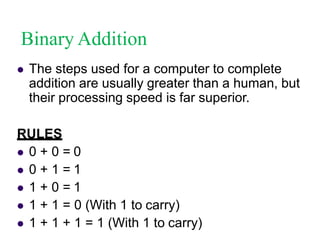
 The steps used for a computer to complete
addition are usually greater than a human, but
their processing speed is far superior.
RULES
 0 + 0 = 0
 0 + 1 = 1
 1 + 0 = 1
 1 + 1 = 0 (With 1 to carry)
 1 + 1 + 1 = 1 (With 1 to carry)
Binary Addition
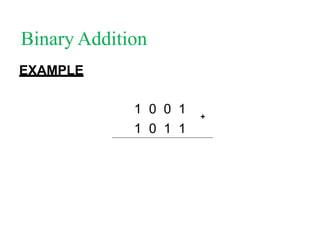
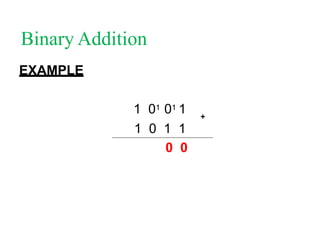
EXAMPLE
1 0 0 1
1 0 1 1
+
Binary Addition
EXAMPLE
1 0 01 1
1 0 1 1
0
+
Binary Addition
EXAMPLE
1 01 01 1
1 0 1 1
0 0
+
Binary Addition
EXAMPLE
1 01 01 1
1 0 1 1
1 0 0
+
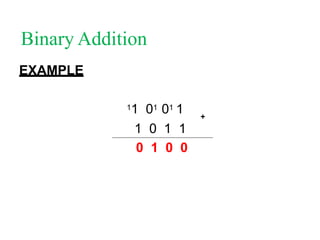
Binary Addition
EXAMPLE
11 01 01 1
1 0 1 1
0 1 0 0
+
Binary Addition
EXAMPLE
11 01 01 1
1 0 1 1
1 0 1 0 0
+
Binary Addition
CHECK THE ANSWER
9
11
20
+
Activity 1
Perform the following additions in binary.
 10110 + 4010 =
 32010 + 1810 =
 7610 + 27110 =
Binary Subtraction
Binary Subtraction
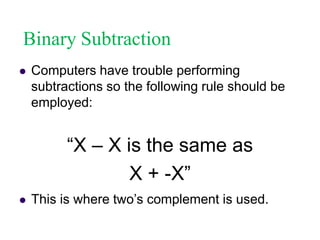
 Computers have trouble performing
subtractions so the following rule should be
employed:
“X – X is the same as
X + -X”
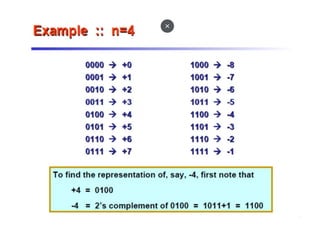
 This is where two’s complement is used.
Binary Subtraction
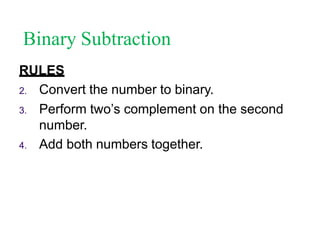
RULES
2. Convert the number to binary.
3. Perform two’s complement on the second
number.
4. Add both numbers together.
Binary Subtraction
EXAMPLE 1
Convert 12 - 8 using two’s complement.
3. Convert to binary
12 = 000011002

8 = 000010002
Perform one’s complement on the 810
000010002
111101112
Binary Subtraction
EXAMPLE 1
2. Perform two’s complement.
1 1 1 1 0 1 1 12
0 0 0 0 0 0 0 12
1 1 1 1 1 0 0 02
6. Add the two numbers together.
= 1 0 0 0 0 0 1 0 02 (Ignore insignificant bits)
+
Binary Subtraction
EXAMPLE 2
What happens if the first number is larger than
the second?
Try 610 - 1010
Binary Subtraction
EXAMPLE 2
2. Convert to binary
6 = 000001102

10 = 000010102
Perform one’s complement on the 1010
000010102
111101012
Binary Subtraction
EXAMPLE 2
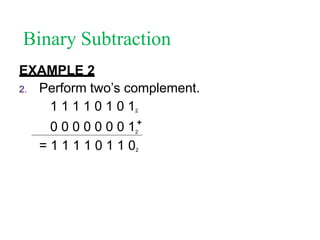
2. Perform two’s complement.
1 1 1 1 0 1 0 12
2
= 1 1 1 1 0 1 1 02
0 0 0 0 0 0 0 1+
Binary Subtraction
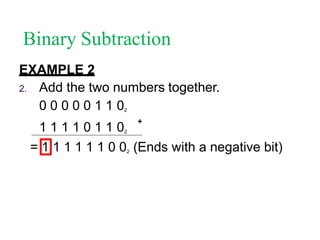
EXAMPLE 2
2. Add the two numbers together.
0 0 0 0 0 1 1 02
1 1 1 1 0 1 1 02
1
= 1 1 1 1 1 0 02 (Ends with a negative bit)
+
Binary Subtraction
EXAMPLE 2
2. Perform one’s complement on the result
1 1 1 1 1 1 0 02
0 0 0 0 0 0 1 12
5. Add 1 to the result.
0 0 0 0 0 0 1 12
0 0 0 0 0 0 0 12
= 0 0 0 0 0 1 0 02
+
Binary Subtraction
EXAMPLE 2
2. We then add the sign bit back.
0 0 0 0 0 1 0 02
= 1 0 0 0 0 1 0 02
Activity
2
Perform the following subtractions.
3. 22 - 8 =
4. 76 - 11 =
5. 6 - 44 =
Binary Multiplication
 Multiplication follows the general principal of
shift and add.
 The rules include:




0 * 0 = 0
0 * 1 = 0
1 * 0 = 0
1 * 1 = 1
Binary Multiplication
EXAMPLE 1
Complete 15 * 5 in binary.
3. Convert to binary
15 = 000011112
5 = 000001012
6. Ignore any insignificant zeros.
000011112
000001012
x
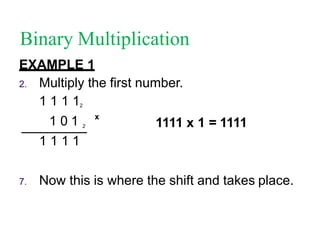
Binary Multiplication
EXAMPLE 1
2. Multiply the first number.
1 1 1 12
1 0 1 2
1 1 1 1
7. Now this is where the shift and takes place.
x
1111 x 1 = 1111
Binary Multiplication
EXAMPLE 1
2. Shift one place to the left and multiple the
second digit.
1 1 1 12
1 0 1 2
1 1 1 1
0 0 0 0 0
x
1111 x 0 = 0000
Shift One Place
Binary Multiplication
EXAMPLE 1
2. Shift one place to the left and multiple the
third digit.
1 1 1 12
1 0 1 2
1 1 1 1
0 0 0 0 0
1 1 1 1 0 0
x
1111 x 1 = 1111
Shift One Place
Binary Multiplication
EXAMPLE 1
2. Add the total of all the steps.
1 1 1 1
0 0 0 0 0
1 1 1 1 0 0
1 0 0 1 0 1 1
8. Convert back to decimal to check.
+
Activity
3
Calculate the following using binary
multiplication shift and add.




12 * 3 = 1 0 0 1 0 02
13 * 5 = 1 0 0 0 0 0 12
97 * 20 = 1 1 1 1 0 0 1 0 1 0 02
121 * 67 = 1 1 1 1 1 1 0 1 0 1 0 1 12
Binary Division
 Division in binary is similar to long division in
decimal.
 It uses what is called a shift and subtract
method.
Binary Division
EXAMPLE 1
Complete 575 / 25 using long division.
2.
0
25 575
Take the first digit of 575 (5) and see if 25
will go into it.
If it can not put a zero above and take the
next number.
02  How many times does 25 go into 57?
2. 25 575
TWICE
Binary Division
02  How much is left over?
2. 25 575  57 – (25 * 2) = 7
50
7
02
 Drop down the next value
2. 25 575
50
75
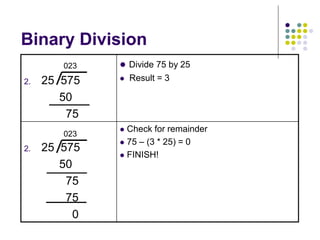
Binary Division
023  Divide 75 by 25
2. 25 575  Result = 3
50
75
023
 Check for remainder
 75 – (3 * 25) = 0
 FINISH!
2. 25 575
50
75
75
0
Binary Division
 Complete the following:
 25/5
Step 1: Convert both numbers to binary.
25 = 1 1 0 0 1
5 = 1 0 1
Step 2: Place the numbers accordingly:
1 0 1 1 1 0 0 1
Binary Division
Step 3: Determine if 1 0 1 (5) will fit into the
first bit of dividend.
1 0 1 1
1 0 1(5) will not fit into 1(1)
Step 4: Place a zero above the first bit and try
the next bit.
1 1 0 0
Binary Division
1 1 0 0
Step 5: Determine if 1 0 1 (5) will fit into the
next two bits of dividend.
0
1 0 1 1
1 0 1(5) will not fit into 1 1(3)
Step 6: Place a zero above the second bit and
try the next bit.
Binary Division
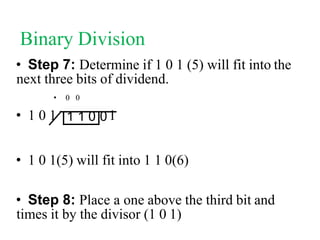
• Step 7: Determine if 1 0 1 (5) will fit into the
next three bits of dividend.
• 0 0
• 1 0 1 1
• 1 0 1(5) will fit into 1 1 0(6)
• Step 8: Place a one above the third bit and
times it by the divisor (1 0 1)
1 1 0 0
Binary Division
1 0 1 0 1
1 1 0
1 0 1
A subtraction should take place, however you
cannot subtract in binary. Therefore, the two’s
complement of the 2nd number must be found and
the two numbers added together to get a result.
Step 9: The multiplication of the divisor should be
placed under the THREE bits you have used.
0 0 1
Binary Division
0 1
1 1 0
0 1 1
0 0 1
Step 10: The two’s complement of 1 0 1 is 0 1 1
0 0 1
1 0 1
+
Binary Division
0 1
1 1 0
0 1 1
0 0 1 0
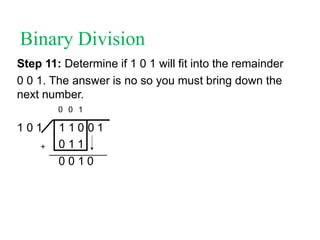
Step 11: Determine if 1 0 1 will fit into the remainder
0 0 1. The answer is no so you must bring down the
next number.
0 0 1
1 0 1
+
Binary Division
0 1
1 1 0
0 1 1
0 0 1 0 1
1 0 1
+
Step 12: 1 01 does not fit into 0 0 1 0. Therefore, a
zero is placed above the last bit. And the next number
is used.
0 0 1 0
Binary Division
0 1
1 1 0
0 1 1
0 0 0
1 0 1
+
0 0 1 0 1
+
0 1 1
Step 13: 1 0 1 does fit into 1 0 1 so therefore, a one is
placed above the final number and the process of shift
and add must be continued.
0 0 1 0 1
Binary Division
Step 14: The final answer is 1 0 1 (5) remainder zero.
Activity
4
 Complete the following divisions:
 340 / 20
 580 / 17
Activity
5
 40/4
 36/7
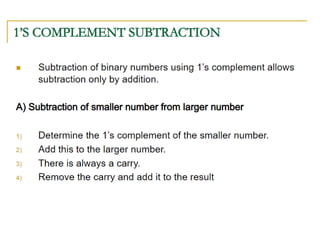
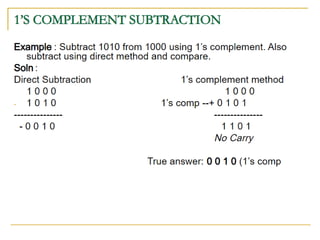
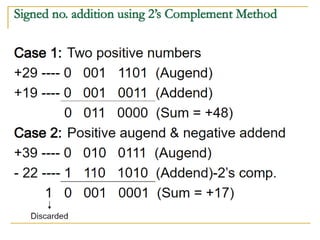
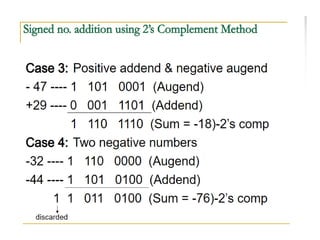
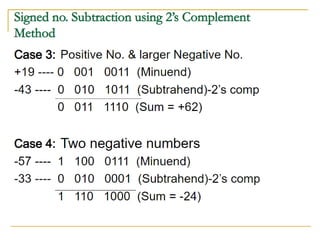
Subtraction using 1’s And 2’s
Complement
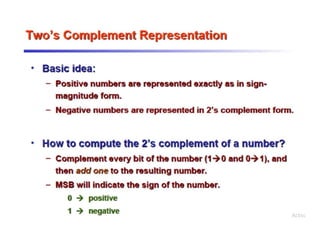
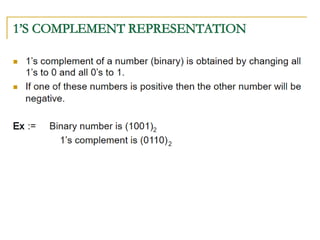
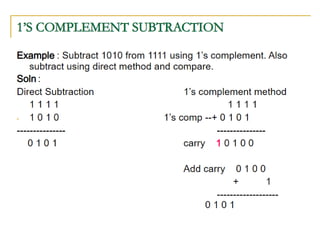
Subtraction by 2’s Complement
• The operation is carried out by means of the following
steps:
• At first, 2’s complement of the subtrahend is found.
• Then it is added to the minuend.
• If the final carry over of the sum is 1, it is dropped and
the result is positive.
• If there is no carry over, the two’s complement of the
sum will be the result and it is negative.
Octal Arithmetic
• Octal rules are similar to the decimal or binary arithmetic.
• This number system is normally used to enter long strings of
binary data into a digital system like a microcomputer.
• This makes the task of entering binary data in a
microcomputer easier.
• Arithmetic operations can be performed by converting the
octal numbers to binary numbers and then using the rules of
binary arithmetic.
Octal Addition
Octal Subtraction
Application of Octal Number System
Hexadecimal Arithmetic
• Hexadecimal rules are similar to the decimal,
octal or binary arithmetic.
• The information can be handled only in binary
form in a digital circuit and it Is easier to enter the
information using hexadecimal number system.
• Arithmetic operations can be performed by
converting the Hexadecimal numbers to binary
numbers and then using the rules of binary
arithmetic.
Hexadecimal Addition
Hexadecimal Subtraction
BCD Addition
BCD Subtraction
• Rules
– If EAC(end around carry)=1 then transfer true result of
adder 1
• If Cn=1, 0000 added in adder 2
• If cn =0, 1010 added in adder 2
– If EAC=0 then transfer 1’s compliment of result of adder
1
• If cn=1, 1010 added in adder 2
• If cn =0, 0000 added in adder 2
• If any carry generated in adder 2 discard it.
BCD Subtraction
Adder 2
BCD Subtraction
• (546) – (429) = (117)
• (429) – (546) = (-117)
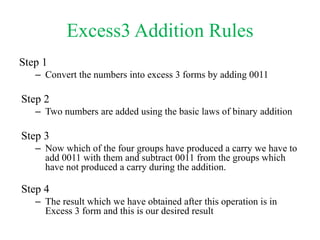
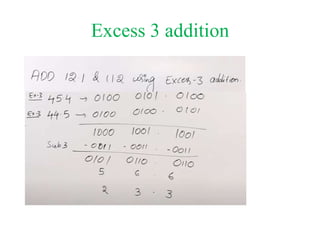
Excess3 Addition Rules
Step 1
– Convert the numbers into excess 3 forms by adding 0011
Step 2
– Two numbers are added using the basic laws of binary addition
Step 3
– Now which of the four groups have produced a carry we have to
add 0011 with them and subtract 0011 from the groups which
have not produced a carry during the addition.
Step 4
– The result which we have obtained after this operation is in
Excess 3 form and this is our desired result
Excess 3 addition
Excess 3 Code Subtraction
• Step 1
Like the previous method both the numbers have to be converted
into excess 3 code
• Step 2
Following the basic methods of binary subtraction, subtraction is
done
• Step 3
Subtract ‘0011’ from each BCD four-bit group in the answer if the
subtraction operation of the relevant four-bit groups required a
borrow from the next higher adjacent four-bit group
• Step 4
Add ‘0011’ to the remaining four-bit groups, if any, in the result.
Excess 3 Subtraction

Binary Arithmetic

  • 1.
  • 2.
    BinaryArithmetic • Binary arithmeticis essential part of all the digital computers and many other digital system. • Binary arithmetic is used in digital systems mainly because the numbers (decimal and floating-point numbers) are stored in binary format in most computer systems. • All arithmetic operations such as addition, subtraction, multiplication, and division are done in binary representation of numbers.
  • 3.
    Binary Addition  Thesteps used for a computer to complete addition are usually greater than a human, but their processing speed is far superior. RULES  0 + 0 = 0  0 + 1 = 1  1 + 0 = 1  1 + 1 = 0 (With 1 to carry)  1 + 1 + 1 = 1 (With 1 to carry)
  • 4.
  • 5.
  • 6.
    Binary Addition EXAMPLE 1 0101 1 1 0 1 1 0 0 +
  • 7.
    Binary Addition EXAMPLE 1 0101 1 1 0 1 1 1 0 0 +
  • 8.
    Binary Addition EXAMPLE 11 0101 1 1 0 1 1 0 1 0 0 +
  • 9.
    Binary Addition EXAMPLE 11 0101 1 1 0 1 1 1 0 1 0 0 +
  • 10.
    Binary Addition CHECK THEANSWER 9 11 20 +
  • 11.
    Activity 1 Perform thefollowing additions in binary.  10110 + 4010 =  32010 + 1810 =  7610 + 27110 =
  • 12.
  • 13.
    Binary Subtraction  Computershave trouble performing subtractions so the following rule should be employed: “X – X is the same as X + -X”  This is where two’s complement is used.
  • 14.
    Binary Subtraction RULES 2. Convertthe number to binary. 3. Perform two’s complement on the second number. 4. Add both numbers together.
  • 15.
    Binary Subtraction EXAMPLE 1 Convert12 - 8 using two’s complement. 3. Convert to binary 12 = 000011002  8 = 000010002 Perform one’s complement on the 810 000010002 111101112
  • 16.
    Binary Subtraction EXAMPLE 1 2.Perform two’s complement. 1 1 1 1 0 1 1 12 0 0 0 0 0 0 0 12 1 1 1 1 1 0 0 02 6. Add the two numbers together. = 1 0 0 0 0 0 1 0 02 (Ignore insignificant bits) +
  • 17.
    Binary Subtraction EXAMPLE 2 Whathappens if the first number is larger than the second? Try 610 - 1010
  • 18.
    Binary Subtraction EXAMPLE 2 2.Convert to binary 6 = 000001102  10 = 000010102 Perform one’s complement on the 1010 000010102 111101012
  • 19.
    Binary Subtraction EXAMPLE 2 2.Perform two’s complement. 1 1 1 1 0 1 0 12 2 = 1 1 1 1 0 1 1 02 0 0 0 0 0 0 0 1+
  • 20.
    Binary Subtraction EXAMPLE 2 2.Add the two numbers together. 0 0 0 0 0 1 1 02 1 1 1 1 0 1 1 02 1 = 1 1 1 1 1 0 02 (Ends with a negative bit) +
  • 21.
    Binary Subtraction EXAMPLE 2 2.Perform one’s complement on the result 1 1 1 1 1 1 0 02 0 0 0 0 0 0 1 12 5. Add 1 to the result. 0 0 0 0 0 0 1 12 0 0 0 0 0 0 0 12 = 0 0 0 0 0 1 0 02 +
  • 22.
    Binary Subtraction EXAMPLE 2 2.We then add the sign bit back. 0 0 0 0 0 1 0 02 = 1 0 0 0 0 1 0 02
  • 23.
    Activity 2 Perform the followingsubtractions. 3. 22 - 8 = 4. 76 - 11 = 5. 6 - 44 =
  • 24.
    Binary Multiplication  Multiplicationfollows the general principal of shift and add.  The rules include:     0 * 0 = 0 0 * 1 = 0 1 * 0 = 0 1 * 1 = 1
  • 25.
    Binary Multiplication EXAMPLE 1 Complete15 * 5 in binary. 3. Convert to binary 15 = 000011112 5 = 000001012 6. Ignore any insignificant zeros. 000011112 000001012 x
  • 26.
    Binary Multiplication EXAMPLE 1 2.Multiply the first number. 1 1 1 12 1 0 1 2 1 1 1 1 7. Now this is where the shift and takes place. x 1111 x 1 = 1111
  • 27.
    Binary Multiplication EXAMPLE 1 2.Shift one place to the left and multiple the second digit. 1 1 1 12 1 0 1 2 1 1 1 1 0 0 0 0 0 x 1111 x 0 = 0000 Shift One Place
  • 28.
    Binary Multiplication EXAMPLE 1 2.Shift one place to the left and multiple the third digit. 1 1 1 12 1 0 1 2 1 1 1 1 0 0 0 0 0 1 1 1 1 0 0 x 1111 x 1 = 1111 Shift One Place
  • 29.
    Binary Multiplication EXAMPLE 1 2.Add the total of all the steps. 1 1 1 1 0 0 0 0 0 1 1 1 1 0 0 1 0 0 1 0 1 1 8. Convert back to decimal to check. +
  • 30.
    Activity 3 Calculate the followingusing binary multiplication shift and add.     12 * 3 = 1 0 0 1 0 02 13 * 5 = 1 0 0 0 0 0 12 97 * 20 = 1 1 1 1 0 0 1 0 1 0 02 121 * 67 = 1 1 1 1 1 1 0 1 0 1 0 1 12
  • 31.
    Binary Division  Divisionin binary is similar to long division in decimal.  It uses what is called a shift and subtract method.
  • 32.
    Binary Division EXAMPLE 1 Complete575 / 25 using long division. 2. 0 25 575 Take the first digit of 575 (5) and see if 25 will go into it. If it can not put a zero above and take the next number. 02  How many times does 25 go into 57? 2. 25 575 TWICE
  • 33.
    Binary Division 02 How much is left over? 2. 25 575  57 – (25 * 2) = 7 50 7 02  Drop down the next value 2. 25 575 50 75
  • 34.
    Binary Division 023 Divide 75 by 25 2. 25 575  Result = 3 50 75 023  Check for remainder  75 – (3 * 25) = 0  FINISH! 2. 25 575 50 75 75 0
  • 35.
    Binary Division  Completethe following:  25/5 Step 1: Convert both numbers to binary. 25 = 1 1 0 0 1 5 = 1 0 1 Step 2: Place the numbers accordingly: 1 0 1 1 1 0 0 1
  • 36.
    Binary Division Step 3:Determine if 1 0 1 (5) will fit into the first bit of dividend. 1 0 1 1 1 0 1(5) will not fit into 1(1) Step 4: Place a zero above the first bit and try the next bit. 1 1 0 0
  • 37.
    Binary Division 1 10 0 Step 5: Determine if 1 0 1 (5) will fit into the next two bits of dividend. 0 1 0 1 1 1 0 1(5) will not fit into 1 1(3) Step 6: Place a zero above the second bit and try the next bit.
  • 38.
    Binary Division • Step7: Determine if 1 0 1 (5) will fit into the next three bits of dividend. • 0 0 • 1 0 1 1 • 1 0 1(5) will fit into 1 1 0(6) • Step 8: Place a one above the third bit and times it by the divisor (1 0 1) 1 1 0 0
  • 39.
    Binary Division 1 01 0 1 1 1 0 1 0 1 A subtraction should take place, however you cannot subtract in binary. Therefore, the two’s complement of the 2nd number must be found and the two numbers added together to get a result. Step 9: The multiplication of the divisor should be placed under the THREE bits you have used. 0 0 1
  • 40.
    Binary Division 0 1 11 0 0 1 1 0 0 1 Step 10: The two’s complement of 1 0 1 is 0 1 1 0 0 1 1 0 1 +
  • 41.
    Binary Division 0 1 11 0 0 1 1 0 0 1 0 Step 11: Determine if 1 0 1 will fit into the remainder 0 0 1. The answer is no so you must bring down the next number. 0 0 1 1 0 1 +
  • 42.
    Binary Division 0 1 11 0 0 1 1 0 0 1 0 1 1 0 1 + Step 12: 1 01 does not fit into 0 0 1 0. Therefore, a zero is placed above the last bit. And the next number is used. 0 0 1 0
  • 43.
    Binary Division 0 1 11 0 0 1 1 0 0 0 1 0 1 + 0 0 1 0 1 + 0 1 1 Step 13: 1 0 1 does fit into 1 0 1 so therefore, a one is placed above the final number and the process of shift and add must be continued. 0 0 1 0 1
  • 44.
    Binary Division Step 14:The final answer is 1 0 1 (5) remainder zero.
  • 45.
    Activity 4  Complete thefollowing divisions:  340 / 20  580 / 17
  • 46.
  • 57.
    Subtraction using 1’sAnd 2’s Complement
  • 64.
    Subtraction by 2’sComplement • The operation is carried out by means of the following steps: • At first, 2’s complement of the subtrahend is found. • Then it is added to the minuend. • If the final carry over of the sum is 1, it is dropped and the result is positive. • If there is no carry over, the two’s complement of the sum will be the result and it is negative.
  • 69.
    Octal Arithmetic • Octalrules are similar to the decimal or binary arithmetic. • This number system is normally used to enter long strings of binary data into a digital system like a microcomputer. • This makes the task of entering binary data in a microcomputer easier. • Arithmetic operations can be performed by converting the octal numbers to binary numbers and then using the rules of binary arithmetic.
  • 70.
  • 71.
  • 72.
    Application of OctalNumber System
  • 73.
    Hexadecimal Arithmetic • Hexadecimalrules are similar to the decimal, octal or binary arithmetic. • The information can be handled only in binary form in a digital circuit and it Is easier to enter the information using hexadecimal number system. • Arithmetic operations can be performed by converting the Hexadecimal numbers to binary numbers and then using the rules of binary arithmetic.
  • 74.
  • 75.
  • 78.
  • 79.
    BCD Subtraction • Rules –If EAC(end around carry)=1 then transfer true result of adder 1 • If Cn=1, 0000 added in adder 2 • If cn =0, 1010 added in adder 2 – If EAC=0 then transfer 1’s compliment of result of adder 1 • If cn=1, 1010 added in adder 2 • If cn =0, 0000 added in adder 2 • If any carry generated in adder 2 discard it.
  • 80.
  • 81.
    BCD Subtraction • (546)– (429) = (117) • (429) – (546) = (-117)
  • 82.
    Excess3 Addition Rules Step1 – Convert the numbers into excess 3 forms by adding 0011 Step 2 – Two numbers are added using the basic laws of binary addition Step 3 – Now which of the four groups have produced a carry we have to add 0011 with them and subtract 0011 from the groups which have not produced a carry during the addition. Step 4 – The result which we have obtained after this operation is in Excess 3 form and this is our desired result
  • 83.
  • 84.
    Excess 3 CodeSubtraction • Step 1 Like the previous method both the numbers have to be converted into excess 3 code • Step 2 Following the basic methods of binary subtraction, subtraction is done • Step 3 Subtract ‘0011’ from each BCD four-bit group in the answer if the subtraction operation of the relevant four-bit groups required a borrow from the next higher adjacent four-bit group • Step 4 Add ‘0011’ to the remaining four-bit groups, if any, in the result.
  • 85.