DATA STANDARD: 
IGES 
• SHRIVASTAVA HIMANSHU ARJUN KAMINI :14MCD0047 
• TONY SEBASTIAN :14MCD0003 
(Vellore Institute Of Technology, India)
DATA EXCHANGE 
• Process of exchanging data from a source to target. 
• In CAD system there are many situations where we have to 
exchange data from one software package to another. 
• We have to translate geometrical data, feature data , assembly 
structure, etc. 
• In CAD data exchange many software technologies and 
methods are involved.
FILE TRANSLATION 
• One data format is converted to another. 
• Important in concurrent engineering. 
• Different companies may be using different CAD software. 
• One design model may be exported and imported into several 
CAD packages before the final file reaches manufacturing. 
• Data of one software package may not be compatible with the 
other.
TYPES OF TRANSLATORS 
1. DIRECT TRANSLATORS 
Need n(n-1) translators for n softwares.
2. INDIRECT TRANSLATORS 
Need 2n translators for n softwares.
NEED OF NEUTRAL FILE FORMATS 
• It is difficult to enforce the use of a common set of CAD/CAM 
tools in different companies. 
• Because of the lack of any common set of tools, a common 
format for neutral file exchange is needed. 
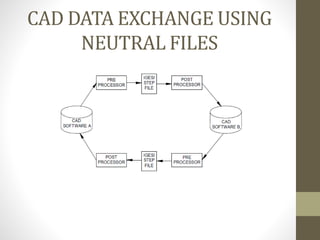
• Usage of neutral standard for transferring information 
drastically reduces the requirements for translators. 
• Thus cost incurred for data translation is reduced.
CAD DATA EXCHANGE USING 
NEUTRAL FILES
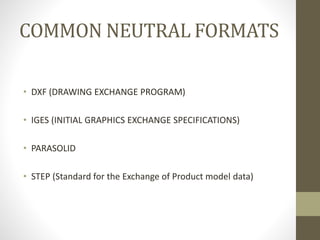
COMMON NEUTRAL FORMATS 
• DXF (DRAWING EXCHANGE PROGRAM) 
• IGES (INITIAL GRAPHICS EXCHANGE SPECIFICATIONS) 
• PARASOLID 
• STEP (Standard for the Exchange of Product model data)
IGES 
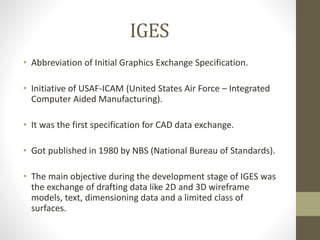
• Abbreviation of Initial Graphics Exchange Specification. 
• Initiative of USAF-ICAM (United States Air Force – Integrated 
Computer Aided Manufacturing). 
• It was the first specification for CAD data exchange. 
• Got published in 1980 by NBS (National Bureau of Standards). 
• The main objective during the development stage of IGES was 
the exchange of drafting data like 2D and 3D wireframe 
models, text, dimensioning data and a limited class of 
surfaces.
CAPABILITIES OF CURRENT VERSION 
The current version, IGES 5.3, provides the following capabilities: 
• Geometry: 2D/3D wireframes, 2D/3D curves and surfaces 
• CSG (since version 4.0 in 1988) 
• B-Rep (since version 5.1 in 1991) 
• Presentation: Drafting entities for technical drawings 
• Finite Element Modelling: Elements for FEM systems
IGES specification consists of format of the file and product 
definition data. The product definition data includes: 
1.Geometric Data: entities required to explain the geometry of 
the drawings. 
2. Topological Data: explains the relationship between different 
geometries 
The geometric and topological data together gives the 
information about geometric shape of the product. 
3. Non-Geometrical Data: it can be divided into 
• Annotation 
• Definition 
• Organisation
Structure of IGES: 
1.Start section 
2.Global section 
3.Directory entry section 
4.Parameter Data Section 
5.Terminal section
Start Section 
• The Start section is a human readable 
introduction to the file. 
• It is recognize by letter "s" in the IGES file.
Global Section 
• The Global Section includes properties and descriptions of the 
pre-processor and information that are needed by 
postprocessor to interpret the file. 
• It is recognize by letter "G" in the IGES file.
Some of the parameter which are included in this section are: 
• 1. The name of IGES file itself. 
• 2. Vendor and software version of sending system. 
• 3. Date and time of file generation 
• 4. Model units 
• 5. Name of the author of IGES file and his/her organization. 
• 6. Parameter and Records Delimiters.
For Example: 
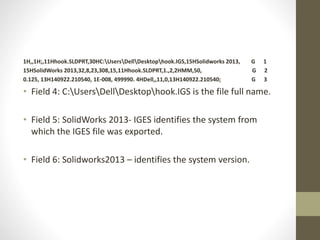
1H,,1H;,11Hhook.SLDPRT,30HC:UsersDellDesktophook.IGS,15HSolidworks 2 013 , G 1 
15HSolidWorks 2013,32,8,23,308,15,11Hhook.SLDPRT,1.,2,2HMM,50, G 2 
0.125, 13H140922.210540, 1E-008, 499990. 4HDell,,11,0,13H140922.210540; G 3 
• Field 1: 1H, - defines that “,” is the parameter delimiter 
character in the G and D sections (the default is “,”). 
• Field 2: 1H; - defines “;” (default) as the record delimiter in G 
and D. A record is a group of fields. In the G section there is 
only one record. 
• Field 3:hook.SLDPRT is the product identification. In this case 
this is an IGES file from solidwork where the filename is used 
as the product id.
1H,,1H;,11Hhook.SLDPRT,30HC:UsersDellDesktophook.IGS,15HSolidworks 2013, G 1 
15HSolidWorks 2013,32,8,23,308,15,11Hhook.SLDPRT,1.,2,2HMM,50, G 2 
0.125, 13H140922.210540, 1E-008, 499990. 4HDell,,11,0,13H140922.210540; G 3 
• Field 4: C:UsersDellDesktophook.IGS is the file full name. 
• Field 5: SolidWorks 2013- IGES identifies the system from 
which the IGES file was exported. 
• Field 6: Solidworks2013 – identifies the system version.
1H,,1H;,11Hhook.SLDPRT,30HC:UsersDellDesktophook.IGS,15HSolidworks 2013,G 
1H,,1H;,11Hhook.SLDPRT,30HC:UsersDellDesktophook.IGS,15HSolidworks 2013, G 1 
15HSolidWorks 2013,32,8,23,308,15,11Hhook.SLDPRT,1.,2,2HMM,50, G 2 
0.125, 13H140922.210540, 1E-008, 499990. 4HDell,11,0,13H140922.210540; G 3 
Field 14: 2-is units used for measuring data. In this example mm 
The other units are represented by the following code: 
• 1 -inches 
• 2 -millimetres 
• 4 -feet 
• 5 -miles 
• 6 -meters 
• 7 -kilometre 
• 8 -mils(0.001 inches) 
• 9 -microns 
• 10 -centimetre 
• 11 -micro inches 
01SolidWorks 2013,32,8,23,308,15,11Hhook.SLDPRT,1.,2,2HMM,50, G 2
1H,,1H;,11Hhook.SLDPRT,30HC:UsersDellDesktophook.IGS,15HSolidworks 2013, G 1 
15HSolidWorks 2013,32,8,23,308,15,11Hhook.SLDPRT,1.,2,2HMM,50, G 2 
0.125, 13H140922.210540, 1E-008, 499990. 4HDell,,11,0,13H140922.210540; G 3 
• Field 19: 1E-008 - Minimum user-intended resolution. Used to 
determine if points are “coincident”. With this value, any 
manufacturing application can consider coordinate locations 
less than this distance apart to be coincident. This field must 
always be given a value.
Directory Entry Section (DE Section): 
• Directory entry section defines the attributes or features of 
the entity like line , colour, transformation matrix, etc. 
• For every geometric element within an IGES file there is 
one Directory Entry. This consists of two 80-character lines 
i.e. 20 right-justified fields of 8 characters each.
For Example 
314 1 0 0 0 00000200D 1 
314 0 0 1 0 0D 2 
110 2 0 0 0 01010000D 3 
110 0 0 1 0 0D 4
Parameter Data Section (PD Section): 
• The PD section contains the actual data defining each entity in 
DE section 
• Directory entry and Parameter data are necessary to 
completely define an entity. The Parameter Data Section can 
be recognizing in IGES file by "P" letter.
For Example: 
110,0.25,-0.428459771,-0.06,0.25,0.571540229,-0.06; 3P 2 
110,0.25,0.,-0.02,0.25,0.071540229,-0.02; 5P 3 
120,3,5,0.,6.28318530717959; 7P 4 
126,1,1,1,0,1,0,0.,0.,1.,1.,1.,1.,0.,6.283185307,0.,1., 9P 5 
6.283185307,0.,0.,1.,0.,0.,1.; 9P 6 
110,0.25,0.,-0.02,0.25,0.071540229,-0.02; 11P 7
Some example of entity are represented in Parameter Data 
Section are: 
• 1.Line (entity 110) 
A line in IGES file is defined by its end points. The coordinates 
of start point and terminate point are included in parameter 
data section of this entity. 
110,0.25,-0.428459771,-0.06,0.25,0.571540229,-0.06; 3P 2
• 2. Circular Arc (entity 100) 
To represent a circular arc in modelling space, IGES provides 
the information including a new plane (XT YT) in which the 
circular lies, the coordinates of centre point, start point, and 
terminate point. A new coordinate system (XT, YT, & ZT) is 
defined by transferring the original coordinate system (Xo, Yo, 
Zo) via a transformation matrix and all coordinates of points 
(centre point, start point, and terminate point) related to this 
new coordinate system.
• Directory Entry Section: 
124 10 0 0 0 00000000D 15 
124 0 0 4 0 0D 16 
100 14 0 0 0 15 01010000D 17 
100 0 0 1 0 0D 18 
• Parameter Data Section: 
100,-0.06,0.25,0.071540229,0.29,0.071540229,0.21,0.071540229; 17P 14
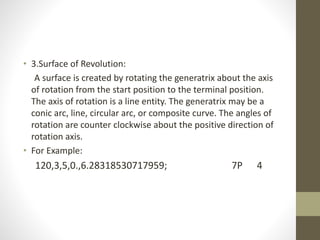
• 3.Surface of Revolution: 
A surface is created by rotating the generatrix about the axis 
of rotation from the start position to the terminal position. 
The axis of rotation is a line entity. The generatrix may be a 
conic arc, line, circular arc, or composite curve. The angles of 
rotation are counter clockwise about the positive direction of 
rotation axis. 
• For Example: 
120,3,5,0.,6.28318530717959; 7P 4
Terminal Section: 
• The terminal section contains only one record which shows 
the number of records in each section. This is used for 
checking purpose 
• S 1G 3D 262P T 1 
Field Columns Section 
1 1-8 Start 
2 9-16 Global 
3 17-24 Directory Entry 
4 25-32 Parameter data 
5-9 33-72 Not used 
10 73-80 Terminate
Problem with IGES file import: 
• Internal data representing the entities is different than that 
required by IGES. 
• when the entity is not specifically supported and thus have to 
be converted to closet available entity.
Import Healing: 
• Healing Missing Faces. 
• Additional surfaces
THANK YOU

Data standard - IGES

  • 1.
    DATA STANDARD: IGES • SHRIVASTAVA HIMANSHU ARJUN KAMINI :14MCD0047 • TONY SEBASTIAN :14MCD0003 (Vellore Institute Of Technology, India)
  • 2.
    DATA EXCHANGE •Process of exchanging data from a source to target. • In CAD system there are many situations where we have to exchange data from one software package to another. • We have to translate geometrical data, feature data , assembly structure, etc. • In CAD data exchange many software technologies and methods are involved.
  • 3.
    FILE TRANSLATION •One data format is converted to another. • Important in concurrent engineering. • Different companies may be using different CAD software. • One design model may be exported and imported into several CAD packages before the final file reaches manufacturing. • Data of one software package may not be compatible with the other.
  • 4.
    TYPES OF TRANSLATORS 1. DIRECT TRANSLATORS Need n(n-1) translators for n softwares.
  • 5.
    2. INDIRECT TRANSLATORS Need 2n translators for n softwares.
  • 6.
    NEED OF NEUTRALFILE FORMATS • It is difficult to enforce the use of a common set of CAD/CAM tools in different companies. • Because of the lack of any common set of tools, a common format for neutral file exchange is needed. • Usage of neutral standard for transferring information drastically reduces the requirements for translators. • Thus cost incurred for data translation is reduced.
  • 7.
    CAD DATA EXCHANGEUSING NEUTRAL FILES
  • 8.
    COMMON NEUTRAL FORMATS • DXF (DRAWING EXCHANGE PROGRAM) • IGES (INITIAL GRAPHICS EXCHANGE SPECIFICATIONS) • PARASOLID • STEP (Standard for the Exchange of Product model data)
  • 9.
    IGES • Abbreviationof Initial Graphics Exchange Specification. • Initiative of USAF-ICAM (United States Air Force – Integrated Computer Aided Manufacturing). • It was the first specification for CAD data exchange. • Got published in 1980 by NBS (National Bureau of Standards). • The main objective during the development stage of IGES was the exchange of drafting data like 2D and 3D wireframe models, text, dimensioning data and a limited class of surfaces.
  • 10.
    CAPABILITIES OF CURRENTVERSION The current version, IGES 5.3, provides the following capabilities: • Geometry: 2D/3D wireframes, 2D/3D curves and surfaces • CSG (since version 4.0 in 1988) • B-Rep (since version 5.1 in 1991) • Presentation: Drafting entities for technical drawings • Finite Element Modelling: Elements for FEM systems
  • 11.
    IGES specification consistsof format of the file and product definition data. The product definition data includes: 1.Geometric Data: entities required to explain the geometry of the drawings. 2. Topological Data: explains the relationship between different geometries The geometric and topological data together gives the information about geometric shape of the product. 3. Non-Geometrical Data: it can be divided into • Annotation • Definition • Organisation
  • 12.
    Structure of IGES: 1.Start section 2.Global section 3.Directory entry section 4.Parameter Data Section 5.Terminal section
  • 13.
    Start Section •The Start section is a human readable introduction to the file. • It is recognize by letter "s" in the IGES file.
  • 14.
    Global Section •The Global Section includes properties and descriptions of the pre-processor and information that are needed by postprocessor to interpret the file. • It is recognize by letter "G" in the IGES file.
  • 15.
    Some of theparameter which are included in this section are: • 1. The name of IGES file itself. • 2. Vendor and software version of sending system. • 3. Date and time of file generation • 4. Model units • 5. Name of the author of IGES file and his/her organization. • 6. Parameter and Records Delimiters.
  • 16.
    For Example: 1H,,1H;,11Hhook.SLDPRT,30HC:UsersDellDesktophook.IGS,15HSolidworks2 013 , G 1 15HSolidWorks 2013,32,8,23,308,15,11Hhook.SLDPRT,1.,2,2HMM,50, G 2 0.125, 13H140922.210540, 1E-008, 499990. 4HDell,,11,0,13H140922.210540; G 3 • Field 1: 1H, - defines that “,” is the parameter delimiter character in the G and D sections (the default is “,”). • Field 2: 1H; - defines “;” (default) as the record delimiter in G and D. A record is a group of fields. In the G section there is only one record. • Field 3:hook.SLDPRT is the product identification. In this case this is an IGES file from solidwork where the filename is used as the product id.
  • 17.
    1H,,1H;,11Hhook.SLDPRT,30HC:UsersDellDesktophook.IGS,15HSolidworks 2013, G1 15HSolidWorks 2013,32,8,23,308,15,11Hhook.SLDPRT,1.,2,2HMM,50, G 2 0.125, 13H140922.210540, 1E-008, 499990. 4HDell,,11,0,13H140922.210540; G 3 • Field 4: C:UsersDellDesktophook.IGS is the file full name. • Field 5: SolidWorks 2013- IGES identifies the system from which the IGES file was exported. • Field 6: Solidworks2013 – identifies the system version.
  • 18.
    1H,,1H;,11Hhook.SLDPRT,30HC:UsersDellDesktophook.IGS,15HSolidworks 2013,G 1H,,1H;,11Hhook.SLDPRT,30HC:UsersDellDesktophook.IGS,15HSolidworks2013, G 1 15HSolidWorks 2013,32,8,23,308,15,11Hhook.SLDPRT,1.,2,2HMM,50, G 2 0.125, 13H140922.210540, 1E-008, 499990. 4HDell,11,0,13H140922.210540; G 3 Field 14: 2-is units used for measuring data. In this example mm The other units are represented by the following code: • 1 -inches • 2 -millimetres • 4 -feet • 5 -miles • 6 -meters • 7 -kilometre • 8 -mils(0.001 inches) • 9 -microns • 10 -centimetre • 11 -micro inches 01SolidWorks 2013,32,8,23,308,15,11Hhook.SLDPRT,1.,2,2HMM,50, G 2
  • 19.
    1H,,1H;,11Hhook.SLDPRT,30HC:UsersDellDesktophook.IGS,15HSolidworks 2013, G1 15HSolidWorks 2013,32,8,23,308,15,11Hhook.SLDPRT,1.,2,2HMM,50, G 2 0.125, 13H140922.210540, 1E-008, 499990. 4HDell,,11,0,13H140922.210540; G 3 • Field 19: 1E-008 - Minimum user-intended resolution. Used to determine if points are “coincident”. With this value, any manufacturing application can consider coordinate locations less than this distance apart to be coincident. This field must always be given a value.
  • 20.
    Directory Entry Section(DE Section): • Directory entry section defines the attributes or features of the entity like line , colour, transformation matrix, etc. • For every geometric element within an IGES file there is one Directory Entry. This consists of two 80-character lines i.e. 20 right-justified fields of 8 characters each.
  • 21.
    For Example 3141 0 0 0 00000200D 1 314 0 0 1 0 0D 2 110 2 0 0 0 01010000D 3 110 0 0 1 0 0D 4
  • 22.
    Parameter Data Section(PD Section): • The PD section contains the actual data defining each entity in DE section • Directory entry and Parameter data are necessary to completely define an entity. The Parameter Data Section can be recognizing in IGES file by "P" letter.
  • 23.
    For Example: 110,0.25,-0.428459771,-0.06,0.25,0.571540229,-0.06;3P 2 110,0.25,0.,-0.02,0.25,0.071540229,-0.02; 5P 3 120,3,5,0.,6.28318530717959; 7P 4 126,1,1,1,0,1,0,0.,0.,1.,1.,1.,1.,0.,6.283185307,0.,1., 9P 5 6.283185307,0.,0.,1.,0.,0.,1.; 9P 6 110,0.25,0.,-0.02,0.25,0.071540229,-0.02; 11P 7
  • 24.
    Some example ofentity are represented in Parameter Data Section are: • 1.Line (entity 110) A line in IGES file is defined by its end points. The coordinates of start point and terminate point are included in parameter data section of this entity. 110,0.25,-0.428459771,-0.06,0.25,0.571540229,-0.06; 3P 2
  • 25.
    • 2. CircularArc (entity 100) To represent a circular arc in modelling space, IGES provides the information including a new plane (XT YT) in which the circular lies, the coordinates of centre point, start point, and terminate point. A new coordinate system (XT, YT, & ZT) is defined by transferring the original coordinate system (Xo, Yo, Zo) via a transformation matrix and all coordinates of points (centre point, start point, and terminate point) related to this new coordinate system.
  • 26.
    • Directory EntrySection: 124 10 0 0 0 00000000D 15 124 0 0 4 0 0D 16 100 14 0 0 0 15 01010000D 17 100 0 0 1 0 0D 18 • Parameter Data Section: 100,-0.06,0.25,0.071540229,0.29,0.071540229,0.21,0.071540229; 17P 14
  • 27.
    • 3.Surface ofRevolution: A surface is created by rotating the generatrix about the axis of rotation from the start position to the terminal position. The axis of rotation is a line entity. The generatrix may be a conic arc, line, circular arc, or composite curve. The angles of rotation are counter clockwise about the positive direction of rotation axis. • For Example: 120,3,5,0.,6.28318530717959; 7P 4
  • 28.
    Terminal Section: •The terminal section contains only one record which shows the number of records in each section. This is used for checking purpose • S 1G 3D 262P T 1 Field Columns Section 1 1-8 Start 2 9-16 Global 3 17-24 Directory Entry 4 25-32 Parameter data 5-9 33-72 Not used 10 73-80 Terminate
  • 29.
    Problem with IGESfile import: • Internal data representing the entities is different than that required by IGES. • when the entity is not specifically supported and thus have to be converted to closet available entity.
  • 30.
    Import Healing: •Healing Missing Faces. • Additional surfaces
  • 31.