Software for
Additive manufacturing
carmelo.demaria@centropiaggio.unipi.it
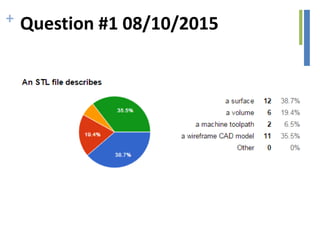
+ Question #1 08/10/2015
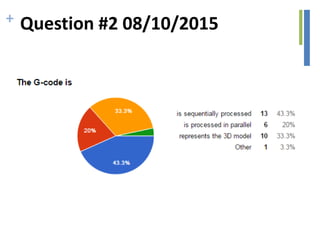
+ Question #2 08/10/2015
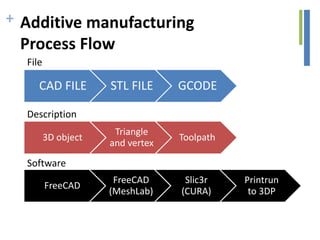
+ Additive manufacturing
Process Flow
• Solid Modelling
• Tesselation/Generation of STL file
• Support Generation
• “Slicing” of the Model
• Model Physical Buildup
• Cleanup and Post Curing
• Surface Finishing
+
CAD FILE STL FILE GCODE
3D object
Triangle
and vertex
Toolpath
FreeCAD
FreeCAD
(MeshLab)
Slic3r
(CURA)
Printrun
to 3DP
File
Description
Software
Additive manufacturing
Process Flow
EXCHANGE FORMATS
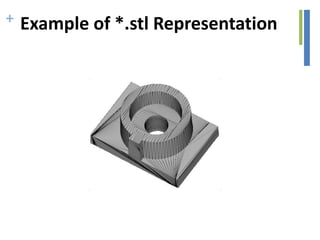
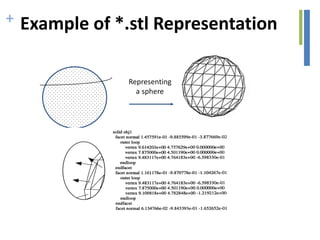
+ Example of *.stl Representation
Representing
a sphere
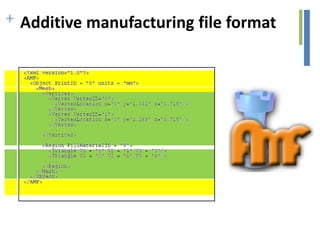
+ Additive manufacturing file format
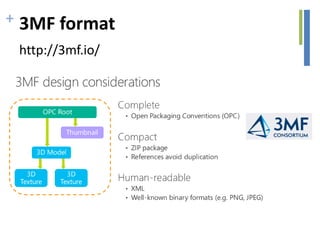
+ 3MF format
http://3mf.io/
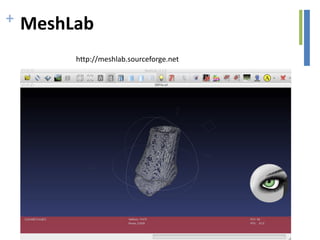
+ MeshLab
http://meshlab.sourceforge.net
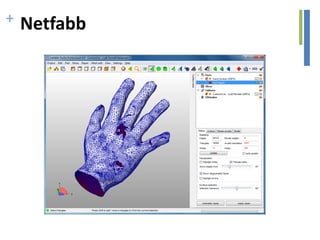
+ Netfabb
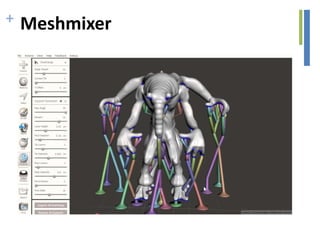
+ Meshmixer
FROM CAD TO CAM
+ Processing of *.stl Files
• After the CAD system has generated *.stl file, it can
be passed to the SFM machine
• Machine then processes the *.stl file, slicing it into
many thin layers stacked on one another. The
resulting files are called slice files.
• The shapes of the slices represent cross sections
• In SFM processes thick solid sections of material are
often removed and replaced with cross hatching
• Thus SFM parts are usually hollow, with cross
hatching on the inside to add strength/stability
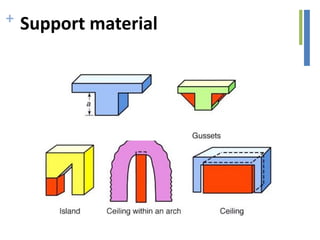
+ Support material
• Some solid freeform fabrication techniques use
two materials in the course of constructing
parts.
• The first material is the part material and the
second is the support material (to support
overhanging features during construction).
• The support material is later removed by heat
or dissolved away with a solvent or water.
+ Support material
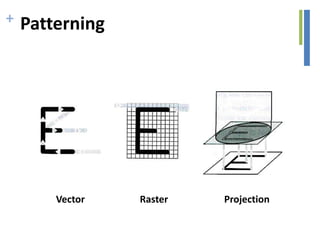
+ Patterning
Vector Raster Projection
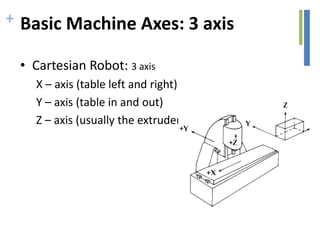
+ Basic Machine Axes: 3 axis
• Cartesian Robot: 3 axis
X – axis (table left and right)
Y – axis (table in and out)
Z – axis (usually the extruder axis)
+ G-CODE
• G – Code Programming
• Originally called the “Word Address”
programming format.
• Processed one line at a time sequentially.
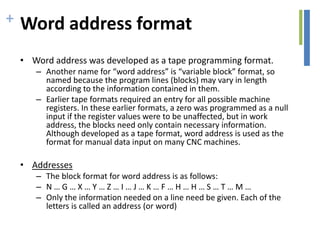
+ Word address format
• Word address was developed as a tape programming format.
– Another name for “word address” is “variable block” format, so
named because the program lines (blocks) may vary in length
according to the information contained in them.
– Earlier tape formats required an entry for all possible machine
registers. In these earlier formats, a zero was programmed as a null
input if the register values were to be unaffected, but in work
address, the blocks need only contain necessary information.
Although developed as a tape format, word address is used as the
format for manual data input on many CNC machines.
• Addresses
– The block format for word address is as follows:
– N … G … X … Y … Z … I … J … K … F … H … H … S … T … M …
– Only the information needed on a line need be given. Each of the
letters is called an address (or word)
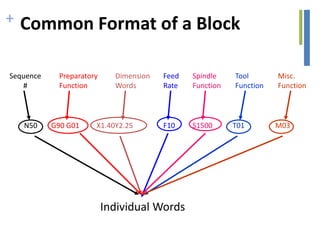
+ Common Format of a Block
Sequence
#
Preparatory
Function
Dimension
Words
Feed
Rate
Spindle
Function
Tool
Function
Misc.
Function
N50 G90 G01 X1.40Y2.25 F10 S1500 T01 M03
Individual Words
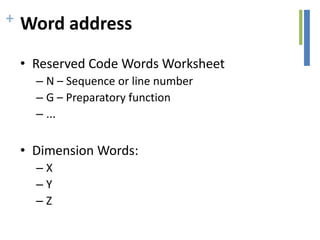
+ Word address
• Reserved Code Words Worksheet
– N – Sequence or line number
– G – Preparatory function
– ...
• Dimension Words:
– X
– Y
– Z
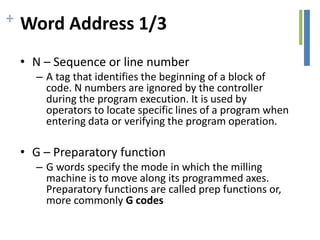
+ Word Address 1/3
• N – Sequence or line number
– A tag that identifies the beginning of a block of
code. N numbers are ignored by the controller
during the program execution. It is used by
operators to locate specific lines of a program when
entering data or verifying the program operation.
• G – Preparatory function
– G words specify the mode in which the milling
machine is to move along its programmed axes.
Preparatory functions are called prep functions or,
more commonly G codes
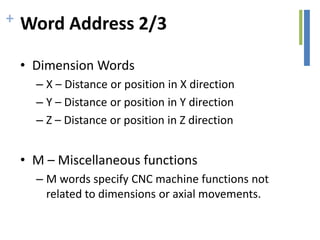
+ Word Address 2/3
• Dimension Words
– X – Distance or position in X direction
– Y – Distance or position in Y direction
– Z – Distance or position in Z direction
• M – Miscellaneous functions
– M words specify CNC machine functions not
related to dimensions or axial movements.
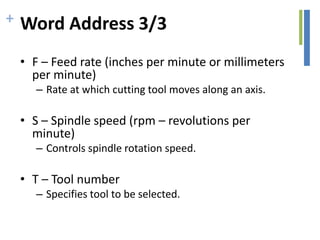
+ Word Address 3/3
• F – Feed rate (inches per minute or millimeters
per minute)
– Rate at which cutting tool moves along an axis.
• S – Spindle speed (rpm – revolutions per
minute)
– Controls spindle rotation speed.
• T – Tool number
– Specifies tool to be selected.
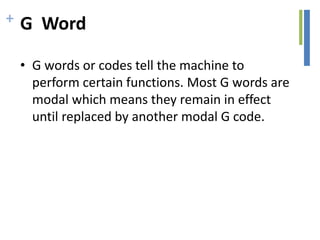
+ G Word
• G words or codes tell the machine to
perform certain functions. Most G words are
modal which means they remain in effect
until replaced by another modal G code.
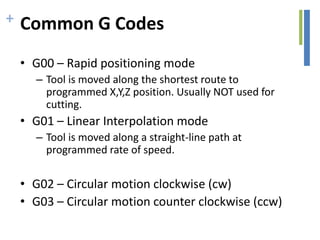
+ Common G Codes
• G00 – Rapid positioning mode
– Tool is moved along the shortest route to
programmed X,Y,Z position. Usually NOT used for
cutting.
• G01 – Linear Interpolation mode
– Tool is moved along a straight-line path at
programmed rate of speed.
• G02 – Circular motion clockwise (cw)
• G03 – Circular motion counter clockwise (ccw)
+ M Word
• M words tell the machine to perform certain
machine related functions, such as: turn
spindle on/off, coolant on/off, or stop/end
program.
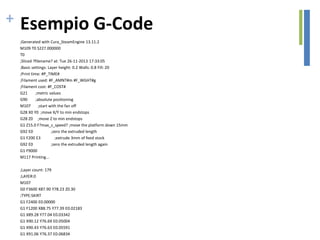
+ Esempio G-Code
;Generated with Cura_SteamEngine 13.11.2
M109 T0 S227.000000
T0
;Sliced ?filename? at: Tue 26-11-2013 17:33:05
;Basic settings: Layer height: 0.2 Walls: 0.8 Fill: 20
;Print time: #P_TIME#
;Filament used: #F_AMNT#m #F_WGHT#g
;Filament cost: #F_COST#
G21 ;metric values
G90 ;absolute positioning
M107 ;start with the fan off
G28 X0 Y0 ;move X/Y to min endstops
G28 Z0 ;move Z to min endstops
G1 Z15.0 F?max_z_speed? ;move the platform down 15mm
G92 E0 ;zero the extruded length
G1 F200 E3 ;extrude 3mm of feed stock
G92 E0 ;zero the extruded length again
G1 F9000
M117 Printing...
;Layer count: 179
;LAYER:0
M107
G0 F3600 X87.90 Y78.23 Z0.30
;TYPE:SKIRT
G1 F2400 E0.00000
G1 F1200 X88.75 Y77.39 E0.02183
G1 X89.28 Y77.04 E0.03342
G1 X90.12 Y76.69 E0.05004
G1 X90.43 Y76.63 E0.05591
G1 X91.06 Y76.37 E0.06834
+ Question time!
http://goo.gl/forms/Jjm4uLd53j

2015 10-07 - additive manufacturing software 2

  • 1.
  • 2.
    + Question #108/10/2015
  • 3.
    + Question #208/10/2015
  • 4.
    + Additive manufacturing ProcessFlow • Solid Modelling • Tesselation/Generation of STL file • Support Generation • “Slicing” of the Model • Model Physical Buildup • Cleanup and Post Curing • Surface Finishing
  • 5.
    + CAD FILE STLFILE GCODE 3D object Triangle and vertex Toolpath FreeCAD FreeCAD (MeshLab) Slic3r (CURA) Printrun to 3DP File Description Software Additive manufacturing Process Flow
  • 6.
  • 7.
    + Example of*.stl Representation
  • 8.
    + Example of*.stl Representation Representing a sphere
  • 9.
  • 10.
  • 11.
  • 12.
  • 13.
  • 14.
  • 15.
    + Processing of*.stl Files • After the CAD system has generated *.stl file, it can be passed to the SFM machine • Machine then processes the *.stl file, slicing it into many thin layers stacked on one another. The resulting files are called slice files. • The shapes of the slices represent cross sections • In SFM processes thick solid sections of material are often removed and replaced with cross hatching • Thus SFM parts are usually hollow, with cross hatching on the inside to add strength/stability
  • 16.
    + Support material •Some solid freeform fabrication techniques use two materials in the course of constructing parts. • The first material is the part material and the second is the support material (to support overhanging features during construction). • The support material is later removed by heat or dissolved away with a solvent or water.
  • 17.
  • 18.
  • 19.
    + Basic MachineAxes: 3 axis • Cartesian Robot: 3 axis X – axis (table left and right) Y – axis (table in and out) Z – axis (usually the extruder axis)
  • 20.
    + G-CODE • G– Code Programming • Originally called the “Word Address” programming format. • Processed one line at a time sequentially.
  • 21.
    + Word addressformat • Word address was developed as a tape programming format. – Another name for “word address” is “variable block” format, so named because the program lines (blocks) may vary in length according to the information contained in them. – Earlier tape formats required an entry for all possible machine registers. In these earlier formats, a zero was programmed as a null input if the register values were to be unaffected, but in work address, the blocks need only contain necessary information. Although developed as a tape format, word address is used as the format for manual data input on many CNC machines. • Addresses – The block format for word address is as follows: – N … G … X … Y … Z … I … J … K … F … H … H … S … T … M … – Only the information needed on a line need be given. Each of the letters is called an address (or word)
  • 22.
    + Common Formatof a Block Sequence # Preparatory Function Dimension Words Feed Rate Spindle Function Tool Function Misc. Function N50 G90 G01 X1.40Y2.25 F10 S1500 T01 M03 Individual Words
  • 23.
    + Word address •Reserved Code Words Worksheet – N – Sequence or line number – G – Preparatory function – ... • Dimension Words: – X – Y – Z
  • 24.
    + Word Address1/3 • N – Sequence or line number – A tag that identifies the beginning of a block of code. N numbers are ignored by the controller during the program execution. It is used by operators to locate specific lines of a program when entering data or verifying the program operation. • G – Preparatory function – G words specify the mode in which the milling machine is to move along its programmed axes. Preparatory functions are called prep functions or, more commonly G codes
  • 25.
    + Word Address2/3 • Dimension Words – X – Distance or position in X direction – Y – Distance or position in Y direction – Z – Distance or position in Z direction • M – Miscellaneous functions – M words specify CNC machine functions not related to dimensions or axial movements.
  • 26.
    + Word Address3/3 • F – Feed rate (inches per minute or millimeters per minute) – Rate at which cutting tool moves along an axis. • S – Spindle speed (rpm – revolutions per minute) – Controls spindle rotation speed. • T – Tool number – Specifies tool to be selected.
  • 27.
    + G Word •G words or codes tell the machine to perform certain functions. Most G words are modal which means they remain in effect until replaced by another modal G code.
  • 28.
    + Common GCodes • G00 – Rapid positioning mode – Tool is moved along the shortest route to programmed X,Y,Z position. Usually NOT used for cutting. • G01 – Linear Interpolation mode – Tool is moved along a straight-line path at programmed rate of speed. • G02 – Circular motion clockwise (cw) • G03 – Circular motion counter clockwise (ccw)
  • 29.
    + M Word •M words tell the machine to perform certain machine related functions, such as: turn spindle on/off, coolant on/off, or stop/end program.
  • 30.
    + Esempio G-Code ;Generatedwith Cura_SteamEngine 13.11.2 M109 T0 S227.000000 T0 ;Sliced ?filename? at: Tue 26-11-2013 17:33:05 ;Basic settings: Layer height: 0.2 Walls: 0.8 Fill: 20 ;Print time: #P_TIME# ;Filament used: #F_AMNT#m #F_WGHT#g ;Filament cost: #F_COST# G21 ;metric values G90 ;absolute positioning M107 ;start with the fan off G28 X0 Y0 ;move X/Y to min endstops G28 Z0 ;move Z to min endstops G1 Z15.0 F?max_z_speed? ;move the platform down 15mm G92 E0 ;zero the extruded length G1 F200 E3 ;extrude 3mm of feed stock G92 E0 ;zero the extruded length again G1 F9000 M117 Printing... ;Layer count: 179 ;LAYER:0 M107 G0 F3600 X87.90 Y78.23 Z0.30 ;TYPE:SKIRT G1 F2400 E0.00000 G1 F1200 X88.75 Y77.39 E0.02183 G1 X89.28 Y77.04 E0.03342 G1 X90.12 Y76.69 E0.05004 G1 X90.43 Y76.63 E0.05591 G1 X91.06 Y76.37 E0.06834
  • 31.