Data Presentation
By: Weam Banjar. DDS., MS
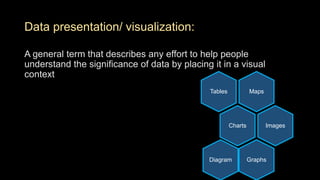
Data presentation/ visualization:
A general term that describes any effort to help people
understand the significance of data by placing it in a visual
context
MapsTables
Charts Images
GraphsDiagram
Why data presentation:
• Preparation of tables and graphs is a crucial tool in the analysis
and production/ publication of results
• Organizes the collected information in a clear summarized
fashion
• Correct preparation of tables allows researchers to present
information efficiently and with significant visual appeal
• Making the results more easily understandable an thus more
attractive to the users of the produced information
Preparation of graphs and tables requires:
• Previous knowledge of data characteristics
• Ability of identifying which type of table or graph is most
appropriate for the situation of interest
Every graph or table should be SELF-EXPLANATORY,
UNDERSTANDBLAE without the need to read the text
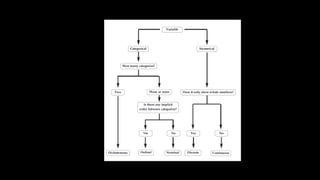
Presentation of categorical variables:
• Frequency distribution might be presented in a table or graph
• In order to synthesize information contained in a categorical
variable using a table, it is important to count the number of
observations in each category of the variable (Absolute
frequency). However, in addition to absolute frequency, it is
worth presenting its percentage values (relative frequency)
Presentation of numerical variables:
• Data distribution
• Measures of central tendency
• Measures of dispersion
Assessing the relationship between two variables:
• The relationship between categorical variables may be investigated using
a contingency table, which has the purpose of analyzing the association
between two or more variables. The lines of this type of table usually
display the exposure variable (independent variable), and the columns, the
outcome variable (dependent variable).
• Tables may be easier to understand by including total values in lines and
columns. These values should agree with the sum of the lines and/or
columns, as appropriate, whereas relative values should be in accordance
with the exposure variable, i.e., the sum of the values mentioned in the
lines should total 100%.
Assessing the relationship between two variables:
• The relationship between two numerical variables or between one
numerical variable and one categorical variable may be assessed using a
scatter diagram, also known as dispersion diagram
• By convention, vertical and horizontal axes should correspond to outcome
and exposure variables, respectively
• Correlation table
• Level of significance
Ideally every table should be :
• Be self-explanatory
• Present values with the same number of decimal places in all its cells
(standardization)
• Include a title informing what is being described and where, as well as the
number of observations (N) and when data were collected
• Have a structure formed by three horizontal lines, defining table heading
and the end of the table at its lower border
• Not have vertical lines at its lateral borders
• Provide additional information in table footer, when needed
• Be inserted into a document only after being mentioned in the text
• Be numbered by Arabic numerals
Ideally every graph should be :
• Include, below the figure, a title providing all relevant information
• Be referred to as figures in the text;
• Identify figure axes by the variables under analysis;
• Quote the source which provided the data, if required;
• Demonstrate the scale being used
• Be self-explanatory.
• The graph’s vertical axis should always start with zero. A usual type of
distortion is starting this axis with values higher than zero. Whenever it
happens, differences between variables are overestimated
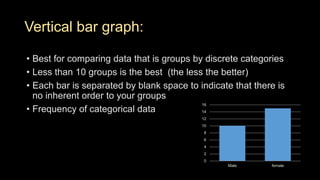
Vertical bar graph:
• Best for comparing data that is groups by discrete categories
• Less than 10 groups is the best (the less the better)
• Each bar is separated by blank space to indicate that there is
no inherent order to your groups
• Frequency of categorical data
0
2
4
6
8
10
12
14
16
Male female
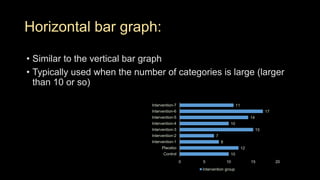
Horizontal bar graph:
• Similar to the vertical bar graph
• Typically used when the number of categories is large (larger
than 10 or so)
10
12
8
7
15
10
14
17
11
0 5 10 15 20
Control
Placebo
Intervention-1
Intervention-2
Intervention-3
Intervention-4
Intervention-5
Intervention-6
Intervention-7
Intervention group
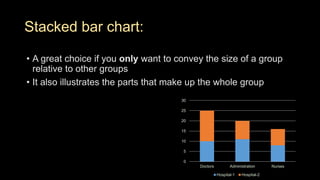
Stacked bar chart:
• A great choice if you only want to convey the size of a group
relative to other groups
• It also illustrates the parts that make up the whole group
0
5
10
15
20
25
30
Doctors Administration Nurses
Hospital-1 Hospital-2
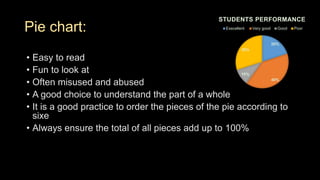
Pie chart:
• Easy to read
• Fun to look at
• Often misused and abused
• A good choice to understand the part of a whole
• It is a good practice to order the pieces of the pie according to
sixe
• Always ensure the total of all pieces add up to 100%
20%
40%
10%
30%
STUDENTS PERFORMANCE
Execellent Very good Good Poor
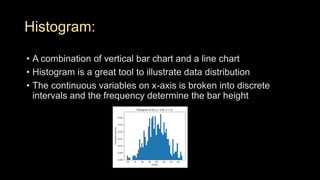
Histogram:
• A combination of vertical bar chart and a line chart
• Histogram is a great tool to illustrate data distribution
• The continuous variables on x-axis is broken into discrete
intervals and the frequency determine the bar height
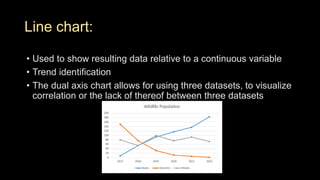
Line chart:
• Used to show resulting data relative to a continuous variable
• Trend identification
• The dual axis chart allows for using three datasets, to visualize
correlation or the lack of thereof between three datasets
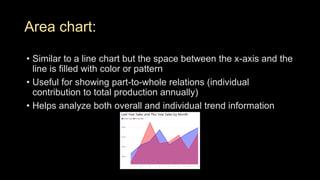
Area chart:
• Similar to a line chart but the space between the x-axis and the
line is filled with color or pattern
• Useful for showing part-to-whole relations (individual
contribution to total production annually)
• Helps analyze both overall and individual trend information
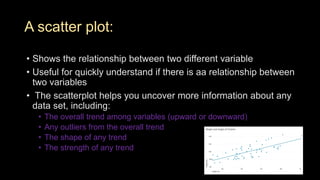
A scatter plot:
• Shows the relationship between two different variable
• Useful for quickly understand if there is aa relationship between
two variables
• The scatterplot helps you uncover more information about any
data set, including:
• The overall trend among variables (upward or downward)
• Any outliers from the overall trend
• The shape of any trend
• The strength of any trend
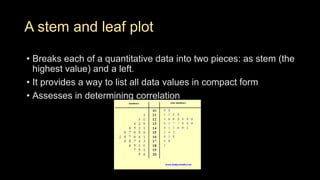
A stem and leaf plot
• Breaks each of a quantitative data into two pieces: as stem (the
highest value) and a left.
• It provides a way to list all data values in compact form
• Assesses in determining correlation
• Stem and Leaf Plot
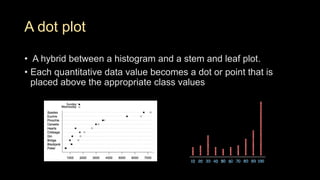
A dot plot
• A hybrid between a histogram and a stem and leaf plot.
• Each quantitative data value becomes a dot or point that is
placed above the appropriate class values
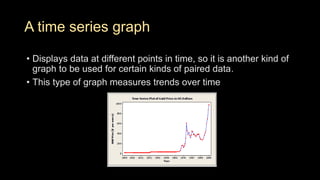
A time series graph
• Displays data at different points in time, so it is another kind of
graph to be used for certain kinds of paired data.
• This type of graph measures trends over time
Data presentation

Data presentation

  • 1.
  • 2.
    Data presentation/ visualization: Ageneral term that describes any effort to help people understand the significance of data by placing it in a visual context MapsTables Charts Images GraphsDiagram
  • 3.
    Why data presentation: •Preparation of tables and graphs is a crucial tool in the analysis and production/ publication of results • Organizes the collected information in a clear summarized fashion • Correct preparation of tables allows researchers to present information efficiently and with significant visual appeal • Making the results more easily understandable an thus more attractive to the users of the produced information
  • 4.
    Preparation of graphsand tables requires: • Previous knowledge of data characteristics • Ability of identifying which type of table or graph is most appropriate for the situation of interest
  • 5.
    Every graph ortable should be SELF-EXPLANATORY, UNDERSTANDBLAE without the need to read the text
  • 7.
    Presentation of categoricalvariables: • Frequency distribution might be presented in a table or graph • In order to synthesize information contained in a categorical variable using a table, it is important to count the number of observations in each category of the variable (Absolute frequency). However, in addition to absolute frequency, it is worth presenting its percentage values (relative frequency)
  • 8.
    Presentation of numericalvariables: • Data distribution • Measures of central tendency • Measures of dispersion
  • 9.
    Assessing the relationshipbetween two variables: • The relationship between categorical variables may be investigated using a contingency table, which has the purpose of analyzing the association between two or more variables. The lines of this type of table usually display the exposure variable (independent variable), and the columns, the outcome variable (dependent variable). • Tables may be easier to understand by including total values in lines and columns. These values should agree with the sum of the lines and/or columns, as appropriate, whereas relative values should be in accordance with the exposure variable, i.e., the sum of the values mentioned in the lines should total 100%.
  • 10.
    Assessing the relationshipbetween two variables: • The relationship between two numerical variables or between one numerical variable and one categorical variable may be assessed using a scatter diagram, also known as dispersion diagram • By convention, vertical and horizontal axes should correspond to outcome and exposure variables, respectively • Correlation table • Level of significance
  • 11.
    Ideally every tableshould be : • Be self-explanatory • Present values with the same number of decimal places in all its cells (standardization) • Include a title informing what is being described and where, as well as the number of observations (N) and when data were collected • Have a structure formed by three horizontal lines, defining table heading and the end of the table at its lower border • Not have vertical lines at its lateral borders • Provide additional information in table footer, when needed • Be inserted into a document only after being mentioned in the text • Be numbered by Arabic numerals
  • 12.
    Ideally every graphshould be : • Include, below the figure, a title providing all relevant information • Be referred to as figures in the text; • Identify figure axes by the variables under analysis; • Quote the source which provided the data, if required; • Demonstrate the scale being used • Be self-explanatory. • The graph’s vertical axis should always start with zero. A usual type of distortion is starting this axis with values higher than zero. Whenever it happens, differences between variables are overestimated
  • 13.
    Vertical bar graph: •Best for comparing data that is groups by discrete categories • Less than 10 groups is the best (the less the better) • Each bar is separated by blank space to indicate that there is no inherent order to your groups • Frequency of categorical data 0 2 4 6 8 10 12 14 16 Male female
  • 14.
    Horizontal bar graph: •Similar to the vertical bar graph • Typically used when the number of categories is large (larger than 10 or so) 10 12 8 7 15 10 14 17 11 0 5 10 15 20 Control Placebo Intervention-1 Intervention-2 Intervention-3 Intervention-4 Intervention-5 Intervention-6 Intervention-7 Intervention group
  • 15.
    Stacked bar chart: •A great choice if you only want to convey the size of a group relative to other groups • It also illustrates the parts that make up the whole group 0 5 10 15 20 25 30 Doctors Administration Nurses Hospital-1 Hospital-2
  • 16.
    Pie chart: • Easyto read • Fun to look at • Often misused and abused • A good choice to understand the part of a whole • It is a good practice to order the pieces of the pie according to sixe • Always ensure the total of all pieces add up to 100% 20% 40% 10% 30% STUDENTS PERFORMANCE Execellent Very good Good Poor
  • 17.
    Histogram: • A combinationof vertical bar chart and a line chart • Histogram is a great tool to illustrate data distribution • The continuous variables on x-axis is broken into discrete intervals and the frequency determine the bar height
  • 18.
    Line chart: • Usedto show resulting data relative to a continuous variable • Trend identification • The dual axis chart allows for using three datasets, to visualize correlation or the lack of thereof between three datasets
  • 19.
    Area chart: • Similarto a line chart but the space between the x-axis and the line is filled with color or pattern • Useful for showing part-to-whole relations (individual contribution to total production annually) • Helps analyze both overall and individual trend information
  • 20.
    A scatter plot: •Shows the relationship between two different variable • Useful for quickly understand if there is aa relationship between two variables • The scatterplot helps you uncover more information about any data set, including: • The overall trend among variables (upward or downward) • Any outliers from the overall trend • The shape of any trend • The strength of any trend
  • 21.
    A stem andleaf plot • Breaks each of a quantitative data into two pieces: as stem (the highest value) and a left. • It provides a way to list all data values in compact form • Assesses in determining correlation • Stem and Leaf Plot
  • 22.
    A dot plot •A hybrid between a histogram and a stem and leaf plot. • Each quantitative data value becomes a dot or point that is placed above the appropriate class values
  • 23.
    A time seriesgraph • Displays data at different points in time, so it is another kind of graph to be used for certain kinds of paired data. • This type of graph measures trends over time