Tutorial:Adobe
Illustrator CS6
The City University of New York
Architectural Technology Dept.
written by Claudia Hernandez
This material is based upon work supported by the National Science Foundation
under Grant Numbers 1141234.
Any opinions, findings, and conclusions or recommendations expressed in this
material are those of the author(s) and do not necessarily reflect the views of the
National Science Foundation.
Tutorial : Adobe Illustrator
2
Stroke
Fill
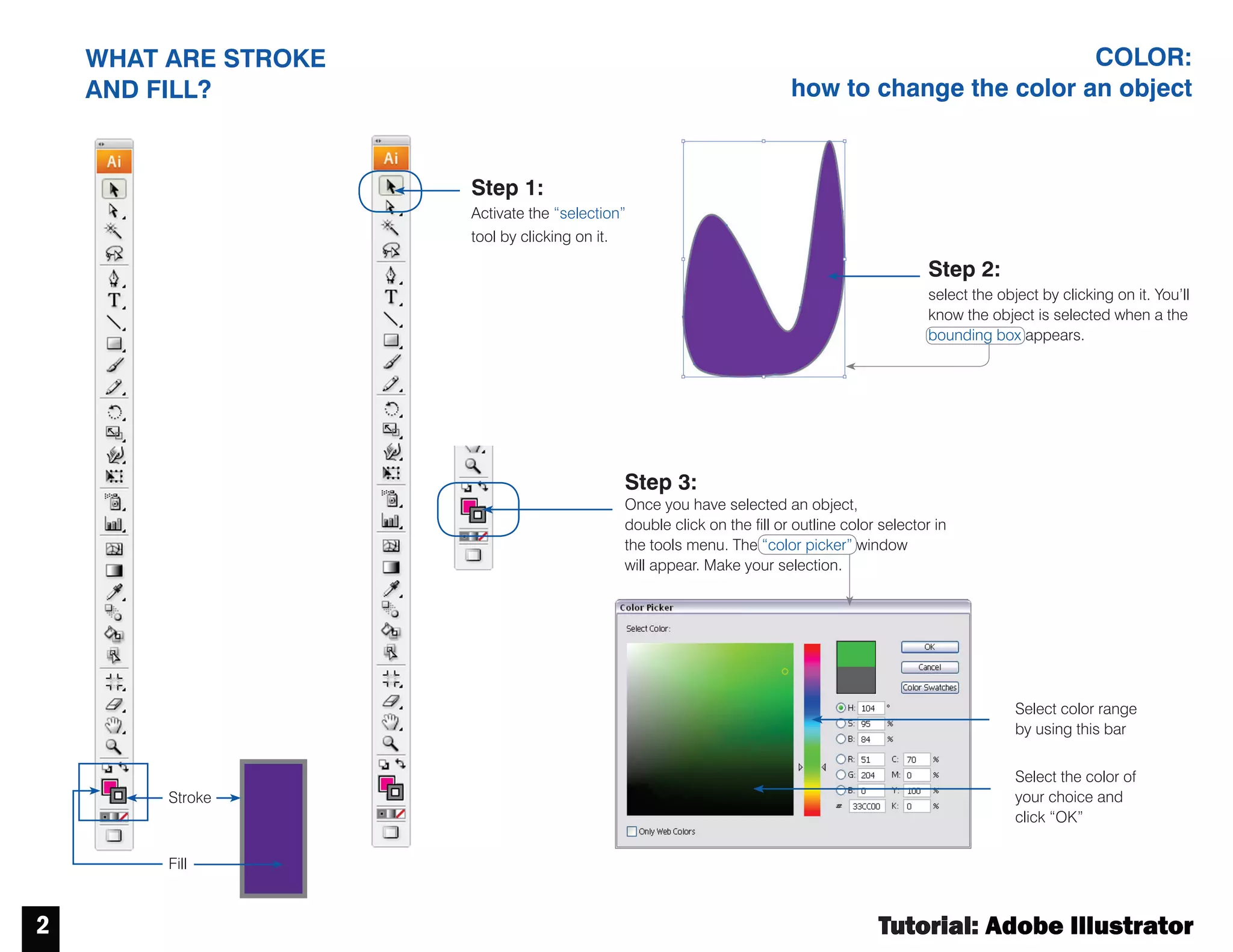
WHAT ARE STROKE
AND FILL?
COLOR:
how to change the color an object
Step 1:
Activate the “selection”
tool by clicking on it.
Step 3:
Once you have selected an object,
double click on the fill or outline color selector in
the tools menu. The “color picker” window
will appear. Make your selection.
Select color range
by using this bar
Select the color of
your choice and
click “OK”
Step 2:
select the object by clicking on it. You’ll
know the object is selected when a the
bounding box appears.
Tutorial : Adobe Illustrator
3
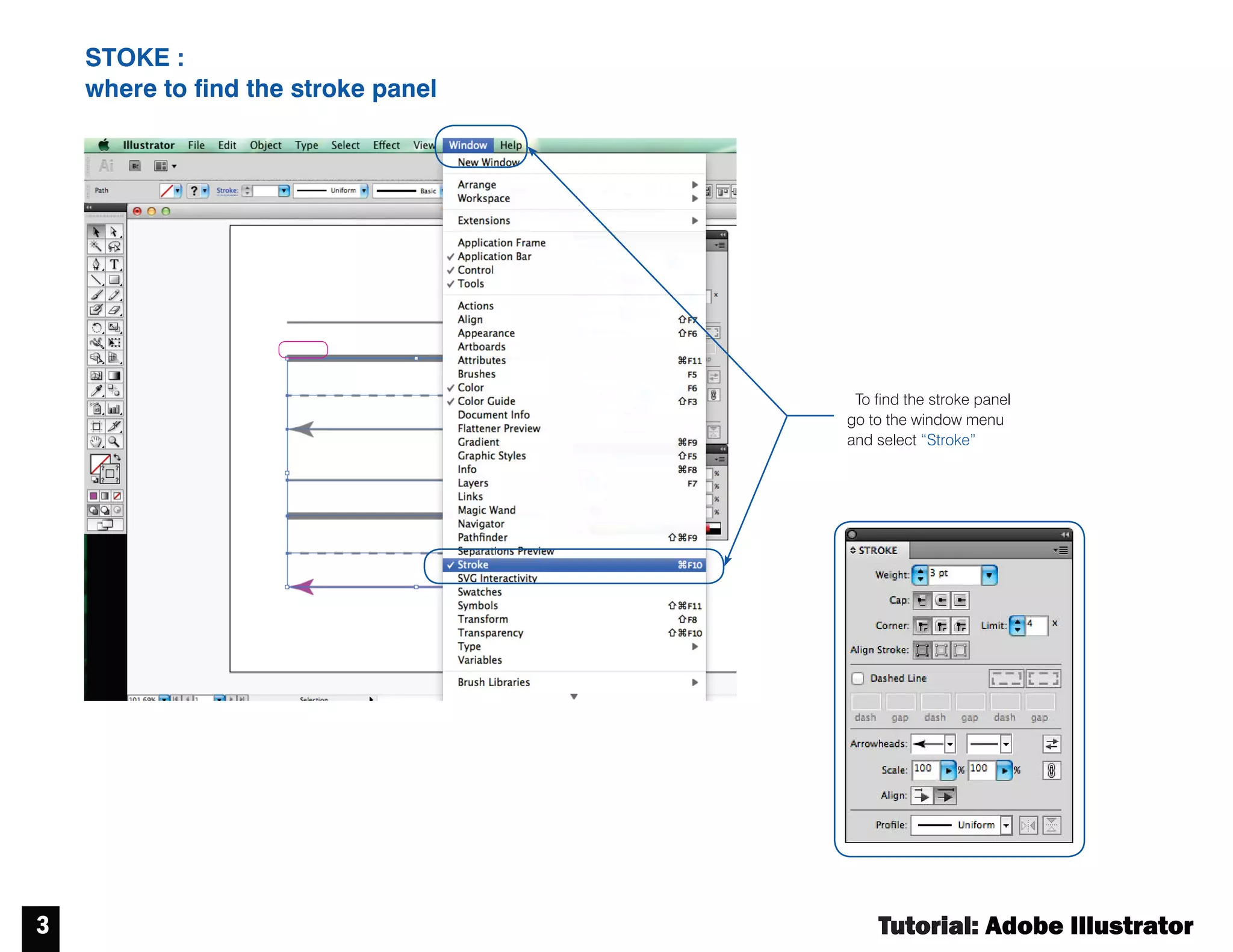
STOKE :
where to find the stroke panel
Tofind the stroke panel
go to the window menu
and select “Stroke”
Tutorial : Adobe Illustrator
4
CONTROL PANEL
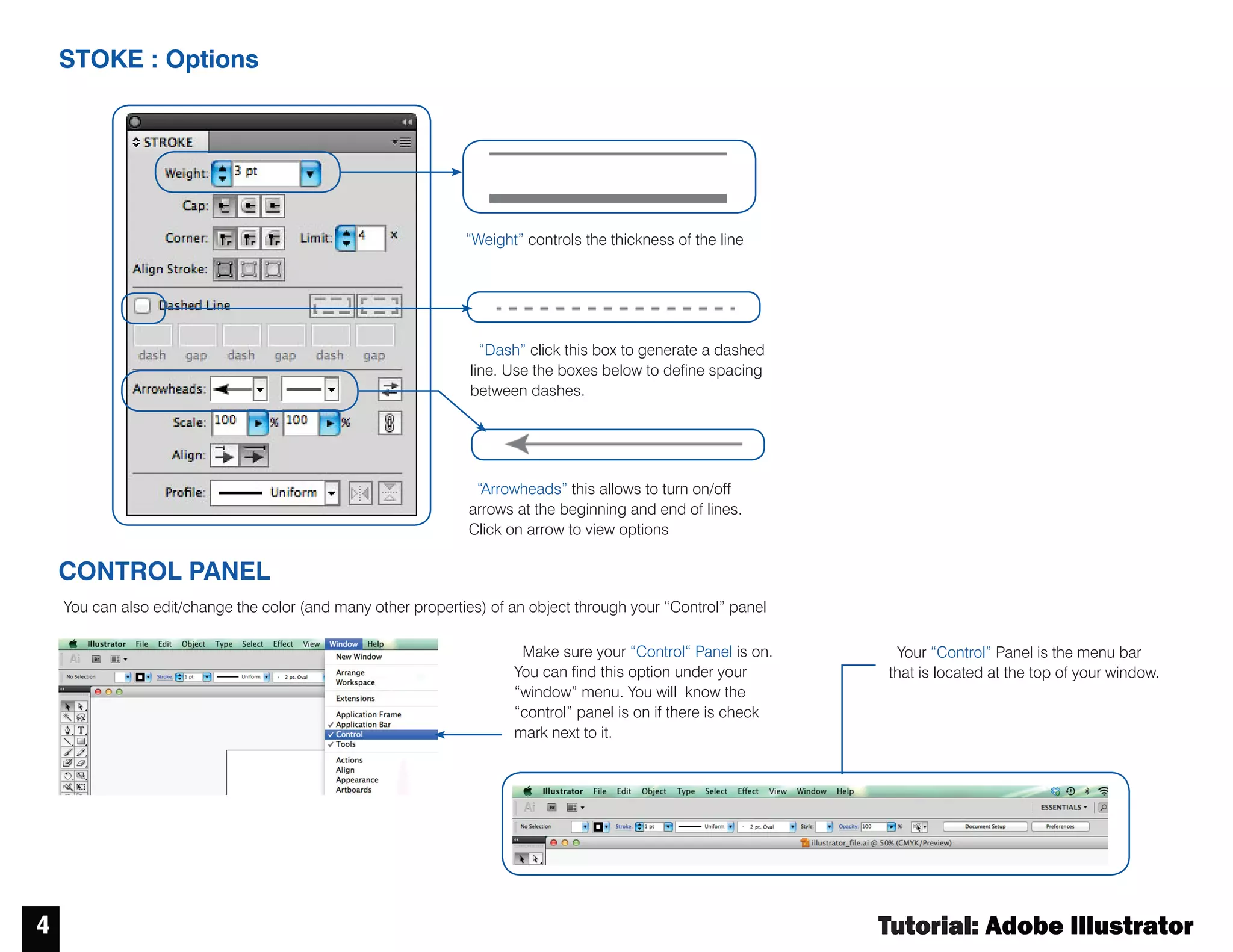
STOKE : Options
Make sure your “Control“ Panel is on.
You can find this option under your
“window” menu. You will know the
“control” panel is on if there is check
mark next to it.
Your “Control” Panel is the menu bar
that is located at the top of your window.
“Arrowheads” this allows to turn on/off
arrows at the beginning and end of lines.
Click on arrow to view options
“Weight” controls the thickness of the line
You can also edit/change the color (and many other properties) of an object through your “Control” panel
“Dash” click this box to generate a dashed
line. Use the boxes below to define spacing
between dashes.
Tutorial : Adobe Illustrator
5
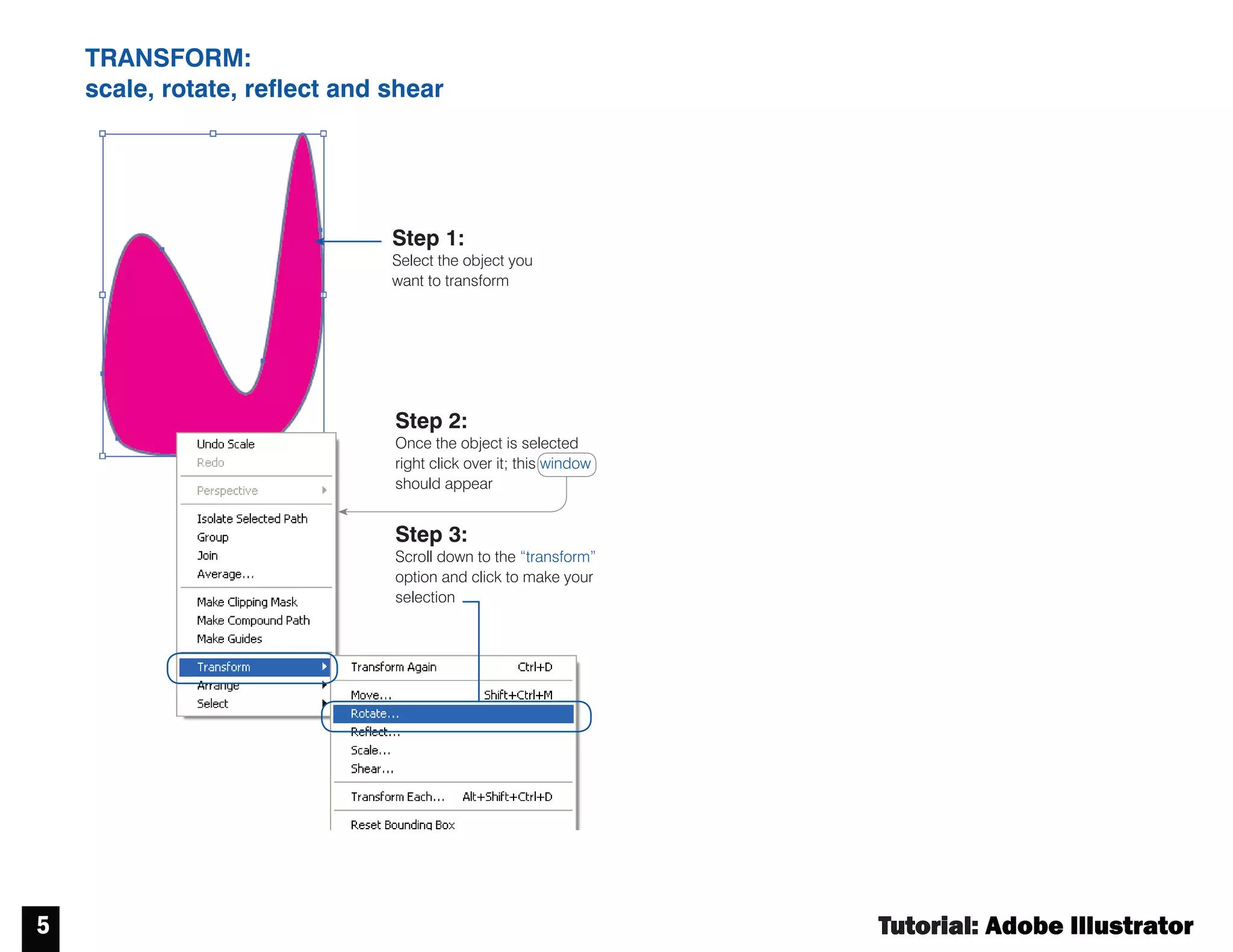
TRANSFORM:
scale, rotate, reflect and shear
Step 1:
Select the object you
want to transform
Step 2:
Once the object is selected
right click over it; this window
should appear
Step 3:
Scroll down to the “transform”
option and click to make your
selection
Tutorial : Adobe Illustrator
6
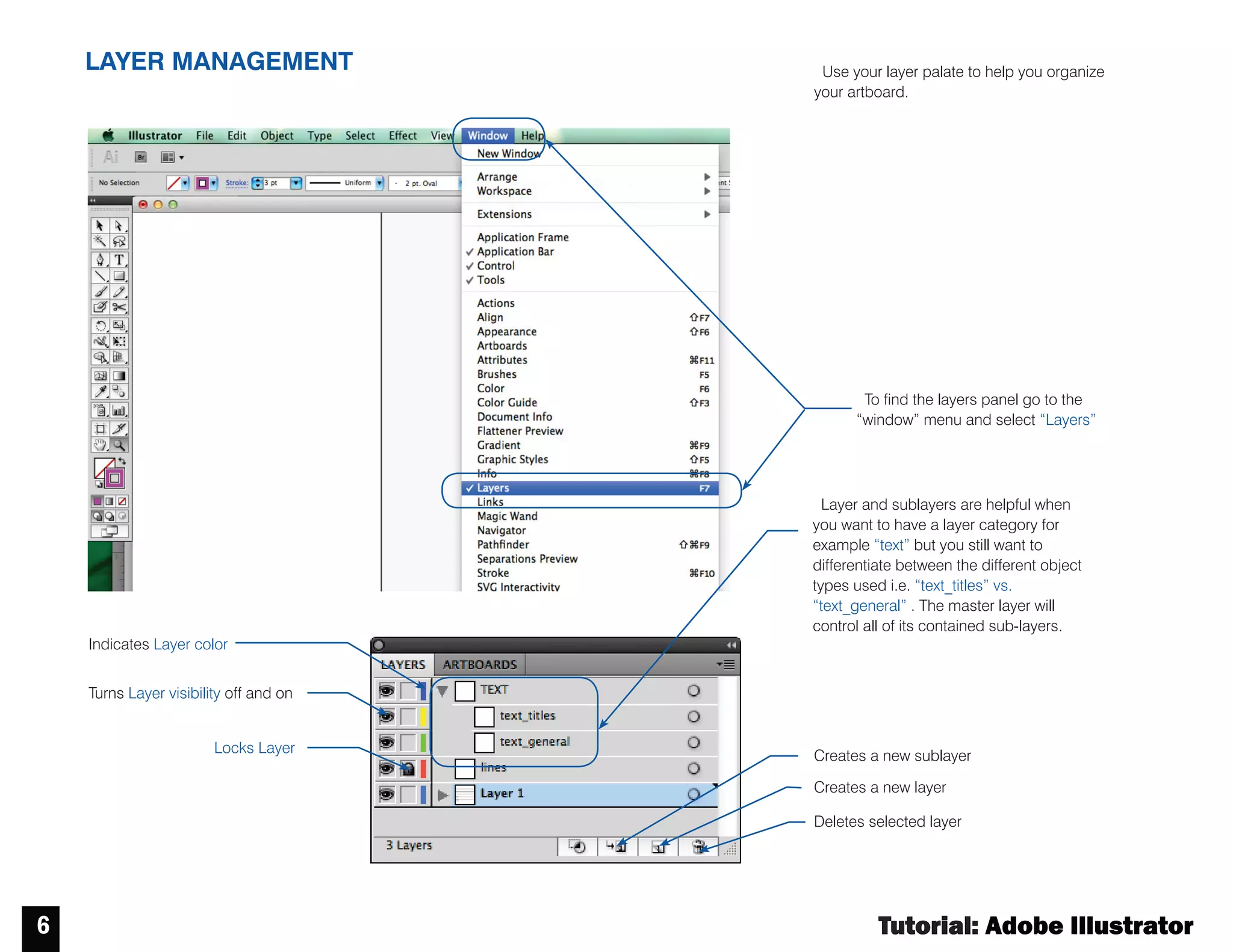
LAYER MANAGEMENT
Turns Layer visibility off and on
Locks Layer
Deletes selected layer
Creates a new layer
Indicates Layer color
Creates a new sublayer
Tofind the layers panel go to the
“window” menu and select “Layers”
Layer and sublayers are helpful when
you want to have a layer category for
example “text” but you still want to
differentiate between the different object
types used i.e. “text_titles” vs.
“text_general” . The master layer will
control all of its contained sub-layers.
Use your layer palate to help you organize
your artboard.
Tutorial : Adobe Illustrator
7
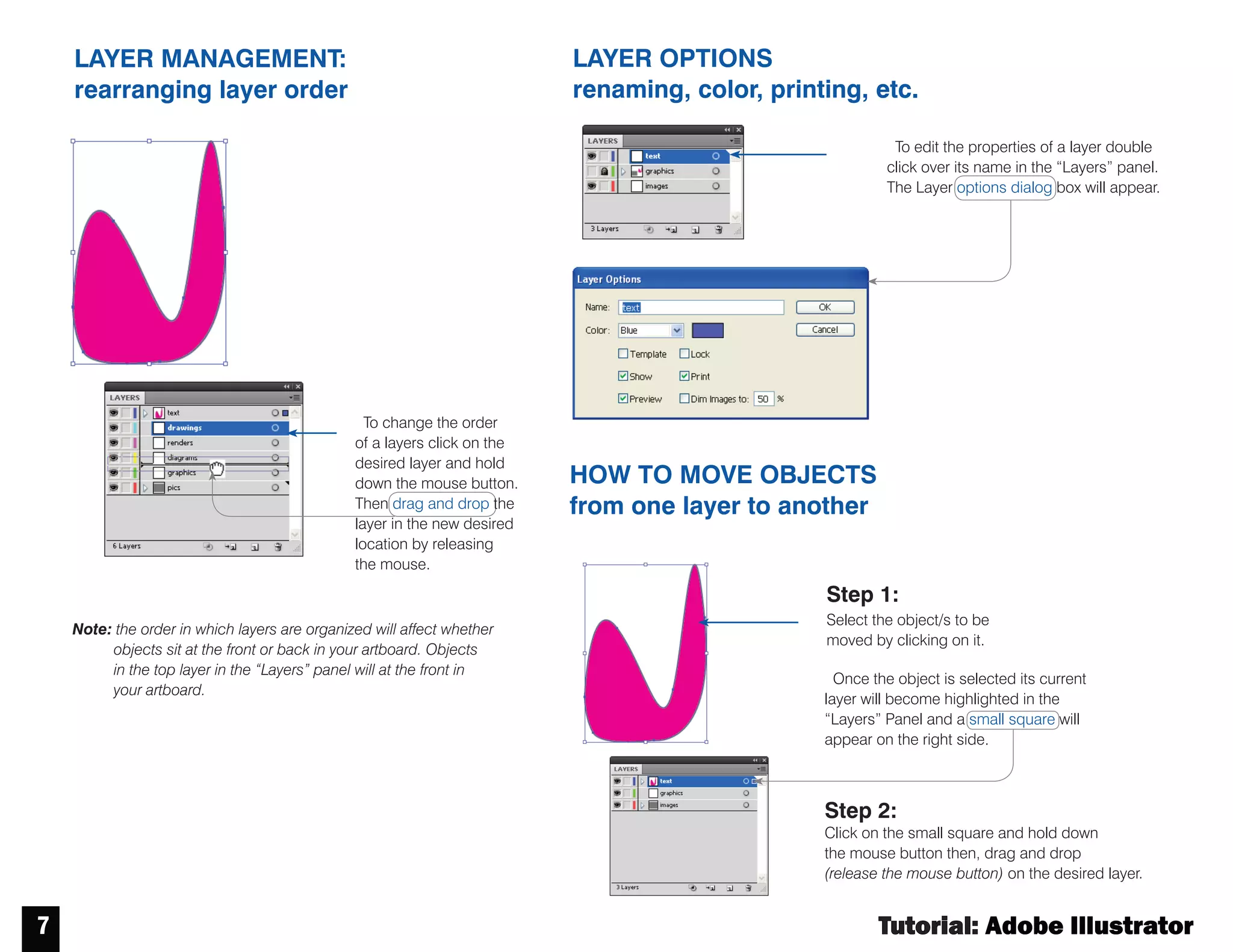
HOW TO MOVE OBJECTS
from one layer to another
LAYER OPTIONS
renaming, color, printing, etc.
LAYER MANAGEMENT:
rearranging layer order
Note: the order in which layers are organized will affect whether
objects sit at the front or back in your artboard. Objects
in the top layer in the “Layers” panel will at the front in
your artboard.
Tochange the order
of a layers click on the
desired layer and hold
down the mouse button.
Then drag and drop the
layer in the new desired
location by releasing
the mouse.
Toedit the properties of a layer double
click over its name in the “Layers” panel.
The Layer options dialog box will appear.
Step 1:
Select the object/s to be
moved by clicking on it.
Once the object is selected its current
layer will become highlighted in the
“Layers” Panel and a small square will
appear on the right side.
Step 2:
Click on the small square and hold down
the mouse button then, drag and drop
(release the mouse button) on the desired layer.
Tutorial : Adobe Illustrator
8
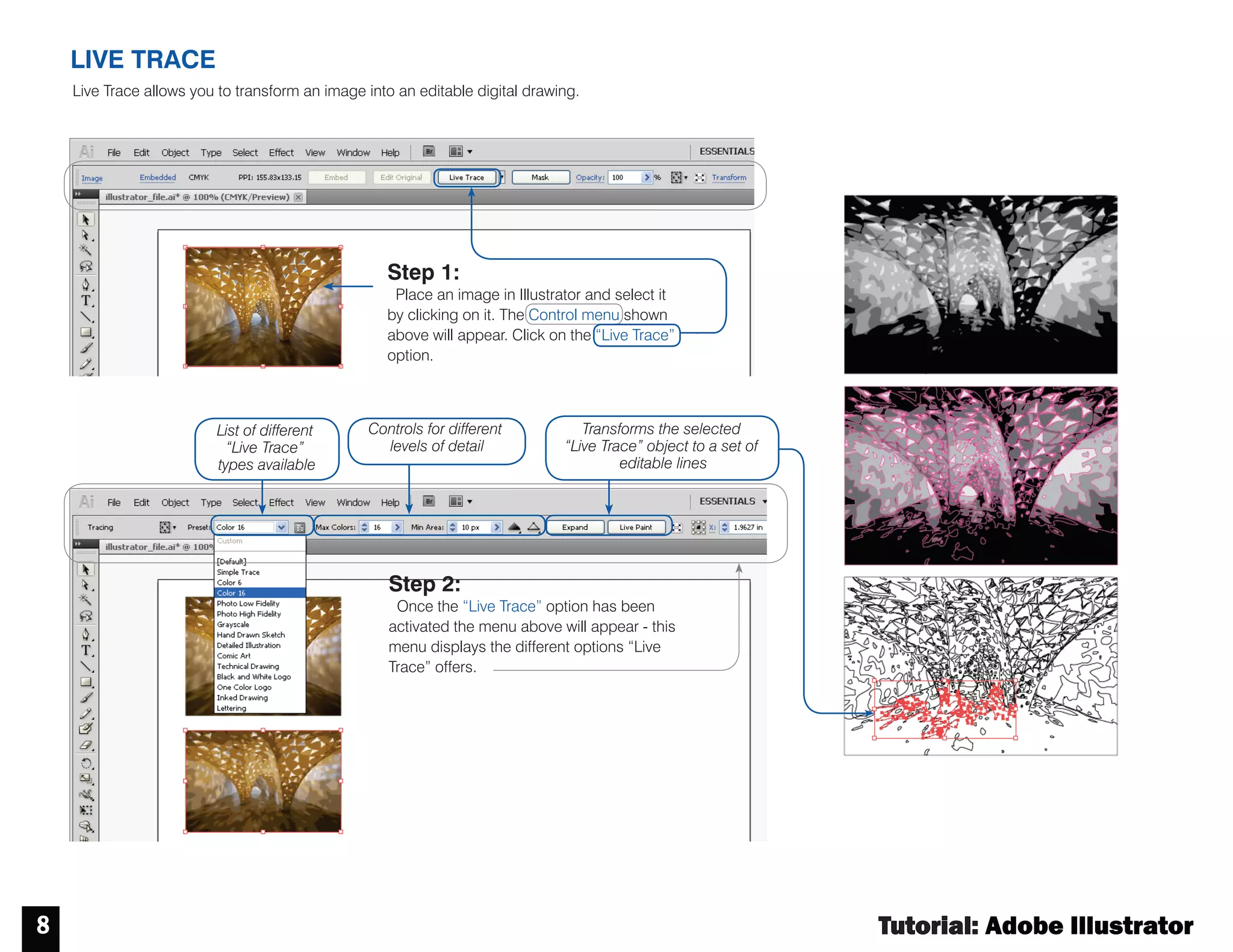
LIVE TRACE
Live Trace allows you to transform an image into an editable digital drawing.
Step 1:
Place an image in Illustrator and select it
by clicking on it. The Control menu shown
above will appear. Click on the “Live Trace”
option.
Step 2:
Once the “Live Trace” option has been
activated the menu above will appear - this
menu displays the different options “Live
Trace” offers.
List of different
“Live Trace”
types available
Controls for different
levels of detail
Transforms the selected
“Live Trace” object to a set of
editable lines
Tutorial : Adobe Illustrator
9
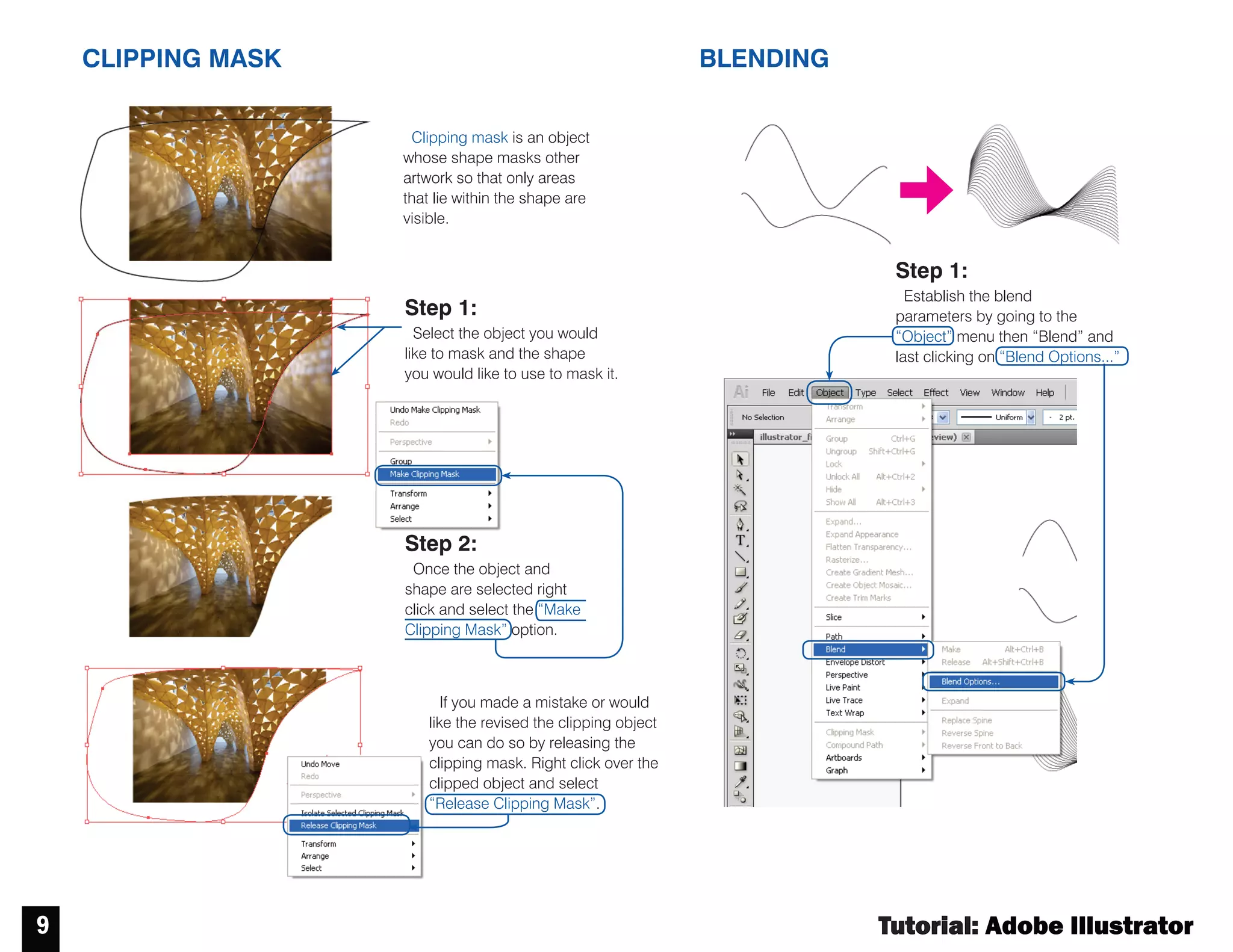
CLIPPING MASK BLENDING
Step 1:
Select the object you would
like to mask and the shape
you would like to use to mask it.
Clipping mask is an object
whose shape masks other
artwork so that only areas
that lie within the shape are
visible.
If you made a mistake or would
like the revised the clipping object
you can do so by releasing the
clipping mask. Right click over the
clipped object and select
“Release Clipping Mask”.
Step 2:
Once the object and
shape are selected right
click and select the “Make
Clipping Mask” option.
Step 1:
Establish the blend
parameters by going to the
“Object” menu then “Blend” and
last clicking on “Blend Options...”
Tutorial : Adobe Illustrator
10
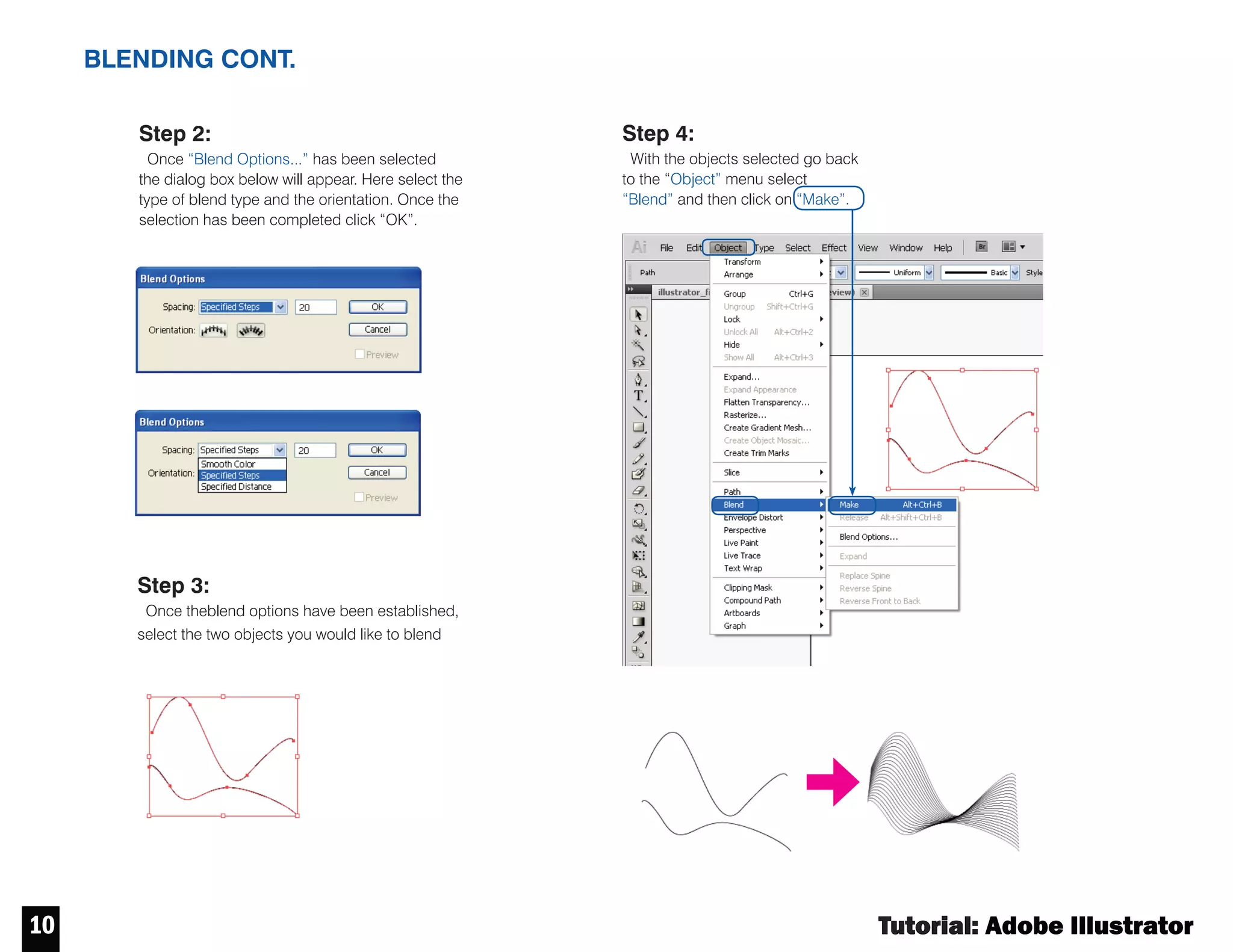
BLENDING CONT.
Step 2:
Once “Blend Options...” has been selected
the dialog box below will appear. Here select the
type of blend type and the orientation. Once the
selection has been completed click “OK”.
Step 3:
Once theblend options have been established,
select the two objects you would like to blend
Step 4:
With the objects selected go back
to the “Object” menu select
“Blend” and then click on “Make”.
Tutorial : Adobe Illustrator
11
11
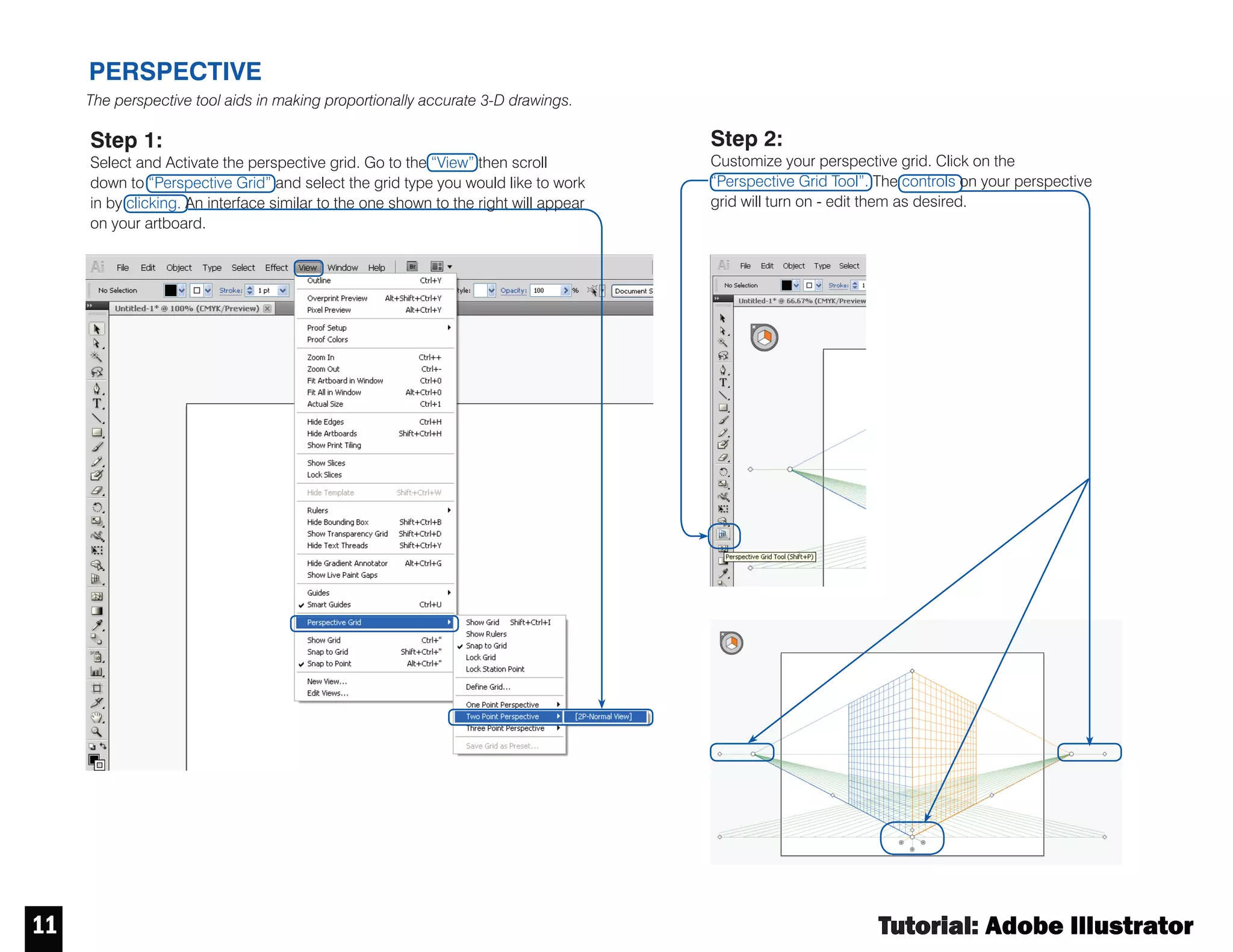
PERSPECTIVE
Step 2:
Customize your perspective grid. Click on the
“Perspective Grid Tool”. The controls on your perspective
grid will turn on - edit them as desired.
Step 1:
Select and Activate the perspective grid. Go to the “View” then scroll
down to “Perspective Grid” and select the grid type you would like to work
in by clicking. An interface similar to the one shown to the right will appear
on your artboard.
The perspective tool aids in making proportionally accurate 3-D drawings.
Tutorial : Adobe Illustrator
12 12
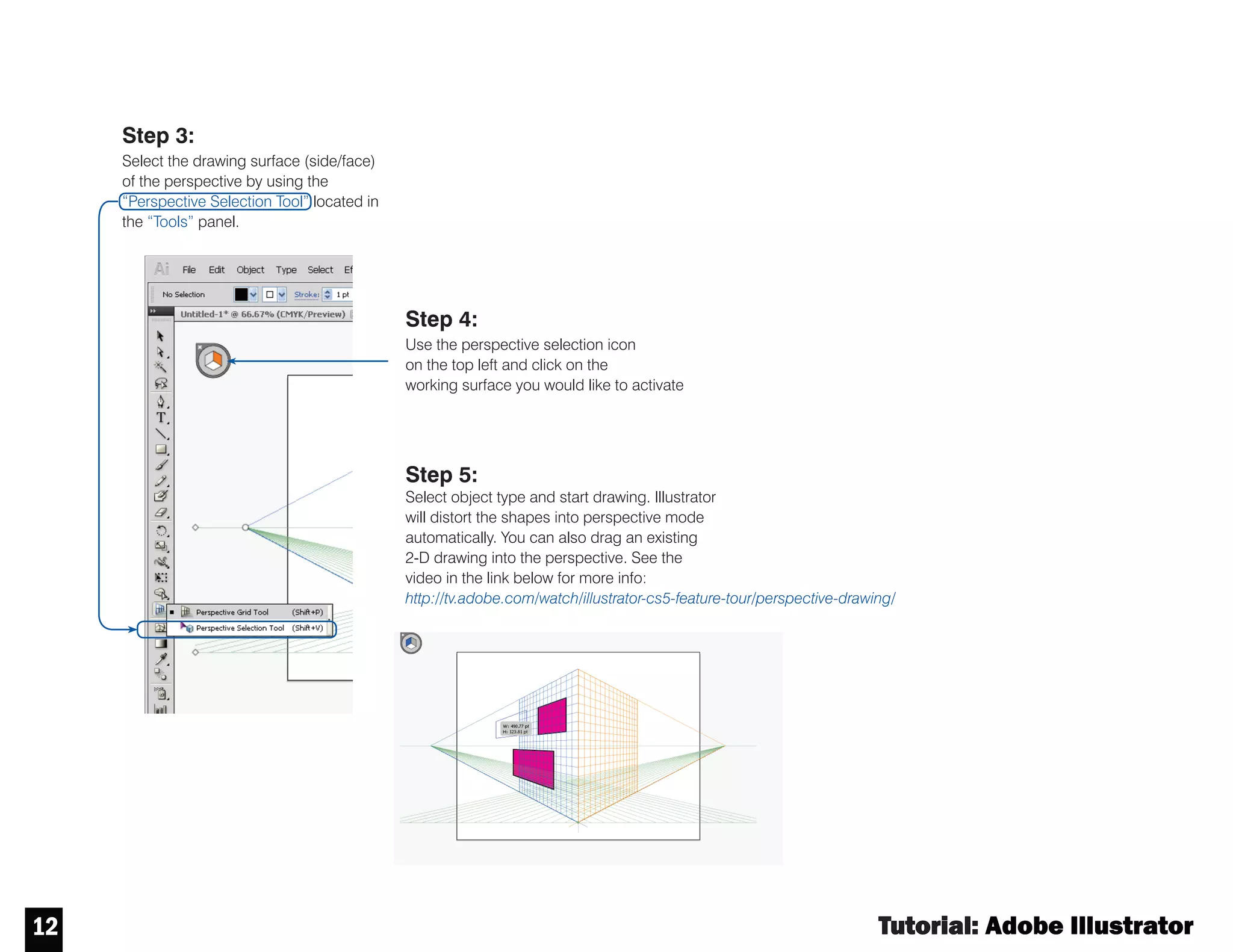
Step 3:
Select the drawing surface (side/face)
of the perspective by using the
“Perspective Selection Tool” located in
the “Tools” panel.
Step 4:
Use the perspective selection icon
on the top left and click on the
working surface you would like to activate
Step 5:
Select object type and start drawing. Illustrator
will distort the shapes into perspective mode
automatically. You can also drag an existing
2-D drawing into the perspective. See the
video in the link below for more info:
http://tv.adobe.com/watch/illustrator-cs5-feature-tour/perspective-drawing/
PERSPECTIVE
Tutorial : Adobe Illustrator
13 13
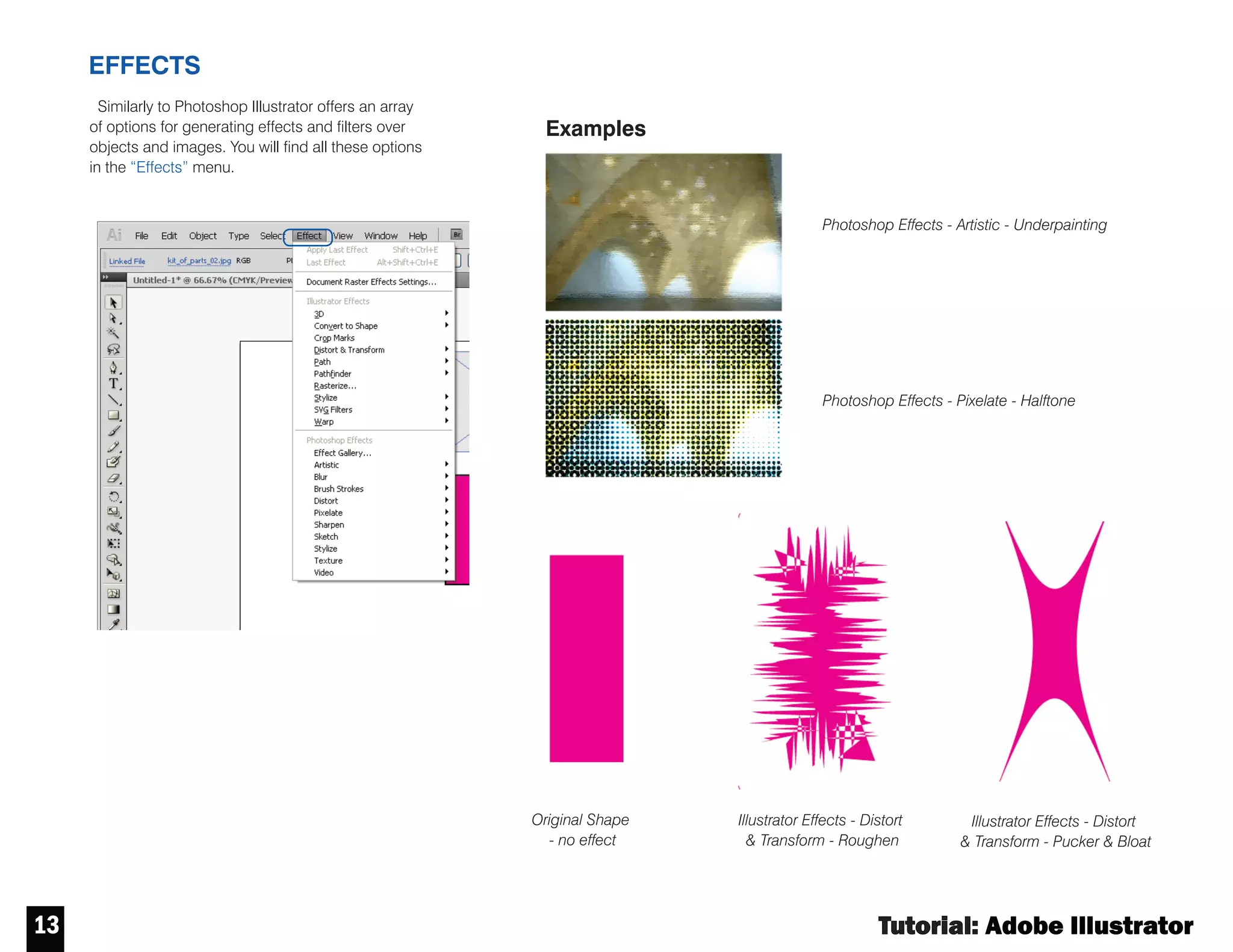
EFFECTS
Similarly to Photoshop Illustrator offers an
Similarly to Photoshop Illustrator offers an array
of options for generating effects and filters over
objects and images. You will find all these options
in the “Effects” menu.
Photoshop Effects - Artistic - Underpainting
Examples
Photoshop Effects - Pixelate - Halftone
Original Shape
- no effect
Illustrator Effects - Distort
& Transform - Roughen
Illustrator Effects - Distort
& Transform - Pucker & Bloat
Tutorial : Adobe Illustrator
14
14
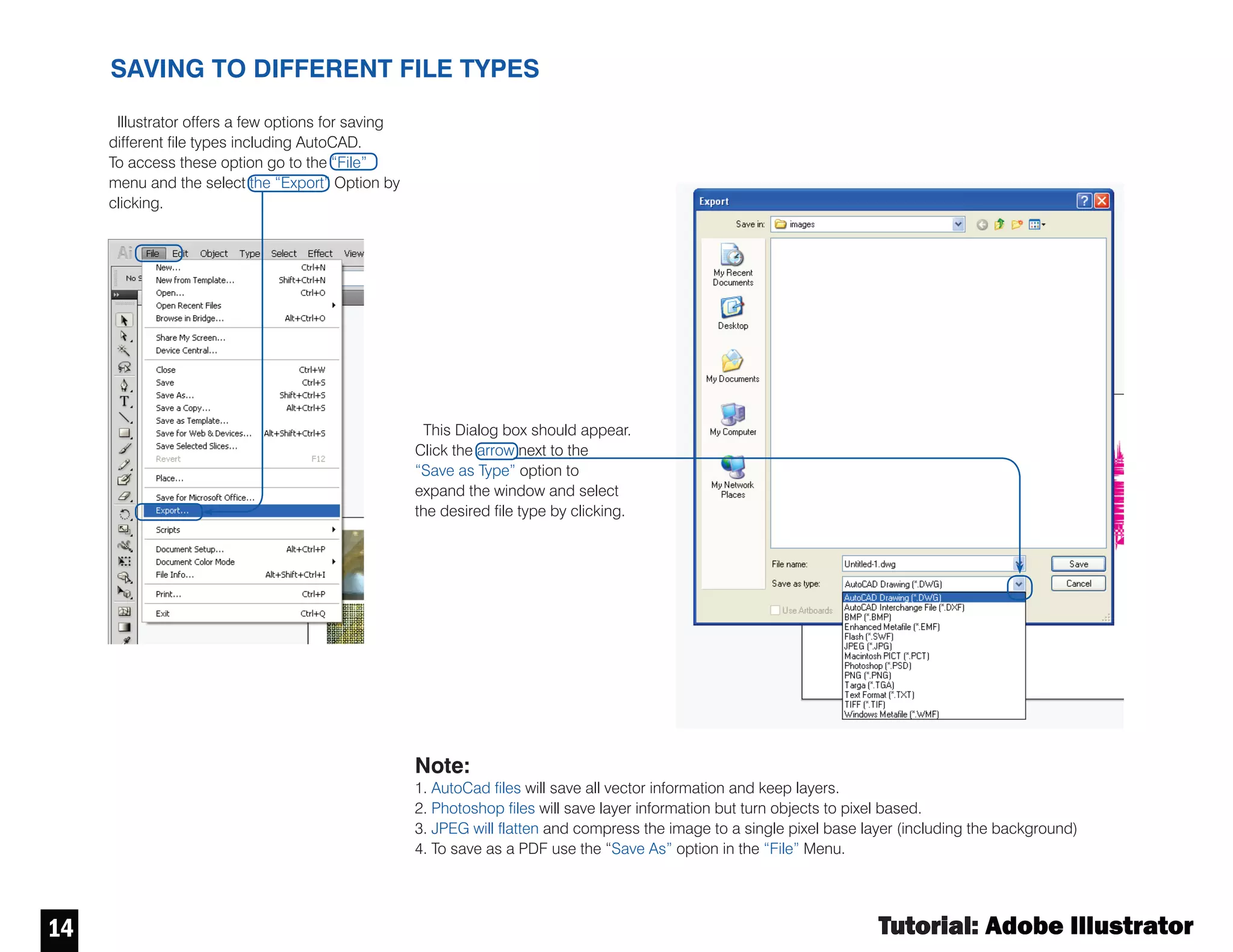
SAVING TO DIFFERENT FILE TYPES
“File” Menu.
Illustrator offers a few options for saving
different file types including AutoCAD.
Toaccess these option go to the “File”
menu and the select the “Export” Option by
clicking.
This Dialog box should appear.
Click the arrow next to the
“Save as Type” option to
expand the window and select
the desired file type by clicking.
Note:
1. AutoCad files will save all vector information and keep layers.
2. Photoshop files will save layer information but turn objects to pixel based.
3. JPEG will flatten and compress the image to a single pixel base layer (including the background)
4. To save as a PDF use the “Save As” option in the “File” Menu.
Tutorial : Adobe Illustrator
1515
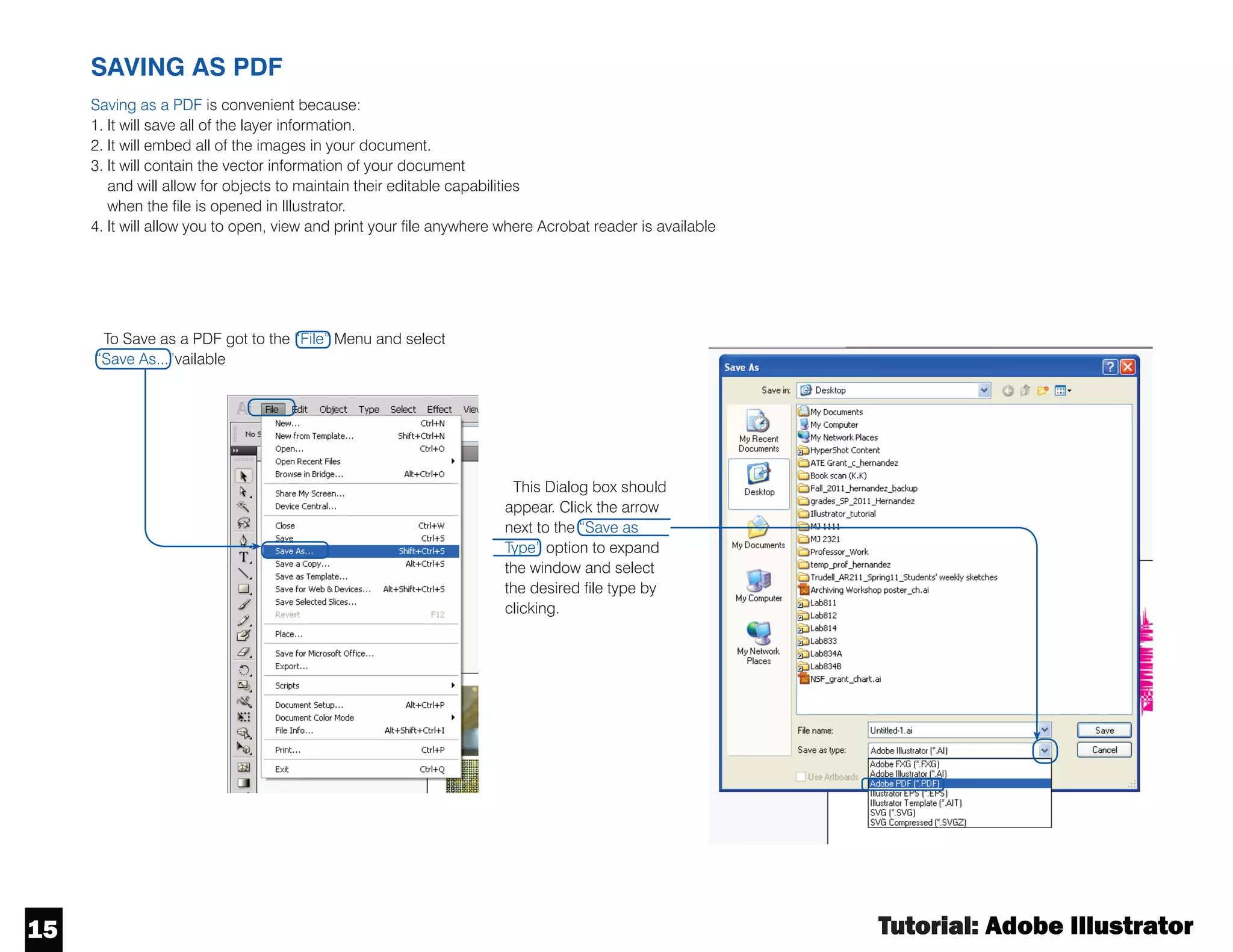
SAVING AS PDF
Saving as a PDF is convenient because:
1. It will save all of the layer information.
2. It will embed all of the images in your document.
3. It will contain the vector information of your document
and will allow for objects to maintain their editable capabilities
when the file is opened in Illustrator.
4. It will allow you to open, view and print your file anywhere where Acrobat reader is available
ToSave as a PDF got to the “File” Menu and select
“Save As...”vailable
This Dialog box should
appear. Click the arrow
next to the “Save as
Type” option to expand
the window and select
the desired file type by
clicking.
Tutorial : Adobe Illustrator

Adobe Illustrator CS6 Primer

  • 1.
    Tutorial:Adobe Illustrator CS6 The CityUniversity of New York Architectural Technology Dept. written by Claudia Hernandez
  • 2.
    written by ClaudiaHernandez This material is based upon work supported by the National Science Foundation under Grant Numbers 1141234. Any opinions, findings, and conclusions or recommendations expressed in this material are those of the author(s) and do not necessarily reflect the views of the National Science Foundation.
  • 3.
    Tutorial : AdobeIllustrator 2 Stroke Fill WHAT ARE STROKE AND FILL? COLOR: how to change the color an object Step 1: Activate the “selection” tool by clicking on it. Step 3: Once you have selected an object, double click on the fill or outline color selector in the tools menu. The “color picker” window will appear. Make your selection. Select color range by using this bar Select the color of your choice and click “OK” Step 2: select the object by clicking on it. You’ll know the object is selected when a the bounding box appears.
  • 4.
    Tutorial : AdobeIllustrator 3 STOKE : where to find the stroke panel Tofind the stroke panel go to the window menu and select “Stroke”
  • 5.
    Tutorial : AdobeIllustrator 4 CONTROL PANEL STOKE : Options Make sure your “Control“ Panel is on. You can find this option under your “window” menu. You will know the “control” panel is on if there is check mark next to it. Your “Control” Panel is the menu bar that is located at the top of your window. “Arrowheads” this allows to turn on/off arrows at the beginning and end of lines. Click on arrow to view options “Weight” controls the thickness of the line You can also edit/change the color (and many other properties) of an object through your “Control” panel “Dash” click this box to generate a dashed line. Use the boxes below to define spacing between dashes.
  • 6.
    Tutorial : AdobeIllustrator 5 TRANSFORM: scale, rotate, reflect and shear Step 1: Select the object you want to transform Step 2: Once the object is selected right click over it; this window should appear Step 3: Scroll down to the “transform” option and click to make your selection
  • 7.
    Tutorial : AdobeIllustrator 6 LAYER MANAGEMENT Turns Layer visibility off and on Locks Layer Deletes selected layer Creates a new layer Indicates Layer color Creates a new sublayer Tofind the layers panel go to the “window” menu and select “Layers” Layer and sublayers are helpful when you want to have a layer category for example “text” but you still want to differentiate between the different object types used i.e. “text_titles” vs. “text_general” . The master layer will control all of its contained sub-layers. Use your layer palate to help you organize your artboard.
  • 8.
    Tutorial : AdobeIllustrator 7 HOW TO MOVE OBJECTS from one layer to another LAYER OPTIONS renaming, color, printing, etc. LAYER MANAGEMENT: rearranging layer order Note: the order in which layers are organized will affect whether objects sit at the front or back in your artboard. Objects in the top layer in the “Layers” panel will at the front in your artboard. Tochange the order of a layers click on the desired layer and hold down the mouse button. Then drag and drop the layer in the new desired location by releasing the mouse. Toedit the properties of a layer double click over its name in the “Layers” panel. The Layer options dialog box will appear. Step 1: Select the object/s to be moved by clicking on it. Once the object is selected its current layer will become highlighted in the “Layers” Panel and a small square will appear on the right side. Step 2: Click on the small square and hold down the mouse button then, drag and drop (release the mouse button) on the desired layer.
  • 9.
    Tutorial : AdobeIllustrator 8 LIVE TRACE Live Trace allows you to transform an image into an editable digital drawing. Step 1: Place an image in Illustrator and select it by clicking on it. The Control menu shown above will appear. Click on the “Live Trace” option. Step 2: Once the “Live Trace” option has been activated the menu above will appear - this menu displays the different options “Live Trace” offers. List of different “Live Trace” types available Controls for different levels of detail Transforms the selected “Live Trace” object to a set of editable lines
  • 10.
    Tutorial : AdobeIllustrator 9 CLIPPING MASK BLENDING Step 1: Select the object you would like to mask and the shape you would like to use to mask it. Clipping mask is an object whose shape masks other artwork so that only areas that lie within the shape are visible. If you made a mistake or would like the revised the clipping object you can do so by releasing the clipping mask. Right click over the clipped object and select “Release Clipping Mask”. Step 2: Once the object and shape are selected right click and select the “Make Clipping Mask” option. Step 1: Establish the blend parameters by going to the “Object” menu then “Blend” and last clicking on “Blend Options...”
  • 11.
    Tutorial : AdobeIllustrator 10 BLENDING CONT. Step 2: Once “Blend Options...” has been selected the dialog box below will appear. Here select the type of blend type and the orientation. Once the selection has been completed click “OK”. Step 3: Once theblend options have been established, select the two objects you would like to blend Step 4: With the objects selected go back to the “Object” menu select “Blend” and then click on “Make”.
  • 12.
    Tutorial : AdobeIllustrator 11 11 PERSPECTIVE Step 2: Customize your perspective grid. Click on the “Perspective Grid Tool”. The controls on your perspective grid will turn on - edit them as desired. Step 1: Select and Activate the perspective grid. Go to the “View” then scroll down to “Perspective Grid” and select the grid type you would like to work in by clicking. An interface similar to the one shown to the right will appear on your artboard. The perspective tool aids in making proportionally accurate 3-D drawings.
  • 13.
    Tutorial : AdobeIllustrator 12 12 Step 3: Select the drawing surface (side/face) of the perspective by using the “Perspective Selection Tool” located in the “Tools” panel. Step 4: Use the perspective selection icon on the top left and click on the working surface you would like to activate Step 5: Select object type and start drawing. Illustrator will distort the shapes into perspective mode automatically. You can also drag an existing 2-D drawing into the perspective. See the video in the link below for more info: http://tv.adobe.com/watch/illustrator-cs5-feature-tour/perspective-drawing/ PERSPECTIVE
  • 14.
    Tutorial : AdobeIllustrator 13 13 EFFECTS Similarly to Photoshop Illustrator offers an Similarly to Photoshop Illustrator offers an array of options for generating effects and filters over objects and images. You will find all these options in the “Effects” menu. Photoshop Effects - Artistic - Underpainting Examples Photoshop Effects - Pixelate - Halftone Original Shape - no effect Illustrator Effects - Distort & Transform - Roughen Illustrator Effects - Distort & Transform - Pucker & Bloat
  • 15.
    Tutorial : AdobeIllustrator 14 14 SAVING TO DIFFERENT FILE TYPES “File” Menu. Illustrator offers a few options for saving different file types including AutoCAD. Toaccess these option go to the “File” menu and the select the “Export” Option by clicking. This Dialog box should appear. Click the arrow next to the “Save as Type” option to expand the window and select the desired file type by clicking. Note: 1. AutoCad files will save all vector information and keep layers. 2. Photoshop files will save layer information but turn objects to pixel based. 3. JPEG will flatten and compress the image to a single pixel base layer (including the background) 4. To save as a PDF use the “Save As” option in the “File” Menu.
  • 16.
    Tutorial : AdobeIllustrator 1515 SAVING AS PDF Saving as a PDF is convenient because: 1. It will save all of the layer information. 2. It will embed all of the images in your document. 3. It will contain the vector information of your document and will allow for objects to maintain their editable capabilities when the file is opened in Illustrator. 4. It will allow you to open, view and print your file anywhere where Acrobat reader is available ToSave as a PDF got to the “File” Menu and select “Save As...”vailable This Dialog box should appear. Click the arrow next to the “Save as Type” option to expand the window and select the desired file type by clicking.
  • 17.
    Tutorial : AdobeIllustrator