Adobe Premiere Pro
The City University of New York
New York City College Of Technology
Architectural Technology Department
Written by Siming Mei
Reviewed by Laurin Moseley
Extract Audios from Videos
February23,2021
Adobe Premiere Pro
2
2
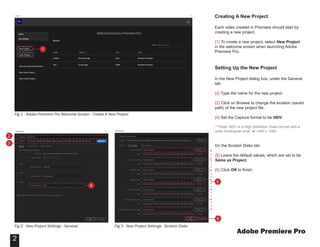
Creating A New Project
Each video created in Premiere should start by
creating a new project.
{1} To create a new project, select New Project
in the welcome screen when launching Adobe
Premiere Pro.
Setting Up the New Project
In the New Project dialog box, under the General
tab:
{2} Type the name for the new project.
{3} Click on Browse to change the location (saved
path) of the new project file.
{4} Set the Capture format to be HDV.
***Note: HDV is a High Definition Video format with a
wide rectangular pixel, at 1440 x 1080.
On the Scratch Disks tab:
{5} Leave the default values, which are set to be
Same as Project.
{6} Click OK to finish.
Fig 1 - Adobe Premiere Pro Welcome Screen - Create A New Project
Fig 2 - New Project Settings - General
1
4
2
3
Fig 3 - New Project Settings - Scratch Disks
5
6
Adobe Premiere Pro
3
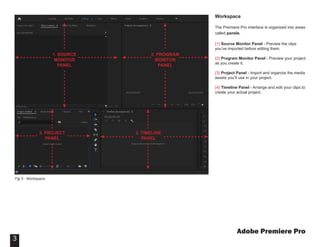
Workspace
The Premiere Pro interface is organized into areas
called panels.
{1} Source Monitor Panel - Preview the clips
you’ve imported before editing them.
{2} Program Monitor Panel - Preview your project
as you create it.
{3} Project Panel - Import and organize the media
assets you’ll use in your project.
{4} Timeline Panel - Arrange and edit your clips to
create your actual project.
Fig 5 - Workspace
1. SOURCE
MONITOR
PANEL
2. PROGRAM
MONITOR
PANEL
3. PROJECT
PANEL
3. TIMELINE
PANEL
Adobe Premiere Pro
4
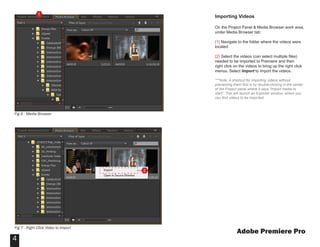
Importing Videos
On the Project Panel & Media Browser work area,
under Media Browser tab:
{1} Navigate to the folder where the videos were
located.
{2} Select the videos (can select multiple files)
needed to be imported to Premiere and then
right click on the videos to bring up the right click
menus. Select Import to import the videos.
***Note: A shortcut for importing videos without
previewing them first is by double-clicking in the center
of the Project panel where it says “Import media to
start”. This will launch an Explorer window, where you
can find videos to be imported.
1
2
Fig 6 - Media Browser
Fig 7 - Right Click Video to Import
Adobe Premiere Pro
5
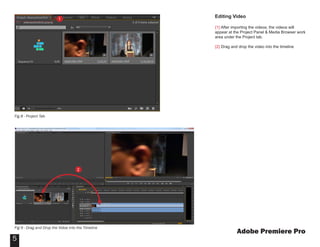
Editing Video
{1} After importing the videos, the videos will
appear at the Project Panel & Media Browser work
area under the Project tab.
{2} Drag and drop the video into the timeline
Fig 8 - Project Tab
Fig 9 - Drag and Drop the Vidoe into the Timeline
1
2
Adobe Premiere Pro
6
Editing Video (Continued)
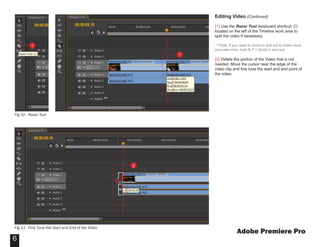
{1} Use the Razor Tool (keyboard shortcut: C)
located on the left of the Timeline work area to
split the video if necessary.
***Note: if you need to Zoom in and out to make more
accurate trims, hold ALT + Scroll in and out.
{2} Delete the portion of the Video that is not
needed. Move the cursor near the edge of the
video clip and fine tune the start and end point of
the video.
1
1
Fig 10 - Razor Tool
Fig 11 - Fine Tune the Start and End of the Video
2
Adobe Premiere Pro
7
Editing Video (Continued)
{1} Right click on the empty space of the video clip
on the timeline area and select Ripple Delete to
remove the unnecessary space from the timeline.
Exporting Audio
After finishing editing the video, the file is ready to
be exported as an audio file.
{2} Right click on File > Export > Media to Bring
up the Export Setting dialog.
1
Fig 12 - Ripple Delete Unnecessary Space from Timeline
2
Fig 13 - Export Media
Adobe Premiere Pro
8
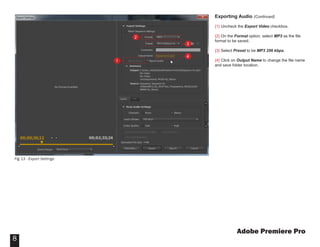
Exporting Audio (Continued)
{1} Uncheck the Export Video checkbox.
{2} On the Format option, select MP3 as the file
format to be saved.
{3} Select Preset to be MP3 256 kbps.
{4} Click on Output Name to change the file name
and save folder location.
Fig 13 - Export Settings
1
2
3
4

Adobe Premiere Pro

  • 1.
    Adobe Premiere Pro TheCity University of New York New York City College Of Technology Architectural Technology Department Written by Siming Mei Reviewed by Laurin Moseley Extract Audios from Videos February23,2021
  • 2.
    Adobe Premiere Pro 2 2 CreatingA New Project Each video created in Premiere should start by creating a new project. {1} To create a new project, select New Project in the welcome screen when launching Adobe Premiere Pro. Setting Up the New Project In the New Project dialog box, under the General tab: {2} Type the name for the new project. {3} Click on Browse to change the location (saved path) of the new project file. {4} Set the Capture format to be HDV. ***Note: HDV is a High Definition Video format with a wide rectangular pixel, at 1440 x 1080. On the Scratch Disks tab: {5} Leave the default values, which are set to be Same as Project. {6} Click OK to finish. Fig 1 - Adobe Premiere Pro Welcome Screen - Create A New Project Fig 2 - New Project Settings - General 1 4 2 3 Fig 3 - New Project Settings - Scratch Disks 5 6
  • 3.
    Adobe Premiere Pro 3 Workspace ThePremiere Pro interface is organized into areas called panels. {1} Source Monitor Panel - Preview the clips you’ve imported before editing them. {2} Program Monitor Panel - Preview your project as you create it. {3} Project Panel - Import and organize the media assets you’ll use in your project. {4} Timeline Panel - Arrange and edit your clips to create your actual project. Fig 5 - Workspace 1. SOURCE MONITOR PANEL 2. PROGRAM MONITOR PANEL 3. PROJECT PANEL 3. TIMELINE PANEL
  • 4.
    Adobe Premiere Pro 4 ImportingVideos On the Project Panel & Media Browser work area, under Media Browser tab: {1} Navigate to the folder where the videos were located. {2} Select the videos (can select multiple files) needed to be imported to Premiere and then right click on the videos to bring up the right click menus. Select Import to import the videos. ***Note: A shortcut for importing videos without previewing them first is by double-clicking in the center of the Project panel where it says “Import media to start”. This will launch an Explorer window, where you can find videos to be imported. 1 2 Fig 6 - Media Browser Fig 7 - Right Click Video to Import
  • 5.
    Adobe Premiere Pro 5 EditingVideo {1} After importing the videos, the videos will appear at the Project Panel & Media Browser work area under the Project tab. {2} Drag and drop the video into the timeline Fig 8 - Project Tab Fig 9 - Drag and Drop the Vidoe into the Timeline 1 2
  • 6.
    Adobe Premiere Pro 6 EditingVideo (Continued) {1} Use the Razor Tool (keyboard shortcut: C) located on the left of the Timeline work area to split the video if necessary. ***Note: if you need to Zoom in and out to make more accurate trims, hold ALT + Scroll in and out. {2} Delete the portion of the Video that is not needed. Move the cursor near the edge of the video clip and fine tune the start and end point of the video. 1 1 Fig 10 - Razor Tool Fig 11 - Fine Tune the Start and End of the Video 2
  • 7.
    Adobe Premiere Pro 7 EditingVideo (Continued) {1} Right click on the empty space of the video clip on the timeline area and select Ripple Delete to remove the unnecessary space from the timeline. Exporting Audio After finishing editing the video, the file is ready to be exported as an audio file. {2} Right click on File > Export > Media to Bring up the Export Setting dialog. 1 Fig 12 - Ripple Delete Unnecessary Space from Timeline 2 Fig 13 - Export Media
  • 8.
    Adobe Premiere Pro 8 ExportingAudio (Continued) {1} Uncheck the Export Video checkbox. {2} On the Format option, select MP3 as the file format to be saved. {3} Select Preset to be MP3 256 kbps. {4} Click on Output Name to change the file name and save folder location. Fig 13 - Export Settings 1 2 3 4