Adobe Illustrator CS5 How-To Guide
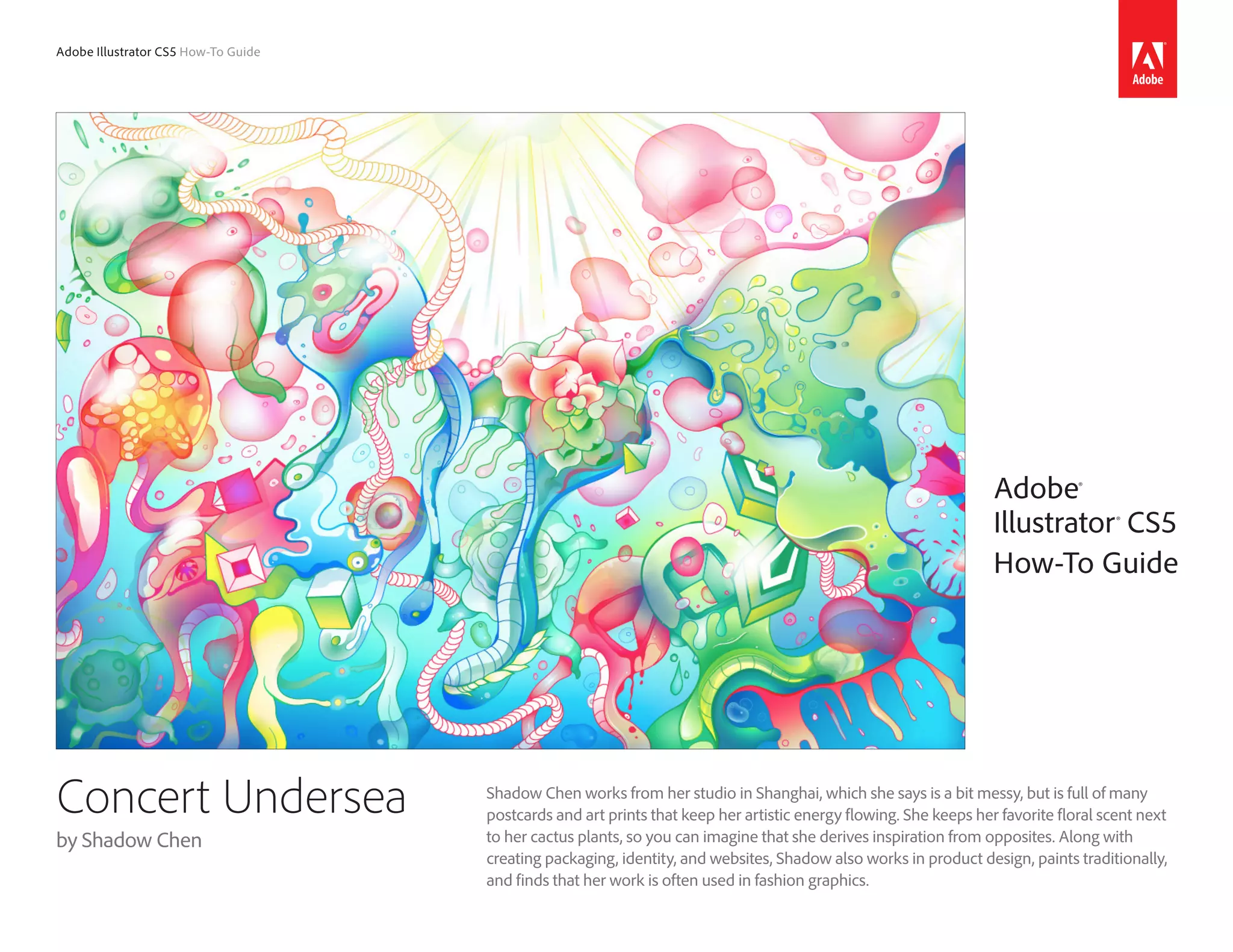
Shadow Chen works from her studio in Shanghai, which she says is a bit messy, but is full of many
postcards and art prints that keep her artistic energy flowing. She keeps her favorite floral scent next
to her cactus plants, so you can imagine that she derives inspiration from opposites. Along with
creating packaging, identity, and websites, Shadow also works in product design, paints traditionally,
and finds that her work is often used in fashion graphics.
Adobe®
Illustrator® CS5
How-To Guide
Concert Undersea
by Shadow Chen
2Adobe Illustrator CS5 How-To Guide
How I work
First and most importantly, I work by feel. When doing a certain piece of art, I get inspired by
emotions, like when you hear music you want to sing along or dance. When the feeling comes I just
have to draw and paint. Second, I need to be alone, in a space only for myself. I believe that being
alone is something special for every art lover. Last but not at least, music influences me. I love
magical, powerful, trippy soundscapes.
Most of the time I start my work with
sketches, and after that I spend some
time thinking about what direction I will
go with finalizing or digitalizing and
coloring the artwork. Then I am ready.
Getting started
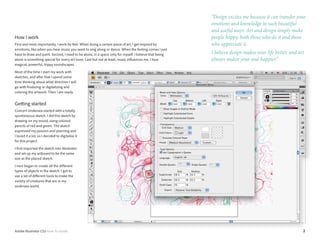
Concert Undersea started with a totally
spontaneous sketch. I did this sketch by
drawing on my mood, using colored
pencils of red and green. The sketch
expressed my passion and yearning and
I loved it a lot, so I decided to digitalize it
for this project.
I first imported the sketch into Illustrator
and set up my artboard to be the same
size as the placed sketch.
I next began to create all the different
types of objects in the sketch. I got to
use a lot of different tools to make the
variety of creatures that are in my
undersea world.
“Design excites me because it can transfer your
emotions and knowledge in such beautiful
and useful ways. Art and design simply make
people happy, both those who do it and those
who appreciate it.
I believe design makes your life better, and art
always makes your soul happier.”
3Adobe Illustrator CS5 How-To Guide
Watercolor texture
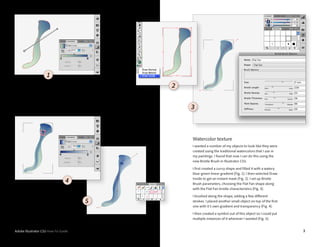
I wanted a number of my objects to look like they were
created using the traditional watercolors that I use in
my paintings. I found that now I can do this using the
new Bristle Brush in Illustrator CS5.
I first created a curvy shape and filled it with a watery
blue-green linear gradient (Fig. 1). I then selected Draw
Inside to get an instant mask (Fig. 2). I set up Bristle
Brush parameters, choosing the Flat Fan shape along
with the Flat Fan bristle characteristics (Fig. 3).
I brushed along the shape, adding a few different
strokes. I placed another small object on top of the first
one with it’s own gradient and transparency (Fig. 4).
I then created a symbol out of this object so I could put
multiple instances of it wherever I wanted (Fig. 5).
3
2
1
4
5
4Adobe Illustrator CS5 How-To Guide
Bubbles
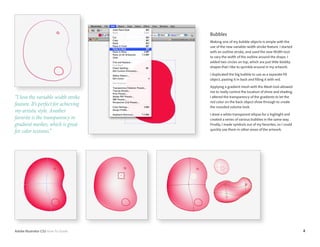
Making one of my bubble objects is simple with the
use of the new variable-width stroke feature. I started
with an outline stroke, and used the new Width tool
to vary the width of the outline around the shape. I
added two circles on top, which are just little blobby
shapes that I like to sprinkle around in my artwork.
I duplicated the big bubble to use as a separate fill
object, pasting it in back and filling it with red.
Applying a gradient mesh with the Mesh tool allowed
me to really control the location of shine and shading.
I altered the transparency of the gradients to let the
red color on the back object show through to create
the rounded volume look.
I drew a white transparent ellipse for a highlight and
created a series of various bubbles in the same way.
Finally, I made symbols out of my favorites, so I could
quickly use them in other areas of the artwork.
“I love the variable-width stroke
feature. It’s perfect for achieving
my artistic style. Another
favorite is the transparency in
gradient meshes, which is great
for color textures.”
5Adobe Illustrator CS5 How-To Guide
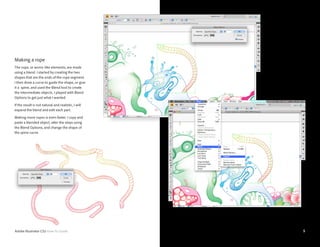
Making a rope
The rope, or worm-like elements, are made
using a blend. I started by creating the two
shapes that are the ends of the rope segment.
I then drew a curve to guide the shape, or give
it a spine, and used the Blend tool to create
the intermediate objects. I played with Blend
Options to get just what I wanted.
If the result is not natural and realistic, I will
expand the blend and edit each part.
Making more ropes is even faster. I copy and
paste a blended object, alter the steps using
the Blend Options, and change the shape of
the spine curve.
6Adobe Illustrator CS5 How-To Guide
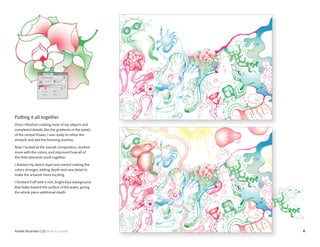
Putting it all together
Once I finished creating most of my objects and
completed details, like the gradients in the petals
of the central flower, I was ready to refine the
artwork and add the finishing touches.
Now I looked at the overall composition, worked
more with the colors, and improved how all of
the little elements work together.
I deleted my sketch layer and started making the
colors stronger, adding depth and new detail to
make the artwork more exciting.
I finished if off with a rich, bright blue background
that fades toward the surface of the water, giving
the whole piece additional depth.
Adobe Systems Incorporated
345 Park Avenue
San Jose, CA 95110-2704
USA
www.adobe.com
Adobe, the Adobe logo, and Illustrator are trademarks of Adobe Systems Incorporated in the United States and/or other countries. All other trademarks are the property of their respective owners.
© 2010 Adobe Systems Incorporated. All rights reserved. 04/10
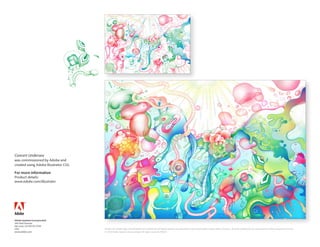
Concert Undersea
was commissioned by Adobe and
created using Adobe Illustrator CS5.
For more information
Product details:
www.adobe.com/illustrator

Concert undersea how to

  • 1.
    Adobe Illustrator CS5How-To Guide Shadow Chen works from her studio in Shanghai, which she says is a bit messy, but is full of many postcards and art prints that keep her artistic energy flowing. She keeps her favorite floral scent next to her cactus plants, so you can imagine that she derives inspiration from opposites. Along with creating packaging, identity, and websites, Shadow also works in product design, paints traditionally, and finds that her work is often used in fashion graphics. Adobe® Illustrator® CS5 How-To Guide Concert Undersea by Shadow Chen
  • 2.
    2Adobe Illustrator CS5How-To Guide How I work First and most importantly, I work by feel. When doing a certain piece of art, I get inspired by emotions, like when you hear music you want to sing along or dance. When the feeling comes I just have to draw and paint. Second, I need to be alone, in a space only for myself. I believe that being alone is something special for every art lover. Last but not at least, music influences me. I love magical, powerful, trippy soundscapes. Most of the time I start my work with sketches, and after that I spend some time thinking about what direction I will go with finalizing or digitalizing and coloring the artwork. Then I am ready. Getting started Concert Undersea started with a totally spontaneous sketch. I did this sketch by drawing on my mood, using colored pencils of red and green. The sketch expressed my passion and yearning and I loved it a lot, so I decided to digitalize it for this project. I first imported the sketch into Illustrator and set up my artboard to be the same size as the placed sketch. I next began to create all the different types of objects in the sketch. I got to use a lot of different tools to make the variety of creatures that are in my undersea world. “Design excites me because it can transfer your emotions and knowledge in such beautiful and useful ways. Art and design simply make people happy, both those who do it and those who appreciate it. I believe design makes your life better, and art always makes your soul happier.”
  • 3.
    3Adobe Illustrator CS5How-To Guide Watercolor texture I wanted a number of my objects to look like they were created using the traditional watercolors that I use in my paintings. I found that now I can do this using the new Bristle Brush in Illustrator CS5. I first created a curvy shape and filled it with a watery blue-green linear gradient (Fig. 1). I then selected Draw Inside to get an instant mask (Fig. 2). I set up Bristle Brush parameters, choosing the Flat Fan shape along with the Flat Fan bristle characteristics (Fig. 3). I brushed along the shape, adding a few different strokes. I placed another small object on top of the first one with it’s own gradient and transparency (Fig. 4). I then created a symbol out of this object so I could put multiple instances of it wherever I wanted (Fig. 5). 3 2 1 4 5
  • 4.
    4Adobe Illustrator CS5How-To Guide Bubbles Making one of my bubble objects is simple with the use of the new variable-width stroke feature. I started with an outline stroke, and used the new Width tool to vary the width of the outline around the shape. I added two circles on top, which are just little blobby shapes that I like to sprinkle around in my artwork. I duplicated the big bubble to use as a separate fill object, pasting it in back and filling it with red. Applying a gradient mesh with the Mesh tool allowed me to really control the location of shine and shading. I altered the transparency of the gradients to let the red color on the back object show through to create the rounded volume look. I drew a white transparent ellipse for a highlight and created a series of various bubbles in the same way. Finally, I made symbols out of my favorites, so I could quickly use them in other areas of the artwork. “I love the variable-width stroke feature. It’s perfect for achieving my artistic style. Another favorite is the transparency in gradient meshes, which is great for color textures.”
  • 5.
    5Adobe Illustrator CS5How-To Guide Making a rope The rope, or worm-like elements, are made using a blend. I started by creating the two shapes that are the ends of the rope segment. I then drew a curve to guide the shape, or give it a spine, and used the Blend tool to create the intermediate objects. I played with Blend Options to get just what I wanted. If the result is not natural and realistic, I will expand the blend and edit each part. Making more ropes is even faster. I copy and paste a blended object, alter the steps using the Blend Options, and change the shape of the spine curve.
  • 6.
    6Adobe Illustrator CS5How-To Guide Putting it all together Once I finished creating most of my objects and completed details, like the gradients in the petals of the central flower, I was ready to refine the artwork and add the finishing touches. Now I looked at the overall composition, worked more with the colors, and improved how all of the little elements work together. I deleted my sketch layer and started making the colors stronger, adding depth and new detail to make the artwork more exciting. I finished if off with a rich, bright blue background that fades toward the surface of the water, giving the whole piece additional depth.
  • 7.
    Adobe Systems Incorporated 345Park Avenue San Jose, CA 95110-2704 USA www.adobe.com Adobe, the Adobe logo, and Illustrator are trademarks of Adobe Systems Incorporated in the United States and/or other countries. All other trademarks are the property of their respective owners. © 2010 Adobe Systems Incorporated. All rights reserved. 04/10 Concert Undersea was commissioned by Adobe and created using Adobe Illustrator CS5. For more information Product details: www.adobe.com/illustrator