Introduction to Linux
li
for bioinformatics
Joachim Jacob
8 and 15 November 2013
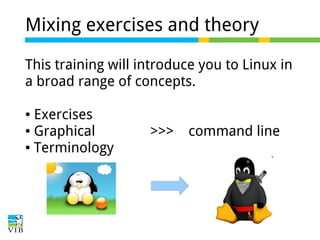
Mixing exercises and theory
This training will introduce you to Linux in
a broad range of concepts.
Exercises
● Graphical
● Terminology
●

>>>

command line
Linux ...
Can somebody tell me what they think
about when hearing 'Linux' ?
A bunch of hardware: a computer!
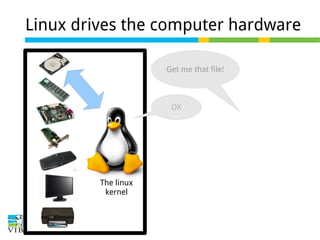
Linux drives the computer hardware
Get me that file!

OK

The linux
kernel
Linux drives the computer hardware
Get me that file!

OK

The linux
kernel
Linux drives the computer hardware
Get me that file!

OK

Here you are:
The linux
kernel
Thank you
Who's asking? GNU!
Get me that file!

The operating
system

OK

GNU
Here you are:
The linux
kernel
Thank you

Provides the
low level
commands
to communicate with
the hardware
through Linux
There a lot of chatter
What's in that directory?
('ls' in GNU language)

The operating
system

3 files: reads.fastq,
pe_aln.sam, README
GNU
Show me the content of
that file reads.fastq
(e.g. 'head')
The linux
kernel

I read:
>HS:0012541
ATCGAATATACGATG
...
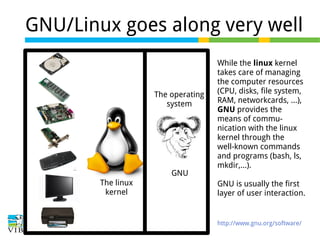
GNU/Linux goes along very well

The operating
system

GNU
The linux
kernel

While the linux kernel
takes care of managing
the computer resources
(CPU, disks, file system,
RAM, networkcards, …),
GNU provides the
means of communication with the linux
kernel through the
well-known commands
and programs (bash, ls,
mkdir,...).
GNU is usually the first
layer of user interaction.

http://www.gnu.org/software/
But who cares?
The operating
system

GNU/Linux

GNU

The goal of linux is to
be as invisible as
possible, doing the
heavy lifting on the
background.
This GNU/Linux
operating system is a
solid core for a lot of
computers and
devices.

The linux
kernel

https://www.dlitz.net/go/sticker/linuxstk800.jpg
http://coe.uncc.edu/mosaic/mosaic-linux/linux-basics/linux-kernel.html

Other OSes: Windows,
Mac OS x, Solaris, ….
Why Linux?
Open source: the kernel code is viewable by
anyone.
● Open development: anybody can propose
enhancements /change it to their needs.
● Free-to-use: anybody can use the kernel to
drive their own computer or device (always interesting in
●

academics: a lot of development here)

Stable: it is one of the most stable OS you can
find.
●

* since so many people use the linux kernel for their projects, and because of the many
eyes watching it, debugging happens at an astonishing rate.
** all this is protected (to remain open) by powerful licenses such as GPL, Apache
license, creative commons,...
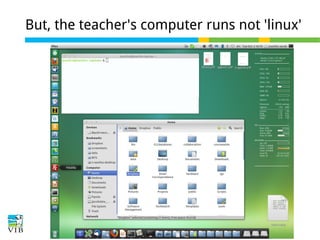
But, the teacher's computer runs not 'linux'
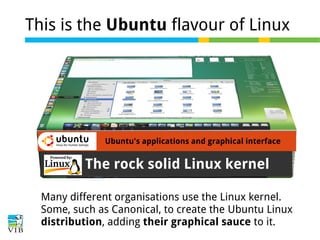
This is the Ubuntu flavour of Linux

Ubuntu's applications and graphical interface

The rock solid Linux kernel
Many different organisations use the Linux kernel.
Some, such as Canonical, to create the Ubuntu Linux
distribution, adding their graphical sauce to it.
So – who of you is using Linux already?

http://www.linuxfoundation.org/
http://www.youtube.com/watch?v=yVpbFMhOAwE

Graphics: http://thenakedhero.com
So – who of you is using Linux already?
Start! Pick a Linux distribution
Different distributions to run on your computer exist:.

They use OS kernel (Linux)
● They add their graphical user interface (desktop
environment)
● They add tools and applications (backup, texteditor,...)
● They provide a software package manager
● initialization & configuration scripts
● commercial support
There are many distributions (600+), but perhaps only a few
that really matter...
●

http://www.distrowatch.com
http://www.linuxtoday.com/
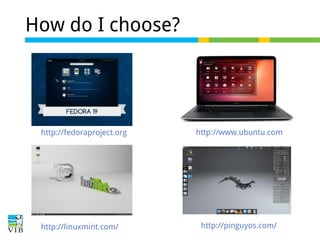
How do I choose?

http://fedoraproject.org

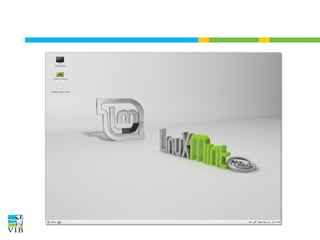
http://linuxmint.com/

http://www.ubuntu.com

http://pinguyos.com/
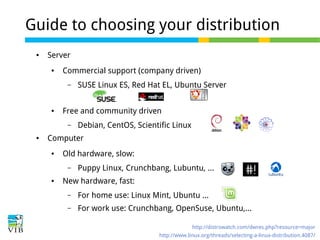
Guide to choosing your distribution
●

Server
●

Commercial support (company driven)
–

●

Free and community driven
–

●

SUSE Linux ES, Red Hat EL, Ubuntu Server

Debian, CentOS, Scientific Linux

Computer
●

Old hardware, slow:
–

●

Puppy Linux, Crunchbang, Lubuntu, ...

New hardware, fast:
–

For home use: Linux Mint, Ubuntu ...

–

For work use: Crunchbang, OpenSuse, Ubuntu,...
http://distrowatch.com/dwres.php?resource=major
http://www.linux.org/threads/selecting-a-linux-distribution.4087/
Guide to choosing your distribution
Perhaps it's easier to define the opposite
●

Want stability? Don't choose Fedora.

●

Want the latest and hottest? Don't choose CentOS

●

Want a lightweight distro? Don't choose Ubuntu

●

Want classic look? Don't choose Elementary OS

●

●

Want to do bioinformatics? Don't choose CentOS, go
for the latest actively developed.
...
(guess I can keep going)
Thread: Distro best for bioinformatics: http://www.biostars.org/p/16778/
Email client

Browser

File manager

System settings

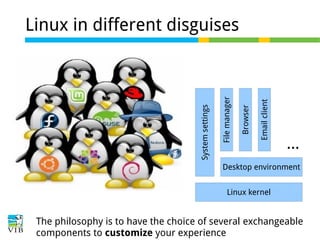
Linux in different disguises

...

Desktop environment
Linux kernel

The philosophy is to have the choice of several exchangeable
components to customize your experience
They differ in 'desktop environment'
KDE

Unity

Gnome

Cinnamon

http://en.wikipedia.org/wiki/Desktop_environmen
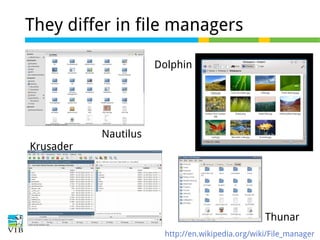
They differ in file managers
Dolphin

Nautilus
Krusader

Thunar
http://en.wikipedia.org/wiki/File_manager
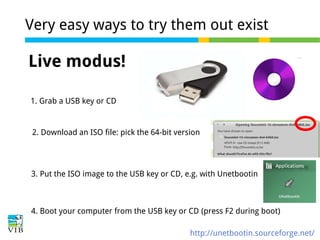
Very easy ways to try them out exist

Live modus!
1. Grab a USB key or CD

2. Download an ISO file: pick the 64-bit version

3. Put the ISO image to the USB key or CD, e.g. with Unetbootin

4. Boot your computer from the USB key or CD (press F2 during boot)
http://unetbootin.sourceforge.net/
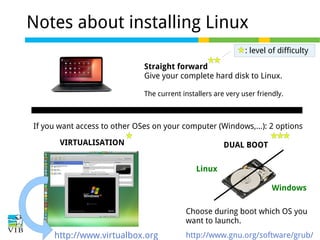
Notes about installing Linux
: level of difficulty
Straight forward
Give your complete hard disk to Linux.
The current installers are very user friendly.

If you want access to other OSes on your computer (Windows,...): 2 options
VIRTUALISATION

DUAL BOOT
Linux
Windows
Choose during boot which OS you
want to launch.

http://www.virtualbox.org

http://www.gnu.org/software/grub/
Exercise: let's play!
To complete the exercises, you will find .iso images
of different distributions in the Downloads folder.
Pick one of those 2 exercises (click on the link):
A: Create a bootable live USB
or
B: Install Linux as a virtual machine
Keywords
operating system
linux
GNU
open source
distribution
desktop environment
live CD
virtual machine
dual boot
Write in your own words what the terms mean
Break

Introduction to Linux for bioinformatics

  • 1.
    Introduction to Linux li forbioinformatics Joachim Jacob 8 and 15 November 2013
  • 2.
    Mixing exercises andtheory This training will introduce you to Linux in a broad range of concepts. Exercises ● Graphical ● Terminology ● >>> command line
  • 3.
    Linux ... Can somebodytell me what they think about when hearing 'Linux' ?
  • 4.
    A bunch ofhardware: a computer!
  • 5.
    Linux drives thecomputer hardware Get me that file! OK The linux kernel
  • 6.
    Linux drives thecomputer hardware Get me that file! OK The linux kernel
  • 7.
    Linux drives thecomputer hardware Get me that file! OK Here you are: The linux kernel Thank you
  • 8.
    Who's asking? GNU! Getme that file! The operating system OK GNU Here you are: The linux kernel Thank you Provides the low level commands to communicate with the hardware through Linux
  • 9.
    There a lotof chatter What's in that directory? ('ls' in GNU language) The operating system 3 files: reads.fastq, pe_aln.sam, README GNU Show me the content of that file reads.fastq (e.g. 'head') The linux kernel I read: >HS:0012541 ATCGAATATACGATG ...
  • 10.
    GNU/Linux goes alongvery well The operating system GNU The linux kernel While the linux kernel takes care of managing the computer resources (CPU, disks, file system, RAM, networkcards, …), GNU provides the means of communication with the linux kernel through the well-known commands and programs (bash, ls, mkdir,...). GNU is usually the first layer of user interaction. http://www.gnu.org/software/
  • 11.
    But who cares? Theoperating system GNU/Linux GNU The goal of linux is to be as invisible as possible, doing the heavy lifting on the background. This GNU/Linux operating system is a solid core for a lot of computers and devices. The linux kernel https://www.dlitz.net/go/sticker/linuxstk800.jpg http://coe.uncc.edu/mosaic/mosaic-linux/linux-basics/linux-kernel.html Other OSes: Windows, Mac OS x, Solaris, ….
  • 12.
    Why Linux? Open source:the kernel code is viewable by anyone. ● Open development: anybody can propose enhancements /change it to their needs. ● Free-to-use: anybody can use the kernel to drive their own computer or device (always interesting in ● academics: a lot of development here) Stable: it is one of the most stable OS you can find. ● * since so many people use the linux kernel for their projects, and because of the many eyes watching it, debugging happens at an astonishing rate. ** all this is protected (to remain open) by powerful licenses such as GPL, Apache license, creative commons,...
  • 13.
    But, the teacher'scomputer runs not 'linux'
  • 14.
    This is theUbuntu flavour of Linux Ubuntu's applications and graphical interface The rock solid Linux kernel Many different organisations use the Linux kernel. Some, such as Canonical, to create the Ubuntu Linux distribution, adding their graphical sauce to it.
  • 15.
    So – whoof you is using Linux already? http://www.linuxfoundation.org/ http://www.youtube.com/watch?v=yVpbFMhOAwE Graphics: http://thenakedhero.com
  • 16.
    So – whoof you is using Linux already?
  • 17.
    Start! Pick aLinux distribution Different distributions to run on your computer exist:. They use OS kernel (Linux) ● They add their graphical user interface (desktop environment) ● They add tools and applications (backup, texteditor,...) ● They provide a software package manager ● initialization & configuration scripts ● commercial support There are many distributions (600+), but perhaps only a few that really matter... ● http://www.distrowatch.com http://www.linuxtoday.com/
  • 18.
    How do Ichoose? http://fedoraproject.org http://linuxmint.com/ http://www.ubuntu.com http://pinguyos.com/
  • 19.
    Guide to choosingyour distribution ● Server ● Commercial support (company driven) – ● Free and community driven – ● SUSE Linux ES, Red Hat EL, Ubuntu Server Debian, CentOS, Scientific Linux Computer ● Old hardware, slow: – ● Puppy Linux, Crunchbang, Lubuntu, ... New hardware, fast: – For home use: Linux Mint, Ubuntu ... – For work use: Crunchbang, OpenSuse, Ubuntu,... http://distrowatch.com/dwres.php?resource=major http://www.linux.org/threads/selecting-a-linux-distribution.4087/
  • 20.
    Guide to choosingyour distribution Perhaps it's easier to define the opposite ● Want stability? Don't choose Fedora. ● Want the latest and hottest? Don't choose CentOS ● Want a lightweight distro? Don't choose Ubuntu ● Want classic look? Don't choose Elementary OS ● ● Want to do bioinformatics? Don't choose CentOS, go for the latest actively developed. ... (guess I can keep going) Thread: Distro best for bioinformatics: http://www.biostars.org/p/16778/
  • 21.
    Email client Browser File manager Systemsettings Linux in different disguises ... Desktop environment Linux kernel The philosophy is to have the choice of several exchangeable components to customize your experience
  • 22.
    They differ in'desktop environment' KDE Unity Gnome Cinnamon http://en.wikipedia.org/wiki/Desktop_environmen
  • 23.
    They differ infile managers Dolphin Nautilus Krusader Thunar http://en.wikipedia.org/wiki/File_manager
  • 24.
    Very easy waysto try them out exist Live modus! 1. Grab a USB key or CD 2. Download an ISO file: pick the 64-bit version 3. Put the ISO image to the USB key or CD, e.g. with Unetbootin 4. Boot your computer from the USB key or CD (press F2 during boot) http://unetbootin.sourceforge.net/
  • 25.
    Notes about installingLinux : level of difficulty Straight forward Give your complete hard disk to Linux. The current installers are very user friendly. If you want access to other OSes on your computer (Windows,...): 2 options VIRTUALISATION DUAL BOOT Linux Windows Choose during boot which OS you want to launch. http://www.virtualbox.org http://www.gnu.org/software/grub/
  • 26.
    Exercise: let's play! Tocomplete the exercises, you will find .iso images of different distributions in the Downloads folder. Pick one of those 2 exercises (click on the link): A: Create a bootable live USB or B: Install Linux as a virtual machine
  • 28.
    Keywords operating system linux GNU open source distribution desktopenvironment live CD virtual machine dual boot Write in your own words what the terms mean
  • 29.