LINUX SECURITY
What is Linux ?
 Linux is a free open source operating system (OS) based on UNIX that was
created in 1991 by Linus Torvalds. Users can modify and create variations of
the source code, known as distributions, for computers and other devices. The
most common use is as a server, but Linux is also used in desktop computers,
smartphones, e-book readers and gaming consoles etc.
 It is also used by Hackers
 Linux Types :
o Ubuntu
o Redhat
o Suse
o Debian
o Centos
o Oracle
Hardening
 Hardening refers to providing various means of protection in a computer
system. Protection is provided in various layers and is often referred to as
defense in depth. Protecting in layers means to protect at the host level, the
application level, the operating system level, the user level, the physical level
and all the sublevels in between. Each level requires a unique method of
security.
 A hardened computer system is a more secure computer system.
 Hardening is also known as system hardening.
 Guides :
 Guides : CIS Benchmark
 Tools : Scap , Lynis
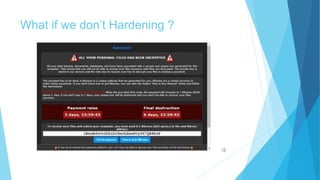
What if we don’t Hardening ?
Users and Groups
 Users and Groups are used to control access to files and resources . Different
permissions are also applied depending on users and groups.
Users:
 Every user of the system is assigned a unique user id known as UID.
 Users names and UID’S are stored in this location -/etc/passwd. Users can’t
read ,write or executable each other’s file without permissions.
Groups:
 Users are assigned to groups with unique group id numbers known as the gid.
 Each user is given their own group . gids are stored in this location -
/etc/group.
File Security
File Permissions:
 Every file and directory in your UNIX/Linux system has following 3 permissions
defined for all the 3 owners discussed above.
 Read (r): This permission give you the authority to open and read a file. Read
permission on a directory gives you the ability to lists its content.
 Write (w): The write permission gives you the authority to modify the contents of
a file. The write permission on a directory gives you the authority to add,
remove and rename files stored in the directory. Consider a scenario where you
have to write permission on file but do not have write permission on the
directory where the file is stored. You will be able to modify the file contents. But
you will not be able to rename, move or remove the file from the directory.
 Execute (x): In Windows, an executable program usually has an extension
".exe" and which you can easily run. In Unix/Linux, you cannot run a program
unless the execute permission is set. If the execute permission is not set, you
might still be able to see/modify the program code(provided read & write
permissions are set), but not run it.
Special Permissions:
 In this we have four cases. They are :
1) SUID (Set – user Identification) for an execution.
2) SGID (set group ID) for an execution.
3) SGID (set group ID) for an Directory.
4) Sticky bit for a directory
LINK: https://thegeeksalive.com/linux-special-permissions/
INODES :
 An inode is a data structure on a traditional Unix-style file system such as UFS
or ext3. An inode stores basic information about a regular file, directory, or other
file system object.
 https://www.cyberciti.biz/tips/understanding-unixlinux-filesystem-inodes.html
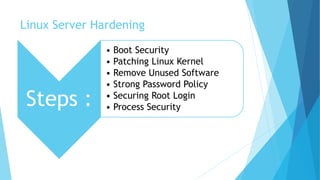
Linux Server Hardening
Steps :
• Boot Security
• Patching Linux Kernel
• Remove Unused Software
• Strong Password Policy
• Securing Root Login
• Process Security
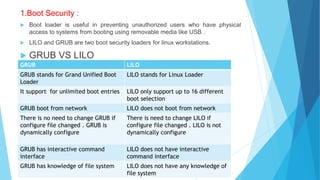
1.Boot Security :
 Boot loader is useful in preventing unauthorized users who have physical
access to systems from booting using removable media like USB .
 LILO and GRUB are two boot security loaders for linux workstations.
 GRUB VS LILO
GRUB LILO
GRUB stands for Grand Unified Boot
Loader
LILO stands for Linux Loader
It support for unlimited boot entries LILO only support up to 16 different
boot selection
GRUB boot from network LILO does not boot from network
There is no need to change GRUB if
configure file changed . GRUB is
dynamically configure
There is need to change LILO if
configure file changed . LILO is not
dynamically configure
GRUB has interactive command
interface
LILO does not have interactive
command interface
GRUB has knowledge of file system LILO does not have any knowledge of
file system
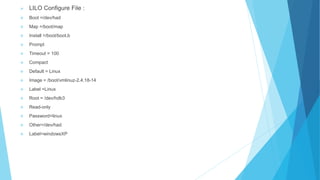
 LILO Configure File :
 Boot =/dev/had
 Map =/boot/map
 Install =/boot/boot.b
 Prompt
 Timeout = 100
 Compact
 Default = Linux
 Image = /boot/vmlinuz-2.4.18-14
 Label =Linux
 Root = /dev/hdb3
 Read-only
 Password=linux
 Other=/dev/had
 Label=windowsXP
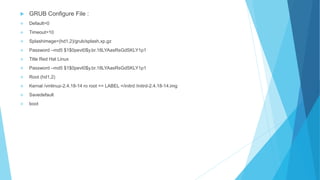
 GRUB Configure File :
 Default=0
 Timeout=10
 Splashimage=(hd1,2)/grub/splash.xp.gz
 Password –md5 $1$0pevt0$y.br.18LYAasRsGdSKLY1p1
 Title Red Hat Linux
 Password –md5 $1$0pevt0$y.br.18LYAasRsGdSKLY1p1
 Root (hd1,2)
 Kernal /vmlinuz-2.4.18-14 ro root == LABEL =/initrd /initrd-2.4.18-14.img
 Savedefault
 boot
2.Patching Linux Kernel:
What is a patch?
 A patch is a small text document containing a delta of changes between two different versions of a
source tree. Patches are created with the diff program.
 To correctly apply a patch you need to know what base it was generated from and what new version
the patch will change the source tree into. These should both be present in the patch file metadata or
be possible to deduce from the filename.
Patching Linux includes :
 Getting new kernel modules
 Editing LILO.conf
 Restarting LILO
 Write new MBR
Kpatch – Dynamic Kernel Patching :
 Kpatch is a feature of the linux kernel that allows live patching of a running kernel which allows kernel
 Patches to be applied to the kernel for security even through the kernel is still running
3.Remove Unused Software:
 Commands:
 For Red Hat/ RHEL/ Fedora / Centos :
$ yum list installed
$ yum list packageName
$ yum remove PackageName
 Debian/Ubuntu Linux :
$ dpkg –l
$ dpkg --info packageName
$ apt-get remove packageName
4.Strong Password Policy :
1) Configuration of shadow password:
 Command:
Nano /etc/login.defs
 Configuration Parameters:
PASS_MAX_DAYS=30
PASS_WARN_AGE=20
ENCRYPT_METHOD SHA512
LOGIN_RETRIES =5
2) Password Files in Linux:
/etc/Passwd /etc/shadow
It has one way encrypted passwords
are stored in a text file.
Shadow utils is a package in linux
that’s installed by default in most of
the distributions.
This file is readable by any user in
the system.
This directory is only accessible to
root.
5.Process Security :
 It is a mix of administrative, engineering and behavioral activities focused on
preventing undesired accidents and unexpected events that may have a
negative impact to a given process.
 We have some components:
 Exec thread
 PID
 Memory Context
 Environment
 Priority
 Security Credentials
 File descriptor
6.Securing Root Login:
 Disabling Root access via any console device (tty).
 edit the securetty file vim/etc/securetty and comment out the following lines:
tty1
#tty2
It means root is allowed to login at tty1. tty2 is disabled.
Operating System
 Patching and Software Updates: periodically patches are released for
included software either due to security flaws or to include additional
functionality.
 File System Configuration:
 Create Separate Partition for /tmp: grep “[[:Space:]]/tmp[[:space:]]” /etc/fstab
 Create Separate Partition for /var: grep “[[:Space:]]/var[[:space:]]” /etc/fstab
 Secure Boot Settings :
 Set permissions on boot loader config: chmod og-rwx/boot/grub/grub.cfg
 Set Boot Loader Password : grub-mkpasswd-pbkdf2
 Os Services:
 Ensure rsh server is not enabled
 Ensure telnet server is not enabled
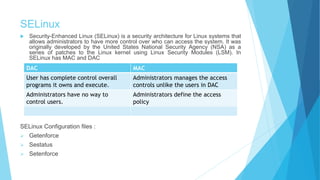
SELinux
 Security-Enhanced Linux (SELinux) is a security architecture for Linux systems that
allows administrators to have more control over who can access the system. It was
originally developed by the United States National Security Agency (NSA) as a
series of patches to the Linux kernel using Linux Security Modules (LSM). In
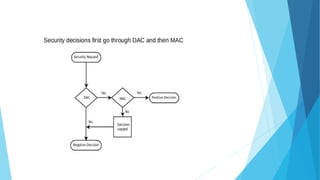
SELinux has MAC and DAC
SELinux Configuration files :
 Getenforce
 Sestatus
 Setenforce
DAC MAC
User has complete control overall
programs it owns and execute.
Administrators manages the access
controls unlike the users in DAC
Administrators have no way to
control users.
Administrators define the access
policy
Linux security

Linux security

  • 1.
  • 2.
    What is Linux?  Linux is a free open source operating system (OS) based on UNIX that was created in 1991 by Linus Torvalds. Users can modify and create variations of the source code, known as distributions, for computers and other devices. The most common use is as a server, but Linux is also used in desktop computers, smartphones, e-book readers and gaming consoles etc.  It is also used by Hackers  Linux Types : o Ubuntu o Redhat o Suse o Debian o Centos o Oracle
  • 3.
    Hardening  Hardening refersto providing various means of protection in a computer system. Protection is provided in various layers and is often referred to as defense in depth. Protecting in layers means to protect at the host level, the application level, the operating system level, the user level, the physical level and all the sublevels in between. Each level requires a unique method of security.  A hardened computer system is a more secure computer system.  Hardening is also known as system hardening.  Guides :  Guides : CIS Benchmark  Tools : Scap , Lynis
  • 4.
    What if wedon’t Hardening ?
  • 5.
    Users and Groups Users and Groups are used to control access to files and resources . Different permissions are also applied depending on users and groups. Users:  Every user of the system is assigned a unique user id known as UID.  Users names and UID’S are stored in this location -/etc/passwd. Users can’t read ,write or executable each other’s file without permissions. Groups:  Users are assigned to groups with unique group id numbers known as the gid.  Each user is given their own group . gids are stored in this location - /etc/group.
  • 6.
    File Security File Permissions: Every file and directory in your UNIX/Linux system has following 3 permissions defined for all the 3 owners discussed above.  Read (r): This permission give you the authority to open and read a file. Read permission on a directory gives you the ability to lists its content.  Write (w): The write permission gives you the authority to modify the contents of a file. The write permission on a directory gives you the authority to add, remove and rename files stored in the directory. Consider a scenario where you have to write permission on file but do not have write permission on the directory where the file is stored. You will be able to modify the file contents. But you will not be able to rename, move or remove the file from the directory.
  • 7.
     Execute (x):In Windows, an executable program usually has an extension ".exe" and which you can easily run. In Unix/Linux, you cannot run a program unless the execute permission is set. If the execute permission is not set, you might still be able to see/modify the program code(provided read & write permissions are set), but not run it. Special Permissions:  In this we have four cases. They are : 1) SUID (Set – user Identification) for an execution. 2) SGID (set group ID) for an execution. 3) SGID (set group ID) for an Directory. 4) Sticky bit for a directory LINK: https://thegeeksalive.com/linux-special-permissions/ INODES :  An inode is a data structure on a traditional Unix-style file system such as UFS or ext3. An inode stores basic information about a regular file, directory, or other file system object.  https://www.cyberciti.biz/tips/understanding-unixlinux-filesystem-inodes.html
  • 8.
    Linux Server Hardening Steps: • Boot Security • Patching Linux Kernel • Remove Unused Software • Strong Password Policy • Securing Root Login • Process Security
  • 9.
    1.Boot Security : Boot loader is useful in preventing unauthorized users who have physical access to systems from booting using removable media like USB .  LILO and GRUB are two boot security loaders for linux workstations.  GRUB VS LILO GRUB LILO GRUB stands for Grand Unified Boot Loader LILO stands for Linux Loader It support for unlimited boot entries LILO only support up to 16 different boot selection GRUB boot from network LILO does not boot from network There is no need to change GRUB if configure file changed . GRUB is dynamically configure There is need to change LILO if configure file changed . LILO is not dynamically configure GRUB has interactive command interface LILO does not have interactive command interface GRUB has knowledge of file system LILO does not have any knowledge of file system
  • 10.
     LILO ConfigureFile :  Boot =/dev/had  Map =/boot/map  Install =/boot/boot.b  Prompt  Timeout = 100  Compact  Default = Linux  Image = /boot/vmlinuz-2.4.18-14  Label =Linux  Root = /dev/hdb3  Read-only  Password=linux  Other=/dev/had  Label=windowsXP
  • 11.
     GRUB ConfigureFile :  Default=0  Timeout=10  Splashimage=(hd1,2)/grub/splash.xp.gz  Password –md5 $1$0pevt0$y.br.18LYAasRsGdSKLY1p1  Title Red Hat Linux  Password –md5 $1$0pevt0$y.br.18LYAasRsGdSKLY1p1  Root (hd1,2)  Kernal /vmlinuz-2.4.18-14 ro root == LABEL =/initrd /initrd-2.4.18-14.img  Savedefault  boot
  • 12.
    2.Patching Linux Kernel: Whatis a patch?  A patch is a small text document containing a delta of changes between two different versions of a source tree. Patches are created with the diff program.  To correctly apply a patch you need to know what base it was generated from and what new version the patch will change the source tree into. These should both be present in the patch file metadata or be possible to deduce from the filename. Patching Linux includes :  Getting new kernel modules  Editing LILO.conf  Restarting LILO  Write new MBR Kpatch – Dynamic Kernel Patching :  Kpatch is a feature of the linux kernel that allows live patching of a running kernel which allows kernel  Patches to be applied to the kernel for security even through the kernel is still running
  • 13.
    3.Remove Unused Software: Commands:  For Red Hat/ RHEL/ Fedora / Centos : $ yum list installed $ yum list packageName $ yum remove PackageName  Debian/Ubuntu Linux : $ dpkg –l $ dpkg --info packageName $ apt-get remove packageName
  • 14.
    4.Strong Password Policy: 1) Configuration of shadow password:  Command: Nano /etc/login.defs  Configuration Parameters: PASS_MAX_DAYS=30 PASS_WARN_AGE=20 ENCRYPT_METHOD SHA512 LOGIN_RETRIES =5 2) Password Files in Linux: /etc/Passwd /etc/shadow It has one way encrypted passwords are stored in a text file. Shadow utils is a package in linux that’s installed by default in most of the distributions. This file is readable by any user in the system. This directory is only accessible to root.
  • 15.
    5.Process Security : It is a mix of administrative, engineering and behavioral activities focused on preventing undesired accidents and unexpected events that may have a negative impact to a given process.  We have some components:  Exec thread  PID  Memory Context  Environment  Priority  Security Credentials  File descriptor
  • 16.
    6.Securing Root Login: Disabling Root access via any console device (tty).  edit the securetty file vim/etc/securetty and comment out the following lines: tty1 #tty2 It means root is allowed to login at tty1. tty2 is disabled.
  • 17.
    Operating System  Patchingand Software Updates: periodically patches are released for included software either due to security flaws or to include additional functionality.  File System Configuration:  Create Separate Partition for /tmp: grep “[[:Space:]]/tmp[[:space:]]” /etc/fstab  Create Separate Partition for /var: grep “[[:Space:]]/var[[:space:]]” /etc/fstab  Secure Boot Settings :  Set permissions on boot loader config: chmod og-rwx/boot/grub/grub.cfg  Set Boot Loader Password : grub-mkpasswd-pbkdf2  Os Services:  Ensure rsh server is not enabled  Ensure telnet server is not enabled
  • 18.
    SELinux  Security-Enhanced Linux(SELinux) is a security architecture for Linux systems that allows administrators to have more control over who can access the system. It was originally developed by the United States National Security Agency (NSA) as a series of patches to the Linux kernel using Linux Security Modules (LSM). In SELinux has MAC and DAC SELinux Configuration files :  Getenforce  Sestatus  Setenforce DAC MAC User has complete control overall programs it owns and execute. Administrators manages the access controls unlike the users in DAC Administrators have no way to control users. Administrators define the access policy