구매회사 구축 프로젝트
Apache HTTPD 설치 보고서
2019-12-27
오픈나루(주)
Copyright © Opennaru, Inc. ii All Rights Reserved.
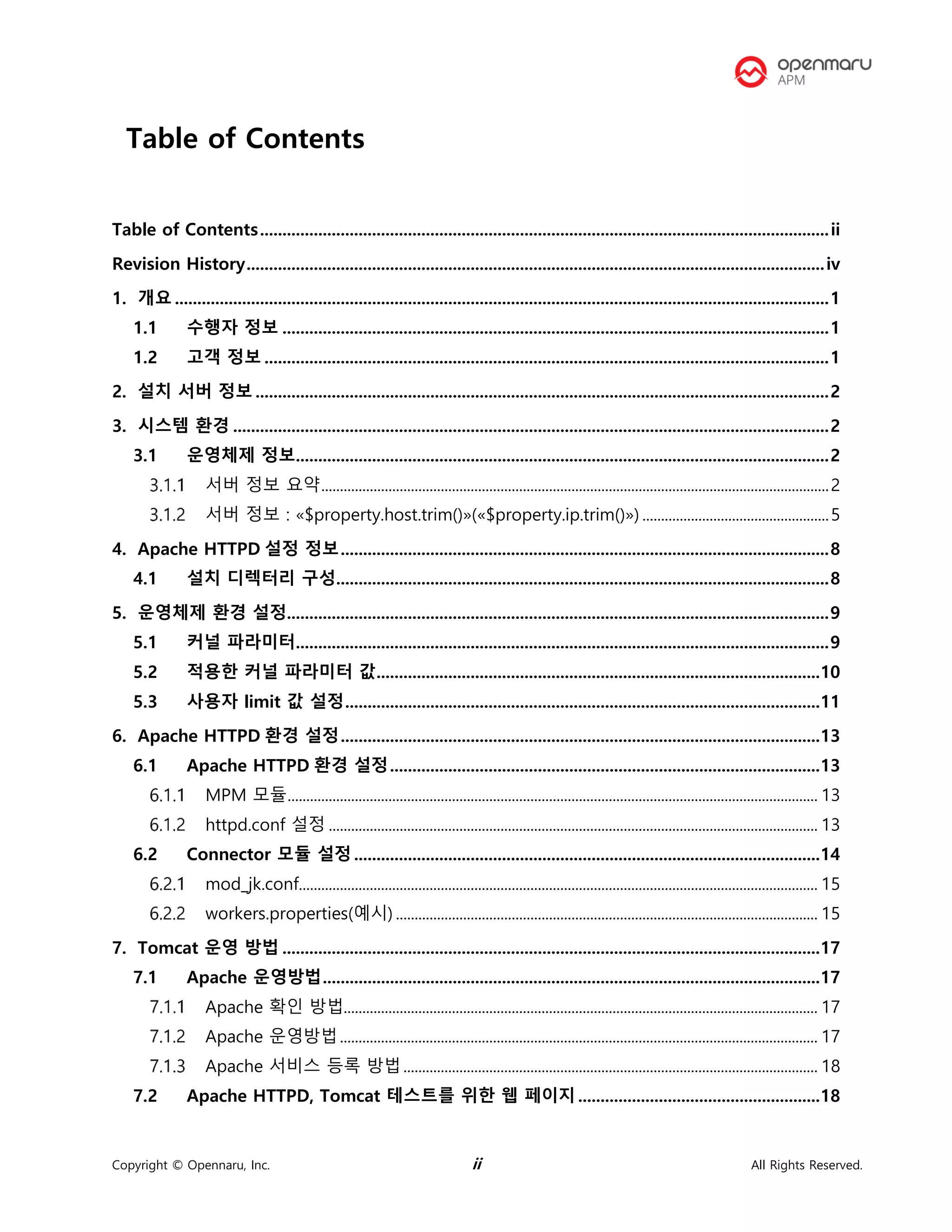
Table of Contents
Table of Contents...............................................................................................................................ii
Revision History.................................................................................................................................iv
1. 개요 ..................................................................................................................................................1
1.1 수행자 정보 ..........................................................................................................................1
1.2 고객 정보 ..............................................................................................................................1
2. 설치 서버 정보 ................................................................................................................................2
3. 시스템 환경 .....................................................................................................................................2
3.1 운영체제 정보.......................................................................................................................2
서버 정보 요약........................................................................................................................................2
서버 정보 : «$property.host.trim()»(«$property.ip.trim()») ..................................................5
4. Apache HTTPD 설정 정보.............................................................................................................8
4.1 설치 디렉터리 구성..............................................................................................................8
5. 운영체제 환경 설정.........................................................................................................................9
5.1 커널 파라미터.......................................................................................................................9
5.2 적용한 커널 파라미터 값...................................................................................................10
5.3 사용자 limit 값 설정..........................................................................................................11
6. Apache HTTPD 환경 설정...........................................................................................................13
6.1 Apache HTTPD 환경 설정................................................................................................13
MPM 모듈.............................................................................................................................................. 13
httpd.conf 설정 ................................................................................................................................... 13
6.2 Connector 모듈 설정 ........................................................................................................14
mod_jk.conf........................................................................................................................................... 15
workers.properties(예시) ................................................................................................................. 15
7. Tomcat 운영 방법 ........................................................................................................................17
7.1 Apache 운영방법...............................................................................................................17
Apache 확인 방법............................................................................................................................... 17
Apache 운영방법................................................................................................................................ 17
Apache 서비스 등록 방법............................................................................................................... 18
7.2 Apache HTTPD, Tomcat 테스트를 위한 웹 페이지......................................................18
Copyright © Opennaru, Inc. iii All Rights Reserved.
Apache HTTPD 자동 생성 웹 페이지.......................................................................................... 19
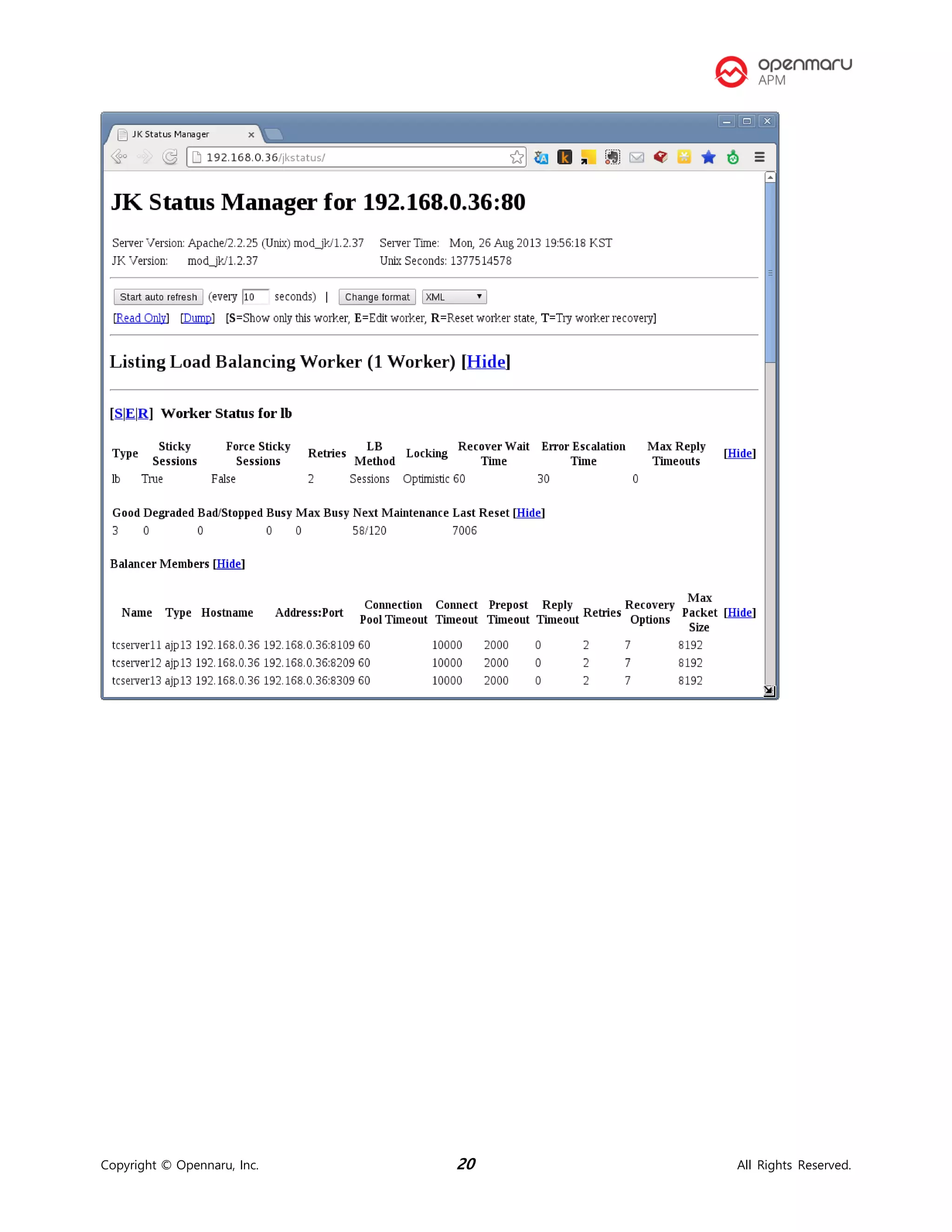
Apache HTTPD jkstatus 페이지.................................................................................................... 19
8. 도움이 필요하십니까? ..................................................................................................................21
9. References....................................................................................................................................22
Copyright © Opennaru, Inc. iv All Rights Reserved.
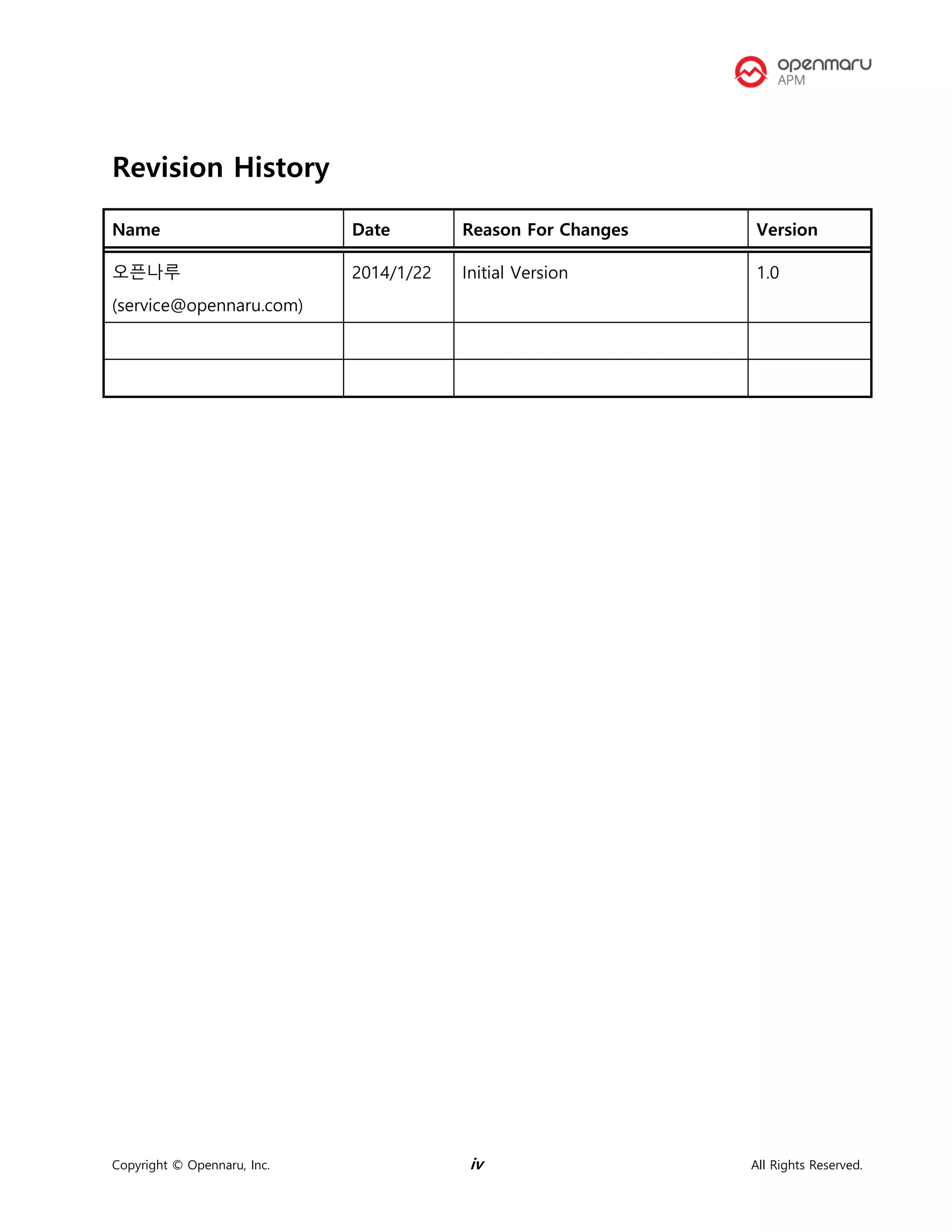
Revision History
Name Date Reason For Changes Version
오픈나루
(service@opennaru.com)
2014/1/22 Initial Version 1.0
Copyright © Opennaru, Inc. 1 All Rights Reserved.
1. 개요
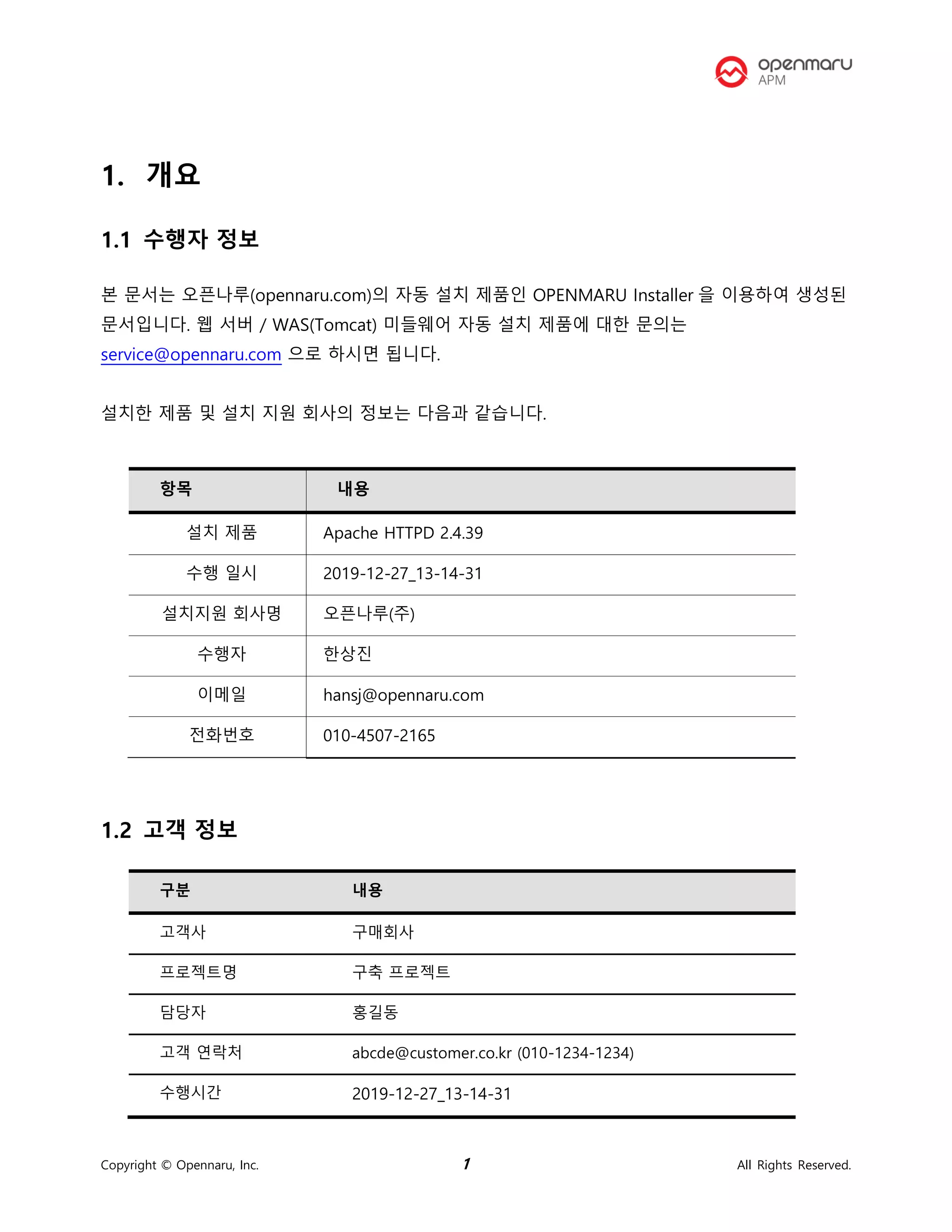
1.1 수행자 정보
본 문서는 오픈나루(opennaru.com)의 자동 설치 제품인 OPENMARU Installer 을 이용하여 생성된
문서입니다. 웹 서버 / WAS(Tomcat) 미들웨어 자동 설치 제품에 대한 문의는
service@opennaru.com 으로 하시면 됩니다.
설치한 제품 및 설치 지원 회사의 정보는 다음과 같습니다.
항목 내용
설치 제품 Apache HTTPD 2.4.39
수행 일시 2019-12-27_13-14-31
설치지원 회사명 오픈나루(주)
수행자 한상진
이메일 hansj@opennaru.com
전화번호 010-4507-2165
1.2 고객 정보
구분 내용
고객사 구매회사
프로젝트명 구축 프로젝트
담당자 홍길동
고객 연락처 abcde@customer.co.kr (010-1234-1234)
수행시간 2019-12-27_13-14-31
Copyright © Opennaru, Inc. 2 All Rights Reserved.
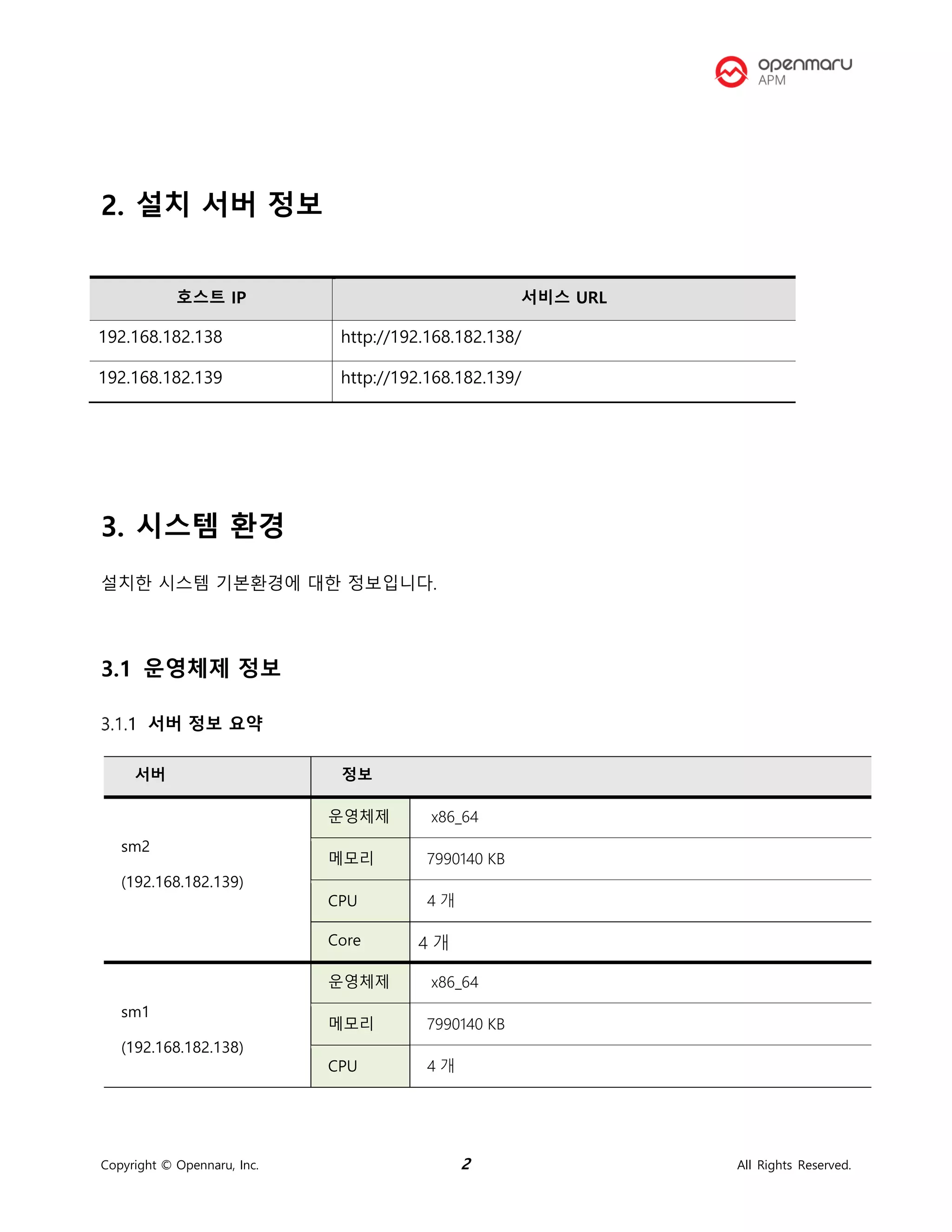
2. 설치 서버 정보
호스트 IP 서비스 URL
192.168.182.138 http://192.168.182.138/
192.168.182.139 http://192.168.182.139/
3. 시스템 환경
설치한 시스템 기본환경에 대한 정보입니다.
3.1 운영체제 정보
서버 정보 요약
서버 정보
sm2
(192.168.182.139)
운영체제 x86_64
메모리 7990140 KB
CPU 4 개
Core 4 개
sm1
(192.168.182.138)
운영체제 x86_64
메모리 7990140 KB
CPU 4 개
Copyright © Opennaru, Inc. 3 All Rights Reserved.
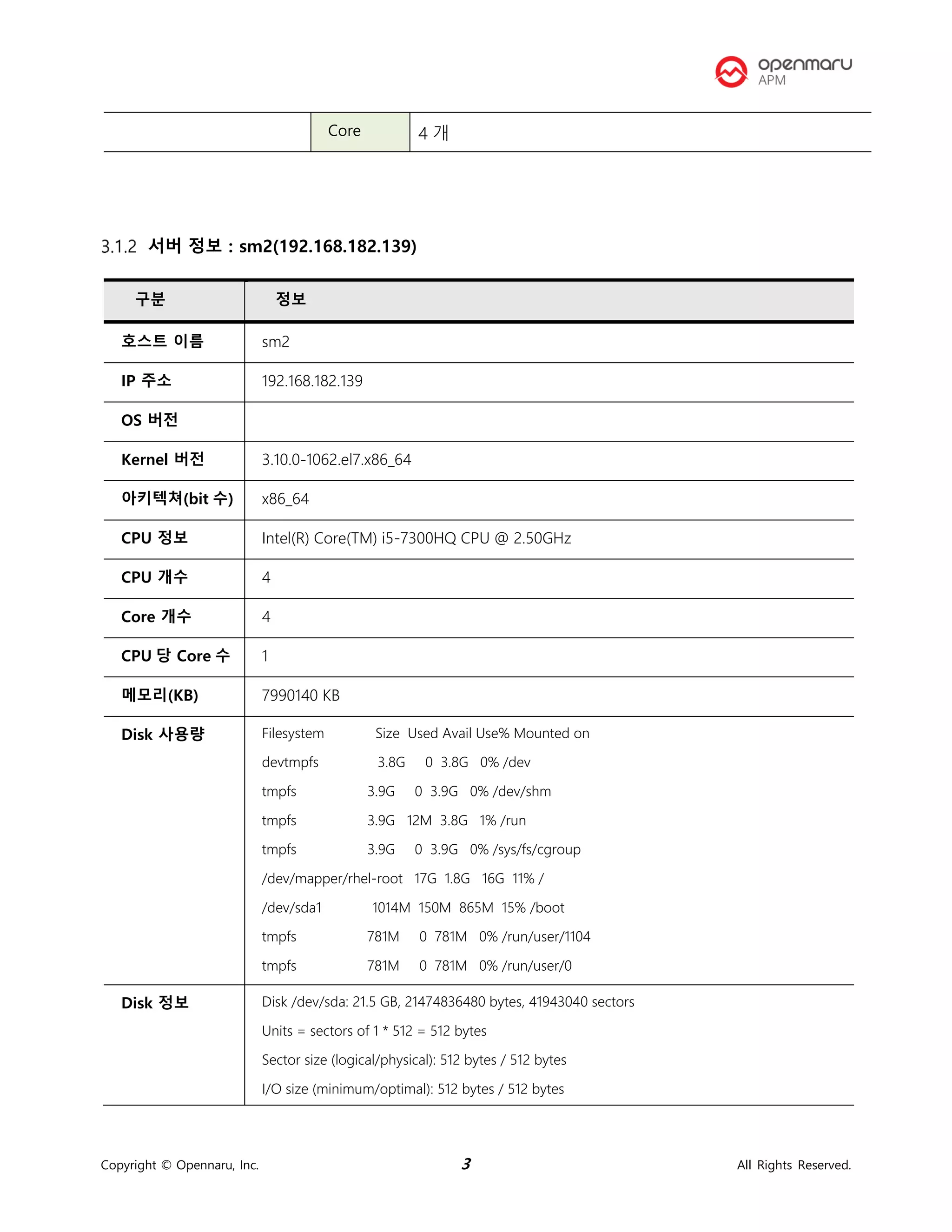
서버 정보 : sm2(192.168.182.139)
Core 4 개
구분 정보
호스트 이름 sm2
IP 주소 192.168.182.139
OS 버전
Kernel 버전 3.10.0-1062.el7.x86_64
아키텍쳐(bit 수) x86_64
CPU 정보 Intel(R) Core(TM) i5-7300HQ CPU @ 2.50GHz
CPU 개수 4
Core 개수 4
CPU 당 Core 수 1
메모리(KB) 7990140 KB
Disk 사용량 Filesystem Size Used Avail Use% Mounted on
devtmpfs 3.8G 0 3.8G 0% /dev
tmpfs 3.9G 0 3.9G 0% /dev/shm
tmpfs 3.9G 12M 3.8G 1% /run
tmpfs 3.9G 0 3.9G 0% /sys/fs/cgroup
/dev/mapper/rhel-root 17G 1.8G 16G 11% /
/dev/sda1 1014M 150M 865M 15% /boot
tmpfs 781M 0 781M 0% /run/user/1104
tmpfs 781M 0 781M 0% /run/user/0
Disk 정보 Disk /dev/sda: 21.5 GB, 21474836480 bytes, 41943040 sectors
Units = sectors of 1 * 512 = 512 bytes
Sector size (logical/physical): 512 bytes / 512 bytes
I/O size (minimum/optimal): 512 bytes / 512 bytes
Copyright © Opennaru, Inc. 4 All Rights Reserved.
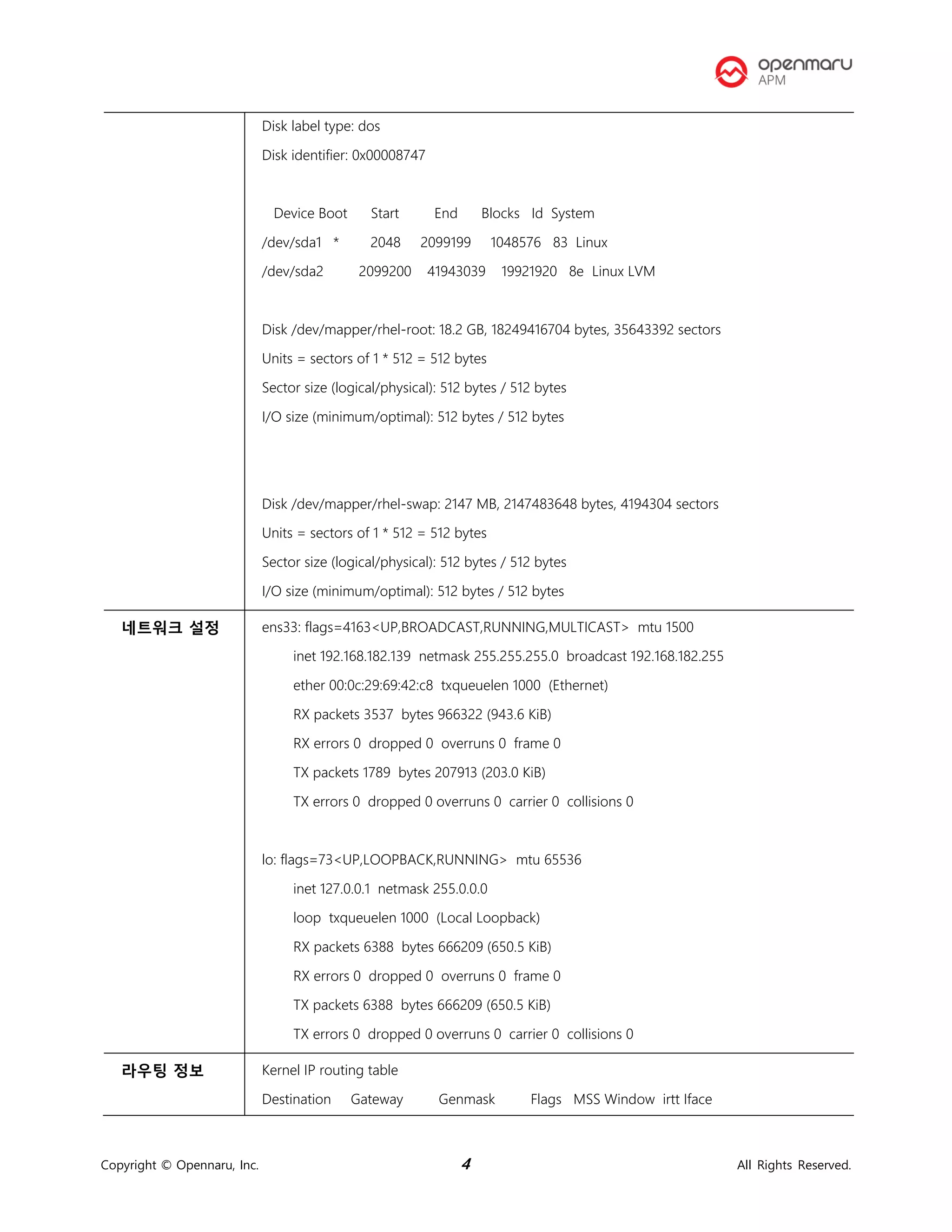
Disk label type: dos
Disk identifier: 0x00008747
Device Boot Start End Blocks Id System
/dev/sda1 * 2048 2099199 1048576 83 Linux
/dev/sda2 2099200 41943039 19921920 8e Linux LVM
Disk /dev/mapper/rhel-root: 18.2 GB, 18249416704 bytes, 35643392 sectors
Units = sectors of 1 * 512 = 512 bytes
Sector size (logical/physical): 512 bytes / 512 bytes
I/O size (minimum/optimal): 512 bytes / 512 bytes
Disk /dev/mapper/rhel-swap: 2147 MB, 2147483648 bytes, 4194304 sectors
Units = sectors of 1 * 512 = 512 bytes
Sector size (logical/physical): 512 bytes / 512 bytes
I/O size (minimum/optimal): 512 bytes / 512 bytes
네트워크 설정 ens33: flags=4163<UP,BROADCAST,RUNNING,MULTICAST> mtu 1500
inet 192.168.182.139 netmask 255.255.255.0 broadcast 192.168.182.255
ether 00:0c:29:69:42:c8 txqueuelen 1000 (Ethernet)
RX packets 3537 bytes 966322 (943.6 KiB)
RX errors 0 dropped 0 overruns 0 frame 0
TX packets 1789 bytes 207913 (203.0 KiB)
TX errors 0 dropped 0 overruns 0 carrier 0 collisions 0
lo: flags=73<UP,LOOPBACK,RUNNING> mtu 65536
inet 127.0.0.1 netmask 255.0.0.0
loop txqueuelen 1000 (Local Loopback)
RX packets 6388 bytes 666209 (650.5 KiB)
RX errors 0 dropped 0 overruns 0 frame 0
TX packets 6388 bytes 666209 (650.5 KiB)
TX errors 0 dropped 0 overruns 0 carrier 0 collisions 0
라우팅 정보 Kernel IP routing table
Destination Gateway Genmask Flags MSS Window irtt Iface
Copyright © Opennaru, Inc. 5 All Rights Reserved.
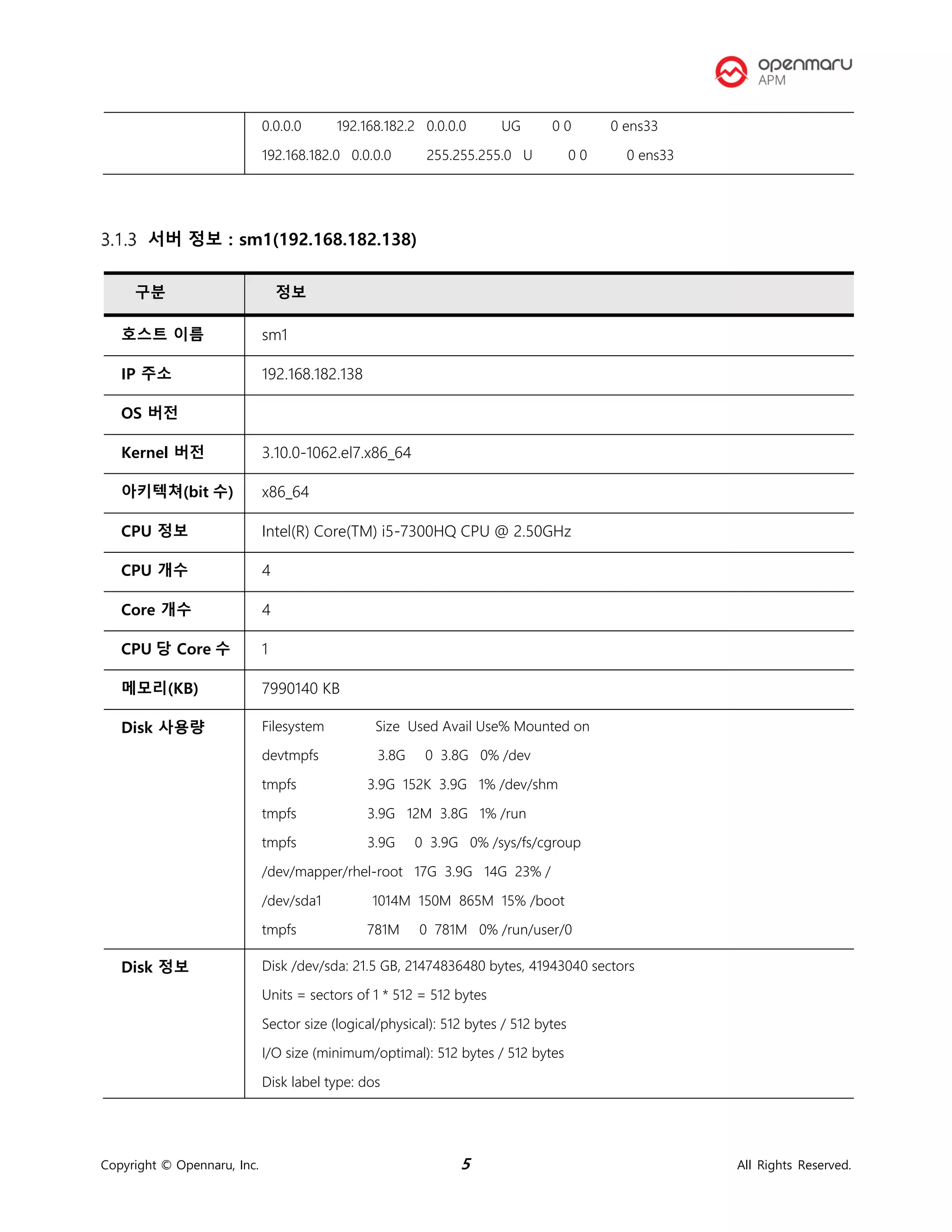
서버 정보 : sm1(192.168.182.138)
0.0.0.0 192.168.182.2 0.0.0.0 UG 0 0 0 ens33
192.168.182.0 0.0.0.0 255.255.255.0 U 0 0 0 ens33
구분 정보
호스트 이름 sm1
IP 주소 192.168.182.138
OS 버전
Kernel 버전 3.10.0-1062.el7.x86_64
아키텍쳐(bit 수) x86_64
CPU 정보 Intel(R) Core(TM) i5-7300HQ CPU @ 2.50GHz
CPU 개수 4
Core 개수 4
CPU 당 Core 수 1
메모리(KB) 7990140 KB
Disk 사용량 Filesystem Size Used Avail Use% Mounted on
devtmpfs 3.8G 0 3.8G 0% /dev
tmpfs 3.9G 152K 3.9G 1% /dev/shm
tmpfs 3.9G 12M 3.8G 1% /run
tmpfs 3.9G 0 3.9G 0% /sys/fs/cgroup
/dev/mapper/rhel-root 17G 3.9G 14G 23% /
/dev/sda1 1014M 150M 865M 15% /boot
tmpfs 781M 0 781M 0% /run/user/0
Disk 정보 Disk /dev/sda: 21.5 GB, 21474836480 bytes, 41943040 sectors
Units = sectors of 1 * 512 = 512 bytes
Sector size (logical/physical): 512 bytes / 512 bytes
I/O size (minimum/optimal): 512 bytes / 512 bytes
Disk label type: dos
Copyright © Opennaru, Inc. 6 All Rights Reserved.
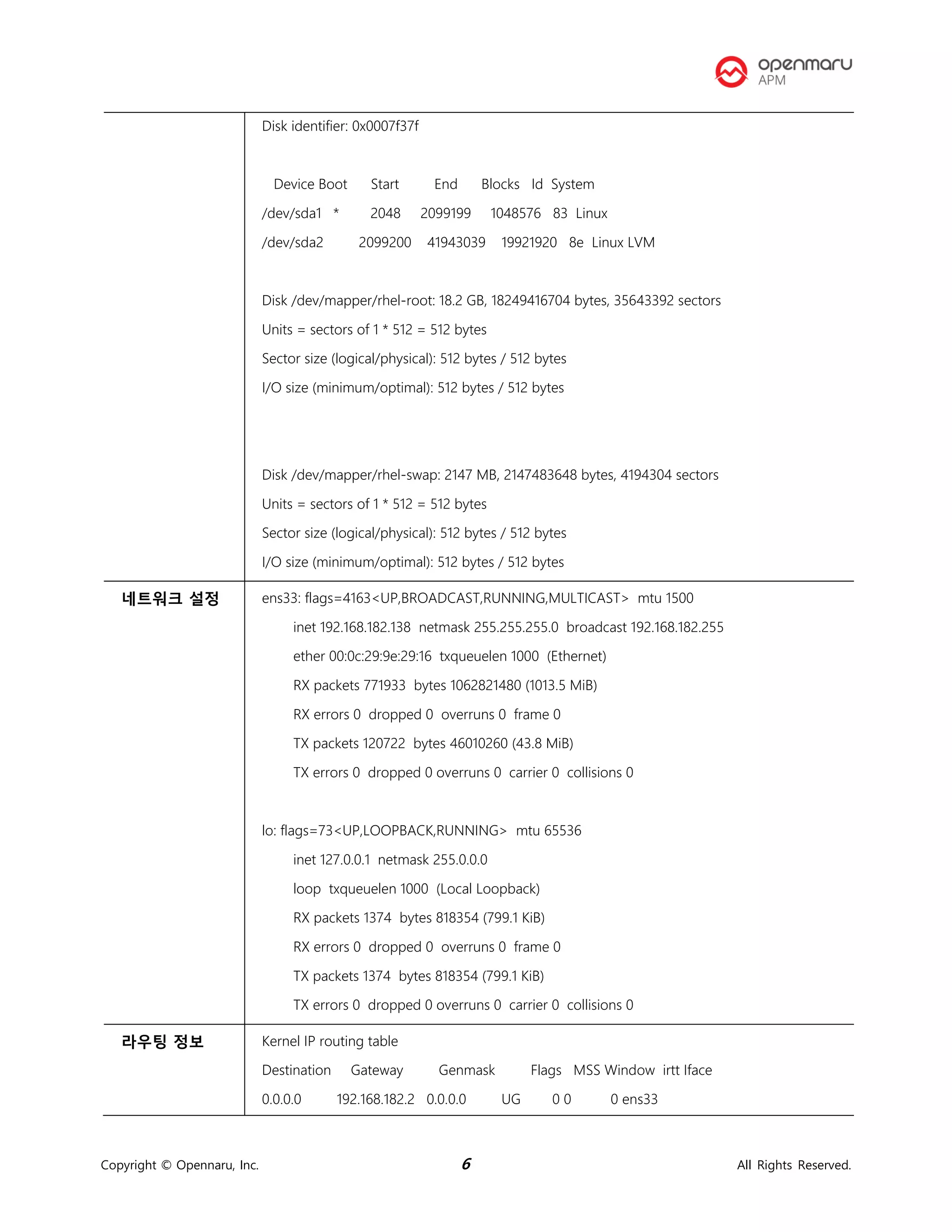
Disk identifier: 0x0007f37f
Device Boot Start End Blocks Id System
/dev/sda1 * 2048 2099199 1048576 83 Linux
/dev/sda2 2099200 41943039 19921920 8e Linux LVM
Disk /dev/mapper/rhel-root: 18.2 GB, 18249416704 bytes, 35643392 sectors
Units = sectors of 1 * 512 = 512 bytes
Sector size (logical/physical): 512 bytes / 512 bytes
I/O size (minimum/optimal): 512 bytes / 512 bytes
Disk /dev/mapper/rhel-swap: 2147 MB, 2147483648 bytes, 4194304 sectors
Units = sectors of 1 * 512 = 512 bytes
Sector size (logical/physical): 512 bytes / 512 bytes
I/O size (minimum/optimal): 512 bytes / 512 bytes
네트워크 설정 ens33: flags=4163<UP,BROADCAST,RUNNING,MULTICAST> mtu 1500
inet 192.168.182.138 netmask 255.255.255.0 broadcast 192.168.182.255
ether 00:0c:29:9e:29:16 txqueuelen 1000 (Ethernet)
RX packets 771933 bytes 1062821480 (1013.5 MiB)
RX errors 0 dropped 0 overruns 0 frame 0
TX packets 120722 bytes 46010260 (43.8 MiB)
TX errors 0 dropped 0 overruns 0 carrier 0 collisions 0
lo: flags=73<UP,LOOPBACK,RUNNING> mtu 65536
inet 127.0.0.1 netmask 255.0.0.0
loop txqueuelen 1000 (Local Loopback)
RX packets 1374 bytes 818354 (799.1 KiB)
RX errors 0 dropped 0 overruns 0 frame 0
TX packets 1374 bytes 818354 (799.1 KiB)
TX errors 0 dropped 0 overruns 0 carrier 0 collisions 0
라우팅 정보 Kernel IP routing table
Destination Gateway Genmask Flags MSS Window irtt Iface
0.0.0.0 192.168.182.2 0.0.0.0 UG 0 0 0 ens33
Copyright © Opennaru, Inc. 7 All Rights Reserved.
192.168.182.0 0.0.0.0 255.255.255.0 U 0 0 0 ens33
Copyright © Opennaru, Inc. 8 All Rights Reserved.
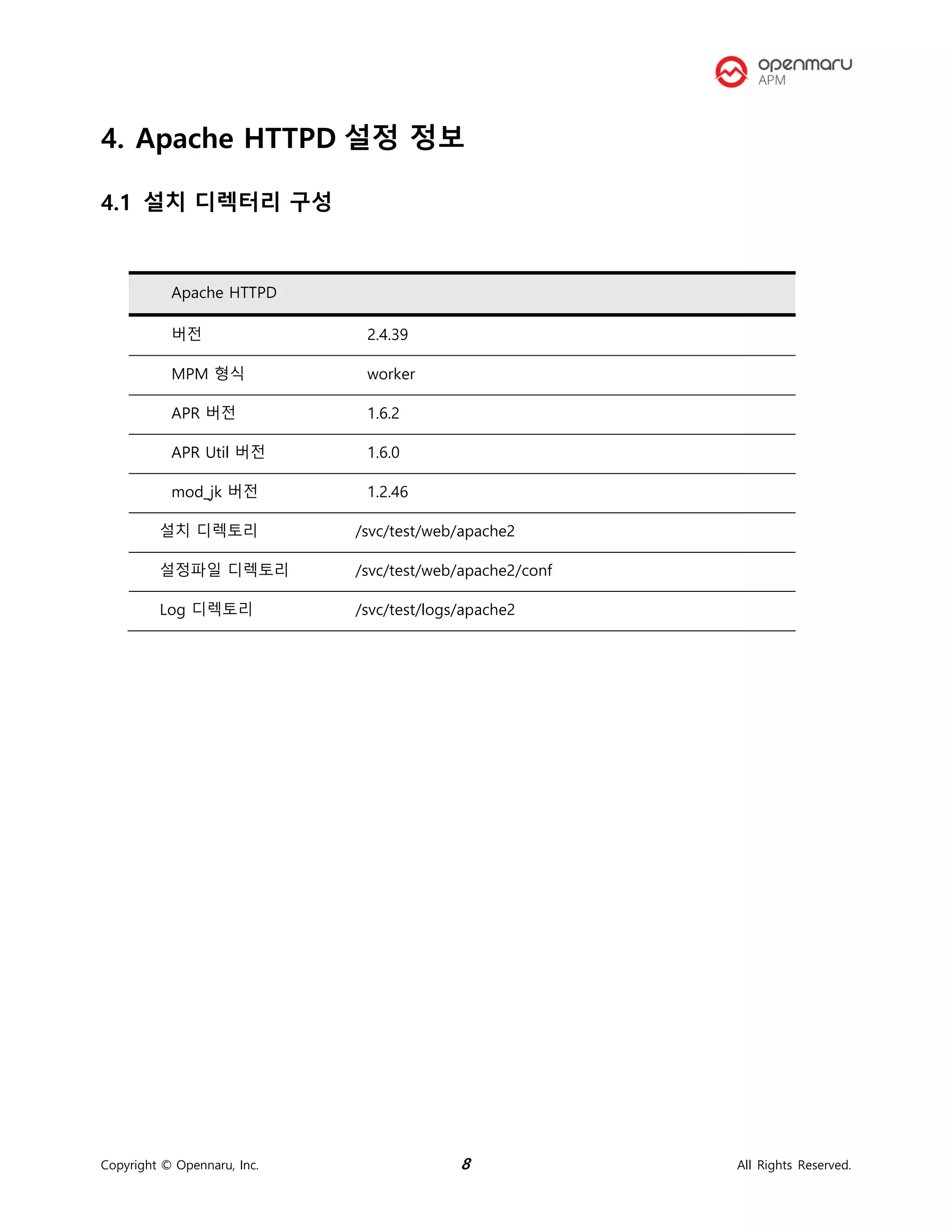
4. Apache HTTPD 설정 정보
4.1 설치 디렉터리 구성
Apache HTTPD
버전 2.4.39
MPM 형식 worker
APR 버전 1.6.2
APR Util 버전 1.6.0
mod_jk 버전 1.2.46
설치 디렉토리 /svc/test/web/apache2
설정파일 디렉토리 /svc/test/web/apache2/conf
Log 디렉토리 /svc/test/logs/apache2
Copyright © Opennaru, Inc. 9 All Rights Reserved.
5. 운영체제 환경 설정
5.1 커널 파라미터
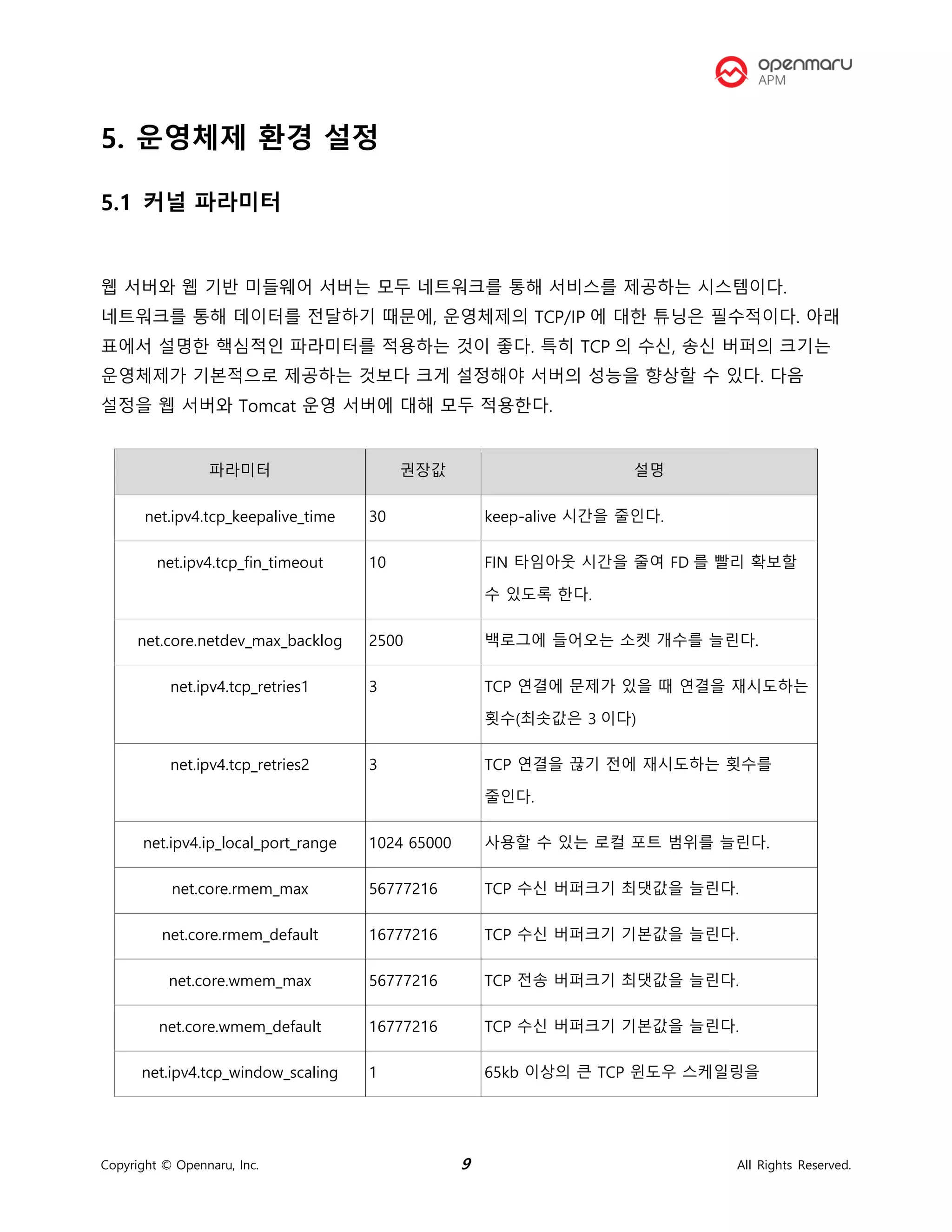
웹 서버와 웹 기반 미들웨어 서버는 모두 네트워크를 통해 서비스를 제공하는 시스템이다.
네트워크를 통해 데이터를 전달하기 때문에, 운영체제의 TCP/IP 에 대한 튜닝은 필수적이다. 아래
표에서 설명한 핵심적인 파라미터를 적용하는 것이 좋다. 특히 TCP 의 수신, 송신 버퍼의 크기는
운영체제가 기본적으로 제공하는 것보다 크게 설정해야 서버의 성능을 향상할 수 있다. 다음
설정을 웹 서버와 Tomcat 운영 서버에 대해 모두 적용한다.
파라미터 권장값 설명
net.ipv4.tcp_keepalive_time 30 keep-alive 시간을 줄인다.
net.ipv4.tcp_fin_timeout 10 FIN 타임아웃 시간을 줄여 FD 를 빨리 확보할
수 있도록 한다.
net.core.netdev_max_backlog 2500 백로그에 들어오는 소켓 개수를 늘린다.
net.ipv4.tcp_retries1 3 TCP 연결에 문제가 있을 때 연결을 재시도하는
횟수(최솟값은 3 이다)
net.ipv4.tcp_retries2 3 TCP 연결을 끊기 전에 재시도하는 횟수를
줄인다.
net.ipv4.ip_local_port_range 1024 65000 사용할 수 있는 로컬 포트 범위를 늘린다.
net.core.rmem_max 56777216 TCP 수신 버퍼크기 최댓값을 늘린다.
net.core.rmem_default 16777216 TCP 수신 버퍼크기 기본값을 늘린다.
net.core.wmem_max 56777216 TCP 전송 버퍼크기 최댓값을 늘린다.
net.core.wmem_default 16777216 TCP 수신 버퍼크기 기본값을 늘린다.
net.ipv4.tcp_window_scaling 1 65kb 이상의 큰 TCP 윈도우 스케일링을
Copyright © Opennaru, Inc. 10 All Rights Reserved.
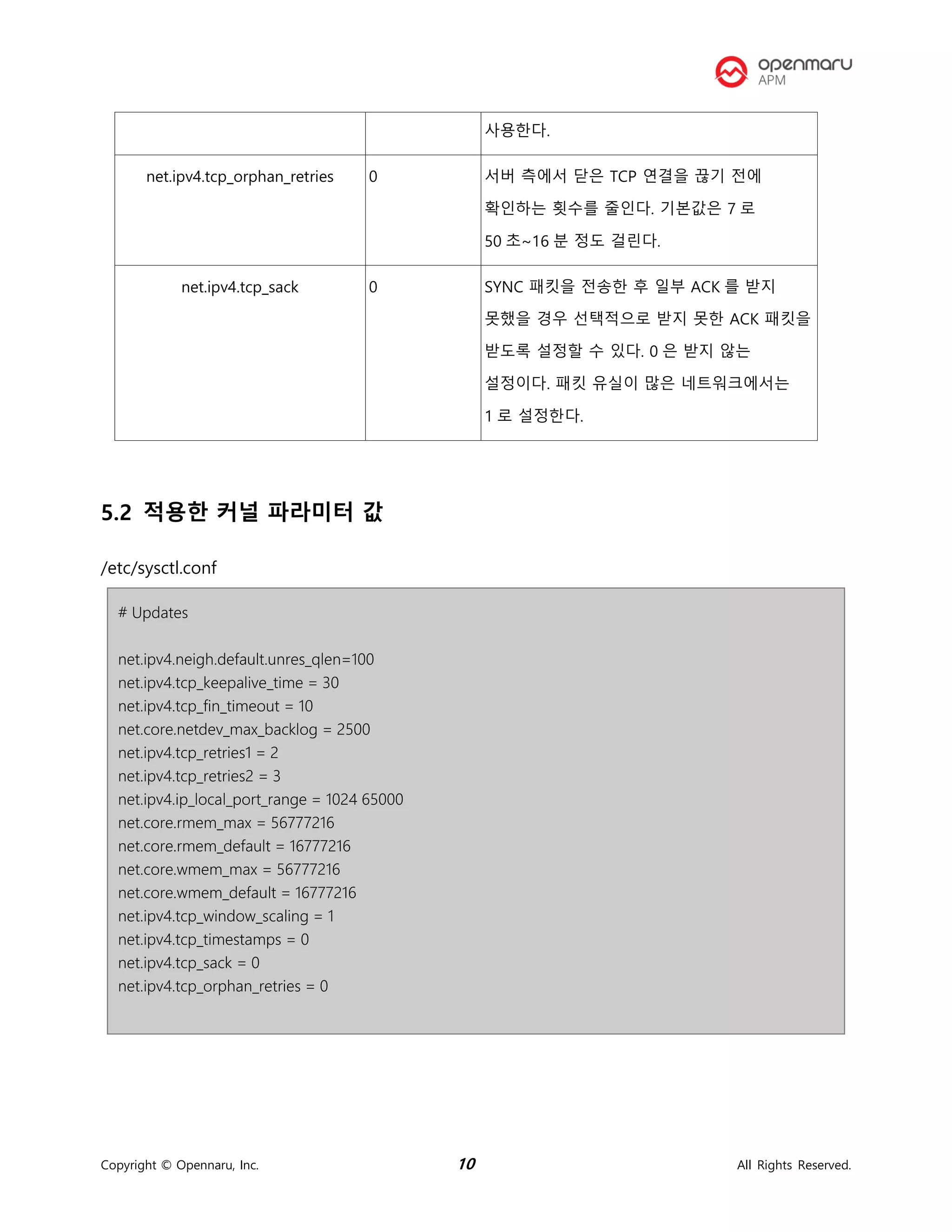
사용한다.
net.ipv4.tcp_orphan_retries 0 서버 측에서 닫은 TCP 연결을 끊기 전에
확인하는 횟수를 줄인다. 기본값은 7 로
50 초~16 분 정도 걸린다.
net.ipv4.tcp_sack 0 SYNC 패킷을 전송한 후 일부 ACK 를 받지
못했을 경우 선택적으로 받지 못한 ACK 패킷을
받도록 설정할 수 있다. 0 은 받지 않는
설정이다. 패킷 유실이 많은 네트워크에서는
1 로 설정한다.
5.2 적용한 커널 파라미터 값
/etc/sysctl.conf
# Updates
net.ipv4.neigh.default.unres_qlen=100
net.ipv4.tcp_keepalive_time = 30
net.ipv4.tcp_fin_timeout = 10
net.core.netdev_max_backlog = 2500
net.ipv4.tcp_retries1 = 2
net.ipv4.tcp_retries2 = 3
net.ipv4.ip_local_port_range = 1024 65000
net.core.rmem_max = 56777216
net.core.rmem_default = 16777216
net.core.wmem_max = 56777216
net.core.wmem_default = 16777216
net.ipv4.tcp_window_scaling = 1
net.ipv4.tcp_timestamps = 0
net.ipv4.tcp_sack = 0
net.ipv4.tcp_orphan_retries = 0
Copyright © Opennaru, Inc. 11 All Rights Reserved.
5.3 사용자 limit 값 설정
# /etc/security/limits.conf
#
#This file sets the resource limits for the users logged in via PAM.
#It does not affect resource limits of the system services.
#
#Each line describes a limit for a user in the form:
#
#<domain> <type> <item> <value>
#
#Where:
#<domain> can be:
# - an user name
# - a group name, with @group syntax
# - the wildcard *, for default entry
# - the wildcard %, can be also used with %group syntax,
# for maxlogin limit
#
#<type> can have the two values:
# - "soft" for enforcing the soft limits
# - "hard" for enforcing hard limits
#
#<item> can be one of the following:
# - core - limits the core file size (KB)
# - data - max data size (KB)
# - fsize - maximum filesize (KB)
# - memlock - max locked-in-memory address space (KB)
# - nofile - max number of open files
# - rss - max resident set size (KB)
# - stack - max stack size (KB)
# - cpu - max CPU time (MIN)
# - nproc - max number of processes
# - as - address space limit (KB)
# - maxlogins - max number of logins for this user
# - maxsyslogins - max number of logins on the system
# - priority - the priority to run user process with
# - locks - max number of file locks the user can hold
# - sigpending - max number of pending signals
# - msgqueue - max memory used by POSIX message queues (bytes)
Copyright © Opennaru, Inc. 12 All Rights Reserved.
# - nice - max nice priority allowed to raise to values: [-20, 19]
# - rtprio - max realtime priority
#
#<domain> <type> <item> <value>
#
#* soft core 0
#* hard rss 10000
#@student hard nproc 20
#@faculty soft nproc 20
#@faculty hard nproc 50
#ftp hard nproc 0
#@student - maxlogins 4
apache hard nofile 65536
apache soft nofile 65536
apache soft nproc 2047
apache hard nproc 16384
# End of file
Copyright © Opennaru, Inc. 13 All Rights Reserved.
6. Apache HTTPD 환경 설정
6.1 Apache HTTPD 환경 설정
MPM 모듈
Apache HTTPD 는 prefork, worker, event 방식을 모두 지원한다. KHAN [provisioning]을 이용한
설치시에는 ‘worker’ 을 사용하도록 설치하였다.
httpd.conf 설정
Worker MPM 방식을 사용할 경우 아래 설정 값이 적용된다.
# worker MPM
# StartServers: initial number of server processes to start
# MaxClients: maximum number of simultaneous client connections
# MinSpareThreads: minimum number of worker threads which are kept spare
# MaxSpareThreads: maximum number of worker threads which are kept spare
# ThreadsPerChild: constant number of worker threads in each server process
# MaxRequestsPerChild: maximum number of requests a server process serves
<IfModule mpm_worker_module>
StartServers 10
MaxClients 960
MinSpareThreads 75
MaxSpareThreads 150
ThreadsPerChild 64
MaxRequestsPerChild 250
</IfModule>
ListenBackLog 1000
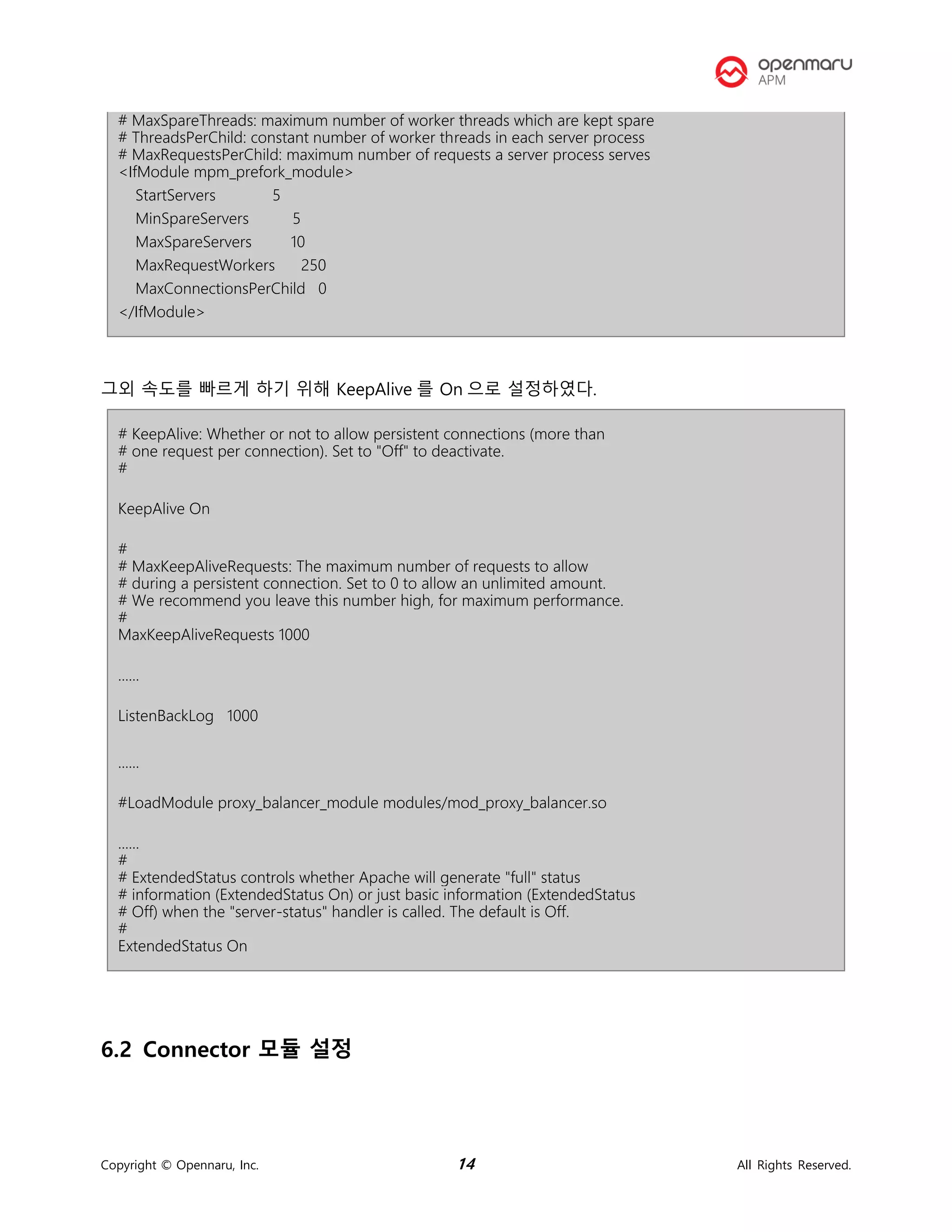
Prefork 일 경우 아래 설정 값이 적용된다.
# worker MPM
# StartServers: initial number of server processes to start
# MaxClients: maximum number of simultaneous client connections
# MinSpareThreads: minimum number of worker threads which are kept spare
Copyright © Opennaru, Inc. 14 All Rights Reserved.
# MaxSpareThreads: maximum number of worker threads which are kept spare
# ThreadsPerChild: constant number of worker threads in each server process
# MaxRequestsPerChild: maximum number of requests a server process serves
<IfModule mpm_prefork_module>
StartServers 5
MinSpareServers 5
MaxSpareServers 10
MaxRequestWorkers 250
MaxConnectionsPerChild 0
</IfModule>
그외 속도를 빠르게 하기 위해 KeepAlive 를 On 으로 설정하였다.
# KeepAlive: Whether or not to allow persistent connections (more than
# one request per connection). Set to "Off" to deactivate.
#
KeepAlive On
#
# MaxKeepAliveRequests: The maximum number of requests to allow
# during a persistent connection. Set to 0 to allow an unlimited amount.
# We recommend you leave this number high, for maximum performance.
#
MaxKeepAliveRequests 1000
......
ListenBackLog 1000
......
#LoadModule proxy_balancer_module modules/mod_proxy_balancer.so
......
#
# ExtendedStatus controls whether Apache will generate "full" status
# information (ExtendedStatus On) or just basic information (ExtendedStatus
# Off) when the "server-status" handler is called. The default is Off.
#
ExtendedStatus On
6.2 Connector 모듈 설정
Copyright © Opennaru, Inc. 15 All Rights Reserved.
Apache HTTPD 는 WAS 서버와 mod_jk 방식을 사용하도록 설정하였다.
$khanConfig.webProperty.property.SVC_WEB_HOME/httpd/conf.d 디렉토리에 mod_jk.conf,
workers.properties 파일에 설정이 저장되어 있다.
mod_jk.conf
# Load mod_jk module
# Update this path to match your modules location
LoadModule jk_module modules/mod_jk.so
# Where to find workers.properties
# Update this path to match your conf directory location (put workers.properties next to httpd.conf)
JkWorkersFile conf.d/workers.properties
# Where to put jk logs
# Update this path to match your logs directory location (put mod_jk.log next to access_log)
JkLogFile /svc/test/logs/web/mod_jk.log
JkShmFile /svc/test/logs/web/mod_jk.shm
# Set the jk log level [debug/error/info]
#JkLogLevel debug
JkLogLevel info
# Select the log format
JkLogStampFormat "[%a %b %d %H:%M:%S %Y] "
# JkOptions indicate to send SSL KEY SIZE,
JkOptions +ForwardKeySize +ForwardURICompat -ForwardDirectories +ForwardURICompatUnparsed
# JkRequestLogFormat set the request format
JkRequestLogFormat "%w %V %T"
# Send everything for context /examples to worker named worker1 (ajp13)
JkMount /*.jsp lb
JkMount /*.do lb
JkMount /*.mvc lb
JkMount /jkstatus* jkstatus
workers.properties(예시)
Copyright © Opennaru, Inc. 16 All Rights Reserved.
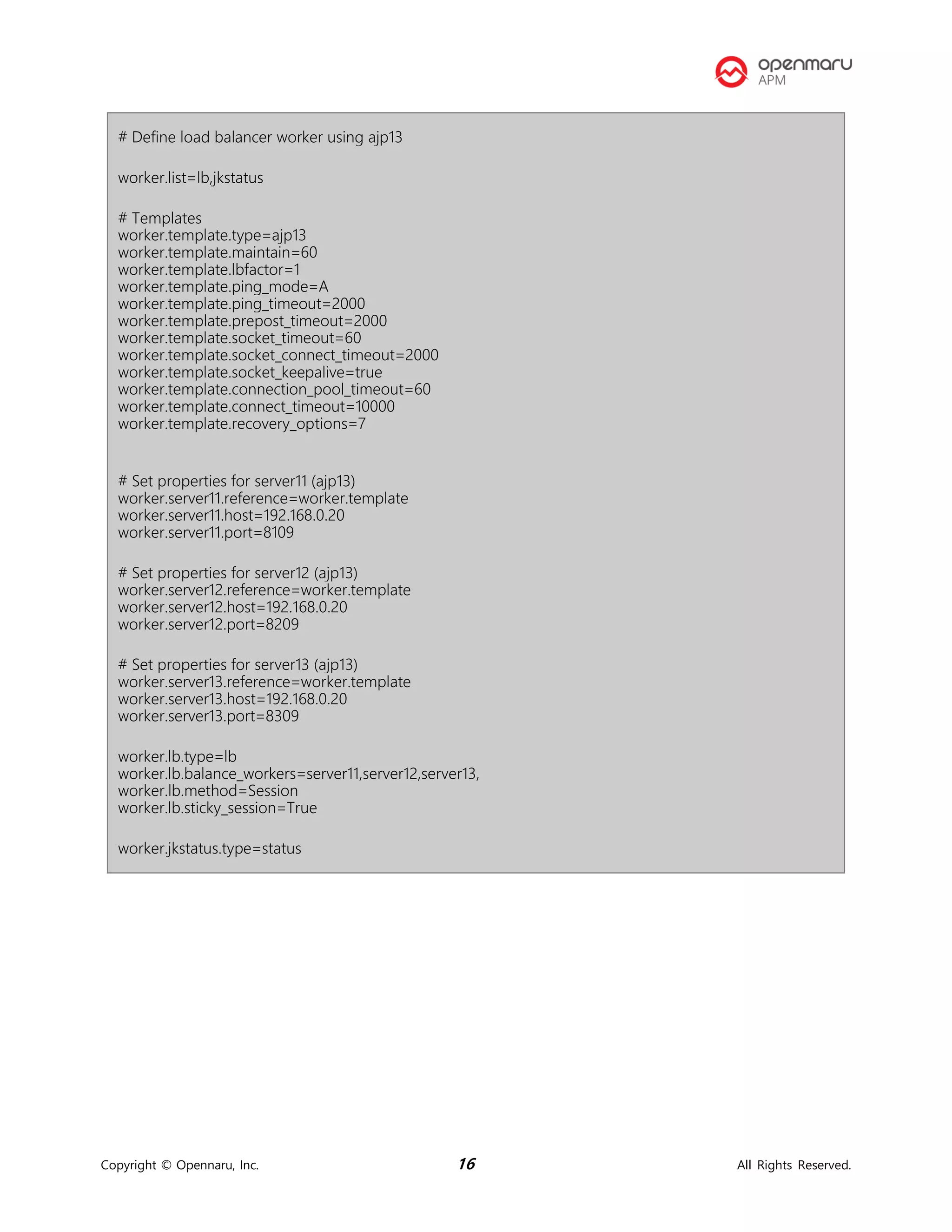
# Define load balancer worker using ajp13
worker.list=lb,jkstatus
# Templates
worker.template.type=ajp13
worker.template.maintain=60
worker.template.lbfactor=1
worker.template.ping_mode=A
worker.template.ping_timeout=2000
worker.template.prepost_timeout=2000
worker.template.socket_timeout=60
worker.template.socket_connect_timeout=2000
worker.template.socket_keepalive=true
worker.template.connection_pool_timeout=60
worker.template.connect_timeout=10000
worker.template.recovery_options=7
# Set properties for server11 (ajp13)
worker.server11.reference=worker.template
worker.server11.host=192.168.0.20
worker.server11.port=8109
# Set properties for server12 (ajp13)
worker.server12.reference=worker.template
worker.server12.host=192.168.0.20
worker.server12.port=8209
# Set properties for server13 (ajp13)
worker.server13.reference=worker.template
worker.server13.host=192.168.0.20
worker.server13.port=8309
worker.lb.type=lb
worker.lb.balance_workers=server11,server12,server13,
worker.lb.method=Session
worker.lb.sticky_session=True
worker.jkstatus.type=status
Copyright © Opennaru, Inc. 17 All Rights Reserved.
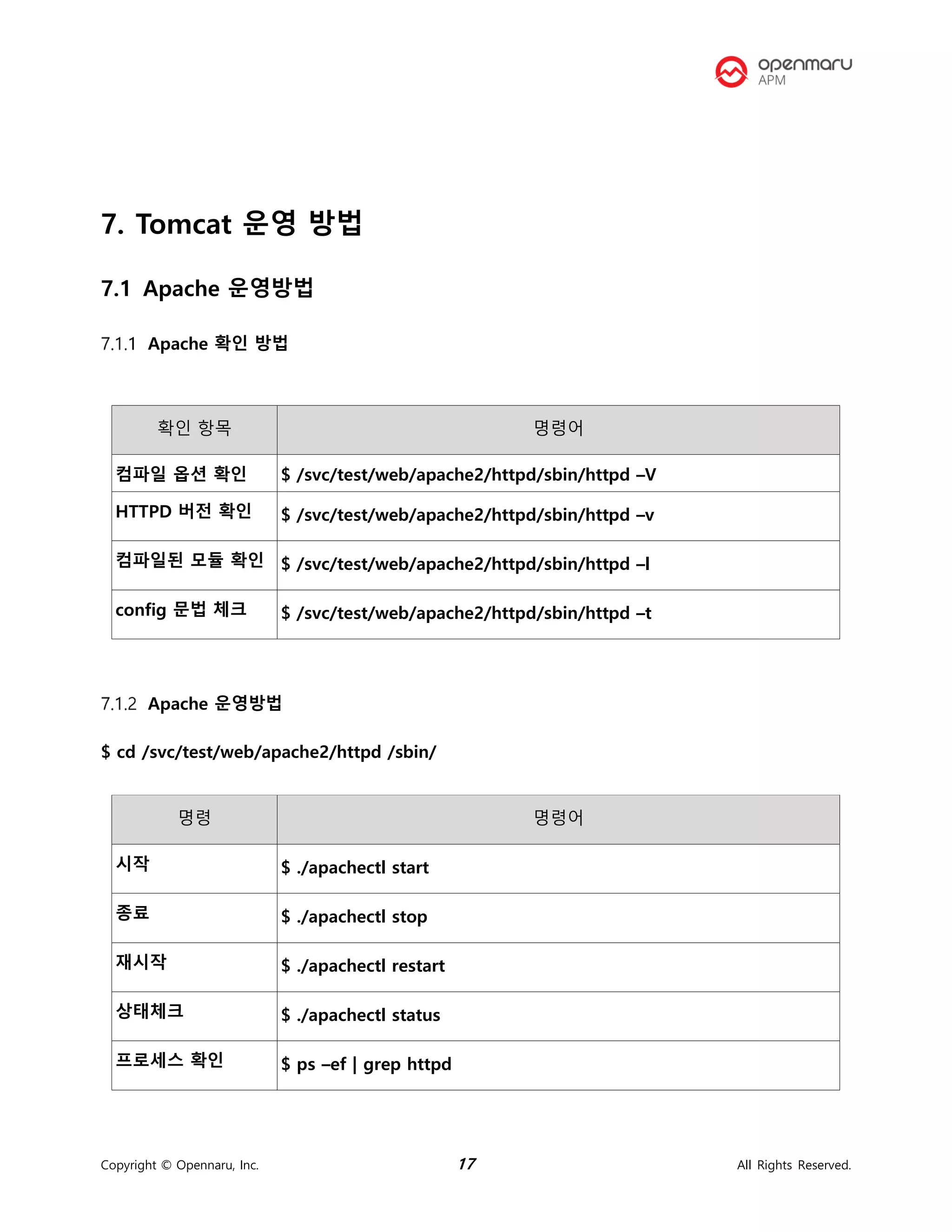
7. Tomcat 운영 방법
7.1 Apache 운영방법
Apache 확인 방법
확인 항목 명령어
컴파일 옵션 확인 $ /svc/test/web/apache2/httpd/sbin/httpd –V
HTTPD 버전 확인 $ /svc/test/web/apache2/httpd/sbin/httpd –v
컴파일된 모듈 확인 $ /svc/test/web/apache2/httpd/sbin/httpd –l
config 문법 체크 $ /svc/test/web/apache2/httpd/sbin/httpd –t
Apache 운영방법
$ cd /svc/test/web/apache2/httpd /sbin/
명령 명령어
시작 $ ./apachectl start
종료 $ ./apachectl stop
재시작 $ ./apachectl restart
상태체크 $ ./apachectl status
프로세스 확인 $ ps –ef | grep httpd
Copyright © Opennaru, Inc. 18 All Rights Reserved.
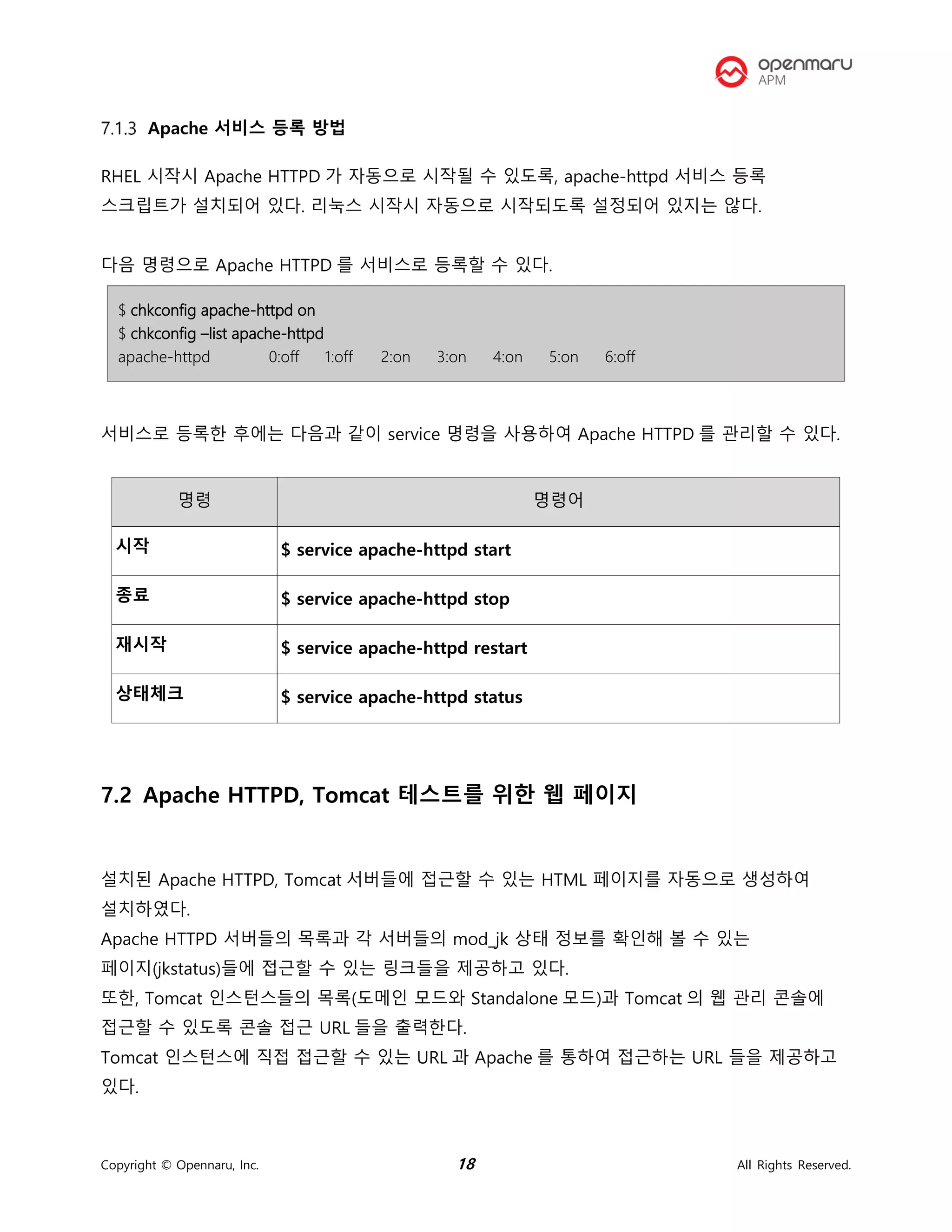
Apache 서비스 등록 방법
RHEL 시작시 Apache HTTPD 가 자동으로 시작될 수 있도록, apache-httpd 서비스 등록
스크립트가 설치되어 있다. 리눅스 시작시 자동으로 시작되도록 설정되어 있지는 않다.
다음 명령으로 Apache HTTPD 를 서비스로 등록할 수 있다.
$ chkconfig apache-httpd on
$ chkconfig –list apache-httpd
apache-httpd 0:off 1:off 2:on 3:on 4:on 5:on 6:off
서비스로 등록한 후에는 다음과 같이 service 명령을 사용하여 Apache HTTPD 를 관리할 수 있다.
명령 명령어
시작 $ service apache-httpd start
종료 $ service apache-httpd stop
재시작 $ service apache-httpd restart
상태체크 $ service apache-httpd status
7.2 Apache HTTPD, Tomcat 테스트를 위한 웹 페이지
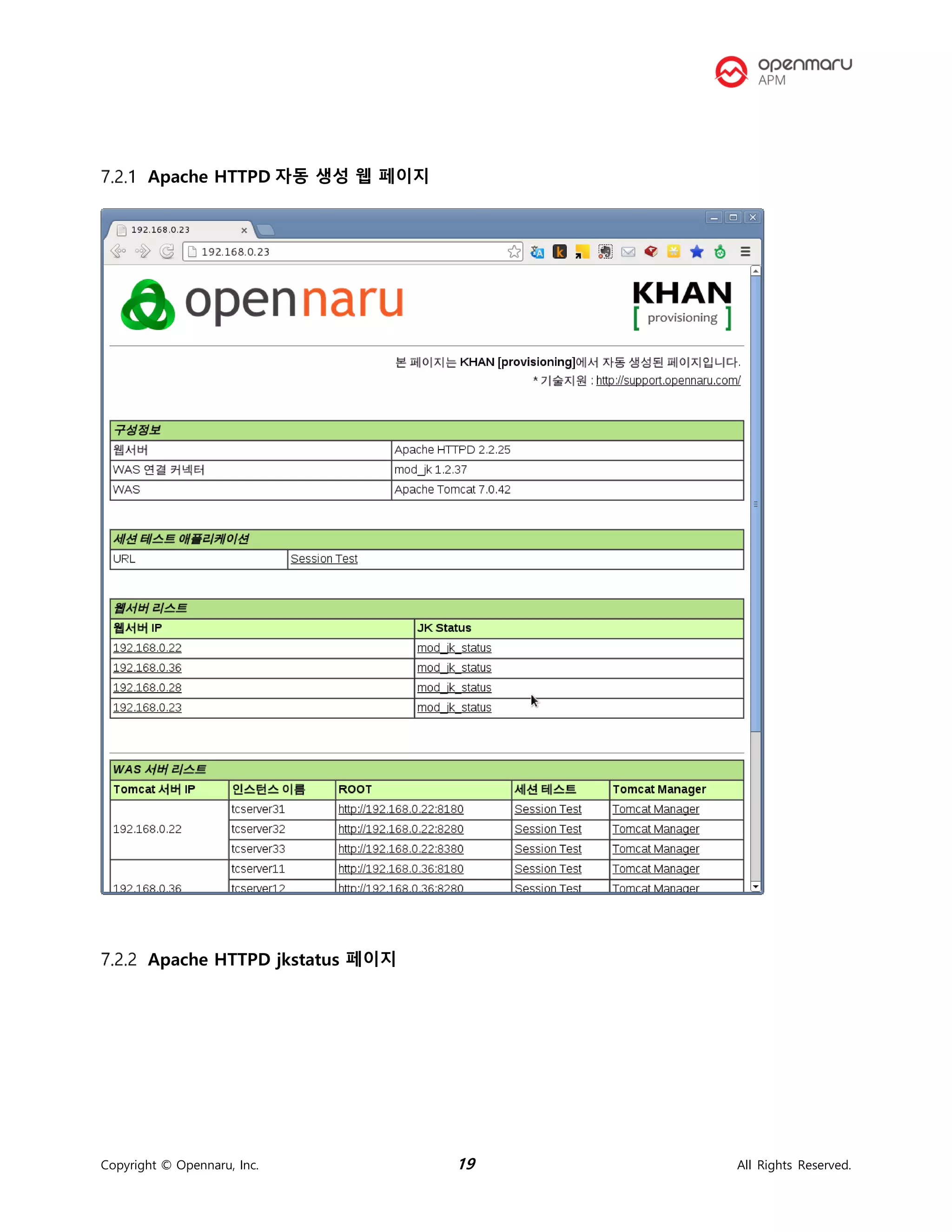
설치된 Apache HTTPD, Tomcat 서버들에 접근할 수 있는 HTML 페이지를 자동으로 생성하여
설치하였다.
Apache HTTPD 서버들의 목록과 각 서버들의 mod_jk 상태 정보를 확인해 볼 수 있는
페이지(jkstatus)들에 접근할 수 있는 링크들을 제공하고 있다.
또한, Tomcat 인스턴스들의 목록(도메인 모드와 Standalone 모드)과 Tomcat 의 웹 관리 콘솔에
접근할 수 있도록 콘솔 접근 URL 들을 출력한다.
Tomcat 인스턴스에 직접 접근할 수 있는 URL 과 Apache 를 통하여 접근하는 URL 들을 제공하고
있다.
Copyright © Opennaru, Inc. 19 All Rights Reserved.
Apache HTTPD 자동 생성 웹 페이지
Apache HTTPD jkstatus 페이지
Copyright © Opennaru, Inc. 20 All Rights Reserved.
Copyright © Opennaru, Inc. 21 All Rights Reserved.
8. 도움이 필요하십니까?
만약 이 문서에 설명된 절차를 수행할 때 문제를 겪는다면, 오픈나루 고객
포털(http://support.opennaru.com)을 방문하십시오.
Copyright © Opennaru, Inc. 22 All Rights Reserved.
9. References
⚫ Red Hat Documentation
 http://docs.redhat.com/
⚫ 오픈나루 고객지원 포탈
 http://support.opennaru.com
⚫ 오픈나루 Facebook Page
 https://www.facebook.com/opennaru
t : +82-2-469-5426 f : +82-2-469-7247
e : service@opennaru.com, sales@opennaru.com
h : http://www.opennaru.com
본 문서는 오픈나루(opennaru.com)의 자동 설치 제품인 OPENMARU Installer 을 이용하여 생성된 문서입니다. 본
문서에 대한 저작권은 오픈나루 주식회사에 있습니다.

Apache httpd ( 아파치 웹서버 ) 설치 가이드

  • 1.
    구매회사 구축 프로젝트 ApacheHTTPD 설치 보고서 2019-12-27 오픈나루(주)
  • 2.
    Copyright © Opennaru,Inc. ii All Rights Reserved. Table of Contents Table of Contents...............................................................................................................................ii Revision History.................................................................................................................................iv 1. 개요 ..................................................................................................................................................1 1.1 수행자 정보 ..........................................................................................................................1 1.2 고객 정보 ..............................................................................................................................1 2. 설치 서버 정보 ................................................................................................................................2 3. 시스템 환경 .....................................................................................................................................2 3.1 운영체제 정보.......................................................................................................................2 서버 정보 요약........................................................................................................................................2 서버 정보 : «$property.host.trim()»(«$property.ip.trim()») ..................................................5 4. Apache HTTPD 설정 정보.............................................................................................................8 4.1 설치 디렉터리 구성..............................................................................................................8 5. 운영체제 환경 설정.........................................................................................................................9 5.1 커널 파라미터.......................................................................................................................9 5.2 적용한 커널 파라미터 값...................................................................................................10 5.3 사용자 limit 값 설정..........................................................................................................11 6. Apache HTTPD 환경 설정...........................................................................................................13 6.1 Apache HTTPD 환경 설정................................................................................................13 MPM 모듈.............................................................................................................................................. 13 httpd.conf 설정 ................................................................................................................................... 13 6.2 Connector 모듈 설정 ........................................................................................................14 mod_jk.conf........................................................................................................................................... 15 workers.properties(예시) ................................................................................................................. 15 7. Tomcat 운영 방법 ........................................................................................................................17 7.1 Apache 운영방법...............................................................................................................17 Apache 확인 방법............................................................................................................................... 17 Apache 운영방법................................................................................................................................ 17 Apache 서비스 등록 방법............................................................................................................... 18 7.2 Apache HTTPD, Tomcat 테스트를 위한 웹 페이지......................................................18
  • 3.
    Copyright © Opennaru,Inc. iii All Rights Reserved. Apache HTTPD 자동 생성 웹 페이지.......................................................................................... 19 Apache HTTPD jkstatus 페이지.................................................................................................... 19 8. 도움이 필요하십니까? ..................................................................................................................21 9. References....................................................................................................................................22
  • 4.
    Copyright © Opennaru,Inc. iv All Rights Reserved. Revision History Name Date Reason For Changes Version 오픈나루 (service@opennaru.com) 2014/1/22 Initial Version 1.0
  • 5.
    Copyright © Opennaru,Inc. 1 All Rights Reserved. 1. 개요 1.1 수행자 정보 본 문서는 오픈나루(opennaru.com)의 자동 설치 제품인 OPENMARU Installer 을 이용하여 생성된 문서입니다. 웹 서버 / WAS(Tomcat) 미들웨어 자동 설치 제품에 대한 문의는 service@opennaru.com 으로 하시면 됩니다. 설치한 제품 및 설치 지원 회사의 정보는 다음과 같습니다. 항목 내용 설치 제품 Apache HTTPD 2.4.39 수행 일시 2019-12-27_13-14-31 설치지원 회사명 오픈나루(주) 수행자 한상진 이메일 hansj@opennaru.com 전화번호 010-4507-2165 1.2 고객 정보 구분 내용 고객사 구매회사 프로젝트명 구축 프로젝트 담당자 홍길동 고객 연락처 abcde@customer.co.kr (010-1234-1234) 수행시간 2019-12-27_13-14-31
  • 6.
    Copyright © Opennaru,Inc. 2 All Rights Reserved. 2. 설치 서버 정보 호스트 IP 서비스 URL 192.168.182.138 http://192.168.182.138/ 192.168.182.139 http://192.168.182.139/ 3. 시스템 환경 설치한 시스템 기본환경에 대한 정보입니다. 3.1 운영체제 정보 서버 정보 요약 서버 정보 sm2 (192.168.182.139) 운영체제 x86_64 메모리 7990140 KB CPU 4 개 Core 4 개 sm1 (192.168.182.138) 운영체제 x86_64 메모리 7990140 KB CPU 4 개
  • 7.
    Copyright © Opennaru,Inc. 3 All Rights Reserved. 서버 정보 : sm2(192.168.182.139) Core 4 개 구분 정보 호스트 이름 sm2 IP 주소 192.168.182.139 OS 버전 Kernel 버전 3.10.0-1062.el7.x86_64 아키텍쳐(bit 수) x86_64 CPU 정보 Intel(R) Core(TM) i5-7300HQ CPU @ 2.50GHz CPU 개수 4 Core 개수 4 CPU 당 Core 수 1 메모리(KB) 7990140 KB Disk 사용량 Filesystem Size Used Avail Use% Mounted on devtmpfs 3.8G 0 3.8G 0% /dev tmpfs 3.9G 0 3.9G 0% /dev/shm tmpfs 3.9G 12M 3.8G 1% /run tmpfs 3.9G 0 3.9G 0% /sys/fs/cgroup /dev/mapper/rhel-root 17G 1.8G 16G 11% / /dev/sda1 1014M 150M 865M 15% /boot tmpfs 781M 0 781M 0% /run/user/1104 tmpfs 781M 0 781M 0% /run/user/0 Disk 정보 Disk /dev/sda: 21.5 GB, 21474836480 bytes, 41943040 sectors Units = sectors of 1 * 512 = 512 bytes Sector size (logical/physical): 512 bytes / 512 bytes I/O size (minimum/optimal): 512 bytes / 512 bytes
  • 8.
    Copyright © Opennaru,Inc. 4 All Rights Reserved. Disk label type: dos Disk identifier: 0x00008747 Device Boot Start End Blocks Id System /dev/sda1 * 2048 2099199 1048576 83 Linux /dev/sda2 2099200 41943039 19921920 8e Linux LVM Disk /dev/mapper/rhel-root: 18.2 GB, 18249416704 bytes, 35643392 sectors Units = sectors of 1 * 512 = 512 bytes Sector size (logical/physical): 512 bytes / 512 bytes I/O size (minimum/optimal): 512 bytes / 512 bytes Disk /dev/mapper/rhel-swap: 2147 MB, 2147483648 bytes, 4194304 sectors Units = sectors of 1 * 512 = 512 bytes Sector size (logical/physical): 512 bytes / 512 bytes I/O size (minimum/optimal): 512 bytes / 512 bytes 네트워크 설정 ens33: flags=4163<UP,BROADCAST,RUNNING,MULTICAST> mtu 1500 inet 192.168.182.139 netmask 255.255.255.0 broadcast 192.168.182.255 ether 00:0c:29:69:42:c8 txqueuelen 1000 (Ethernet) RX packets 3537 bytes 966322 (943.6 KiB) RX errors 0 dropped 0 overruns 0 frame 0 TX packets 1789 bytes 207913 (203.0 KiB) TX errors 0 dropped 0 overruns 0 carrier 0 collisions 0 lo: flags=73<UP,LOOPBACK,RUNNING> mtu 65536 inet 127.0.0.1 netmask 255.0.0.0 loop txqueuelen 1000 (Local Loopback) RX packets 6388 bytes 666209 (650.5 KiB) RX errors 0 dropped 0 overruns 0 frame 0 TX packets 6388 bytes 666209 (650.5 KiB) TX errors 0 dropped 0 overruns 0 carrier 0 collisions 0 라우팅 정보 Kernel IP routing table Destination Gateway Genmask Flags MSS Window irtt Iface
  • 9.
    Copyright © Opennaru,Inc. 5 All Rights Reserved. 서버 정보 : sm1(192.168.182.138) 0.0.0.0 192.168.182.2 0.0.0.0 UG 0 0 0 ens33 192.168.182.0 0.0.0.0 255.255.255.0 U 0 0 0 ens33 구분 정보 호스트 이름 sm1 IP 주소 192.168.182.138 OS 버전 Kernel 버전 3.10.0-1062.el7.x86_64 아키텍쳐(bit 수) x86_64 CPU 정보 Intel(R) Core(TM) i5-7300HQ CPU @ 2.50GHz CPU 개수 4 Core 개수 4 CPU 당 Core 수 1 메모리(KB) 7990140 KB Disk 사용량 Filesystem Size Used Avail Use% Mounted on devtmpfs 3.8G 0 3.8G 0% /dev tmpfs 3.9G 152K 3.9G 1% /dev/shm tmpfs 3.9G 12M 3.8G 1% /run tmpfs 3.9G 0 3.9G 0% /sys/fs/cgroup /dev/mapper/rhel-root 17G 3.9G 14G 23% / /dev/sda1 1014M 150M 865M 15% /boot tmpfs 781M 0 781M 0% /run/user/0 Disk 정보 Disk /dev/sda: 21.5 GB, 21474836480 bytes, 41943040 sectors Units = sectors of 1 * 512 = 512 bytes Sector size (logical/physical): 512 bytes / 512 bytes I/O size (minimum/optimal): 512 bytes / 512 bytes Disk label type: dos
  • 10.
    Copyright © Opennaru,Inc. 6 All Rights Reserved. Disk identifier: 0x0007f37f Device Boot Start End Blocks Id System /dev/sda1 * 2048 2099199 1048576 83 Linux /dev/sda2 2099200 41943039 19921920 8e Linux LVM Disk /dev/mapper/rhel-root: 18.2 GB, 18249416704 bytes, 35643392 sectors Units = sectors of 1 * 512 = 512 bytes Sector size (logical/physical): 512 bytes / 512 bytes I/O size (minimum/optimal): 512 bytes / 512 bytes Disk /dev/mapper/rhel-swap: 2147 MB, 2147483648 bytes, 4194304 sectors Units = sectors of 1 * 512 = 512 bytes Sector size (logical/physical): 512 bytes / 512 bytes I/O size (minimum/optimal): 512 bytes / 512 bytes 네트워크 설정 ens33: flags=4163<UP,BROADCAST,RUNNING,MULTICAST> mtu 1500 inet 192.168.182.138 netmask 255.255.255.0 broadcast 192.168.182.255 ether 00:0c:29:9e:29:16 txqueuelen 1000 (Ethernet) RX packets 771933 bytes 1062821480 (1013.5 MiB) RX errors 0 dropped 0 overruns 0 frame 0 TX packets 120722 bytes 46010260 (43.8 MiB) TX errors 0 dropped 0 overruns 0 carrier 0 collisions 0 lo: flags=73<UP,LOOPBACK,RUNNING> mtu 65536 inet 127.0.0.1 netmask 255.0.0.0 loop txqueuelen 1000 (Local Loopback) RX packets 1374 bytes 818354 (799.1 KiB) RX errors 0 dropped 0 overruns 0 frame 0 TX packets 1374 bytes 818354 (799.1 KiB) TX errors 0 dropped 0 overruns 0 carrier 0 collisions 0 라우팅 정보 Kernel IP routing table Destination Gateway Genmask Flags MSS Window irtt Iface 0.0.0.0 192.168.182.2 0.0.0.0 UG 0 0 0 ens33
  • 11.
    Copyright © Opennaru,Inc. 7 All Rights Reserved. 192.168.182.0 0.0.0.0 255.255.255.0 U 0 0 0 ens33
  • 12.
    Copyright © Opennaru,Inc. 8 All Rights Reserved. 4. Apache HTTPD 설정 정보 4.1 설치 디렉터리 구성 Apache HTTPD 버전 2.4.39 MPM 형식 worker APR 버전 1.6.2 APR Util 버전 1.6.0 mod_jk 버전 1.2.46 설치 디렉토리 /svc/test/web/apache2 설정파일 디렉토리 /svc/test/web/apache2/conf Log 디렉토리 /svc/test/logs/apache2
  • 13.
    Copyright © Opennaru,Inc. 9 All Rights Reserved. 5. 운영체제 환경 설정 5.1 커널 파라미터 웹 서버와 웹 기반 미들웨어 서버는 모두 네트워크를 통해 서비스를 제공하는 시스템이다. 네트워크를 통해 데이터를 전달하기 때문에, 운영체제의 TCP/IP 에 대한 튜닝은 필수적이다. 아래 표에서 설명한 핵심적인 파라미터를 적용하는 것이 좋다. 특히 TCP 의 수신, 송신 버퍼의 크기는 운영체제가 기본적으로 제공하는 것보다 크게 설정해야 서버의 성능을 향상할 수 있다. 다음 설정을 웹 서버와 Tomcat 운영 서버에 대해 모두 적용한다. 파라미터 권장값 설명 net.ipv4.tcp_keepalive_time 30 keep-alive 시간을 줄인다. net.ipv4.tcp_fin_timeout 10 FIN 타임아웃 시간을 줄여 FD 를 빨리 확보할 수 있도록 한다. net.core.netdev_max_backlog 2500 백로그에 들어오는 소켓 개수를 늘린다. net.ipv4.tcp_retries1 3 TCP 연결에 문제가 있을 때 연결을 재시도하는 횟수(최솟값은 3 이다) net.ipv4.tcp_retries2 3 TCP 연결을 끊기 전에 재시도하는 횟수를 줄인다. net.ipv4.ip_local_port_range 1024 65000 사용할 수 있는 로컬 포트 범위를 늘린다. net.core.rmem_max 56777216 TCP 수신 버퍼크기 최댓값을 늘린다. net.core.rmem_default 16777216 TCP 수신 버퍼크기 기본값을 늘린다. net.core.wmem_max 56777216 TCP 전송 버퍼크기 최댓값을 늘린다. net.core.wmem_default 16777216 TCP 수신 버퍼크기 기본값을 늘린다. net.ipv4.tcp_window_scaling 1 65kb 이상의 큰 TCP 윈도우 스케일링을
  • 14.
    Copyright © Opennaru,Inc. 10 All Rights Reserved. 사용한다. net.ipv4.tcp_orphan_retries 0 서버 측에서 닫은 TCP 연결을 끊기 전에 확인하는 횟수를 줄인다. 기본값은 7 로 50 초~16 분 정도 걸린다. net.ipv4.tcp_sack 0 SYNC 패킷을 전송한 후 일부 ACK 를 받지 못했을 경우 선택적으로 받지 못한 ACK 패킷을 받도록 설정할 수 있다. 0 은 받지 않는 설정이다. 패킷 유실이 많은 네트워크에서는 1 로 설정한다. 5.2 적용한 커널 파라미터 값 /etc/sysctl.conf # Updates net.ipv4.neigh.default.unres_qlen=100 net.ipv4.tcp_keepalive_time = 30 net.ipv4.tcp_fin_timeout = 10 net.core.netdev_max_backlog = 2500 net.ipv4.tcp_retries1 = 2 net.ipv4.tcp_retries2 = 3 net.ipv4.ip_local_port_range = 1024 65000 net.core.rmem_max = 56777216 net.core.rmem_default = 16777216 net.core.wmem_max = 56777216 net.core.wmem_default = 16777216 net.ipv4.tcp_window_scaling = 1 net.ipv4.tcp_timestamps = 0 net.ipv4.tcp_sack = 0 net.ipv4.tcp_orphan_retries = 0
  • 15.
    Copyright © Opennaru,Inc. 11 All Rights Reserved. 5.3 사용자 limit 값 설정 # /etc/security/limits.conf # #This file sets the resource limits for the users logged in via PAM. #It does not affect resource limits of the system services. # #Each line describes a limit for a user in the form: # #<domain> <type> <item> <value> # #Where: #<domain> can be: # - an user name # - a group name, with @group syntax # - the wildcard *, for default entry # - the wildcard %, can be also used with %group syntax, # for maxlogin limit # #<type> can have the two values: # - "soft" for enforcing the soft limits # - "hard" for enforcing hard limits # #<item> can be one of the following: # - core - limits the core file size (KB) # - data - max data size (KB) # - fsize - maximum filesize (KB) # - memlock - max locked-in-memory address space (KB) # - nofile - max number of open files # - rss - max resident set size (KB) # - stack - max stack size (KB) # - cpu - max CPU time (MIN) # - nproc - max number of processes # - as - address space limit (KB) # - maxlogins - max number of logins for this user # - maxsyslogins - max number of logins on the system # - priority - the priority to run user process with # - locks - max number of file locks the user can hold # - sigpending - max number of pending signals # - msgqueue - max memory used by POSIX message queues (bytes)
  • 16.
    Copyright © Opennaru,Inc. 12 All Rights Reserved. # - nice - max nice priority allowed to raise to values: [-20, 19] # - rtprio - max realtime priority # #<domain> <type> <item> <value> # #* soft core 0 #* hard rss 10000 #@student hard nproc 20 #@faculty soft nproc 20 #@faculty hard nproc 50 #ftp hard nproc 0 #@student - maxlogins 4 apache hard nofile 65536 apache soft nofile 65536 apache soft nproc 2047 apache hard nproc 16384 # End of file
  • 17.
    Copyright © Opennaru,Inc. 13 All Rights Reserved. 6. Apache HTTPD 환경 설정 6.1 Apache HTTPD 환경 설정 MPM 모듈 Apache HTTPD 는 prefork, worker, event 방식을 모두 지원한다. KHAN [provisioning]을 이용한 설치시에는 ‘worker’ 을 사용하도록 설치하였다. httpd.conf 설정 Worker MPM 방식을 사용할 경우 아래 설정 값이 적용된다. # worker MPM # StartServers: initial number of server processes to start # MaxClients: maximum number of simultaneous client connections # MinSpareThreads: minimum number of worker threads which are kept spare # MaxSpareThreads: maximum number of worker threads which are kept spare # ThreadsPerChild: constant number of worker threads in each server process # MaxRequestsPerChild: maximum number of requests a server process serves <IfModule mpm_worker_module> StartServers 10 MaxClients 960 MinSpareThreads 75 MaxSpareThreads 150 ThreadsPerChild 64 MaxRequestsPerChild 250 </IfModule> ListenBackLog 1000 Prefork 일 경우 아래 설정 값이 적용된다. # worker MPM # StartServers: initial number of server processes to start # MaxClients: maximum number of simultaneous client connections # MinSpareThreads: minimum number of worker threads which are kept spare
  • 18.
    Copyright © Opennaru,Inc. 14 All Rights Reserved. # MaxSpareThreads: maximum number of worker threads which are kept spare # ThreadsPerChild: constant number of worker threads in each server process # MaxRequestsPerChild: maximum number of requests a server process serves <IfModule mpm_prefork_module> StartServers 5 MinSpareServers 5 MaxSpareServers 10 MaxRequestWorkers 250 MaxConnectionsPerChild 0 </IfModule> 그외 속도를 빠르게 하기 위해 KeepAlive 를 On 으로 설정하였다. # KeepAlive: Whether or not to allow persistent connections (more than # one request per connection). Set to "Off" to deactivate. # KeepAlive On # # MaxKeepAliveRequests: The maximum number of requests to allow # during a persistent connection. Set to 0 to allow an unlimited amount. # We recommend you leave this number high, for maximum performance. # MaxKeepAliveRequests 1000 ...... ListenBackLog 1000 ...... #LoadModule proxy_balancer_module modules/mod_proxy_balancer.so ...... # # ExtendedStatus controls whether Apache will generate "full" status # information (ExtendedStatus On) or just basic information (ExtendedStatus # Off) when the "server-status" handler is called. The default is Off. # ExtendedStatus On 6.2 Connector 모듈 설정
  • 19.
    Copyright © Opennaru,Inc. 15 All Rights Reserved. Apache HTTPD 는 WAS 서버와 mod_jk 방식을 사용하도록 설정하였다. $khanConfig.webProperty.property.SVC_WEB_HOME/httpd/conf.d 디렉토리에 mod_jk.conf, workers.properties 파일에 설정이 저장되어 있다. mod_jk.conf # Load mod_jk module # Update this path to match your modules location LoadModule jk_module modules/mod_jk.so # Where to find workers.properties # Update this path to match your conf directory location (put workers.properties next to httpd.conf) JkWorkersFile conf.d/workers.properties # Where to put jk logs # Update this path to match your logs directory location (put mod_jk.log next to access_log) JkLogFile /svc/test/logs/web/mod_jk.log JkShmFile /svc/test/logs/web/mod_jk.shm # Set the jk log level [debug/error/info] #JkLogLevel debug JkLogLevel info # Select the log format JkLogStampFormat "[%a %b %d %H:%M:%S %Y] " # JkOptions indicate to send SSL KEY SIZE, JkOptions +ForwardKeySize +ForwardURICompat -ForwardDirectories +ForwardURICompatUnparsed # JkRequestLogFormat set the request format JkRequestLogFormat "%w %V %T" # Send everything for context /examples to worker named worker1 (ajp13) JkMount /*.jsp lb JkMount /*.do lb JkMount /*.mvc lb JkMount /jkstatus* jkstatus workers.properties(예시)
  • 20.
    Copyright © Opennaru,Inc. 16 All Rights Reserved. # Define load balancer worker using ajp13 worker.list=lb,jkstatus # Templates worker.template.type=ajp13 worker.template.maintain=60 worker.template.lbfactor=1 worker.template.ping_mode=A worker.template.ping_timeout=2000 worker.template.prepost_timeout=2000 worker.template.socket_timeout=60 worker.template.socket_connect_timeout=2000 worker.template.socket_keepalive=true worker.template.connection_pool_timeout=60 worker.template.connect_timeout=10000 worker.template.recovery_options=7 # Set properties for server11 (ajp13) worker.server11.reference=worker.template worker.server11.host=192.168.0.20 worker.server11.port=8109 # Set properties for server12 (ajp13) worker.server12.reference=worker.template worker.server12.host=192.168.0.20 worker.server12.port=8209 # Set properties for server13 (ajp13) worker.server13.reference=worker.template worker.server13.host=192.168.0.20 worker.server13.port=8309 worker.lb.type=lb worker.lb.balance_workers=server11,server12,server13, worker.lb.method=Session worker.lb.sticky_session=True worker.jkstatus.type=status
  • 21.
    Copyright © Opennaru,Inc. 17 All Rights Reserved. 7. Tomcat 운영 방법 7.1 Apache 운영방법 Apache 확인 방법 확인 항목 명령어 컴파일 옵션 확인 $ /svc/test/web/apache2/httpd/sbin/httpd –V HTTPD 버전 확인 $ /svc/test/web/apache2/httpd/sbin/httpd –v 컴파일된 모듈 확인 $ /svc/test/web/apache2/httpd/sbin/httpd –l config 문법 체크 $ /svc/test/web/apache2/httpd/sbin/httpd –t Apache 운영방법 $ cd /svc/test/web/apache2/httpd /sbin/ 명령 명령어 시작 $ ./apachectl start 종료 $ ./apachectl stop 재시작 $ ./apachectl restart 상태체크 $ ./apachectl status 프로세스 확인 $ ps –ef | grep httpd
  • 22.
    Copyright © Opennaru,Inc. 18 All Rights Reserved. Apache 서비스 등록 방법 RHEL 시작시 Apache HTTPD 가 자동으로 시작될 수 있도록, apache-httpd 서비스 등록 스크립트가 설치되어 있다. 리눅스 시작시 자동으로 시작되도록 설정되어 있지는 않다. 다음 명령으로 Apache HTTPD 를 서비스로 등록할 수 있다. $ chkconfig apache-httpd on $ chkconfig –list apache-httpd apache-httpd 0:off 1:off 2:on 3:on 4:on 5:on 6:off 서비스로 등록한 후에는 다음과 같이 service 명령을 사용하여 Apache HTTPD 를 관리할 수 있다. 명령 명령어 시작 $ service apache-httpd start 종료 $ service apache-httpd stop 재시작 $ service apache-httpd restart 상태체크 $ service apache-httpd status 7.2 Apache HTTPD, Tomcat 테스트를 위한 웹 페이지 설치된 Apache HTTPD, Tomcat 서버들에 접근할 수 있는 HTML 페이지를 자동으로 생성하여 설치하였다. Apache HTTPD 서버들의 목록과 각 서버들의 mod_jk 상태 정보를 확인해 볼 수 있는 페이지(jkstatus)들에 접근할 수 있는 링크들을 제공하고 있다. 또한, Tomcat 인스턴스들의 목록(도메인 모드와 Standalone 모드)과 Tomcat 의 웹 관리 콘솔에 접근할 수 있도록 콘솔 접근 URL 들을 출력한다. Tomcat 인스턴스에 직접 접근할 수 있는 URL 과 Apache 를 통하여 접근하는 URL 들을 제공하고 있다.
  • 23.
    Copyright © Opennaru,Inc. 19 All Rights Reserved. Apache HTTPD 자동 생성 웹 페이지 Apache HTTPD jkstatus 페이지
  • 24.
    Copyright © Opennaru,Inc. 20 All Rights Reserved.
  • 25.
    Copyright © Opennaru,Inc. 21 All Rights Reserved. 8. 도움이 필요하십니까? 만약 이 문서에 설명된 절차를 수행할 때 문제를 겪는다면, 오픈나루 고객 포털(http://support.opennaru.com)을 방문하십시오.
  • 26.
    Copyright © Opennaru,Inc. 22 All Rights Reserved. 9. References ⚫ Red Hat Documentation  http://docs.redhat.com/ ⚫ 오픈나루 고객지원 포탈  http://support.opennaru.com ⚫ 오픈나루 Facebook Page  https://www.facebook.com/opennaru t : +82-2-469-5426 f : +82-2-469-7247 e : service@opennaru.com, sales@opennaru.com h : http://www.opennaru.com 본 문서는 오픈나루(opennaru.com)의 자동 설치 제품인 OPENMARU Installer 을 이용하여 생성된 문서입니다. 본 문서에 대한 저작권은 오픈나루 주식회사에 있습니다.