Transforming Technologies:
Teaching and Learning in the
Digital Age
Session 4:
Classroom approaches that really
work
Learning outcomes
• To discuss the types of teaching, learning and
activities that go on in a classroom or training
room and match technology solutions to them.
• To critically evaluate the effectiveness of
classroom technologies against agreed, shared
criteria.
• To become familiar with Mahara and negotiate
agreed assessment criteria for assignment 2.
What do we want from learning?
What do we expect from
teaching/training?
Critical questions to ask
• How is the technology supporting the desired learning
outcomes of the session?
• How does the intervention add value?
• How accessible is the technology? Is it multi-platform? Is it
free?
• How much ‘lead in’ time is required to learn this tool?
• Does this tool collect data and how can this made
available?
• What is the availability of this outside of the classroom?
• How engaging is this tool? Do students and teachers enjoy
it?
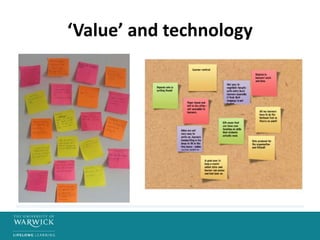
‘Value’ and technology
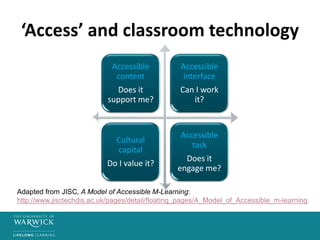
‘Access’ and classroom technology
Accessible
content
Does it
support me?
Accessible
interface
Can I work
it?
Cultural
capital
Do I value it?
Accessible
task
Does it
engage me?
Adapted from JISC, A Model of Accessible M-Learning:
http://www.jisctechdis.ac.uk/pages/detail/floating_pages/A_Model_of_Accessible_m-learning
Classroom technology categories
• Tools for annotation and analysis
• Tools for real time assessment and capturing
student thinking
• Tools for ongoing classroom dialogue
• Tools for brainstorming and collaboration
• Tools for explanation and demo
• Tools for presentation and progress
Tools for brainstorming and
collaboration
• Mindjet
• Simplemind
• iBrainstorm
• Padlet
• Popplet
• GroupBoard
Tools for real time assessment and
student thinking
• Responseware
• Polleverywhere
• Nearpod
• Socrative
• Kahoot
Tools for explanation and demo
• You Tube
• Screenchomp
• Show Me
• Audacity
• Audio Boo
• Quizlet
Tools for annotation an analysis
• iAnnotate
• Live scribe
• Google docs
• Evernote
• Smartboard
• Wordle
Tools for presentation and ‘progress’
• PowerPoint
• Keynote
• Prezi
• Webquests
• Nearpod
• Document visualisers
Tools for ongoing classroom dialogue
• Today’s Meet
• Twitter
Experiment with a tool
• Use the time to experiment with a tool of your
choice. Work on your own or in a pair or small
group to create a resource which could be
used as a classroom technology.
• Be prepared to share what you have done.
Tips for incorporating classroom
technologies
• Ensure tools are working before use! This
includes connection to wifi
• Set-up pre-prepared templates, boards or
rooms.
• Give students/participants quick routes to
tools, such as QR codes, shortened hyperlinks.
• Consider the purposefulness of the tool in its
relationship to the learning outcomes.
Critical questions
• Which classroom technologies have the
greatest impact, in terms of the criteria we
have set for good teaching and learning?
• What is the relative value of digital versions of
artefacts like ‘post-it notes’ compared to more
tangible versions? What is gained and/or what
is lost in the use of these tools?

Transformingtechnologies session4

  • 1.
    Transforming Technologies: Teaching andLearning in the Digital Age Session 4: Classroom approaches that really work
  • 2.
    Learning outcomes • Todiscuss the types of teaching, learning and activities that go on in a classroom or training room and match technology solutions to them. • To critically evaluate the effectiveness of classroom technologies against agreed, shared criteria. • To become familiar with Mahara and negotiate agreed assessment criteria for assignment 2.
  • 3.
    What do wewant from learning?
  • 4.
    What do weexpect from teaching/training?
  • 5.
    Critical questions toask • How is the technology supporting the desired learning outcomes of the session? • How does the intervention add value? • How accessible is the technology? Is it multi-platform? Is it free? • How much ‘lead in’ time is required to learn this tool? • Does this tool collect data and how can this made available? • What is the availability of this outside of the classroom? • How engaging is this tool? Do students and teachers enjoy it?
  • 6.
  • 7.
    ‘Access’ and classroomtechnology Accessible content Does it support me? Accessible interface Can I work it? Cultural capital Do I value it? Accessible task Does it engage me? Adapted from JISC, A Model of Accessible M-Learning: http://www.jisctechdis.ac.uk/pages/detail/floating_pages/A_Model_of_Accessible_m-learning
  • 8.
    Classroom technology categories •Tools for annotation and analysis • Tools for real time assessment and capturing student thinking • Tools for ongoing classroom dialogue • Tools for brainstorming and collaboration • Tools for explanation and demo • Tools for presentation and progress
  • 9.
    Tools for brainstormingand collaboration • Mindjet • Simplemind • iBrainstorm • Padlet • Popplet • GroupBoard
  • 10.
    Tools for realtime assessment and student thinking • Responseware • Polleverywhere • Nearpod • Socrative • Kahoot
  • 11.
    Tools for explanationand demo • You Tube • Screenchomp • Show Me • Audacity • Audio Boo • Quizlet
  • 12.
    Tools for annotationan analysis • iAnnotate • Live scribe • Google docs • Evernote • Smartboard • Wordle
  • 13.
    Tools for presentationand ‘progress’ • PowerPoint • Keynote • Prezi • Webquests • Nearpod • Document visualisers
  • 14.
    Tools for ongoingclassroom dialogue • Today’s Meet • Twitter
  • 15.
    Experiment with atool • Use the time to experiment with a tool of your choice. Work on your own or in a pair or small group to create a resource which could be used as a classroom technology. • Be prepared to share what you have done.
  • 16.
    Tips for incorporatingclassroom technologies • Ensure tools are working before use! This includes connection to wifi • Set-up pre-prepared templates, boards or rooms. • Give students/participants quick routes to tools, such as QR codes, shortened hyperlinks. • Consider the purposefulness of the tool in its relationship to the learning outcomes.
  • 17.
    Critical questions • Whichclassroom technologies have the greatest impact, in terms of the criteria we have set for good teaching and learning? • What is the relative value of digital versions of artefacts like ‘post-it notes’ compared to more tangible versions? What is gained and/or what is lost in the use of these tools?