Transforming Technologies:
Reflections on Curriculum Design
and Digital Identity
Sara Hattersley,
Centre for Lifelong Learning
About the course
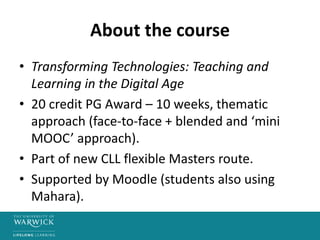
• Transforming Technologies: Teaching and
Learning in the Digital Age
• 20 credit PG Award – 10 weeks, thematic
approach (face-to-face + blended and ‘mini
MOOC’ approach).
• Part of new CLL flexible Masters route.
• Supported by Moodle (students also using
Mahara).
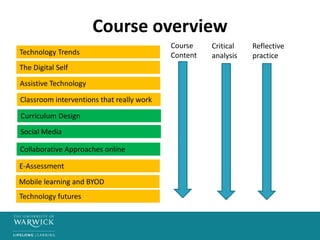
Course overview
Technology Trends
The Digital Self
Assistive Technology
Curriculum Design
Social Media
Collaborative Approaches online
Classroom interventions that really work
E-Assessment
Mobile learning and BYOD
Technology futures
Course
Content
Critical
analysis
Reflective
practice
Explorations in Eytmology
• Curriculum = (Latin) “a race” or “the course of a
race”, deriving from the term currere, “to run/to
proceed”.
• Learning = (old English) leomian “learn” also
(German) “lore”.
• Pedagogy = (Greek) “to lead the child”
• Technology = (Greek) techne “art, skills, cunning of
hand” and logio/lego “I speak”
Source: Wikipedia (accessed 28/04/15) https://en.wikipedia.org/wiki/
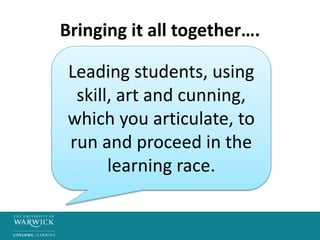
Bringing it all together….
Leading students, using
skill, art and cunning,
which you articulate, to
run and proceed in the
learning race.
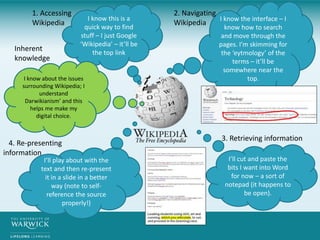
I know this is a
quick way to find
stuff – I just Google
‘Wikipedia’ – it’ll be
the top link
I know the interface – I
know how to search
and move through the
pages. I’m skimming for
the ‘eytmology’ of the
terms – it’ll be
somewhere near the
top.
1. Accessing
Wikipedia
2. Navigating
Wikipedia
I’ll cut and paste the
bits I want into Word
for now – a sort of
notepad (it happens to
be open).
3. Retrieving information
I’ll play about with the
text and then re-present
it in a slide in a better
way (note to self-
reference the source
properly!)
4. Re-presenting
information
I know about the issues
surrounding Wikipedia; I
understand
Darwikianism’ and this
helps me make my
digital choice.
Inherent
knowledge
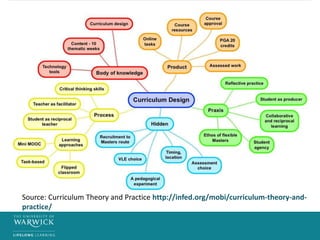
Ways to make the curriculum ‘explicit’
• Sharing and reflecting on key documentation
(e.g. course proposal and approval records,
lesson plans)
• Explaining the relationship between learning
and teaching activities, and assessment.
• Sharing the rationale for choice of approach,
in particular, technology employed.
• Inviting students to be contributors to an
evolving curriculum.
Source: Curriculum Theory and Practice http://infed.org/mobi/curriculum-theory-and-
practice/
Modelling your thinking
• ‘Explanatory artefacts’ – videos, podcasts,
infographics, mindmaps.
• Sharing your ‘story’ – exposing your own
digital literacies and practices (e.g. how I go
about approaching a new tool; how I use a
tool for a set purpose).
• Unpicking and critically analysing tools,
pedagogically, and evaluating choices.
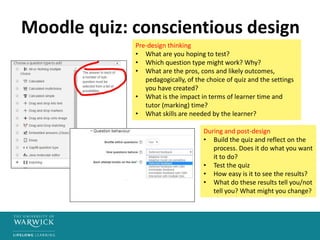
Moodle quiz: conscientious design
Pre-design thinking
• What are you hoping to test?
• Which question type might work? Why?
• What are the pros, cons and likely outcomes,
pedagogically, of the choice of quiz and the settings
you have created?
• What is the impact in terms of learner time and
tutor (marking) time?
• What skills are needed by the learner?
During and post-design
• Build the quiz and reflect on the
process. Does it do what you want
it to do?
• Test the quiz
• How easy is it to see the results?
• What do these results tell you/not
tell you? What might you change?
Activities that promote student
‘agency’ in a VLE
• Varied administrative and editing permissions
• Shared glossary of terms, repository or other
space for sharing artefacts and notes.
• Resource or artefact creation for a key purpose.
• Reflections/discussion in a group blog or forum
• ‘Ill-structured’ problems, using a wiki
• Peer assessed work/paired collaborations
• Profile information and settings
• ‘Stepping out’ into an alternative space
Activities that promote engagement
and persistence
• Notifications and alerts on forum entries,
blogs and wikis.
• Work timelines, checklists and management
• Clear navigation and instructions
• Task-based, inter-dependent, incremental
activities.
• Dialogue and feedback (tutor and/or peers).
Source: TAP http://mahara.warwick.ac.uk/view/view.php?id=14563
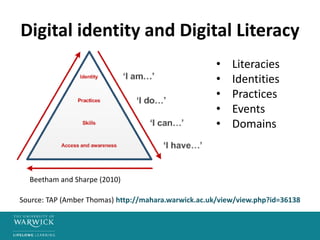
Digital identity and Digital Literacy
• Literacies
• Identities
• Practices
• Events
• Domains
Source: TAP (Amber Thomas) http://mahara.warwick.ac.uk/view/view.php?id=36138
Beetham and Sharpe (2010)
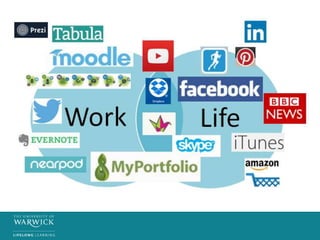
Digital domains, tools and practices
Social media
e.g. Facebook=social; Twitter=professional
Devices
e.g. Phone=most things; iPad=classroom work, document annotation,
sharing; laptop – last resort!
Tools
e.g. Tools I really like (Mahara) V tools I dislike (Prezi)
• Digital practices are often well-established and driven by
use of preferred tools and domains.
• Digital practices can also emerge from ‘chance encounters’
or ‘contrived routes’.
• Digital domains and practices can overlap and change in
their importance, over time.
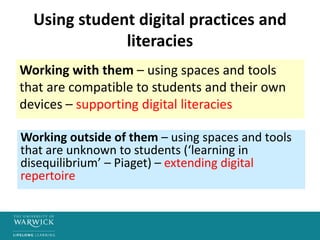
Using student digital practices and
literacies
Working with them – using spaces and tools
that are compatible to students and their own
devices – supporting digital literacies
Working outside of them – using spaces and tools
that are unknown to students (‘learning in
disequilibrium’ – Piaget) – extending digital
repertoire
Discussion
• How far is a more ‘explicit’ curriculum a more
desirable curriculum? Or is it better to be
‘artful and cunning’?
• What are the best ways to give students
agency in the curriculum design process? Do
they want to do it?
• What is the value of understanding our own
and students’ digital literacies?

Transforming Technologies

  • 1.
    Transforming Technologies: Reflections onCurriculum Design and Digital Identity Sara Hattersley, Centre for Lifelong Learning
  • 2.
    About the course •Transforming Technologies: Teaching and Learning in the Digital Age • 20 credit PG Award – 10 weeks, thematic approach (face-to-face + blended and ‘mini MOOC’ approach). • Part of new CLL flexible Masters route. • Supported by Moodle (students also using Mahara).
  • 3.
    Course overview Technology Trends TheDigital Self Assistive Technology Curriculum Design Social Media Collaborative Approaches online Classroom interventions that really work E-Assessment Mobile learning and BYOD Technology futures Course Content Critical analysis Reflective practice
  • 4.
    Explorations in Eytmology •Curriculum = (Latin) “a race” or “the course of a race”, deriving from the term currere, “to run/to proceed”. • Learning = (old English) leomian “learn” also (German) “lore”. • Pedagogy = (Greek) “to lead the child” • Technology = (Greek) techne “art, skills, cunning of hand” and logio/lego “I speak” Source: Wikipedia (accessed 28/04/15) https://en.wikipedia.org/wiki/
  • 5.
    Bringing it alltogether…. Leading students, using skill, art and cunning, which you articulate, to run and proceed in the learning race.
  • 6.
    I know thisis a quick way to find stuff – I just Google ‘Wikipedia’ – it’ll be the top link I know the interface – I know how to search and move through the pages. I’m skimming for the ‘eytmology’ of the terms – it’ll be somewhere near the top. 1. Accessing Wikipedia 2. Navigating Wikipedia I’ll cut and paste the bits I want into Word for now – a sort of notepad (it happens to be open). 3. Retrieving information I’ll play about with the text and then re-present it in a slide in a better way (note to self- reference the source properly!) 4. Re-presenting information I know about the issues surrounding Wikipedia; I understand Darwikianism’ and this helps me make my digital choice. Inherent knowledge
  • 7.
    Ways to makethe curriculum ‘explicit’ • Sharing and reflecting on key documentation (e.g. course proposal and approval records, lesson plans) • Explaining the relationship between learning and teaching activities, and assessment. • Sharing the rationale for choice of approach, in particular, technology employed. • Inviting students to be contributors to an evolving curriculum.
  • 8.
    Source: Curriculum Theoryand Practice http://infed.org/mobi/curriculum-theory-and- practice/
  • 9.
    Modelling your thinking •‘Explanatory artefacts’ – videos, podcasts, infographics, mindmaps. • Sharing your ‘story’ – exposing your own digital literacies and practices (e.g. how I go about approaching a new tool; how I use a tool for a set purpose). • Unpicking and critically analysing tools, pedagogically, and evaluating choices.
  • 10.
    Moodle quiz: conscientiousdesign Pre-design thinking • What are you hoping to test? • Which question type might work? Why? • What are the pros, cons and likely outcomes, pedagogically, of the choice of quiz and the settings you have created? • What is the impact in terms of learner time and tutor (marking) time? • What skills are needed by the learner? During and post-design • Build the quiz and reflect on the process. Does it do what you want it to do? • Test the quiz • How easy is it to see the results? • What do these results tell you/not tell you? What might you change?
  • 11.
    Activities that promotestudent ‘agency’ in a VLE • Varied administrative and editing permissions • Shared glossary of terms, repository or other space for sharing artefacts and notes. • Resource or artefact creation for a key purpose. • Reflections/discussion in a group blog or forum • ‘Ill-structured’ problems, using a wiki • Peer assessed work/paired collaborations • Profile information and settings • ‘Stepping out’ into an alternative space
  • 12.
    Activities that promoteengagement and persistence • Notifications and alerts on forum entries, blogs and wikis. • Work timelines, checklists and management • Clear navigation and instructions • Task-based, inter-dependent, incremental activities. • Dialogue and feedback (tutor and/or peers). Source: TAP http://mahara.warwick.ac.uk/view/view.php?id=14563
  • 13.
    Digital identity andDigital Literacy • Literacies • Identities • Practices • Events • Domains Source: TAP (Amber Thomas) http://mahara.warwick.ac.uk/view/view.php?id=36138 Beetham and Sharpe (2010)
  • 14.
    Digital domains, toolsand practices Social media e.g. Facebook=social; Twitter=professional Devices e.g. Phone=most things; iPad=classroom work, document annotation, sharing; laptop – last resort! Tools e.g. Tools I really like (Mahara) V tools I dislike (Prezi) • Digital practices are often well-established and driven by use of preferred tools and domains. • Digital practices can also emerge from ‘chance encounters’ or ‘contrived routes’. • Digital domains and practices can overlap and change in their importance, over time.
  • 16.
    Using student digitalpractices and literacies Working with them – using spaces and tools that are compatible to students and their own devices – supporting digital literacies Working outside of them – using spaces and tools that are unknown to students (‘learning in disequilibrium’ – Piaget) – extending digital repertoire
  • 17.
    Discussion • How faris a more ‘explicit’ curriculum a more desirable curriculum? Or is it better to be ‘artful and cunning’? • What are the best ways to give students agency in the curriculum design process? Do they want to do it? • What is the value of understanding our own and students’ digital literacies?