Technology-enhanced learning:
polling and quizzes
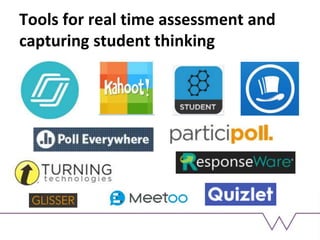
Tools we will be using this
session
Kahoot
Polleverywhere
NearPod
Socrative
Responseware
Learning outcomes
To consider the notion of digital literacies and analyse
our own, current practices.
To critically evaluate the interchange between personal
and institutional digital spaces and tools.
To evaluate a number of apps and programmes designed
for polling or classroom interactivity.
To design smart questions which are purposeful within a
curriculum design.
To evaluate the place and potential of technologies used
today in your own practice.
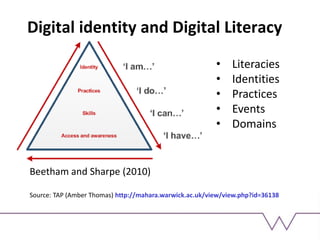
Digital identity and Digital Literacy
• Literacies
• Identities
• Practices
• Events
• Domains
Source: TAP (Amber Thomas) http://mahara.warwick.ac.uk/view/view.php?id=36138
Beetham and Sharpe (2010)
Digital domains, tools and practices
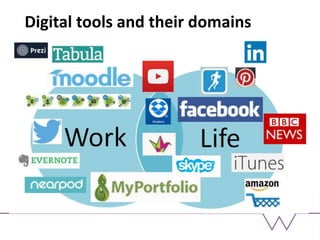
Social media
e.g. Facebook=social; Twitter=professional
Devices
e.g. Phone=most things; iPad=classroom work, document annotation,
sharing; laptop – last resort!
Tools
e.g. Tools I really like (Mahara) V tools I dislike (Prezi)
• Digital practices are often well-established and driven by use
of preferred tools and domains.
• Digital practices can also emerge from ‘chance encounters’
or ‘contrived routes’.
• Digital domains and practices can overlap and change in
their importance, over time.
Digital tools and their domains
TASK 1: Analysing your digital
literacies
Use the grid to consider your own digital literacy
practices. Think about tools you use at home, at work
or in other contexts. Some of these tools may span
more than one domain.
Share your grid with someone else. Discuss whether
you think your digital literacy practices match those of
your learners.
Using student digital practices and
literacies
Working with them – using spaces and tools
that are compatible to students and their own
devices – supporting digital literacies
Working outside of them – using spaces and tools
that are unknown to students (‘learning in
disequilibrium’ – Piaget) – extending digital
repertoire
Critical questions
What is the value of understanding our own
and others' digital literacies?
Is there a mismatch between individual
digital literacies and institutional practice?
How far should we aim to accommodate our
learners’ digital literacy practices into our
work?
Tools for real time assessment and
capturing student thinking
Advantages of these tools
Ability to keep and share results
Creating synchonous classroom and homework
tasks
Motivation and interest; ‘authentic’ results
Initial or formative assessment of concepts
Anonymity; encourages all learners to engage
Gamification
Peer dialogue around the ‘live’ results
Group decision-making
Creation of enduring resources
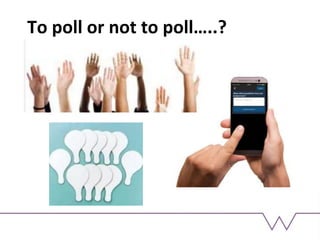
To poll or not to poll…..?
Activity: question design
Have a go at designing some questions (for your
subject discipline) that could be presented using
one or more of the tools explored.
Consider where in your curriculum design/session
plan this tool might be used effectively.
What would you need to consider, before using this
tool?
Stay in touch!
Sara Hattersley
S.Hattersley@warwick.ac.uk

PGDEtechnology1

  • 1.
  • 2.
    Tools we willbe using this session Kahoot Polleverywhere NearPod Socrative Responseware
  • 3.
    Learning outcomes To considerthe notion of digital literacies and analyse our own, current practices. To critically evaluate the interchange between personal and institutional digital spaces and tools. To evaluate a number of apps and programmes designed for polling or classroom interactivity. To design smart questions which are purposeful within a curriculum design. To evaluate the place and potential of technologies used today in your own practice.
  • 4.
    Digital identity andDigital Literacy • Literacies • Identities • Practices • Events • Domains Source: TAP (Amber Thomas) http://mahara.warwick.ac.uk/view/view.php?id=36138 Beetham and Sharpe (2010)
  • 5.
    Digital domains, toolsand practices Social media e.g. Facebook=social; Twitter=professional Devices e.g. Phone=most things; iPad=classroom work, document annotation, sharing; laptop – last resort! Tools e.g. Tools I really like (Mahara) V tools I dislike (Prezi) • Digital practices are often well-established and driven by use of preferred tools and domains. • Digital practices can also emerge from ‘chance encounters’ or ‘contrived routes’. • Digital domains and practices can overlap and change in their importance, over time.
  • 6.
    Digital tools andtheir domains
  • 7.
    TASK 1: Analysingyour digital literacies Use the grid to consider your own digital literacy practices. Think about tools you use at home, at work or in other contexts. Some of these tools may span more than one domain. Share your grid with someone else. Discuss whether you think your digital literacy practices match those of your learners.
  • 8.
    Using student digitalpractices and literacies Working with them – using spaces and tools that are compatible to students and their own devices – supporting digital literacies Working outside of them – using spaces and tools that are unknown to students (‘learning in disequilibrium’ – Piaget) – extending digital repertoire
  • 9.
    Critical questions What isthe value of understanding our own and others' digital literacies? Is there a mismatch between individual digital literacies and institutional practice? How far should we aim to accommodate our learners’ digital literacy practices into our work?
  • 10.
    Tools for realtime assessment and capturing student thinking
  • 11.
    Advantages of thesetools Ability to keep and share results Creating synchonous classroom and homework tasks Motivation and interest; ‘authentic’ results Initial or formative assessment of concepts Anonymity; encourages all learners to engage Gamification Peer dialogue around the ‘live’ results Group decision-making Creation of enduring resources
  • 12.
    To poll ornot to poll…..?
  • 13.
    Activity: question design Havea go at designing some questions (for your subject discipline) that could be presented using one or more of the tools explored. Consider where in your curriculum design/session plan this tool might be used effectively. What would you need to consider, before using this tool?
  • 14.
    Stay in touch! SaraHattersley S.Hattersley@warwick.ac.uk