@isaja
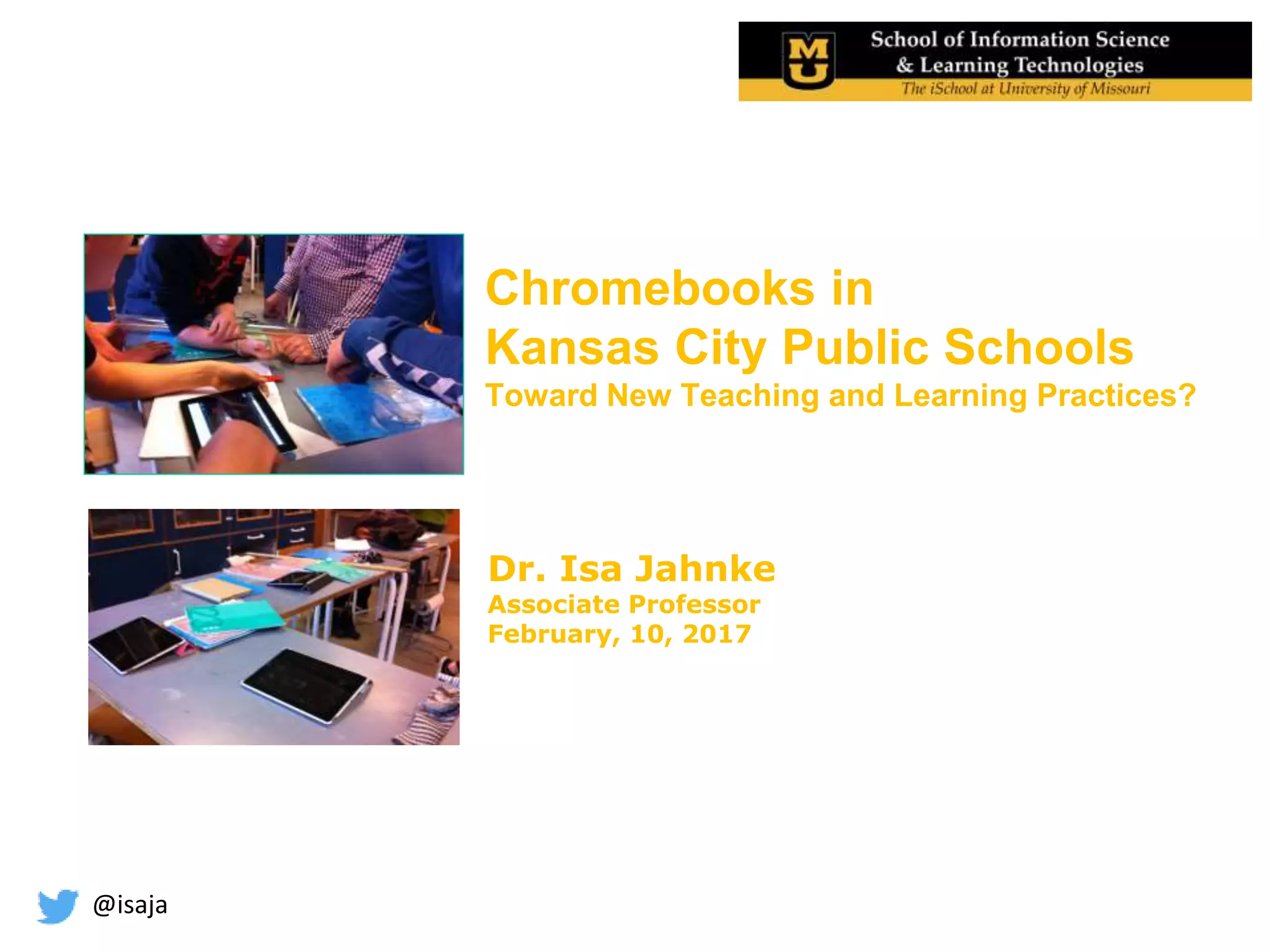
Chromebooks in
Kansas City Public Schools
Toward New Teaching and Learning Practices?
Dr. Isa Jahnke
Associate Professor
February, 10, 2017
@isaja
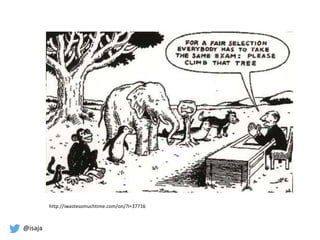
http://iwastesomuchtime.com/on/?i=37716
@isaja
About me
Teacher, Researcher, Professional Development Workshops
(15 years experience)
Germany, Sweden, Columbia MO
EdTech.missouri.edu
Educational Technology – M.Ed. study program online
 Technology in Schools program
@isaja
What is your experience
in the Chromebook classroom? 
Find a postcard that symbolize your
experience at best & introduce yourself (Name, Subject, X)
Postcard Symbol
Method
@isaja
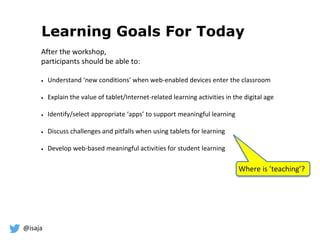
Learning Goals For Today
After the workshop,
participants should be able to:
 Understand ‘new conditions’ when web-enabled devices enter the classroom
 Explain the value of tablet/Internet-related learning activities in the digital age
 Identify/select appropriate ‘apps’ to support meaningful learning
 Discuss challenges and pitfalls when using tablets for learning
 Develop web-based meaningful activities for student learning
Where is ’teaching’?
@isaja
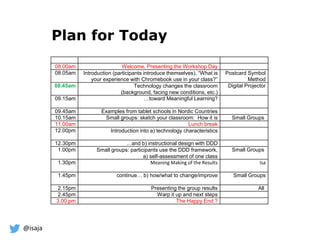
Plan for Today
08.00am Welcome, Presenting the Workshop Day
08.05am Introduction (participants introduce themselves), “What is
your experience with Chromebook use in your class?”
Postcard Symbol
Method
08.45am Technology changes the classroom
(background, facing new conditions, etc.)
Digital Projector
09.15am …toward Meaningful Learning?
09.45am Examples from tablet schools in Nordic Countries
10.15am Small groups: sketch your classroom: How it is Small Groups
11.00am Lunch break
12.00pm Introduction into a) technology characteristics
12.30pm …and b) instructional design with DDD
1.00pm Small groups: participants use the DDD framework,
a) self-assessment of one class
Small Groups
1.30pm Meaning Making of the Results Isa
1.45pm continue… b) how/what to change/improve Small Groups
2.15pm Presenting the group results All
2.45pm Warp it up and next steps
3.00 pm The Happy End ?
@isaja
Some thoughts about technology in schools…
@isaja 8
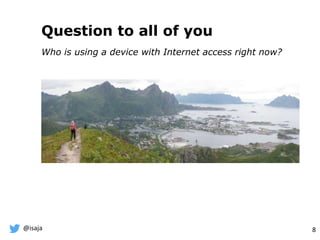
Question to all of you
Who is using a device with Internet access right now?
lofoten picture
@isaja
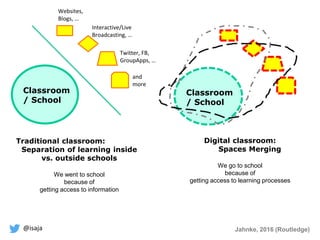
Classroom
/ School
Classroom
/ School
Digital classroom:
Spaces Merging
We go to school
because of
getting access to learning processes
Twitter, FB,
GroupApps, …
Interactive/Live
Broadcasting, …
Websites,
Blogs, …
and
more
Traditional classroom:
Separation of learning inside
vs. outside schools
We went to school
because of
getting access to information
Jahnke, 2016 (Routledge)
@isaja
Tablets (web-enabled devices) in
education is more than just a tool
Physical classrooms and web-enabled mobile devices are
merging into something new spaces
=> CrossActionSpaces
Jahnke, 2016 (Routledge)
@isaja
Photo: Ralf Jahnke-Wachholz
Jahnke, 2016
Routledge
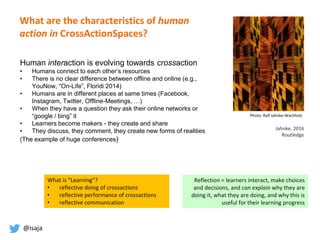
Human interaction is evolving towards crossaction
• Humans connect to each other’s resources
• There is no clear difference between offline and online (e.g.,
YouNow, “On-Life”, Floridi 2014)
• Humans are in different places at same times (Facebook,
Instagram, Twitter, Offline-Meetings, …)
• When they have a question they ask their online networks or
“google / bing” it
• Learners become makers - they create and share
• They discuss, they comment, they create new forms of realities
(The example of huge conferences)
Reflection = learners interact, make choices
and decisions, and can explain why they are
doing it, what they are doing, and why this is
useful for their learning progress
What is “Learning”?
• reflective doing of crossactions
• reflective performance of crossactions
• reflective communication
What are the characteristics of human
action in CrossActionSpaces?
@isaja
Simply put: The Tablet changes conditions
and ways of learning
Jahnke, 2016 (Routledge)
Benefit:
Access to a lot of online resources,
and collaborative tools!
@isaja
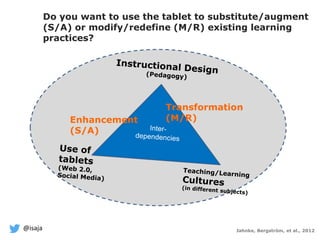
Enhancement
(S/A)
Transformation
(M/R)
Jahnke, Bergström, et al., 2012
Do you want to use the tablet to substitute/augment
(S/A) or modify/redefine (M/R) existing learning
practices?
@isaja
Meaningful Learning as Framework?
Here you probably wonder
why do I say so much about
the technology ? Isn’t it
about the instructional
design? Yes, it is both!
@isaja
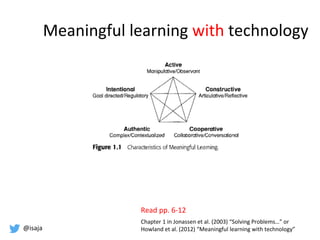
Meaningful learning with technology
Chapter 1 in Jonassen et al. (2003) “Solving Problems…” or
Howland et al. (2012) “Meaningful learning with technology”
Read pp. 6-12
@isaja
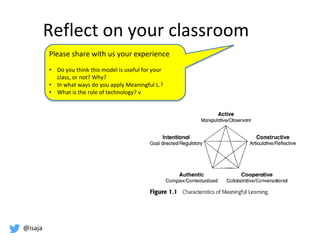
Reflect on your classroom
Please share with us your experience
• Do you think this model is useful for your
class, or not? Why?
• In what ways do you apply Meaningful L.?
• What is the role of technology? v
@isaja
Examples from Nordic Schools
@isaja
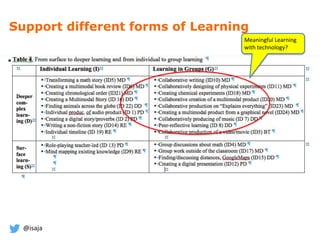
Support different forms of Learning
Meaningful Learning
with technology?
@isaja
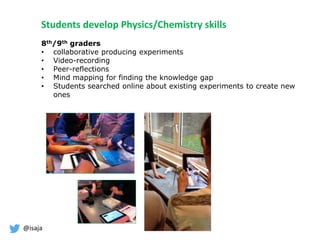
8th/9th graders
• collaborative producing experiments
• Video-recording
• Peer-reflections
• Mind mapping for finding the knowledge gap
• Students searched online about existing experiments to create new
ones
Students develop Physics/Chemistry skills
@isaja
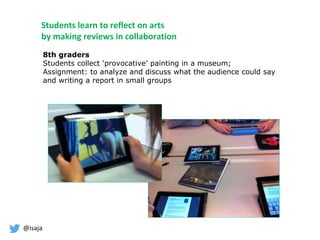
Students learn to reflect on arts
by making reviews in collaboration
8th graders
Students collect ‘provocative’ painting in a museum;
Assignment: to analyze and discuss what the audience could say
and writing a report in small groups
@isaja
Students develop language skills
by peer-reflections
7th graders
Students write something
from their childhood and
reflect in peer-reviews their
writing skills using FB
FB groups
@isaja
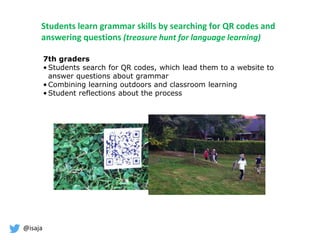
Students learn grammar skills by searching for QR codes and
answering questions (treasure hunt for language learning)
7th graders
• Students search for QR codes, which lead them to a website to
answer questions about grammar
• Combining learning outdoors and classroom learning
• Student reflections about the process
@isaja
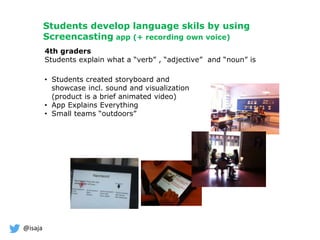
Students develop language skils by using
Screencasting app (+ recording own voice)
4th graders
Students explain what a “verb” , “adjective” and “noun” is
• Students created storyboard and
showcase incl. sound and visualization
(product is a brief animated video)
• App Explains Everything
• Small teams “outdoors”
@isaja
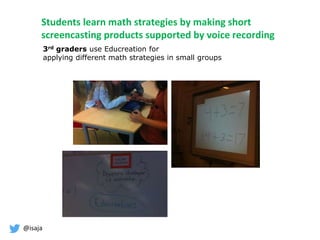
Students learn math strategies by making short
screencasting products supported by voice recording
3rd graders use Educreation for
applying different math strategies in small groups
@isaja
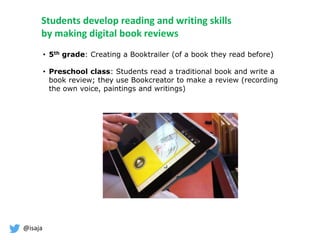
Students develop reading and writing skills
by making digital book reviews
• 5th grade: Creating a Booktrailer (of a book they read before)
• Preschool class: Students read a traditional book and write a
book review; they use Bookcreator to make a review (recording
the own voice, paintings and writings)
@isaja
Sketch your class What could you do
to integrate the
Chromebook?
Task 1
I can analyze an informative text!
The example of running shoes. English class
The dominant N in biology/Science class
What is a thesis statement? English
@isaja
My ideas
I can analyze an informative text!
The example of running shoes.
English class
The dominant N in biology class
What is a thesis statement? English
• Students work in groups of 3 to create an
informative text on the laptop
• Students create a video or Booktrailer of 3-
5 minutes to pitch the informative text
• Class as Shark Tank, they buy it or don’t buy
it (apply criteria if the
text was informative or not, why)
• Students use screencasting tools, in groups
of 3, creating the solution
• They share their products in
Google Classroom
• They give feedback to each other
• Students share their results in a FB-app
• Students give peer-feedback by applying
criteria if this is a correct thesis statement
• They write their research proposals and
share it to Online Science Fair (or make an
online school event where a real audience
is invited)
What do you think
are the benefits?
@isaja
Lunch 11.00-12.15
@isaja
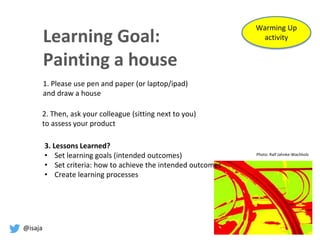
Learning Goal:
Painting a house
1. Please use pen and paper (or laptop/ipad)
and draw a house
Photo: Ralf Jahnke-Wachholz
Warming Up
activity
2. Then, ask your colleague (sitting next to you)
to assess your product
3. Lessons Learned?
• Set learning goals (intended outcomes)
• Set criteria: how to achieve the intended outcomes
• Create learning processes
@isaja
The view from the technology…
@isaja
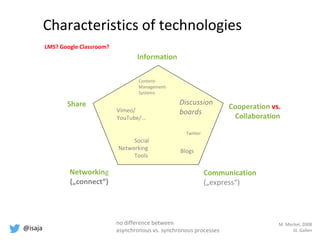
Communication
(„express“)
Information
Networking
(„connect“)
Cooperation vs.
Collaboration
Share Discussion
boards
Blogs
Twitter
Social
Networking
Tools
Vimeo/
YouTube/…
Content-
Management-
Systems
Characteristics of technologies
M. Meckel, 2008
St. Gallen
LMS? Google Classroom?
no difference between
asynchronous vs. synchronous processes
@isaja
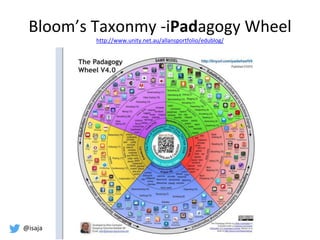
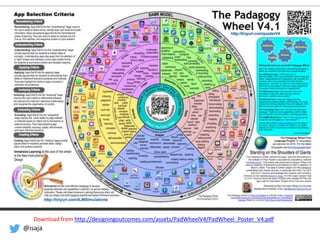
Bloom’s Taxonmy -iPadagogy Wheel
http://www.unity.net.au/allansportfolio/edublog/
@isaja
Download from http://designingoutcomes.com/assets/PadWheelV4/PadWheel_Poster_V4.pdf
@isaja
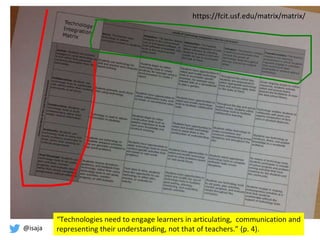
“Technologies need to engage learners in articulating, communication and
representing their understanding, not that of teachers.” (p. 4).
https://fcit.usf.edu/matrix/matrix/
@isaja
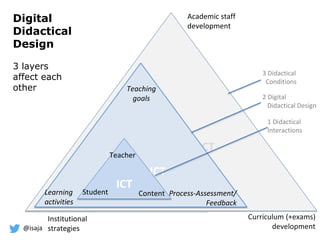
DDD as a tool to re-design
@isaja
A design lens
Design is the act of giving a form to something
Teaching is the ’design act’ of creating conditions for
learning; more specific, it is the act of modelling
sociotechnical-pedagogical processes to enable
student learning
Designs for Learning
Bonderup-Dohn & Hansen, 2014
Jahnke, Norqvist, & Olsson, 2014
@isaja
Digital
Didactical
Design
3 layers
affect each
other
ICT ICT
ICT
ICT
Student
Teacher
Content
Teaching
goals
Process-Assessment/
Feedback
Learning
activities
Academic staff
development
Curriculum (+exams)
development
Institutional
strategies
1 Didactical
Interactions
2 Digital
Didactical Design
3 Didactical
Conditions
@isaja
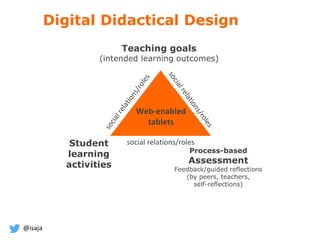
Teaching goals
(intended learning outcomes)
Student
learning
activities
Process-based
Assessment
Feedback/guided reflections
(by peers, teachers,
self-reflections)
social relations/roles
Web-enabled
tablets
Digital Didactical Design
@isaja
What kinds of ‘designs for learning’
do you apply in your classroom
practice?
What learning do you support?
Task 2
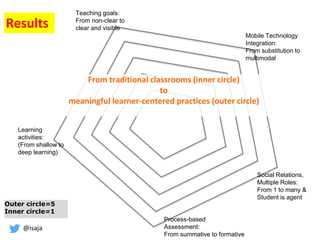
self-assessment
using DDD sheet
@isaja
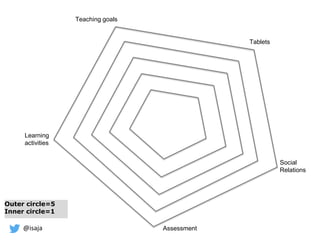
Social
Relations
Learning
activities
Teaching goals
Outer circle=5
Inner circle=1
Tablets
Assessment
@isaja
Social Relations,
Multiple Roles:
From 1 to many &
Student is agent
Learning
activities:
(From shallow to
deep learning)
Teaching goals:
From non-clear to
clear and visible
Outer circle=5
Inner circle=1
From traditional classrooms (inner circle)
to
meaningful learner-centered practices (outer circle)
Mobile Technology
Integration:
From substitution to
multimodal
Process-based
Assessment:
From summative to formative
Results
@isaja
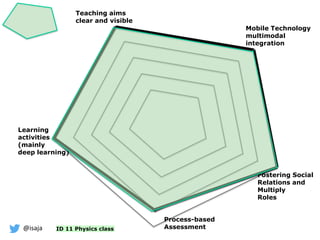
Learning
activities
(mainly
deep learning)
Process-based
Assessment
Mobile Technology
multimodal
integration
Fostering Social
Relations and
Multiply
Roles
Teaching aims
clear and visible
ID 11 Physics class
@isaja
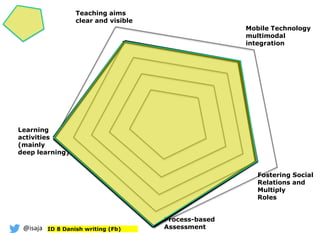
Learning
activities
(mainly
deep learning)
Fostering Social
Relations and
Multiply
Roles
Process-based
Assessment
Teaching aims
clear and visible
Mobile Technology
multimodal
integration
ID 8 Danish writing (Fb)
@isaja
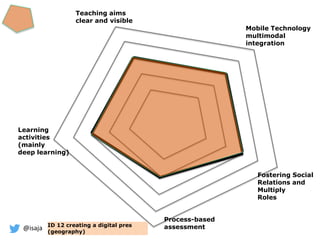
Process-based
assessment
Fostering Social
Relations and
Multiply
Roles
Teaching aims
clear and visible
Mobile Technology
multimodal
integration
Learning
activities
(mainly
deep learning)
ID 12 creating a digital pres
(geography)
@isaja
Process-based
assessment
Fostering Social
Relations and
Multiply
Roles
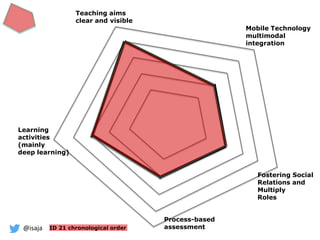
Mobile Technology
multimodal
integration
Teaching aims
clear and visible
Learning
activities
(mainly
deep learning)
ID 21 chronological order
@isaja
Process-based
assessment
Fostering Social
Relations and
Multiply
Roles
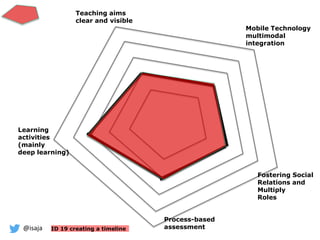
Mobile Technology
multimodal
integration
Teaching aims
clear and visible
Learning
activities
(mainly
deep learning)
ID 19 creating a timeline
@isaja
Go back into your team and
start discussing on how to make changes to your design
@isaja 48
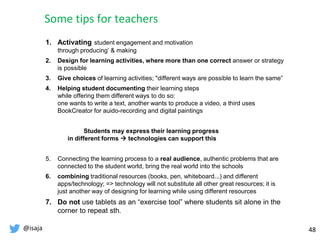
1. Activating student engagement and motivation
through producing’ & making
2. Design for learning activities, where more than one correct answer or strategy
is possible
3. Give choices of learning activities; "different ways are possible to learn the same”
4. Helping student documenting their learning steps
while offering them different ways to do so:
one wants to write a text, another wants to produce a video, a third uses
BookCreator for auido-recording and digital paintings
Students may express their learning progress
in different forms  technologies can support this
5. Connecting the learning process to a real audience, authentic problems that are
connected to the student world, bring the real world into the schools
6. combining traditional resources (books, pen, whiteboard...) and different
apps/technology; => technology will not substitute all other great resources; it is
just another way of designing for learning while using different resources
7. Do not use tablets as an “exercise tool” where students sit alone in the
corner to repeat sth.
Some tips for teachers
@isaja 49
Teaching turns into a design project in teacher teams
Teachers are learners at the school workplace
(Goggins, Jahnke, Wulf, 2014)
Time and Space for teachers to collaborate / reflect in peers
Establish a REFLECTION MODEL for teachers in teams where they get the
opportunity to discuss their daily classroom experiences honestly (overcome
student-teacher-loneliness)
Discussing and developing teacher roles and student roles – there are different
expectations! Teachers, lead users, pedagogical leaders, students, etc. discuss
together what good learning situations are - discuss it in your school
Some tips for school leaders
@isaja
The school of the future
In the school of the future, teaching is organized in project
teacher teams across existing disciplines
Learning by topic (not by subject)
Teacher teams from different departments work together per
semester and design a "learning expedition"
„knowledge is not the destination but an ongoing activity”
(Jonsson et al., 2013)
@isaja
Dr. Isa Jahnke, Associate Professor and
Research Director for the Information Experience Lab
Email
jahnkei@missouri.edu
Website
http://www.isa-jahnke.com
My book
Routledge, 2016
@isaja
Backup
@isaja
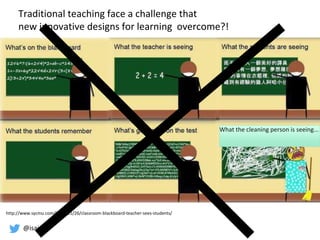
What the cleaning person is seeing...
http://www.sycmu.com/2012/11/26/classroom-blackboard-teacher-sees-students/
Traditional teaching face a challenge that
new innovative designs for learning overcome?!
@isaja
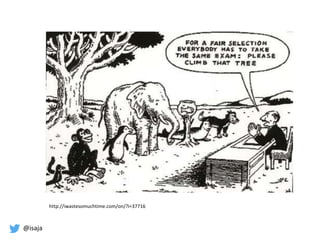
http://iwastesomuchtime.com/on/?i=37716
@isaja
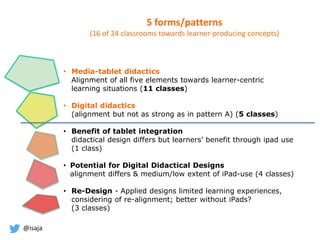
5 forms/patterns
(16 of 24 classrooms towards learner-producing concepts)
• Media-tablet didactics
Alignment of all five elements towards learner-centric
learning situations (11 classes)
• Digital didactics
(alignment but not as strong as in pattern A) (5 classes)
• Benefit of tablet integration
didactical design differs but learners’ benefit through ipad use
(1 class)
• Potential for Digital Didactical Designs
alignment differs & medium/low extent of iPad-use (4 classes)
• Re-Design - Applied designs limited learning experiences,
considering of re-alignment; better without iPads?
(3 classes)
@isaja
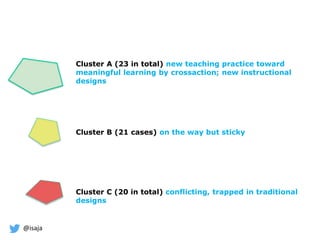
Cluster A (23 in total) new teaching practice toward
meaningful learning by crossaction; new instructional
designs
Cluster B (21 cases) on the way but sticky
Cluster C (20 in total) conflicting, trapped in traditional
designs
@isaja
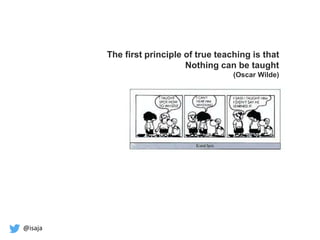
The first principle of true teaching is that
Nothing can be taught
(Oscar Wilde)

2017 02-kansas city-ijv2

  • 1.
    @isaja Chromebooks in Kansas CityPublic Schools Toward New Teaching and Learning Practices? Dr. Isa Jahnke Associate Professor February, 10, 2017
  • 2.
  • 3.
    @isaja About me Teacher, Researcher,Professional Development Workshops (15 years experience) Germany, Sweden, Columbia MO EdTech.missouri.edu Educational Technology – M.Ed. study program online  Technology in Schools program
  • 4.
    @isaja What is yourexperience in the Chromebook classroom?  Find a postcard that symbolize your experience at best & introduce yourself (Name, Subject, X) Postcard Symbol Method
  • 5.
    @isaja Learning Goals ForToday After the workshop, participants should be able to:  Understand ‘new conditions’ when web-enabled devices enter the classroom  Explain the value of tablet/Internet-related learning activities in the digital age  Identify/select appropriate ‘apps’ to support meaningful learning  Discuss challenges and pitfalls when using tablets for learning  Develop web-based meaningful activities for student learning Where is ’teaching’?
  • 6.
    @isaja Plan for Today 08.00amWelcome, Presenting the Workshop Day 08.05am Introduction (participants introduce themselves), “What is your experience with Chromebook use in your class?” Postcard Symbol Method 08.45am Technology changes the classroom (background, facing new conditions, etc.) Digital Projector 09.15am …toward Meaningful Learning? 09.45am Examples from tablet schools in Nordic Countries 10.15am Small groups: sketch your classroom: How it is Small Groups 11.00am Lunch break 12.00pm Introduction into a) technology characteristics 12.30pm …and b) instructional design with DDD 1.00pm Small groups: participants use the DDD framework, a) self-assessment of one class Small Groups 1.30pm Meaning Making of the Results Isa 1.45pm continue… b) how/what to change/improve Small Groups 2.15pm Presenting the group results All 2.45pm Warp it up and next steps 3.00 pm The Happy End ?
  • 7.
    @isaja Some thoughts abouttechnology in schools…
  • 8.
    @isaja 8 Question toall of you Who is using a device with Internet access right now? lofoten picture
  • 9.
    @isaja Classroom / School Classroom / School Digitalclassroom: Spaces Merging We go to school because of getting access to learning processes Twitter, FB, GroupApps, … Interactive/Live Broadcasting, … Websites, Blogs, … and more Traditional classroom: Separation of learning inside vs. outside schools We went to school because of getting access to information Jahnke, 2016 (Routledge)
  • 10.
    @isaja Tablets (web-enabled devices)in education is more than just a tool Physical classrooms and web-enabled mobile devices are merging into something new spaces => CrossActionSpaces Jahnke, 2016 (Routledge)
  • 11.
    @isaja Photo: Ralf Jahnke-Wachholz Jahnke,2016 Routledge Human interaction is evolving towards crossaction • Humans connect to each other’s resources • There is no clear difference between offline and online (e.g., YouNow, “On-Life”, Floridi 2014) • Humans are in different places at same times (Facebook, Instagram, Twitter, Offline-Meetings, …) • When they have a question they ask their online networks or “google / bing” it • Learners become makers - they create and share • They discuss, they comment, they create new forms of realities (The example of huge conferences) Reflection = learners interact, make choices and decisions, and can explain why they are doing it, what they are doing, and why this is useful for their learning progress What is “Learning”? • reflective doing of crossactions • reflective performance of crossactions • reflective communication What are the characteristics of human action in CrossActionSpaces?
  • 12.
    @isaja Simply put: TheTablet changes conditions and ways of learning Jahnke, 2016 (Routledge) Benefit: Access to a lot of online resources, and collaborative tools!
  • 13.
    @isaja Enhancement (S/A) Transformation (M/R) Jahnke, Bergström, etal., 2012 Do you want to use the tablet to substitute/augment (S/A) or modify/redefine (M/R) existing learning practices?
  • 14.
    @isaja Meaningful Learning asFramework? Here you probably wonder why do I say so much about the technology ? Isn’t it about the instructional design? Yes, it is both!
  • 15.
    @isaja Meaningful learning withtechnology Chapter 1 in Jonassen et al. (2003) “Solving Problems…” or Howland et al. (2012) “Meaningful learning with technology” Read pp. 6-12
  • 16.
    @isaja Reflect on yourclassroom Please share with us your experience • Do you think this model is useful for your class, or not? Why? • In what ways do you apply Meaningful L.? • What is the role of technology? v
  • 17.
  • 18.
    @isaja Support different formsof Learning Meaningful Learning with technology?
  • 19.
    @isaja 8th/9th graders • collaborativeproducing experiments • Video-recording • Peer-reflections • Mind mapping for finding the knowledge gap • Students searched online about existing experiments to create new ones Students develop Physics/Chemistry skills
  • 20.
    @isaja Students learn toreflect on arts by making reviews in collaboration 8th graders Students collect ‘provocative’ painting in a museum; Assignment: to analyze and discuss what the audience could say and writing a report in small groups
  • 21.
    @isaja Students develop languageskills by peer-reflections 7th graders Students write something from their childhood and reflect in peer-reviews their writing skills using FB FB groups
  • 22.
    @isaja Students learn grammarskills by searching for QR codes and answering questions (treasure hunt for language learning) 7th graders • Students search for QR codes, which lead them to a website to answer questions about grammar • Combining learning outdoors and classroom learning • Student reflections about the process
  • 23.
    @isaja Students develop languageskils by using Screencasting app (+ recording own voice) 4th graders Students explain what a “verb” , “adjective” and “noun” is • Students created storyboard and showcase incl. sound and visualization (product is a brief animated video) • App Explains Everything • Small teams “outdoors”
  • 24.
    @isaja Students learn mathstrategies by making short screencasting products supported by voice recording 3rd graders use Educreation for applying different math strategies in small groups
  • 25.
    @isaja Students develop readingand writing skills by making digital book reviews • 5th grade: Creating a Booktrailer (of a book they read before) • Preschool class: Students read a traditional book and write a book review; they use Bookcreator to make a review (recording the own voice, paintings and writings)
  • 26.
    @isaja Sketch your classWhat could you do to integrate the Chromebook? Task 1 I can analyze an informative text! The example of running shoes. English class The dominant N in biology/Science class What is a thesis statement? English
  • 27.
    @isaja My ideas I cananalyze an informative text! The example of running shoes. English class The dominant N in biology class What is a thesis statement? English • Students work in groups of 3 to create an informative text on the laptop • Students create a video or Booktrailer of 3- 5 minutes to pitch the informative text • Class as Shark Tank, they buy it or don’t buy it (apply criteria if the text was informative or not, why) • Students use screencasting tools, in groups of 3, creating the solution • They share their products in Google Classroom • They give feedback to each other • Students share their results in a FB-app • Students give peer-feedback by applying criteria if this is a correct thesis statement • They write their research proposals and share it to Online Science Fair (or make an online school event where a real audience is invited) What do you think are the benefits?
  • 28.
  • 29.
    @isaja Learning Goal: Painting ahouse 1. Please use pen and paper (or laptop/ipad) and draw a house Photo: Ralf Jahnke-Wachholz Warming Up activity 2. Then, ask your colleague (sitting next to you) to assess your product 3. Lessons Learned? • Set learning goals (intended outcomes) • Set criteria: how to achieve the intended outcomes • Create learning processes
  • 30.
    @isaja The view fromthe technology…
  • 31.
  • 32.
    @isaja Bloom’s Taxonmy -iPadagogyWheel http://www.unity.net.au/allansportfolio/edublog/
  • 33.
  • 34.
    @isaja “Technologies need toengage learners in articulating, communication and representing their understanding, not that of teachers.” (p. 4). https://fcit.usf.edu/matrix/matrix/
  • 35.
    @isaja DDD as atool to re-design
  • 36.
    @isaja A design lens Designis the act of giving a form to something Teaching is the ’design act’ of creating conditions for learning; more specific, it is the act of modelling sociotechnical-pedagogical processes to enable student learning Designs for Learning Bonderup-Dohn & Hansen, 2014 Jahnke, Norqvist, & Olsson, 2014
  • 37.
    @isaja Digital Didactical Design 3 layers affect each other ICTICT ICT ICT Student Teacher Content Teaching goals Process-Assessment/ Feedback Learning activities Academic staff development Curriculum (+exams) development Institutional strategies 1 Didactical Interactions 2 Digital Didactical Design 3 Didactical Conditions
  • 38.
    @isaja Teaching goals (intended learningoutcomes) Student learning activities Process-based Assessment Feedback/guided reflections (by peers, teachers, self-reflections) social relations/roles Web-enabled tablets Digital Didactical Design
  • 39.
    @isaja What kinds of‘designs for learning’ do you apply in your classroom practice? What learning do you support? Task 2 self-assessment using DDD sheet
  • 40.
  • 41.
    @isaja Social Relations, Multiple Roles: From1 to many & Student is agent Learning activities: (From shallow to deep learning) Teaching goals: From non-clear to clear and visible Outer circle=5 Inner circle=1 From traditional classrooms (inner circle) to meaningful learner-centered practices (outer circle) Mobile Technology Integration: From substitution to multimodal Process-based Assessment: From summative to formative Results
  • 42.
    @isaja Learning activities (mainly deep learning) Process-based Assessment Mobile Technology multimodal integration FosteringSocial Relations and Multiply Roles Teaching aims clear and visible ID 11 Physics class
  • 43.
    @isaja Learning activities (mainly deep learning) Fostering Social Relationsand Multiply Roles Process-based Assessment Teaching aims clear and visible Mobile Technology multimodal integration ID 8 Danish writing (Fb)
  • 44.
    @isaja Process-based assessment Fostering Social Relations and Multiply Roles Teachingaims clear and visible Mobile Technology multimodal integration Learning activities (mainly deep learning) ID 12 creating a digital pres (geography)
  • 45.
    @isaja Process-based assessment Fostering Social Relations and Multiply Roles MobileTechnology multimodal integration Teaching aims clear and visible Learning activities (mainly deep learning) ID 21 chronological order
  • 46.
    @isaja Process-based assessment Fostering Social Relations and Multiply Roles MobileTechnology multimodal integration Teaching aims clear and visible Learning activities (mainly deep learning) ID 19 creating a timeline
  • 47.
    @isaja Go back intoyour team and start discussing on how to make changes to your design
  • 48.
    @isaja 48 1. Activatingstudent engagement and motivation through producing’ & making 2. Design for learning activities, where more than one correct answer or strategy is possible 3. Give choices of learning activities; "different ways are possible to learn the same” 4. Helping student documenting their learning steps while offering them different ways to do so: one wants to write a text, another wants to produce a video, a third uses BookCreator for auido-recording and digital paintings Students may express their learning progress in different forms  technologies can support this 5. Connecting the learning process to a real audience, authentic problems that are connected to the student world, bring the real world into the schools 6. combining traditional resources (books, pen, whiteboard...) and different apps/technology; => technology will not substitute all other great resources; it is just another way of designing for learning while using different resources 7. Do not use tablets as an “exercise tool” where students sit alone in the corner to repeat sth. Some tips for teachers
  • 49.
    @isaja 49 Teaching turnsinto a design project in teacher teams Teachers are learners at the school workplace (Goggins, Jahnke, Wulf, 2014) Time and Space for teachers to collaborate / reflect in peers Establish a REFLECTION MODEL for teachers in teams where they get the opportunity to discuss their daily classroom experiences honestly (overcome student-teacher-loneliness) Discussing and developing teacher roles and student roles – there are different expectations! Teachers, lead users, pedagogical leaders, students, etc. discuss together what good learning situations are - discuss it in your school Some tips for school leaders
  • 50.
    @isaja The school ofthe future In the school of the future, teaching is organized in project teacher teams across existing disciplines Learning by topic (not by subject) Teacher teams from different departments work together per semester and design a "learning expedition" „knowledge is not the destination but an ongoing activity” (Jonsson et al., 2013)
  • 51.
    @isaja Dr. Isa Jahnke,Associate Professor and Research Director for the Information Experience Lab Email jahnkei@missouri.edu Website http://www.isa-jahnke.com My book Routledge, 2016
  • 52.
  • 53.
    @isaja What the cleaningperson is seeing... http://www.sycmu.com/2012/11/26/classroom-blackboard-teacher-sees-students/ Traditional teaching face a challenge that new innovative designs for learning overcome?!
  • 54.
  • 55.
    @isaja 5 forms/patterns (16 of24 classrooms towards learner-producing concepts) • Media-tablet didactics Alignment of all five elements towards learner-centric learning situations (11 classes) • Digital didactics (alignment but not as strong as in pattern A) (5 classes) • Benefit of tablet integration didactical design differs but learners’ benefit through ipad use (1 class) • Potential for Digital Didactical Designs alignment differs & medium/low extent of iPad-use (4 classes) • Re-Design - Applied designs limited learning experiences, considering of re-alignment; better without iPads? (3 classes)
  • 56.
    @isaja Cluster A (23in total) new teaching practice toward meaningful learning by crossaction; new instructional designs Cluster B (21 cases) on the way but sticky Cluster C (20 in total) conflicting, trapped in traditional designs
  • 57.
    @isaja The first principleof true teaching is that Nothing can be taught (Oscar Wilde)

Editor's Notes

  • #2 Good Morning
  • #3 I want to start with
  • #10 Here is what has changed over the last years ….. In the digital age – theoretical views
  • #11 How can teachers me and you those these CrossActionSpaces in teaching in higher Ed ? So, before I go into detail how to use those Spaces, let me start from another angle
  • #12 Unsere Welt ist technisch offen Aber soziale Barrieren, zB wer erwartet was von wemm HINDERT unsern Lernprozess = Rollenabhängigkeit
  • #13 In other words, easier said: …. Sharing , communicating, getting information, ... This all is different with the tablet
  • #15 Here you probably wonder why do I say so much about the technology ? Isn’t it about the instructional design? Yes, it is both!
  • #38 the design layer can only be as good as the outer layer is framing the environment vice versa
  • #40 How do teachers design for what kind of learning?
  • #46 Non fiction, grade 5
  • #56 MD = Media-tablet-Didactics (7-8) DD = Digital Didactics (5-6) BT = Benefit of Tablet integration (special case, 4) PD = Potential for a digital didactical design (3-4) RE = RE-alignment required (1-2)
  • #57 MD = Media-tablet-Didactics (7-8) DD = Digital Didactics (5-6) BT = Benefit of Tablet integration (special case, 4) PD = Potential for a digital didactical design (3-4) RE = RE-alignment required (1-2)
  • #58 When we really believe this statement is true, then teaching is preparation for learning. teaching designs for learning that students are able to learn