Transforming Technologies:
Teaching and Learning in the
Digital Age
Session 9:
Mobile learning and BYOD
Learning outcomes
• To evaluate the benefits and issues of mobile
learning and ‘bring your own device’.
• To evaluate the educational uses of mobile
devices.
• To explore a range of apps and their potential
for teaching and learning.
Horizon Report 2012
• The NMC (New Media Consortium) is an
international community of experts in educational
technology – they produce the ‘Horizon Report’
predicting the technologies which will be ‘the next
big thing’ in HE.
• 2012 report noted that mobile apps and tablet
computing would be key within two years of the
report.
http://www.nmc.org/pdf/2012-horizon-report-HE.pdf
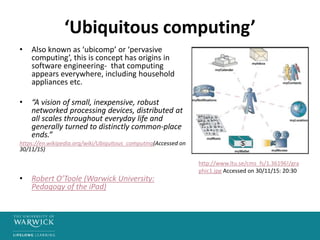
‘Ubiquitous computing’
• Also known as ‘ubicomp’ or ‘pervasive
computing’, this is concept has origins in
software engineering- that computing
appears everywhere, including household
appliances etc.
• “A vision of small, inexpensive, robust
networked processing devices, distributed at
all scales throughout everyday life and
generally turned to distinctly common-place
ends.”
https://en.wikipedia.org/wiki/Ubiquitous_computing(Accessed on
30/11/15)
• Robert O’Toole (Warwick University:
Pedagogy of the iPad)
http://www.ltu.se/cms_fs/1.36196!/gra
phic1.jpg Accessed on 30/11/15: 20:30
Recent projects
• The MoLeNET initiative funded and supported 104 projects involving approximately
40,000 learners and over 7,000 staff, in the 3 years 2007/08, 2008/09 and 2009/10.
Lead by the Learning and Skills Network (now Skills Funding Agency), MoLeNET
worked in the skills sector and with schools.
http://www.molenet.org.uk/
• JISC Mobile learning projects:
http://www.webarchive.org.uk/wayback/archive/20140614113521/http://www.jisc.ac.uk
/whatwedo/topics/mobilelearning.aspx?page=1&filter=Projects
Mobile learning: pedagogical matches
• Flipped classroom approach – learning before
the ‘lecture’
• Crowdsourcing – searching for information ‘in
the moment’
• Backchannel – dialogue ‘in the moment’
• Personalisation – access to all relevant
information through one log in.
• Remote learning– immersive engagement in
real time environment, using GPS
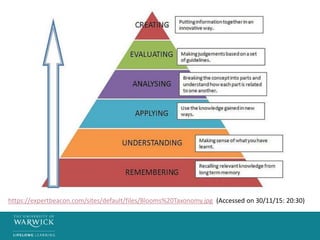
https://expertbeacon.com/sites/default/files/Blooms%20Taxonomy.jpg (Accessed on 30/11/15: 20:30)
Other affordances
• ‘Just in time learning’
• Access for students with physical and learning
difficulties and disabilities.
• Community-based learning approaches which can
be local and global.
• Recording, saving and sharing and transporting
instantly and in a variety of ways.
• One ‘place’ for educational, social, work-based
and other important life resources.
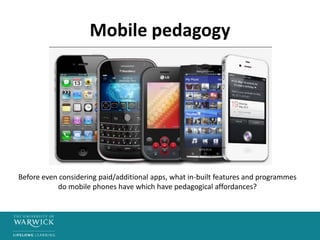
Mobile pedagogy
Before even considering paid/additional apps, what in-built features and programmes
do mobile phones have which have pedagogical affordances?
Mobile literacies?
“The future our students will inherit is one that will
be mediated and stitched together by the mobile
web, and I think that ethically we are called on as
teachers to teach them how to use these
technologies effectively?”
(David Parry, University of Texas, in Brock (2013) Best practices for teaching with
emerging technologies, Routledge)
Institutional issues re. BYOD
• Institutional systems can be opened up to personal device
use – bringing opportunities and issues.
“Not opening the system to mobile access may actually increase the
likelihood of unauthorised device use” (JISC)
• Students increasing expect mobile access to institutional tools, and
liability now extends to mobile use.
• Data protection – risk of unlawful processing of personal data
• Copyright – cost/intellectual property rights to materials
• Inappropriate material – malware and liability
• Internet safety – location information, safeguarding, cyberbullying.
JISC: https://www.jisc.ac.uk/guides/your-students-mobile-devices-law-and-liability
The phenomenon of apps
• Apps radically reduced the cost of specialist software
– from user licences to one-off downloads and
‘disposable’, low cost solutions.
• Resources that ‘fit in the palm of your hand’.
• Interoperability, sharing, multiple device ownership
and, in many cases, cloud-based actions.
• Works well with the notion of ubiquitous
learning/computing – ‘an app for everything’.
Tablet computing
• Portable, lightweight and (crucially) keyboard free – a
design choice which proved key for the way people
interacted with the device.
• iPad: “lean back” experience versus “lean forward” –
the design encourages exploration (e.g. pinching,
tapping, swiping).
• Screen technology very advanced – multimedia and
‘textbook’ capabilities.
• Heritage in the smart phone, not in the PC.
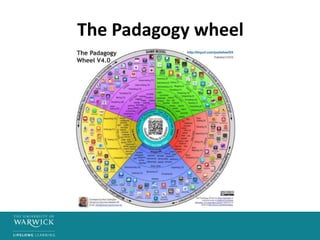
The Padagogy wheel
Critical questions
• Do the benefits of BYOD outway the issues, in
education?
• How can mobile learning enable students to
reach the highest of educational objectives?

Transformingtechnologies session9

  • 1.
    Transforming Technologies: Teaching andLearning in the Digital Age Session 9: Mobile learning and BYOD
  • 2.
    Learning outcomes • Toevaluate the benefits and issues of mobile learning and ‘bring your own device’. • To evaluate the educational uses of mobile devices. • To explore a range of apps and their potential for teaching and learning.
  • 3.
    Horizon Report 2012 •The NMC (New Media Consortium) is an international community of experts in educational technology – they produce the ‘Horizon Report’ predicting the technologies which will be ‘the next big thing’ in HE. • 2012 report noted that mobile apps and tablet computing would be key within two years of the report. http://www.nmc.org/pdf/2012-horizon-report-HE.pdf
  • 4.
    ‘Ubiquitous computing’ • Alsoknown as ‘ubicomp’ or ‘pervasive computing’, this is concept has origins in software engineering- that computing appears everywhere, including household appliances etc. • “A vision of small, inexpensive, robust networked processing devices, distributed at all scales throughout everyday life and generally turned to distinctly common-place ends.” https://en.wikipedia.org/wiki/Ubiquitous_computing(Accessed on 30/11/15) • Robert O’Toole (Warwick University: Pedagogy of the iPad) http://www.ltu.se/cms_fs/1.36196!/gra phic1.jpg Accessed on 30/11/15: 20:30
  • 5.
    Recent projects • TheMoLeNET initiative funded and supported 104 projects involving approximately 40,000 learners and over 7,000 staff, in the 3 years 2007/08, 2008/09 and 2009/10. Lead by the Learning and Skills Network (now Skills Funding Agency), MoLeNET worked in the skills sector and with schools. http://www.molenet.org.uk/ • JISC Mobile learning projects: http://www.webarchive.org.uk/wayback/archive/20140614113521/http://www.jisc.ac.uk /whatwedo/topics/mobilelearning.aspx?page=1&filter=Projects
  • 6.
    Mobile learning: pedagogicalmatches • Flipped classroom approach – learning before the ‘lecture’ • Crowdsourcing – searching for information ‘in the moment’ • Backchannel – dialogue ‘in the moment’ • Personalisation – access to all relevant information through one log in. • Remote learning– immersive engagement in real time environment, using GPS
  • 7.
  • 8.
    Other affordances • ‘Justin time learning’ • Access for students with physical and learning difficulties and disabilities. • Community-based learning approaches which can be local and global. • Recording, saving and sharing and transporting instantly and in a variety of ways. • One ‘place’ for educational, social, work-based and other important life resources.
  • 9.
    Mobile pedagogy Before evenconsidering paid/additional apps, what in-built features and programmes do mobile phones have which have pedagogical affordances?
  • 10.
    Mobile literacies? “The futureour students will inherit is one that will be mediated and stitched together by the mobile web, and I think that ethically we are called on as teachers to teach them how to use these technologies effectively?” (David Parry, University of Texas, in Brock (2013) Best practices for teaching with emerging technologies, Routledge)
  • 11.
    Institutional issues re.BYOD • Institutional systems can be opened up to personal device use – bringing opportunities and issues. “Not opening the system to mobile access may actually increase the likelihood of unauthorised device use” (JISC) • Students increasing expect mobile access to institutional tools, and liability now extends to mobile use. • Data protection – risk of unlawful processing of personal data • Copyright – cost/intellectual property rights to materials • Inappropriate material – malware and liability • Internet safety – location information, safeguarding, cyberbullying. JISC: https://www.jisc.ac.uk/guides/your-students-mobile-devices-law-and-liability
  • 12.
    The phenomenon ofapps • Apps radically reduced the cost of specialist software – from user licences to one-off downloads and ‘disposable’, low cost solutions. • Resources that ‘fit in the palm of your hand’. • Interoperability, sharing, multiple device ownership and, in many cases, cloud-based actions. • Works well with the notion of ubiquitous learning/computing – ‘an app for everything’.
  • 13.
    Tablet computing • Portable,lightweight and (crucially) keyboard free – a design choice which proved key for the way people interacted with the device. • iPad: “lean back” experience versus “lean forward” – the design encourages exploration (e.g. pinching, tapping, swiping). • Screen technology very advanced – multimedia and ‘textbook’ capabilities. • Heritage in the smart phone, not in the PC.
  • 14.
  • 15.
    Critical questions • Dothe benefits of BYOD outway the issues, in education? • How can mobile learning enable students to reach the highest of educational objectives?