Technology for Teaching and Learning 2
Producing Learning
Resources Using
Technology Tools
Producing Learning Resources Using Technology Tools
Human and Non-
human Learning
Resources/
Instructional Materials
● Also known as Teaching/Learning Materials (TLM)
● Any collections of materials including animate and
inanimate objects and human and non-human resources
that a teacher may use in teaching and learning situations
to help achieve desired learning objectives.
Instructional materials can be classified by type,
including:
Print
Cassettes,
microphone,
podcast
Audio
Charts, real
objects,
photographs,
transparencies
Visual
Slides, tapes,
films, filmstrips,
television, video,
multimedia
Audiovisual
Electronic
Interactive
Textbooks,
pamphlets,
handouts, study
guides, manuals
Computers,
graphing
calculators,
tablets
IGI Global Scientific Publishing is a
rapidly growing, mid-sized,
independent international
academic publisher dedicated to
releasing high-quality, peer-
reviewed scholarly research
publications in the three major
academic subject areas of
Business & Management;
Science, Technology, & Medicine
(STM)
; and Education & Social Science.
● According to IGI Global, Instructional materials refer to the human and nonhuman materials
and facilities that can be used to ease, encourage, improved and promote teaching and learning
activities.
Producing Learning Resources Using Technology Tools
Technology Tools
for Teaching
Science
Technology Tools
● According to IGI Global, refers to software, primarily, that can be used
to develop or support online course content.
● This could include blogs, wikis, authoring tools such as Articulate or
Captivate, and Web 2.0 tools available through the Internet. Another
example of a classroom based technology tools include the
whiteboard, index cards, posters, audience response systems (e.g.
clicker technology), Google collaboration tools, 3D printing, and wikis.
Depending on course learning goals and
outcomes, instructors may choose to use one
or several of these tools to augment the
teaching and learning environment in their
classroom
― Yale Poorvu Center for Teaching and Learning
Technology
Tools
― Ekaran, 2018.
Some of the Best Technology Tools focusing specifically on those that are
designed for encouraging, enhancing, and managing learning”
“The use of technology in the classroom is no
longer up for debate. It's now extremely clear:
the effective use of classroom technology drives
student results. But, any competent education
professional would be quick to point out that
student results are only positively impacted
when they are introduced to the right tools.”
― Dukes, (201p)
“Educators have said the benefits that come
with having and using technology in schools
includes expanding on and reinforcing lesson
content and motivating students to learn. It
also gives teachers the option to reach students
with different learning styles.”
― Lye (2018)
“Your classroom app for fun,
effective classroom engagement”
● A cloud-based student response
system, allowing teachers to
immediately test student
understanding by way of mini-quizzes,
assigned to them on class laptops or
tablets.
Socrative
A simple, fun, and engaging introduction
to programming, designed specifically
for 8 to 16-year-olds.
● Scratch is a free, visual programming
language that helps kids learn to code
by creating interactive stories, games,
and animations.
Scratch
“Creating, giving, and tracking beautiful
interactive presentations is as easy as 1,2,3”
with Prezi
● Prezi is a web-based tool for creating
interactive presentations that are
different from traditional slide-based
presentations.
Prezi
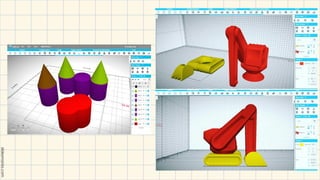
A free, cloud-based 3D CAD
software package for students.
● A 3D modeling and design software
that allows users to create 3D models
from scratch or use templates.
SelfCAD
A great way to bring study
notes to into the 21st
century.
● Quizlet is a web-based tool that allows
users to create study tools such as
interactive flashcards, tests, and study
games.
Quizlet / Quizlet
Live
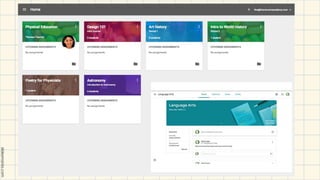
A powerful community based
social tool for learning.
● Google Classroom is a free education
platform that enables teachers to
interact with students and share
educational materials easily
Google Classroom
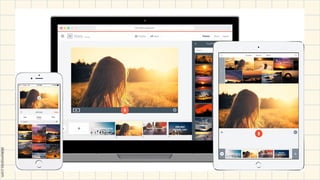
A video creation tool that allows users to
create short, engaging videos with text,
images, and music.
● Spark Video is part of the Adobe Spark
suite. The application enables students
to produce short, animated, narrated
explainer videos.
Adobe Spark Video
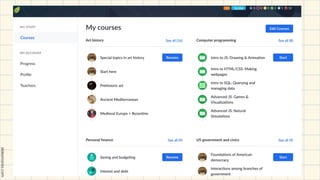
With Khan Academy you can
literally learn anything; all for
free.
● A free learning app for Class 1-12
students with videos, exercises and
tests for math, science and more
subjects.
Khan Academy
Seesaw brings together high-quality instruction,
authentic assessments that drive deep learning
insights, and inclusive communication – in one
place.
● Seesaw is an easy to use learning
portfolio application, enabling students
to document, showcase and reflect on
what they are learning at school.
Seesaw
A 100% free, digital student portfolio
that allows students to share classwork
with their teachers and family!
● Class Dojo is a free classroom
communication, community building,
and behavior management application.
Class Dojo
A communication app that helps schools,
teachers, students, and families
communicate with each other
● Edvoice is a feature-rich
communication tool with everything
from lesson planning and rubrics, to
messaging, announcements,
notifications, and even tools to help
prevent (or respond to) bullying in the
classroom.
Edvoice
A tool or technique used to create
ambient noise to help students focus
and reduce distractions.
● SimplyNoise, White Noise, Lite, Krisp,
Brain.fm, Coffitivity, Rainy Café,
Ambient Soundscapes, SoundCurtain
Background Noise
Create interactive lessons, assess
students on the fly, and see data and
student responses in real-time.
● Venngage is a web-based design tool
for creating infographics.
● AI-Infographic Generator: Venngage
can auto-create infographics from user
prompts, a feature Canva lack
Venngage
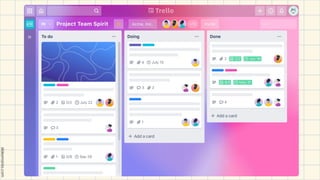
Trello is a free and super easy-to-use tool
students can use to create workflow
charts.
● Trello is the visual work management
tool that empowers teams to ideate,
plan, manage, and celebrate their work
together in a collaborative, productive,
and organized way.
Trello
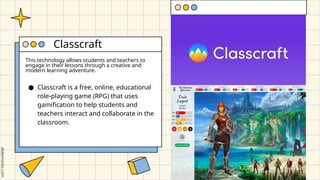
This technology allows students and teachers to
engage in their lessons through a creative and
modern learning adventure.
● Classcraft is a free, online, educational
role-playing game (RPG) that uses
gamification to help students and
teachers interact and collaborate in the
classroom.
Classcraft
The technology industry has been developing
more and more advanced tools to bring
learning to life and help students develop a
respect and appreciation for education. By
simply implementing just a couple of these
tools can transform a students’ education
journey. Technology in education has the ability
to open up a new world of experiences and
knowledge to students and educators.
― Lye (2018)
Thank you!
Do you have any questions?
hello@mail.com
555-111-222
mydomain.com

Producing Learning Resources Using Technology Tools

  • 1.
    Technology for Teachingand Learning 2 Producing Learning Resources Using Technology Tools
  • 2.
    Producing Learning ResourcesUsing Technology Tools Human and Non- human Learning Resources/ Instructional Materials
  • 3.
    Instructional Materials ● Alsoknown as Teaching/Learning Materials (TLM) ● Any collections of materials including animate and inanimate objects and human and non-human resources that a teacher may use in teaching and learning situations to help achieve desired learning objectives.
  • 4.
    Instructional materials canbe classified by type, including: Print Cassettes, microphone, podcast Audio Charts, real objects, photographs, transparencies Visual Slides, tapes, films, filmstrips, television, video, multimedia Audiovisual Electronic Interactive Textbooks, pamphlets, handouts, study guides, manuals Computers, graphing calculators, tablets
  • 5.
    IGI Global ScientificPublishing is a rapidly growing, mid-sized, independent international academic publisher dedicated to releasing high-quality, peer- reviewed scholarly research publications in the three major academic subject areas of Business & Management; Science, Technology, & Medicine (STM) ; and Education & Social Science. ● According to IGI Global, Instructional materials refer to the human and nonhuman materials and facilities that can be used to ease, encourage, improved and promote teaching and learning activities.
  • 6.
    Producing Learning ResourcesUsing Technology Tools Technology Tools for Teaching Science
  • 7.
    Technology Tools ● Accordingto IGI Global, refers to software, primarily, that can be used to develop or support online course content. ● This could include blogs, wikis, authoring tools such as Articulate or Captivate, and Web 2.0 tools available through the Internet. Another example of a classroom based technology tools include the whiteboard, index cards, posters, audience response systems (e.g. clicker technology), Google collaboration tools, 3D printing, and wikis.
  • 8.
    Depending on courselearning goals and outcomes, instructors may choose to use one or several of these tools to augment the teaching and learning environment in their classroom ― Yale Poorvu Center for Teaching and Learning
  • 9.
    Technology Tools ― Ekaran, 2018. Someof the Best Technology Tools focusing specifically on those that are designed for encouraging, enhancing, and managing learning”
  • 10.
    “The use oftechnology in the classroom is no longer up for debate. It's now extremely clear: the effective use of classroom technology drives student results. But, any competent education professional would be quick to point out that student results are only positively impacted when they are introduced to the right tools.” ― Dukes, (201p)
  • 11.
    “Educators have saidthe benefits that come with having and using technology in schools includes expanding on and reinforcing lesson content and motivating students to learn. It also gives teachers the option to reach students with different learning styles.” ― Lye (2018)
  • 12.
    “Your classroom appfor fun, effective classroom engagement” ● A cloud-based student response system, allowing teachers to immediately test student understanding by way of mini-quizzes, assigned to them on class laptops or tablets. Socrative
  • 14.
    A simple, fun,and engaging introduction to programming, designed specifically for 8 to 16-year-olds. ● Scratch is a free, visual programming language that helps kids learn to code by creating interactive stories, games, and animations. Scratch
  • 16.
    “Creating, giving, andtracking beautiful interactive presentations is as easy as 1,2,3” with Prezi ● Prezi is a web-based tool for creating interactive presentations that are different from traditional slide-based presentations. Prezi
  • 18.
    A free, cloud-based3D CAD software package for students. ● A 3D modeling and design software that allows users to create 3D models from scratch or use templates. SelfCAD
  • 20.
    A great wayto bring study notes to into the 21st century. ● Quizlet is a web-based tool that allows users to create study tools such as interactive flashcards, tests, and study games. Quizlet / Quizlet Live
  • 22.
    A powerful communitybased social tool for learning. ● Google Classroom is a free education platform that enables teachers to interact with students and share educational materials easily Google Classroom
  • 24.
    A video creationtool that allows users to create short, engaging videos with text, images, and music. ● Spark Video is part of the Adobe Spark suite. The application enables students to produce short, animated, narrated explainer videos. Adobe Spark Video
  • 26.
    With Khan Academyyou can literally learn anything; all for free. ● A free learning app for Class 1-12 students with videos, exercises and tests for math, science and more subjects. Khan Academy
  • 28.
    Seesaw brings togetherhigh-quality instruction, authentic assessments that drive deep learning insights, and inclusive communication – in one place. ● Seesaw is an easy to use learning portfolio application, enabling students to document, showcase and reflect on what they are learning at school. Seesaw
  • 30.
    A 100% free,digital student portfolio that allows students to share classwork with their teachers and family! ● Class Dojo is a free classroom communication, community building, and behavior management application. Class Dojo
  • 32.
    A communication appthat helps schools, teachers, students, and families communicate with each other ● Edvoice is a feature-rich communication tool with everything from lesson planning and rubrics, to messaging, announcements, notifications, and even tools to help prevent (or respond to) bullying in the classroom. Edvoice
  • 34.
    A tool ortechnique used to create ambient noise to help students focus and reduce distractions. ● SimplyNoise, White Noise, Lite, Krisp, Brain.fm, Coffitivity, Rainy Café, Ambient Soundscapes, SoundCurtain Background Noise
  • 36.
    Create interactive lessons,assess students on the fly, and see data and student responses in real-time. ● Venngage is a web-based design tool for creating infographics. ● AI-Infographic Generator: Venngage can auto-create infographics from user prompts, a feature Canva lack Venngage
  • 38.
    Trello is afree and super easy-to-use tool students can use to create workflow charts. ● Trello is the visual work management tool that empowers teams to ideate, plan, manage, and celebrate their work together in a collaborative, productive, and organized way. Trello
  • 40.
    This technology allowsstudents and teachers to engage in their lessons through a creative and modern learning adventure. ● Classcraft is a free, online, educational role-playing game (RPG) that uses gamification to help students and teachers interact and collaborate in the classroom. Classcraft
  • 42.
    The technology industryhas been developing more and more advanced tools to bring learning to life and help students develop a respect and appreciation for education. By simply implementing just a couple of these tools can transform a students’ education journey. Technology in education has the ability to open up a new world of experiences and knowledge to students and educators. ― Lye (2018)
  • 43.
    Thank you! Do youhave any questions? hello@mail.com 555-111-222 mydomain.com

Editor's Notes

  • #1 Technology tools can greatly enhance the production of learning resources. Using these tools, educators can create engaging and effective materials that cater to diverse learning styles and needs.
  • #2 Learning resources come in various forms, each offering unique advantages. We can categorize them into human and non-human resources. Human resources, like teachers and mentors, provide personalized guidance, feedback, and support. They offer invaluable insights based on their expertise and experience. Non-human resources, on the other hand, encompass a wide range of materials like textbooks, online courses, videos, and simulations. These resources provide structured knowledge, diverse perspectives, and accessible information. By effectively integrating both human and non-human resources, we can create a comprehensive and enriching learning experience that caters to diverse learning styles and preferences.
  • #3 Also known as Teaching/Learning Materials (TLM), these resources encompass a wide range of materials, both animate and inanimate, human and non-human, that educators utilize to support teaching and learning. TLMs are essential tools for achieving desired learning objectives, providing a diverse array of methods to engage learners and facilitate knowledge acquisition. Here are some examples of both animate and inanimate TLMs: Animate TLMs: Teachers: The most fundamental human TLM, teachers act as facilitators, guides, and mentors, directly interacting with students to impart knowledge, foster skills, and stimulate critical thinking. Guest speakers: Experts in specific fields can provide valuable insights and real-world perspectives, enriching the learning experience. Peer tutors: Students can learn from and support each other through peer tutoring, fostering collaboration and peer-to-peer learning. Animals: Live animals, such as pets, farm animals, or zoo animals, offer hands-on experiences for learning about biology, animal behavior, and ecosystems. Inanimate TLMs: Books: Traditional textbooks, reference books, and storybooks remain foundational resources, providing information, stories, and literary experiences. Whiteboards and chalkboards: These classic tools enable visual presentations, brainstorming, and collaborative note-taking. Models and diagrams: Representations of objects, structures, or processes can enhance understanding and facilitate visualization. Technology: Computers, tablets, interactive whiteboards, and online platforms offer a wide range of multimedia learning experiences, simulations, and interactive tools. Manipulatives: Tangible objects like blocks, puzzles, and building materials facilitate hands-on learning, problem-solving, and spatial reasoning.
  • #6 Technology tools have revolutionized science education, offering educators powerful means to engage students and foster a deeper understanding of scientific concepts. These tools provide interactive simulations, virtual labs, and immersive experiences that bring abstract ideas to life. By leveraging technology, educators can create dynamic learning environments that encourage exploration, experimentation, and critical thinking, ultimately enhancing student engagement and scientific literacy.
  • #12 Socrative is an online tool for teachers to give quizzes and on-the-fly assessments to students. Socrative professes to be “your classroom app for fun, effective classroom engagement”. In a nutshell, it is a cloud-based student response system, allowing teachers to immediately test student understanding by way of mini-quizzes, assigned to them on class laptops or tablets. Quizzes can be multiple choice, graded short answer, true-false, or open-ended short response. Socrative’s strength lies in its “on the fly” assessment method, providing teachers with valuable and timely feedback.
  • #14 Scratch is a simple, fun, and engaging introduction to programming, designed specifically for 8 to 16-year-olds. Users can combine music, graphics, and photos to create interactive games, animations, and slideshows. All of their creations are shareable with others in a student’s online community. It’s important to note that Scratch will really only teach programming concepts, not so much real, authentic programming.
  • #16 Prezi is a web-based tool for creating interactive presentations that are different from traditional slide-based presentations. According to Prezi, “creating, giving, and tracking beautiful interactive presentations is as easy as 1,2,3” with their cloud-based presentation software. Prezi presentations are nothing like your traditional presentations; zooming in and out and moving side to side across one single, very attractive and modern canvas, focusing in on images and videos inputted by the user. Prezi is very popular and consistently receives excellent reviews.
  • #18 It is incredibly easy to use, yet provides an authentic, ‘real world’ 3D design experience. Another notable feature—SelfCAD has teamed up with MyMiniFactory, to provide a database of already completed 3D printable designs, making thousands of 3D objects available for immediate 3D printing. All round, it is a very powerful and effective tool for learning in STEM, and a number of schools are getting on board.
  • #20 Quizlet is a web-based tool that allows users to create study tools such as interactive flashcards, tests, and study games. Quizlet provides a platform for students and teachers to create and share their own learning materials, including flashcards and diagrams. Quizlet Live is the free in class quiz game, produced by Quizlet that can then bring these learning materials to life. In this engaging and interactive game, students must all contribute, stay focused and communicate well to win. Quizlet consistently receives excellent reviews and is a great way to bring study notes to into the 21st century.
  • #22 Google Classroom is a powerful community based social tool for learning. It allows students to post questions and receive answers from their teachers and fellow students. Furthermore, teachers can post intriguing questions and lesson materials for review at home. It can also be integrated with other Google products such as Google Forms, which can be a great way to get feedback from students.
  • #24 Spark Video is part of the Adobe Spark suite. The application enables students to produce short, animated, narrated explainer videos. Students can easily add photos, video clips, icons, and voice, as well as professional-quality soundtracks and cinematic motion to their video creations. Video and vlog making is a great way to engage students creatively, and an ‘out of the box’ approach to class projects or reviewing learning materials.
  • #26 With Khan Academy you can literally learn anything; all for free. Lessons are presented by way of videos, interactive activities, and challenges. Learners also earn badges in line with their achievements and can save their progress to their own profile. Khan Academy is a great way to supplement your teaching, provide extra work to your gifted and talented students or help those who are struggling with certain content.
  • #28 Work can be made accessible to parents as well. The collective monitoring of learning by students, teachers, and parents is a great way to motivate students, and the tool is incredibly popular with teachers.
  • #30 A well-behaved student body is associated with better learning for everyone in the class as it minimizes distractions and improves student focus. Class Dojo enables teachers to not only track behavior and share this with parents, but also assign students tasks which build positive behavioral skills and traits.
  • #31 Useful tools such as a timer and group maker help keep classes on track.
  • #34 Depending on what you want the students engage in–you, one another, content, an assignment, etc.–they need to be able to focus, and classroom aren’t always the easiest places to do that. Background noise can not only drown out excess noise, but more helpfully as students concentrate, there is less noise because they’re concentrating. Neat trick, huh?
  • #36 Create interactive lessons, assess students on the fly, and see data and student responses in real-time. Students that can ask questions and receive feedback at any time are more likely to be engaged. With so much focus being given to data analytics these days, data literacy is a useful skill for students to learn. Whether your students have collected their own data or they’ve collected it from other sources, being able to visualize their data in an infographic is a highly useful skill. Infographics appeal to both visual learners and textual learners. Venngage offers a selection of infographic templates that students can customize.
  • #40 Classcraft is a free, online, educational role-playing game (RPG) that uses gamification to help students and teachers interact and collaborate in the classroom. Classcraft uses these same gaming principles to engage students in the educational process and create a more harmonized learning environment. The platform encourages students to work together as they build academic and social skills. Classcraft is free and also has a paid version, which offers teachers a suite of additional features.