Ray Tracing
Computer Graphics

Prepared by
Yogesh Jatin
Gupta

1
Ray-Tracing

2
What is Ray Tracing
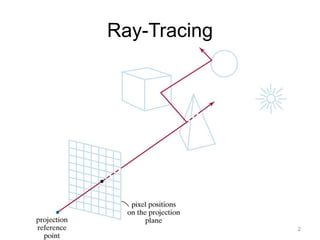
• Ray tracing is a technique for generating an
image by tracing the path of light through pixels
in an image plane and simulating the effects of
its encounters with virtual objects.
• The technique is capable of producing a very
high degree of visual realism, usually higher
than that of typical scan line rendering methods,
but at a greater computational cost.
3
Raytraced Images

4
Ray Tracing Model

5
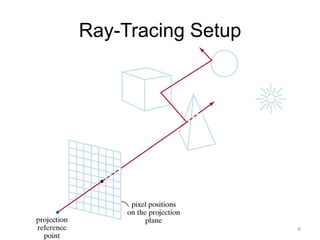
Ray-Tracing Setup

6
Ray Tracing from Eye

• Starting at the light position traces many rays that never
reach the eye. Thus the traditional ray-tracing method is
to start at the eye and trace rays back-wards to the sourc
e.
7
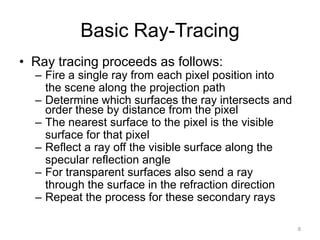
Basic Ray-Tracing
• Ray tracing proceeds as follows:

– Fire a single ray from each pixel position into
the scene along the projection path
– Determine which surfaces the ray intersects and
order these by distance from the pixel
– The nearest surface to the pixel is the visible
surface for that pixel
– Reflect a ray off the visible surface along the
specular reflection angle
– For transparent surfaces also send a ray
through the surface in the refraction direction
– Repeat the process for these secondary rays
8
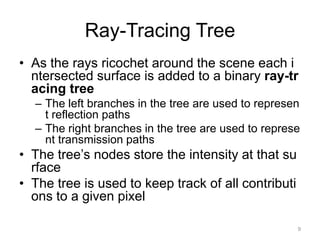
Ray-Tracing Tree
• As the rays ricochet around the scene each i
ntersected surface is added to a binary ray-tr
acing tree
– The left branches in the tree are used to represen
t reflection paths
– The right branches in the tree are used to represe
nt transmission paths

• The tree’s nodes store the intensity at that su
rface
• The tree is used to keep track of all contributi
ons to a given pixel
9
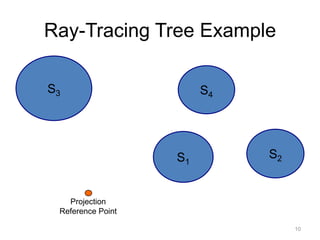
Ray-Tracing Tree Example
S3

S4

S1

S2

Projection
Reference Point
10
11
Ray-Tracing Tree (cont…)
• After the ray-tracing tree has been completed
for a pixel the intensity contributions are accu
mulated
• We start at the terminal nodes (bottom) of the
tree
• The surface intensity at each node is attenuat
ed by the distance from the parent surface an
d added to the intensity of the parent surface
• The sum of the attenuated intensities at the r
oot node is assigned to the pixel
12
Ray-Tracing & Illumination Models
• At each surface intersection the
illumination model is invoked to determine the
surface intensity contribution
L = LIGHT SOURCE
N= NORMAL TO SURFAC
E
H = LIGHT INTENSITY

13
The Shadow Ray
• The path from the intersection to the light s
ource is known as the shadow ray
• If any object intersects the shadow ray bet
ween the surface and the light source then
the surface is in shadow with respect to th
at source

14
Reflection

15
Thank You!

16

Ray tracing

  • 1.
  • 2.
  • 3.
    What is RayTracing • Ray tracing is a technique for generating an image by tracing the path of light through pixels in an image plane and simulating the effects of its encounters with virtual objects. • The technique is capable of producing a very high degree of visual realism, usually higher than that of typical scan line rendering methods, but at a greater computational cost. 3
  • 4.
  • 5.
  • 6.
  • 7.
    Ray Tracing fromEye • Starting at the light position traces many rays that never reach the eye. Thus the traditional ray-tracing method is to start at the eye and trace rays back-wards to the sourc e. 7
  • 8.
    Basic Ray-Tracing • Raytracing proceeds as follows: – Fire a single ray from each pixel position into the scene along the projection path – Determine which surfaces the ray intersects and order these by distance from the pixel – The nearest surface to the pixel is the visible surface for that pixel – Reflect a ray off the visible surface along the specular reflection angle – For transparent surfaces also send a ray through the surface in the refraction direction – Repeat the process for these secondary rays 8
  • 9.
    Ray-Tracing Tree • Asthe rays ricochet around the scene each i ntersected surface is added to a binary ray-tr acing tree – The left branches in the tree are used to represen t reflection paths – The right branches in the tree are used to represe nt transmission paths • The tree’s nodes store the intensity at that su rface • The tree is used to keep track of all contributi ons to a given pixel 9
  • 10.
  • 11.
  • 12.
    Ray-Tracing Tree (cont…) •After the ray-tracing tree has been completed for a pixel the intensity contributions are accu mulated • We start at the terminal nodes (bottom) of the tree • The surface intensity at each node is attenuat ed by the distance from the parent surface an d added to the intensity of the parent surface • The sum of the attenuated intensities at the r oot node is assigned to the pixel 12
  • 13.
    Ray-Tracing & IlluminationModels • At each surface intersection the illumination model is invoked to determine the surface intensity contribution L = LIGHT SOURCE N= NORMAL TO SURFAC E H = LIGHT INTENSITY 13
  • 14.
    The Shadow Ray •The path from the intersection to the light s ource is known as the shadow ray • If any object intersects the shadow ray bet ween the surface and the light source then the surface is in shadow with respect to th at source 14
  • 15.
  • 16.