Scratch A
Pixel -
Reflection
RASTERIZATION AND SCREEN
SPACE REFLECTION
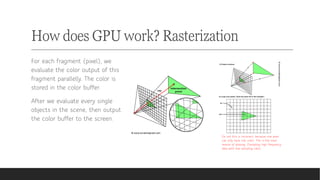
How does GPU work? Rasterization
For each fragment (pixel), we
evaluate the color output of this
fragment parallelly. The color is
stored in the color buffer.
After we evaluate every single
objects in the scene, then output
the color buffer to the screen.
Do not this is incorrect, because one pixel
can only have one color. This is the main
reason of aliasing. (Sampling high frequency
data with low sampling rate)
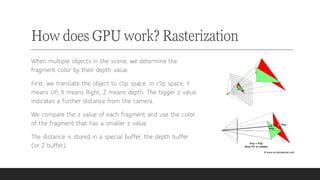
How does GPU work? Rasterization
When multiple objects in the scene, we determine the
fragment color by their depth value.
First, we translate the object to clip space. In clip space, Y
means UP, X means Right, Z means depth. The bigger z value
indicates a further distance from the camera.
We compare the z value of each fragment and use the color
of the fragment that has a smaller z value.
The distance is stored in a special buffer, the depth buffer
(or Z buffer).
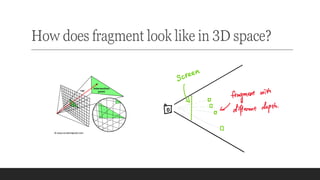
How does fragment look like in 3D space?
How is reflection
calculated?
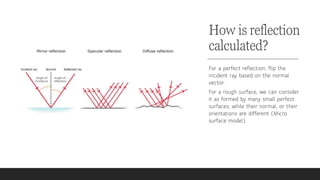
For a perfect reflection, flip the
incident ray based on the normal
vector.
For a rough surface, we can consider
it as formed by many small perfect
surfaces, while their normal, or their
orientations are different (Micro
surface model).
How is reflection
calculated?
Reflection is always implemented
by Raytracing algorithm.
For each light path, we need to
evaluate the reflection direction
and the color from that direction,
then we combine the color with
the color of the current pixel.
Raytracing is an unbounded
algorithm. When the scene getting
bigger, it becomes much slower.
Unbounded vs Bounded algorithm
For an unbounded algorithm, it increases
when the problem size increases.
Sometimes, it increases much faster
than the problem size. Especially for
GPU, for each computing unit, it is very
slow. For an unbounded algorithm, when
the scene size increases, it becomes
much slower than before, and very soon,
it becomes unusable.
For a bounded algorithm, it does not
increase when the problem size
increases. It has a fixed upper limit. It
usually is impossible to find a perfect
bounded algorithm, but it is still useful if
we can get some approximation.
Bounded algorithm and
Screen Space Buffer
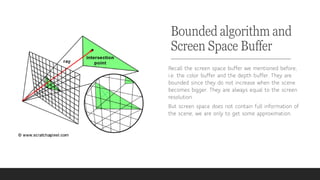
Recall the screen space buffer we mentioned before,
i.e. the color buffer and the depth buffer. They are
bounded since they do not increase when the scene
becomes bigger. They are always equal to the screen
resolution.
But screen space does not contain full information of
the scene, we are only to get some approximation.
What we need to
calculate
reflection vector?
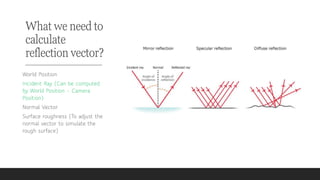
World Position
Incident Ray (Can be computed
by World Position – Camera
Position)
Normal Vector
Surface roughness (To adjust the
normal vector to simulate the
rough surface)
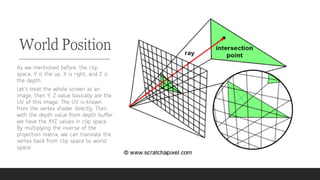
World Position
As we mentioned before, the clip
space, Y is the up, X is right, and Z is
the depth.
Let’s treat the whole screen as an
image, then Y, Z value basically are the
UV of this image. The UV is known
from the vertex shader directly. Then
with the depth value from depth buffer
we have the XYZ values in clip space.
By multiplying the inverse of the
projection matrix, we can translate the
vertex back from clip space to world
space.
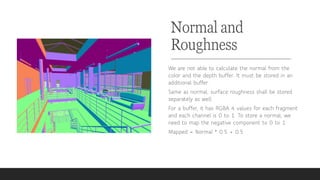
Normal and
Roughness
We are not able to calculate the normal from the
color and the depth buffer. It must be stored in an
additional buffer.
Same as normal, surface roughness shall be stored
separately as well.
For a buffer, it has RGBA 4 values for each fragment
and each channel is 0 to 1. To store a normal, we
need to map the negative component to 0 to 1.
Mapped = Normal * 0.5 + 0.5
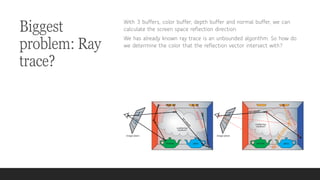
Biggest
problem: Ray
trace?
With 3 buffers, color buffer, depth buffer and normal buffer, we can
calculate the screen space reflection direction.
We has already known ray trace is an unbounded algorithm. So how do
we determine the color that the reflection vector intersect with?
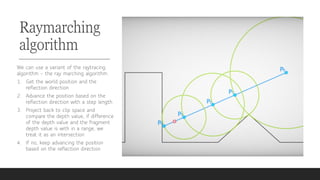
Raymarching
algorithm
We can use a variant of the raytracing
algorithm – the ray marching algorithm.
1. Get the world position and the
reflection direction
2. Advance the position based on the
reflection direction with a step length
3. Project back to clip space and
compare the depth value, if difference
of the depth value and the fragment
depth value is with in a range, we
treat it as an intersection
4. If no, keep advancing the position
based on the reflection direction
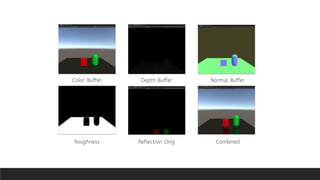
Buffers and Results
Color Buffer Depth Buffer Normal Buffer
Roughness Reflection Only Combined
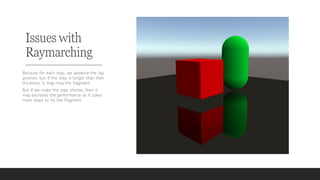
Issues with
Raymarching
Because for each step, we advance the ray
position, but if the step is longer than then
thickness, it may miss the fragment.
But if we make the step shorter, then it
may decrease the performance as it takes
more steps to hit the fragment.
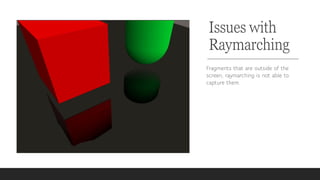
Issues with
Raymarching
Fragments that are outside of the
screen, raymarching is not able to
capture them.
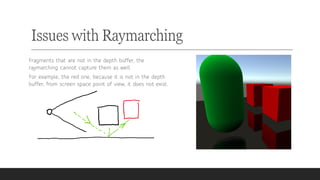
Issues with Raymarching
Fragments that are not in the depth buffer, the
raymarching cannot capture them as well.
For example, the red one, because it is not in the depth
buffer, from screen space point of view, it does not exist.
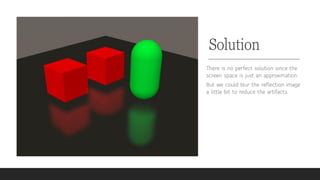
Solution
There is no perfect solution since the
screen space is just an approximation.
But we could blur the reflection image
a little bit to reduce the artifacts.
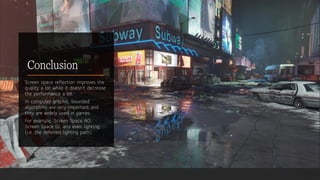
Conclusion
Screen space reflection improves the
quality a lot while it doesn't decrease
the performance a lot.
In computer graphic, bounded
algorithms are very important and
they are widely used in games.
For example, Screen Space AO,
Screen Space GI, and even lighting
(i.e. the deferred lighting path).

Scratch a pixel - Reflection

  • 1.
    Scratch A Pixel - Reflection RASTERIZATIONAND SCREEN SPACE REFLECTION
  • 2.
    How does GPUwork? Rasterization For each fragment (pixel), we evaluate the color output of this fragment parallelly. The color is stored in the color buffer. After we evaluate every single objects in the scene, then output the color buffer to the screen. Do not this is incorrect, because one pixel can only have one color. This is the main reason of aliasing. (Sampling high frequency data with low sampling rate)
  • 3.
    How does GPUwork? Rasterization When multiple objects in the scene, we determine the fragment color by their depth value. First, we translate the object to clip space. In clip space, Y means UP, X means Right, Z means depth. The bigger z value indicates a further distance from the camera. We compare the z value of each fragment and use the color of the fragment that has a smaller z value. The distance is stored in a special buffer, the depth buffer (or Z buffer).
  • 4.
    How does fragmentlook like in 3D space?
  • 5.
    How is reflection calculated? Fora perfect reflection, flip the incident ray based on the normal vector. For a rough surface, we can consider it as formed by many small perfect surfaces, while their normal, or their orientations are different (Micro surface model).
  • 6.
    How is reflection calculated? Reflectionis always implemented by Raytracing algorithm. For each light path, we need to evaluate the reflection direction and the color from that direction, then we combine the color with the color of the current pixel. Raytracing is an unbounded algorithm. When the scene getting bigger, it becomes much slower.
  • 7.
    Unbounded vs Boundedalgorithm For an unbounded algorithm, it increases when the problem size increases. Sometimes, it increases much faster than the problem size. Especially for GPU, for each computing unit, it is very slow. For an unbounded algorithm, when the scene size increases, it becomes much slower than before, and very soon, it becomes unusable. For a bounded algorithm, it does not increase when the problem size increases. It has a fixed upper limit. It usually is impossible to find a perfect bounded algorithm, but it is still useful if we can get some approximation.
  • 8.
    Bounded algorithm and ScreenSpace Buffer Recall the screen space buffer we mentioned before, i.e. the color buffer and the depth buffer. They are bounded since they do not increase when the scene becomes bigger. They are always equal to the screen resolution. But screen space does not contain full information of the scene, we are only to get some approximation.
  • 9.
    What we needto calculate reflection vector? World Position Incident Ray (Can be computed by World Position – Camera Position) Normal Vector Surface roughness (To adjust the normal vector to simulate the rough surface)
  • 10.
    World Position As wementioned before, the clip space, Y is the up, X is right, and Z is the depth. Let’s treat the whole screen as an image, then Y, Z value basically are the UV of this image. The UV is known from the vertex shader directly. Then with the depth value from depth buffer we have the XYZ values in clip space. By multiplying the inverse of the projection matrix, we can translate the vertex back from clip space to world space.
  • 11.
    Normal and Roughness We arenot able to calculate the normal from the color and the depth buffer. It must be stored in an additional buffer. Same as normal, surface roughness shall be stored separately as well. For a buffer, it has RGBA 4 values for each fragment and each channel is 0 to 1. To store a normal, we need to map the negative component to 0 to 1. Mapped = Normal * 0.5 + 0.5
  • 12.
    Biggest problem: Ray trace? With 3buffers, color buffer, depth buffer and normal buffer, we can calculate the screen space reflection direction. We has already known ray trace is an unbounded algorithm. So how do we determine the color that the reflection vector intersect with?
  • 13.
    Raymarching algorithm We can usea variant of the raytracing algorithm – the ray marching algorithm. 1. Get the world position and the reflection direction 2. Advance the position based on the reflection direction with a step length 3. Project back to clip space and compare the depth value, if difference of the depth value and the fragment depth value is with in a range, we treat it as an intersection 4. If no, keep advancing the position based on the reflection direction
  • 14.
    Buffers and Results ColorBuffer Depth Buffer Normal Buffer Roughness Reflection Only Combined
  • 15.
    Issues with Raymarching Because foreach step, we advance the ray position, but if the step is longer than then thickness, it may miss the fragment. But if we make the step shorter, then it may decrease the performance as it takes more steps to hit the fragment.
  • 16.
    Issues with Raymarching Fragments thatare outside of the screen, raymarching is not able to capture them.
  • 17.
    Issues with Raymarching Fragmentsthat are not in the depth buffer, the raymarching cannot capture them as well. For example, the red one, because it is not in the depth buffer, from screen space point of view, it does not exist.
  • 18.
    Solution There is noperfect solution since the screen space is just an approximation. But we could blur the reflection image a little bit to reduce the artifacts.
  • 19.
    Conclusion Screen space reflectionimproves the quality a lot while it doesn't decrease the performance a lot. In computer graphic, bounded algorithms are very important and they are widely used in games. For example, Screen Space AO, Screen Space GI, and even lighting (i.e. the deferred lighting path).