Digital Image
Processing
Contents
Histogram Processing
Histogram Equalization
Histogram Matching
Local Histogram processing
Using histogram statistics for image enhancement
Histograms
Histograms plots show many times (frequency) each
intensity value in image occurs
Example:
Image (left) has 256 distinct gray-levels (8bits)
Histogram (right) shows frequency (how many times)each
gray-level occurs
Histograms
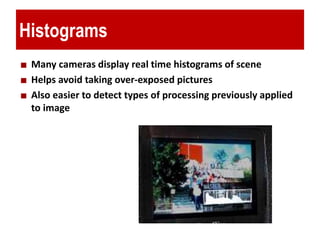
Many cameras display real time histograms of scene
Helps avoid taking over-exposed pictures
Also easier to detect types of processing previously applied
to image
Histograms
E.g. L = 16, 10 pixels have intensity value = 2
Histograms: only statistical information
No indication of location of pixels
Histograms
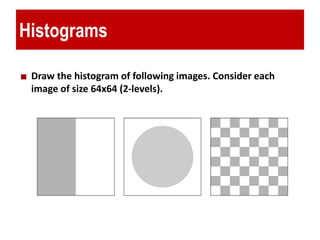
Draw the histogram of following images. Consider each
image of size 64x64 (2-levels).
Histograms
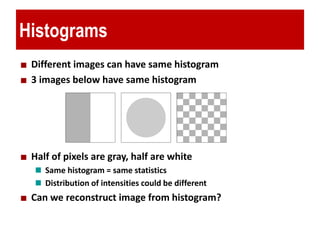
Different images can have same histogram
3 images below have same histogram
Half of pixels are gray, half are white
Same histogram = same statistics
Distribution of intensities could be different
Can we reconstruct image from histogram?
Histograms
A histogram for a grayscale image with intensity values in
range I(x, y) [0, L—1] would contain exactly L entries
E.g. 8-bit grayscale image, L = 2^8 = 256
Each histogram entry is defined as:
h(i) = number of pixels with intensity i for all 0 <= i< L.
E.g: h(255) = number of pixels with intensity = 255
Image Contrast
The contrast of a grayscale image indicates how easily
objects in the image can be distinguished
High contrast image: many distinct intensity values
Low contrast: image uses few intensity values
Histogram and Image Contrast
Histogram Processing
Uses for Histogram Processing
Image enhancements
Image statistics
Image compression
Image segmentation
Simple to calculate in software
Economic hardware implementations
Popular tool in real-time image processing
A plot of this function for all values of k provides a global
description of the appearance of the image (gives useful
information for contrast enhancement)
Uses for Histogram Processing
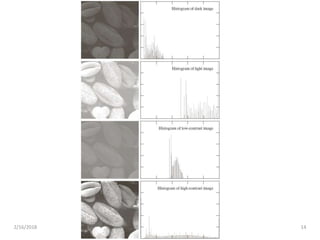
Four basic image types and their corresponding
histograms
– Dark
– Light
– Low contrast
– High contrast
Histograms commonly
viewed in plots as
2/16/2018 14
Histogram Equalization
2/16/2018 15
Dynamic Range
2/16/2018 16
• Dynamic Range: Number of distinct pixels in
image
• High dynamic range means very bright and very
dark parts in a single image (many distinct values)
Dynamic Range
2/16/2018 17
Histogram Equalization
2/16/2018 18
The intensity levels in an image may be viewed as
random variables in the interval [0, L-1].
Let ( ) and ( ) denote the probability density
function (PDF) of random variables and .
r sp r p s
r s
2/16/2018 19
Histogram Equalization
( ) 0 1s T r r L   
. T(r) is a strictly monotonically increasing function
in the interval 0 -1;
. 0 ( ) -1 for 0 -1.
a
r L
b T r L r L
 
   
2/16/2018 20
Histogram Equalization
. T(r) is a strictly monotonically increasing function
in the interval 0 -1;
. 0 ( ) -1 for 0 -1.
a
r L
b T r L r L
 
   
( ) 0 1s T r r L   
( ) is continuous and differentiable.T r
( ) ( )s rp s ds p r dr
Histogram Equalization
0
( ) ( 1) ( )
r
rs T r L p w dw   
2/16/2018 21
0
( )
( 1) ( )
r
r
ds dT r d
L p w dw
dr dr dr
   
  
( 1) ( )rL p r 
 
( ) 1( ) ( )
( )
( 1) ( ) 1
r r r
s
r
p r dr p r p r
p s
L p rdsds L
dr
   
  
 
 
2/16/2018 22
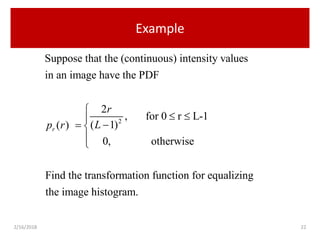
Example
2
Suppose that the (continuous) intensity values
in an image have the PDF
2
, for 0 r L-1
( 1)( )
0, otherwise
Find the transformation function for equalizing
the image histogra
r
r
Lp r

 
 


m.
2/16/2018 23
Example
0
( ) ( 1) ( )
r
rs T r L p w dw   
20
2
( 1)
( 1)
r w
L dw
L
 

2
1
r
L


2/16/2018 24
Histogram Equalization
0
Continuous case:
( ) ( 1) ( )
r
rs T r L p w dw   
0
Discrete values:
( ) ( 1) ( )
k
k k r j
j
s T r L p r

   
0 0
1
( 1) k=0,1,..., L-1
k k
j
j
j j
n L
L n
MN MN 

   
2/16/2018 25
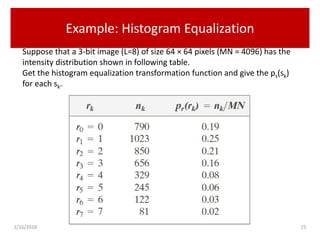
Example: Histogram Equalization
Suppose that a 3-bit image (L=8) of size 64 × 64 pixels (MN = 4096) has the
intensity distribution shown in following table.
Get the histogram equalization transformation function and give the ps(sk)
for each sk.
2/16/2018 26
Example: Histogram Equalization
0
0 0
0
( ) 7 ( ) 7 0.19 1.33r j
j
s T r p r

     1
1
1 1
0
( ) 7 ( ) 7 (0.19 0.25) 3.08r j
j
s T r p r

      3
2 3
4 5
6 7
4.55 5 5.67 6
6.23 6 6.65 7
6.86 7 7.00 7
s s
s s
s s
   
   
   
2/16/2018 27
Example: Histogram Equalization
2/16/2018 28
2/16/2018 29
2/16/2018 30
Question
Is histogram equalization always good?
2/16/2018 31
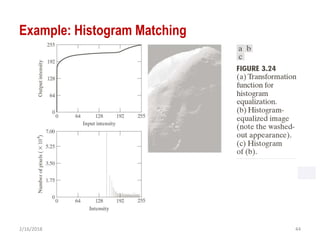
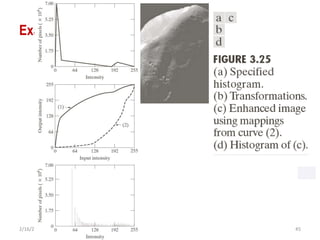
Histogram Matching
Histogram matching (histogram specification)
— generate a processed image that has a specified histogram
Let ( ) and ( ) denote the continous probability
density functions of the variables and . ( ) is the
specified probability density function.
Let be the random variable with the prob
r z
z
p r p z
r z p z
s
0
0
ability
( ) ( 1) ( )
Define a random variable with the probability
( ) ( 1) ( )
r
r
z
z
s T r L p w dw
z
G z L p t dt s
  
  


2/16/2018 32
Histogram Matching
0
0
( ) ( 1) ( )
( ) ( 1) ( )
r
r
z
z
s T r L p w dw
G z L p t dt s
  
  


 1 1
( ) ( )z G s G T r 
 
2/16/2018 33
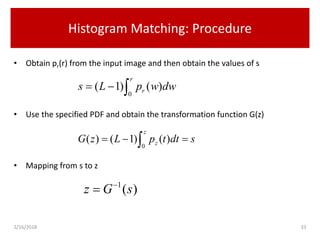
Histogram Matching: Procedure
• Obtain pr(r) from the input image and then obtain the values of s
• Use the specified PDF and obtain the transformation function G(z)
• Mapping from s to z
0
( 1) ( )
r
rs L p w dw  
0
( ) ( 1) ( )
z
zG z L p t dt s  
1
( )z G s

2/16/2018 34
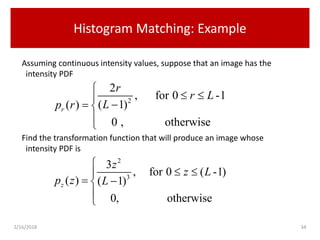
Histogram Matching: Example
Assuming continuous intensity values, suppose that an image has the
intensity PDF
Find the transformation function that will produce an image whose
intensity PDF is
2
2
, for 0 -1
( 1)( )
0 , otherwise
r
r
r L
Lp r

 
 


2
3
3
, for 0 ( -1)
( ) ( 1)
0, otherwise
z
z
z L
p z L

 
 


Histogram Matching: Example
Find the histogram equalization transformation for the input image
Find the histogram equalization transformation for the specified histogram
The transformation function
20 0
2
( ) ( 1) ( ) ( 1)
( 1)
r r
r
w
s T r L p w dw L dw
L
    
 
2/16/2018 35
2 3
3 20 0
3
( ) ( 1) ( ) ( 1)
( 1) ( 1)
z z
z
t z
G z L p t dt L dt s
L L
     
  
2
1
r
L


1/32
1/3 1/32 2 2
( 1) ( 1) ( 1)
1
r
z L s L L r
L
 
             
2/16/2018 36
Histogram Matching: Discrete Cases
• Obtain pr(rj) from the input image and then obtain the values of sk,
round the value to the integer range [0, L-1].
• Use the specified PDF and obtain the transformation function G(zq),
round the value to the integer range [0, L-1].
• Mapping from sk to zq
0 0
( 1)
( ) ( 1) ( )
k k
k k r j j
j j
L
s T r L p r n
MN 

    
0
( ) ( 1) ( )
q
q z i k
i
G z L p z s

  
1
( )q kz G s

2/16/2018 37
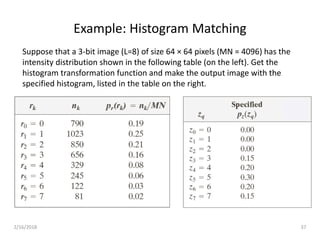
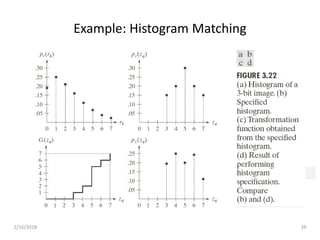
Example: Histogram Matching
Suppose that a 3-bit image (L=8) of size 64 × 64 pixels (MN = 4096) has the
intensity distribution shown in the following table (on the left). Get the
histogram transformation function and make the output image with the
specified histogram, listed in the table on the right.
2/16/2018
Example: Histogram Matching
Obtain the scaled histogram-equalized values,
Compute all the values of the transformation function G,
0 1 2 3 4
5 6 7
1, 3, 5, 6, 7,
7, 7, 7.
s s s s s
s s s
    
  
0
0
0
( ) 7 ( ) 0.00z j
j
G z p z

 
1 2
3 4
5 6
7
( ) 0.00 ( ) 0.00
( ) 1.05 ( ) 2.45
( ) 4.55 ( ) 5.95
( ) 7.00
G z G z
G z G z
G z G z
G z
 
 
 

0
0 0
1 2
65
7
2/16/2018 39
Example: Histogram Matching
2/16/2018 40
Example: Histogram Matching
Obtain the scaled histogram-equalized values,
Compute all the values of the transformation function G,
0 1 2 3 4
5 6 7
1, 3, 5, 6, 7,
7, 7, 7.
s s s s s
s s s
    
  
0
0
0
( ) 7 ( ) 0.00z j
j
G z p z

 
1 2
3 4
5 6
7
( ) 0.00 ( ) 0.00
( ) 1.05 ( ) 2.45
( ) 4.55 ( ) 5.95
( ) 7.00
G z G z
G z G z
G z G z
G z
 
 
 

0
0 0
1 2
65
7
s0
s2 s3
s5 s6 s7
s1
s4
2/16/2018 41
Example: Histogram Matching
0 1 2 3 4
5 6 7
1, 3, 5, 6, 7,
7, 7, 7.
s s s s s
s s s
    
  
0
1
2
3
4
5
6
7
kr
2/16/2018 42
Example: Histogram Matching
0 3
1 4
2 5
3 6
4 7
5 7
6 7
7 7
k qr z








2/16/2018 43
Example: Histogram Matching
2/16/2018 44
Example: Histogram Matching
2/16/2018 45
Example: Histogram Matching
2/16/2018 46
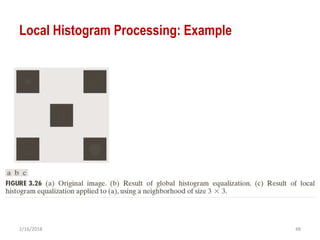
Local Histogram Processing
Define a neighborhood and move its center from pixel to pixel
At each location, the histogram of the points in the neighborhood
is computed. Either histogram equalization or histogram
specification transformation function is obtained
Map the intensity of the pixel centered in the neighborhood
Move to the next location and repeat the procedure
2/16/2018 47
Local Histogram Processing
• The two histogram processing methods discussed:
• Global
• pixels are modified by a transformation
function based on the gray-level content of an
entire image.
• Global approach is suitable for overall enhancement
• there are cases in which it is necessary to
enhance details over small areas in an image
2/16/2018 48
Local Histogram Processing: Example
2/16/2018 49
Using Histogram Statistics for Image
Enhancement
1
0
( )
L
i i
i
m r p r


 
1
0
( ) ( ) ( )
L
n
n i i
i
u r r m p r


 
1
2 2
2
0
( ) ( ) ( )
L
i i
i
u r r m p r


  
1 1
0 0
1
( , )
M N
x y
f x y
MN
 
 
 
 
1 1
2
0 0
1
( , )
M N
x y
f x y m
MN
 
 
 
Average Intensity
Variance
2/16/2018 50
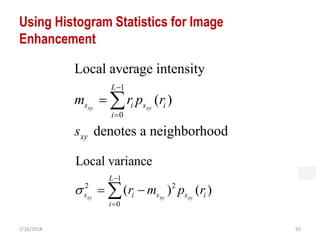
Using Histogram Statistics for Image
Enhancement
1
0
Local average intensity
( )
denotes a neighborhood
xy xy
L
s i s i
i
xy
m r p r
s


 
1
2 2
0
Local variance
( ) ( )xy xy xy
L
s i s s i
i
r m p r


 
2/16/2018 51
Using Histogram Statistics for Image
Enhancement: Example
0 1 2
0 1 2
( , ), if and
( , )
( , ), otherwise
:global mean; :global standard deviation
0.4; 0.02; 0.4; 4
xy xys G G s G
G G
E f x y m k m k k
g x y
f x y
m
k k k E
  

  
 

   
g
Enhancement Using Arithmetic/Logic
Operations
Arithmetic/logic operations involving images
are performed on a pixel-by-pixel basis
between two or more images (this excludes
the logic operation NOT, which is performed
on a single image).
The difference between two images f(x, y) and
h(x, y), expressed as
G(x,y)=f(x,y)-h(x,y)
Basics of Spatial Filtering
The subimage is called a filter, mask,
kernel, template, or window.
The values in a filter subimage are referred to
as coefficients , rather than pixels.
Smoothing spatial filters

Histogram Processing

  • 1.
  • 2.
    Contents Histogram Processing Histogram Equalization HistogramMatching Local Histogram processing Using histogram statistics for image enhancement
  • 3.
    Histograms Histograms plots showmany times (frequency) each intensity value in image occurs Example: Image (left) has 256 distinct gray-levels (8bits) Histogram (right) shows frequency (how many times)each gray-level occurs
  • 4.
    Histograms Many cameras displayreal time histograms of scene Helps avoid taking over-exposed pictures Also easier to detect types of processing previously applied to image
  • 5.
    Histograms E.g. L =16, 10 pixels have intensity value = 2 Histograms: only statistical information No indication of location of pixels
  • 6.
    Histograms Draw the histogramof following images. Consider each image of size 64x64 (2-levels).
  • 7.
    Histograms Different images canhave same histogram 3 images below have same histogram Half of pixels are gray, half are white Same histogram = same statistics Distribution of intensities could be different Can we reconstruct image from histogram?
  • 8.
    Histograms A histogram fora grayscale image with intensity values in range I(x, y) [0, L—1] would contain exactly L entries E.g. 8-bit grayscale image, L = 2^8 = 256 Each histogram entry is defined as: h(i) = number of pixels with intensity i for all 0 <= i< L. E.g: h(255) = number of pixels with intensity = 255
  • 9.
    Image Contrast The contrastof a grayscale image indicates how easily objects in the image can be distinguished High contrast image: many distinct intensity values Low contrast: image uses few intensity values
  • 10.
  • 11.
  • 12.
    Uses for HistogramProcessing Image enhancements Image statistics Image compression Image segmentation Simple to calculate in software Economic hardware implementations Popular tool in real-time image processing A plot of this function for all values of k provides a global description of the appearance of the image (gives useful information for contrast enhancement)
  • 13.
    Uses for HistogramProcessing Four basic image types and their corresponding histograms – Dark – Light – Low contrast – High contrast Histograms commonly viewed in plots as
  • 14.
  • 15.
  • 16.
    Dynamic Range 2/16/2018 16 •Dynamic Range: Number of distinct pixels in image • High dynamic range means very bright and very dark parts in a single image (many distinct values)
  • 17.
  • 18.
    Histogram Equalization 2/16/2018 18 Theintensity levels in an image may be viewed as random variables in the interval [0, L-1]. Let ( ) and ( ) denote the probability density function (PDF) of random variables and . r sp r p s r s
  • 19.
    2/16/2018 19 Histogram Equalization () 0 1s T r r L    . T(r) is a strictly monotonically increasing function in the interval 0 -1; . 0 ( ) -1 for 0 -1. a r L b T r L r L      
  • 20.
    2/16/2018 20 Histogram Equalization .T(r) is a strictly monotonically increasing function in the interval 0 -1; . 0 ( ) -1 for 0 -1. a r L b T r L r L       ( ) 0 1s T r r L    ( ) is continuous and differentiable.T r ( ) ( )s rp s ds p r dr
  • 21.
    Histogram Equalization 0 ( )( 1) ( ) r rs T r L p w dw    2/16/2018 21 0 ( ) ( 1) ( ) r r ds dT r d L p w dw dr dr dr        ( 1) ( )rL p r    ( ) 1( ) ( ) ( ) ( 1) ( ) 1 r r r s r p r dr p r p r p s L p rdsds L dr           
  • 22.
    2/16/2018 22 Example 2 Suppose thatthe (continuous) intensity values in an image have the PDF 2 , for 0 r L-1 ( 1)( ) 0, otherwise Find the transformation function for equalizing the image histogra r r Lp r        m.
  • 23.
    2/16/2018 23 Example 0 ( )( 1) ( ) r rs T r L p w dw    20 2 ( 1) ( 1) r w L dw L    2 1 r L  
  • 24.
    2/16/2018 24 Histogram Equalization 0 Continuouscase: ( ) ( 1) ( ) r rs T r L p w dw    0 Discrete values: ( ) ( 1) ( ) k k k r j j s T r L p r      0 0 1 ( 1) k=0,1,..., L-1 k k j j j j n L L n MN MN      
  • 25.
    2/16/2018 25 Example: HistogramEqualization Suppose that a 3-bit image (L=8) of size 64 × 64 pixels (MN = 4096) has the intensity distribution shown in following table. Get the histogram equalization transformation function and give the ps(sk) for each sk.
  • 26.
    2/16/2018 26 Example: HistogramEqualization 0 0 0 0 ( ) 7 ( ) 7 0.19 1.33r j j s T r p r       1 1 1 1 0 ( ) 7 ( ) 7 (0.19 0.25) 3.08r j j s T r p r        3 2 3 4 5 6 7 4.55 5 5.67 6 6.23 6 6.65 7 6.86 7 7.00 7 s s s s s s            
  • 27.
  • 28.
  • 29.
  • 30.
    2/16/2018 30 Question Is histogramequalization always good?
  • 31.
    2/16/2018 31 Histogram Matching Histogrammatching (histogram specification) — generate a processed image that has a specified histogram Let ( ) and ( ) denote the continous probability density functions of the variables and . ( ) is the specified probability density function. Let be the random variable with the prob r z z p r p z r z p z s 0 0 ability ( ) ( 1) ( ) Define a random variable with the probability ( ) ( 1) ( ) r r z z s T r L p w dw z G z L p t dt s        
  • 32.
    2/16/2018 32 Histogram Matching 0 0 () ( 1) ( ) ( ) ( 1) ( ) r r z z s T r L p w dw G z L p t dt s          1 1 ( ) ( )z G s G T r   
  • 33.
    2/16/2018 33 Histogram Matching:Procedure • Obtain pr(r) from the input image and then obtain the values of s • Use the specified PDF and obtain the transformation function G(z) • Mapping from s to z 0 ( 1) ( ) r rs L p w dw   0 ( ) ( 1) ( ) z zG z L p t dt s   1 ( )z G s 
  • 34.
    2/16/2018 34 Histogram Matching:Example Assuming continuous intensity values, suppose that an image has the intensity PDF Find the transformation function that will produce an image whose intensity PDF is 2 2 , for 0 -1 ( 1)( ) 0 , otherwise r r r L Lp r        2 3 3 , for 0 ( -1) ( ) ( 1) 0, otherwise z z z L p z L       
  • 35.
    Histogram Matching: Example Findthe histogram equalization transformation for the input image Find the histogram equalization transformation for the specified histogram The transformation function 20 0 2 ( ) ( 1) ( ) ( 1) ( 1) r r r w s T r L p w dw L dw L        2/16/2018 35 2 3 3 20 0 3 ( ) ( 1) ( ) ( 1) ( 1) ( 1) z z z t z G z L p t dt L dt s L L          2 1 r L   1/32 1/3 1/32 2 2 ( 1) ( 1) ( 1) 1 r z L s L L r L                
  • 36.
    2/16/2018 36 Histogram Matching:Discrete Cases • Obtain pr(rj) from the input image and then obtain the values of sk, round the value to the integer range [0, L-1]. • Use the specified PDF and obtain the transformation function G(zq), round the value to the integer range [0, L-1]. • Mapping from sk to zq 0 0 ( 1) ( ) ( 1) ( ) k k k k r j j j j L s T r L p r n MN        0 ( ) ( 1) ( ) q q z i k i G z L p z s     1 ( )q kz G s 
  • 37.
    2/16/2018 37 Example: HistogramMatching Suppose that a 3-bit image (L=8) of size 64 × 64 pixels (MN = 4096) has the intensity distribution shown in the following table (on the left). Get the histogram transformation function and make the output image with the specified histogram, listed in the table on the right.
  • 38.
    2/16/2018 Example: Histogram Matching Obtainthe scaled histogram-equalized values, Compute all the values of the transformation function G, 0 1 2 3 4 5 6 7 1, 3, 5, 6, 7, 7, 7, 7. s s s s s s s s         0 0 0 ( ) 7 ( ) 0.00z j j G z p z    1 2 3 4 5 6 7 ( ) 0.00 ( ) 0.00 ( ) 1.05 ( ) 2.45 ( ) 4.55 ( ) 5.95 ( ) 7.00 G z G z G z G z G z G z G z        0 0 0 1 2 65 7
  • 39.
  • 40.
    2/16/2018 40 Example: HistogramMatching Obtain the scaled histogram-equalized values, Compute all the values of the transformation function G, 0 1 2 3 4 5 6 7 1, 3, 5, 6, 7, 7, 7, 7. s s s s s s s s         0 0 0 ( ) 7 ( ) 0.00z j j G z p z    1 2 3 4 5 6 7 ( ) 0.00 ( ) 0.00 ( ) 1.05 ( ) 2.45 ( ) 4.55 ( ) 5.95 ( ) 7.00 G z G z G z G z G z G z G z        0 0 0 1 2 65 7 s0 s2 s3 s5 s6 s7 s1 s4
  • 41.
    2/16/2018 41 Example: HistogramMatching 0 1 2 3 4 5 6 7 1, 3, 5, 6, 7, 7, 7, 7. s s s s s s s s         0 1 2 3 4 5 6 7 kr
  • 42.
    2/16/2018 42 Example: HistogramMatching 0 3 1 4 2 5 3 6 4 7 5 7 6 7 7 7 k qr z        
  • 43.
  • 44.
  • 45.
  • 46.
    2/16/2018 46 Local HistogramProcessing Define a neighborhood and move its center from pixel to pixel At each location, the histogram of the points in the neighborhood is computed. Either histogram equalization or histogram specification transformation function is obtained Map the intensity of the pixel centered in the neighborhood Move to the next location and repeat the procedure
  • 47.
    2/16/2018 47 Local HistogramProcessing • The two histogram processing methods discussed: • Global • pixels are modified by a transformation function based on the gray-level content of an entire image. • Global approach is suitable for overall enhancement • there are cases in which it is necessary to enhance details over small areas in an image
  • 48.
    2/16/2018 48 Local HistogramProcessing: Example
  • 49.
    2/16/2018 49 Using HistogramStatistics for Image Enhancement 1 0 ( ) L i i i m r p r     1 0 ( ) ( ) ( ) L n n i i i u r r m p r     1 2 2 2 0 ( ) ( ) ( ) L i i i u r r m p r      1 1 0 0 1 ( , ) M N x y f x y MN         1 1 2 0 0 1 ( , ) M N x y f x y m MN       Average Intensity Variance
  • 50.
    2/16/2018 50 Using HistogramStatistics for Image Enhancement 1 0 Local average intensity ( ) denotes a neighborhood xy xy L s i s i i xy m r p r s     1 2 2 0 Local variance ( ) ( )xy xy xy L s i s s i i r m p r    
  • 51.
    2/16/2018 51 Using HistogramStatistics for Image Enhancement: Example 0 1 2 0 1 2 ( , ), if and ( , ) ( , ), otherwise :global mean; :global standard deviation 0.4; 0.02; 0.4; 4 xy xys G G s G G G E f x y m k m k k g x y f x y m k k k E               g
  • 52.
    Enhancement Using Arithmetic/Logic Operations Arithmetic/logicoperations involving images are performed on a pixel-by-pixel basis between two or more images (this excludes the logic operation NOT, which is performed on a single image). The difference between two images f(x, y) and h(x, y), expressed as G(x,y)=f(x,y)-h(x,y)
  • 53.
    Basics of SpatialFiltering The subimage is called a filter, mask, kernel, template, or window. The values in a filter subimage are referred to as coefficients , rather than pixels. Smoothing spatial filters