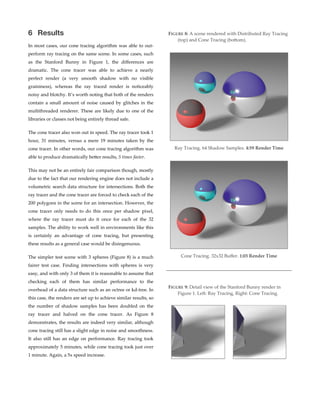
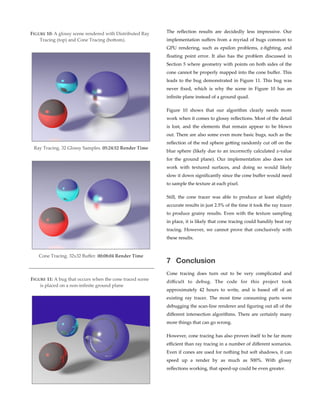
This document discusses a method called cone tracing, which is a variant of ray tracing that can be used to render realistic soft shadows and glossy reflections more efficiently than traditional ray tracing. The key aspects are:
- Cone tracing models light as conical volumes rather than individual rays, reducing the number of intersections needed while avoiding noise.
- The paper presents a rendering engine that uses both cone tracing and ray tracing modules to produce shadows and reflections. Cone tracing is used to determine occlusion and reflection colors at ray intersection points.
- Intersection algorithms are approximated for cones, which have linear widening, rather than solved directly through systems of equations like with rays. This achieves accurate results more efficiently

![cone tracing should be revisited, and have demonstrated
that it can work alongside ray tracing to produce fast,
excellent results in a wide variety of situations.
1.1 Prior Work
Cone tracing was first proposed in “Ray Tracing with
Cones” [Amanatides 1984]. The paper outlines the basic
concept and a variety of approximate intersection
algorithms. The results are particularly impressive for 1984,
however he does not compare them to traditional ray
tracing for quality or speed. His system also models
everything as cones, even in situations where rays would
suffice and be faster. Still, it is easily the foundational paper
of the field, and most of the algorithms in this paper are
based off of his work.
A similar method, beam tracing, was proposed the same
year in “Beam Tracing Polygonal Objects” [Heckbert &
Hanrahan 1984]. It is a similar concept, but it uses
rectangular prism or square pyramid shapes instead of
circular cones. Their work involved optimizing non-‐‑glossy
reflection and refraction by taking advantage of the spacial
coherence of a scene using a ‘beam tree’, instead of the
traditional recursive approach to ray tracing. The paper
provides a much more detailed approach to fast CPU-‐‑based
scan conversion of polygons that acempts to minimize gaps
between shapes.
The beam tracing approach is expanded to handle scene
antialiasing in “A Beam Tracing Method with Precise
Antialiasing for Polyhedral Scenes” [Ghazenfarpour &
Hasenfraf, 1998]. Their method is able to work on any
convex polyhedra, and includes many optimizations not
possible for more complex scenes. They also briefly explore
applying these same optimizations to soft shadows, and
compare those results to traditional ray tracing. They were
the first to prove that volumetric samples (beams or cones)
can be more computationally efficient than rays.
Cone tracing has not achieved widespread adoption,
however with the advent of programmable GPUs there has
been a resurgence of interest in the topic. For example,
“Interactive Indirect Illumination Using Voxel Cone
Tracing” [Crassin et. al. 2011] explores its use as a way to
achieve effects such as radiosity in real time on the GPU (it
was co-‐‑sponsored by Nvidia). They do this by representing
the scene as a grid of cubic ‘voxels’, rather than polygon
meshes or surface geometry. This modern research proves
that cone tracing is worth revisiting, and that its usefulness
may actually extend beyond what distributed ray tracing is
capable of.
2 Approach
This paper describes a system capable of using both rays
and cones to render a scene. The rendering of each pixel
starts with a ray being cast outwards from the camera.
When that ray hits an object, the ray tracer calls on the cone
tracer to determine the shadow and reflection colors at the
intersection points, and factors those results into those final
color calculations for the pixel. The cone tracer can also call
itself to create tertiary cones for reflections and shadows
inside of reflections. This modular system, diagrammed in
figure 2, lays out a clear separation of concerns for the
different classes.
FIGURE 2: A high-‐‑level view of the architecture of the
dual-‐‑mode rendering engine.
Render Thread
Ray Tracer
Shadow Occlusion
Cone Tracer
Reflection
Cone Tracer
Pixel Location Pixel Color
% Occlusion
Point, Normal Reflection
Color
Point, Light
Reflection Intersection Point -‐‑> % Occlusion](https://image.slidesharecdn.com/753349d1-86c3-41d8-a9cf-f9389b9e9ee2-151111040358-lva1-app6891/85/Report-2-320.jpg)
![3.2 Cone-Polygon Intersection
Finding the actual 3D intersection between a cone and an
arbitrary polygon is a very complicated problem. It is also a
very common problem, since 3D models are usually treated
as collections of triangles or quads. Luckily, it can be
reduced to a 2D problem using the same perspective
transformations that simulate cameras [Amanatides 1984].
In other words, instead of dealing with each point of the
polygon in 3D space, each point is mapped to a 2D location
in the “cone’s eye view” and the intersection algorithm
operates on that.
The transformation matrix is calculated the same way as it
would be for a camera. The focal length, f, is equal to 1/h.
The near clipping plane is set as close to zero as possible
without encountering floating point error, and the far plane
is set to infinity. With only these variables, an intrinsic
camera matrix can be created.
This matrix can then be multiplied by rotation and
translation matrices to fully represent the point of view of
the cone. Then 3D points can be mapped onto the cone’s 2D
viewport by multiplying them by the transformation
matrix. A point that lies on the cone’s center line will map
to (0,0). Any point whose distance from (0,0) is less than 0.5
is considered to be within the circular viewport.
Even with the points reduced to 2D, several cases have to be
considered when checking for intersections.
3.2.1
Vertex in View
The simplest, and most common, case occurs when one of
the vertices of the polygon is within view of the cone. If the
cone can see a vertex, it can obviously see the shape.
3.2.2
Cone Center inside Polygon
If a polygon blocks the entire view of the cone, none of its
points will be within the viewport. To detect this situation,
2D ray casting is used. If every ray passing from the center
of the viewport through one of the edges of the polygon
intersects an odd number of edges, the circle is inside the
polygon. An even number of intersections means the ray
both entered and exited the polygon, which means that it
was not inside the shape to begin with. This is the most
compute intensive check, so it is performed last.
3.2.3
Edge Intersection
Even if both of those tests fail, there could still be an
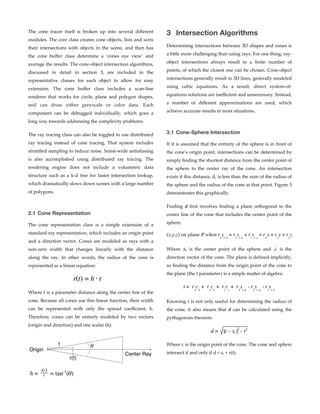
intersection. As Figure 4 demonstrates, it is possible to have
an edge of the polygon intersect with an edge of the
viewport. These intersection points can be found using a
similar method to the sphere intersection algorithm
described in Section 3.1. The code finds the closest point on
the edge to (0,0), the center of the viewport. If the point is
closer than 0.5 units away, there is an intersection.
FIGURE 3: A 2D diagram representing the logic behind
cone-‐‑sphere intersection. The left cone has an
intersection, the right one does not.
d
cr
r(t)
d
cr
r(t)
FIGURE 4: Different types of cone-‐‑triangle intersections.
Vertex in View Cone Center Inside
Edge Intersection](https://image.slidesharecdn.com/753349d1-86c3-41d8-a9cf-f9389b9e9ee2-151111040358-lva1-app6891/85/Report-4-320.jpg)