3/20/2018
1
SBE 306B - Computer Systems III
Illumination and Shading
Dr. Ayman Eldeib
Systems & Biomedical
Engineering Department
Spring 2018
Computer Graphics Illumination & Shading
Lighting
 So…given a 3-D triangle and a 3-D viewpoint,
we can set the right pixels
 But what color should those pixels be?
 If we’re attempting to create a realistic image,
we need to simulate the lighting of the
surfaces in the scene
Fundamentally simulation of physics and optics
As you’ll see, we use a lot of approximations (a.k.a
hacks) to do this simulation fast enough
3/20/2018
2
Computer Graphics Illumination & Shading
Illumination and Shading
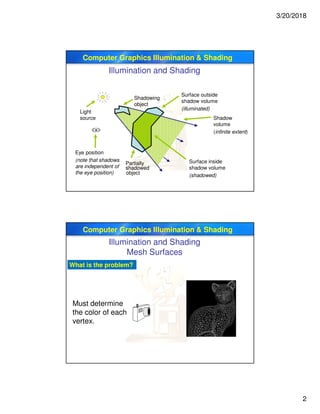
Shadowing
object
Partially
shadowed
object
Light
source
Eye position
(note that shadows
are independent of
the eye position)
Surface inside
shadow volume
(shadowed)
Surface outside
shadow volume
(illuminated)
Shadow
volume
(infinite extent)
Computer Graphics Illumination & Shading
Illumination and Shading
Mesh Surfaces
What is the problem?
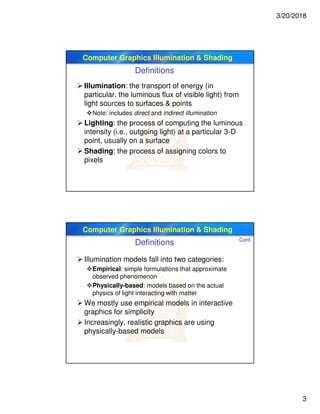
Must determine
the color of each
vertex.
3/20/2018
3
Computer Graphics Illumination & Shading
Definitions
 Illumination: the transport of energy (in
particular, the luminous flux of visible light) from
light sources to surfaces & points
Note: includes direct and indirect illumination
 Lighting: the process of computing the luminous
intensity (i.e., outgoing light) at a particular 3-D
point, usually on a surface
 Shading: the process of assigning colors to
pixels
Computer Graphics Illumination & Shading
 Illumination models fall into two categories:
Empirical: simple formulations that approximate
observed phenomenon
Physically-based: models based on the actual
physics of light interacting with matter
 We mostly use empirical models in interactive
graphics for simplicity
 Increasingly, realistic graphics are using
physically-based models
Cont.
Definitions
3/20/2018
4
Computer Graphics Illumination & Shading
Components of Illumination
 Two components of illumination: light sources
and surface properties
 Light sources (or emitters)
Spectrum of emittance (i.e, color of the light)
Geometric attributes
o Position
o Direction
o Shape
Directional attenuation
Computer Graphics Illumination & Shading
 Surface properties
Reflectance spectrum (i.e., color of the surface)
Geometric attributes
o Position
o Orientation
o Micro-structure
 Common simplifications in interactive graphics
Only direct illumination from emitters to surfaces
Simplify geometry of emitters to trivial cases
Cont.
Components of Illumination
3/20/2018
5
Computer Graphics Illumination & Shading
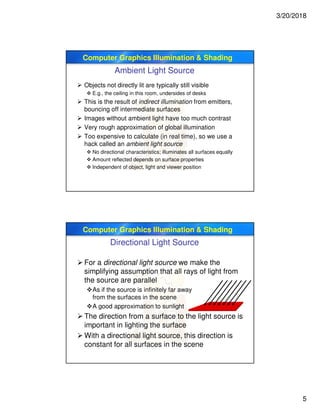
Ambient Light Source
 Objects not directly lit are typically still visible
 E.g., the ceiling in this room, undersides of desks
 This is the result of indirect illumination from emitters,
bouncing off intermediate surfaces
 Images without ambient light have too much contrast
 Very rough approximation of global illumination
 Too expensive to calculate (in real time), so we use a
hack called an ambient light source
 No directional characteristics; illuminates all surfaces equally
 Amount reflected depends on surface properties
 Independent of object, light and viewer position
Computer Graphics Illumination & Shading
Directional Light Source
 For a directional light source we make the
simplifying assumption that all rays of light from
the source are parallel
As if the source is infinitely far away
from the surfaces in the scene
A good approximation to sunlight
 The direction from a surface to the light source is
important in lighting the surface
 With a directional light source, this direction is
constant for all surfaces in the scene
3/20/2018
6
Computer Graphics Illumination & Shading
Point Light Source
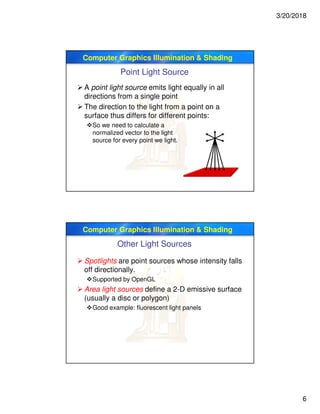
 A point light source emits light equally in all
directions from a single point
 The direction to the light from a point on a
surface thus differs for different points:
So we need to calculate a
normalized vector to the light
source for every point we light.
Computer Graphics Illumination & Shading
Other Light Sources
 Spotlights are point sources whose intensity falls
off directionally.
Supported by OpenGL
 Area light sources define a 2-D emissive surface
(usually a disc or polygon)
Good example: fluorescent light panels
3/20/2018
7
Computer Graphics Illumination & Shading
Physics of Reflection
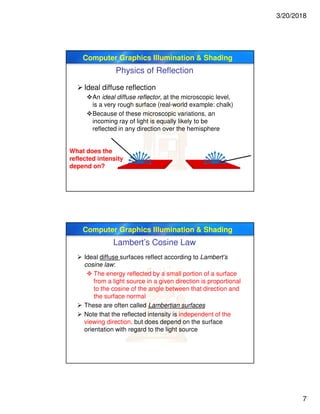
 Ideal diffuse reflection
An ideal diffuse reflector, at the microscopic level,
is a very rough surface (real-world example: chalk)
Because of these microscopic variations, an
incoming ray of light is equally likely to be
reflected in any direction over the hemisphere
What does the
reflected intensity
depend on?
Computer Graphics Illumination & Shading
Lambert’s Cosine Law
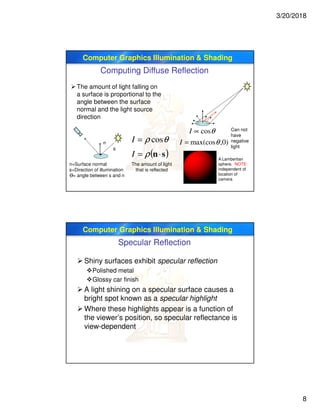
 Ideal diffuse surfaces reflect according to Lambert’s
cosine law:
 The energy reflected by a small portion of a surface
from a light source in a given direction is proportional
to the cosine of the angle between that direction and
the surface normal
 These are often called Lambertian surfaces
 Note that the reflected intensity is independent of the
viewing direction, but does depend on the surface
orientation with regard to the light source
3/20/2018
8
Computer Graphics Illumination & Shading
The amount of light falling on
a surface is proportional to the
angle between the surface
normal and the light source
direction
n
s
n=Surface normal
s=Direction of illumination
Ө= angle between s and n
( )sn⋅=
=
ρ
θρ
I
I cos
A Lambertian
sphere. NOTE:
independent of
location of
camera
The amount of light
that is reflected
)0,max(cos
cos
θ
θ
=
∝
I
I Can not
have
negative
light
Computing Diffuse Reflection
Computer Graphics Illumination & Shading
Specular Reflection
 Shiny surfaces exhibit specular reflection
Polished metal
Glossy car finish
 A light shining on a specular surface causes a
bright spot known as a specular highlight
 Where these highlights appear is a function of
the viewer’s position, so specular reflectance is
view-dependent
3/20/2018
9
Computer Graphics Illumination & Shading
Physics of Reflection
 At the microscopic level a specular reflecting
surface is very smooth
 Thus rays of light are likely to bounce off the
microgeometry in a mirror-like fashion
 The smoother the surface, the closer it becomes
to a perfect mirror
Computer Graphics Illumination & Shading
Optics of Reflection
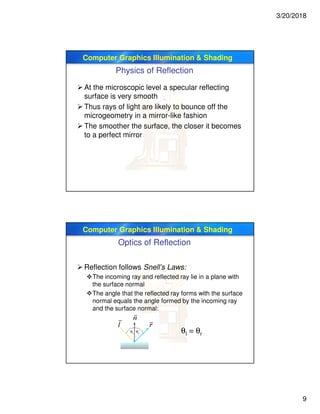
 Reflection follows Snell’s Laws:
The incoming ray and reflected ray lie in a plane with
the surface normal
The angle that the reflected ray forms with the surface
normal equals the angle formed by the incoming ray
and the surface normal:
θl = θr
3/20/2018
10
Computer Graphics Illumination & Shading
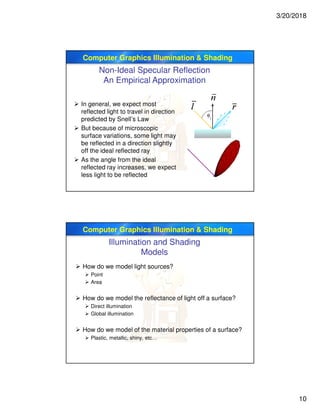
Non-Ideal Specular Reflection
An Empirical Approximation
 In general, we expect most
reflected light to travel in direction
predicted by Snell’s Law
 But because of microscopic
surface variations, some light may
be reflected in a direction slightly
off the ideal reflected ray
 As the angle from the ideal
reflected ray increases, we expect
less light to be reflected
Computer Graphics Illumination & Shading
Illumination and Shading
Models
 How do we model light sources?
 Point
 Area
 How do we model the reflectance of light off a surface?
 Direct illumination
 Global illumination
 How do we model of the material properties of a surface?
 Plastic, metallic, shiny, etc…
3/20/2018
11
Computer Graphics Illumination & Shading
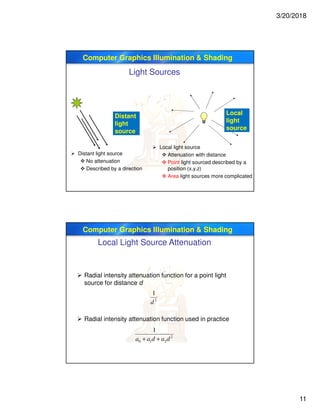
Light Sources
Distant
light
source
Local
light
source
 Distant light source
 No attenuation
 Described by a direction
 Local light source
 Attenuation with distance
 Point light sourced described by a
position (x,y,z)
 Area light sources more complicated
Computer Graphics Illumination & Shading
Local Light Source Attenuation
 Radial intensity attenuation function for a point light
source for distance d
 Radial intensity attenuation function used in practice
2
1
d
2
210
1
dadaa ++
3/20/2018
12
Computer Graphics Illumination & Shading
OpenGL Lighting
 glLight* (name, property, value)
 Name specifies which light
 multiple lights, starting with GL_LIGHT0
 glGetIntegerv( GL_MAX_LIGHTS, &n );
 Properties
Position and type
Ambient (GL_AMBIENT), diffuse, (GL_DIFFUSE)
and specular (GL_SPECULAR) colors
Attenuation coefficients
Computer Graphics Illumination & Shading
 OpenGL supports two types of Lights
 Local (Point) light sources
 Infinite (Directional) light sources
 Type of light controlled by w coordinate
 w = 0 Infinite Light directed along (x y z)
 w ≠ 0 Local Light positioned at (x/w y/w z/w)
Types of Lights
Cont.
OpenGL Lighting
3/20/2018
13
Computer Graphics Illumination & Shading
void InitLights (void)
{
glEnable(GL_LIGHTING); // Turn on the power
glEnable(GL_LIGHT0); // Flip each light’s switch
glEnable(GL_LIGHT1);
GLfloat lightpos0[] = {.5, 1, .5, 0};
glLightfv(GL_LIGHT0, GL_POSITION, lightpos0);
GLfloat lightpos1[] = {4,4,4,0};
glLightfv(GL_LIGHT1, GL_POSITION, lightpos1);
}
Cont.
OpenGL Lighting
Computer Graphics Illumination & Shading
OpenGL Moving Light Source
 Light sources transform like geometry
 Only modelview transform is applied
 Stationary light
 Set transform to identity before specifying location
 Moving light
 push matrix, move light, pop matrix to uniquely control a light’s position
 Light source attached to camera
3/20/2018
14
Computer Graphics Illumination & Shading
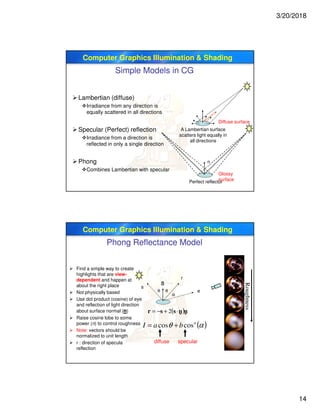
Simple Models in CG
Lambertian (diffuse)
Irradiance from any direction is
equally scattered in all directions
Specular (Perfect) reflection
Irradiance from a direction is
reflected in only a single direction
Phong
Combines Lambertian with specular
n
Perfect reflector
A Lambertian surface
scatters light equally in
all directions
Glossy
surface
Diffuse surface
Computer Graphics Illumination & Shading
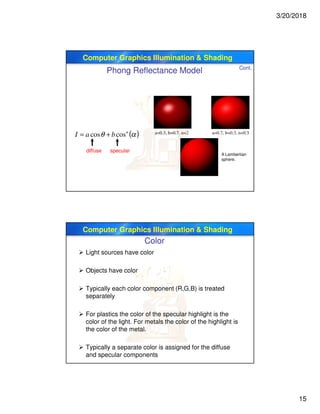
Phong Reflectance Model
 Find a simple way to create
highlights that are view-
dependent and happen at
about the right place
 Not physically based
 Use dot product (cosine) of eye
and reflection of light direction
about surface normal (n)
 Raise cosine lobe to some
power (n) to control roughness
 Note: vectors should be
normalized to unit length
 r : direction of specula
reflection
Roughness
n
e
r
θ θ
α
s
( )αθ n
baI coscos +=
diffuse specular
( )nnssr ⋅+−= 2 - -
3/20/2018
15
Computer Graphics Illumination & Shading
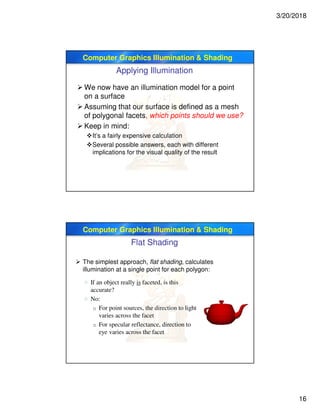
a=0.3, b=0.7, n=2 a=0.7, b=0.3, n=0.5
( )αθ n
baI coscos +=
diffuse specular
A Lambertian
sphere.
Cont.
Phong Reflectance Model
Computer Graphics Illumination & Shading
Color
 Light sources have color
 Objects have color
 Typically each color component (R,G,B) is treated
separately
 For plastics the color of the specular highlight is the
color of the light. For metals the color of the highlight is
the color of the metal.
 Typically a separate color is assigned for the diffuse
and specular components
3/20/2018
16
Computer Graphics Illumination & Shading
Applying Illumination
 We now have an illumination model for a point
on a surface
 Assuming that our surface is defined as a mesh
of polygonal facets, which points should we use?
 Keep in mind:
It’s a fairly expensive calculation
Several possible answers, each with different
implications for the visual quality of the result
Computer Graphics Illumination & Shading
Flat Shading
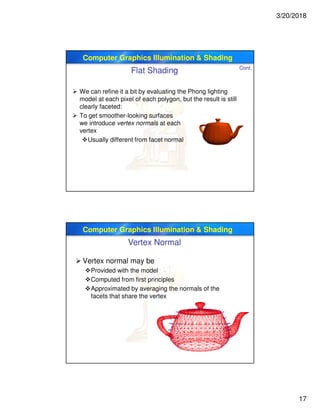
 The simplest approach, flat shading, calculates
illumination at a single point for each polygon:
 If an object really is faceted, is this
accurate?
 No:
o For point sources, the direction to light
varies across the facet
o For specular reflectance, direction to
eye varies across the facet
3/20/2018
17
Computer Graphics Illumination & Shading
 We can refine it a bit by evaluating the Phong lighting
model at each pixel of each polygon, but the result is still
clearly faceted:
 To get smoother-looking surfaces
we introduce vertex normals at each
vertex
Usually different from facet normal
Cont.
Flat Shading
Computer Graphics Illumination & Shading
Vertex Normal
 Vertex normal may be
Provided with the model
Computed from first principles
Approximated by averaging the normals of the
facets that share the vertex
3/20/2018
18
Computer Graphics Illumination & Shading
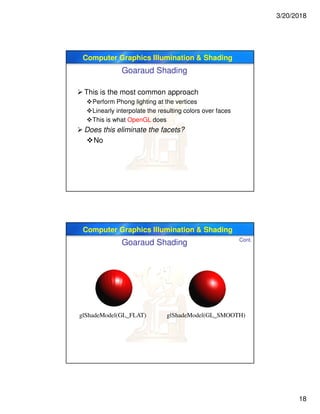
Goaraud Shading
 This is the most common approach
Perform Phong lighting at the vertices
Linearly interpolate the resulting colors over faces
This is what OpenGL does
 Does this eliminate the facets?
No
Computer Graphics Illumination & Shading
glShadeModel(GL_FLAT) glShadeModel(GL_SMOOTH)
Cont.
Goaraud Shading
3/20/2018
19
Computer Graphics Illumination & Shading
Phong Shading
 Phong shading is not the same as Phong
lighting, though they are sometimes mixed up
Phong lighting: the empirical model we’ve been
discussing to calculate illumination at a point on a
surface
Phong shading: linearly interpolating the surface
normal across the facet, applying the Phong lighting
model at every pixel
o Same input as Gouraud shading
o Usually very smooth-looking results
o But, considerably more expensive
Computer Graphics Illumination & Shading
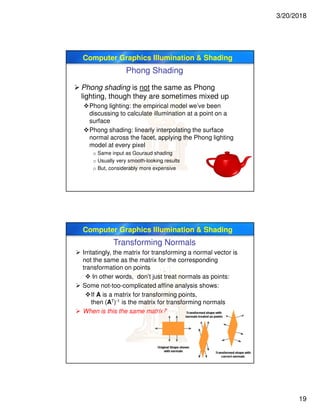
Transforming Normals
 Irritatingly, the matrix for transforming a normal vector is
not the same as the matrix for the corresponding
transformation on points
 In other words, don’t just treat normals as points:
 Some not-too-complicated affine analysis shows:
If A is a matrix for transforming points,
then (AT)-1 is the matrix for transforming normals
 When is this the same matrix?
3/20/2018
20
Computer Graphics Illumination & Shading
Shading Polygons
 Flat shading
 Use one surface normal for each polygon
 Calculate one color for each polygon
 glShadeModel(GL_FLAT)
 Gouraud shading
 Calculate a surface normal at each vertex
 Calculate color at each vertex
 Interpolate color inside polygon
 glShadeModel(GL_SMOOTH)
 Phong normal interpolation
 Calculate a surface normal at each vertex
 Interpolate surface normals across polygon
 Use interpolated normals to calculate color at each pixel
 OpenGL doesn’t do this, but you can with programmable shaders
Computer Graphics Illumination & Shading
OpenGL Specifying Material Properties
 glMaterialfv (face, property, value)
 Separate materials for front and back
 Properties
3/20/2018
21
Computer Graphics Illumination & Shading
OpenGL Specifying Normal
 Use the function glNormal3f( x, y, z)
 Normals define how a surface reflects light
 Specifying a normal sets the current normal
 Remains unchanged until user alters it
 Usual sequence: glNormal, glVertex…….,
glNormal, glVertex…….., glNormal, glVertex…
 Usually, we want unit normals for shading
 glEnable( GL_NORMALIZE )
 This is slow – either normalize them yourself or
don’t use glScale
 scaling affects a normal’s length
 You should generate normals for curved surfaces
 GLUT does it automatically for teapot, cylinder,…
g{tÇ~ lÉâg{tÇ~ lÉâg{tÇ~ lÉâg{tÇ~ lÉâ

7 illumination and-shading computer graphics

  • 1.
    3/20/2018 1 SBE 306B -Computer Systems III Illumination and Shading Dr. Ayman Eldeib Systems & Biomedical Engineering Department Spring 2018 Computer Graphics Illumination & Shading Lighting  So…given a 3-D triangle and a 3-D viewpoint, we can set the right pixels  But what color should those pixels be?  If we’re attempting to create a realistic image, we need to simulate the lighting of the surfaces in the scene Fundamentally simulation of physics and optics As you’ll see, we use a lot of approximations (a.k.a hacks) to do this simulation fast enough
  • 2.
    3/20/2018 2 Computer Graphics Illumination& Shading Illumination and Shading Shadowing object Partially shadowed object Light source Eye position (note that shadows are independent of the eye position) Surface inside shadow volume (shadowed) Surface outside shadow volume (illuminated) Shadow volume (infinite extent) Computer Graphics Illumination & Shading Illumination and Shading Mesh Surfaces What is the problem? Must determine the color of each vertex.
  • 3.
    3/20/2018 3 Computer Graphics Illumination& Shading Definitions  Illumination: the transport of energy (in particular, the luminous flux of visible light) from light sources to surfaces & points Note: includes direct and indirect illumination  Lighting: the process of computing the luminous intensity (i.e., outgoing light) at a particular 3-D point, usually on a surface  Shading: the process of assigning colors to pixels Computer Graphics Illumination & Shading  Illumination models fall into two categories: Empirical: simple formulations that approximate observed phenomenon Physically-based: models based on the actual physics of light interacting with matter  We mostly use empirical models in interactive graphics for simplicity  Increasingly, realistic graphics are using physically-based models Cont. Definitions
  • 4.
    3/20/2018 4 Computer Graphics Illumination& Shading Components of Illumination  Two components of illumination: light sources and surface properties  Light sources (or emitters) Spectrum of emittance (i.e, color of the light) Geometric attributes o Position o Direction o Shape Directional attenuation Computer Graphics Illumination & Shading  Surface properties Reflectance spectrum (i.e., color of the surface) Geometric attributes o Position o Orientation o Micro-structure  Common simplifications in interactive graphics Only direct illumination from emitters to surfaces Simplify geometry of emitters to trivial cases Cont. Components of Illumination
  • 5.
    3/20/2018 5 Computer Graphics Illumination& Shading Ambient Light Source  Objects not directly lit are typically still visible  E.g., the ceiling in this room, undersides of desks  This is the result of indirect illumination from emitters, bouncing off intermediate surfaces  Images without ambient light have too much contrast  Very rough approximation of global illumination  Too expensive to calculate (in real time), so we use a hack called an ambient light source  No directional characteristics; illuminates all surfaces equally  Amount reflected depends on surface properties  Independent of object, light and viewer position Computer Graphics Illumination & Shading Directional Light Source  For a directional light source we make the simplifying assumption that all rays of light from the source are parallel As if the source is infinitely far away from the surfaces in the scene A good approximation to sunlight  The direction from a surface to the light source is important in lighting the surface  With a directional light source, this direction is constant for all surfaces in the scene
  • 6.
    3/20/2018 6 Computer Graphics Illumination& Shading Point Light Source  A point light source emits light equally in all directions from a single point  The direction to the light from a point on a surface thus differs for different points: So we need to calculate a normalized vector to the light source for every point we light. Computer Graphics Illumination & Shading Other Light Sources  Spotlights are point sources whose intensity falls off directionally. Supported by OpenGL  Area light sources define a 2-D emissive surface (usually a disc or polygon) Good example: fluorescent light panels
  • 7.
    3/20/2018 7 Computer Graphics Illumination& Shading Physics of Reflection  Ideal diffuse reflection An ideal diffuse reflector, at the microscopic level, is a very rough surface (real-world example: chalk) Because of these microscopic variations, an incoming ray of light is equally likely to be reflected in any direction over the hemisphere What does the reflected intensity depend on? Computer Graphics Illumination & Shading Lambert’s Cosine Law  Ideal diffuse surfaces reflect according to Lambert’s cosine law:  The energy reflected by a small portion of a surface from a light source in a given direction is proportional to the cosine of the angle between that direction and the surface normal  These are often called Lambertian surfaces  Note that the reflected intensity is independent of the viewing direction, but does depend on the surface orientation with regard to the light source
  • 8.
    3/20/2018 8 Computer Graphics Illumination& Shading The amount of light falling on a surface is proportional to the angle between the surface normal and the light source direction n s n=Surface normal s=Direction of illumination Ө= angle between s and n ( )sn⋅= = ρ θρ I I cos A Lambertian sphere. NOTE: independent of location of camera The amount of light that is reflected )0,max(cos cos θ θ = ∝ I I Can not have negative light Computing Diffuse Reflection Computer Graphics Illumination & Shading Specular Reflection  Shiny surfaces exhibit specular reflection Polished metal Glossy car finish  A light shining on a specular surface causes a bright spot known as a specular highlight  Where these highlights appear is a function of the viewer’s position, so specular reflectance is view-dependent
  • 9.
    3/20/2018 9 Computer Graphics Illumination& Shading Physics of Reflection  At the microscopic level a specular reflecting surface is very smooth  Thus rays of light are likely to bounce off the microgeometry in a mirror-like fashion  The smoother the surface, the closer it becomes to a perfect mirror Computer Graphics Illumination & Shading Optics of Reflection  Reflection follows Snell’s Laws: The incoming ray and reflected ray lie in a plane with the surface normal The angle that the reflected ray forms with the surface normal equals the angle formed by the incoming ray and the surface normal: θl = θr
  • 10.
    3/20/2018 10 Computer Graphics Illumination& Shading Non-Ideal Specular Reflection An Empirical Approximation  In general, we expect most reflected light to travel in direction predicted by Snell’s Law  But because of microscopic surface variations, some light may be reflected in a direction slightly off the ideal reflected ray  As the angle from the ideal reflected ray increases, we expect less light to be reflected Computer Graphics Illumination & Shading Illumination and Shading Models  How do we model light sources?  Point  Area  How do we model the reflectance of light off a surface?  Direct illumination  Global illumination  How do we model of the material properties of a surface?  Plastic, metallic, shiny, etc…
  • 11.
    3/20/2018 11 Computer Graphics Illumination& Shading Light Sources Distant light source Local light source  Distant light source  No attenuation  Described by a direction  Local light source  Attenuation with distance  Point light sourced described by a position (x,y,z)  Area light sources more complicated Computer Graphics Illumination & Shading Local Light Source Attenuation  Radial intensity attenuation function for a point light source for distance d  Radial intensity attenuation function used in practice 2 1 d 2 210 1 dadaa ++
  • 12.
    3/20/2018 12 Computer Graphics Illumination& Shading OpenGL Lighting  glLight* (name, property, value)  Name specifies which light  multiple lights, starting with GL_LIGHT0  glGetIntegerv( GL_MAX_LIGHTS, &n );  Properties Position and type Ambient (GL_AMBIENT), diffuse, (GL_DIFFUSE) and specular (GL_SPECULAR) colors Attenuation coefficients Computer Graphics Illumination & Shading  OpenGL supports two types of Lights  Local (Point) light sources  Infinite (Directional) light sources  Type of light controlled by w coordinate  w = 0 Infinite Light directed along (x y z)  w ≠ 0 Local Light positioned at (x/w y/w z/w) Types of Lights Cont. OpenGL Lighting
  • 13.
    3/20/2018 13 Computer Graphics Illumination& Shading void InitLights (void) { glEnable(GL_LIGHTING); // Turn on the power glEnable(GL_LIGHT0); // Flip each light’s switch glEnable(GL_LIGHT1); GLfloat lightpos0[] = {.5, 1, .5, 0}; glLightfv(GL_LIGHT0, GL_POSITION, lightpos0); GLfloat lightpos1[] = {4,4,4,0}; glLightfv(GL_LIGHT1, GL_POSITION, lightpos1); } Cont. OpenGL Lighting Computer Graphics Illumination & Shading OpenGL Moving Light Source  Light sources transform like geometry  Only modelview transform is applied  Stationary light  Set transform to identity before specifying location  Moving light  push matrix, move light, pop matrix to uniquely control a light’s position  Light source attached to camera
  • 14.
    3/20/2018 14 Computer Graphics Illumination& Shading Simple Models in CG Lambertian (diffuse) Irradiance from any direction is equally scattered in all directions Specular (Perfect) reflection Irradiance from a direction is reflected in only a single direction Phong Combines Lambertian with specular n Perfect reflector A Lambertian surface scatters light equally in all directions Glossy surface Diffuse surface Computer Graphics Illumination & Shading Phong Reflectance Model  Find a simple way to create highlights that are view- dependent and happen at about the right place  Not physically based  Use dot product (cosine) of eye and reflection of light direction about surface normal (n)  Raise cosine lobe to some power (n) to control roughness  Note: vectors should be normalized to unit length  r : direction of specula reflection Roughness n e r θ θ α s ( )αθ n baI coscos += diffuse specular ( )nnssr ⋅+−= 2 - -
  • 15.
    3/20/2018 15 Computer Graphics Illumination& Shading a=0.3, b=0.7, n=2 a=0.7, b=0.3, n=0.5 ( )αθ n baI coscos += diffuse specular A Lambertian sphere. Cont. Phong Reflectance Model Computer Graphics Illumination & Shading Color  Light sources have color  Objects have color  Typically each color component (R,G,B) is treated separately  For plastics the color of the specular highlight is the color of the light. For metals the color of the highlight is the color of the metal.  Typically a separate color is assigned for the diffuse and specular components
  • 16.
    3/20/2018 16 Computer Graphics Illumination& Shading Applying Illumination  We now have an illumination model for a point on a surface  Assuming that our surface is defined as a mesh of polygonal facets, which points should we use?  Keep in mind: It’s a fairly expensive calculation Several possible answers, each with different implications for the visual quality of the result Computer Graphics Illumination & Shading Flat Shading  The simplest approach, flat shading, calculates illumination at a single point for each polygon:  If an object really is faceted, is this accurate?  No: o For point sources, the direction to light varies across the facet o For specular reflectance, direction to eye varies across the facet
  • 17.
    3/20/2018 17 Computer Graphics Illumination& Shading  We can refine it a bit by evaluating the Phong lighting model at each pixel of each polygon, but the result is still clearly faceted:  To get smoother-looking surfaces we introduce vertex normals at each vertex Usually different from facet normal Cont. Flat Shading Computer Graphics Illumination & Shading Vertex Normal  Vertex normal may be Provided with the model Computed from first principles Approximated by averaging the normals of the facets that share the vertex
  • 18.
    3/20/2018 18 Computer Graphics Illumination& Shading Goaraud Shading  This is the most common approach Perform Phong lighting at the vertices Linearly interpolate the resulting colors over faces This is what OpenGL does  Does this eliminate the facets? No Computer Graphics Illumination & Shading glShadeModel(GL_FLAT) glShadeModel(GL_SMOOTH) Cont. Goaraud Shading
  • 19.
    3/20/2018 19 Computer Graphics Illumination& Shading Phong Shading  Phong shading is not the same as Phong lighting, though they are sometimes mixed up Phong lighting: the empirical model we’ve been discussing to calculate illumination at a point on a surface Phong shading: linearly interpolating the surface normal across the facet, applying the Phong lighting model at every pixel o Same input as Gouraud shading o Usually very smooth-looking results o But, considerably more expensive Computer Graphics Illumination & Shading Transforming Normals  Irritatingly, the matrix for transforming a normal vector is not the same as the matrix for the corresponding transformation on points  In other words, don’t just treat normals as points:  Some not-too-complicated affine analysis shows: If A is a matrix for transforming points, then (AT)-1 is the matrix for transforming normals  When is this the same matrix?
  • 20.
    3/20/2018 20 Computer Graphics Illumination& Shading Shading Polygons  Flat shading  Use one surface normal for each polygon  Calculate one color for each polygon  glShadeModel(GL_FLAT)  Gouraud shading  Calculate a surface normal at each vertex  Calculate color at each vertex  Interpolate color inside polygon  glShadeModel(GL_SMOOTH)  Phong normal interpolation  Calculate a surface normal at each vertex  Interpolate surface normals across polygon  Use interpolated normals to calculate color at each pixel  OpenGL doesn’t do this, but you can with programmable shaders Computer Graphics Illumination & Shading OpenGL Specifying Material Properties  glMaterialfv (face, property, value)  Separate materials for front and back  Properties
  • 21.
    3/20/2018 21 Computer Graphics Illumination& Shading OpenGL Specifying Normal  Use the function glNormal3f( x, y, z)  Normals define how a surface reflects light  Specifying a normal sets the current normal  Remains unchanged until user alters it  Usual sequence: glNormal, glVertex……., glNormal, glVertex…….., glNormal, glVertex…  Usually, we want unit normals for shading  glEnable( GL_NORMALIZE )  This is slow – either normalize them yourself or don’t use glScale  scaling affects a normal’s length  You should generate normals for curved surfaces  GLUT does it automatically for teapot, cylinder,… g{tÇ~ lÉâg{tÇ~ lÉâg{tÇ~ lÉâg{tÇ~ lÉâ