11
Matrices and Arrays in
MATLAB
Lecture Series – 3
by
Shameer Koya
2
MATLAB Matrices
 MATLAB treats all variables as matrices. For our purposes
a matrix can be thought of as an array, in fact, that is how
it is stored.
 Vectors are special forms of matrices and contain only one
row OR one column.
 Scalars are matrices with only one row AND one column
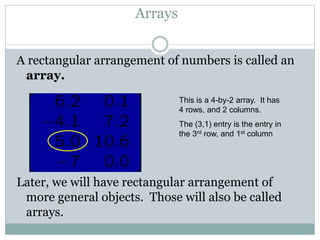
A rectangular arrangement of numbers is called an
array.
Later, we will have rectangular arrangement of
more general objects. Those will also be called
arrays.
Arrays
This is a 4-by-2 array. It has
4 rows, and 2 columns.
The (3,1) entry is the entry in
the 3rd row, and 1st column
4
Entering a Matrix in MATLAB
Enter an explicit list of elements
Load matrices from external data files
Using built-in functions
Using own functions in M-files
 A matrix can be created in MATLAB as
follows (note the commas AND semicolons):
» matrix = [1 2 3 ; 4 5 6 ; 7 8 9]
5
Entering a Matrix in MATLAB ….
>> A = [2 -3 5; -1 4 5]
A =
 2 -3 5
 -1 4 5
>> x = [1 4 7]
x =
 1 4 7
>> x = [1; 4; 7]
x =
 1
 4
 7
[1 4 7]x
2 -3 5
-1 4 6
 
  
 
A
1
4
7
 
   
  
x
6
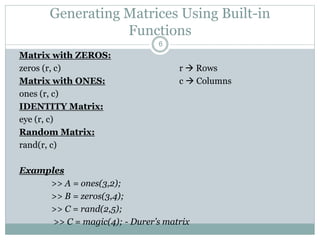
Matrix with ZEROS:
zeros (r, c) r  Rows
Matrix with ONES: c  Columns
ones (r, c)
IDENTITY Matrix:
eye (r, c)
Random Matrix:
rand(r, c)
Examples
>> A = ones(3,2);
>> B = zeros(3,4);
>> C = rand(2,5);
>> C = magic(4); - Durer’s matrix
Generating Matrices Using Built-in
Functions
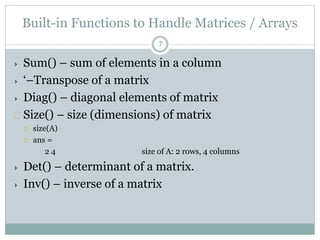
Built-in Functions to Handle Matrices / Arrays
› Sum() – sum of elements in a column
› ‘–Transpose of a matrix
› Diag() – diagonal elements of matrix
 Size() – size (dimensions) of matrix
 size(A)
 ans =
2 4 size of A: 2 rows, 4 columns
› Det() – determinant of a matrix.
› Inv() – inverse of a matrix
7
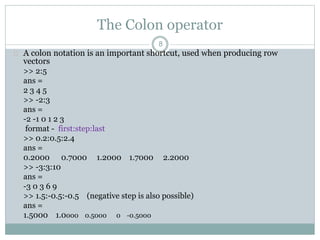
The Colon operator
 A colon notation is an important shortcut, used when producing row
vectors
>> 2:5
ans =
2 3 4 5
>> -2:3
ans =
-2 -1 0 1 2 3
format - first:step:last
>> 0.2:0.5:2.4
ans =
0.2000 0.7000 1.2000 1.7000 2.2000
>> -3:3:10
ans =
-3 0 3 6 9
>> 1.5:-0.5:-0.5 (negative step is also possible)
ans =
1.5000 1.0000 0.5000 0 -0.5000
8
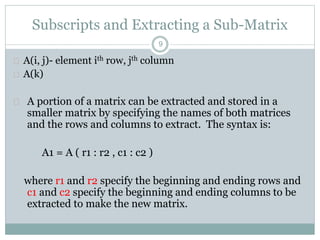
Subscripts and Extracting a Sub-Matrix
 A(i, j)- element ith row, jth column
 A(k)
 A portion of a matrix can be extracted and stored in a
smaller matrix by specifying the names of both matrices
and the rows and columns to extract. The syntax is:
A1 = A ( r1 : r2 , c1 : c2 )
where r1 and r2 specify the beginning and ending rows and
c1 and c2 specify the beginning and ending columns to be
extracted to make the new matrix.
9
10
Extracting a Sub-Matrix ….
 >> A(3,:) % extract the 3rd row of A
 ans =
7 8 9
 >> A(:,2) % extract the 2nd column of A
 ans =
2
5
8
 >> A([1,3],1:2) % extract a part of A
 ans =
1 2
7 8
Adding And Deleting Elements
 Indexing can be used to add and delete elements from a
matrix.
 >> A(5,2) = 5 % assign 5 to the position (5,2); the uninitialized
elements become zeros
 A =
1 2 3
4 5 8
7 8 9
0 0 0
0 5 0
 >> A(4,:) = [2, 1, 2]; % assign vector [2, 1, 2] to the 4th row of A
 >> A(5,[1,3]) = [4, 4]; % assign: A(5,1) = 4 and A(5,3) = 4
11
Adding And Deleting Elements …
 A(1,2) =5 – will replace the element in position (1,2) with 5
 A(4,:) = [ ] - will delete 4th row
 A(:, 3) = [ ] – will delete 3rd column
 A(1,2) = [ ] – error
 Can’t delete single element in a row or column.
 A(2:2:6) = [ ]
 ans = 1 7 5 3 6 9
 ……………. How?
12
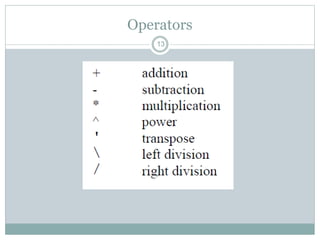
Operators
13
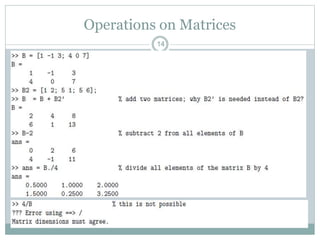
Operations on Matrices
14
Operations on Matrices
15
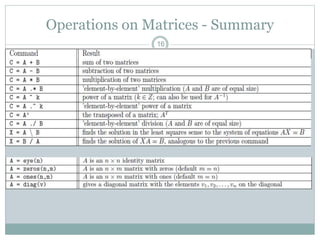
Operations on Matrices - Summary
16
17
Matrix Addition and Subtraction
Matrix addition and subtraction with MATLAB
are achieved in the same manner as with scalars
provided that the matrices have the same size.
Typical expressions are shown below.
>> C = A + B
>> D = A - B
18
Matrix Multiplication
Matrix multiplication with MATLAB is
achieved in the same manner as with
scalars provided that the number of
columns of the first matrix is equal to the
number of rows of the second matrix. A
typical expression is
>> E = A*B
19
Array Multiplication
There is another form of multiplication of
matrices in which it is desired to multiply
corresponding elements in a fashion similar to
that of addition and subtraction. This operation
arises frequently with MATLAB, and we will
hereafter refer to the process as the array
product to distinguish it from the standard
matrix multiplication form.
20
MATLAB Array Multiplication
To form an array product in MATLAB, a period
must be placed after the first variable. The
operation is commutative. The following two
operations produce the same result.
>> F=A.*B
>> F=B.*A
21
MATLAB Array Multiplication
Continuation
If there are more than two matrices for
which array multiplication is desired, the
periods should follow all but the last one
in the expression; e. g., A.*B.*C in the
case of three matrices. Alternately,
nesting can be used; e.g. (A.*B).*C for
the case of three matrices.
22
MATLAB Array Multiplication
Continuation
The array multiplication concept arises in any
operation in which the command could be
“confused” for a standard matrix operation. For
example, suppose it is desired to form a matrix B
from a matrix A by raising each element of A to
the 3rd power, The MATLAB command is
>> B = A.^3
23
Multi-dimensional Array
Arrays can have more than two dimensions
A= [ 1 2; 3 4]
You can add the 3rd dimension by
A(:,:,2) = [ 5 6; 7 8]
24
Matrixes and vectors command summary
 x = [1,2,3] , vector-row,
 y=[1;2;3], vector-column,
 x=0:0.1:0.8 , vector x=[0,0.1,0.2,0.3....0.8],
 A = [1,3,5;5,6,7;8,9,10], matrix,
 A(1,2), element of matrix, 1. row, 2. column,
 A(:,2), second column of matrix,
 A(1,:), first row of matrix ,
 C=[A;[10,20,30]] matrix with additional row,
 A(:,2)=[], deleting of second column,
 B=A(2:3,1:2), part of matrix,
 x’, transpose.
25
Matrixes and vectors command summary …
 size(A), matrix size,
 det(A), determinant,
 inv(A), inverse matrix,
 eye(3), unit matrix,
 zeros(3,4), matrix of zeros,
 rand(3,5), matrix of random values,
 sum(A), sum of elements,
 A*x, matrix-vector product (if dimensions are
corresponding),
 A.*B, element multiplication of two matrixes.
26
Thanks
Questions ??

Matlab matrices and arrays

  • 1.
    11 Matrices and Arraysin MATLAB Lecture Series – 3 by Shameer Koya
  • 2.
    2 MATLAB Matrices  MATLABtreats all variables as matrices. For our purposes a matrix can be thought of as an array, in fact, that is how it is stored.  Vectors are special forms of matrices and contain only one row OR one column.  Scalars are matrices with only one row AND one column
  • 3.
    A rectangular arrangementof numbers is called an array. Later, we will have rectangular arrangement of more general objects. Those will also be called arrays. Arrays This is a 4-by-2 array. It has 4 rows, and 2 columns. The (3,1) entry is the entry in the 3rd row, and 1st column
  • 4.
    4 Entering a Matrixin MATLAB Enter an explicit list of elements Load matrices from external data files Using built-in functions Using own functions in M-files  A matrix can be created in MATLAB as follows (note the commas AND semicolons): » matrix = [1 2 3 ; 4 5 6 ; 7 8 9]
  • 5.
    5 Entering a Matrixin MATLAB …. >> A = [2 -3 5; -1 4 5] A =  2 -3 5  -1 4 5 >> x = [1 4 7] x =  1 4 7 >> x = [1; 4; 7] x =  1  4  7 [1 4 7]x 2 -3 5 -1 4 6        A 1 4 7          x
  • 6.
    6 Matrix with ZEROS: zeros(r, c) r  Rows Matrix with ONES: c  Columns ones (r, c) IDENTITY Matrix: eye (r, c) Random Matrix: rand(r, c) Examples >> A = ones(3,2); >> B = zeros(3,4); >> C = rand(2,5); >> C = magic(4); - Durer’s matrix Generating Matrices Using Built-in Functions
  • 7.
    Built-in Functions toHandle Matrices / Arrays › Sum() – sum of elements in a column › ‘–Transpose of a matrix › Diag() – diagonal elements of matrix  Size() – size (dimensions) of matrix  size(A)  ans = 2 4 size of A: 2 rows, 4 columns › Det() – determinant of a matrix. › Inv() – inverse of a matrix 7
  • 8.
    The Colon operator A colon notation is an important shortcut, used when producing row vectors >> 2:5 ans = 2 3 4 5 >> -2:3 ans = -2 -1 0 1 2 3 format - first:step:last >> 0.2:0.5:2.4 ans = 0.2000 0.7000 1.2000 1.7000 2.2000 >> -3:3:10 ans = -3 0 3 6 9 >> 1.5:-0.5:-0.5 (negative step is also possible) ans = 1.5000 1.0000 0.5000 0 -0.5000 8
  • 9.
    Subscripts and Extractinga Sub-Matrix  A(i, j)- element ith row, jth column  A(k)  A portion of a matrix can be extracted and stored in a smaller matrix by specifying the names of both matrices and the rows and columns to extract. The syntax is: A1 = A ( r1 : r2 , c1 : c2 ) where r1 and r2 specify the beginning and ending rows and c1 and c2 specify the beginning and ending columns to be extracted to make the new matrix. 9
  • 10.
    10 Extracting a Sub-Matrix….  >> A(3,:) % extract the 3rd row of A  ans = 7 8 9  >> A(:,2) % extract the 2nd column of A  ans = 2 5 8  >> A([1,3],1:2) % extract a part of A  ans = 1 2 7 8
  • 11.
    Adding And DeletingElements  Indexing can be used to add and delete elements from a matrix.  >> A(5,2) = 5 % assign 5 to the position (5,2); the uninitialized elements become zeros  A = 1 2 3 4 5 8 7 8 9 0 0 0 0 5 0  >> A(4,:) = [2, 1, 2]; % assign vector [2, 1, 2] to the 4th row of A  >> A(5,[1,3]) = [4, 4]; % assign: A(5,1) = 4 and A(5,3) = 4 11
  • 12.
    Adding And DeletingElements …  A(1,2) =5 – will replace the element in position (1,2) with 5  A(4,:) = [ ] - will delete 4th row  A(:, 3) = [ ] – will delete 3rd column  A(1,2) = [ ] – error  Can’t delete single element in a row or column.  A(2:2:6) = [ ]  ans = 1 7 5 3 6 9  ……………. How? 12
  • 13.
  • 14.
  • 15.
  • 16.
  • 17.
    17 Matrix Addition andSubtraction Matrix addition and subtraction with MATLAB are achieved in the same manner as with scalars provided that the matrices have the same size. Typical expressions are shown below. >> C = A + B >> D = A - B
  • 18.
    18 Matrix Multiplication Matrix multiplicationwith MATLAB is achieved in the same manner as with scalars provided that the number of columns of the first matrix is equal to the number of rows of the second matrix. A typical expression is >> E = A*B
  • 19.
    19 Array Multiplication There isanother form of multiplication of matrices in which it is desired to multiply corresponding elements in a fashion similar to that of addition and subtraction. This operation arises frequently with MATLAB, and we will hereafter refer to the process as the array product to distinguish it from the standard matrix multiplication form.
  • 20.
    20 MATLAB Array Multiplication Toform an array product in MATLAB, a period must be placed after the first variable. The operation is commutative. The following two operations produce the same result. >> F=A.*B >> F=B.*A
  • 21.
    21 MATLAB Array Multiplication Continuation Ifthere are more than two matrices for which array multiplication is desired, the periods should follow all but the last one in the expression; e. g., A.*B.*C in the case of three matrices. Alternately, nesting can be used; e.g. (A.*B).*C for the case of three matrices.
  • 22.
    22 MATLAB Array Multiplication Continuation Thearray multiplication concept arises in any operation in which the command could be “confused” for a standard matrix operation. For example, suppose it is desired to form a matrix B from a matrix A by raising each element of A to the 3rd power, The MATLAB command is >> B = A.^3
  • 23.
    23 Multi-dimensional Array Arrays canhave more than two dimensions A= [ 1 2; 3 4] You can add the 3rd dimension by A(:,:,2) = [ 5 6; 7 8]
  • 24.
    24 Matrixes and vectorscommand summary  x = [1,2,3] , vector-row,  y=[1;2;3], vector-column,  x=0:0.1:0.8 , vector x=[0,0.1,0.2,0.3....0.8],  A = [1,3,5;5,6,7;8,9,10], matrix,  A(1,2), element of matrix, 1. row, 2. column,  A(:,2), second column of matrix,  A(1,:), first row of matrix ,  C=[A;[10,20,30]] matrix with additional row,  A(:,2)=[], deleting of second column,  B=A(2:3,1:2), part of matrix,  x’, transpose.
  • 25.
    25 Matrixes and vectorscommand summary …  size(A), matrix size,  det(A), determinant,  inv(A), inverse matrix,  eye(3), unit matrix,  zeros(3,4), matrix of zeros,  rand(3,5), matrix of random values,  sum(A), sum of elements,  A*x, matrix-vector product (if dimensions are corresponding),  A.*B, element multiplication of two matrixes.
  • 26.