1. >> for = 5
??? for = 5
Error: The expression to the left of the equals sign is not a valid target
for an assignment
2. >> else =6
??? else = 6
Error: Illegal use of reserved keyword "else"
3. >> cos = 2; cos(0)
??? Subscript indices must either be real positive integers or logicals
4. >> A = [1,2,3]; sum(A)
ans = 6
>> sum = 7; sum(A)
??? Index exceeds matrix dimensions
2
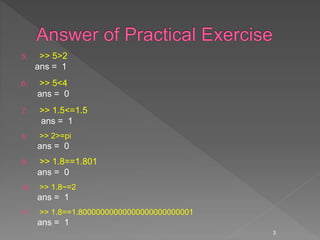
5. >> 5>2
ans = 1
6. >> 5<4
ans = 0
7. >> 1.5<=1.5
ans = 1
8. >> 2>=pi
ans = 0
9. >> 1.8==1.801
ans = 0
10. >> 1.8~=2
ans = 1
11. >> 1.8==1.80000000000000000000000001
ans = 1
3
 Creating and manipulating matrices
 Built-in functions for matrices
4
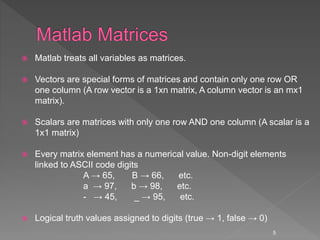
 Matlab treats all variables as matrices.
 Vectors are special forms of matrices and contain only one row OR
one column (A row vector is a 1xn matrix, A column vector is an mx1
matrix).
 Scalars are matrices with only one row AND one column (A scalar is a
1x1 matrix)
 Every matrix element has a numerical value. Non-digit elements
linked to ASCII code digits
A → 65, B → 66, etc.
a → 97, b → 98, etc.
- → 45, _ → 95, etc.
 Logical truth values assigned to digits (true → 1, false → 0)
5
 A matrix with only one row is called a row
vector.
 A row vector can be created in Matlab as
follows (note the commas or you can use
spaces):
» rowvec = [12 , 14 , 63]
rowvec =
12 14 63
6
 A matrix with only one column is called a
column vector.
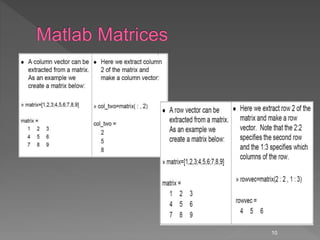
 A column vector can be created in MATLAB as
follows (note the semicolons):
» colvec = [13 ; 45 ; -2]
colvec =
13
45
-2
7
 A matrix can be created in Matlab as follows
 (note the commas AND semicolons):
 » matrix = [1 , 2 , 3 ; 4 , 5 ,6 ; 7 , 8 , 9]
matrix =
1 2 3
4 5 6
7 8 9
8
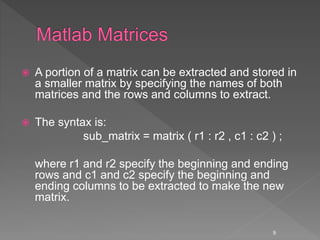
 A portion of a matrix can be extracted and stored in
a smaller matrix by specifying the names of both
matrices and the rows and columns to extract.
 The syntax is:
sub_matrix = matrix ( r1 : r2 , c1 : c2 ) ;
where r1 and r2 specify the beginning and ending
rows and c1 and c2 specify the beginning and
ending columns to be extracted to make the new
matrix.
9
10
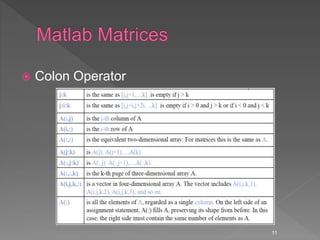
 Colon Operator
11
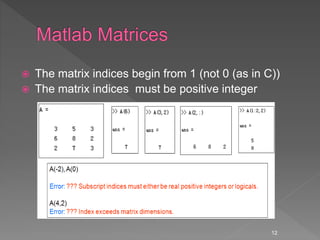
 The matrix indices begin from 1 (not 0 (as in C))
 The matrix indices must be positive integer
12
 Accessing Single Elements of a Matrix A(i,j)
 Accessing Multiple Elements of a Matrix
A(1,4) + A(2,4) + A(3,4) + A(4,4)
A([1,3,4], :)= all of rows 1, 3 and 4
sum(A(1:4,4))
sum(A(:,end))
The keyword end refers to the last row or column.
 Deleting Rows and Columns: to delete the second column
of X, use X(:,2) = []
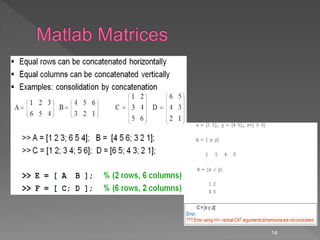
 Concatenating Matrices A and B C=[A;B]
13
14
Logic--searching with find
 Find--searches for the truth (or not false)
› b=[1 0 -1 0 0];
› I=find(b)
I=1 3 b(I) is an array without zeros
› I=find(ones(3,1)*[ 1 2 3]==2)
I= 4 5 6
› [I,J]=find(ones(3,1)*[ 1 2 3]==2)
I= 1 2 3
J= 2 2 2
15
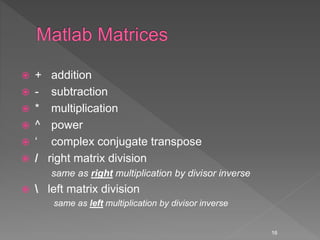
 + addition
 - subtraction
 * multiplication
 ^ power
 ‘ complex conjugate transpose
 / right matrix division
same as right multiplication by divisor inverse
  left matrix division
same as left multiplication by divisor inverse
16
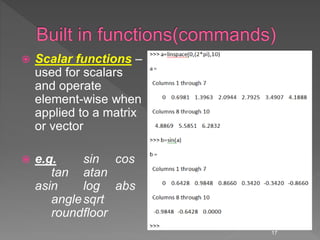
 Scalar functions –
used for scalars
and operate
element-wise when
applied to a matrix
or vector
 e.g. sin cos
tan atan
asin log abs
anglesqrt
roundfloor
17
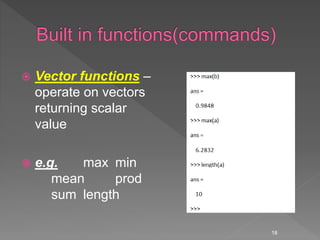
 Vector functions –
operate on vectors
returning scalar
value
 e.g. max min
mean prod
sum length
18
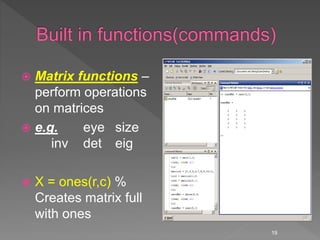
 Matrix functions –
perform operations
on matrices
 e.g. eye size
inv det eig
 X = ones(r,c) %
Creates matrix full
with ones
19
 X = zeros(r,c) % Creates
matrix full with zeros
 A = diag(x) % Creates
squared matrix with vector
x in diagonal
 [r,c] = size(A) % Return
dimensions of matrix A
 B = rand(r,c) %creates a
matrix of random numbers.
20
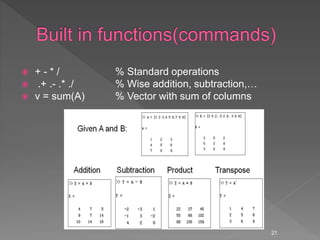
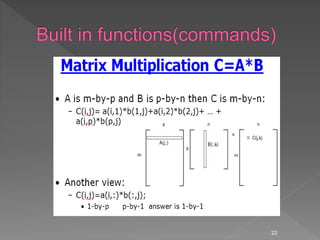
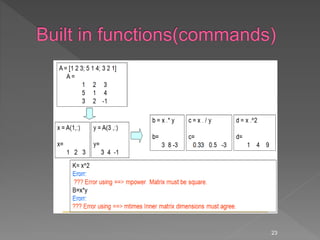
 + - * / % Standard operations
 .+ .- .* ./ % Wise addition, subtraction,…
 v = sum(A) % Vector with sum of columns
21
22
23
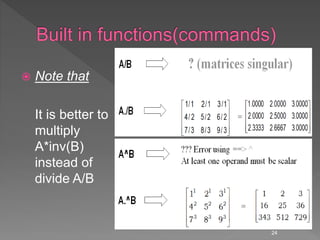
 Note that
It is better to
multiply
A*inv(B)
instead of
divide A/B
24
25
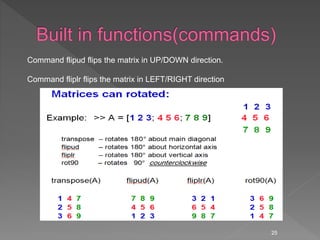
Command flipud flips the matrix in UP/DOWN direction.
Command fliplr flips the matrix in LEFT/RIGHT direction
26
Some powerful matrix functions in Matlab
 X = A’ % Transposed matrix
(A transpose operation changes the column of a matrix into rows, and
rows into columns)
 X = inv(A) % Inverse matrix squared matrix
 X = pinv(A) % Pseudo inverse
 X = chol(A) % Cholesky decomp.
 d = det(A) % Determinant
 [X,D] = eig(A) % Eigenvalues and eigenvectors
 [Q,R] = qr(X) % QR decomposition
 [U,D,V] = svd(A) % singular value decomp
27
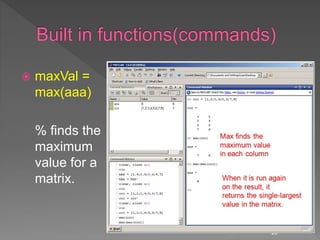
 maxVal =
max(aaa)
% finds the
maximum
value for a
matrix.
28
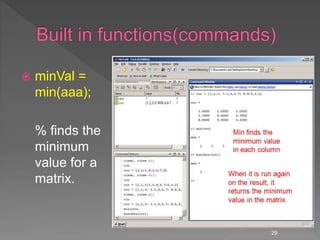
 minVal =
min(aaa);
% finds the
minimum
value for a
matrix.
29
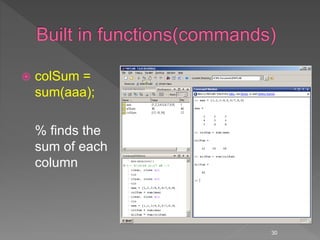
 colSum =
sum(aaa);
% finds the
sum of each
column
30
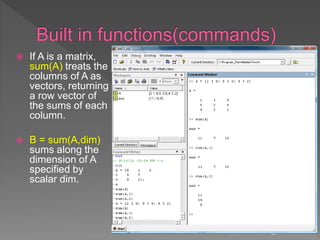
 If A is a matrix,
sum(A) treats the
columns of A as
vectors, returning
a row vector of
the sums of each
column.
 B = sum(A,dim)
sums along the
dimension of A
specified by
scalar dim.
31
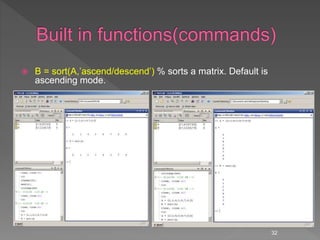
 B = sort(A,’ascend/descend’) % sorts a matrix. Default is
ascending mode.
32
1. A is a row vector. The first element in A is 0, and the
value vary from 0 to 10 with increment of 2
2. B is row vector with six elements, and every variable
in B is 2.5
3. Calculate the value of C, which is equal to the sum of
A and B
4. Calculate the value of D, which is equal to the
element-by element multiplication between A and B
5. Change A(1,3) to 8.
6. Calculate E = A./B
33
1. A=[1, 2.7, 8.9, -8, 4, 3.5]
2. B>0;
3. Return the sum and mean value of all the
elements in A.
4. Return the max value of all elements in A.
5. fix(A)
34
1. A=[1, 2.7, 8.9, -8, 4, 3.5; 6.5, 8.9, 5, -0.9,
3, 19] ;
2. Set every element in six column to be 0.7.
3. Remove the second column in A;
4. Return the mean value of every column in
A;
5. Return the mean value of whole A;
35

Introduction to matlab lecture 2 of 4

  • 2.
    1. >> for= 5 ??? for = 5 Error: The expression to the left of the equals sign is not a valid target for an assignment 2. >> else =6 ??? else = 6 Error: Illegal use of reserved keyword "else" 3. >> cos = 2; cos(0) ??? Subscript indices must either be real positive integers or logicals 4. >> A = [1,2,3]; sum(A) ans = 6 >> sum = 7; sum(A) ??? Index exceeds matrix dimensions 2
  • 3.
    5. >> 5>2 ans= 1 6. >> 5<4 ans = 0 7. >> 1.5<=1.5 ans = 1 8. >> 2>=pi ans = 0 9. >> 1.8==1.801 ans = 0 10. >> 1.8~=2 ans = 1 11. >> 1.8==1.80000000000000000000000001 ans = 1 3
  • 4.
     Creating andmanipulating matrices  Built-in functions for matrices 4
  • 5.
     Matlab treatsall variables as matrices.  Vectors are special forms of matrices and contain only one row OR one column (A row vector is a 1xn matrix, A column vector is an mx1 matrix).  Scalars are matrices with only one row AND one column (A scalar is a 1x1 matrix)  Every matrix element has a numerical value. Non-digit elements linked to ASCII code digits A → 65, B → 66, etc. a → 97, b → 98, etc. - → 45, _ → 95, etc.  Logical truth values assigned to digits (true → 1, false → 0) 5
  • 6.
     A matrixwith only one row is called a row vector.  A row vector can be created in Matlab as follows (note the commas or you can use spaces): » rowvec = [12 , 14 , 63] rowvec = 12 14 63 6
  • 7.
     A matrixwith only one column is called a column vector.  A column vector can be created in MATLAB as follows (note the semicolons): » colvec = [13 ; 45 ; -2] colvec = 13 45 -2 7
  • 8.
     A matrixcan be created in Matlab as follows  (note the commas AND semicolons):  » matrix = [1 , 2 , 3 ; 4 , 5 ,6 ; 7 , 8 , 9] matrix = 1 2 3 4 5 6 7 8 9 8
  • 9.
     A portionof a matrix can be extracted and stored in a smaller matrix by specifying the names of both matrices and the rows and columns to extract.  The syntax is: sub_matrix = matrix ( r1 : r2 , c1 : c2 ) ; where r1 and r2 specify the beginning and ending rows and c1 and c2 specify the beginning and ending columns to be extracted to make the new matrix. 9
  • 10.
  • 11.
  • 12.
     The matrixindices begin from 1 (not 0 (as in C))  The matrix indices must be positive integer 12
  • 13.
     Accessing SingleElements of a Matrix A(i,j)  Accessing Multiple Elements of a Matrix A(1,4) + A(2,4) + A(3,4) + A(4,4) A([1,3,4], :)= all of rows 1, 3 and 4 sum(A(1:4,4)) sum(A(:,end)) The keyword end refers to the last row or column.  Deleting Rows and Columns: to delete the second column of X, use X(:,2) = []  Concatenating Matrices A and B C=[A;B] 13
  • 14.
  • 15.
    Logic--searching with find Find--searches for the truth (or not false) › b=[1 0 -1 0 0]; › I=find(b) I=1 3 b(I) is an array without zeros › I=find(ones(3,1)*[ 1 2 3]==2) I= 4 5 6 › [I,J]=find(ones(3,1)*[ 1 2 3]==2) I= 1 2 3 J= 2 2 2 15
  • 16.
     + addition - subtraction  * multiplication  ^ power  ‘ complex conjugate transpose  / right matrix division same as right multiplication by divisor inverse  left matrix division same as left multiplication by divisor inverse 16
  • 17.
     Scalar functions– used for scalars and operate element-wise when applied to a matrix or vector  e.g. sin cos tan atan asin log abs anglesqrt roundfloor 17
  • 18.
     Vector functions– operate on vectors returning scalar value  e.g. max min mean prod sum length 18
  • 19.
     Matrix functions– perform operations on matrices  e.g. eye size inv det eig  X = ones(r,c) % Creates matrix full with ones 19
  • 20.
     X =zeros(r,c) % Creates matrix full with zeros  A = diag(x) % Creates squared matrix with vector x in diagonal  [r,c] = size(A) % Return dimensions of matrix A  B = rand(r,c) %creates a matrix of random numbers. 20
  • 21.
     + -* / % Standard operations  .+ .- .* ./ % Wise addition, subtraction,…  v = sum(A) % Vector with sum of columns 21
  • 22.
  • 23.
  • 24.
     Note that Itis better to multiply A*inv(B) instead of divide A/B 24
  • 25.
    25 Command flipud flipsthe matrix in UP/DOWN direction. Command fliplr flips the matrix in LEFT/RIGHT direction
  • 26.
  • 27.
    Some powerful matrixfunctions in Matlab  X = A’ % Transposed matrix (A transpose operation changes the column of a matrix into rows, and rows into columns)  X = inv(A) % Inverse matrix squared matrix  X = pinv(A) % Pseudo inverse  X = chol(A) % Cholesky decomp.  d = det(A) % Determinant  [X,D] = eig(A) % Eigenvalues and eigenvectors  [Q,R] = qr(X) % QR decomposition  [U,D,V] = svd(A) % singular value decomp 27
  • 28.
     maxVal = max(aaa) %finds the maximum value for a matrix. 28
  • 29.
     minVal = min(aaa); %finds the minimum value for a matrix. 29
  • 30.
     colSum = sum(aaa); %finds the sum of each column 30
  • 31.
     If Ais a matrix, sum(A) treats the columns of A as vectors, returning a row vector of the sums of each column.  B = sum(A,dim) sums along the dimension of A specified by scalar dim. 31
  • 32.
     B =sort(A,’ascend/descend’) % sorts a matrix. Default is ascending mode. 32
  • 33.
    1. A isa row vector. The first element in A is 0, and the value vary from 0 to 10 with increment of 2 2. B is row vector with six elements, and every variable in B is 2.5 3. Calculate the value of C, which is equal to the sum of A and B 4. Calculate the value of D, which is equal to the element-by element multiplication between A and B 5. Change A(1,3) to 8. 6. Calculate E = A./B 33
  • 34.
    1. A=[1, 2.7,8.9, -8, 4, 3.5] 2. B>0; 3. Return the sum and mean value of all the elements in A. 4. Return the max value of all elements in A. 5. fix(A) 34
  • 35.
    1. A=[1, 2.7,8.9, -8, 4, 3.5; 6.5, 8.9, 5, -0.9, 3, 19] ; 2. Set every element in six column to be 0.7. 3. Remove the second column in A; 4. Return the mean value of every column in A; 5. Return the mean value of whole A; 35