

11
M File Script and Function
Lecture Series – 5
by
Shameer Koya
Files used in MATLAB
 .m files
 Both functions and scripts are stored in .m files
 .mat files
 The MATLAB workspace (or specific variables) can be saved in
.mat files
 These files are easy to save and load, and MATLAB accessing
them is very efficient
 .fig files (next week)
 Plots can be saved in .fig files, and then the figure can be edited
without reloading data
2
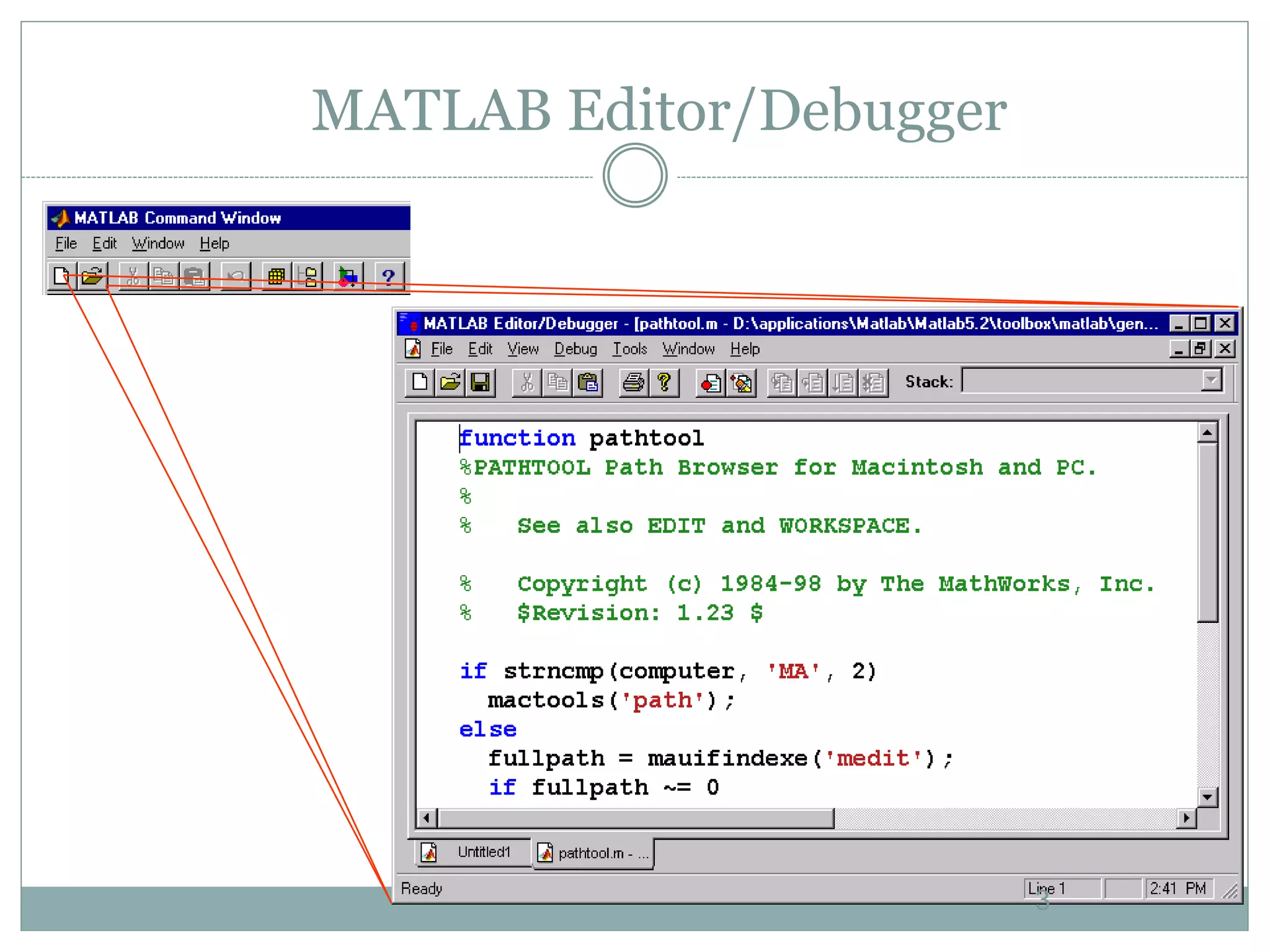
MATLAB Editor/Debugger
3
.m files
 Code can be saved in .m files and run in the
command window – exact implementation
depends on whether the code is a function or a
script
4
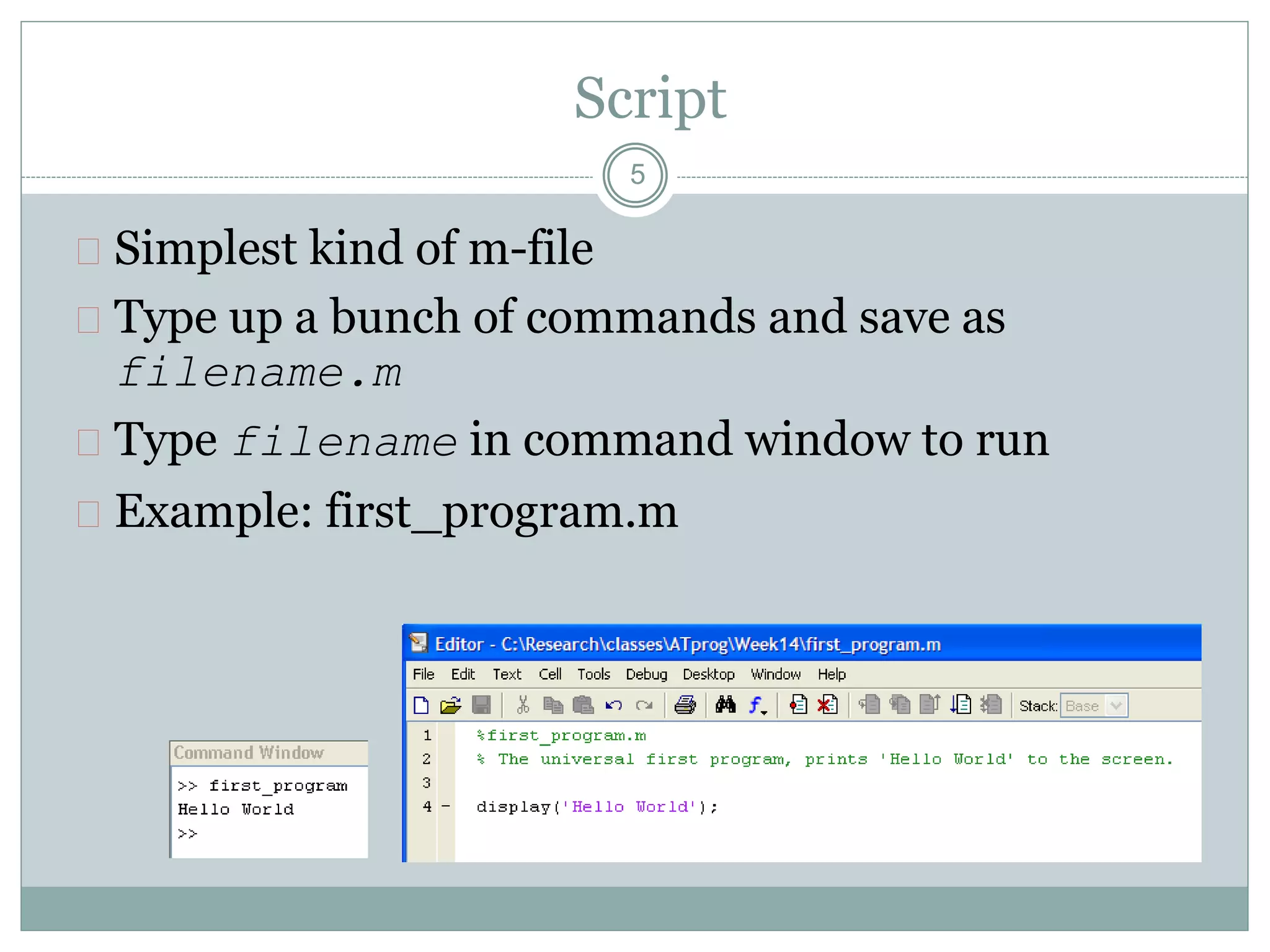
Script
 Simplest kind of m-file
 Type up a bunch of commands and save as
filename.m
 Type filename in command window to run
 Example: first_program.m
5
Function
 Functions are more complex than scripts
 Functions have their own local variables
 Functions return output as specified, and can accept
input as specified
6
Commenting
 Comment your code!
 Any line starting with % is a comment
 Comments can be added to the end of existing lines
by adding a %
 Note that anything after % will be ignored
 In editor screen comments are green
 Any comments written at the beginning of an m-
file will be displayed by the command help
filename
7
Flow control
 Conditional control – if, else, switch
 Loop control – for, while, continue, break
 Program termination – return
8
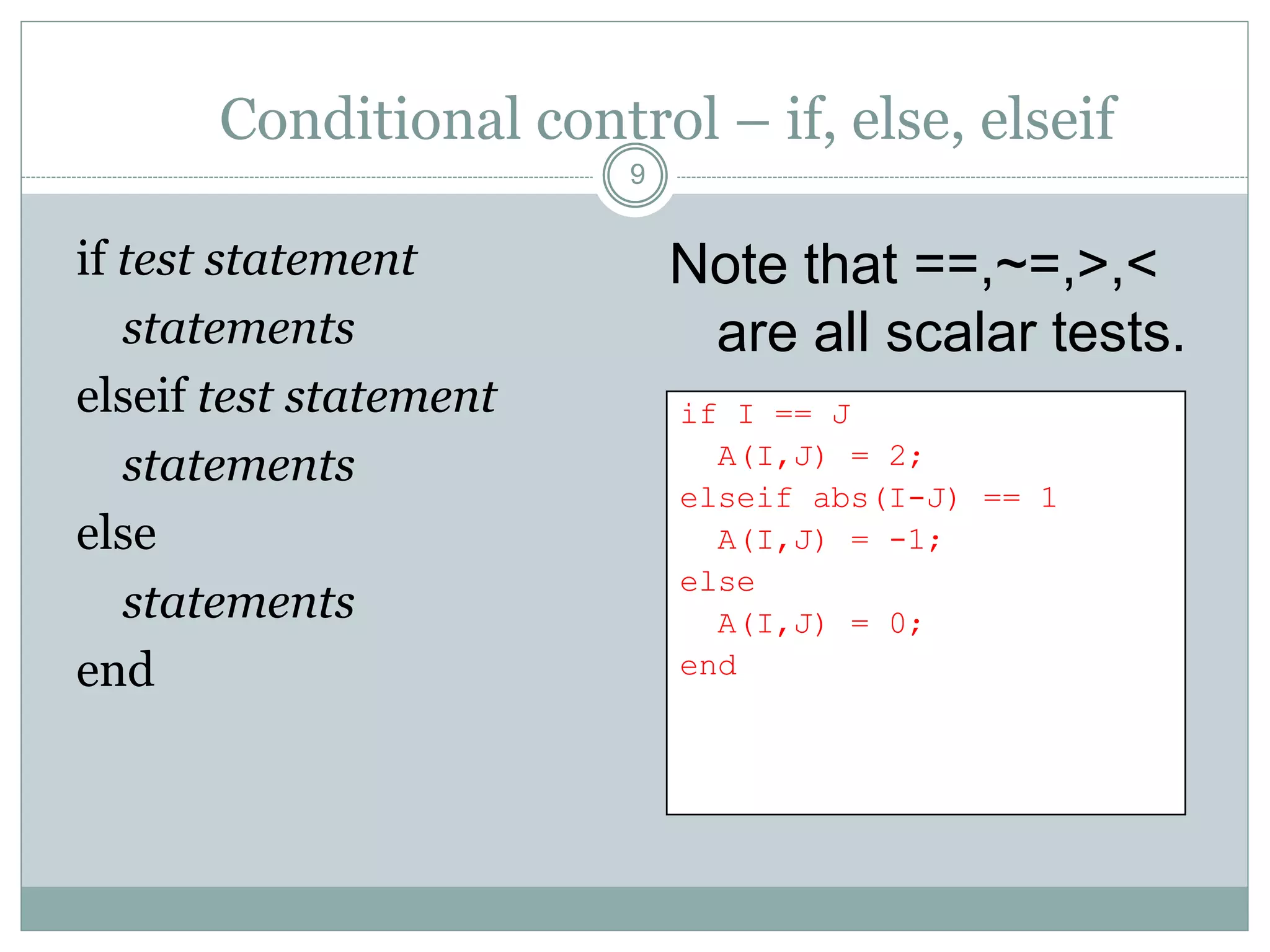
Conditional control – if, else, elseif
if test statement
statements
elseif test statement
statements
else
statements
end
Note that ==,~=,>,<
are all scalar tests.
9
if I == J
A(I,J) = 2;
elseif abs(I-J) == 1
A(I,J) = -1;
else
A(I,J) = 0;
end
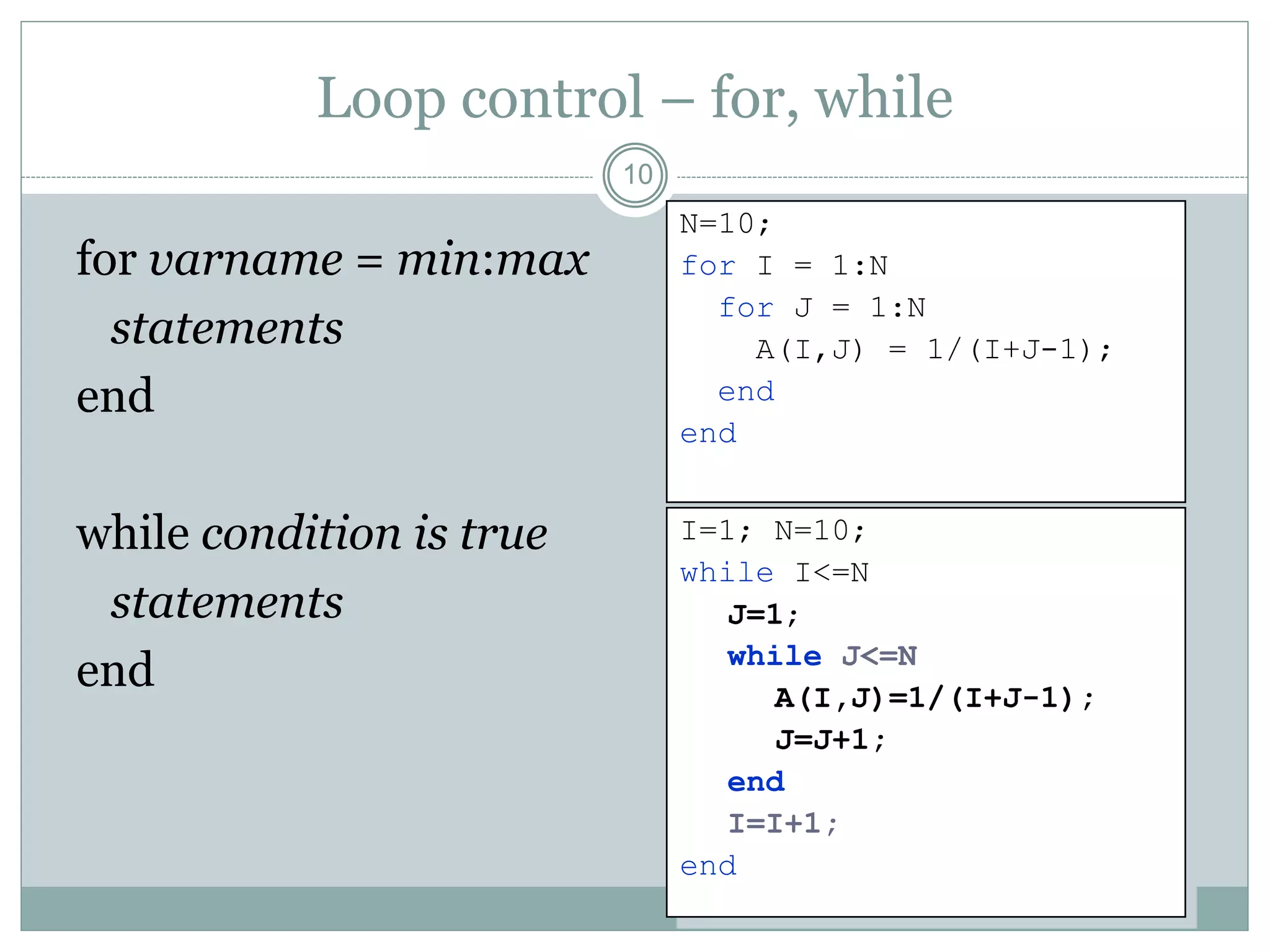
Loop control – for, while
for varname = min:max
statements
end
while condition is true
statements
end
10
N=10;
for I = 1:N
for J = 1:N
A(I,J) = 1/(I+J-1);
end
end
I=1; N=10;
while I<=N
J=1;
while J<=N
A(I,J)=1/(I+J-1);
J=J+1;
end
I=I+1;
end
CS 111
11
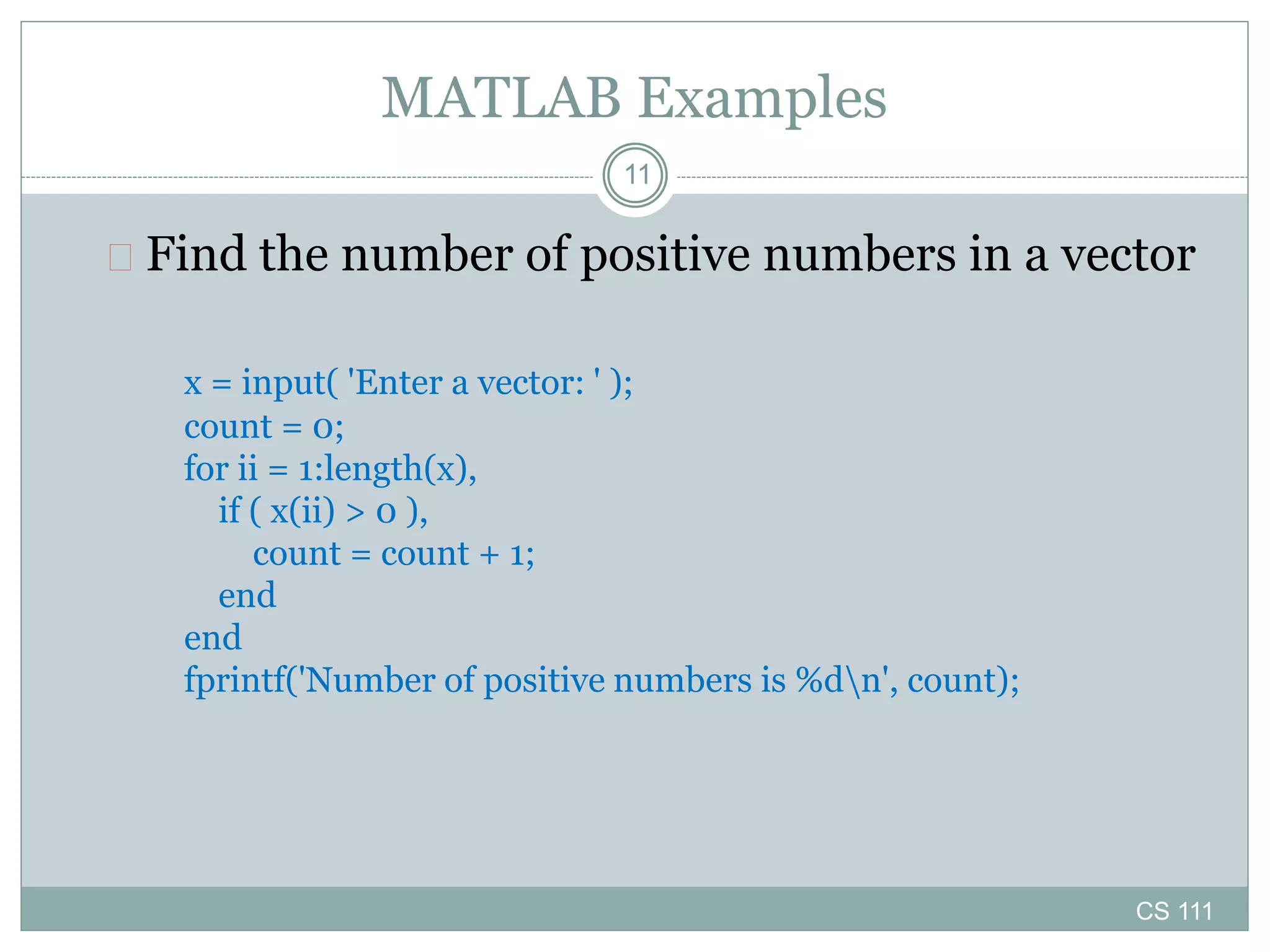
MATLAB Examples
 Find the number of positive numbers in a vector
x = input( 'Enter a vector: ' );
count = 0;
for ii = 1:length(x),
if ( x(ii) > 0 ),
count = count + 1;
end
end
fprintf('Number of positive numbers is %dn', count);
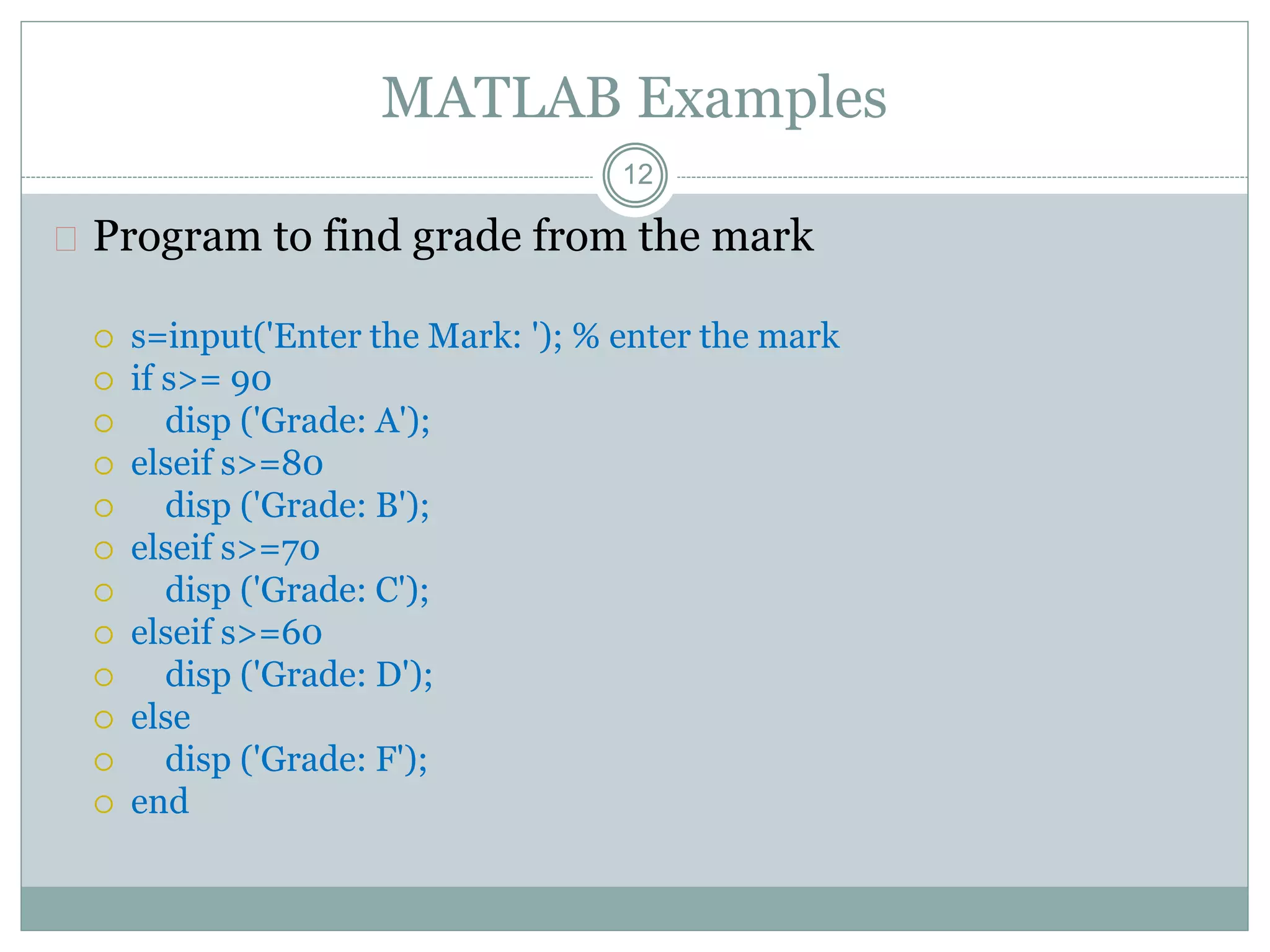
MATLAB Examples
 Program to find grade from the mark
 s=input('Enter the Mark: '); % enter the mark
 if s>= 90
 disp ('Grade: A');
 elseif s>=80
 disp ('Grade: B');
 elseif s>=70
 disp ('Grade: C');
 elseif s>=60
 disp ('Grade: D');
 else
 disp ('Grade: F');
 end
12
13
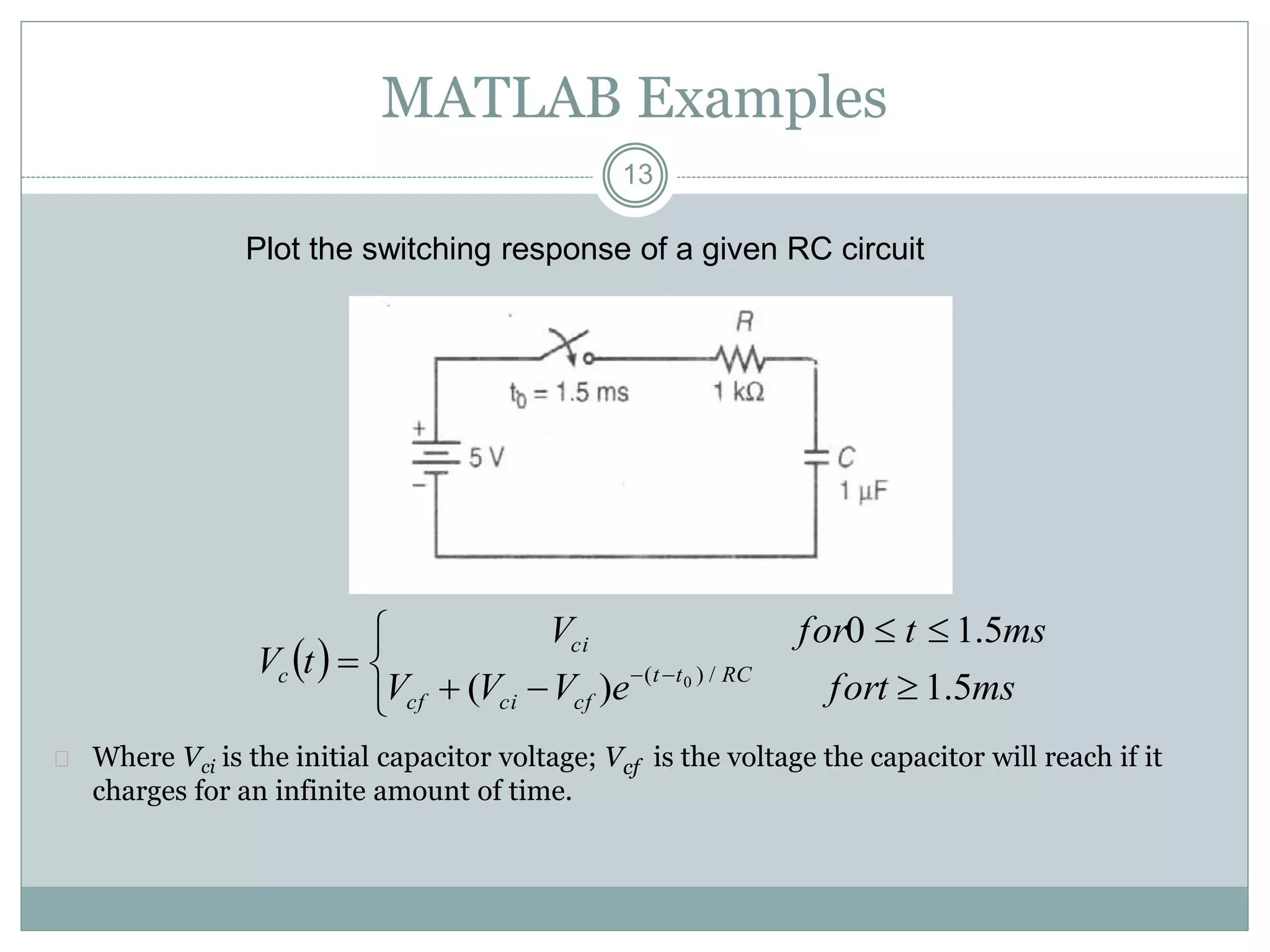
MATLAB Examples
Plot the switching response of a given RC circuit
 Where Vci is the initial capacitor voltage; Vcf is the voltage the capacitor will reach if it
charges for an infinite amount of time.
 





 
msforteVVV
mstforV
tV RCtt
cfcicf
ci
c
5.1)(
5.10
/)( 0
14
MATLAB Examples
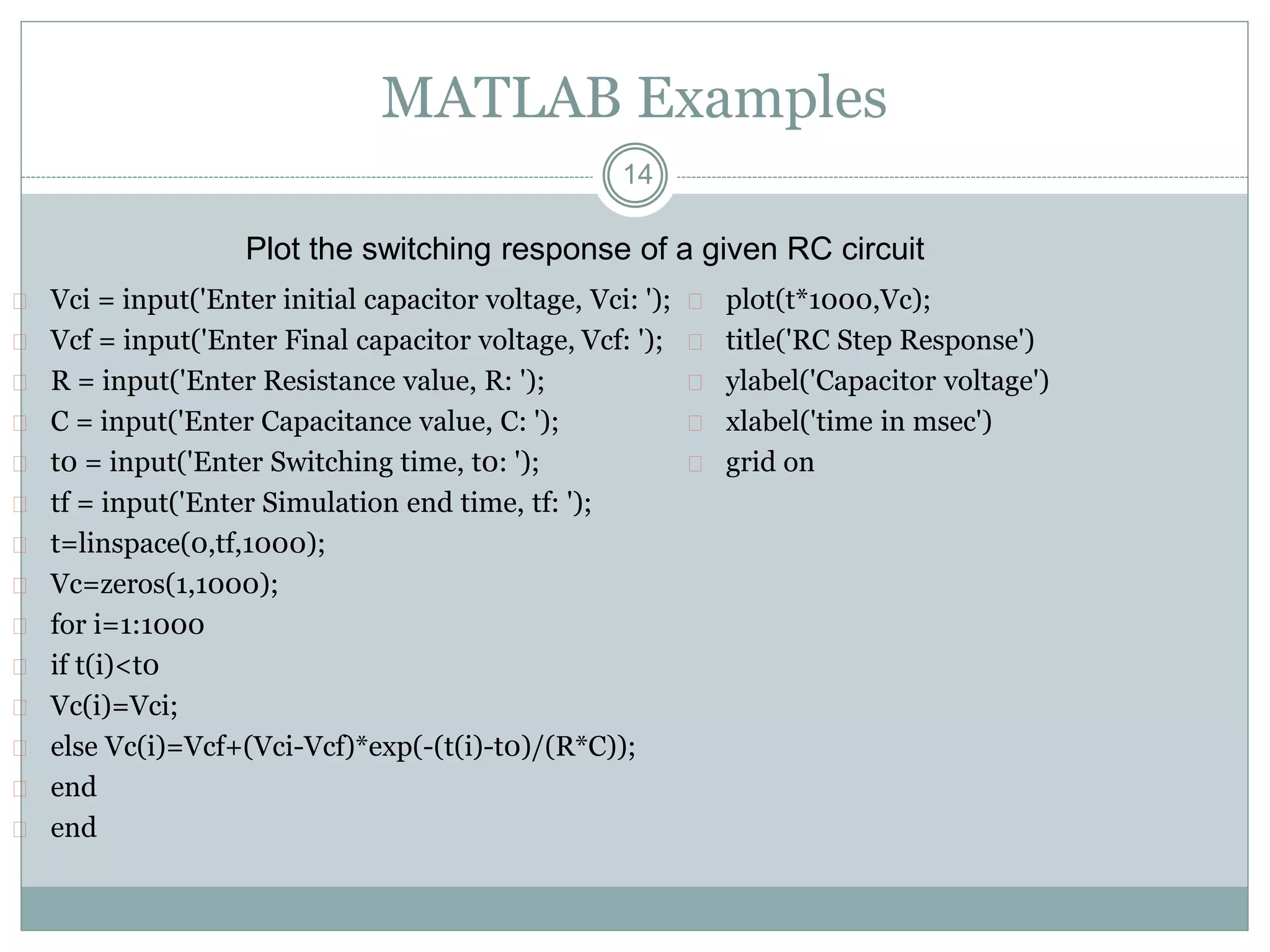
 Vci = input('Enter initial capacitor voltage, Vci: ');
 Vcf = input('Enter Final capacitor voltage, Vcf: ');
 R = input('Enter Resistance value, R: ');
 C = input('Enter Capacitance value, C: ');
 t0 = input('Enter Switching time, t0: ');
 tf = input('Enter Simulation end time, tf: ');
 t=linspace(0,tf,1000);
 Vc=zeros(1,1000);
 for i=1:1000
 if t(i)<t0
 Vc(i)=Vci;
 else Vc(i)=Vcf+(Vci-Vcf)*exp(-(t(i)-t0)/(R*C));
 end
 end
 plot(t*1000,Vc);
 title('RC Step Response')
 ylabel('Capacitor voltage')
 xlabel('time in msec')
 grid on
Plot the switching response of a given RC circuit
15
MATLAB Examples
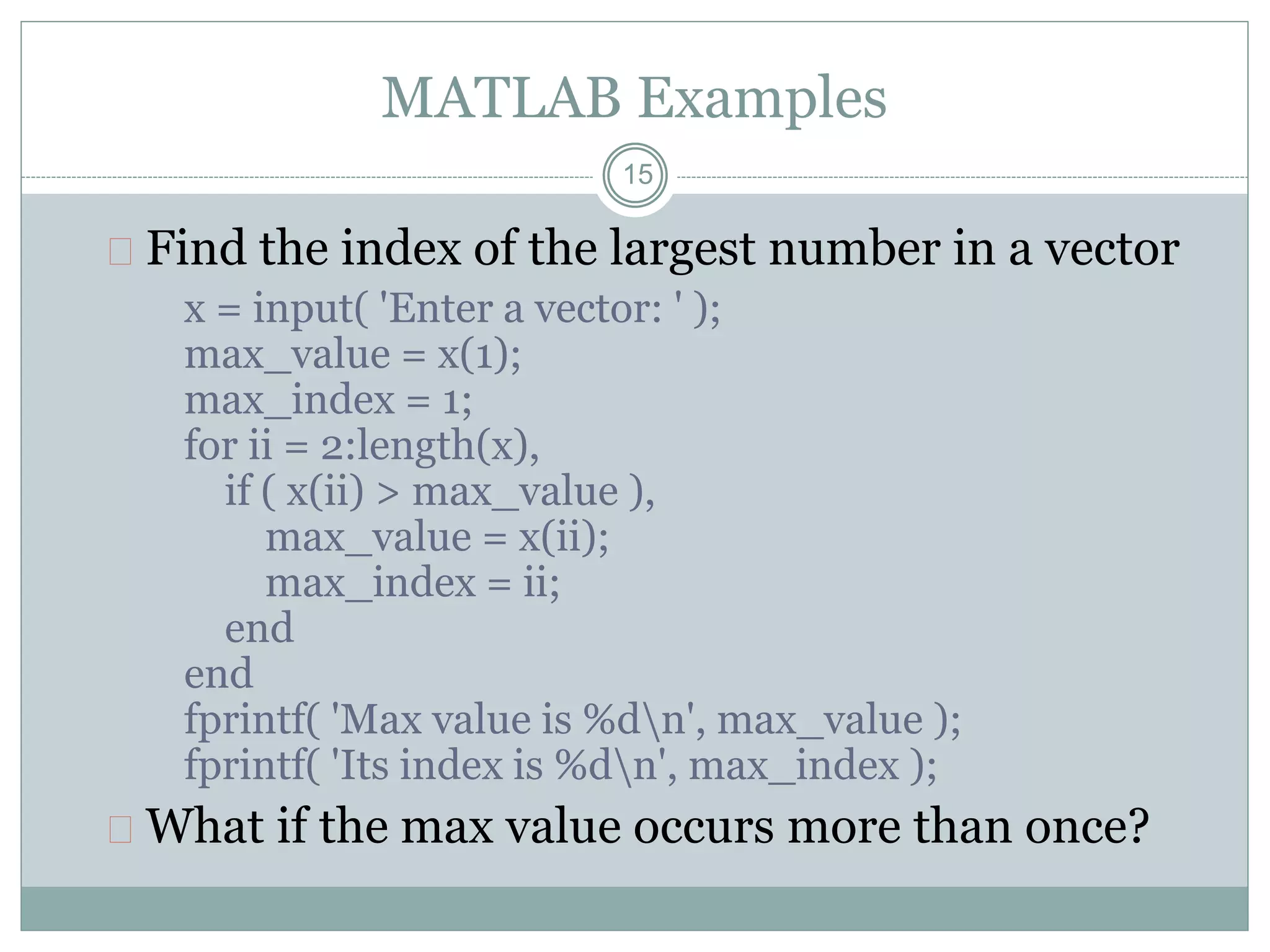
 Find the index of the largest number in a vector
x = input( 'Enter a vector: ' );
max_value = x(1);
max_index = 1;
for ii = 2:length(x),
if ( x(ii) > max_value ),
max_value = x(ii);
max_index = ii;
end
end
fprintf( 'Max value is %dn', max_value );
fprintf( 'Its index is %dn', max_index );
 What if the max value occurs more than once?
 Write program to find step response of RL circuit
 Program to make p w m signals
16
17
Thanks
Questions ??

Matlab m files and scripts

  • 1.
    11 M File Scriptand Function Lecture Series – 5 by Shameer Koya
  • 2.
    Files used inMATLAB  .m files  Both functions and scripts are stored in .m files  .mat files  The MATLAB workspace (or specific variables) can be saved in .mat files  These files are easy to save and load, and MATLAB accessing them is very efficient  .fig files (next week)  Plots can be saved in .fig files, and then the figure can be edited without reloading data 2
  • 3.
  • 4.
    .m files  Codecan be saved in .m files and run in the command window – exact implementation depends on whether the code is a function or a script 4
  • 5.
    Script  Simplest kindof m-file  Type up a bunch of commands and save as filename.m  Type filename in command window to run  Example: first_program.m 5
  • 6.
    Function  Functions aremore complex than scripts  Functions have their own local variables  Functions return output as specified, and can accept input as specified 6
  • 7.
    Commenting  Comment yourcode!  Any line starting with % is a comment  Comments can be added to the end of existing lines by adding a %  Note that anything after % will be ignored  In editor screen comments are green  Any comments written at the beginning of an m- file will be displayed by the command help filename 7
  • 8.
    Flow control  Conditionalcontrol – if, else, switch  Loop control – for, while, continue, break  Program termination – return 8
  • 9.
    Conditional control –if, else, elseif if test statement statements elseif test statement statements else statements end Note that ==,~=,>,< are all scalar tests. 9 if I == J A(I,J) = 2; elseif abs(I-J) == 1 A(I,J) = -1; else A(I,J) = 0; end
  • 10.
    Loop control –for, while for varname = min:max statements end while condition is true statements end 10 N=10; for I = 1:N for J = 1:N A(I,J) = 1/(I+J-1); end end I=1; N=10; while I<=N J=1; while J<=N A(I,J)=1/(I+J-1); J=J+1; end I=I+1; end
  • 11.
    CS 111 11 MATLAB Examples Find the number of positive numbers in a vector x = input( 'Enter a vector: ' ); count = 0; for ii = 1:length(x), if ( x(ii) > 0 ), count = count + 1; end end fprintf('Number of positive numbers is %dn', count);
  • 12.
    MATLAB Examples  Programto find grade from the mark  s=input('Enter the Mark: '); % enter the mark  if s>= 90  disp ('Grade: A');  elseif s>=80  disp ('Grade: B');  elseif s>=70  disp ('Grade: C');  elseif s>=60  disp ('Grade: D');  else  disp ('Grade: F');  end 12
  • 13.
    13 MATLAB Examples Plot theswitching response of a given RC circuit  Where Vci is the initial capacitor voltage; Vcf is the voltage the capacitor will reach if it charges for an infinite amount of time.          msforteVVV mstforV tV RCtt cfcicf ci c 5.1)( 5.10 /)( 0
  • 14.
    14 MATLAB Examples  Vci= input('Enter initial capacitor voltage, Vci: ');  Vcf = input('Enter Final capacitor voltage, Vcf: ');  R = input('Enter Resistance value, R: ');  C = input('Enter Capacitance value, C: ');  t0 = input('Enter Switching time, t0: ');  tf = input('Enter Simulation end time, tf: ');  t=linspace(0,tf,1000);  Vc=zeros(1,1000);  for i=1:1000  if t(i)<t0  Vc(i)=Vci;  else Vc(i)=Vcf+(Vci-Vcf)*exp(-(t(i)-t0)/(R*C));  end  end  plot(t*1000,Vc);  title('RC Step Response')  ylabel('Capacitor voltage')  xlabel('time in msec')  grid on Plot the switching response of a given RC circuit
  • 15.
    15 MATLAB Examples  Findthe index of the largest number in a vector x = input( 'Enter a vector: ' ); max_value = x(1); max_index = 1; for ii = 2:length(x), if ( x(ii) > max_value ), max_value = x(ii); max_index = ii; end end fprintf( 'Max value is %dn', max_value ); fprintf( 'Its index is %dn', max_index );  What if the max value occurs more than once?
  • 16.
     Write programto find step response of RL circuit  Program to make p w m signals 16
  • 17.