MathWorks®
MATLAB®
R2012a (7.14)
MATLAB
Introducing MATLAB – Language of technical computing 2
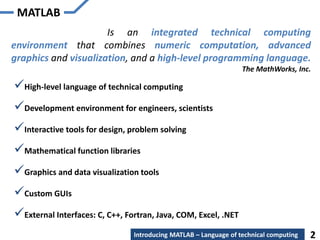
Is an integrated technical computing
environment that combines numeric computation, advanced
graphics and visualization, and a high-level programming language.
The MathWorks, Inc.
High-level language of technical computing
Development environment for engineers, scientists
Interactive tools for design, problem solving
Mathematical function libraries
Graphics and data visualization tools
Custom GUIs
External Interfaces: C, C++, Fortran, Java, COM, Excel, .NET
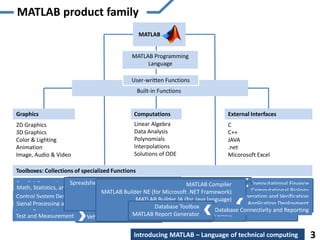
MATLAB product family
Toolboxes: Collections of specialized Functions
Graphics
2D Graphics
3D Graphics
Color & Lighting
Animation
Image, Audio & Video
Computations
Linear Algebra
Data Analysis
Polynomials
Interpolations
Solutions of ODE
External Interfaces
C
C++
JAVA
.net
Micorosoft Excel
Parallel Computing
Math, Statistics, and Optimization
Control System Design and Analysis
Signal Processing and Communications
Image Processing and Computer Vision
Test and Measurement
Built-in Functions
User-written Functions
MATLAB
Computational Finance
Computational Biology
Code Generation and Verification
Application Deployment
Database Connectivity and Reporting
MATLAB Programming
Language
Parallel Computing Toolbox
MATLAB Distributed Computing Server
Parallel Computing Symbolic Math Toolbox
Partial Differential Equation Toolbox
Statistics Toolbox
Curve Fitting Toolbox
Optimization Toolbox
Global Optimization Toolbox
Neural Network Toolbox
Model-Based Calibration Toolbox
Math, Statistics, and Optimization
Control System Toolbox
System Identification Toolbox
Fuzzy Logic Toolbox
Robust Control Toolbox
Model Predictive Control Toolbox
Aerospace Toolbox
Control System Design and Analysis Signal Processing Toolbox
DSP System Toolbox
Communications System Toolbox
Wavelet Toolbox
Fixed-Point Toolbox
RF Toolbox
Phased Array System Toolbox
Signal Processing and Communications
Image Processing Toolbox
Computer Vision System Toolbox
Image Acquisition Toolbox
Mapping Toolbox
Image Processing and Computer Vision
Data Acquisition Toolbox
Instrument Control Toolbox
Image Acquisition Toolbox
OPC Toolbox
Vehicle Network ToolboxTest and Measurement
Financial Toolbox
Econometrics Toolbox
Datafeed Toolbox
Database Toolbox
Computational FinanceSpreadsheet Link EX (for Microsoft Excel)
Fixed-Income Toolbox
Financial Derivatives Toolbox
Bioinformatics Toolbox
SimBiology
Computational Biology
MATLAB Coder
HDL Coder
HDL Verifier
Filter Design HDL Coder
Code Generation and Verification
MATLAB Compiler
MATLAB Builder NE (for Microsoft .NET Framework)
MATLAB Builder JA (for Java language)
MATLAB Builder EX (for Microsoft Excel)
Spreadsheet Link EX (for Microsoft Excel)
Application Deployment
Database Toolbox
MATLAB Report Generator
Database Connectivity and Reporting
Introducing MATLAB – Language of technical computing 3
Agenda
Introducing MATLAB – Language of technical computing
Minimal MATLAB
4
Agenda
Introducing MATLAB – Language of technical computing
Minimal MATLAB
MATLAB Desktop
Computing with MATLAB
5
Array – creation & working
Plotting – creating & visualizing
Automating commands – creating, saving & executing script file
Conditional control statements
Loop control statements
Functions – creating & executing a function file
MATLAB for Image Processing
Agenda
Introducing MATLAB – Language of technical computing
Minimal MATLAB
MATLAB Desktop
Computing with MATLAB
Array – creation & working
Plotting – creating & visualizing
Automating commands – creating, saving & executing script file
Functions – creating & executing a function file
6
Conditional control statements
Loop control statements
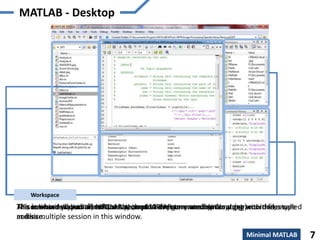
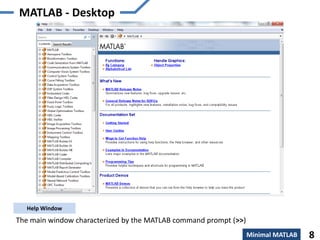
The main window characterized by the MATLAB command prompt (>>)
Command Window
This is where you write, edit, create, and save your own script or programs in files called
m-files.
Editor Window
This is where all your files from the current directory are listed.
Current Directory
All commands typed on MATLAB prompt in the command window get recorded, even
across multiple session in this window.
Command History
This subwindow lists all variables that you have generated so far along with there type
and size.
Workspace
MATLAB - Desktop
Minimal MATLAB 7
MATLAB - Desktop
The main window characterized by the MATLAB command prompt (>>)
Help Window
Minimal MATLAB 8
Agenda
Introducing MATLAB – Language of technical computing
Minimal MATLAB
MATLAB Desktop
Computing with MATLAB
Array – creation & working
Plotting – creating & visualizing
Automating commands – creating, saving & executing script file
Functions – creating & executing a function file
9
Conditional control statements
Loop control statements
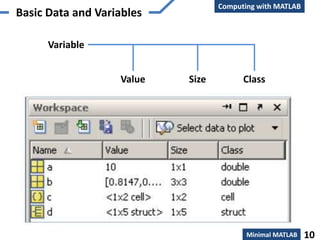
Basic Data and Variables
Computing with MATLAB
Class
Variable
SizeValue
Minimal MATLAB 10
Basic Data and Variables
Computing with MATLAB
Multidimensional Array
[full or sparse]
Scalar

logical
ab
char
{ }
cell struct
function
handle (@)numeric
int8, uint8,
int16, unit16,
int32, unit32,
int64, unit64
single double
Minimal MATLAB 11
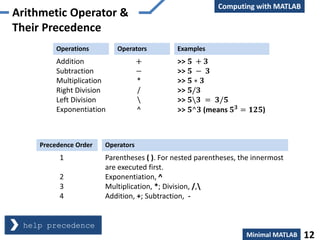
Arithmetic Operator &
Their Precedence
Computing with MATLAB
Operations Operators Examples
Addition
Subtraction
Multiplication
Right Division
Left Division
Exponentiation
+
−
*
/

^
>> 𝟓 + 𝟑
>> 𝟓 − 𝟑
>> 𝟓 ∗ 𝟑
>> 𝟓/𝟑
>> 𝟓𝟑 = 𝟑/𝟓
>> 𝟓^𝟑 (means 𝟓 𝟑
= 𝟏𝟐𝟓)
Precedence Order Operators
1
2
3
4
Parentheses ( ). For nested parentheses, the innermost
are executed first.
Exponentiation, ^
Multiplication, *; Division, /,
Addition, +; Subtraction, -
help precedence
Minimal MATLAB 12
Computing with MATLAB
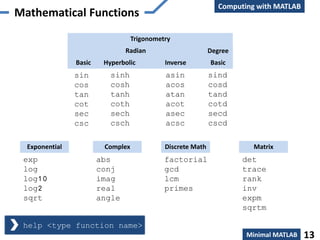
Mathematical Functions
Trigonometry
sind
cosd
tand
cotd
secd
cscd
Degree
sin
cos
tan
cot
sec
csc
sinh
cosh
tanh
coth
sech
csch
asin
acos
atan
acot
asec
acsc
Basic Hyperbolic Inverse
Radian
Basic
Exponential
exp
log
log10
log2
sqrt
Complex
abs
conj
imag
real
angle
Matrix
det
trace
rank
inv
expm
sqrtm
Discrete Math
factorial
gcd
lcm
primes
help <type function name>
Minimal MATLAB 13
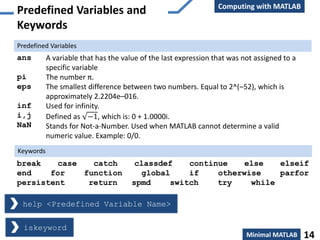
Predefined Variables and
Keywords
ans
pi
eps
inf
i,j
NaN
A variable that has the value of the last expression that was not assigned to a
specific variable
The number π.
The smallest difference between two numbers. Equal to 2^(–52), which is
approximately 2.2204e–016.
Used for infinity.
Defined as −1, which is: 0 + 1.0000i.
Stands for Not-a-Number. Used when MATLAB cannot determine a valid
numeric value. Example: 0/0.
Predefined Variables
break case catch classdef continue else elseif
end for function global if otherwise parfor
persistent return spmd switch try while
Keywords
iskeyword
help <Predefined Variable Name>
Computing with MATLAB
Minimal MATLAB 14
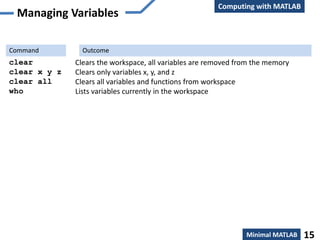
Managing Variables
clear
clear x y z
clear all
who
Clears the workspace, all variables are removed from the memory
Clears only variables x, y, and z
Clears all variables and functions from workspace
Lists variables currently in the workspace
Command Outcome
Computing with MATLAB
Minimal MATLAB 15
Agenda
Introducing MATLAB – Language of technical computing
Minimal MATLAB
MATLAB Desktop
Computing with MATLAB
Array – creation & working
Plotting – creating & visualizing
Automating commands – creating, saving & executing script file
Functions – creating & executing a function file
16
Conditional control statements
Loop control statements
Overview
Array
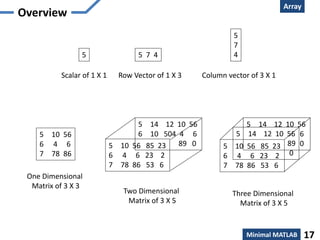
5
5
7
45 7 4
5 10 56
6 4 6
7 78 86
Scalar of 1 X 1 Row Vector of 1 X 3 Column vector of 3 X 1
One Dimensional
Matrix of 3 X 3
5 10 56 85 23
6 4 6 23 2
7 78 86 53 6
5 14 12 10 56
6 10 504 4 6
89 0
Two Dimensional
Matrix of 3 X 5
5 10 56 85 23
6 4 6 23 2
7 78 86 53 6
5 14 12 10 56
6
0
5 14 12 10 56
89
0
Three Dimensional
Matrix of 3 X 5
Minimal MATLAB 17
Creation
Array
One Dimensional Array
variable_name = [ type vector elements ]
Minimal MATLAB 18
Two Dimensional Array
variable_name = [1st row elements; 2nd row elements; 3rd row
elements; ... ; last row elements]
 from a known list of numbers
 with constant spacing by specifying the first term, the spacing, and the
last term
Known lists of numbers
Array
Minimal MATLAB 19
Creation
Creating a vector with constant spacing by specifying the
first term, the spacing, and the last term:
variable_name = [m:q:n]
or
variable_name = m:q:n
m = first term
q = spacing
n = last term
: (colon operator)Constant spacing
Creating a vector with linear (equal) spacing by specifying
the first and last terms, and the number of terms:
variable_name = linspace(xi, xf, n)
xi = first element
xf = Last element
n = number of elements
linspaceConstant spacing
Array
Minimal MATLAB 20
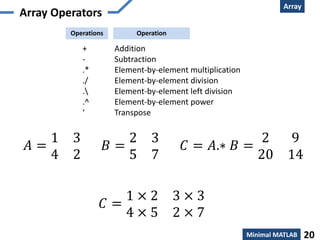
Array Operators
+ Addition
- Subtraction
.* Element-by-element multiplication
./ Element-by-element division
. Element-by-element left division
.^ Element-by-element power
‘ Transpose
Operations Operation
𝐴 =
1 3
4 2
𝐵 =
2 3
5 7
𝐶 = 𝐴.∗ 𝐵 =
2 9
20 14
𝐶 =
1 × 2 3 × 3
4 × 5 2 × 7
Data Manipulation
Array
Minimal MATLAB 21
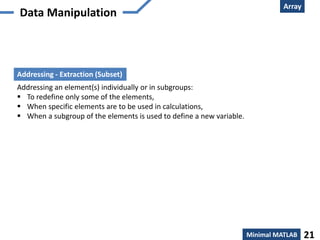
Addressing - Extraction (Subset)
Addressing an element(s) individually or in subgroups:
 To redefine only some of the elements,
 When specific elements are to be used in calculations,
 When a subgroup of the elements is used to define a new variable.
Array
Minimal MATLAB 22
Address vector
>> ve = [35 46 78 23 5 14 81 3 55]
ve =
35 46 78 23 5 14 81 3 55
1 2 3 4 5 6 7 8 9 position or index of element
Data Manipulation
Array
Minimal MATLAB 23
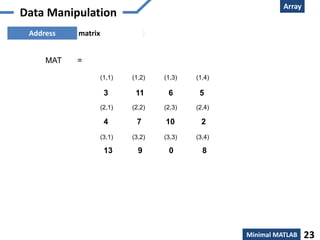
Address matrix )
(1,1) (1,2) (1,3) (1,4)
(2,1) (2,2) (2,3) (2,4)
(3,1) (3,2) (3,3) (3,4)
3 11 6 5
4 7 10 2
13 9 0 8
MAT =
Data Manipulation
Array
Minimal MATLAB 24
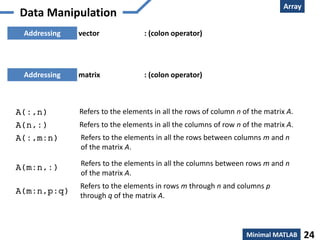
Addressing vector : (colon operator)
Data Manipulation
Addressing matrix : (colon operator)
A(:,n) Refers to the elements in all the rows of column n of the matrix A.
A(n,:) Refers to the elements in all the columns of row n of the matrix A.
A(:,m:n) Refers to the elements in all the rows between columns m and n
of the matrix A.
A(m:n,:) Refers to the elements in all the columns between rows m and n
of the matrix A.
A(m:n,p:q)
Refers to the elements in rows m through n and columns p
through q of the matrix A.
Agenda
Introducing MATLAB – Language of technical computing
Minimal MATLAB
MATLAB Desktop
Computing with MATLAB
Array – creation & working
Plotting – creating & visualizing
Automating commands – creating, saving & executing script file
Functions – creating & executing a function file
25
Conditional control statements
Loop control statements
Creation
Plotting
Minimal MATLAB 26
Example
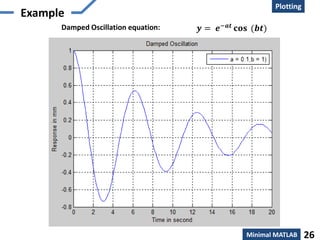
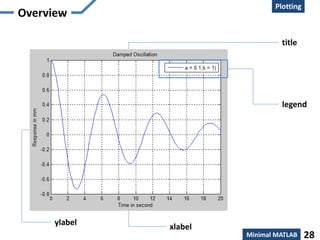
Damped Oscillation equation: 𝒚 = 𝒆−𝒂𝒕 𝐜𝐨𝐬 (𝒃𝒕)
Creation
Plotting
Minimal MATLAB 27
Example
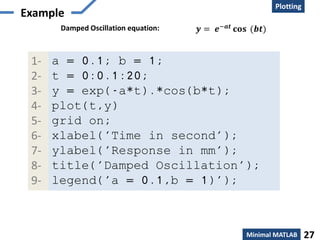
Damped Oscillation equation: 𝒚 = 𝒆−𝒂𝒕 𝐜𝐨𝐬 (𝒃𝒕)
a = 0.1; b = 1;
t = 0:0.1:20;
y = exp(-a*t).*cos(b*t);
plot(t,y)
grid on;
xlabel('Time in second');
ylabel('Response in mm');
title('Damped Oscillation');
legend('a = 0.1,b = 1)');
1-
2-
3-
4-
5-
6-
7-
8-
9-
Creation
Plotting
Minimal MATLAB 28
Overview
ylabel xlabel
title
legend
Graphing
Plotting
Minimal MATLAB 29
Plot function plot(x,y)
where the variables x and y are vector and must be of same size i.e the number of
elements should be equal.
x=[1 2 3 5 7 7.5 8 10];
y=[2 6.5 7 7 5.5 4 6 8];
plot(x,y)
Graphing
Plotting
Minimal MATLAB 30
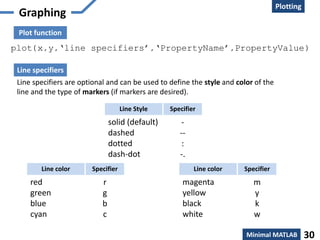
Plot function
plot(x,y,‘line specifiers’,‘PropertyName’,PropertyValue)
Line specifiers are optional and can be used to define the style and color of the
line and the type of markers (if markers are desired).
Line specifiers
solid (default)
dashed
dotted
dash-dot
Line Style Specifier
-
--
:
-.
red
green
blue
cyan
Line color Specifier
r
g
b
c
magenta
yellow
black
white
Line color Specifier
m
y
k
w
Graphing
Plotting
Minimal MATLAB 31
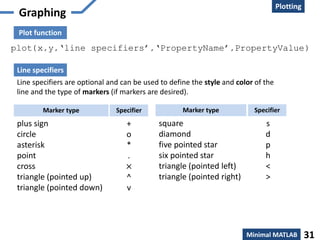
Plot function
plot(x,y,‘line specifiers’,‘PropertyName’,PropertyValue)
Line specifiers are optional and can be used to define the style and color of the
line and the type of markers (if markers are desired).
Line specifiers
plus sign
circle
asterisk
point
cross
triangle (pointed up)
triangle (pointed down)
Marker type Specifier
+
o
*
.
×
^
v
square
diamond
five pointed star
six pointed star
triangle (pointed left)
triangle (pointed right)
Marker type Specifier
s
d
p
h
<
>
Graphing
Plotting
Minimal MATLAB 32
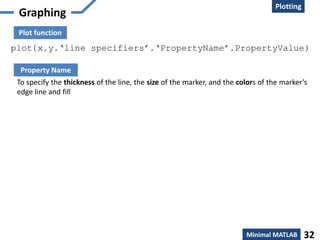
Plot function
plot(x,y,‘line specifiers’,‘PropertyName’,PropertyValue)
To specify the thickness of the line, the size of the marker, and the colors of the marker’s
edge line and fill
Property Name
Agenda
Introducing MATLAB – Language of technical computing
Minimal MATLAB
MATLAB Desktop
Computing with MATLAB
Array – creation & working
Plotting – creating & visualizing
Automating commands – creating, saving & executing script file
Functions – creating & executing a function file
33
Conditional control statements
Loop control statements
Creation
Script
Minimal MATLAB 34
Overview
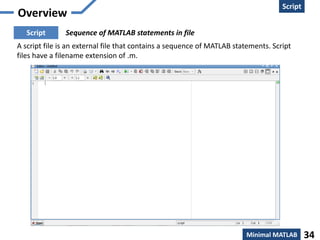
Sequence of MATLAB statements in fileScript
A script file is an external file that contains a sequence of MATLAB statements. Script
files have a filename extension of .m.
Basics
Script
Minimal MATLAB 35
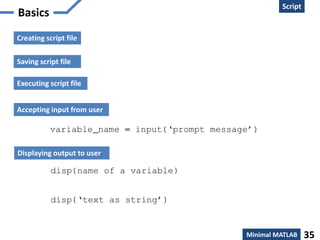
variable_name = input(‘prompt message’)
Accepting input from user
Displaying output to user
disp(name of a variable)
disp(‘text as string’)
Saving script file
Creating script file
Executing script file
Agenda
Introducing MATLAB – Language of technical computing
Minimal MATLAB
MATLAB Desktop
Computing with MATLAB
Array – creation & working
Plotting – creating & visualizing
Automating commands – creating, saving & executing script file
Functions – creating & executing a function file
36
Conditional control statements
Loop control statements
Creation
Script
Minimal MATLAB 37
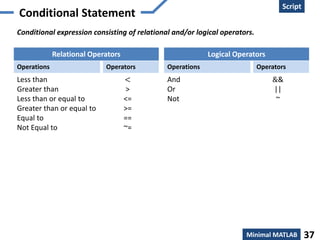
Conditional Statement
Conditional expression consisting of relational and/or logical operators.
Operations Operators
Less than
Greater than
Less than or equal to
Greater than or equal to
Equal to
Not Equal to
<
>
<=
>=
==
~=
Relational Operators
Operations Operators
And
Or
Not
&&
||
~
Logical Operators
Creation
Script
Minimal MATLAB 38
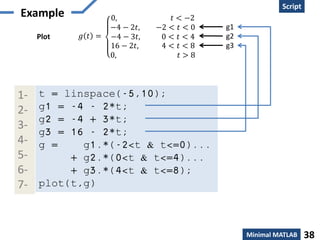
Example
𝑔 𝑡 =
0, 𝑡 < −2
−4 − 2𝑡, −2 < 𝑡 < 0
−4 − 3𝑡, 0 < 𝑡 < 4
16 − 2𝑡, 4 < 𝑡 < 8
0, 𝑡 > 8
Plot
g1
g2
g3
t = linspace(-5,10);
g1 = -4 - 2*t;
g2 = -4 + 3*t;
g3 = 16 - 2*t;
g = g1.*(-2<t & t<=0)...
+ g2.*(0<t & t<=4)...
+ g3.*(4<t & t<=8);
plot(t,g)
1-
2-
3-
4-
5-
6-
7-
g1
g2
g3
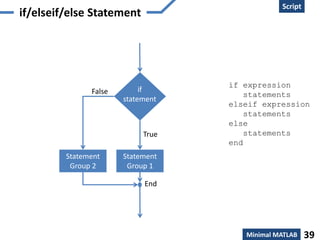
if/elseif/else Statement
Script
Minimal MATLAB 39
if
statement
Statement
Group 1
False
True
End
Statement
Group 2
if expression
statements
elseif expression
statements
else
statements
end
Creation
Script
Minimal MATLAB 40
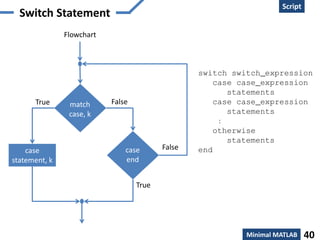
Switch Statement
False
True
Flowchart
match
case, k
case
end
False
case
statement, k
True
switch switch_expression
case case_expression
statements
case case_expression
statements
:
otherwise
statements
end
Agenda
Introducing MATLAB – Language of technical computing
Minimal MATLAB
MATLAB Desktop
Computing with MATLAB
Array – creation & working
Plotting – creating & visualizing
Automating commands – creating, saving & executing script file
Functions – creating & executing a function file
41
Conditional control statements
Loop control statements
Script
Minimal MATLAB 42
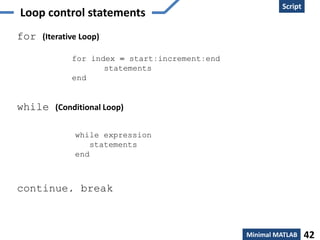
for (Iterative Loop)
while (Conditional Loop)
continue, break
for index = start:increment:end
statements
end
while expression
statements
end
Agenda
Introducing MATLAB – Language of technical computing
Minimal MATLAB
MATLAB Desktop
Computing with MATLAB
Array – creation & working
Plotting – creating & visualizing
Automating commands – creating, saving & executing script file
Functions – creating & executing a function file
43
Conditional control statements
Loop control statements
Creation
Function
Minimal MATLAB 44
Overview
SYSTEM
[Mathematical model of
Physical Phenomenon]
(function file)
Set of inputs Set of outputs
1
2
3
m
1
2
3
n
[System]
Electrical Networks
Communication System
Control System
Thermodynamic System
Computer system, etc
[Input variables]
current, voltage,
power, energy,
temperature,
data
[Output variables]
current, voltage,
power, energy,
temperature,
Processed data
function [out1, out2, ...] = func_name(in1, in2, ...)
declares the function func_name, and its inputs and outputs
Creation
Function
Minimal MATLAB 45
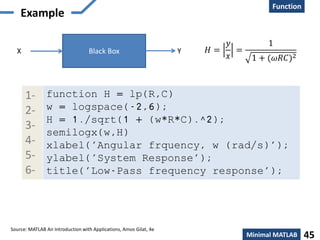
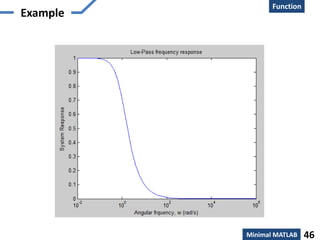
Example
𝐻 =
𝑦
𝑥
=
1
1 + (𝜔𝑅𝐶)2
Black BoxX Y
function H = lp(R,C)
w = logspace(-2,6);
H = 1./sqrt(1 + (w*R*C).^2);
semilogx(w,H)
xlabel('Angular frquency, w (rad/s)');
ylabel('System Response');
title('Low-Pass frequency response');
1-
2-
3-
4-
5-
6-
Source: MATLAB An Introduction with Applications, Amos Gilat, 4e
Creation
Function
Minimal MATLAB 46
Example
Creation
Function
Minimal MATLAB 47
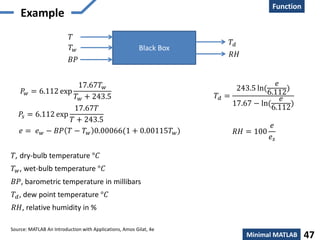
Example
Black Box
𝑇
𝑇𝑑
𝑇 𝑤
𝐵𝑃
𝑅𝐻
𝑅𝐻 = 100
𝑒
𝑒𝑠
𝑇𝑑 =
243.5 ln(
𝑒
6.112
)
17.67 − ln(
𝑒
6.112
)
𝑇𝑑, dew point temperature °𝐶
𝑇, dry-bulb temperature °𝐶
𝑇 𝑤, wet-bulb temperature °𝐶
𝐵𝑃, barometric temperature in millibars
𝑅𝐻, relative humidity in %
𝑃𝑠 = 6.112 exp
17.67𝑇
𝑇 + 243.5
𝑃𝑤 = 6.112 exp
17.67𝑇 𝑤
𝑇 𝑤 + 243.5
𝑒 = 𝑒 𝑤 − 𝐵𝑃 𝑇 − 𝑇 𝑤 0.00066(1 + 0.00115𝑇 𝑤)
Source: MATLAB An Introduction with Applications, Amos Gilat, 4e
Creation
Function
Minimal MATLAB 48
Example
function [Td, RH] = DewptRhum(T,Tw,BP)
es = 6.112*exp((17.67*T)/(T + 243.5));
ew = 6.112*exp((17.67*Tw)/(Tw + 243.5));
e = ew - BP*(T - Tw)*0.00066*(1 + 0.00115*Tw);
RH = 100*(e/es);
Td = (243.5*log(e/6.112))/(17.67 - log(e/6.112));
1-
2-
3-
4-
5-
𝑇 = 25°𝐶, 𝑇 𝑤 = 19°𝐶, 𝐵𝑃 = 985 𝑚𝑖𝑙𝑙𝑖𝑏𝑎𝑟
Calculate 𝑻 𝒅 =? , 𝑹𝑯 =?
𝑇 = 36°𝐶, 𝑇 𝑤 = 31°𝐶, 𝐵𝑃 = 1020 𝑚𝑖𝑙𝑙𝑖𝑏𝑎𝑟
Creation
Function
Minimal MATLAB 48
Visualization and Graphics
• plot(x,y),plot(x,sin(x)) – plot 1D function
• figure, figure(k) – open a new figure
• hold on, hold off – refreshing
• axis([xmin xmax ymin ymax]) – change
axes
• title(‘figure titile’) – add title to figure
• mesh(x_ax,y_ax,z_mat) – view surface
• contour(z_mat) – view z as topo map
• subplot(3,1,2) – locate several plots in figure
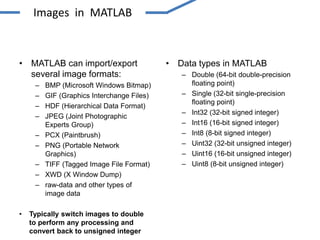
• MATLAB can import/export
several image formats:
– BMP (Microsoft Windows Bitmap)
– GIF (Graphics Interchange Files)
– HDF (Hierarchical Data Format)
– JPEG (Joint Photographic
Experts Group)
– PCX (Paintbrush)
– PNG (Portable Network
Graphics)
– TIFF (Tagged Image File Format)
– XWD (X Window Dump)
– raw-data and other types of
image data
• Typically switch images to double
to perform any processing and
convert back to unsigned integer
• Data types in MATLAB
– Double (64-bit double-precision
floating point)
– Single (32-bit single-precision
floating point)
– Int32 (32-bit signed integer)
– Int16 (16-bit signed integer)
– Int8 (8-bit signed integer)
– Uint32 (32-bit unsigned integer)
– Uint16 (16-bit unsigned integer)
– Uint8 (8-bit unsigned integer)
Images in MATLAB
• Binary images : {0,1}
• Intensity images : [0,1] or uint8, double etc.
• RGB images : m × n × 3
• Multidimensional images: m × n × p (p is the number of layers)
Images in MATLAB
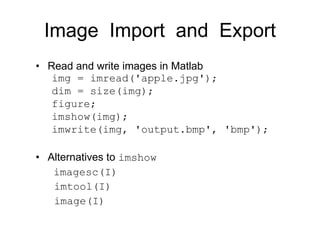
Image Import and Export
• Read and write images in Matlab
img = imread('apple.jpg');
dim = size(img);
figure;
imshow(img);
imwrite(img, 'output.bmp', 'bmp');
• Alternatives to imshow
imagesc(I)
imtool(I)
image(I)
Images and Matrices
Column 1 to 256
Row1to256
o
[0, 0]
o
[256, 256]
How to build a matrix
(or image)?
Intensity Image:
row = 256;
col = 256;
img = zeros(row, col);
img(100:105, :) = 0.5;
img(:, 100:105) = 1;
figure;
imshow(img);
Images and Matrices
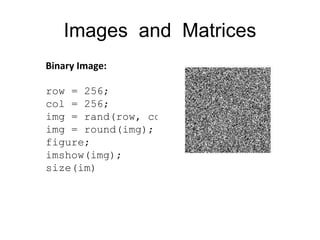
Binary Image:
row = 256;
col = 256;
img = rand(row, col);
img = round(img);
figure;
imshow(img);
size(im)
Image Display
• image - create and display image object
• imagesc - scale and display as image
• imshow - display image
THANKS
DIVYANSHU RASAURIA
divyanshurashouariya@yahoo.in

Matlab basic and image

  • 1.
  • 2.
    MATLAB Introducing MATLAB –Language of technical computing 2 Is an integrated technical computing environment that combines numeric computation, advanced graphics and visualization, and a high-level programming language. The MathWorks, Inc. High-level language of technical computing Development environment for engineers, scientists Interactive tools for design, problem solving Mathematical function libraries Graphics and data visualization tools Custom GUIs External Interfaces: C, C++, Fortran, Java, COM, Excel, .NET
  • 3.
    MATLAB product family Toolboxes:Collections of specialized Functions Graphics 2D Graphics 3D Graphics Color & Lighting Animation Image, Audio & Video Computations Linear Algebra Data Analysis Polynomials Interpolations Solutions of ODE External Interfaces C C++ JAVA .net Micorosoft Excel Parallel Computing Math, Statistics, and Optimization Control System Design and Analysis Signal Processing and Communications Image Processing and Computer Vision Test and Measurement Built-in Functions User-written Functions MATLAB Computational Finance Computational Biology Code Generation and Verification Application Deployment Database Connectivity and Reporting MATLAB Programming Language Parallel Computing Toolbox MATLAB Distributed Computing Server Parallel Computing Symbolic Math Toolbox Partial Differential Equation Toolbox Statistics Toolbox Curve Fitting Toolbox Optimization Toolbox Global Optimization Toolbox Neural Network Toolbox Model-Based Calibration Toolbox Math, Statistics, and Optimization Control System Toolbox System Identification Toolbox Fuzzy Logic Toolbox Robust Control Toolbox Model Predictive Control Toolbox Aerospace Toolbox Control System Design and Analysis Signal Processing Toolbox DSP System Toolbox Communications System Toolbox Wavelet Toolbox Fixed-Point Toolbox RF Toolbox Phased Array System Toolbox Signal Processing and Communications Image Processing Toolbox Computer Vision System Toolbox Image Acquisition Toolbox Mapping Toolbox Image Processing and Computer Vision Data Acquisition Toolbox Instrument Control Toolbox Image Acquisition Toolbox OPC Toolbox Vehicle Network ToolboxTest and Measurement Financial Toolbox Econometrics Toolbox Datafeed Toolbox Database Toolbox Computational FinanceSpreadsheet Link EX (for Microsoft Excel) Fixed-Income Toolbox Financial Derivatives Toolbox Bioinformatics Toolbox SimBiology Computational Biology MATLAB Coder HDL Coder HDL Verifier Filter Design HDL Coder Code Generation and Verification MATLAB Compiler MATLAB Builder NE (for Microsoft .NET Framework) MATLAB Builder JA (for Java language) MATLAB Builder EX (for Microsoft Excel) Spreadsheet Link EX (for Microsoft Excel) Application Deployment Database Toolbox MATLAB Report Generator Database Connectivity and Reporting Introducing MATLAB – Language of technical computing 3
  • 4.
    Agenda Introducing MATLAB –Language of technical computing Minimal MATLAB 4
  • 5.
    Agenda Introducing MATLAB –Language of technical computing Minimal MATLAB MATLAB Desktop Computing with MATLAB 5 Array – creation & working Plotting – creating & visualizing Automating commands – creating, saving & executing script file Conditional control statements Loop control statements Functions – creating & executing a function file MATLAB for Image Processing
  • 6.
    Agenda Introducing MATLAB –Language of technical computing Minimal MATLAB MATLAB Desktop Computing with MATLAB Array – creation & working Plotting – creating & visualizing Automating commands – creating, saving & executing script file Functions – creating & executing a function file 6 Conditional control statements Loop control statements
  • 7.
    The main windowcharacterized by the MATLAB command prompt (>>) Command Window This is where you write, edit, create, and save your own script or programs in files called m-files. Editor Window This is where all your files from the current directory are listed. Current Directory All commands typed on MATLAB prompt in the command window get recorded, even across multiple session in this window. Command History This subwindow lists all variables that you have generated so far along with there type and size. Workspace MATLAB - Desktop Minimal MATLAB 7
  • 8.
    MATLAB - Desktop Themain window characterized by the MATLAB command prompt (>>) Help Window Minimal MATLAB 8
  • 9.
    Agenda Introducing MATLAB –Language of technical computing Minimal MATLAB MATLAB Desktop Computing with MATLAB Array – creation & working Plotting – creating & visualizing Automating commands – creating, saving & executing script file Functions – creating & executing a function file 9 Conditional control statements Loop control statements
  • 10.
    Basic Data andVariables Computing with MATLAB Class Variable SizeValue Minimal MATLAB 10
  • 11.
    Basic Data andVariables Computing with MATLAB Multidimensional Array [full or sparse] Scalar  logical ab char { } cell struct function handle (@)numeric int8, uint8, int16, unit16, int32, unit32, int64, unit64 single double Minimal MATLAB 11
  • 12.
    Arithmetic Operator & TheirPrecedence Computing with MATLAB Operations Operators Examples Addition Subtraction Multiplication Right Division Left Division Exponentiation + − * / ^ >> 𝟓 + 𝟑 >> 𝟓 − 𝟑 >> 𝟓 ∗ 𝟑 >> 𝟓/𝟑 >> 𝟓𝟑 = 𝟑/𝟓 >> 𝟓^𝟑 (means 𝟓 𝟑 = 𝟏𝟐𝟓) Precedence Order Operators 1 2 3 4 Parentheses ( ). For nested parentheses, the innermost are executed first. Exponentiation, ^ Multiplication, *; Division, /, Addition, +; Subtraction, - help precedence Minimal MATLAB 12
  • 13.
    Computing with MATLAB MathematicalFunctions Trigonometry sind cosd tand cotd secd cscd Degree sin cos tan cot sec csc sinh cosh tanh coth sech csch asin acos atan acot asec acsc Basic Hyperbolic Inverse Radian Basic Exponential exp log log10 log2 sqrt Complex abs conj imag real angle Matrix det trace rank inv expm sqrtm Discrete Math factorial gcd lcm primes help <type function name> Minimal MATLAB 13
  • 14.
    Predefined Variables and Keywords ans pi eps inf i,j NaN Avariable that has the value of the last expression that was not assigned to a specific variable The number π. The smallest difference between two numbers. Equal to 2^(–52), which is approximately 2.2204e–016. Used for infinity. Defined as −1, which is: 0 + 1.0000i. Stands for Not-a-Number. Used when MATLAB cannot determine a valid numeric value. Example: 0/0. Predefined Variables break case catch classdef continue else elseif end for function global if otherwise parfor persistent return spmd switch try while Keywords iskeyword help <Predefined Variable Name> Computing with MATLAB Minimal MATLAB 14
  • 15.
    Managing Variables clear clear xy z clear all who Clears the workspace, all variables are removed from the memory Clears only variables x, y, and z Clears all variables and functions from workspace Lists variables currently in the workspace Command Outcome Computing with MATLAB Minimal MATLAB 15
  • 16.
    Agenda Introducing MATLAB –Language of technical computing Minimal MATLAB MATLAB Desktop Computing with MATLAB Array – creation & working Plotting – creating & visualizing Automating commands – creating, saving & executing script file Functions – creating & executing a function file 16 Conditional control statements Loop control statements
  • 17.
    Overview Array 5 5 7 45 7 4 510 56 6 4 6 7 78 86 Scalar of 1 X 1 Row Vector of 1 X 3 Column vector of 3 X 1 One Dimensional Matrix of 3 X 3 5 10 56 85 23 6 4 6 23 2 7 78 86 53 6 5 14 12 10 56 6 10 504 4 6 89 0 Two Dimensional Matrix of 3 X 5 5 10 56 85 23 6 4 6 23 2 7 78 86 53 6 5 14 12 10 56 6 0 5 14 12 10 56 89 0 Three Dimensional Matrix of 3 X 5 Minimal MATLAB 17
  • 18.
    Creation Array One Dimensional Array variable_name= [ type vector elements ] Minimal MATLAB 18 Two Dimensional Array variable_name = [1st row elements; 2nd row elements; 3rd row elements; ... ; last row elements]  from a known list of numbers  with constant spacing by specifying the first term, the spacing, and the last term Known lists of numbers
  • 19.
    Array Minimal MATLAB 19 Creation Creatinga vector with constant spacing by specifying the first term, the spacing, and the last term: variable_name = [m:q:n] or variable_name = m:q:n m = first term q = spacing n = last term : (colon operator)Constant spacing Creating a vector with linear (equal) spacing by specifying the first and last terms, and the number of terms: variable_name = linspace(xi, xf, n) xi = first element xf = Last element n = number of elements linspaceConstant spacing
  • 20.
    Array Minimal MATLAB 20 ArrayOperators + Addition - Subtraction .* Element-by-element multiplication ./ Element-by-element division . Element-by-element left division .^ Element-by-element power ‘ Transpose Operations Operation 𝐴 = 1 3 4 2 𝐵 = 2 3 5 7 𝐶 = 𝐴.∗ 𝐵 = 2 9 20 14 𝐶 = 1 × 2 3 × 3 4 × 5 2 × 7
  • 21.
    Data Manipulation Array Minimal MATLAB21 Addressing - Extraction (Subset) Addressing an element(s) individually or in subgroups:  To redefine only some of the elements,  When specific elements are to be used in calculations,  When a subgroup of the elements is used to define a new variable.
  • 22.
    Array Minimal MATLAB 22 Addressvector >> ve = [35 46 78 23 5 14 81 3 55] ve = 35 46 78 23 5 14 81 3 55 1 2 3 4 5 6 7 8 9 position or index of element Data Manipulation
  • 23.
    Array Minimal MATLAB 23 Addressmatrix ) (1,1) (1,2) (1,3) (1,4) (2,1) (2,2) (2,3) (2,4) (3,1) (3,2) (3,3) (3,4) 3 11 6 5 4 7 10 2 13 9 0 8 MAT = Data Manipulation
  • 24.
    Array Minimal MATLAB 24 Addressingvector : (colon operator) Data Manipulation Addressing matrix : (colon operator) A(:,n) Refers to the elements in all the rows of column n of the matrix A. A(n,:) Refers to the elements in all the columns of row n of the matrix A. A(:,m:n) Refers to the elements in all the rows between columns m and n of the matrix A. A(m:n,:) Refers to the elements in all the columns between rows m and n of the matrix A. A(m:n,p:q) Refers to the elements in rows m through n and columns p through q of the matrix A.
  • 25.
    Agenda Introducing MATLAB –Language of technical computing Minimal MATLAB MATLAB Desktop Computing with MATLAB Array – creation & working Plotting – creating & visualizing Automating commands – creating, saving & executing script file Functions – creating & executing a function file 25 Conditional control statements Loop control statements
  • 26.
    Creation Plotting Minimal MATLAB 26 Example DampedOscillation equation: 𝒚 = 𝒆−𝒂𝒕 𝐜𝐨𝐬 (𝒃𝒕)
  • 27.
    Creation Plotting Minimal MATLAB 27 Example DampedOscillation equation: 𝒚 = 𝒆−𝒂𝒕 𝐜𝐨𝐬 (𝒃𝒕) a = 0.1; b = 1; t = 0:0.1:20; y = exp(-a*t).*cos(b*t); plot(t,y) grid on; xlabel('Time in second'); ylabel('Response in mm'); title('Damped Oscillation'); legend('a = 0.1,b = 1)'); 1- 2- 3- 4- 5- 6- 7- 8- 9-
  • 28.
  • 29.
    Graphing Plotting Minimal MATLAB 29 Plotfunction plot(x,y) where the variables x and y are vector and must be of same size i.e the number of elements should be equal. x=[1 2 3 5 7 7.5 8 10]; y=[2 6.5 7 7 5.5 4 6 8]; plot(x,y)
  • 30.
    Graphing Plotting Minimal MATLAB 30 Plotfunction plot(x,y,‘line specifiers’,‘PropertyName’,PropertyValue) Line specifiers are optional and can be used to define the style and color of the line and the type of markers (if markers are desired). Line specifiers solid (default) dashed dotted dash-dot Line Style Specifier - -- : -. red green blue cyan Line color Specifier r g b c magenta yellow black white Line color Specifier m y k w
  • 31.
    Graphing Plotting Minimal MATLAB 31 Plotfunction plot(x,y,‘line specifiers’,‘PropertyName’,PropertyValue) Line specifiers are optional and can be used to define the style and color of the line and the type of markers (if markers are desired). Line specifiers plus sign circle asterisk point cross triangle (pointed up) triangle (pointed down) Marker type Specifier + o * . × ^ v square diamond five pointed star six pointed star triangle (pointed left) triangle (pointed right) Marker type Specifier s d p h < >
  • 32.
    Graphing Plotting Minimal MATLAB 32 Plotfunction plot(x,y,‘line specifiers’,‘PropertyName’,PropertyValue) To specify the thickness of the line, the size of the marker, and the colors of the marker’s edge line and fill Property Name
  • 33.
    Agenda Introducing MATLAB –Language of technical computing Minimal MATLAB MATLAB Desktop Computing with MATLAB Array – creation & working Plotting – creating & visualizing Automating commands – creating, saving & executing script file Functions – creating & executing a function file 33 Conditional control statements Loop control statements
  • 34.
    Creation Script Minimal MATLAB 34 Overview Sequenceof MATLAB statements in fileScript A script file is an external file that contains a sequence of MATLAB statements. Script files have a filename extension of .m.
  • 35.
    Basics Script Minimal MATLAB 35 variable_name= input(‘prompt message’) Accepting input from user Displaying output to user disp(name of a variable) disp(‘text as string’) Saving script file Creating script file Executing script file
  • 36.
    Agenda Introducing MATLAB –Language of technical computing Minimal MATLAB MATLAB Desktop Computing with MATLAB Array – creation & working Plotting – creating & visualizing Automating commands – creating, saving & executing script file Functions – creating & executing a function file 36 Conditional control statements Loop control statements
  • 37.
    Creation Script Minimal MATLAB 37 ConditionalStatement Conditional expression consisting of relational and/or logical operators. Operations Operators Less than Greater than Less than or equal to Greater than or equal to Equal to Not Equal to < > <= >= == ~= Relational Operators Operations Operators And Or Not && || ~ Logical Operators
  • 38.
    Creation Script Minimal MATLAB 38 Example 𝑔𝑡 = 0, 𝑡 < −2 −4 − 2𝑡, −2 < 𝑡 < 0 −4 − 3𝑡, 0 < 𝑡 < 4 16 − 2𝑡, 4 < 𝑡 < 8 0, 𝑡 > 8 Plot g1 g2 g3 t = linspace(-5,10); g1 = -4 - 2*t; g2 = -4 + 3*t; g3 = 16 - 2*t; g = g1.*(-2<t & t<=0)... + g2.*(0<t & t<=4)... + g3.*(4<t & t<=8); plot(t,g) 1- 2- 3- 4- 5- 6- 7- g1 g2 g3
  • 39.
    if/elseif/else Statement Script Minimal MATLAB39 if statement Statement Group 1 False True End Statement Group 2 if expression statements elseif expression statements else statements end
  • 40.
    Creation Script Minimal MATLAB 40 SwitchStatement False True Flowchart match case, k case end False case statement, k True switch switch_expression case case_expression statements case case_expression statements : otherwise statements end
  • 41.
    Agenda Introducing MATLAB –Language of technical computing Minimal MATLAB MATLAB Desktop Computing with MATLAB Array – creation & working Plotting – creating & visualizing Automating commands – creating, saving & executing script file Functions – creating & executing a function file 41 Conditional control statements Loop control statements
  • 42.
    Loop control statements Script MinimalMATLAB 42 for (Iterative Loop) while (Conditional Loop) continue, break for index = start:increment:end statements end while expression statements end
  • 43.
    Agenda Introducing MATLAB –Language of technical computing Minimal MATLAB MATLAB Desktop Computing with MATLAB Array – creation & working Plotting – creating & visualizing Automating commands – creating, saving & executing script file Functions – creating & executing a function file 43 Conditional control statements Loop control statements
  • 44.
    Creation Function Minimal MATLAB 44 Overview SYSTEM [Mathematicalmodel of Physical Phenomenon] (function file) Set of inputs Set of outputs 1 2 3 m 1 2 3 n [System] Electrical Networks Communication System Control System Thermodynamic System Computer system, etc [Input variables] current, voltage, power, energy, temperature, data [Output variables] current, voltage, power, energy, temperature, Processed data function [out1, out2, ...] = func_name(in1, in2, ...) declares the function func_name, and its inputs and outputs
  • 45.
    Creation Function Minimal MATLAB 45 Example 𝐻= 𝑦 𝑥 = 1 1 + (𝜔𝑅𝐶)2 Black BoxX Y function H = lp(R,C) w = logspace(-2,6); H = 1./sqrt(1 + (w*R*C).^2); semilogx(w,H) xlabel('Angular frquency, w (rad/s)'); ylabel('System Response'); title('Low-Pass frequency response'); 1- 2- 3- 4- 5- 6- Source: MATLAB An Introduction with Applications, Amos Gilat, 4e
  • 46.
  • 47.
    Creation Function Minimal MATLAB 47 Example BlackBox 𝑇 𝑇𝑑 𝑇 𝑤 𝐵𝑃 𝑅𝐻 𝑅𝐻 = 100 𝑒 𝑒𝑠 𝑇𝑑 = 243.5 ln( 𝑒 6.112 ) 17.67 − ln( 𝑒 6.112 ) 𝑇𝑑, dew point temperature °𝐶 𝑇, dry-bulb temperature °𝐶 𝑇 𝑤, wet-bulb temperature °𝐶 𝐵𝑃, barometric temperature in millibars 𝑅𝐻, relative humidity in % 𝑃𝑠 = 6.112 exp 17.67𝑇 𝑇 + 243.5 𝑃𝑤 = 6.112 exp 17.67𝑇 𝑤 𝑇 𝑤 + 243.5 𝑒 = 𝑒 𝑤 − 𝐵𝑃 𝑇 − 𝑇 𝑤 0.00066(1 + 0.00115𝑇 𝑤) Source: MATLAB An Introduction with Applications, Amos Gilat, 4e
  • 48.
    Creation Function Minimal MATLAB 48 Example function[Td, RH] = DewptRhum(T,Tw,BP) es = 6.112*exp((17.67*T)/(T + 243.5)); ew = 6.112*exp((17.67*Tw)/(Tw + 243.5)); e = ew - BP*(T - Tw)*0.00066*(1 + 0.00115*Tw); RH = 100*(e/es); Td = (243.5*log(e/6.112))/(17.67 - log(e/6.112)); 1- 2- 3- 4- 5- 𝑇 = 25°𝐶, 𝑇 𝑤 = 19°𝐶, 𝐵𝑃 = 985 𝑚𝑖𝑙𝑙𝑖𝑏𝑎𝑟 Calculate 𝑻 𝒅 =? , 𝑹𝑯 =? 𝑇 = 36°𝐶, 𝑇 𝑤 = 31°𝐶, 𝐵𝑃 = 1020 𝑚𝑖𝑙𝑙𝑖𝑏𝑎𝑟
  • 49.
    Creation Function Minimal MATLAB 48 Visualizationand Graphics • plot(x,y),plot(x,sin(x)) – plot 1D function • figure, figure(k) – open a new figure • hold on, hold off – refreshing • axis([xmin xmax ymin ymax]) – change axes • title(‘figure titile’) – add title to figure • mesh(x_ax,y_ax,z_mat) – view surface • contour(z_mat) – view z as topo map • subplot(3,1,2) – locate several plots in figure
  • 50.
    • MATLAB canimport/export several image formats: – BMP (Microsoft Windows Bitmap) – GIF (Graphics Interchange Files) – HDF (Hierarchical Data Format) – JPEG (Joint Photographic Experts Group) – PCX (Paintbrush) – PNG (Portable Network Graphics) – TIFF (Tagged Image File Format) – XWD (X Window Dump) – raw-data and other types of image data • Typically switch images to double to perform any processing and convert back to unsigned integer • Data types in MATLAB – Double (64-bit double-precision floating point) – Single (32-bit single-precision floating point) – Int32 (32-bit signed integer) – Int16 (16-bit signed integer) – Int8 (8-bit signed integer) – Uint32 (32-bit unsigned integer) – Uint16 (16-bit unsigned integer) – Uint8 (8-bit unsigned integer) Images in MATLAB
  • 51.
    • Binary images: {0,1} • Intensity images : [0,1] or uint8, double etc. • RGB images : m × n × 3 • Multidimensional images: m × n × p (p is the number of layers) Images in MATLAB
  • 52.
    Image Import andExport • Read and write images in Matlab img = imread('apple.jpg'); dim = size(img); figure; imshow(img); imwrite(img, 'output.bmp', 'bmp'); • Alternatives to imshow imagesc(I) imtool(I) image(I)
  • 53.
    Images and Matrices Column1 to 256 Row1to256 o [0, 0] o [256, 256] How to build a matrix (or image)? Intensity Image: row = 256; col = 256; img = zeros(row, col); img(100:105, :) = 0.5; img(:, 100:105) = 1; figure; imshow(img);
  • 54.
    Images and Matrices BinaryImage: row = 256; col = 256; img = rand(row, col); img = round(img); figure; imshow(img); size(im)
  • 55.
    Image Display • image- create and display image object • imagesc - scale and display as image • imshow - display image
  • 56.