


ASSEMBLY LANGUAGE
T S Pradeep Kumar
VIT University – Chennai Campus
http://www.pradeepkumar.org
Topics
• CPU Behavior
• Accumulator Based CPU
• Assembly language
• Pros and Cons of Assembly Language
• Elements of Assembly Language
• Example: AC = AC x N
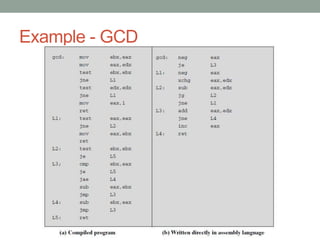
• Greatest Common Divisor
• Macros and Subroutines
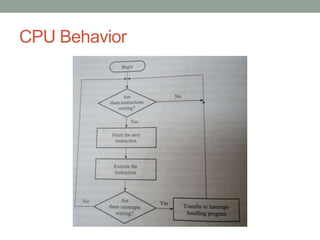
CPU Behavior
Accumulator based CPU
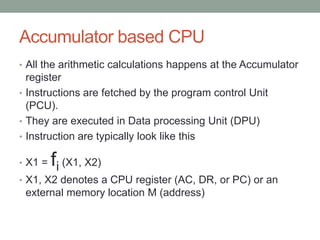
• All the arithmetic calculations happens at the Accumulator
  register
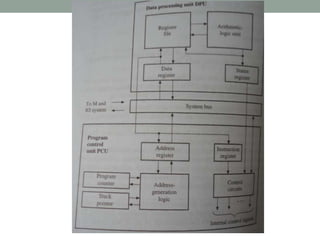
• Instructions are fetched by the program control Unit
  (PCU).
• They are executed in Data processing Unit (DPU)
• Instruction are typically look like this

• X1 =   fi (X1, X2)
• X1, X2 denotes a CPU register (AC, DR, or PC) or an
 external memory location M (address)
Accumulator based CPU
• fi is operation performed by the ALU are limited to Fixed
 point addition, subtraction, shifting and logical operations.
Assembly Language
• An assembly language is a symbolic representation of the
  machine language of a specific processor, augmented by
  additional types of statements that facilitate program
  writing and that provide instructions to the assembler
• An assembler is a program that translates assembly
  language into machine code.
• Assembly Language is hardware dependent with a
  different assembly language for each type of processor.
Advantages of Assembly Language over
HLL
• Debugging and Verification
• Making compilers
• Embedded systems
• Hardware drivers and system code
• Accessing instructions that are not accessible from HLL
• Self modifying code
• Optimizing code for size and speed
• Function libraries
Disadvantages of Assembly language
• Development time
• Reliability and security
• Debugging and verifying is difficult
• Maintainability
• Portability
• Compilers have been improved a lot in recent years
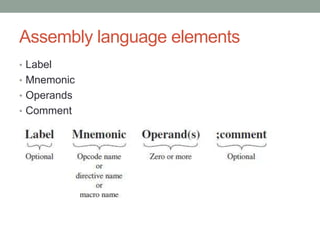
Assembly language elements
• Label
• Mnemonic
• Operands
• Comment
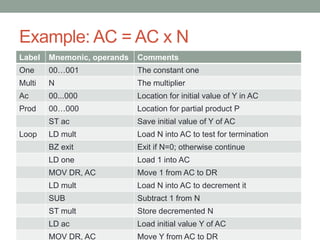
Example: AC = AC x N
Label   Mnemonic, operands   Comments
One     00…001               The constant one
Multi   N                    The multiplier
Ac      00...000             Location for initial value of Y in AC
Prod    00…000               Location for partial product P
        ST ac                Save initial value of Y of AC
Loop    LD mult              Load N into AC to test for termination
        BZ exit              Exit if N=0; otherwise continue
        LD one               Load 1 into AC
        MOV DR, AC           Move 1 from AC to DR
        LD mult              Load N into AC to decrement it
        SUB                  Subtract 1 from N
        ST mult              Store decremented N
        LD ac                Load initial value Y of AC
        MOV DR, AC           Move Y from AC to DR
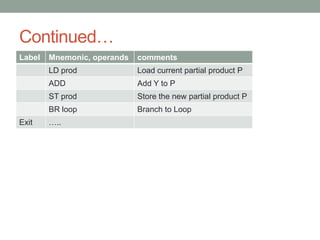
Continued…
Label   Mnemonic, operands   comments
        LD prod              Load current partial product P
        ADD                  Add Y to P
        ST prod              Store the new partial product P
        BR loop              Branch to Loop
Exit    …..
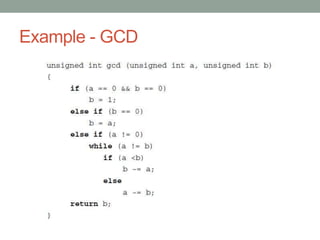
Example - GCD
Example - GCD
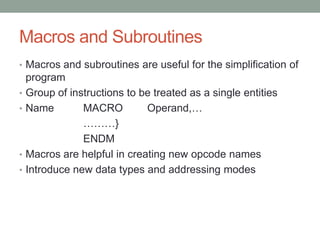
Macros and Subroutines
• Macros and subroutines are useful for the simplification of
    program
•   Group of instructions to be treated as a single entities
•   Name        MACRO         Operand,…
                ………}
                ENDM
•   Macros are helpful in creating new opcode names
•   Introduce new data types and addressing modes
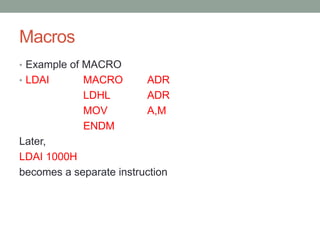
Macros
• Example of MACRO
• LDAI      MACRO        ADR
            LDHL         ADR
            MOV          A,M
            ENDM
Later,
LDAI 1000H
becomes a separate instruction
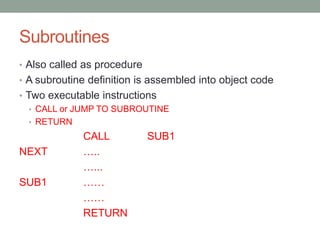
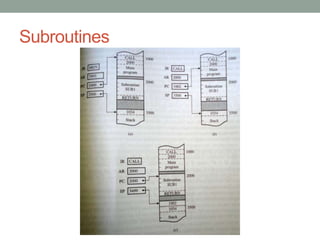
Subroutines
• Also called as procedure
• A subroutine definition is assembled into object code
• Two executable instructions
   • CALL or JUMP TO SUBROUTINE
   • RETURN
             CALL            SUB1
NEXT         …..
             …...
SUB1         ……
             ……
             RETURN
Subroutines
EVALUATION……

Lecture 4 assembly language

  • 1.
    ASSEMBLY LANGUAGE T SPradeep Kumar VIT University – Chennai Campus http://www.pradeepkumar.org
  • 2.
    Topics • CPU Behavior •Accumulator Based CPU • Assembly language • Pros and Cons of Assembly Language • Elements of Assembly Language • Example: AC = AC x N • Greatest Common Divisor • Macros and Subroutines
  • 3.
  • 5.
    Accumulator based CPU •All the arithmetic calculations happens at the Accumulator register • Instructions are fetched by the program control Unit (PCU). • They are executed in Data processing Unit (DPU) • Instruction are typically look like this • X1 = fi (X1, X2) • X1, X2 denotes a CPU register (AC, DR, or PC) or an external memory location M (address)
  • 6.
    Accumulator based CPU •fi is operation performed by the ALU are limited to Fixed point addition, subtraction, shifting and logical operations.
  • 7.
    Assembly Language • Anassembly language is a symbolic representation of the machine language of a specific processor, augmented by additional types of statements that facilitate program writing and that provide instructions to the assembler • An assembler is a program that translates assembly language into machine code. • Assembly Language is hardware dependent with a different assembly language for each type of processor.
  • 8.
    Advantages of AssemblyLanguage over HLL • Debugging and Verification • Making compilers • Embedded systems • Hardware drivers and system code • Accessing instructions that are not accessible from HLL • Self modifying code • Optimizing code for size and speed • Function libraries
  • 9.
    Disadvantages of Assemblylanguage • Development time • Reliability and security • Debugging and verifying is difficult • Maintainability • Portability • Compilers have been improved a lot in recent years
  • 10.
    Assembly language elements •Label • Mnemonic • Operands • Comment
  • 11.
    Example: AC =AC x N Label Mnemonic, operands Comments One 00…001 The constant one Multi N The multiplier Ac 00...000 Location for initial value of Y in AC Prod 00…000 Location for partial product P ST ac Save initial value of Y of AC Loop LD mult Load N into AC to test for termination BZ exit Exit if N=0; otherwise continue LD one Load 1 into AC MOV DR, AC Move 1 from AC to DR LD mult Load N into AC to decrement it SUB Subtract 1 from N ST mult Store decremented N LD ac Load initial value Y of AC MOV DR, AC Move Y from AC to DR
  • 12.
    Continued… Label Mnemonic, operands comments LD prod Load current partial product P ADD Add Y to P ST prod Store the new partial product P BR loop Branch to Loop Exit …..
  • 13.
  • 14.
  • 15.
    Macros and Subroutines •Macros and subroutines are useful for the simplification of program • Group of instructions to be treated as a single entities • Name MACRO Operand,… ………} ENDM • Macros are helpful in creating new opcode names • Introduce new data types and addressing modes
  • 16.
    Macros • Example ofMACRO • LDAI MACRO ADR LDHL ADR MOV A,M ENDM Later, LDAI 1000H becomes a separate instruction
  • 17.
    Subroutines • Also calledas procedure • A subroutine definition is assembled into object code • Two executable instructions • CALL or JUMP TO SUBROUTINE • RETURN CALL SUB1 NEXT ….. …... SUB1 …… …… RETURN
  • 18.
  • 19.