8086 ALP PROGRAMS 
Presented by 
C.GOKUL, 
AP/EEE 
Velalar College of Engg & Tech
Assembly Language 
Programming(ALP) 
8086
Program 1: Increment an 8-bit number 
• MOV AL, 05H Move 8-bit data to AL. 
• INC AL Increment AL. 
Program 2: Increment an 16-bit number 
• MOV AX, 0005H Move 16-bit data to AX. 
• INC AX Increment AX.
Program 3: Decrement an 8-bit number 
• MOV AL, 05H Move 8-bit data to AL. 
• DEC AL Decrement AL. 
Program 4: Decrement an 16-bit number 
• MOV AX, 0005H Move 16-bit data to AX. 
• DEC AX Decrement AX.
Program 5: 1’s complement of an 8-bit number. 
• MOV AL, 05H Move 8-bit data to AL. 
• NOT AL Complement AL. 
Program 6: 1’s complement of a 16-bit 
number. 
• MOV AX, 0005H Move 16-bit data to AX. 
• NOT AX Complement AX.
Program 7: 2’s complement of an 8-bit number. 
• MOV AL, 05H Move 8-bit data to AL. 
• NOT AL Complement AL. 
• INC AL Increment AL 
Program 8: 2’s complement of a 16-bit 
number. 
• MOV AX, 0005H Move 16-bit data to AX. 
• NOT AX Complement AX. 
• INC AX Increment AX
Program 7: 2’s complement of an 8-bit number. 
• MOV AL, 05H Move 8-bit data to AL. 
• NOT AL Complement AL. 
• INC AL Increment AL 
Program 8: 2’s complement of a 16-bit 
number. 
• MOV AX, 0005H Move 16-bit data to AX. 
• NOT AX Complement AX. 
• INC AX Increment AX
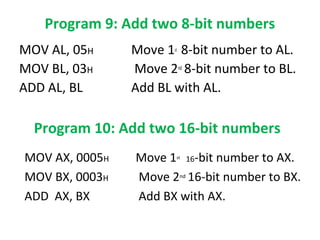
Program 9: Add two 8-bit numbers 
MOV AL, 05H Move 1st 8-bit number to AL. 
MOV BL, 03H Move 2nd 8-bit number to BL. 
ADD AL, BL Add BL with AL. 
Program 10: Add two 16-bit numbers 
MOV AX, 0005H Move 1st 16-bit number to AX. 
MOV BX, 0003H Move 2nd 16-bit number to BX. 
ADD AX, BX Add BX with AX.
Program 11: subtract two 8-bit numbers 
MOV AL, 05H Move 1st 8-bit number to AL. 
MOV BL, 03H Move 2nd 8-bit number to BL. 
SUB AL, BL subtract BL from AL. 
Program 12: subtract two 16-bit numbers 
MOV AX, 0005H Move 1st 16-bit number to AX. 
MOV BX, 0003H Move 2nd 16-bit number to BX. 
SUB AX, BX subtract BX from AX.
Program 13: Multiply two 8-bit unsigned 
numbers. 
MOV AL, 04H Move 1st 8-bit number to AL. 
MOV BL, 02H Move 2nd 8-bit number to BL. 
MUL BL Multiply BL with AL and the result will 
be in AX. 
Program 14: Multiply two 8-bit signed 
numbers. 
MOV AL, 04H Move 1st 8-bit number to AL. 
MOV BL, 02H Move 2nd 8-bit number to BL. 
IMUL BL Multiply BL with AL and the result will 
be in AX. 
Presented by C.GOKUL,AP/EEE
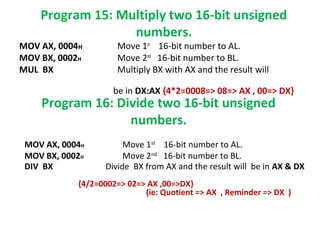
Program 15: Multiply two 16-bit unsigned 
numbers. 
MOV AX, 0004H Move 1st 16-bit number to AL. 
MOV BX, 0002H Move 2nd 16-bit number to BL. 
MUL BX Multiply BX with AX and the result will 
be in DX:AX {4*2=0008=> 08=> AX , 00=> DX} 
Program 16: Divide two 16-bit unsigned 
numbers. 
MOV AX, 0004H Move 1st 16-bit number to AL. 
MOV BX, 0002H Move 2nd 16-bit number to BL. 
DIV BX Divide BX from AX and the result will be in AX & DX 
{4/2=0002=> 02=> AX ,00=>DX} 
(ie: Quotient => AX , Reminder => DX )
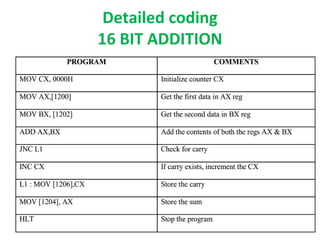
Detailed coding 
16 BIT ADDITION
Detailed coding 
16 BIT SUBTRACTION
16 BIT MULTIPLICATION
16 BIT DIVISION
SUM of N numbers 
MOV AX,0000 
MOV SI,1100 
MOV DI,1200 
MOV CX,0005 5 NUMBERS TO BE TAKEN SUM 
MOV DX,0000 
L1: ADD AX,[SI] 
INC SI 
INC DX 
CMP CX,DX 
JNZ L1 
MOV [1200],AX 
HLT
Average of N numbers 
MOV AX,0000 
MOV SI,1100 
MOV DI,1200 
MOV CX,0005 5 NUMBERS TO BE TAKEN AVERAGE 
MOV DX,0000 
L1: ADD AX,[SI] 
INC SI 
INC DX 
CMP CX,DX 
JNZ L1 
DIV CX AX=AX/5(AVERAGE OF 5 NUMBERS) 
MOV [1200],AX 
HLT
FACTORIAL of N 
MOV CX,0005 5 Factorial=5*4*3*2*1=120 
MOV DX,0000 
MOV AX,0001 
L1: MUL CX 
DEC DX 
CMP CX,DX 
JNZ L1 
MOV [1200],AX 
HLT
ASCENDING ORDER
DECENDING ORDER 
Note: change the coding JNB L1 into JB L1 in the LINE 10
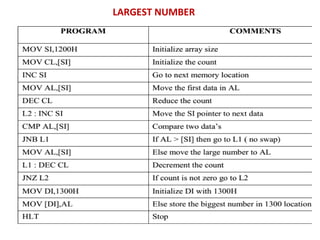
LARGEST, smallest NUMBER IN AN 
ARRAY
LARGEST NUMBER
SMALLEST NUMBER
Byte Manipulation(Using Logical 
Instructions ){ex: AND,OR,NOT,XOR} 
Example 1: 
MOV AX,[1000] 
MOV BX,[1002] 
AND AX,BX 
MOV [2000],AX 
HLT 
Example 2: 
MOV AX,[1000] 
MOV BX,[1002] 
OR AX,BX 
MOV [2000],AX 
HLT 
Example 3: 
MOV AX,[1000] 
MOV BX,[1002] 
XOR AX,BX 
MOV [2000],AX 
HLT 
Example 4: 
MOV AX,[1000] 
NOT AX 
MOV [2000],AX 
HLT
STRING MANIPULATION 
1. Copying a string (MOV SB) 
MOV CX,0003 copy 3 memory locations 
MOV SI,1000 
MOV DI,2000 
L1 CLD 
MOV SB 
DEC CX decrement CX 
JNZ L1 
HLT 
Presented by C.GOKUL,AP/EEE, Velalar College of Engg & Tech
2. Find & Replace
Procedures
• Procedure is a part of code that can be called from 
your program in order to make some specific task. 
Procedures make program more structural and 
easier to understand. 
• syntax for procedure declaration: 
name PROC 
…………. ; here goes the code 
…………. ; of the procedure ... 
RET 
name ENDP 
here PROC is the procedure name.(used in top & bottom) 
RET - used to return from OS. CALL-call a procedure 
PROC & ENDP – complier directives 
CALL & RET - instructions
EXAMPLE 1 (call a procedure) 
ORG 100h 
CALL m1 
MOV AX, 2 
RET ; return to operating system. 
m1 PROC 
MOV BX, 5 
RET ; return to caller. 
m1 ENDP 
END 
• The above example calls procedure m1, does MOV BX, 5 & 
returns to the next instruction after CALL: MOV AX, 2.
Example 2 : several ways to pass 
parameters to procedure 
ORG 100h 
MOV AL, 1 
MOV BL, 2 
CALL m2 
CALL m2 
CALL m2 
CALL m2 
RET ; return to operating system. 
m2 PROC 
MUL BL ; AX = AL * BL. 
RET ; return to caller. 
m2 ENDP 
END 
value of AL register is update every time the 
procedure is called. 
final result in AX register is 16 (or 10h)
STACK
• Stack is an area of memory for keeping 
temporary data. 
• STACK is used by CALL & RET instructions. 
PUSH -stores 16 bit value in the stack. 
POP -gets 16 bit value from the stack. 
• PUSH and POP instruction are especially useful 
because we don't have too much registers to operate 
1. Store original value of the register in stack (using 
PUSH). 
2. Use the register for any purpose. 
3. Restore the original value of the register from stack 
(using POP).
Example-1 (store value in STACK using 
PUSH & POP) 
ORG 100h 
MOV AX, 1234h 
PUSH AX ; store value of AX in stack. 
MOV AX, 5678h ; modify the AX value. 
POP AX ; restore the original value of AX. 
RET 
END 
Presented by C.GOKUL,AP/EEE
Example 2: use of the stack is for 
exchanging the values 
ORG 100h 
MOV AX, 1212h ; store 1212h in AX. 
MOV BX, 3434h ; store 3434h in BX 
PUSH AX ; store value of AX in stack. 
PUSH BX ; store value of BX in stack. 
POP AX ; set AX to original value of BX. 
POP BX ; set BX to original value of AX. 
RET 
END 
push 1212h and then 3434h, on pop we will 
first get 3434h and only after it 1212h
MACROS
• Macros are just like procedures, but not really. 
• Macros exist only until your code is compiled 
• After compilation all macros are replaced with 
real instructions 
• several macros to make coding easier(Reduce 
large & complex programs) 
Example (Macro definition) 
name MACRO [parameters,...] 
<instructions> 
ENDM
Example1 : Macro Definitions 
SAVE MACRO definition of MACRO name SAVE 
PUSH AX 
PUSH BX 
PUSH CX 
ENDM 
RETREIVE MACRO Another definition of MACRO name RETREIVE 
POP CX 
POP BX 
POP AX 
ENDM
MACROS with Parameters 
Example: 
COPY MACRO x, y ; macro named COPY with 
2 parameters{x, y} 
PUSH AX 
MOV AX, x 
MOV y, AX 
POP AX 
ENDM

8086 alp

  • 1.
    8086 ALP PROGRAMS Presented by C.GOKUL, AP/EEE Velalar College of Engg & Tech
  • 2.
  • 3.
    Program 1: Incrementan 8-bit number • MOV AL, 05H Move 8-bit data to AL. • INC AL Increment AL. Program 2: Increment an 16-bit number • MOV AX, 0005H Move 16-bit data to AX. • INC AX Increment AX.
  • 4.
    Program 3: Decrementan 8-bit number • MOV AL, 05H Move 8-bit data to AL. • DEC AL Decrement AL. Program 4: Decrement an 16-bit number • MOV AX, 0005H Move 16-bit data to AX. • DEC AX Decrement AX.
  • 5.
    Program 5: 1’scomplement of an 8-bit number. • MOV AL, 05H Move 8-bit data to AL. • NOT AL Complement AL. Program 6: 1’s complement of a 16-bit number. • MOV AX, 0005H Move 16-bit data to AX. • NOT AX Complement AX.
  • 6.
    Program 7: 2’scomplement of an 8-bit number. • MOV AL, 05H Move 8-bit data to AL. • NOT AL Complement AL. • INC AL Increment AL Program 8: 2’s complement of a 16-bit number. • MOV AX, 0005H Move 16-bit data to AX. • NOT AX Complement AX. • INC AX Increment AX
  • 7.
    Program 7: 2’scomplement of an 8-bit number. • MOV AL, 05H Move 8-bit data to AL. • NOT AL Complement AL. • INC AL Increment AL Program 8: 2’s complement of a 16-bit number. • MOV AX, 0005H Move 16-bit data to AX. • NOT AX Complement AX. • INC AX Increment AX
  • 8.
    Program 9: Addtwo 8-bit numbers MOV AL, 05H Move 1st 8-bit number to AL. MOV BL, 03H Move 2nd 8-bit number to BL. ADD AL, BL Add BL with AL. Program 10: Add two 16-bit numbers MOV AX, 0005H Move 1st 16-bit number to AX. MOV BX, 0003H Move 2nd 16-bit number to BX. ADD AX, BX Add BX with AX.
  • 9.
    Program 11: subtracttwo 8-bit numbers MOV AL, 05H Move 1st 8-bit number to AL. MOV BL, 03H Move 2nd 8-bit number to BL. SUB AL, BL subtract BL from AL. Program 12: subtract two 16-bit numbers MOV AX, 0005H Move 1st 16-bit number to AX. MOV BX, 0003H Move 2nd 16-bit number to BX. SUB AX, BX subtract BX from AX.
  • 10.
    Program 13: Multiplytwo 8-bit unsigned numbers. MOV AL, 04H Move 1st 8-bit number to AL. MOV BL, 02H Move 2nd 8-bit number to BL. MUL BL Multiply BL with AL and the result will be in AX. Program 14: Multiply two 8-bit signed numbers. MOV AL, 04H Move 1st 8-bit number to AL. MOV BL, 02H Move 2nd 8-bit number to BL. IMUL BL Multiply BL with AL and the result will be in AX. Presented by C.GOKUL,AP/EEE
  • 11.
    Program 15: Multiplytwo 16-bit unsigned numbers. MOV AX, 0004H Move 1st 16-bit number to AL. MOV BX, 0002H Move 2nd 16-bit number to BL. MUL BX Multiply BX with AX and the result will be in DX:AX {4*2=0008=> 08=> AX , 00=> DX} Program 16: Divide two 16-bit unsigned numbers. MOV AX, 0004H Move 1st 16-bit number to AL. MOV BX, 0002H Move 2nd 16-bit number to BL. DIV BX Divide BX from AX and the result will be in AX & DX {4/2=0002=> 02=> AX ,00=>DX} (ie: Quotient => AX , Reminder => DX )
  • 12.
    Detailed coding 16BIT ADDITION
  • 13.
    Detailed coding 16BIT SUBTRACTION
  • 14.
  • 15.
  • 16.
    SUM of Nnumbers MOV AX,0000 MOV SI,1100 MOV DI,1200 MOV CX,0005 5 NUMBERS TO BE TAKEN SUM MOV DX,0000 L1: ADD AX,[SI] INC SI INC DX CMP CX,DX JNZ L1 MOV [1200],AX HLT
  • 17.
    Average of Nnumbers MOV AX,0000 MOV SI,1100 MOV DI,1200 MOV CX,0005 5 NUMBERS TO BE TAKEN AVERAGE MOV DX,0000 L1: ADD AX,[SI] INC SI INC DX CMP CX,DX JNZ L1 DIV CX AX=AX/5(AVERAGE OF 5 NUMBERS) MOV [1200],AX HLT
  • 18.
    FACTORIAL of N MOV CX,0005 5 Factorial=5*4*3*2*1=120 MOV DX,0000 MOV AX,0001 L1: MUL CX DEC DX CMP CX,DX JNZ L1 MOV [1200],AX HLT
  • 19.
  • 21.
    DECENDING ORDER Note:change the coding JNB L1 into JB L1 in the LINE 10
  • 22.
  • 23.
  • 24.
  • 25.
    Byte Manipulation(Using Logical Instructions ){ex: AND,OR,NOT,XOR} Example 1: MOV AX,[1000] MOV BX,[1002] AND AX,BX MOV [2000],AX HLT Example 2: MOV AX,[1000] MOV BX,[1002] OR AX,BX MOV [2000],AX HLT Example 3: MOV AX,[1000] MOV BX,[1002] XOR AX,BX MOV [2000],AX HLT Example 4: MOV AX,[1000] NOT AX MOV [2000],AX HLT
  • 26.
    STRING MANIPULATION 1.Copying a string (MOV SB) MOV CX,0003 copy 3 memory locations MOV SI,1000 MOV DI,2000 L1 CLD MOV SB DEC CX decrement CX JNZ L1 HLT Presented by C.GOKUL,AP/EEE, Velalar College of Engg & Tech
  • 27.
    2. Find &Replace
  • 28.
  • 29.
    • Procedure isa part of code that can be called from your program in order to make some specific task. Procedures make program more structural and easier to understand. • syntax for procedure declaration: name PROC …………. ; here goes the code …………. ; of the procedure ... RET name ENDP here PROC is the procedure name.(used in top & bottom) RET - used to return from OS. CALL-call a procedure PROC & ENDP – complier directives CALL & RET - instructions
  • 30.
    EXAMPLE 1 (calla procedure) ORG 100h CALL m1 MOV AX, 2 RET ; return to operating system. m1 PROC MOV BX, 5 RET ; return to caller. m1 ENDP END • The above example calls procedure m1, does MOV BX, 5 & returns to the next instruction after CALL: MOV AX, 2.
  • 31.
    Example 2 :several ways to pass parameters to procedure ORG 100h MOV AL, 1 MOV BL, 2 CALL m2 CALL m2 CALL m2 CALL m2 RET ; return to operating system. m2 PROC MUL BL ; AX = AL * BL. RET ; return to caller. m2 ENDP END value of AL register is update every time the procedure is called. final result in AX register is 16 (or 10h)
  • 32.
  • 33.
    • Stack isan area of memory for keeping temporary data. • STACK is used by CALL & RET instructions. PUSH -stores 16 bit value in the stack. POP -gets 16 bit value from the stack. • PUSH and POP instruction are especially useful because we don't have too much registers to operate 1. Store original value of the register in stack (using PUSH). 2. Use the register for any purpose. 3. Restore the original value of the register from stack (using POP).
  • 34.
    Example-1 (store valuein STACK using PUSH & POP) ORG 100h MOV AX, 1234h PUSH AX ; store value of AX in stack. MOV AX, 5678h ; modify the AX value. POP AX ; restore the original value of AX. RET END Presented by C.GOKUL,AP/EEE
  • 35.
    Example 2: useof the stack is for exchanging the values ORG 100h MOV AX, 1212h ; store 1212h in AX. MOV BX, 3434h ; store 3434h in BX PUSH AX ; store value of AX in stack. PUSH BX ; store value of BX in stack. POP AX ; set AX to original value of BX. POP BX ; set BX to original value of AX. RET END push 1212h and then 3434h, on pop we will first get 3434h and only after it 1212h
  • 36.
  • 37.
    • Macros arejust like procedures, but not really. • Macros exist only until your code is compiled • After compilation all macros are replaced with real instructions • several macros to make coding easier(Reduce large & complex programs) Example (Macro definition) name MACRO [parameters,...] <instructions> ENDM
  • 38.
    Example1 : MacroDefinitions SAVE MACRO definition of MACRO name SAVE PUSH AX PUSH BX PUSH CX ENDM RETREIVE MACRO Another definition of MACRO name RETREIVE POP CX POP BX POP AX ENDM
  • 40.
    MACROS with Parameters Example: COPY MACRO x, y ; macro named COPY with 2 parameters{x, y} PUSH AX MOV AX, x MOV y, AX POP AX ENDM