



WELCOME
TO
OUR
PRESENTATION
Microprocessor and
Assembly Language
Programming
TEAM :ABRACADABRA
1. Afnanul Hassan #161-15-
7213
2. Khaled Akram Sany #161-15-
7203
3.Shami Al Rahad #161-15-
7349
4. Md. Sohanur Rahman Sakib #161-
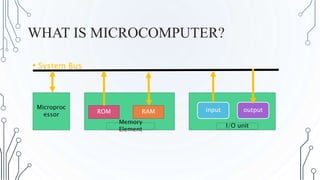
WHAT IS MICROCOMPUTER?
• System Bus
Microproc
essor ROM RAM input output
Memory
Element
I/O unit
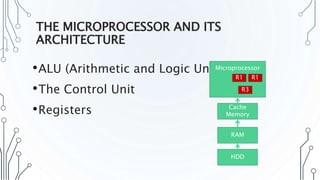
THE MICROPROCESSOR AND ITS
ARCHITECTURE
•ALU (Arithmetic and Logic Unit)
•The Control Unit
•Registers
HDD
RAM
Cache
Memory
Microprocessor
R1 R1
R3
THE PROGRAMMING
MODEL
•Program visible registers
•We can access via programs
•Program invisible registers
•We can not access via
programs
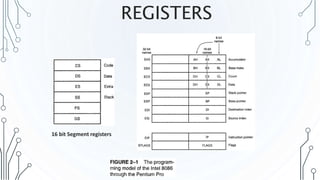
REGISTERS
16 bit Segment registers
EXAMPLE DATA
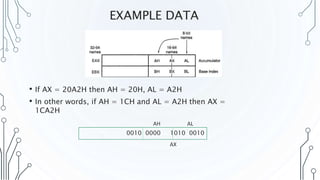
• If AX = 20A2H then AH = 20H, AL = A2H
• In other words, if AH = 1CH and AL = A2H then AX =
1CA2H
0010 0000 1010 0010
AH AL
AX
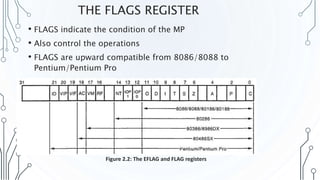
THE FLAGS REGISTER
• FLAGS indicate the condition of the MP
• Also control the operations
• FLAGS are upward compatible from 8086/8088 to
Pentium/Pentium Pro
Figure 2.2: The EFLAG and FLAG registers
THE FLAGS
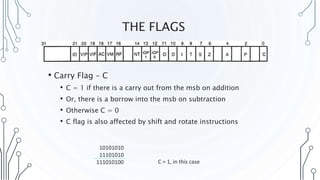
• Carry Flag – C
• C = 1 if there is a carry out from the msb on addition
• Or, there is a borrow into the msb on subtraction
• Otherwise C = 0
• C flag is also affected by shift and rotate instructions
10101010
11101010
111010100 C = 1, in this case
THE FLAGS
• Parity Flag – P
• P = 1 for even parity, if number contains even number
of ones
• P = 0 for odd parity, if odd number of ones
10101010 10101011
P = 1 P = 0
Even number of ones Odd number of ones
Definition changes from microprocessor to microprocessor
THE FLAGS
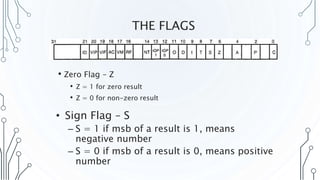
• Zero Flag – Z
• Z = 1 for zero result
• Z = 0 for non-zero result
• Sign Flag – S
– S = 1 if msb of a result is 1, means
negative number
– S = 0 if msb of a result is 0, means positive
number
THE FLAGS
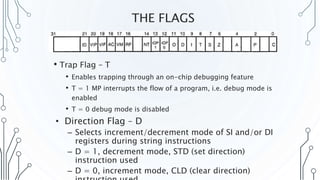
• Trap Flag – T
• Enables trapping through an on-chip debugging feature
• T = 1 MP interrupts the flow of a program, i.e. debug mode is
enabled
• T = 0 debug mode is disabled
• Direction Flag – D
– Selects increment/decrement mode of SI and/or DI
registers during string instructions
– D = 1, decrement mode, STD (set direction)
instruction used
– D = 0, increment mode, CLD (clear direction)
THE FLAGS
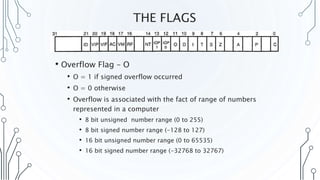
• Overflow Flag – O
• O = 1 if signed overflow occurred
• O = 0 otherwise
• Overflow is associated with the fact of range of numbers
represented in a computer
• 8 bit unsigned number range (0 to 255)
• 8 bit signed number range (-128 to 127)
• 16 bit unsigned number range (0 to 65535)
• 16 bit signed number range (-32768 to 32767)
HOW INSTRUCTIONS AFFECT THE
FLAGS?
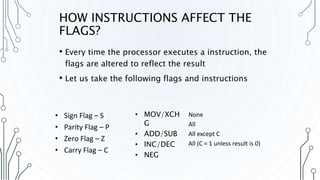
• Every time the processor executes a instruction, the
flags are altered to reflect the result
• Let us take the following flags and instructions
• Sign Flag – S
• Parity Flag – P
• Zero Flag – Z
• Carry Flag – C
• MOV/XCH
G
• ADD/SUB
• INC/DEC
• NEG
None
All
All except C
All (C = 1 unless result is 0)
EXAMPLE 1
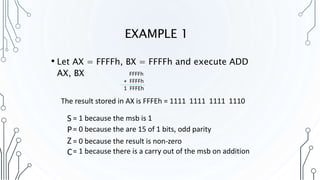
• Let AX = FFFFh, BX = FFFFh and execute ADD
AX, BX FFFFh
+ FFFFh
1 FFFEh
The result stored in AX is FFFEh = 1111 1111 1111 1110
S
P
Z
C
= 1 because the msb is 1
= 0 because the are 15 of 1 bits, odd parity
= 0 because the result is non-zero
= 1 because there is a carry out of the msb on addition
EXAMPLE 2
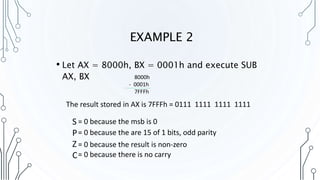
• Let AX = 8000h, BX = 0001h and execute SUB
AX, BX 8000h
- 0001h
7FFFh
The result stored in AX is 7FFFh = 0111 1111 1111 1111
S
P
Z
C
= 0 because the msb is 0
= 0 because the are 15 of 1 bits, odd parity
= 0 because the result is non-zero
= 0 because there is no carry
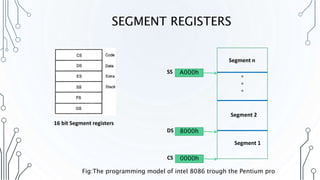
SEGMENT REGISTERS
16 bit Segment registers
*
*
*
Segment 1
Segment 2
Segment n
0000hCS
8000hDS
A000hSS
Fig:The programming model of intel 8086 trough the Pentium pro
ASSEMBLY PROGRAM
(TO CHECK WHEATHER INPUT,DIGIT,OR CAPITAL OR SMALL)
; You may customize this and other start-up
templates;
; The location of this template is
c:emu8086inc0_com_template.txt
.model small
.stack 100h
.data
MSG1 DB ': NUMBER$'
MSG2 DB ': CAPITAL$'
MSG3 DB ': SMALL$'
MSG4 DB ': not letter or digit$'
.CODE
mov ax,@data
mov ds,ax
MOV AH, 1
INT 21H
MOV BL, AL
CMP BL, 30H
JGE ANDD
CMP BL, 41H
JGE ANDDD
CMP BL, 61H
JGE ANDDDD
JMP ELSE
ANDD:
CMP BL, 39H
JLE NUMBER
ANDDD:
CMP BL, 5AH
JLE CAPITAL
ANDDDD:
CMP BL, 7AH
JLE SMALL
NUMBER:
lea dx,msg1
mov ah,9
int 21h
JMP EXIT
ASSEMBLY PROGRAM
CAPITAL:
lea dx,msg2
mov ah,9
int 21h
JMP EXIT
SMALL:
lea dx,msg3
mov ah,9
int 21h
JMP EXIT
ELSE:
lea dx,msg4
mov ah,9
int 21h
JMP EXIT
EXIT:
.exit
ret
Input:
A
Output:
ASSEMBLY PROGRAM
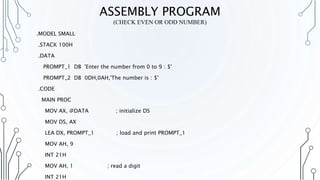
(CHECK EVEN OR ODD NUMBER)
.MODEL SMALL
.STACK 100H
.DATA
PROMPT_1 DB 'Enter the number from 0 to 9 : $'
PROMPT_2 DB 0DH,0AH,'The number is : $'
.CODE
MAIN PROC
MOV AX, @DATA ; initialize DS
MOV DS, AX
LEA DX, PROMPT_1 ; load and print PROMPT_1
MOV AH, 9
INT 21H
MOV AH, 1 ; read a digit
INT 21H
ASSEMBLY PROGRAM
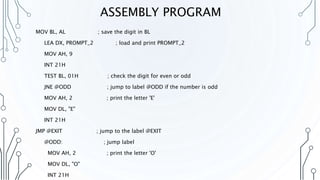
MOV BL, AL ; save the digit in BL
LEA DX, PROMPT_2 ; load and print PROMPT_2
MOV AH, 9
INT 21H
TEST BL, 01H ; check the digit for even or odd
JNE @ODD ; jump to label @ODD if the number is odd
MOV AH, 2 ; print the letter 'E'
MOV DL, "E"
INT 21H
JMP @EXIT ; jump to the label @EXIT
@ODD: ; jump label
MOV AH, 2 ; print the letter 'O'
MOV DL, "O"
INT 21H
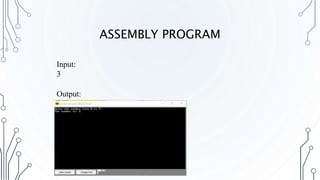
ASSEMBLY PROGRAM
Output:
Input:
3
Z
Thank You

Assembly Language and microprocessor

  • 1.
  • 2.
  • 3.
    TEAM :ABRACADABRA 1. AfnanulHassan #161-15- 7213 2. Khaled Akram Sany #161-15- 7203 3.Shami Al Rahad #161-15- 7349 4. Md. Sohanur Rahman Sakib #161-
  • 4.
    WHAT IS MICROCOMPUTER? •System Bus Microproc essor ROM RAM input output Memory Element I/O unit
  • 5.
    THE MICROPROCESSOR ANDITS ARCHITECTURE •ALU (Arithmetic and Logic Unit) •The Control Unit •Registers HDD RAM Cache Memory Microprocessor R1 R1 R3
  • 6.
    THE PROGRAMMING MODEL •Program visibleregisters •We can access via programs •Program invisible registers •We can not access via programs
  • 7.
  • 8.
    EXAMPLE DATA • IfAX = 20A2H then AH = 20H, AL = A2H • In other words, if AH = 1CH and AL = A2H then AX = 1CA2H 0010 0000 1010 0010 AH AL AX
  • 9.
    THE FLAGS REGISTER •FLAGS indicate the condition of the MP • Also control the operations • FLAGS are upward compatible from 8086/8088 to Pentium/Pentium Pro Figure 2.2: The EFLAG and FLAG registers
  • 10.
    THE FLAGS • CarryFlag – C • C = 1 if there is a carry out from the msb on addition • Or, there is a borrow into the msb on subtraction • Otherwise C = 0 • C flag is also affected by shift and rotate instructions 10101010 11101010 111010100 C = 1, in this case
  • 11.
    THE FLAGS • ParityFlag – P • P = 1 for even parity, if number contains even number of ones • P = 0 for odd parity, if odd number of ones 10101010 10101011 P = 1 P = 0 Even number of ones Odd number of ones Definition changes from microprocessor to microprocessor
  • 12.
    THE FLAGS • ZeroFlag – Z • Z = 1 for zero result • Z = 0 for non-zero result • Sign Flag – S – S = 1 if msb of a result is 1, means negative number – S = 0 if msb of a result is 0, means positive number
  • 13.
    THE FLAGS • TrapFlag – T • Enables trapping through an on-chip debugging feature • T = 1 MP interrupts the flow of a program, i.e. debug mode is enabled • T = 0 debug mode is disabled • Direction Flag – D – Selects increment/decrement mode of SI and/or DI registers during string instructions – D = 1, decrement mode, STD (set direction) instruction used – D = 0, increment mode, CLD (clear direction)
  • 14.
    THE FLAGS • OverflowFlag – O • O = 1 if signed overflow occurred • O = 0 otherwise • Overflow is associated with the fact of range of numbers represented in a computer • 8 bit unsigned number range (0 to 255) • 8 bit signed number range (-128 to 127) • 16 bit unsigned number range (0 to 65535) • 16 bit signed number range (-32768 to 32767)
  • 15.
    HOW INSTRUCTIONS AFFECTTHE FLAGS? • Every time the processor executes a instruction, the flags are altered to reflect the result • Let us take the following flags and instructions • Sign Flag – S • Parity Flag – P • Zero Flag – Z • Carry Flag – C • MOV/XCH G • ADD/SUB • INC/DEC • NEG None All All except C All (C = 1 unless result is 0)
  • 16.
    EXAMPLE 1 • LetAX = FFFFh, BX = FFFFh and execute ADD AX, BX FFFFh + FFFFh 1 FFFEh The result stored in AX is FFFEh = 1111 1111 1111 1110 S P Z C = 1 because the msb is 1 = 0 because the are 15 of 1 bits, odd parity = 0 because the result is non-zero = 1 because there is a carry out of the msb on addition
  • 17.
    EXAMPLE 2 • LetAX = 8000h, BX = 0001h and execute SUB AX, BX 8000h - 0001h 7FFFh The result stored in AX is 7FFFh = 0111 1111 1111 1111 S P Z C = 0 because the msb is 0 = 0 because the are 15 of 1 bits, odd parity = 0 because the result is non-zero = 0 because there is no carry
  • 18.
    SEGMENT REGISTERS 16 bitSegment registers * * * Segment 1 Segment 2 Segment n 0000hCS 8000hDS A000hSS Fig:The programming model of intel 8086 trough the Pentium pro
  • 19.
    ASSEMBLY PROGRAM (TO CHECKWHEATHER INPUT,DIGIT,OR CAPITAL OR SMALL) ; You may customize this and other start-up templates; ; The location of this template is c:emu8086inc0_com_template.txt .model small .stack 100h .data MSG1 DB ': NUMBER$' MSG2 DB ': CAPITAL$' MSG3 DB ': SMALL$' MSG4 DB ': not letter or digit$' .CODE mov ax,@data mov ds,ax MOV AH, 1 INT 21H MOV BL, AL CMP BL, 30H JGE ANDD CMP BL, 41H JGE ANDDD CMP BL, 61H JGE ANDDDD JMP ELSE ANDD: CMP BL, 39H JLE NUMBER ANDDD: CMP BL, 5AH JLE CAPITAL ANDDDD: CMP BL, 7AH JLE SMALL NUMBER: lea dx,msg1 mov ah,9 int 21h JMP EXIT
  • 20.
    ASSEMBLY PROGRAM CAPITAL: lea dx,msg2 movah,9 int 21h JMP EXIT SMALL: lea dx,msg3 mov ah,9 int 21h JMP EXIT ELSE: lea dx,msg4 mov ah,9 int 21h JMP EXIT EXIT: .exit ret Input: A Output:
  • 21.
    ASSEMBLY PROGRAM (CHECK EVENOR ODD NUMBER) .MODEL SMALL .STACK 100H .DATA PROMPT_1 DB 'Enter the number from 0 to 9 : $' PROMPT_2 DB 0DH,0AH,'The number is : $' .CODE MAIN PROC MOV AX, @DATA ; initialize DS MOV DS, AX LEA DX, PROMPT_1 ; load and print PROMPT_1 MOV AH, 9 INT 21H MOV AH, 1 ; read a digit INT 21H
  • 22.
    ASSEMBLY PROGRAM MOV BL,AL ; save the digit in BL LEA DX, PROMPT_2 ; load and print PROMPT_2 MOV AH, 9 INT 21H TEST BL, 01H ; check the digit for even or odd JNE @ODD ; jump to label @ODD if the number is odd MOV AH, 2 ; print the letter 'E' MOV DL, "E" INT 21H JMP @EXIT ; jump to the label @EXIT @ODD: ; jump label MOV AH, 2 ; print the letter 'O' MOV DL, "O" INT 21H
  • 23.
  • 24.