FIGURE 1.3
© Relay Graduate School of Education. All rights reserved. 2
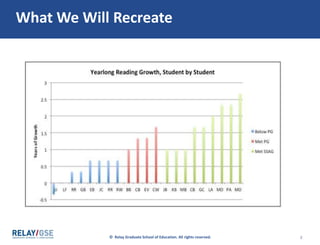
What We Will Recreate
3
First, copy the needed
tracker data into a
scratch workbook
© Relay Graduate School of Education. All rights reserved. 4
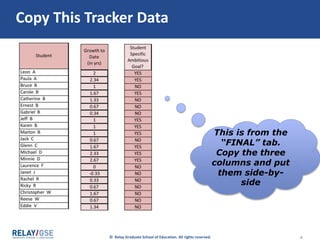
Copy This Tracker Data
This is from the
“FINAL” tab.
Copy the three
columns and put
them side-by-
side
© Relay Graduate School of Education. All rights reserved. 5
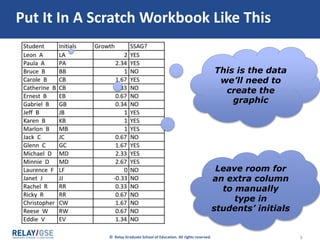
Put It In A Scratch Workbook Like This
This is the data
we’ll need to
create the
graphic
Leave room for
an extra column
to manually
type in
students’ initials
© Relay Graduate School of Education. All rights reserved. 6
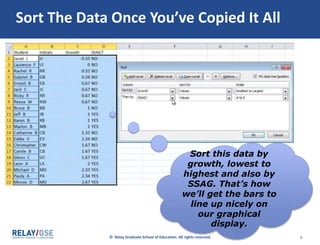
Sort The Data Once You’ve Copied It All
Sort this data by
growth, lowest to
highest and also by
SSAG. That’s how
we’ll get the bars to
line up nicely on
our graphical
display.
7
Next, organize the data
so that Excel will make
the figure you want
© Relay Graduate School of Education. All rights reserved. 8
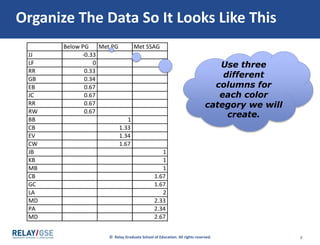
Organize The Data So It Looks Like This
Use three
different
columns for
each color
category we will
create.
9
Now, highlight the
organized data and tell
Excel what kind of
graphical display you
want
© Relay Graduate School of Education. All rights reserved. 10
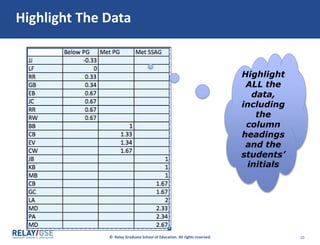
Highlight The Data
Highlight
ALL the
data,
including
the
column
headings
and the
students’
initials
© Relay Graduate School of Education. All rights reserved. 11
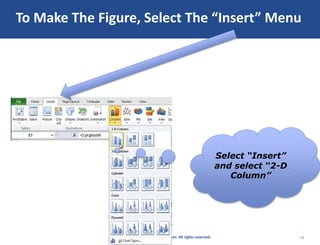
To Make The Figure, Select The “Insert” Menu
Select “Insert”
and select “2-D
Column”
© Relay Graduate School of Education. All rights reserved. 12
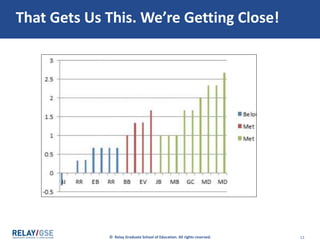
That Gets Us This. We’re Getting Close!
© Relay Graduate School of Education. All rights reserved. 13
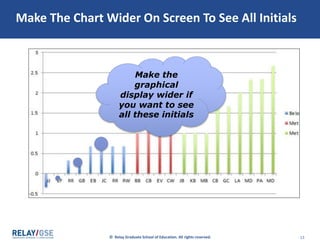
Make The Chart Wider On Screen To See All Initials
Make the
graphical
display wider if
you want to see
all these initials
14
Lastly, make the figure
accessible by adding
title, axis labels, etc.
© Relay Graduate School of Education. All rights reserved. 15
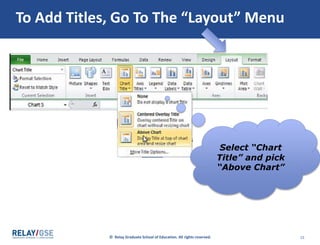
To Add Titles, Go To The “Layout” Menu
Select “Chart
Title” and pick
“Above Chart”
© Relay Graduate School of Education. All rights reserved. 16
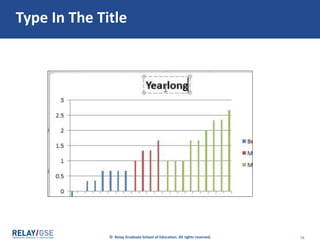
Type In The Title
© Relay Graduate School of Education. All rights reserved. 17
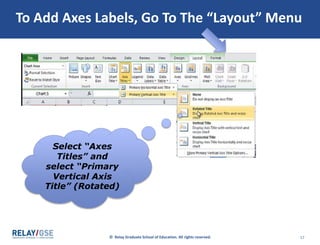
To Add Axes Labels, Go To The “Layout” Menu
Select “Axes
Titles” and
select “Primary
Vertical Axis
Title” (Rotated)
© Relay Graduate School of Education. All rights reserved. 18
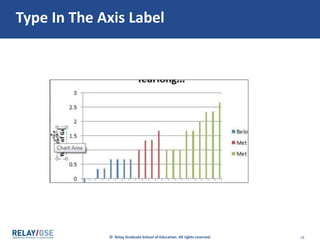
Type In The Axis Label
19
Well done!

Figure 1.3

  • 1.
  • 2.
    © Relay GraduateSchool of Education. All rights reserved. 2 What We Will Recreate
  • 3.
    3 First, copy theneeded tracker data into a scratch workbook
  • 4.
    © Relay GraduateSchool of Education. All rights reserved. 4 Copy This Tracker Data This is from the “FINAL” tab. Copy the three columns and put them side-by- side
  • 5.
    © Relay GraduateSchool of Education. All rights reserved. 5 Put It In A Scratch Workbook Like This This is the data we’ll need to create the graphic Leave room for an extra column to manually type in students’ initials
  • 6.
    © Relay GraduateSchool of Education. All rights reserved. 6 Sort The Data Once You’ve Copied It All Sort this data by growth, lowest to highest and also by SSAG. That’s how we’ll get the bars to line up nicely on our graphical display.
  • 7.
    7 Next, organize thedata so that Excel will make the figure you want
  • 8.
    © Relay GraduateSchool of Education. All rights reserved. 8 Organize The Data So It Looks Like This Use three different columns for each color category we will create.
  • 9.
    9 Now, highlight the organizeddata and tell Excel what kind of graphical display you want
  • 10.
    © Relay GraduateSchool of Education. All rights reserved. 10 Highlight The Data Highlight ALL the data, including the column headings and the students’ initials
  • 11.
    © Relay GraduateSchool of Education. All rights reserved. 11 To Make The Figure, Select The “Insert” Menu Select “Insert” and select “2-D Column”
  • 12.
    © Relay GraduateSchool of Education. All rights reserved. 12 That Gets Us This. We’re Getting Close!
  • 13.
    © Relay GraduateSchool of Education. All rights reserved. 13 Make The Chart Wider On Screen To See All Initials Make the graphical display wider if you want to see all these initials
  • 14.
    14 Lastly, make thefigure accessible by adding title, axis labels, etc.
  • 15.
    © Relay GraduateSchool of Education. All rights reserved. 15 To Add Titles, Go To The “Layout” Menu Select “Chart Title” and pick “Above Chart”
  • 16.
    © Relay GraduateSchool of Education. All rights reserved. 16 Type In The Title
  • 17.
    © Relay GraduateSchool of Education. All rights reserved. 17 To Add Axes Labels, Go To The “Layout” Menu Select “Axes Titles” and select “Primary Vertical Axis Title” (Rotated)
  • 18.
    © Relay GraduateSchool of Education. All rights reserved. 18 Type In The Axis Label
  • 19.

Editor's Notes

  • #3 Say The next part of the data narrative is the “All Students” section. In this section, you will present and discuss the progress of your class, as a whole, toward the AF and AG.   Give G/S’s 30 seconds to read through rubric and assessment template.   Ask / Turn and Talk What is required in this part of the Data Narrative?   Review That's right, the "All Students" section should give a high-level summary of Whether students met the Floor/Goal in one/both Pathway measures Student outcomes relative to goal (how many Floor/Goal/neither) Overall student performance, student-by-student ("distribution")
  • #5 Say The next part of the data narrative is the “All Students” section. In this section, you will present and discuss the progress of your class, as a whole, toward the AF and AG.   Give G/S’s 30 seconds to read through rubric and assessment template.   Ask / Turn and Talk What is required in this part of the Data Narrative?   Review That's right, the "All Students" section should give a high-level summary of Whether students met the Floor/Goal in one/both Pathway measures Student outcomes relative to goal (how many Floor/Goal/neither) Overall student performance, student-by-student ("distribution")
  • #6 Say The next part of the data narrative is the “All Students” section. In this section, you will present and discuss the progress of your class, as a whole, toward the AF and AG.   Give G/S’s 30 seconds to read through rubric and assessment template.   Ask / Turn and Talk What is required in this part of the Data Narrative?   Review That's right, the "All Students" section should give a high-level summary of Whether students met the Floor/Goal in one/both Pathway measures Student outcomes relative to goal (how many Floor/Goal/neither) Overall student performance, student-by-student ("distribution")
  • #7 Say The next part of the data narrative is the “All Students” section. In this section, you will present and discuss the progress of your class, as a whole, toward the AF and AG.   Give G/S’s 30 seconds to read through rubric and assessment template.   Ask / Turn and Talk What is required in this part of the Data Narrative?   Review That's right, the "All Students" section should give a high-level summary of Whether students met the Floor/Goal in one/both Pathway measures Student outcomes relative to goal (how many Floor/Goal/neither) Overall student performance, student-by-student ("distribution")
  • #9 Say The next part of the data narrative is the “All Students” section. In this section, you will present and discuss the progress of your class, as a whole, toward the AF and AG.   Give G/S’s 30 seconds to read through rubric and assessment template.   Ask / Turn and Talk What is required in this part of the Data Narrative?   Review That's right, the "All Students" section should give a high-level summary of Whether students met the Floor/Goal in one/both Pathway measures Student outcomes relative to goal (how many Floor/Goal/neither) Overall student performance, student-by-student ("distribution")
  • #11 Say The next part of the data narrative is the “All Students” section. In this section, you will present and discuss the progress of your class, as a whole, toward the AF and AG.   Give G/S’s 30 seconds to read through rubric and assessment template.   Ask / Turn and Talk What is required in this part of the Data Narrative?   Review That's right, the "All Students" section should give a high-level summary of Whether students met the Floor/Goal in one/both Pathway measures Student outcomes relative to goal (how many Floor/Goal/neither) Overall student performance, student-by-student ("distribution")
  • #12 Say The next part of the data narrative is the “All Students” section. In this section, you will present and discuss the progress of your class, as a whole, toward the AF and AG.   Give G/S’s 30 seconds to read through rubric and assessment template.   Ask / Turn and Talk What is required in this part of the Data Narrative?   Review That's right, the "All Students" section should give a high-level summary of Whether students met the Floor/Goal in one/both Pathway measures Student outcomes relative to goal (how many Floor/Goal/neither) Overall student performance, student-by-student ("distribution")
  • #16 Say The next part of the data narrative is the “All Students” section. In this section, you will present and discuss the progress of your class, as a whole, toward the AF and AG.   Give G/S’s 30 seconds to read through rubric and assessment template.   Ask / Turn and Talk What is required in this part of the Data Narrative?   Review That's right, the "All Students" section should give a high-level summary of Whether students met the Floor/Goal in one/both Pathway measures Student outcomes relative to goal (how many Floor/Goal/neither) Overall student performance, student-by-student ("distribution")
  • #17 Say The next part of the data narrative is the “All Students” section. In this section, you will present and discuss the progress of your class, as a whole, toward the AF and AG.   Give G/S’s 30 seconds to read through rubric and assessment template.   Ask / Turn and Talk What is required in this part of the Data Narrative?   Review That's right, the "All Students" section should give a high-level summary of Whether students met the Floor/Goal in one/both Pathway measures Student outcomes relative to goal (how many Floor/Goal/neither) Overall student performance, student-by-student ("distribution")
  • #18 Say The next part of the data narrative is the “All Students” section. In this section, you will present and discuss the progress of your class, as a whole, toward the AF and AG.   Give G/S’s 30 seconds to read through rubric and assessment template.   Ask / Turn and Talk What is required in this part of the Data Narrative?   Review That's right, the "All Students" section should give a high-level summary of Whether students met the Floor/Goal in one/both Pathway measures Student outcomes relative to goal (how many Floor/Goal/neither) Overall student performance, student-by-student ("distribution")
  • #19 Say The next part of the data narrative is the “All Students” section. In this section, you will present and discuss the progress of your class, as a whole, toward the AF and AG.   Give G/S’s 30 seconds to read through rubric and assessment template.   Ask / Turn and Talk What is required in this part of the Data Narrative?   Review That's right, the "All Students" section should give a high-level summary of Whether students met the Floor/Goal in one/both Pathway measures Student outcomes relative to goal (how many Floor/Goal/neither) Overall student performance, student-by-student ("distribution")