Accessing and Administering your
 Enterprise Geodatabase through
         SQL and Python

        Brent Pierce @brent_pierce
     Russell Brennan @russellbrennan
             hashtag: #sqlpy
Assumptions


  •   Basic knowledge of SQL, Python and relational
      databases


  •   Basic knowledge of the Geodatabase


  •   We’ll hold all questions till end


             Please turn off cell phones
What is the Geodatabase?

 • A physical store of geographic data
     -   Scalable storage model supported on different platforms


 •   Core ArcGIS information model
     -   A comprehensive model for representing and managing
         GIS data
     -   Implemented as a series of simple tables


 •   A transactional model for managing GIS workflows


 •   Set of components for accessing data
Geodatabase is based on relational principles


 •   The geodatabase is built on an extended relational
     database
     -   Relational integrity
     -   Reliability, Flexibility, Scalability
     -   Supports continuous, large datasets
     -   Standard relational database schema
     -   Base short transaction model
     -   Supports structured query language (SQL)
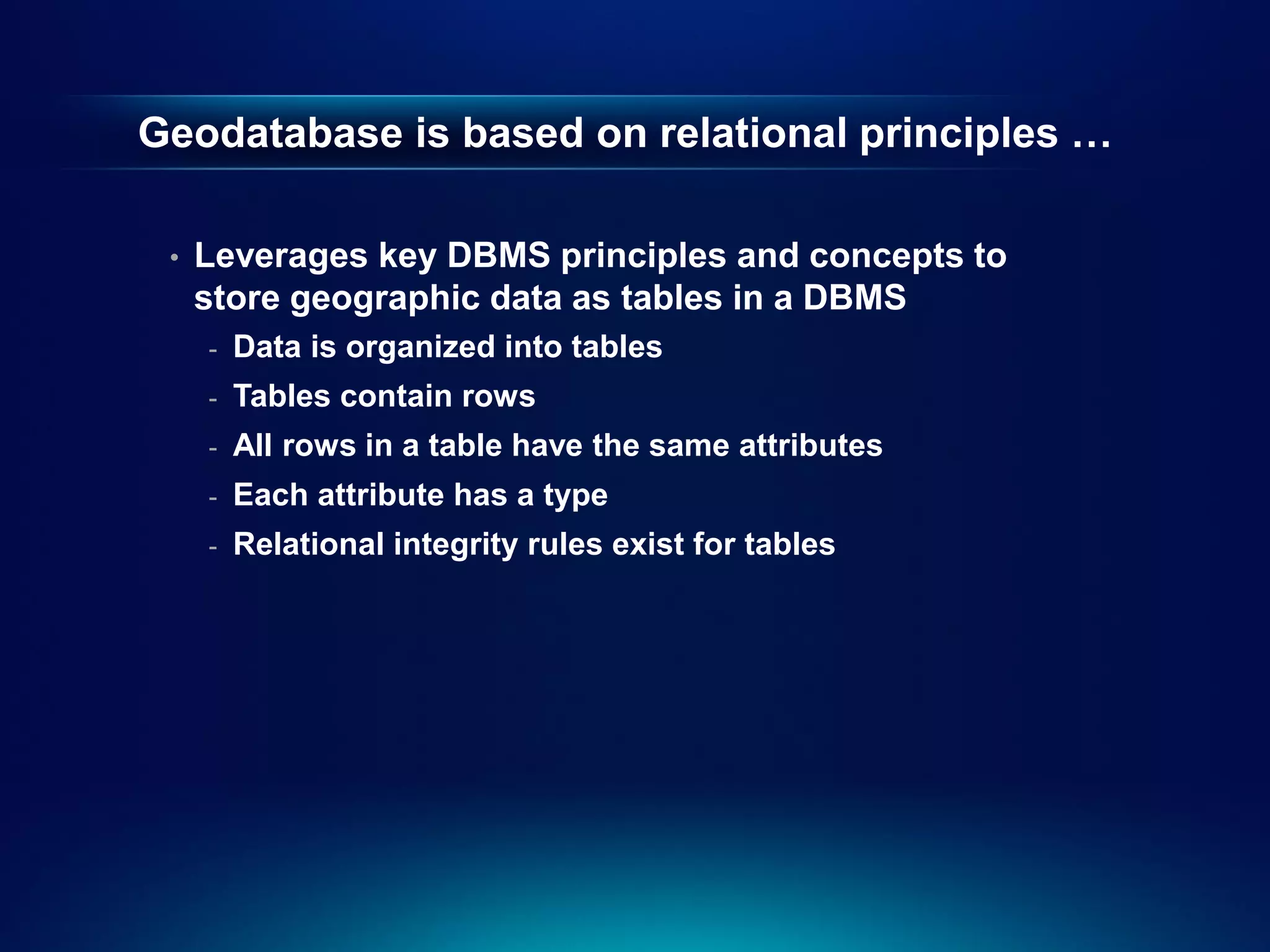
Geodatabase is based on relational principles …

 •   Leverages key DBMS principles and concepts to
     store geographic data as tables in a DBMS
     -   Data is organized into tables
     -   Tables contain rows
     -   All rows in a table have the same attributes
     -   Each attribute has a type
     -   Relational integrity rules exist for tables
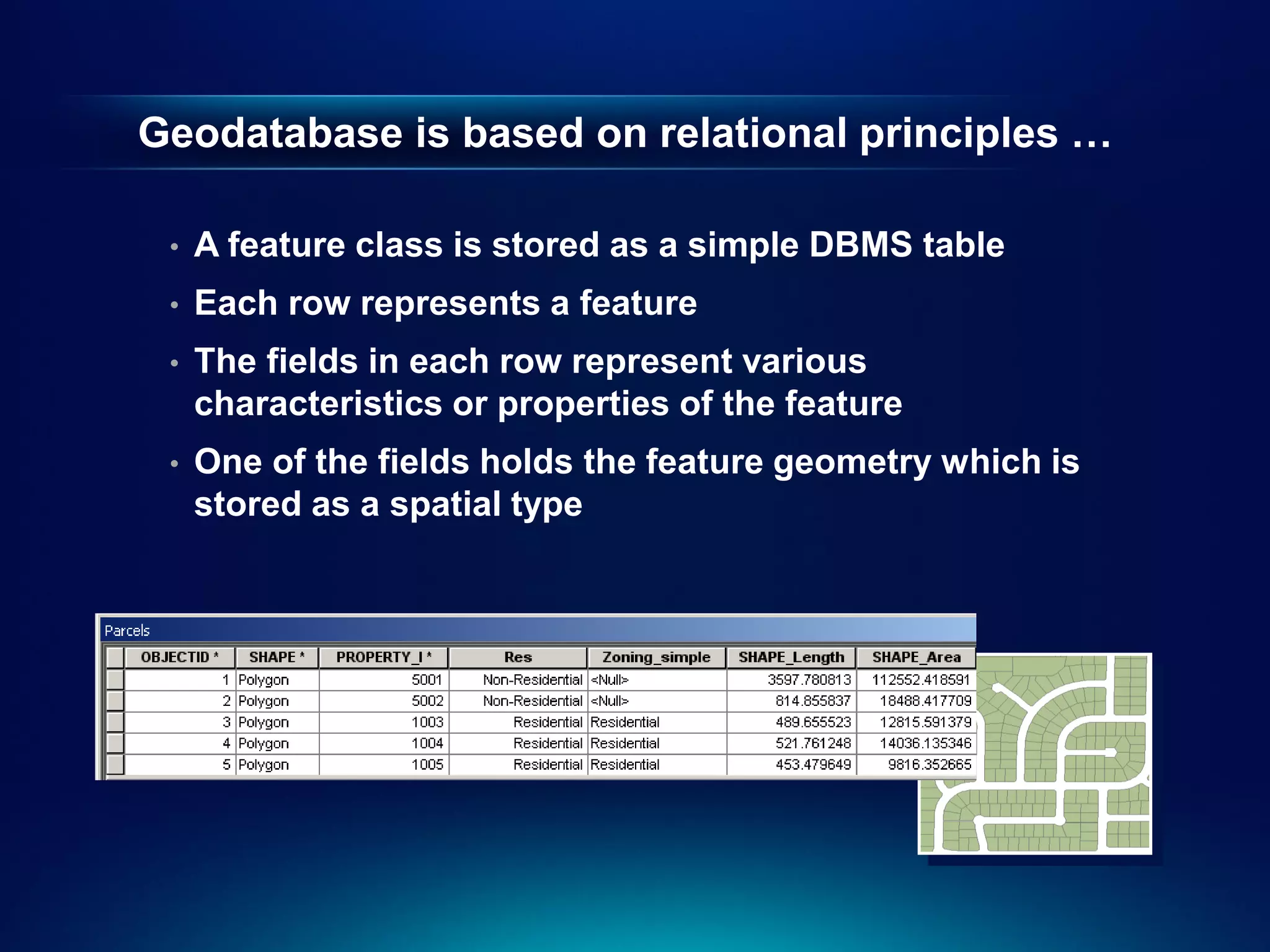
Geodatabase is based on relational principles …

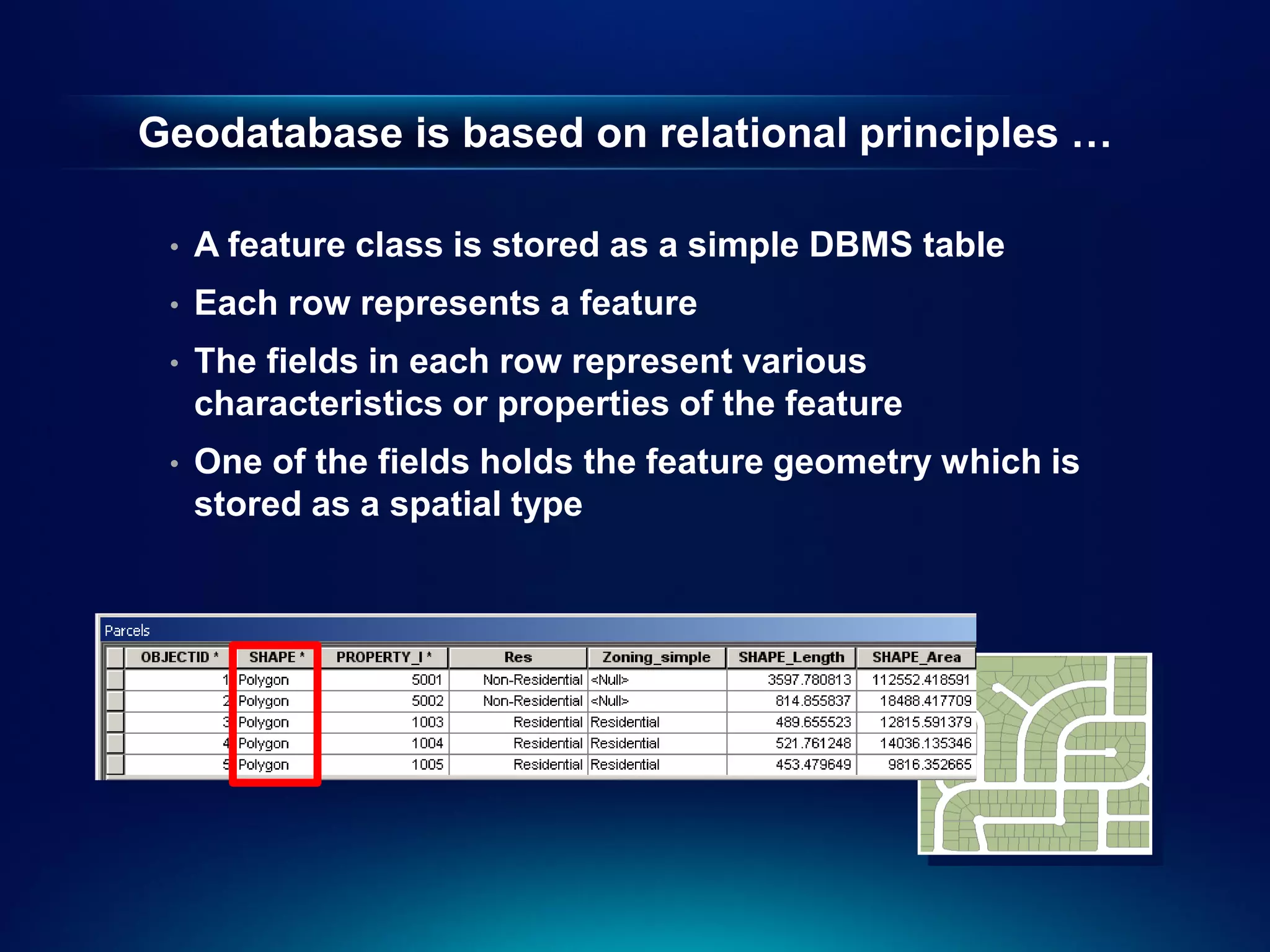
 •   A feature class is stored as a simple DBMS table
 •   Each row represents a feature
 •   The fields in each row represent various
     characteristics or properties of the feature
 •   One of the fields holds the feature geometry which is
     stored as a spatial type
Geodatabase is based on relational principles …

 •   A feature class is stored as a simple DBMS table
 •   Each row represents a feature
 •   The fields in each row represent various
     characteristics or properties of the feature
 •   One of the fields holds the feature geometry which is
     stored as a spatial type
Geodatabase Schema

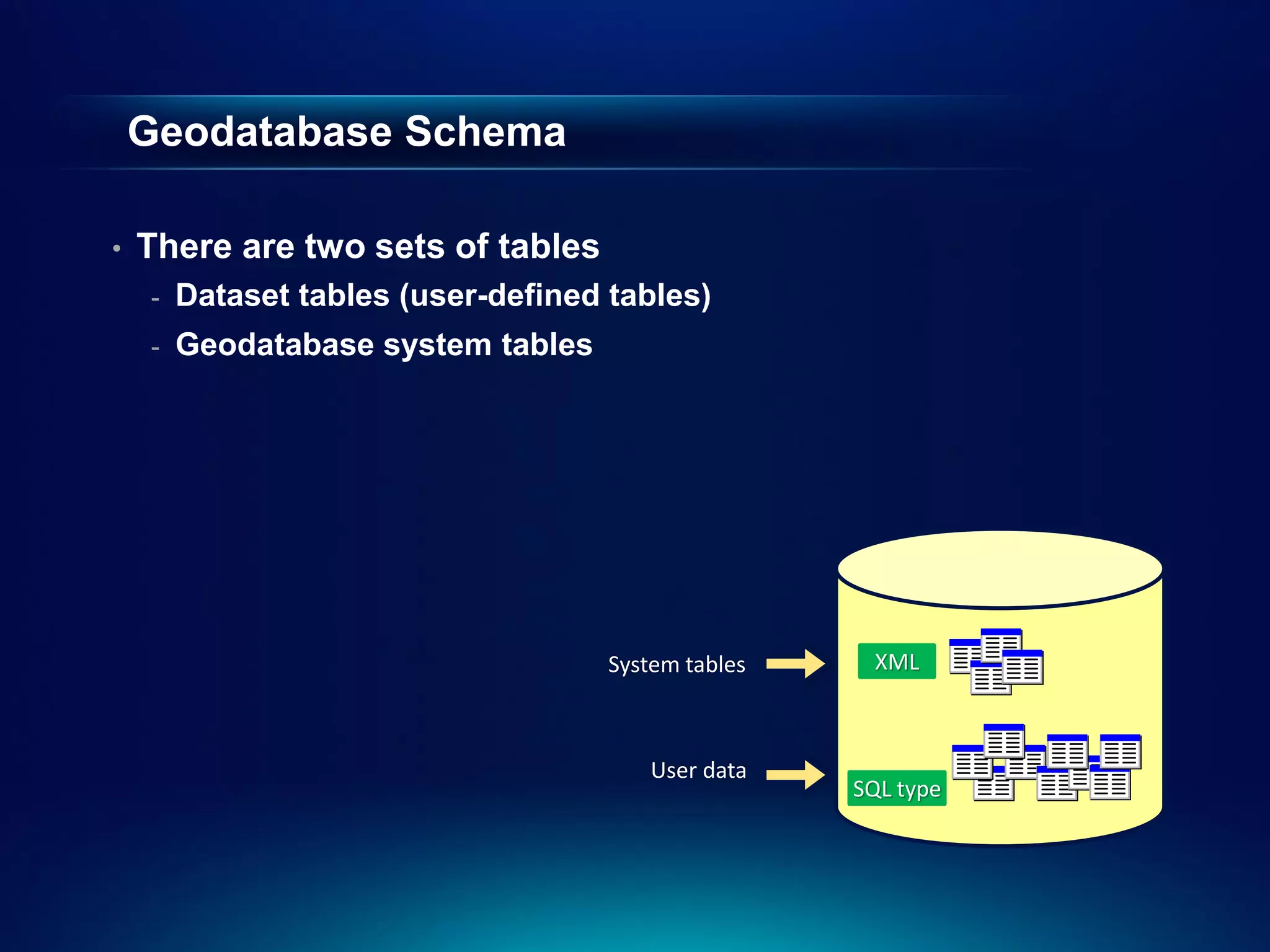
•   There are two sets of tables
    -   Dataset tables (user-defined tables)
    -   Geodatabase system tables


                                     System tables    XML


                                        User data
                                                     SQL type
User-defined tables

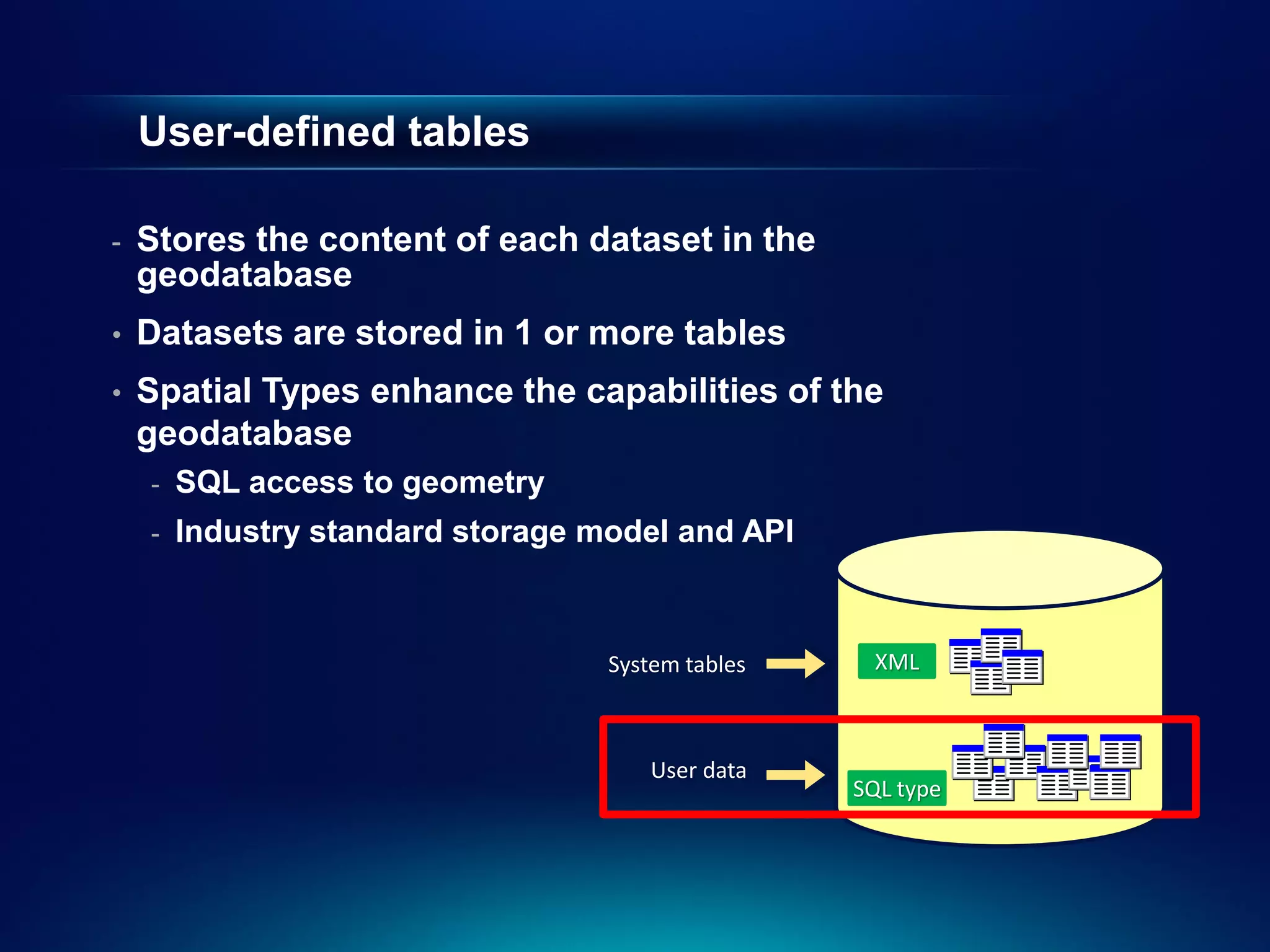
-   Stores the content of each dataset in the
    geodatabase
•   Datasets are stored in 1 or more tables
•   Spatial Types enhance the capabilities of the
    geodatabase
    -   SQL access to geometry
    -   Industry standard storage model and API


                                   System tables    XML


                                      User data
                                                   SQL type
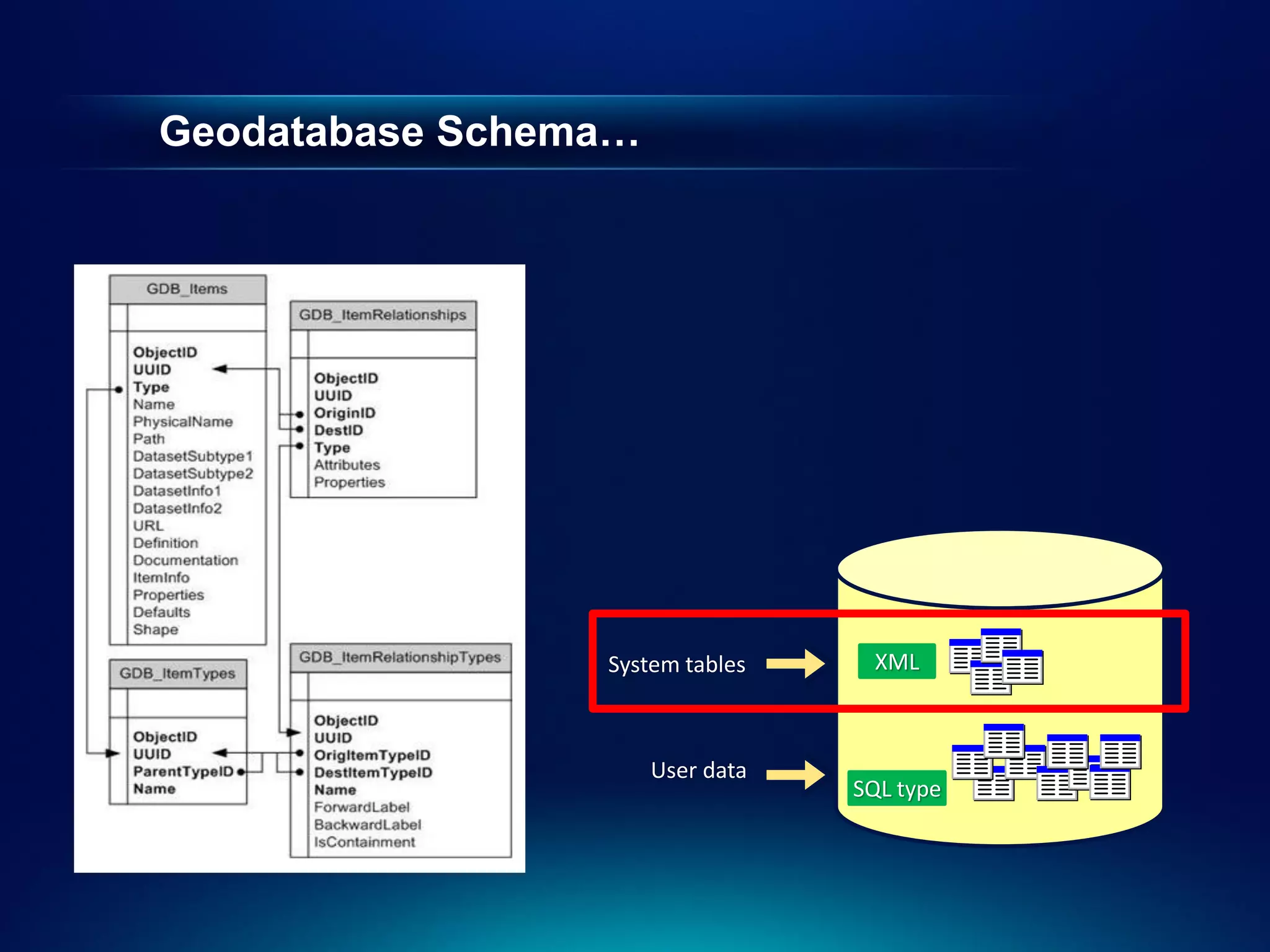
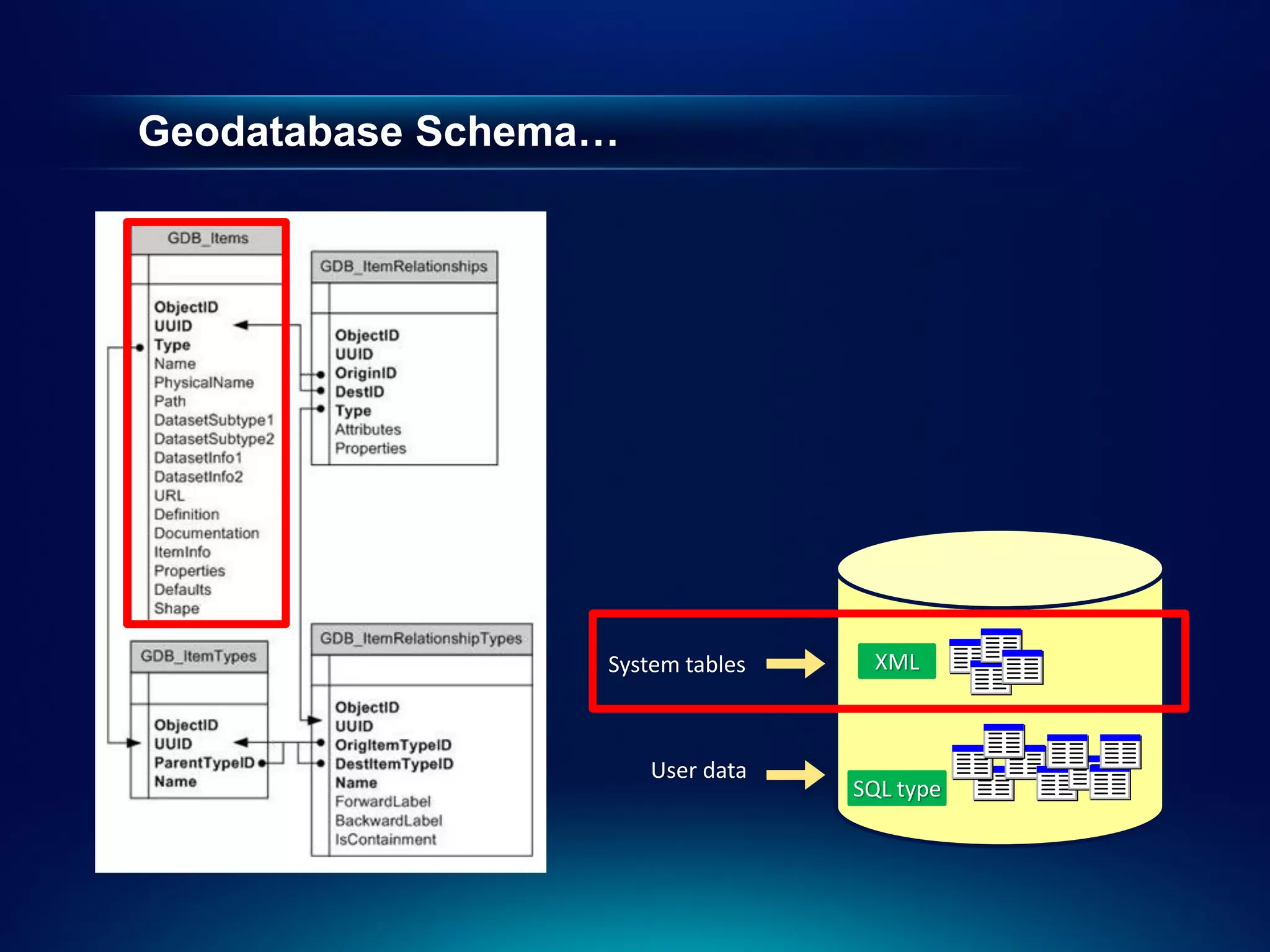
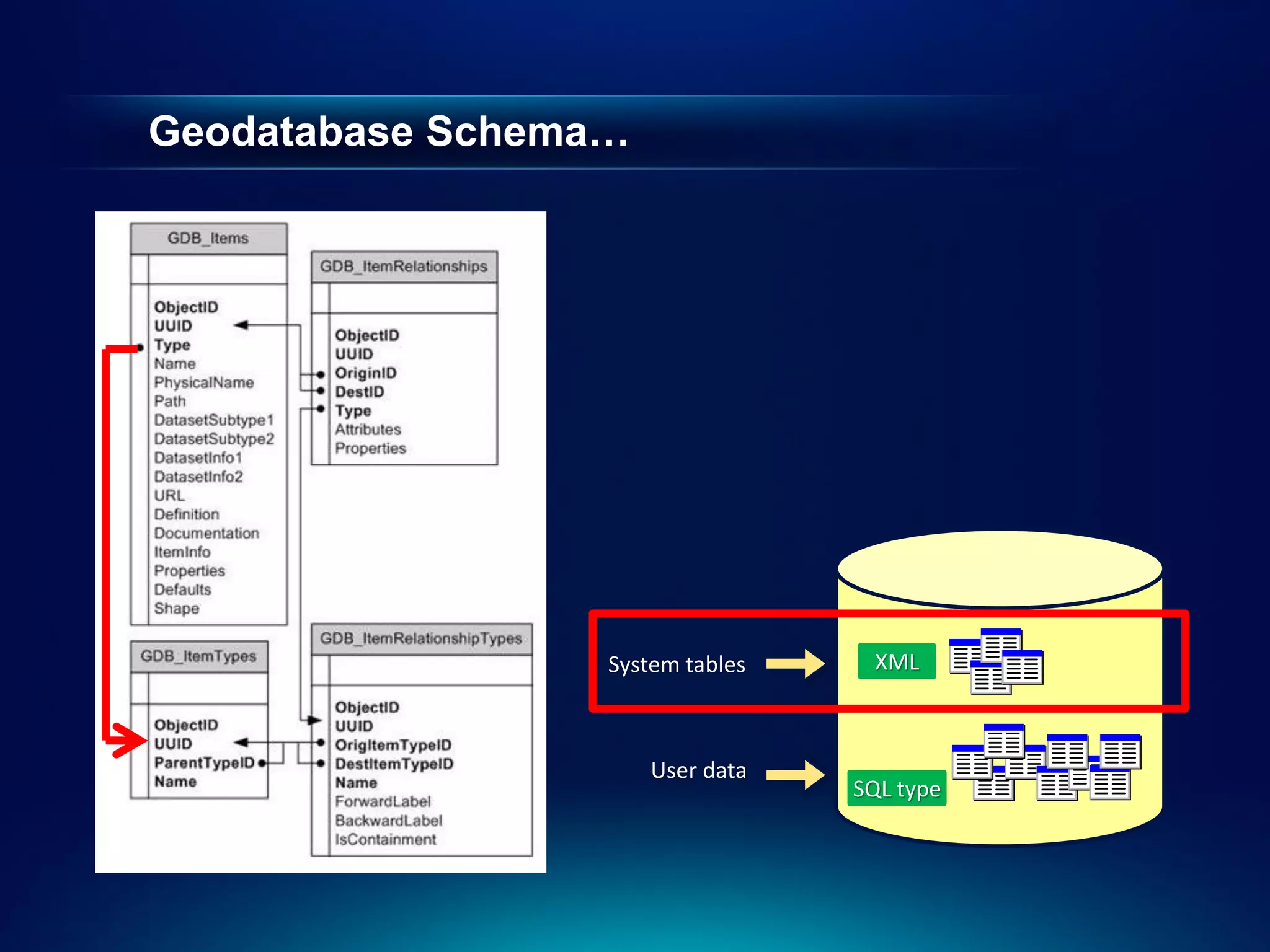
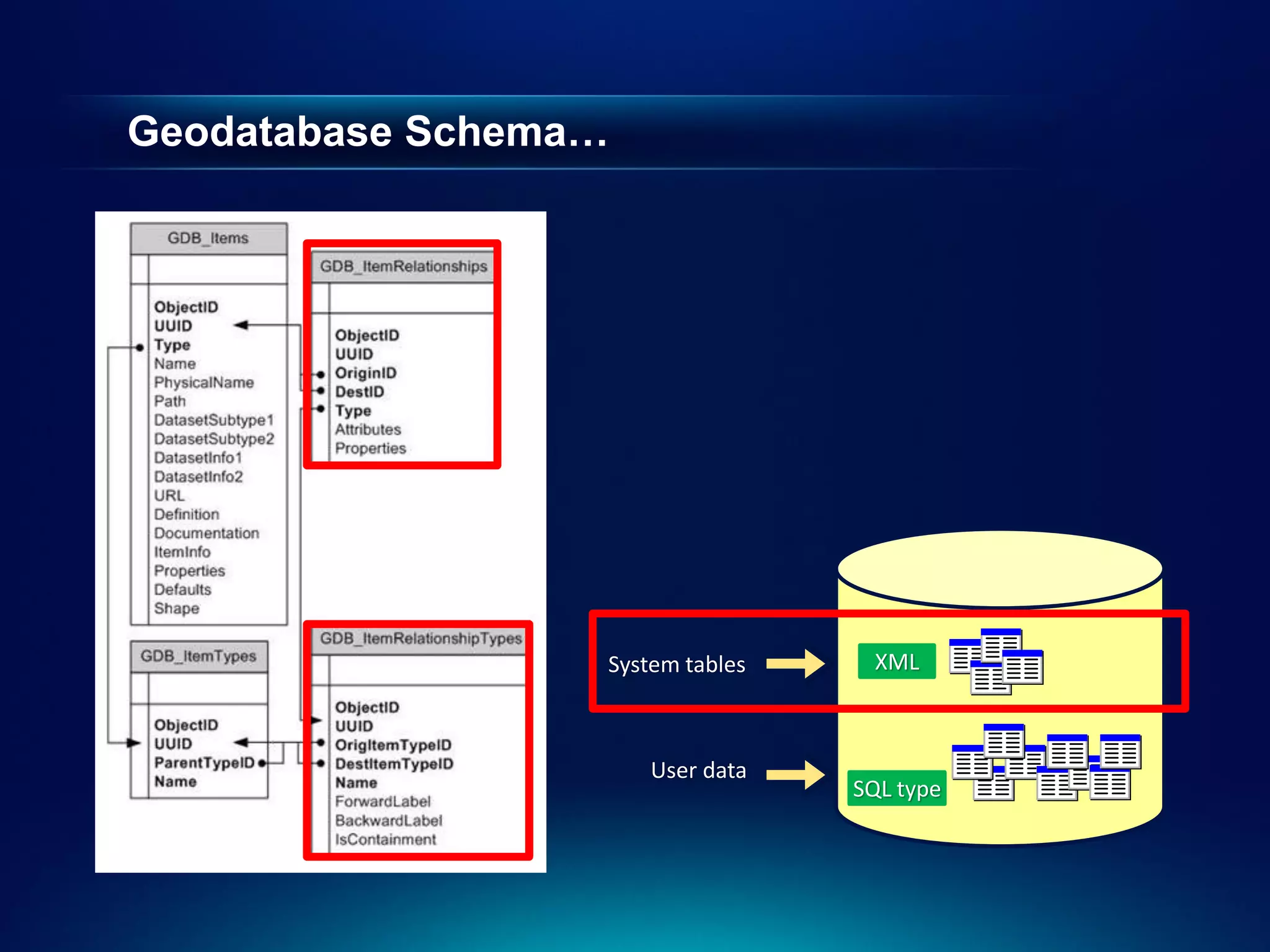
Geodatabase system tables

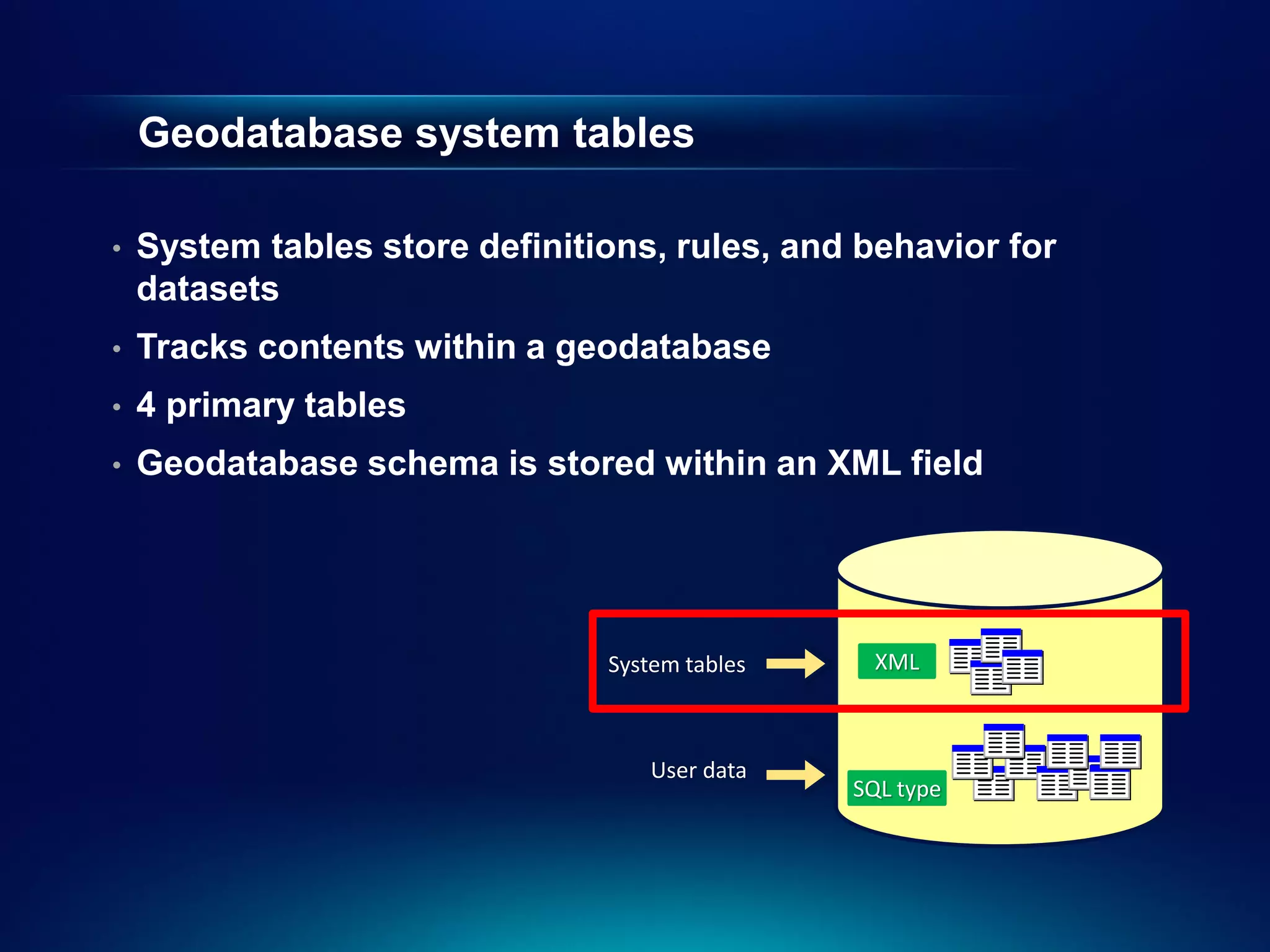
•   System tables store definitions, rules, and behavior for
    datasets
•   Tracks contents within a geodatabase
•   4 primary tables
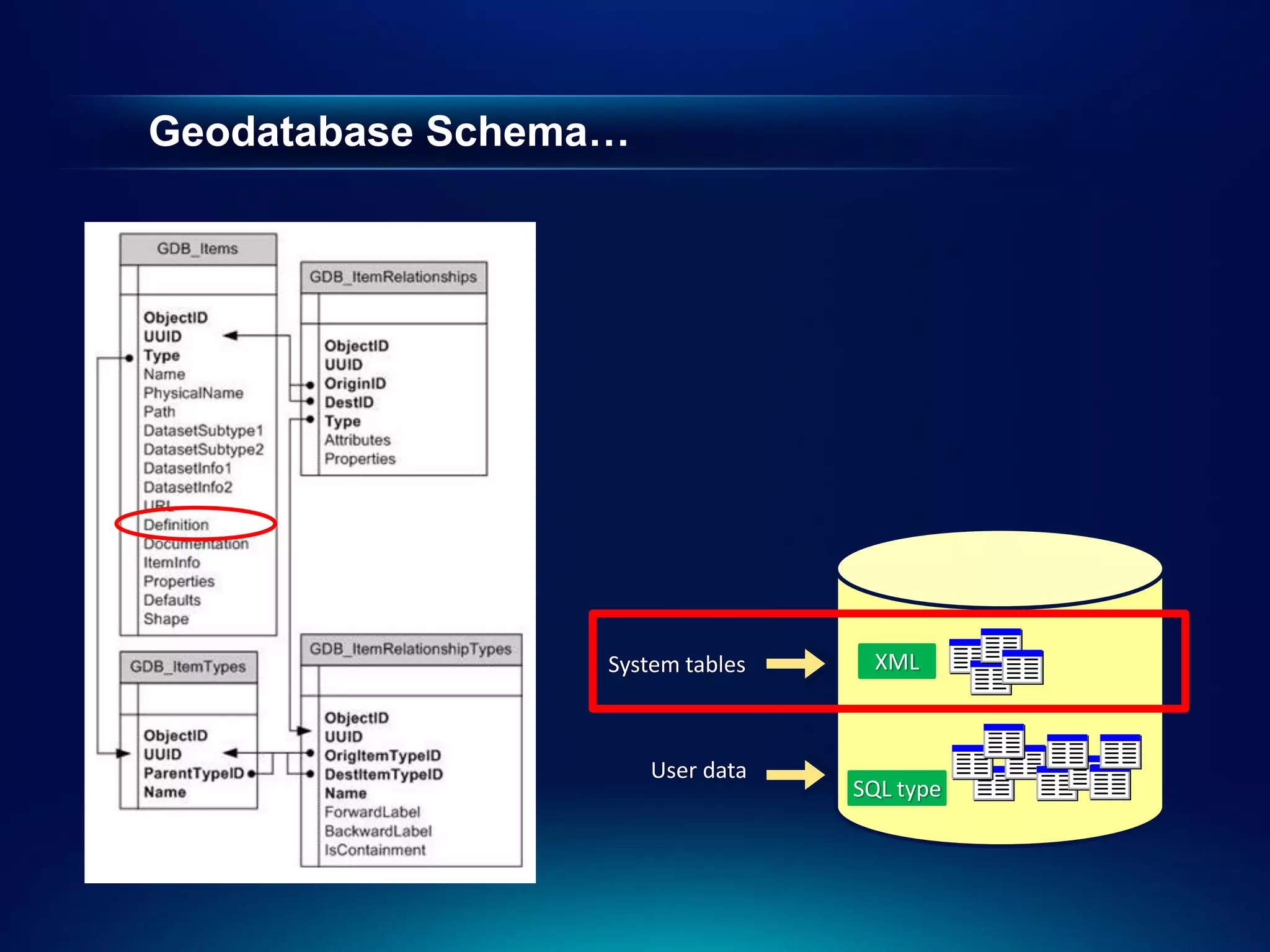
•   Geodatabase schema is stored within an XML field


                                System tables    XML


                                   User data
                                                SQL type
Geodatabase Schema…


                 System tables     XML


                      User data
                                  SQL type
Geodatabase Schema…


                  System tables    XML


                      User data
                                  SQL type
Geodatabase Schema…


                  System tables    XML


                      User data
                                  SQL type
Geodatabase Schema…


                  System tables    XML


                      User data
                                  SQL type
Geodatabase Schema…


                  System tables    XML


                      User data
                                  SQL type
What is a spatial type?

 •   A spatial type (ST_Geometry) is a type that stores
     geometry data in a single spatial attribute
     -   Geometry type, coordinates, dimension, spatial
         reference


 •   Spatial Index
     -   Access path for quick retrieval


 •   Relational and geometry operators and Functions
     -   Constructors
     -   Accessor
     -   Relational
     -   Geometry
What are the benefits of a spatial type?


 •   Efficiency
     -   Spatial data and methods are stored in the database
     -   Applications access native dbms type


 •   Accessed using common API’s and SQL
     -   C, C++, C#, Java
     -   Adheres to standards for SQL access
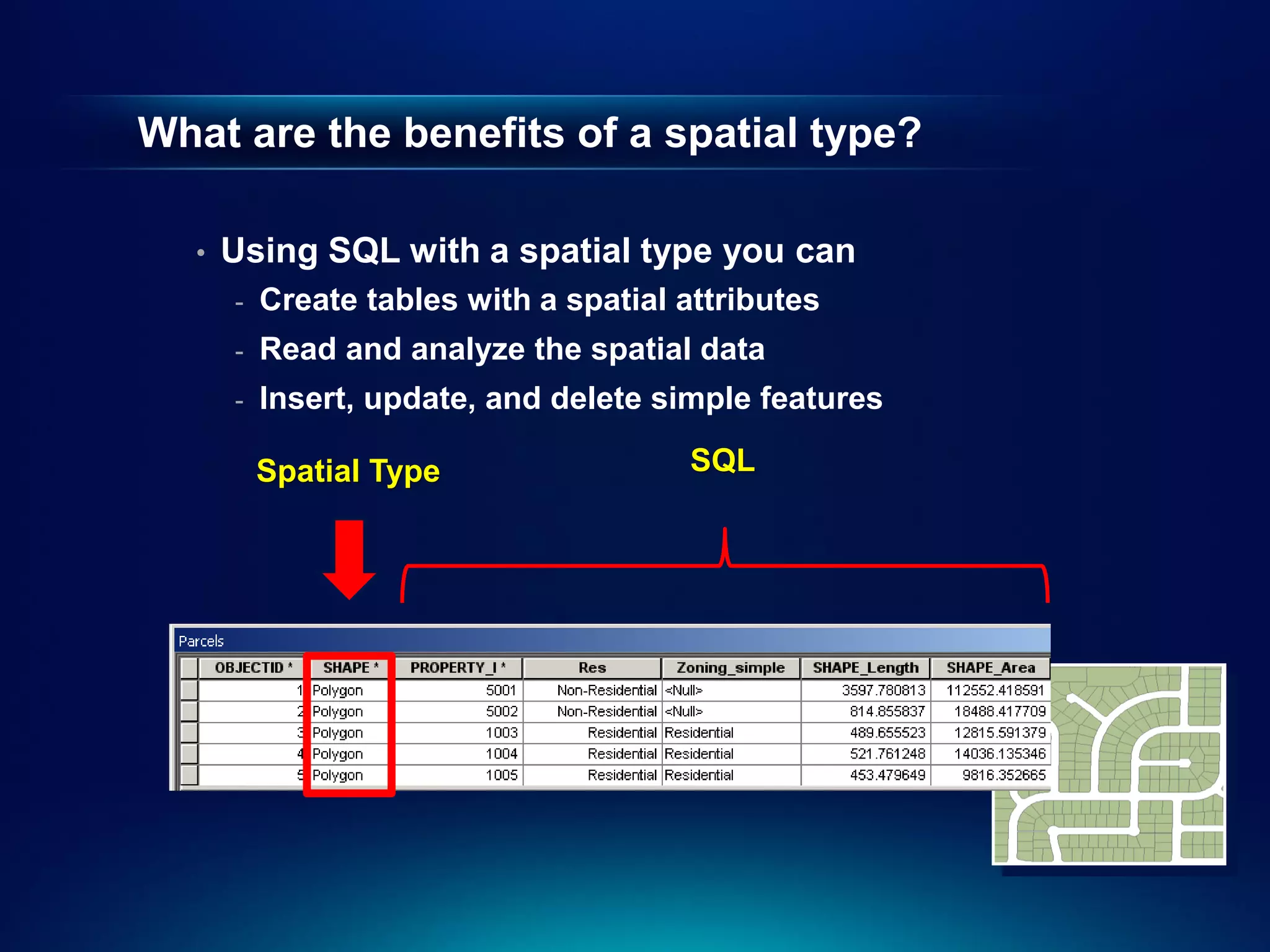
What are the benefits of a spatial type?

  •   Using SQL with a spatial type you can
      -   Create tables with a spatial attributes
      -   Read and analyze the spatial data
      -   Insert, update, and delete simple features

          Spatial Type                 SQL
Accessing Geodatabase through SQL

•   Access schema and properties of existing datasets
     -   Use SQL statements and XPath queries to query the definition
         attribute on the gdb_items table


•   Editing tables/feature classes, whether versioned or not
     -   Versioned classes are edited through versioned views


•   Create tables with SQL containing spatial types


•   Leverage SQL functions to evaluate attributes and spatial
    relationships, perform spatial operations, and return, set spatial
    properties
Accessing Geodatabase through SQL

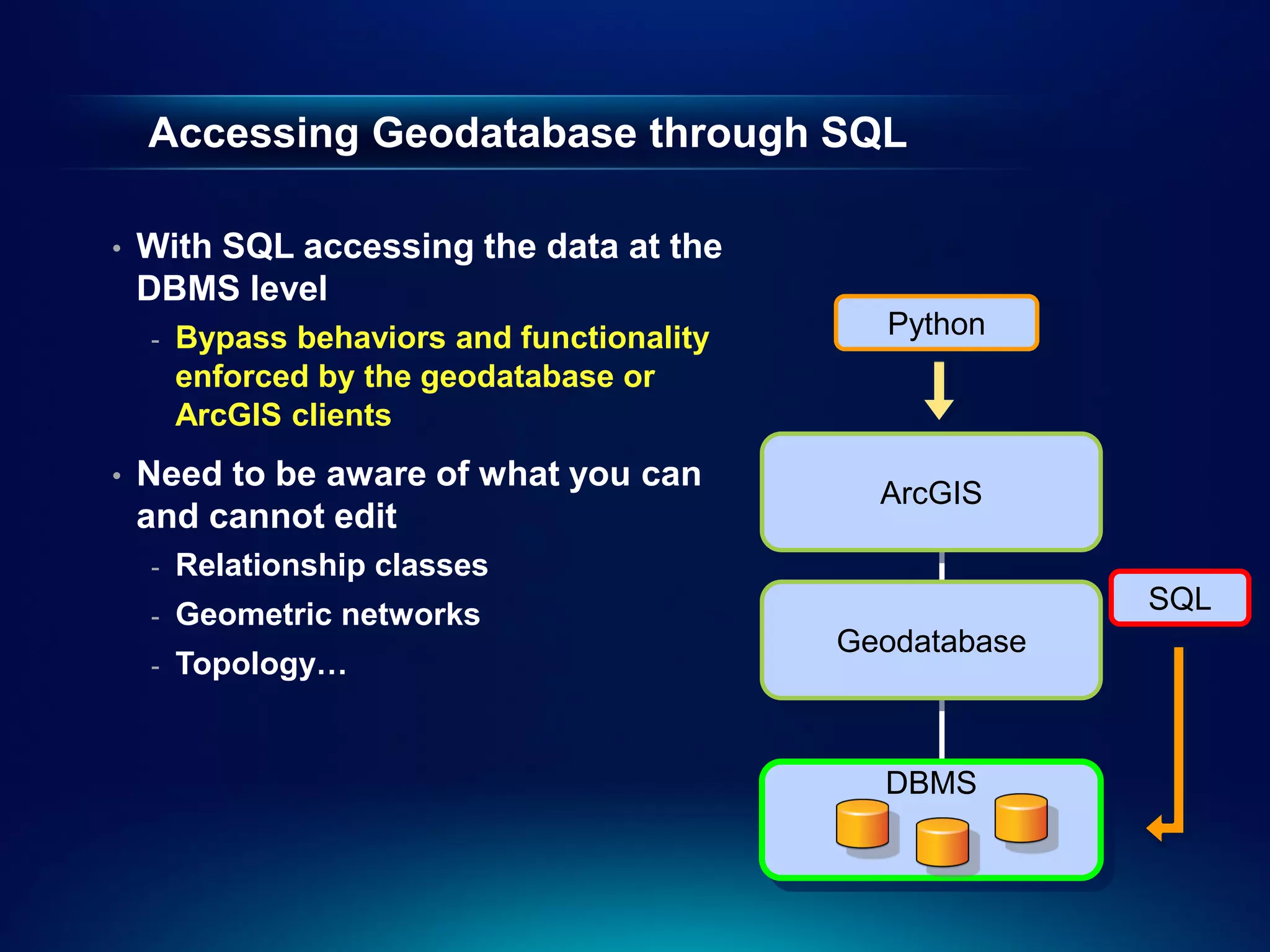
•   With SQL accessing the data at the
    DBMS level
    -   Bypass behaviors and functionality     Python
        enforced by the geodatabase or
        ArcGIS clients
•   Need to be aware of what you can
                                               ArcGIS
    and cannot edit
    -   Relationship classes
    -   Geometric networks                                 SQL
                                             Geodatabase
    -   Topology…


                                               DBMS
Accessing Geodatabase through SQL

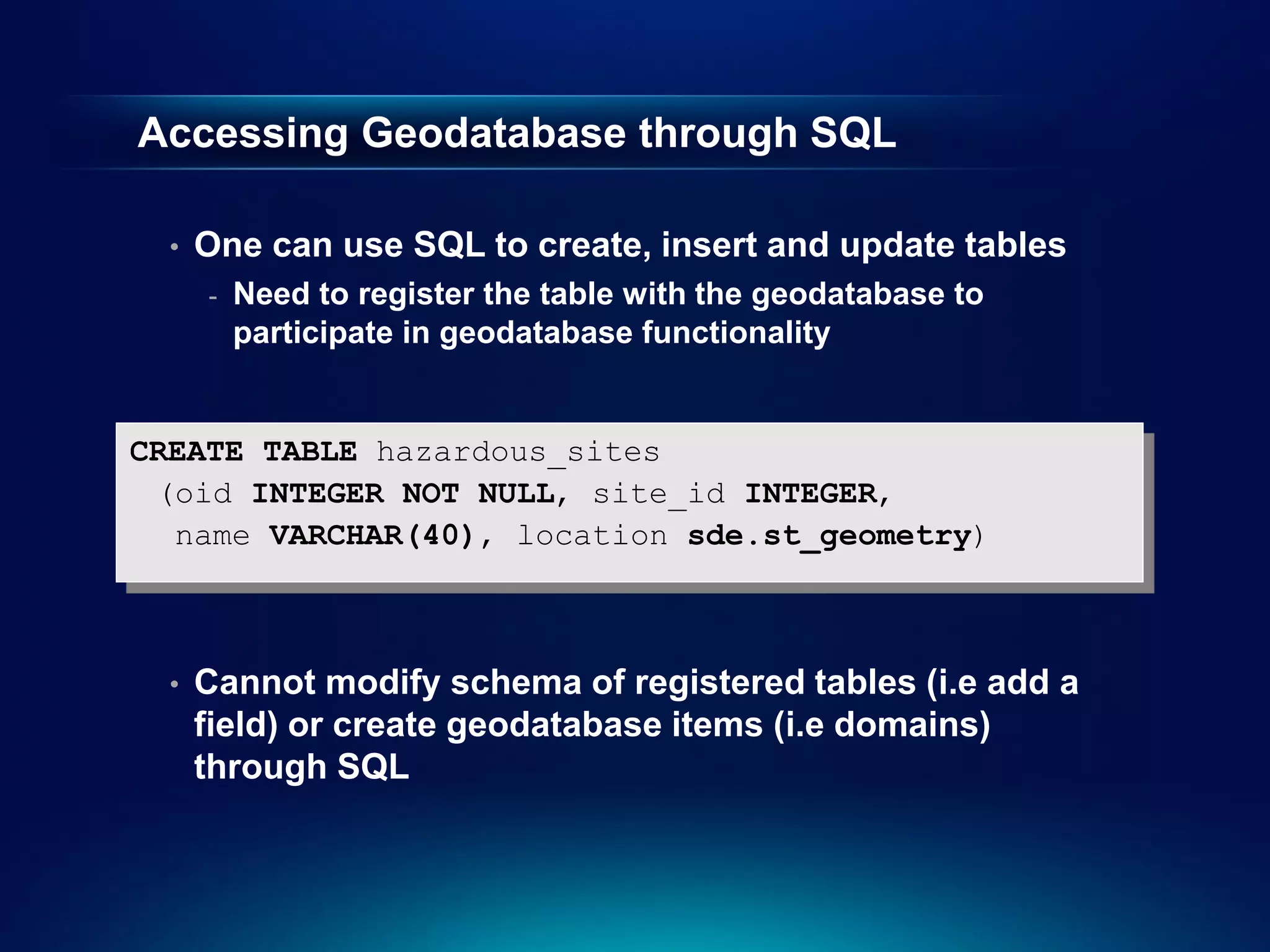
  •   One can use SQL to create, insert and update tables
      -   Need to register the table with the geodatabase to
          participate in geodatabase functionality


CREATE TABLE hazardous_sites
 (oid INTEGER NOT NULL, site_id INTEGER,
  name VARCHAR(40), location sde.st_geometry)


  •   Cannot modify schema of registered tables (i.e add a
      field) or create geodatabase items (i.e domains)
      through SQL
Accessing Geodatabase through SQL

•   Editing feature classes with SQL
     -   Points, lines, polygons (single or multipart)
     -   Ability to modify geometry when stored as a spatial type
     -   Without geodatabase behavior
          -   Not part of topology, geometric network, etc…

•   Editing tables/feature classes
     -   Use SQL statements
     -   Directly editing the database tables (no delta tables)
     -   Nonversioned editing in ArcGIS terminology
•   Editing versioned tables/feature classes
     -   Requires versioned views
Editing tables/feature classes

  •   Can use SQL to update, insert and delete data from
      tables that are not versioned
  •   Can leverage DBMS functionality
      -   Unique indexes, constraints, referential integrity, default
          values, triggers
  •   Requires a unique identifier (ObjectID) when
      inserting
      -   Used to uniquely identify rows in tables in a
          geodatabase
      -   Obtained from classes sequence or procedure
      -   Object ID is used by ArcGIS to do such things as display
          selection sets and perform identify operations on
          features
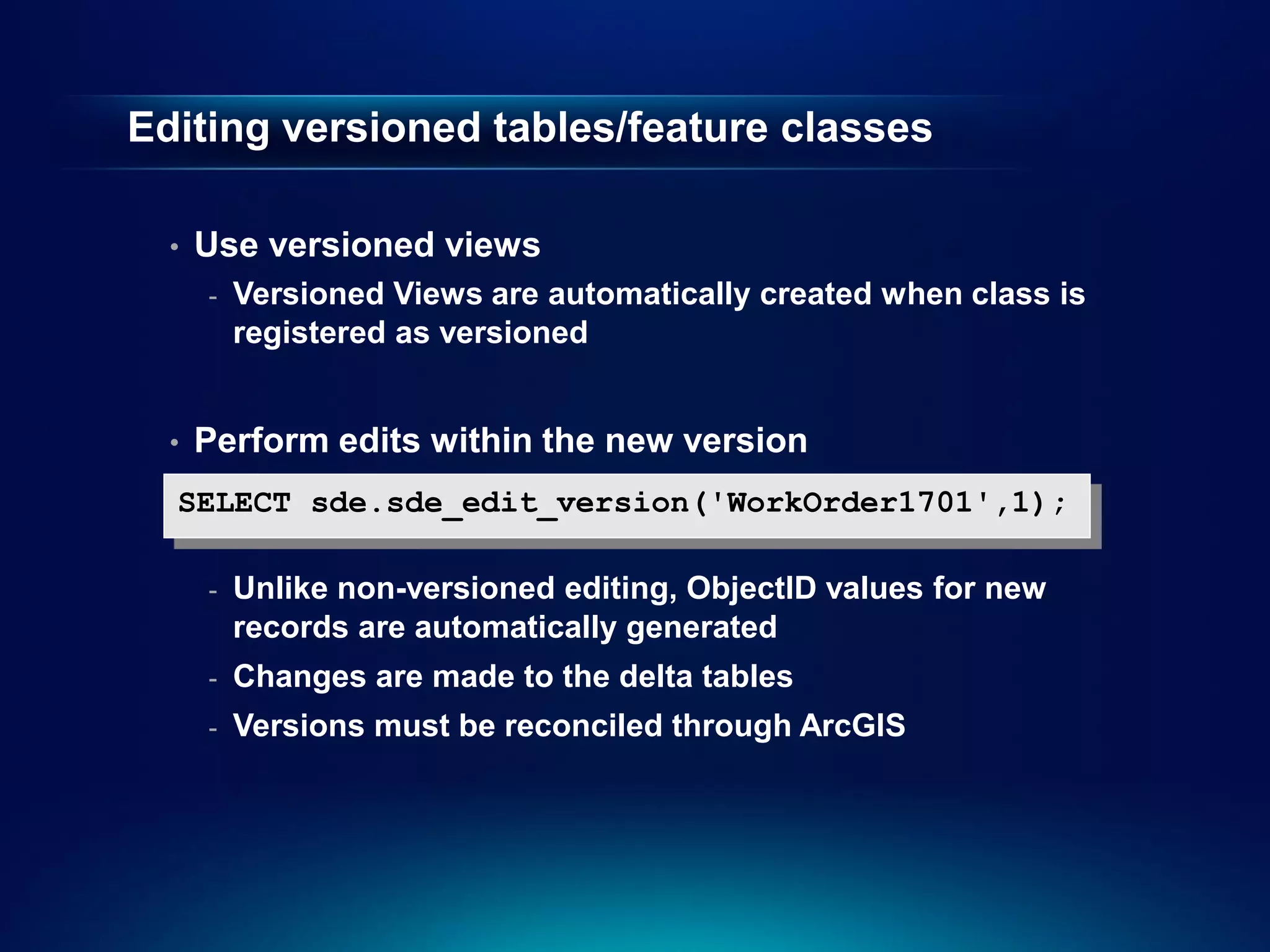
Editing versioned tables/feature classes

  •   Use versioned views
      -   Versioned Views are automatically created when class is
          registered as versioned


  •   Perform edits within the new version
  SELECT sde.sde_edit_version('WorkOrder1701',1);

      -   Unlike non-versioned editing, ObjectID values for new
          records are automatically generated
      -   Changes are made to the delta tables
      -   Versions must be reconciled through ArcGIS
Demo
Accessing a geodatabase through SQL
Geodatabase Administration
       with Python
                   Russell Brennan
Second Half Agenda


  •   Why use Python?
  •   Tips for using Python with geodatabases
  •   Demo: Creating geodatabase schema
  •   Demo: Performing geodatabase maintenance
  •   Demo: Publishing
Why use Python for Administration?


  •   Numerous tools available
      -   Schema creation and administration
      -   Maintenance
  •   Cross platform.
  •   Easy access to complex behavior.
  •   Easy to schedule tasks.
Using Python to access your geodatabase


  •   Connection files.
      -   Create Database Connection tool.
  •   Version access is defined in the connection file.
  •   Connected user is defined in the connection file.
  •   Multiple connections = multiple connection files.
Demo
Creating a Geodatabase
Demo 1: Creating a geodatabase


  •   Create an enterprise geodatabase.
  •   Create database roles.
  •   Create users.
  •   Create schema.
  •   Apply privileges.
  •   Register data as versioned.
  •   Create edit versions.
Demo
Performing maintenance
Demo 2: Geodatabase Maintenance


  •   Blocking and accepting connections
  •   Disconnecting users.
  •   Reconcile/Post versions
  •   Compress database
  •   Updating statistics and indexes
  •   Email notifications
  •   Scheduling
Demo
Publishing
Publishing


  •   Creating a script tool
  •   Publishing using the geoprocessing framework
  •   Consuming the tool
Slide Deck


  http://www.slideshare.net/brentpierce/enterprise-
     geodatabase-sql-access-and-administration
Thanks for attending
    Questions?

  Please fill out session surveys
www.esri.com/sessionevals

Enterprise geodatabase sql access and administration

  • 1.
    Accessing and Administeringyour Enterprise Geodatabase through SQL and Python Brent Pierce @brent_pierce Russell Brennan @russellbrennan hashtag: #sqlpy
  • 2.
    Assumptions • Basic knowledge of SQL, Python and relational databases • Basic knowledge of the Geodatabase • We’ll hold all questions till end Please turn off cell phones
  • 3.
    What is theGeodatabase? • A physical store of geographic data - Scalable storage model supported on different platforms • Core ArcGIS information model - A comprehensive model for representing and managing GIS data - Implemented as a series of simple tables • A transactional model for managing GIS workflows • Set of components for accessing data
  • 4.
    Geodatabase is basedon relational principles • The geodatabase is built on an extended relational database - Relational integrity - Reliability, Flexibility, Scalability - Supports continuous, large datasets - Standard relational database schema - Base short transaction model - Supports structured query language (SQL)
  • 5.
    Geodatabase is basedon relational principles … • Leverages key DBMS principles and concepts to store geographic data as tables in a DBMS - Data is organized into tables - Tables contain rows - All rows in a table have the same attributes - Each attribute has a type - Relational integrity rules exist for tables
  • 6.
    Geodatabase is basedon relational principles … • A feature class is stored as a simple DBMS table • Each row represents a feature • The fields in each row represent various characteristics or properties of the feature • One of the fields holds the feature geometry which is stored as a spatial type
  • 7.
    Geodatabase is basedon relational principles … • A feature class is stored as a simple DBMS table • Each row represents a feature • The fields in each row represent various characteristics or properties of the feature • One of the fields holds the feature geometry which is stored as a spatial type
  • 8.
    Geodatabase Schema • There are two sets of tables - Dataset tables (user-defined tables) - Geodatabase system tables System tables XML User data SQL type
  • 9.
    User-defined tables - Stores the content of each dataset in the geodatabase • Datasets are stored in 1 or more tables • Spatial Types enhance the capabilities of the geodatabase - SQL access to geometry - Industry standard storage model and API System tables XML User data SQL type
  • 10.
    Geodatabase system tables • System tables store definitions, rules, and behavior for datasets • Tracks contents within a geodatabase • 4 primary tables • Geodatabase schema is stored within an XML field System tables XML User data SQL type
  • 11.
    Geodatabase Schema… System tables XML User data SQL type
  • 12.
    Geodatabase Schema… System tables XML User data SQL type
  • 13.
    Geodatabase Schema… System tables XML User data SQL type
  • 14.
    Geodatabase Schema… System tables XML User data SQL type
  • 15.
    Geodatabase Schema… System tables XML User data SQL type
  • 16.
    What is aspatial type? • A spatial type (ST_Geometry) is a type that stores geometry data in a single spatial attribute - Geometry type, coordinates, dimension, spatial reference • Spatial Index - Access path for quick retrieval • Relational and geometry operators and Functions - Constructors - Accessor - Relational - Geometry
  • 17.
    What are thebenefits of a spatial type? • Efficiency - Spatial data and methods are stored in the database - Applications access native dbms type • Accessed using common API’s and SQL - C, C++, C#, Java - Adheres to standards for SQL access
  • 18.
    What are thebenefits of a spatial type? • Using SQL with a spatial type you can - Create tables with a spatial attributes - Read and analyze the spatial data - Insert, update, and delete simple features Spatial Type SQL
  • 19.
    Accessing Geodatabase throughSQL • Access schema and properties of existing datasets - Use SQL statements and XPath queries to query the definition attribute on the gdb_items table • Editing tables/feature classes, whether versioned or not - Versioned classes are edited through versioned views • Create tables with SQL containing spatial types • Leverage SQL functions to evaluate attributes and spatial relationships, perform spatial operations, and return, set spatial properties
  • 20.
    Accessing Geodatabase throughSQL • With SQL accessing the data at the DBMS level - Bypass behaviors and functionality Python enforced by the geodatabase or ArcGIS clients • Need to be aware of what you can ArcGIS and cannot edit - Relationship classes - Geometric networks SQL Geodatabase - Topology… DBMS
  • 21.
    Accessing Geodatabase throughSQL • One can use SQL to create, insert and update tables - Need to register the table with the geodatabase to participate in geodatabase functionality CREATE TABLE hazardous_sites (oid INTEGER NOT NULL, site_id INTEGER, name VARCHAR(40), location sde.st_geometry) • Cannot modify schema of registered tables (i.e add a field) or create geodatabase items (i.e domains) through SQL
  • 22.
    Accessing Geodatabase throughSQL • Editing feature classes with SQL - Points, lines, polygons (single or multipart) - Ability to modify geometry when stored as a spatial type - Without geodatabase behavior - Not part of topology, geometric network, etc… • Editing tables/feature classes - Use SQL statements - Directly editing the database tables (no delta tables) - Nonversioned editing in ArcGIS terminology • Editing versioned tables/feature classes - Requires versioned views
  • 23.
    Editing tables/feature classes • Can use SQL to update, insert and delete data from tables that are not versioned • Can leverage DBMS functionality - Unique indexes, constraints, referential integrity, default values, triggers • Requires a unique identifier (ObjectID) when inserting - Used to uniquely identify rows in tables in a geodatabase - Obtained from classes sequence or procedure - Object ID is used by ArcGIS to do such things as display selection sets and perform identify operations on features
  • 24.
    Editing versioned tables/featureclasses • Use versioned views - Versioned Views are automatically created when class is registered as versioned • Perform edits within the new version SELECT sde.sde_edit_version('WorkOrder1701',1); - Unlike non-versioned editing, ObjectID values for new records are automatically generated - Changes are made to the delta tables - Versions must be reconciled through ArcGIS
  • 25.
  • 26.
    Geodatabase Administration with Python Russell Brennan
  • 27.
    Second Half Agenda • Why use Python? • Tips for using Python with geodatabases • Demo: Creating geodatabase schema • Demo: Performing geodatabase maintenance • Demo: Publishing
  • 28.
    Why use Pythonfor Administration? • Numerous tools available - Schema creation and administration - Maintenance • Cross platform. • Easy access to complex behavior. • Easy to schedule tasks.
  • 29.
    Using Python toaccess your geodatabase • Connection files. - Create Database Connection tool. • Version access is defined in the connection file. • Connected user is defined in the connection file. • Multiple connections = multiple connection files.
  • 30.
  • 31.
    Demo 1: Creatinga geodatabase • Create an enterprise geodatabase. • Create database roles. • Create users. • Create schema. • Apply privileges. • Register data as versioned. • Create edit versions.

  • 32.
  • 33.
    Demo 2: GeodatabaseMaintenance • Blocking and accepting connections • Disconnecting users. • Reconcile/Post versions • Compress database • Updating statistics and indexes • Email notifications • Scheduling
  • 34.
  • 35.
    Publishing • Creating a script tool • Publishing using the geoprocessing framework • Consuming the tool
  • 36.
    Slide Deck http://www.slideshare.net/brentpierce/enterprise- geodatabase-sql-access-and-administration
  • 37.
    Thanks for attending Questions? Please fill out session surveys www.esri.com/sessionevals