Data Flow Diagrams (DFDs)
Mr.Prasad Sawant
Department Of Computer Science
Prof .Ramkurshana More Arts, Commerce and Science College Akurdi.
Mobile :9665755707
Email:sawanprasad@gmail.com
Blog:http://prasadmsawant.blogspot.com/
Data Flow Diagrams (DFDs)
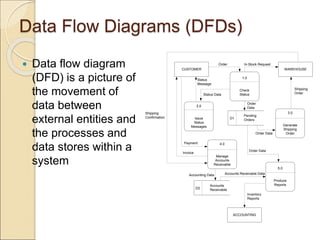
 Data flow diagram
(DFD) is a picture of
the movement of
data between
external entities and
the processes and
data stores within a
system
1.0
Check
Status
2.0
Issue
Status
Messages
3.0
Generate
Shipping
Order
ACCOUNTING
CUSTOMER WAREHOUSE
4.0
Manage
Accounts
Receivable
5.0
Produce
Reports
Order In-Stock Request
Status Data
Status
Message
Pending
Orders
D1
Order
Data
Order Data
Shipping
Order
Shipping
Confirmation
Invoice
Payment
Accounts
Receivable
D2
Accounting Data Accounts Receivable Data
Order Data
Inventory
Reports
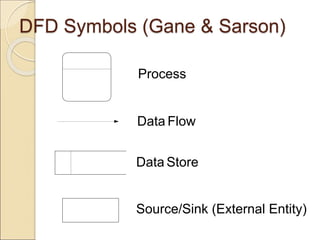
DFD Symbols (Gane & Sarson)
Process
Data Flow
Data Store
Source/Sink (External Entity)
Process
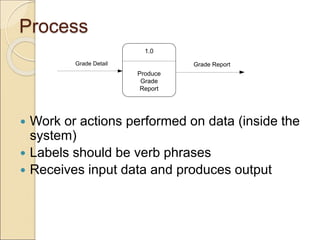
 Work or actions performed on data (inside the
system)
 Labels should be verb phrases
 Receives input data and produces output
1.0
Produce
Grade
Report
Grade Detail Grade Report
Rule 1: Process
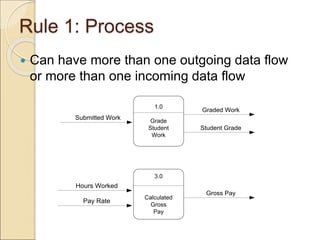
 Can have more than one outgoing data flow
or more than one incoming data flow
1.0
Grade
Student
Work
Student Grade
Submitted Work
Graded Work
3.0
Calculated
Gross
Pay
Hours Worked
Pay Rate
Gross Pay
Rule 2: Process
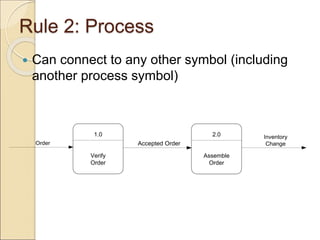
 Can connect to any other symbol (including
another process symbol)
1.0
Verify
Order
2.0
Assemble
Order
Order Accepted Order
Inventory
Change
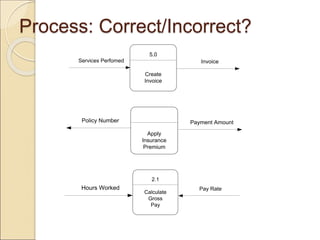
Process: Correct/Incorrect?
5.0
Create
Invoice
Services Perfomed Invoice
Apply
Insurance
Premium
Payment Amount
Policy Number
2.1
Calculate
Gross
Pay
Hours Worked Pay Rate
Data Store
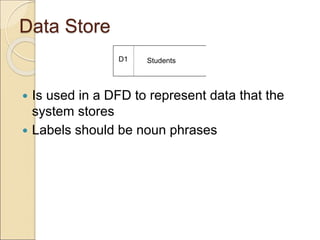
 Is used in a DFD to represent data that the
system stores
 Labels should be noun phrases
Students
D1
Rule: Data Store
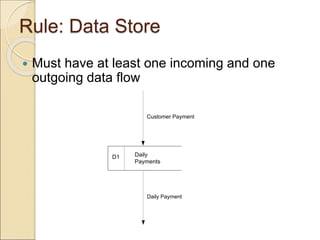
 Must have at least one incoming and one
outgoing data flow
Daily
Payments
D1
Customer Payment
Daily Payment
Source/Sink (External Entity)
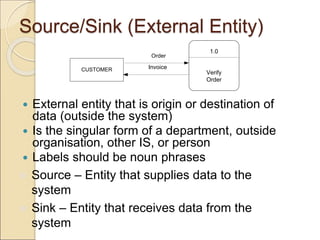
 External entity that is origin or destination of
data (outside the system)
 Is the singular form of a department, outside
organisation, other IS, or person
 Labels should be noun phrases
CUSTOMER
1.0
Verify
Order
Order
Invoice
 Source – Entity that supplies data to the
system
 Sink – Entity that receives data from the
system
Rule: Source/Sink
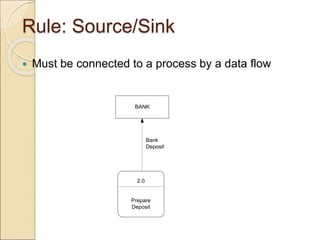
 Must be connected to a process by a data flow
BANK
2.0
Prepare
Deposit
Bank
Deposit
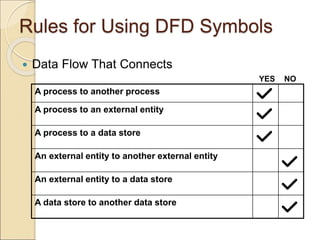
Rules for Using DFD Symbols
 Data Flow That Connects
YES NO
A process to another process
A process to an external entity
A process to a data store
An external entity to another external entity
An external entity to a data store
A data store to another data store
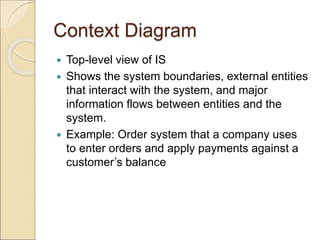
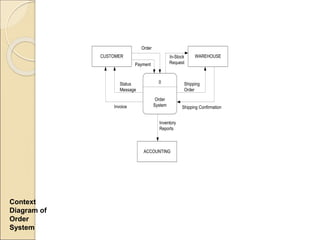
Context Diagram
 Top-level view of IS
 Shows the system boundaries, external entities
that interact with the system, and major
information flows between entities and the
system.
 Example: Order system that a company uses
to enter orders and apply payments against a
customer’s balance
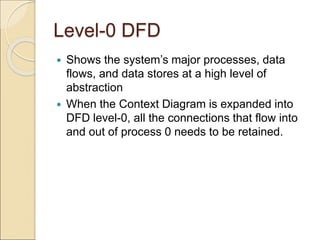
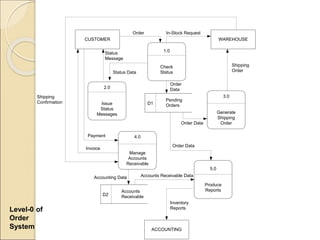
Level-0 DFD
 Shows the system’s major processes, data
flows, and data stores at a high level of
abstraction
 When the Context Diagram is expanded into
DFD level-0, all the connections that flow into
and out of process 0 needs to be retained.
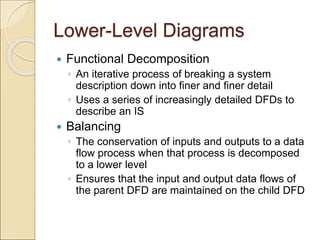
Lower-Level Diagrams
 Functional Decomposition
◦ An iterative process of breaking a system
description down into finer and finer detail
◦ Uses a series of increasingly detailed DFDs to
describe an IS
 Balancing
◦ The conservation of inputs and outputs to a data
flow process when that process is decomposed
to a lower level
◦ Ensures that the input and output data flows of
the parent DFD are maintained on the child DFD
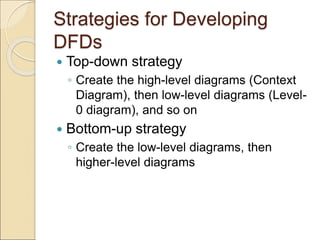
Strategies for Developing
DFDs
 Top-down strategy
◦ Create the high-level diagrams (Context
Diagram), then low-level diagrams (Level-
0 diagram), and so on
 Bottom-up strategy
◦ Create the low-level diagrams, then
higher-level diagrams
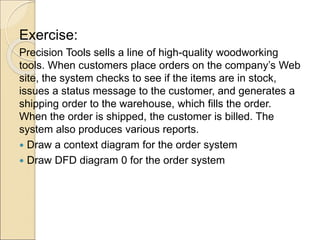
Exercise:
Precision Tools sells a line of high-quality woodworking
tools. When customers place orders on the company’s Web
site, the system checks to see if the items are in stock,
issues a status message to the customer, and generates a
shipping order to the warehouse, which fills the order.
When the order is shipped, the customer is billed. The
system also produces various reports.
 Draw a context diagram for the order system
 Draw DFD diagram 0 for the order system
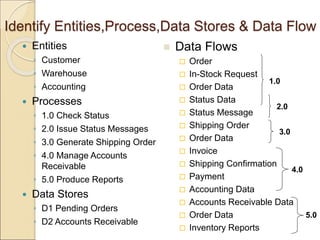
Identify Entities,Process,Data Stores & Data Flow
 Entities
◦ Customer
◦ Warehouse
◦ Accounting
 Processes
◦ 1.0 Check Status
◦ 2.0 Issue Status Messages
◦ 3.0 Generate Shipping Order
◦ 4.0 Manage Accounts
Receivable
◦ 5.0 Produce Reports
 Data Stores
◦ D1 Pending Orders
◦ D2 Accounts Receivable
 Data Flows
 Order
 In-Stock Request
 Order Data
 Status Data
 Status Message
 Shipping Order
 Order Data
 Invoice
 Shipping Confirmation
 Payment
 Accounting Data
 Accounts Receivable Data
 Order Data
 Inventory Reports
1.0
2.0
3.0
4.0
5.0
ACCOUNTING
WAREHOUSE
CUSTOMER
0
Order
System
Order
Payment
In-Stock
Request
Status
Message
Invoice Shipping Confirmation
Shipping
Order
Inventory
Reports
Context
Diagram of
Order
System
1.0
Check
Status
2.0
Issue
Status
Messages
3.0
Generate
Shipping
Order
ACCOUNTING
CUSTOMER WAREHOUSE
4.0
Manage
Accounts
Receivable
5.0
Produce
Reports
Order In-Stock Request
Status Data
Status
Message
Pending
Orders
D1
Order
Data
Order Data
Shipping
Order
Shipping
Confirmation
Invoice
Payment
Accounts
Receivable
D2
Accounting Data Accounts Receivable Data
Order Data
Inventory
Reports
Level-0 of
Order
System

DFD1.ppt

  • 1.
    Data Flow Diagrams(DFDs) Mr.Prasad Sawant Department Of Computer Science Prof .Ramkurshana More Arts, Commerce and Science College Akurdi. Mobile :9665755707 Email:sawanprasad@gmail.com Blog:http://prasadmsawant.blogspot.com/
  • 2.
    Data Flow Diagrams(DFDs)  Data flow diagram (DFD) is a picture of the movement of data between external entities and the processes and data stores within a system 1.0 Check Status 2.0 Issue Status Messages 3.0 Generate Shipping Order ACCOUNTING CUSTOMER WAREHOUSE 4.0 Manage Accounts Receivable 5.0 Produce Reports Order In-Stock Request Status Data Status Message Pending Orders D1 Order Data Order Data Shipping Order Shipping Confirmation Invoice Payment Accounts Receivable D2 Accounting Data Accounts Receivable Data Order Data Inventory Reports
  • 3.
    DFD Symbols (Gane& Sarson) Process Data Flow Data Store Source/Sink (External Entity)
  • 4.
    Process  Work oractions performed on data (inside the system)  Labels should be verb phrases  Receives input data and produces output 1.0 Produce Grade Report Grade Detail Grade Report
  • 5.
    Rule 1: Process Can have more than one outgoing data flow or more than one incoming data flow 1.0 Grade Student Work Student Grade Submitted Work Graded Work 3.0 Calculated Gross Pay Hours Worked Pay Rate Gross Pay
  • 6.
    Rule 2: Process Can connect to any other symbol (including another process symbol) 1.0 Verify Order 2.0 Assemble Order Order Accepted Order Inventory Change
  • 7.
    Process: Correct/Incorrect? 5.0 Create Invoice Services PerfomedInvoice Apply Insurance Premium Payment Amount Policy Number 2.1 Calculate Gross Pay Hours Worked Pay Rate
  • 8.
    Data Store  Isused in a DFD to represent data that the system stores  Labels should be noun phrases Students D1
  • 9.
    Rule: Data Store Must have at least one incoming and one outgoing data flow Daily Payments D1 Customer Payment Daily Payment
  • 10.
    Source/Sink (External Entity) External entity that is origin or destination of data (outside the system)  Is the singular form of a department, outside organisation, other IS, or person  Labels should be noun phrases CUSTOMER 1.0 Verify Order Order Invoice  Source – Entity that supplies data to the system  Sink – Entity that receives data from the system
  • 11.
    Rule: Source/Sink  Mustbe connected to a process by a data flow BANK 2.0 Prepare Deposit Bank Deposit
  • 12.
    Rules for UsingDFD Symbols  Data Flow That Connects YES NO A process to another process A process to an external entity A process to a data store An external entity to another external entity An external entity to a data store A data store to another data store
  • 13.
    Context Diagram  Top-levelview of IS  Shows the system boundaries, external entities that interact with the system, and major information flows between entities and the system.  Example: Order system that a company uses to enter orders and apply payments against a customer’s balance
  • 14.
    Level-0 DFD  Showsthe system’s major processes, data flows, and data stores at a high level of abstraction  When the Context Diagram is expanded into DFD level-0, all the connections that flow into and out of process 0 needs to be retained.
  • 15.
    Lower-Level Diagrams  FunctionalDecomposition ◦ An iterative process of breaking a system description down into finer and finer detail ◦ Uses a series of increasingly detailed DFDs to describe an IS  Balancing ◦ The conservation of inputs and outputs to a data flow process when that process is decomposed to a lower level ◦ Ensures that the input and output data flows of the parent DFD are maintained on the child DFD
  • 16.
    Strategies for Developing DFDs Top-down strategy ◦ Create the high-level diagrams (Context Diagram), then low-level diagrams (Level- 0 diagram), and so on  Bottom-up strategy ◦ Create the low-level diagrams, then higher-level diagrams
  • 17.
    Exercise: Precision Tools sellsa line of high-quality woodworking tools. When customers place orders on the company’s Web site, the system checks to see if the items are in stock, issues a status message to the customer, and generates a shipping order to the warehouse, which fills the order. When the order is shipped, the customer is billed. The system also produces various reports.  Draw a context diagram for the order system  Draw DFD diagram 0 for the order system
  • 18.
    Identify Entities,Process,Data Stores& Data Flow  Entities ◦ Customer ◦ Warehouse ◦ Accounting  Processes ◦ 1.0 Check Status ◦ 2.0 Issue Status Messages ◦ 3.0 Generate Shipping Order ◦ 4.0 Manage Accounts Receivable ◦ 5.0 Produce Reports  Data Stores ◦ D1 Pending Orders ◦ D2 Accounts Receivable  Data Flows  Order  In-Stock Request  Order Data  Status Data  Status Message  Shipping Order  Order Data  Invoice  Shipping Confirmation  Payment  Accounting Data  Accounts Receivable Data  Order Data  Inventory Reports 1.0 2.0 3.0 4.0 5.0
  • 19.
  • 20.
    1.0 Check Status 2.0 Issue Status Messages 3.0 Generate Shipping Order ACCOUNTING CUSTOMER WAREHOUSE 4.0 Manage Accounts Receivable 5.0 Produce Reports Order In-StockRequest Status Data Status Message Pending Orders D1 Order Data Order Data Shipping Order Shipping Confirmation Invoice Payment Accounts Receivable D2 Accounting Data Accounts Receivable Data Order Data Inventory Reports Level-0 of Order System