Essentials of
Systems Analysis and Design
Managing the Information Systems
Project
2.1
Learning Objectives
Discuss skills required to be an effective
project manager
Describe skills and activities of a project
manager during project initiation, planning,
execution and closedown
Explain Gantt Charts and Network Diagrams
Review commercial project management
software packages
2.2
Pine Valley Furniture
Manufacturing Company
 Product: Wood Furniture
 Market: U.S.
 Organized into functional areas
 Manufacturing
 Sales
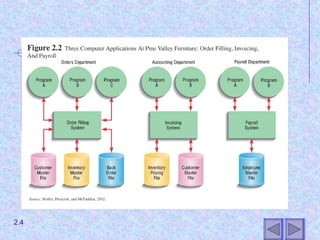
 Three independent computer systems
were converted to a database in 1990s
2.3
2.4
Managing the Information
Systems Project
Focus of project management
 To ensure that information system projects
meet customer expectations
 Delivered in a timely manner
 Meet constraints and requirements
2.5
Project Manager
 Systems Analyst responsible for
 Planning
 Analysis
 Development
 Implementation
 Requires diverse set of skills
 Management
 Leadership
 Technical
 Conflict management
 Customer relations
Managing the Information
Systems Project
2.6
Project Management Process
Project
 Planned undertaking of related activities to reach
an objective that has a beginning and an end
Four Phases
 Planning
 Analysis
 Development
 Implementation
2.7
Planning the Project
1. Establish project initiation team
2. Establish relationship with customer
3. Establish project initiation plan
4. Establish management procedures
5. Establish project management
environment and workbook
2.8
Analyzing the Project
1. Describe project scope, alternatives
and feasibility
 Scope and Feasibility
 Understand the project
 What problem is addressed
 What results are to be achieved
 Measures of success
 Completion criteria
2.9
Analyzing the Project
2. Divide the project into manageable
tasks
• Work breakdown structure
• Gantt chart
2. Estimate resources and create a
resource plan
3. Develop a preliminary schedule
• Utilize Gantt Charts and Network Diagrams
2.10
Analyzing the Project
5. Develop a communication plan
 Outline communication processes among
customers, team members and
management
 Types of reports
 Frequency of reports
2.11
2.12
Analyzing the Project
6. Determine project standards and
procedures
 Specify how deliverables are tested and
produced
7. Identify and assess risk
 Identify sources of risk
 Estimate consequences of risk
8. Create a preliminary budget
9. Develop a statement of work
 Describe what the project will deliver
2.13
Analyzing the Project
10.Set a baseline project plan
 Estimate of project’s tasks and resources
2.14
Developing the Project
1. Execute baseline project plan
 Acquire and assign resources
 Train new team members
 Keep project on schedule
2. Monitor project progress
 Adjust resources, budget and/or activities
2.15
Developing the Project
3. Manage changes to baseline project
plan
 Slipped completion dates
 Changes in personnel
 New activities
4. Maintain project workbook
5. Communicate project status
2.16
Implementation
1. Termination
 Types of termination
 Natural
 Requirements have been met
 Unnatural
 Project stopped
 Documentation
 Personnel Appraisal
2.17
Implementation
2. Conduct post-project reviews
 Determine strengths and weaknesses of:
 Project deliverables
 Project management process
 Development process
3. Close customer contract
2.18
Representing and Scheduling
Project Plans
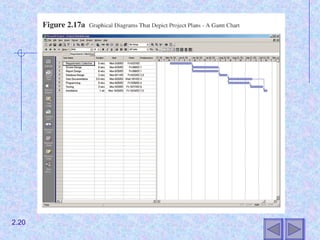
Gantt Charts
 Useful for depicting simple projects or parts
of large projects
 Show start and completion dates for
individual tasks
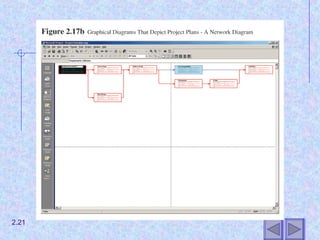
Network Diagrams
 Show order of activities
2.19
2.20
2.21
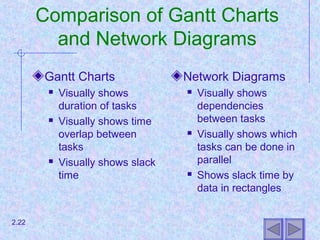
Comparison of Gantt Charts
and Network Diagrams
Gantt Charts
 Visually shows
duration of tasks
 Visually shows time
overlap between
tasks
 Visually shows slack
time
Network Diagrams
 Visually shows
dependencies
between tasks
 Visually shows which
tasks can be done in
parallel
 Shows slack time by
data in rectangles
2.22
Gantt Chart and Network
Diagram for Pine Valley Furniture
Steps
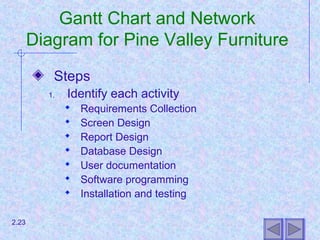
1. Identify each activity
 Requirements Collection
 Screen Design
 Report Design
 Database Design
 User documentation
 Software programming
 Installation and testing
2.23
Gantt Chart and Network
Diagram for Pine Valley Furniture
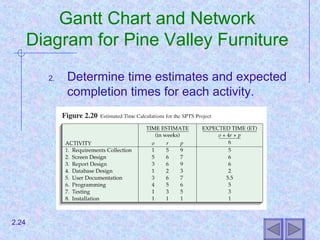
2. Determine time estimates and expected
completion times for each activity.
2.24
Gantt Chart and Network
Diagram for Pine Valley Furniture
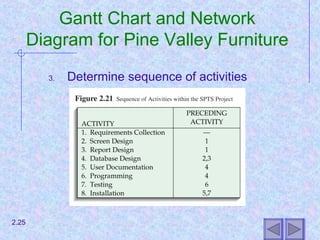
3. Determine sequence of activities
2.25
Gantt Chart and Network
Diagram for Pine Valley Furniture
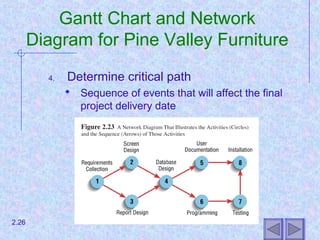
4. Determine critical path
 Sequence of events that will affect the final
project delivery date
2.26
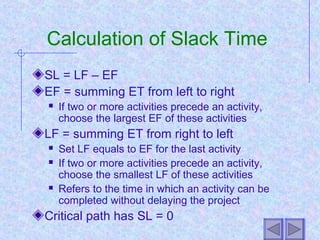
Calculation of Slack Time
SL = LF – EF
EF = summing ET from left to right
 If two or more activities precede an activity,
choose the largest EF of these activities
LF = summing ET from right to left
 Set LF equals to EF for the last activity
 If two or more activities precede an activity,
choose the smallest LF of these activities
 Refers to the time in which an activity can be
completed without delaying the project
Critical path has SL = 0
Commercial Project
Management Software
Many systems are available
Three activities required to use:
 Establish project start or end date
 Enter tasks and assign task relationships
 Select scheduling method to review project
reports
2.28
Summary
Skills of an effective project manager
Activities of project manager
 Initiation
 Planning
 Execution
 Closedown
Gantt Charts and Network Diagrams
Commercial PM Software
2.29

Project management

  • 1.
    Essentials of Systems Analysisand Design Managing the Information Systems Project 2.1
  • 2.
    Learning Objectives Discuss skillsrequired to be an effective project manager Describe skills and activities of a project manager during project initiation, planning, execution and closedown Explain Gantt Charts and Network Diagrams Review commercial project management software packages 2.2
  • 3.
    Pine Valley Furniture ManufacturingCompany  Product: Wood Furniture  Market: U.S.  Organized into functional areas  Manufacturing  Sales  Three independent computer systems were converted to a database in 1990s 2.3
  • 4.
  • 5.
    Managing the Information SystemsProject Focus of project management  To ensure that information system projects meet customer expectations  Delivered in a timely manner  Meet constraints and requirements 2.5
  • 6.
    Project Manager  SystemsAnalyst responsible for  Planning  Analysis  Development  Implementation  Requires diverse set of skills  Management  Leadership  Technical  Conflict management  Customer relations Managing the Information Systems Project 2.6
  • 7.
    Project Management Process Project Planned undertaking of related activities to reach an objective that has a beginning and an end Four Phases  Planning  Analysis  Development  Implementation 2.7
  • 8.
    Planning the Project 1.Establish project initiation team 2. Establish relationship with customer 3. Establish project initiation plan 4. Establish management procedures 5. Establish project management environment and workbook 2.8
  • 9.
    Analyzing the Project 1.Describe project scope, alternatives and feasibility  Scope and Feasibility  Understand the project  What problem is addressed  What results are to be achieved  Measures of success  Completion criteria 2.9
  • 10.
    Analyzing the Project 2.Divide the project into manageable tasks • Work breakdown structure • Gantt chart 2. Estimate resources and create a resource plan 3. Develop a preliminary schedule • Utilize Gantt Charts and Network Diagrams 2.10
  • 11.
    Analyzing the Project 5.Develop a communication plan  Outline communication processes among customers, team members and management  Types of reports  Frequency of reports 2.11
  • 12.
  • 13.
    Analyzing the Project 6.Determine project standards and procedures  Specify how deliverables are tested and produced 7. Identify and assess risk  Identify sources of risk  Estimate consequences of risk 8. Create a preliminary budget 9. Develop a statement of work  Describe what the project will deliver 2.13
  • 14.
    Analyzing the Project 10.Seta baseline project plan  Estimate of project’s tasks and resources 2.14
  • 15.
    Developing the Project 1.Execute baseline project plan  Acquire and assign resources  Train new team members  Keep project on schedule 2. Monitor project progress  Adjust resources, budget and/or activities 2.15
  • 16.
    Developing the Project 3.Manage changes to baseline project plan  Slipped completion dates  Changes in personnel  New activities 4. Maintain project workbook 5. Communicate project status 2.16
  • 17.
    Implementation 1. Termination  Typesof termination  Natural  Requirements have been met  Unnatural  Project stopped  Documentation  Personnel Appraisal 2.17
  • 18.
    Implementation 2. Conduct post-projectreviews  Determine strengths and weaknesses of:  Project deliverables  Project management process  Development process 3. Close customer contract 2.18
  • 19.
    Representing and Scheduling ProjectPlans Gantt Charts  Useful for depicting simple projects or parts of large projects  Show start and completion dates for individual tasks Network Diagrams  Show order of activities 2.19
  • 20.
  • 21.
  • 22.
    Comparison of GanttCharts and Network Diagrams Gantt Charts  Visually shows duration of tasks  Visually shows time overlap between tasks  Visually shows slack time Network Diagrams  Visually shows dependencies between tasks  Visually shows which tasks can be done in parallel  Shows slack time by data in rectangles 2.22
  • 23.
    Gantt Chart andNetwork Diagram for Pine Valley Furniture Steps 1. Identify each activity  Requirements Collection  Screen Design  Report Design  Database Design  User documentation  Software programming  Installation and testing 2.23
  • 24.
    Gantt Chart andNetwork Diagram for Pine Valley Furniture 2. Determine time estimates and expected completion times for each activity. 2.24
  • 25.
    Gantt Chart andNetwork Diagram for Pine Valley Furniture 3. Determine sequence of activities 2.25
  • 26.
    Gantt Chart andNetwork Diagram for Pine Valley Furniture 4. Determine critical path  Sequence of events that will affect the final project delivery date 2.26
  • 27.
    Calculation of SlackTime SL = LF – EF EF = summing ET from left to right  If two or more activities precede an activity, choose the largest EF of these activities LF = summing ET from right to left  Set LF equals to EF for the last activity  If two or more activities precede an activity, choose the smallest LF of these activities  Refers to the time in which an activity can be completed without delaying the project Critical path has SL = 0
  • 28.
    Commercial Project Management Software Manysystems are available Three activities required to use:  Establish project start or end date  Enter tasks and assign task relationships  Select scheduling method to review project reports 2.28
  • 29.
    Summary Skills of aneffective project manager Activities of project manager  Initiation  Planning  Execution  Closedown Gantt Charts and Network Diagrams Commercial PM Software 2.29