NTIPRIT
National Telecommunication Institute for Policy Research, Innovation and Training
Ghaziabad – 201002. www.ntiprit.gov.in
Data Communication
1
An Introduction
By Naveen Jakhar, ITS
NTIPRIT
Discussion Points
9/13/2016 Introduction Data Com 2
 Basic Data Communication Concepts
• Message, Packets, Nodes, link, Backbone
Communication Channel, Protocol
 Network Elements
• Hub, Switch, Bridge, Router, gateway
 Packet Switching Concepts
 Various Types of Data Communication
NTIPRIT
Why Data Communication?
3
NTIPRITNTIPRIT
Over the past few years, it has become clear that the world
has changed forever.
We are now in the Information Age—the second Industrial
Revolution,
The first Industrial Revolution revolutionized the way people
worked by introducing machines and new organizational
forms.
Information is power, information is tool! (information is
processed Data)
One of the challenges in studying data communications and
networking is that there are many perspectives that can be
used
NTIPRITNTIPRIT
Is the process of using computing and communication
technologies to transfer data from one place to another,
and vice versa. It enables the movement of electronic or
digital data between two or more nodes, regardless of
geographical location, technological medium or data
contents.
DC incorporates several techniques and technologies
with the primary objective of enabling any form of
electronic communication. These technologies include
telecommunications, computer networking and
radio/satellite communication.
Data communications (DC)
9/13/2016 5Introduction Data Com
NTIPRIT
Electronic transmission of information that has been
encoded digitally
(as for storage and processing by computers)
sending digital messages using communication technology
Data Communication
9/13/2016 Introduction Data Com 6
NTIPRIT
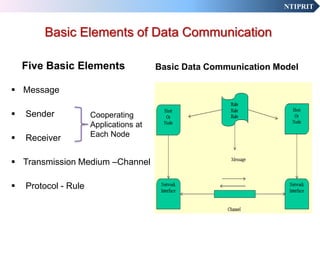
Basic Elements of Data Communication
Five Basic Elements
 Message
 Sender
 Receiver
 Transmission Medium –Channel
 Protocol - Rule
Basic Data Communication Model
Cooperating
Applications at
Each Node
NTIPRIT
5 Basic Components
9/13/2016 Introduction Data Com 8
NTIPRIT
MESSAGE
Examples of Message : Data, Program, File, Snippet of Personal
Conversation, Stream of Audio, Video, Voice, etc
The Message is the primary purpose of communication. It can take
many forms
Limitations of use of Message as Communication Tool: Varying
Message Length & Inefficient Utilization of Bandwidth
Message as Byte Stream
The meaning of message is established by the protocols recognized by
the cooperating applications at each node
Messages are converted into Analog/Digital Signals for transmission
over the communication Medium
9
NTIPRIT
DSL
Modem
DSLAM Internet
Ethernet packets
Analog Signal Digital ATM, MPLS,SONET Ethernet packets
Converter Various
converters
Web
serverHome PC Links Links
JOURNEY OF MESSAGE FROM SOURCE TO DESTINATION
10
NTIPRIT
Packets
Basic Unit of Data Communication
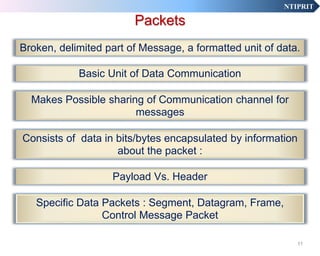
Broken, delimited part of Message, a formatted unit of data.
Payload Vs. Header
Makes Possible sharing of Communication channel for
messages
Consists of data in bits/bytes encapsulated by information
about the packet :
Specific Data Packets : Segment, Datagram, Frame,
Control Message Packet
11
NTIPRIT
Why Packet is the Basic Unit?
Represents a reasonable unit for routing of data
The use of packets simplifies operations and increases communication
efficiency
Enables processing of a block of data all at once, instead of a character
or byte at a time
Packets offer an alternative to dedicated channel for entire message
length
It increases the productivity of the communication channel
It simplifies synchronisation of the sending and receiving systems
12
NTIPRIT
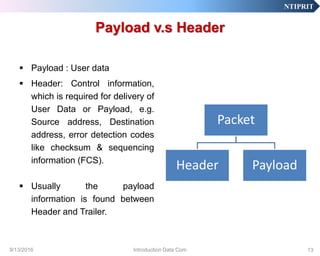
Payload v.s Header
 Payload : User data
 Header: Control information,
which is required for delivery of
User Data or Payload, e.g.
Source address, Destination
address, error detection codes
like checksum & sequencing
information (FCS).
 Usually the payload
information is found between
Header and Trailer.
Packet
Header Payload
9/13/2016 13Introduction Data Com
NTIPRIT
NODE
 Can be any communication
Device – PC, Smart Phone,
Router, gateway
 Can be either source,
Destination, or Intermediary
 Each node on a network is
identified by unique logical
address – IP address on TCP/IP
 Node connect to the network
through its Interface
Node
9/13/2016 14Introduction Data Com
NTIPRIT
INTERFACE
 Connects Node to the network
 Each Interface is identified by
unique Physical Address –
MAC address in NIC
 A node may have multiple
Interfaces
 Multi Homing
9/13/2016 15Introduction Data Com
NTIPRIT
LINK
 A Segment of the transmission
Channel
 A LAN or Subnet is a Link
 Devices on same Link uses Physical
Address to identify each other
 Devices connected on same Link
communicate at Layer 2, Data Link
Layer
 Hub and switch works on the Link
 Link
9/13/2016 16Introduction Data Com
NTIPRIT
BACKBONE
 A Backbone is a network
Infrastructure that interconnect
diverse LANs or Sub networks
 A backbone can tie together
diverse networks in the same
building, in different buildings in a
campus environment, or over wide
areas
 Network backbones are designed
to maximize the reliability and
performance of large-scale, long-
distance data communications.
 WAN Backbones typically consist
of routers and switches connected
by fibre optic
9/13/2016 17Introduction Data Com
NTIPRIT
HUB
 A common connection point
for devices in a network. Also
known as concentrator.
 A hub is the place where data
converges from one or more
directions and is forwarded out in
one or more directions.
 Hubs are commonly used to
connect segments of a LAN.
 Hub basically acts as signal splitter.
When a data frame arrives at one
port, it is redistributed to all the
other ports so that all devices of the
LAN can see all frames.
 Types of Hub
• Active, Passive, Intelligent
 Hub
9/13/2016 18Introduction Data Com
NTIPRIT
SWITCH
 A network switch joins multiple
Devices together within one LAN.
 Allow different nodes of a network to
communicate directly with each
other.
 It receives a message (Ethernet
frame) from any device connected to
its input ports and then transmits the
message only to that output port to
which the destination device is
connected.
 One to one connection
 Ensures optimum utilization of
Bandwidth or N/W resources.
LAN SWITCH
9/13/2016 19Introduction Data Com
NTIPRIT
SWITCH
 Switch Types
• Managed Vs. Unmanaged
• Layer 2 Vs. layer 3 switch
• Multi layer Switch
9/13/2016 20Introduction Data Com
NTIPRIT
Unmanaged Switch
• In scenarios where the network traffic is light, all that
is required is a way for the data to pass from one
device to another.
• There is no need for prioritizing the packets as all the
traffic will flow unimpeded.
• An unmanaged switch will fill this need without
issues.
9/13/2016 21Introduction Data Com
NTIPRIT
Managed Switch
• As the number of devices increases, the ability to
ensure that the time-sensitive packets are prioritized
becomes increasingly difficult as more concurrent
streams of data hit the network.
• Another issue that may need to be dealt with is which
devices have access to what portion of the network.
9/13/2016 22Introduction Data Com
NTIPRIT
Multilayer Switch
• A multilayer switch is a network device that has the
ability to operate at higher layers of the OSI reference
model.
• A multilayer switch can perform the functions of a
switch as well as that of a router at incredibly fast
speeds.
• Multilayer switches became devices that examine
Layer 2 through Layer 7.
9/13/2016 23Introduction Data Com
NTIPRIT
Hub vs. Switch
HUB
 Broadcast Data Frame to all
nodes connected to it
 Inefficient use of LAN
Bandwidth
 Half Duplex Communication
 Unmanaged
SWITCH
 Frame from source node is
sent only to destination node
 Efficient use of Bandwidth –
Micro segmenting
 Full Duplex Communication
 Can be managed
NTIPRIT
HUB
Hub vs. Switch
25
NTIPRIT
BRIDGE
 A bridge connects a LAN to
another LAN that uses the same
protocol (for example, Ethernet or
token ring).
 Has ports connected to two or
more separate LANs. Packets
received on one port may be re-
transmitted on another port.
 Bridges learn which addresses are
on which network and develop a
learning table so that subsequent
messages can be forwarded to the
right network.
 Operates at Data Link Layer.
 Bridge
LAN1 LAN2
9/13/2016 26Introduction Data Com
NTIPRIT
ROUTER
 A router is a device or a software in a
computer that determines the next network
point to which a packet should be
forwarded to its destination.
 Allows different networks to communicate
with each other
 A router creates and maintain a table of the
available routes and their conditions and
uses this information along with distance
and cost algorithms to determine the best
route for a given packet.
 A packet will travel through a number of
network points with routers before arriving
at its destination.
9/13/2016 27Introduction Data Com
NTIPRIT
SWITCH
Processor
Memory
NIC
NIC
NIC
NIC
NIC
NIC
OUTPUT
PORT
INPUT
PORT
INSIDE THE ROUTER
28
NTIPRIT
ROUTERS
 Edge Router
• Routes data packets between a Backbone Network
and LAN
 Core Router
• Routes data packets Within a Backbone Network
 Gateway Router
 B-router
• Router Combined with Bridge Functionality
 Firewall Router
• Router having Packet Filtering capabilities
9/13/2016 29Introduction Data Com
NTIPRIT
GATEWAY
 A gateway is a network point ,
similar to router that acts as an
entrance to another network;
 Gateway Connects Networks on
Different Protocols/dissimilar
networks
 Gateway nodes are computers
that control traffic within a
company’s network or at local
internet service provider (ISP)
 Gateway
9/13/2016 30Introduction Data Com
NTIPRIT
Dynamic vs. Static Routing
 STATIC ROUTING :
Routers forward the arriving Data packets to
predefined output port. The routing table is
manually configured.
 DYANMIC ROUTING :
The Router learns the state of the Network and
continuously update its routing table. For this, it
uses routing protocols.
9/13/2016 31Introduction Data Com
NTIPRIT
What is the difference between….?
 Bridge: device to interconnect two LANs that use
the SAME logical link control protocol but may
use different medium access control protocols.
 Router: device to interconnect SIMILAR
networks, e.g. similar protocols and workstations
and servers
 Gateway: device to interconnect DISSIMILAR
protocols and servers.
9/13/2016 32Introduction Data Com
NTIPRIT
SWITCHING
33
• Switching is basically transfer of
information from one point to another
point with some intelligence or control
or
• Establishing a temporary path or
connection between two points or
writing at one point of time and reading
at another point of time.
NTIPRIT
SWITCH
 A switch is a device that channels incoming data from any of multiple
input ports to the specific output port that will take the data toward its
intended destination
 In the traditional circuit-switched telephone network, one or more
switches are used to set up a dedicated though temporary
connection or circuit for an exchange between two or more parties
 On local area network (LAN), a switch determines, from the physical
device (Media Access Control or MAC) address in each incoming
message frame, which output port to forward it
 In a wide area packet-switched network such as the Internet, a
switch determines from the IP address in each packet which output
port to use for the next part of its trip to the intended destination
9/13/2016 34Introduction Data Com
NTIPRIT
Packet Switching
 A digital network technology that breaks up a message (Bit Stream)
into fixed size packets for transmission
 Each packet is then transmitted individually and can even follow
different routes to its destination.
 Once all the packets forming a message arrive at the destination,
they are recompiled into the original message.
 Packets of different messages share the communication channel
 When traversing network switches, routers and other network
nodes, packets are buffered and queued, resulting in variable delay
and throughput depending on the traffic load in the network.
9/13/2016 35Introduction Data Com
NTIPRIT
AN END TO END CHANNEL WITH MULTIPLE PATHS
THROUGH THE INTERMEDIATE NODES
36
NTIPRIT
Packet Switching :
Illustration
9/13/2016 Introduction Data Com 37
1
2
4
3
2
2
4
1
3
4
1
1 1
31
4
4 3 2 1
2 1
1432
3
1
12
24
2
NTIPRITNTIPRIT
Data traffic is divided into packets.
• Packets travel separately through network
• Packet forwarding based on the header
• Network nodes may store packets temporarily
Destination reconstructs the message
• Best-effort delivery
• Packets may be lost
• Packets may be corrupted
• Packets may be delivered out of order
Each packet contains a header with Source and destination address
38
Packet Switching : features
NTIPRITNTIPRIT
The effectiveness of a data communication system depends on four
fundamental characteristics
Delivery
The system must deliver data to the correct destination.
Accuracy
Accurately- without errors/ alteration/ duplication/ missing
Timeliness
Data delivered late are useless.
•in the same order that they are produced,
•without significant delay.
•This kind of delivery is called Real-time transmission.
Jitter
 Variation in the arrival time of packets. Uneven delay in delivery of
packets may cause data disruption .
.
Fundamental Characteristics
9/13/2016 39Introduction Data Com
NTIPRIT
Routing vs. Switching
ROUTING
 Routing is the process of
selecting paths in a network
along which to send network
traffic
 Based on Logical (IP) Address
 Forwarding Decision by
Microprocessor
 At Layer 3 (Network layer) of
OSI
SWITCHING
 Switching is one to one data
frame transmission in a LAN
Segment
 Based on Physical (MAC)
address
 Generally Hardwired (ASIC)*
 At Layer 2 (Data Link layer) of
OSI
(* Application Specific Integrated Circuit.: Customized for particular use rather than general purpose.)
NTIPRIT
Advantages:
o Bandwidth used to full
potential.
o Diverse Devices & Networks
can communicate
o Not affected by line failure (re-
diverts signal)
o Availability – do not have to
wait for a direct connection to
become available
o More Robust : Shared
resources & Redundancies
Disadvantages
o Low Throughput
o Under heavy use there can be
a delay
o Data packets can get lost or
become corrupted
o Variable delay : Jitter
o Each packet need header :
Overload
Packet Switching
NTIPRIT
TYPES OF DATA COMMUNICATION
GUIDED
BASED UPON THE KIND OF
COMMUNICATION CHANNEL
UNGUIDED
:waves are guided along a solid medium
path (twisted pair, coaxial cable, and
optical fiber).
:waves are propagated through the
atmosphere and inner/outerspace (satellite,
laser, and wireless transmissions). 42
NTIPRIT
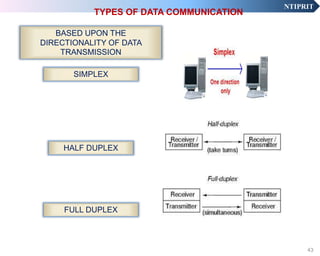
TYPES OF DATA COMMUNICATION
SIMPLEX
BASED UPON THE
DIRECTIONALITY OF DATA
TRANSMISSION
HALF DUPLEX
FULL DUPLEX
43
NTIPRIT
TYPES OF DATA COMMUNICATION: Routing of Packet
ANYCAST
BASED UPON DIRECTION OF DATA
TRANSMISSION
UNICAST
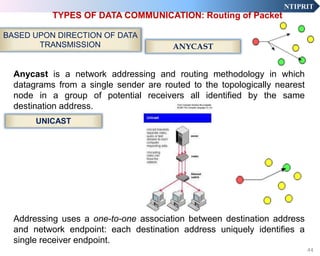
Anycast is a network addressing and routing methodology in which
datagrams from a single sender are routed to the topologically nearest
node in a group of potential receivers all identified by the same
destination address.
Addressing uses a one-to-one association between destination address
and network endpoint: each destination address uniquely identifies a
single receiver endpoint.
44
NTIPRIT
TYPES OF DATA COMMUNICATION: Routing of Packet
MULTICAST
Multicast is the delivery of a message or information to a
group of destinations, simultaneously in a single
transmission from the source.
Copies are automatically created in other network
elements, such as routers.
45
NTIPRIT
TYPES OF DATA COMMUNICATION: Routing of Packet
BROADCAST
broadcasting refers to transmitting a packet that will be
received by every device on the network
46
NTIPRIT
TYPES OF DATA COMMUNICATION: Routing of Packet
Geocast refers to the delivery of information to a group of
destinations in a network identified by their geographical
locations.
 It is a specialized form of multicast addressing used by
some routing protocols for mobile ad hoc networks.
GEOCAST
47
NTIPRIT
TYPES OF DATA COMMUNICATION
CONNECTION
ORIENTED
BASED UPON END TO END
CONNECTION
CONNECTIONLESS
UDP
48
NTIPRIT
Connection Vs. Connectionless
 Connection Oriented
• Requires a session connection (analogous to a phone call) be
established before any data can be sent
• data is delivered in correct order, and signalling overhead is
required during a connection establishment phase
• This Provides Reliable Service
• Implemented at Transport and Data Link layer
• Examples Frame Relay and ATM networks- Data Link
– TCP – Transport layer
– MPLS – Network layer
– Example is IP (Internet Protocol) – Network layer ; UDP –
Transport layer
9/13/2016 49Introduction Data Com
NTIPRIT
Connection oriented vs. Connectionless
 Connectionless
• Does not require a session connection between sender and
receiver. The sender simply starts sending packets (called
Datagrams) to the destination. (Like sending a Post Card).
• Packets of same message may reach to the end node via different
intermediate node and may reach out of order
• Un-reliable but fast service
– Example is IP (Internet Protocol) – Network layer ; UDP –
Transport layer
9/13/2016 50Introduction Data Com
NTIPRIT
Types Of Data Communication
SERIAL
PARALLEL
51
NTIPRIT
Serial Transmission
 Data is transmitted, on a single channel, one bit
at a time one after another
Receiver receivedSender
transmitted
101 0 0 1 1 0
9/13/2016 52Introduction Data Com
NTIPRIT
Receiverreceived
-each bit has it’s own piece of wire along which it travels
- often used to send data to a printer
Parallel Transmission
53
All bits are sent simultaneously
Sendertransmitted
1
0
0
1
1
0
0
1
NTIPRIT
What is MAC Address?!
 Media Access Control (MAC) Address – are the physical
address of any device, e.g. a NIC in a computer on the
network.
 The MAC address has two parts of 3 bytes long.
 The first 3 bytes specify the company that made the NIC
and the second 3 bytes are the serial number of the NIC.
9/13/2016 54Introduction Data Com
NTIPRITNTIPRIT
Protocol are used for communication between computers
in different computer networks. Protocol achieves:
What is communicated between computers?
How it is communicated?
When it is communicated?
What conformance (bit sequence) between computers?
Protocols
9/13/2016 58Introduction Data Com
Data Communication Tasks/functions
•Switching •Addressing •Sequencing
•Interfacing •Routing •Flow Control
•Signal Generation •Recovery •Error Feedback
•Synchronization •Formatting •Network MGT
•Exchange
Management
•Security/safety •QoS
•Error Detection &
Correction
•Monitoring
System
Utilization
•N/W
Administration
599/13/2016 Introduction Data Com
V. Sobhana
DDG, NTIPRIT
60
NTIPRIT
Circuit Switching
SAS
Direction of transmission
Time Slots as Physical Channels
BCDAD
D
A
B
C
D
BCS
C
B
A
NTIPRIT
Circuit Switching
SAS
Direction of transmission
Inefficient Utilization of media
___A_
D
A
__S
C
B
A
NTIPRIT
A
Direction of transmission
BDAD
D
A
B
C
D
B
C
B
A
Virtual Channels
No Physical channel like a Time Slot
Statistical or Asynchronous Multiplexing
Packet Switching
9/13/2016 63

Data communication basics

  • 1.
    NTIPRIT National Telecommunication Institutefor Policy Research, Innovation and Training Ghaziabad – 201002. www.ntiprit.gov.in Data Communication 1 An Introduction By Naveen Jakhar, ITS
  • 2.
    NTIPRIT Discussion Points 9/13/2016 IntroductionData Com 2  Basic Data Communication Concepts • Message, Packets, Nodes, link, Backbone Communication Channel, Protocol  Network Elements • Hub, Switch, Bridge, Router, gateway  Packet Switching Concepts  Various Types of Data Communication
  • 3.
  • 4.
    NTIPRITNTIPRIT Over the pastfew years, it has become clear that the world has changed forever. We are now in the Information Age—the second Industrial Revolution, The first Industrial Revolution revolutionized the way people worked by introducing machines and new organizational forms. Information is power, information is tool! (information is processed Data) One of the challenges in studying data communications and networking is that there are many perspectives that can be used
  • 5.
    NTIPRITNTIPRIT Is the processof using computing and communication technologies to transfer data from one place to another, and vice versa. It enables the movement of electronic or digital data between two or more nodes, regardless of geographical location, technological medium or data contents. DC incorporates several techniques and technologies with the primary objective of enabling any form of electronic communication. These technologies include telecommunications, computer networking and radio/satellite communication. Data communications (DC) 9/13/2016 5Introduction Data Com
  • 6.
    NTIPRIT Electronic transmission ofinformation that has been encoded digitally (as for storage and processing by computers) sending digital messages using communication technology Data Communication 9/13/2016 Introduction Data Com 6
  • 7.
    NTIPRIT Basic Elements ofData Communication Five Basic Elements  Message  Sender  Receiver  Transmission Medium –Channel  Protocol - Rule Basic Data Communication Model Cooperating Applications at Each Node
  • 8.
    NTIPRIT 5 Basic Components 9/13/2016Introduction Data Com 8
  • 9.
    NTIPRIT MESSAGE Examples of Message: Data, Program, File, Snippet of Personal Conversation, Stream of Audio, Video, Voice, etc The Message is the primary purpose of communication. It can take many forms Limitations of use of Message as Communication Tool: Varying Message Length & Inefficient Utilization of Bandwidth Message as Byte Stream The meaning of message is established by the protocols recognized by the cooperating applications at each node Messages are converted into Analog/Digital Signals for transmission over the communication Medium 9
  • 10.
    NTIPRIT DSL Modem DSLAM Internet Ethernet packets AnalogSignal Digital ATM, MPLS,SONET Ethernet packets Converter Various converters Web serverHome PC Links Links JOURNEY OF MESSAGE FROM SOURCE TO DESTINATION 10
  • 11.
    NTIPRIT Packets Basic Unit ofData Communication Broken, delimited part of Message, a formatted unit of data. Payload Vs. Header Makes Possible sharing of Communication channel for messages Consists of data in bits/bytes encapsulated by information about the packet : Specific Data Packets : Segment, Datagram, Frame, Control Message Packet 11
  • 12.
    NTIPRIT Why Packet isthe Basic Unit? Represents a reasonable unit for routing of data The use of packets simplifies operations and increases communication efficiency Enables processing of a block of data all at once, instead of a character or byte at a time Packets offer an alternative to dedicated channel for entire message length It increases the productivity of the communication channel It simplifies synchronisation of the sending and receiving systems 12
  • 13.
    NTIPRIT Payload v.s Header Payload : User data  Header: Control information, which is required for delivery of User Data or Payload, e.g. Source address, Destination address, error detection codes like checksum & sequencing information (FCS).  Usually the payload information is found between Header and Trailer. Packet Header Payload 9/13/2016 13Introduction Data Com
  • 14.
    NTIPRIT NODE  Can beany communication Device – PC, Smart Phone, Router, gateway  Can be either source, Destination, or Intermediary  Each node on a network is identified by unique logical address – IP address on TCP/IP  Node connect to the network through its Interface Node 9/13/2016 14Introduction Data Com
  • 15.
    NTIPRIT INTERFACE  Connects Nodeto the network  Each Interface is identified by unique Physical Address – MAC address in NIC  A node may have multiple Interfaces  Multi Homing 9/13/2016 15Introduction Data Com
  • 16.
    NTIPRIT LINK  A Segmentof the transmission Channel  A LAN or Subnet is a Link  Devices on same Link uses Physical Address to identify each other  Devices connected on same Link communicate at Layer 2, Data Link Layer  Hub and switch works on the Link  Link 9/13/2016 16Introduction Data Com
  • 17.
    NTIPRIT BACKBONE  A Backboneis a network Infrastructure that interconnect diverse LANs or Sub networks  A backbone can tie together diverse networks in the same building, in different buildings in a campus environment, or over wide areas  Network backbones are designed to maximize the reliability and performance of large-scale, long- distance data communications.  WAN Backbones typically consist of routers and switches connected by fibre optic 9/13/2016 17Introduction Data Com
  • 18.
    NTIPRIT HUB  A commonconnection point for devices in a network. Also known as concentrator.  A hub is the place where data converges from one or more directions and is forwarded out in one or more directions.  Hubs are commonly used to connect segments of a LAN.  Hub basically acts as signal splitter. When a data frame arrives at one port, it is redistributed to all the other ports so that all devices of the LAN can see all frames.  Types of Hub • Active, Passive, Intelligent  Hub 9/13/2016 18Introduction Data Com
  • 19.
    NTIPRIT SWITCH  A networkswitch joins multiple Devices together within one LAN.  Allow different nodes of a network to communicate directly with each other.  It receives a message (Ethernet frame) from any device connected to its input ports and then transmits the message only to that output port to which the destination device is connected.  One to one connection  Ensures optimum utilization of Bandwidth or N/W resources. LAN SWITCH 9/13/2016 19Introduction Data Com
  • 20.
    NTIPRIT SWITCH  Switch Types •Managed Vs. Unmanaged • Layer 2 Vs. layer 3 switch • Multi layer Switch 9/13/2016 20Introduction Data Com
  • 21.
    NTIPRIT Unmanaged Switch • Inscenarios where the network traffic is light, all that is required is a way for the data to pass from one device to another. • There is no need for prioritizing the packets as all the traffic will flow unimpeded. • An unmanaged switch will fill this need without issues. 9/13/2016 21Introduction Data Com
  • 22.
    NTIPRIT Managed Switch • Asthe number of devices increases, the ability to ensure that the time-sensitive packets are prioritized becomes increasingly difficult as more concurrent streams of data hit the network. • Another issue that may need to be dealt with is which devices have access to what portion of the network. 9/13/2016 22Introduction Data Com
  • 23.
    NTIPRIT Multilayer Switch • Amultilayer switch is a network device that has the ability to operate at higher layers of the OSI reference model. • A multilayer switch can perform the functions of a switch as well as that of a router at incredibly fast speeds. • Multilayer switches became devices that examine Layer 2 through Layer 7. 9/13/2016 23Introduction Data Com
  • 24.
    NTIPRIT Hub vs. Switch HUB Broadcast Data Frame to all nodes connected to it  Inefficient use of LAN Bandwidth  Half Duplex Communication  Unmanaged SWITCH  Frame from source node is sent only to destination node  Efficient use of Bandwidth – Micro segmenting  Full Duplex Communication  Can be managed
  • 25.
  • 26.
    NTIPRIT BRIDGE  A bridgeconnects a LAN to another LAN that uses the same protocol (for example, Ethernet or token ring).  Has ports connected to two or more separate LANs. Packets received on one port may be re- transmitted on another port.  Bridges learn which addresses are on which network and develop a learning table so that subsequent messages can be forwarded to the right network.  Operates at Data Link Layer.  Bridge LAN1 LAN2 9/13/2016 26Introduction Data Com
  • 27.
    NTIPRIT ROUTER  A routeris a device or a software in a computer that determines the next network point to which a packet should be forwarded to its destination.  Allows different networks to communicate with each other  A router creates and maintain a table of the available routes and their conditions and uses this information along with distance and cost algorithms to determine the best route for a given packet.  A packet will travel through a number of network points with routers before arriving at its destination. 9/13/2016 27Introduction Data Com
  • 28.
  • 29.
    NTIPRIT ROUTERS  Edge Router •Routes data packets between a Backbone Network and LAN  Core Router • Routes data packets Within a Backbone Network  Gateway Router  B-router • Router Combined with Bridge Functionality  Firewall Router • Router having Packet Filtering capabilities 9/13/2016 29Introduction Data Com
  • 30.
    NTIPRIT GATEWAY  A gatewayis a network point , similar to router that acts as an entrance to another network;  Gateway Connects Networks on Different Protocols/dissimilar networks  Gateway nodes are computers that control traffic within a company’s network or at local internet service provider (ISP)  Gateway 9/13/2016 30Introduction Data Com
  • 31.
    NTIPRIT Dynamic vs. StaticRouting  STATIC ROUTING : Routers forward the arriving Data packets to predefined output port. The routing table is manually configured.  DYANMIC ROUTING : The Router learns the state of the Network and continuously update its routing table. For this, it uses routing protocols. 9/13/2016 31Introduction Data Com
  • 32.
    NTIPRIT What is thedifference between….?  Bridge: device to interconnect two LANs that use the SAME logical link control protocol but may use different medium access control protocols.  Router: device to interconnect SIMILAR networks, e.g. similar protocols and workstations and servers  Gateway: device to interconnect DISSIMILAR protocols and servers. 9/13/2016 32Introduction Data Com
  • 33.
    NTIPRIT SWITCHING 33 • Switching isbasically transfer of information from one point to another point with some intelligence or control or • Establishing a temporary path or connection between two points or writing at one point of time and reading at another point of time.
  • 34.
    NTIPRIT SWITCH  A switchis a device that channels incoming data from any of multiple input ports to the specific output port that will take the data toward its intended destination  In the traditional circuit-switched telephone network, one or more switches are used to set up a dedicated though temporary connection or circuit for an exchange between two or more parties  On local area network (LAN), a switch determines, from the physical device (Media Access Control or MAC) address in each incoming message frame, which output port to forward it  In a wide area packet-switched network such as the Internet, a switch determines from the IP address in each packet which output port to use for the next part of its trip to the intended destination 9/13/2016 34Introduction Data Com
  • 35.
    NTIPRIT Packet Switching  Adigital network technology that breaks up a message (Bit Stream) into fixed size packets for transmission  Each packet is then transmitted individually and can even follow different routes to its destination.  Once all the packets forming a message arrive at the destination, they are recompiled into the original message.  Packets of different messages share the communication channel  When traversing network switches, routers and other network nodes, packets are buffered and queued, resulting in variable delay and throughput depending on the traffic load in the network. 9/13/2016 35Introduction Data Com
  • 36.
    NTIPRIT AN END TOEND CHANNEL WITH MULTIPLE PATHS THROUGH THE INTERMEDIATE NODES 36
  • 37.
    NTIPRIT Packet Switching : Illustration 9/13/2016Introduction Data Com 37 1 2 4 3 2 2 4 1 3 4 1 1 1 31 4 4 3 2 1 2 1 1432 3 1 12 24 2
  • 38.
    NTIPRITNTIPRIT Data traffic isdivided into packets. • Packets travel separately through network • Packet forwarding based on the header • Network nodes may store packets temporarily Destination reconstructs the message • Best-effort delivery • Packets may be lost • Packets may be corrupted • Packets may be delivered out of order Each packet contains a header with Source and destination address 38 Packet Switching : features
  • 39.
    NTIPRITNTIPRIT The effectiveness ofa data communication system depends on four fundamental characteristics Delivery The system must deliver data to the correct destination. Accuracy Accurately- without errors/ alteration/ duplication/ missing Timeliness Data delivered late are useless. •in the same order that they are produced, •without significant delay. •This kind of delivery is called Real-time transmission. Jitter  Variation in the arrival time of packets. Uneven delay in delivery of packets may cause data disruption . . Fundamental Characteristics 9/13/2016 39Introduction Data Com
  • 40.
    NTIPRIT Routing vs. Switching ROUTING Routing is the process of selecting paths in a network along which to send network traffic  Based on Logical (IP) Address  Forwarding Decision by Microprocessor  At Layer 3 (Network layer) of OSI SWITCHING  Switching is one to one data frame transmission in a LAN Segment  Based on Physical (MAC) address  Generally Hardwired (ASIC)*  At Layer 2 (Data Link layer) of OSI (* Application Specific Integrated Circuit.: Customized for particular use rather than general purpose.)
  • 41.
    NTIPRIT Advantages: o Bandwidth usedto full potential. o Diverse Devices & Networks can communicate o Not affected by line failure (re- diverts signal) o Availability – do not have to wait for a direct connection to become available o More Robust : Shared resources & Redundancies Disadvantages o Low Throughput o Under heavy use there can be a delay o Data packets can get lost or become corrupted o Variable delay : Jitter o Each packet need header : Overload Packet Switching
  • 42.
    NTIPRIT TYPES OF DATACOMMUNICATION GUIDED BASED UPON THE KIND OF COMMUNICATION CHANNEL UNGUIDED :waves are guided along a solid medium path (twisted pair, coaxial cable, and optical fiber). :waves are propagated through the atmosphere and inner/outerspace (satellite, laser, and wireless transmissions). 42
  • 43.
    NTIPRIT TYPES OF DATACOMMUNICATION SIMPLEX BASED UPON THE DIRECTIONALITY OF DATA TRANSMISSION HALF DUPLEX FULL DUPLEX 43
  • 44.
    NTIPRIT TYPES OF DATACOMMUNICATION: Routing of Packet ANYCAST BASED UPON DIRECTION OF DATA TRANSMISSION UNICAST Anycast is a network addressing and routing methodology in which datagrams from a single sender are routed to the topologically nearest node in a group of potential receivers all identified by the same destination address. Addressing uses a one-to-one association between destination address and network endpoint: each destination address uniquely identifies a single receiver endpoint. 44
  • 45.
    NTIPRIT TYPES OF DATACOMMUNICATION: Routing of Packet MULTICAST Multicast is the delivery of a message or information to a group of destinations, simultaneously in a single transmission from the source. Copies are automatically created in other network elements, such as routers. 45
  • 46.
    NTIPRIT TYPES OF DATACOMMUNICATION: Routing of Packet BROADCAST broadcasting refers to transmitting a packet that will be received by every device on the network 46
  • 47.
    NTIPRIT TYPES OF DATACOMMUNICATION: Routing of Packet Geocast refers to the delivery of information to a group of destinations in a network identified by their geographical locations.  It is a specialized form of multicast addressing used by some routing protocols for mobile ad hoc networks. GEOCAST 47
  • 48.
    NTIPRIT TYPES OF DATACOMMUNICATION CONNECTION ORIENTED BASED UPON END TO END CONNECTION CONNECTIONLESS UDP 48
  • 49.
    NTIPRIT Connection Vs. Connectionless Connection Oriented • Requires a session connection (analogous to a phone call) be established before any data can be sent • data is delivered in correct order, and signalling overhead is required during a connection establishment phase • This Provides Reliable Service • Implemented at Transport and Data Link layer • Examples Frame Relay and ATM networks- Data Link – TCP – Transport layer – MPLS – Network layer – Example is IP (Internet Protocol) – Network layer ; UDP – Transport layer 9/13/2016 49Introduction Data Com
  • 50.
    NTIPRIT Connection oriented vs.Connectionless  Connectionless • Does not require a session connection between sender and receiver. The sender simply starts sending packets (called Datagrams) to the destination. (Like sending a Post Card). • Packets of same message may reach to the end node via different intermediate node and may reach out of order • Un-reliable but fast service – Example is IP (Internet Protocol) – Network layer ; UDP – Transport layer 9/13/2016 50Introduction Data Com
  • 51.
    NTIPRIT Types Of DataCommunication SERIAL PARALLEL 51
  • 52.
    NTIPRIT Serial Transmission  Datais transmitted, on a single channel, one bit at a time one after another Receiver receivedSender transmitted 101 0 0 1 1 0 9/13/2016 52Introduction Data Com
  • 53.
    NTIPRIT Receiverreceived -each bit hasit’s own piece of wire along which it travels - often used to send data to a printer Parallel Transmission 53 All bits are sent simultaneously Sendertransmitted 1 0 0 1 1 0 0 1
  • 54.
    NTIPRIT What is MACAddress?!  Media Access Control (MAC) Address – are the physical address of any device, e.g. a NIC in a computer on the network.  The MAC address has two parts of 3 bytes long.  The first 3 bytes specify the company that made the NIC and the second 3 bytes are the serial number of the NIC. 9/13/2016 54Introduction Data Com
  • 55.
    NTIPRITNTIPRIT Protocol are usedfor communication between computers in different computer networks. Protocol achieves: What is communicated between computers? How it is communicated? When it is communicated? What conformance (bit sequence) between computers? Protocols 9/13/2016 58Introduction Data Com
  • 56.
    Data Communication Tasks/functions •Switching•Addressing •Sequencing •Interfacing •Routing •Flow Control •Signal Generation •Recovery •Error Feedback •Synchronization •Formatting •Network MGT •Exchange Management •Security/safety •QoS •Error Detection & Correction •Monitoring System Utilization •N/W Administration 599/13/2016 Introduction Data Com
  • 57.
  • 58.
    NTIPRIT Circuit Switching SAS Direction oftransmission Time Slots as Physical Channels BCDAD D A B C D BCS C B A
  • 59.
    NTIPRIT Circuit Switching SAS Direction oftransmission Inefficient Utilization of media ___A_ D A __S C B A
  • 60.
    NTIPRIT A Direction of transmission BDAD D A B C D B C B A VirtualChannels No Physical channel like a Time Slot Statistical or Asynchronous Multiplexing Packet Switching 9/13/2016 63

Editor's Notes

  • #5 Data is raw, unorganized facts that need to be processed. Data can be something simple and seemingly random and useless until it is organized.When data is processed, organized, structured or presented in a given context so as to make it useful, it is called information.
  • #17 a communication facility or medium over which nodes can communicate at the link layer, i.e., the layer immediately below IPv6. Examples are Ethernets (simple or bridged); PPP links; X.25, Frame Relay, or ATM networks; and internet (or higher) layer "tunnels", such as tunnels over IPv4 or IPv6 itself.
  • #25 carrier sense multiple access with collision detection
  • #52 Serial communication : Modem. Parallel Communication : Printer.