14/COM/05
CONTENT
1. INTRODUCTION
2. SIMPLE NETWORK WITH SWITCH
3. APPLICATIONS OF SWITCHES
4. FUNCTIONS & ROLE
5. SWITCH vs HUB
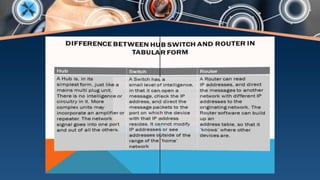
6. SWITCH vs ROUTER
7. ADVANTAGES
8. DISADVANTAGE
Introduction to NETWORK SWITCH
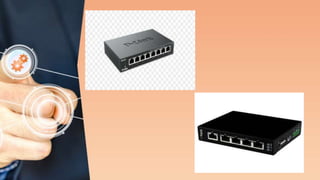
 A network switch is a device used to
connect network segments or network
devices.
 Network switch receive messages and send
them to the targeted audience.
 It is a telecommunication device that uses
the packet switching to receive , process and
forward data to the destination address
CONTD…..
Network switch forwards data to one
or multiple devices that need to
receive it.
Switches are the multiport network
bridges that process and forward data
at the data link layer(layer 2 of OSI
model).
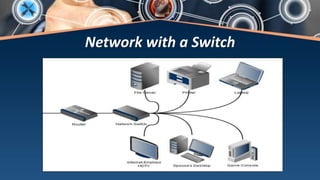
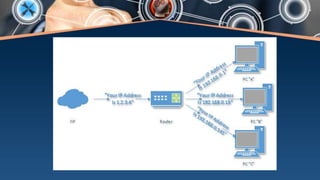
Network with a Switch
APPLICATIONS OF SWITCHES
 A switch is a device used in a computer
network to physically connect the devices
together.
 A switch can transfer data to any of the other
devices at a time using half duplex mode or
full duplex mode.
 A switch can manage the flow of data across
the network.
Contd…
A network switch plays an integral part in
most modern Ethernet LANs. Mid to large
sized LANs contain a number of linked
managed switches
Each network device is connected to a
switch is identified using a MAC address
or a hardware address. There fore, a
switch is also considered as a intelligent
network hub.
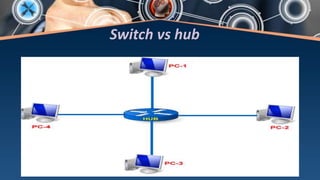
Switch vs hub
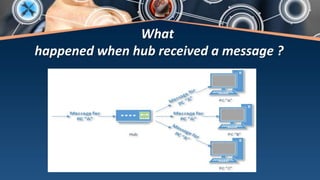
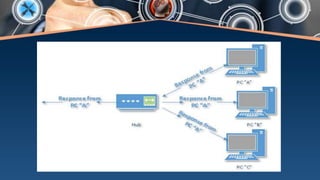
What
happened when hub received a message ?
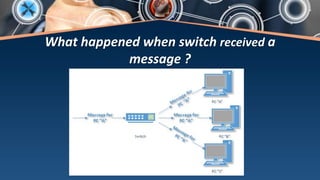
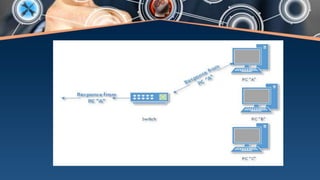
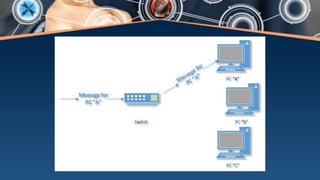
What happened when switch received a
message ?
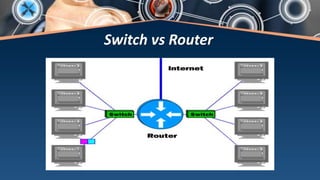
Switch vs Router
ADVANTAGES
 The number of broadcast domains gets
decreased.
 Unlike hub, switches are more hardware
oriented.
 It can make use of CAM table for port to MAC
mapping.
 Unlike router , multi ports of switches are
available in lower cost.
 It helps in logical segmentation by supporting
VLAN.
DISADVANTAGE
 Proper designing and configuration is
required if multicast packets are being
handled.
 While limiting broadcasts, switches
are not as good as routers.
Switches on Networking

Switches on Networking

  • 1.
  • 2.
    CONTENT 1. INTRODUCTION 2. SIMPLENETWORK WITH SWITCH 3. APPLICATIONS OF SWITCHES 4. FUNCTIONS & ROLE 5. SWITCH vs HUB 6. SWITCH vs ROUTER 7. ADVANTAGES 8. DISADVANTAGE
  • 3.
    Introduction to NETWORKSWITCH  A network switch is a device used to connect network segments or network devices.  Network switch receive messages and send them to the targeted audience.  It is a telecommunication device that uses the packet switching to receive , process and forward data to the destination address
  • 5.
    CONTD….. Network switch forwardsdata to one or multiple devices that need to receive it. Switches are the multiport network bridges that process and forward data at the data link layer(layer 2 of OSI model).
  • 6.
  • 7.
    APPLICATIONS OF SWITCHES A switch is a device used in a computer network to physically connect the devices together.  A switch can transfer data to any of the other devices at a time using half duplex mode or full duplex mode.  A switch can manage the flow of data across the network.
  • 8.
    Contd… A network switchplays an integral part in most modern Ethernet LANs. Mid to large sized LANs contain a number of linked managed switches Each network device is connected to a switch is identified using a MAC address or a hardware address. There fore, a switch is also considered as a intelligent network hub.
  • 9.
  • 10.
    What happened when hubreceived a message ?
  • 12.
    What happened whenswitch received a message ?
  • 15.
  • 18.
    ADVANTAGES  The numberof broadcast domains gets decreased.  Unlike hub, switches are more hardware oriented.  It can make use of CAM table for port to MAC mapping.  Unlike router , multi ports of switches are available in lower cost.  It helps in logical segmentation by supporting VLAN.
  • 19.
    DISADVANTAGE  Proper designingand configuration is required if multicast packets are being handled.  While limiting broadcasts, switches are not as good as routers.