Data Communication and Computer Networks
Chapter 2
Network Components
Outlines
• Hardware Components
• Clients and Servers
• Connecting device
• Transmission Mediums
• Software Components
• Operating systems
• Protocol Suites
Network Components
• Computer networks components comprise both physical
parts as well as the software required for installing
computer networks, both at organizations and at home.
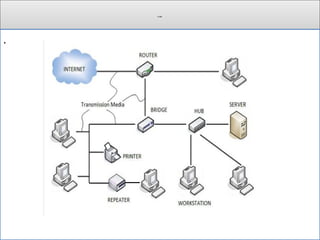
• The hardware components are the server, client, peer,
transmission medium, and connecting devices.
• The software components are operating system and
protocols.
• The following figure shows a network along with its
components:
Cont.
.
Cont.
Hardware Components
• Servers −Servers are high-configuration computers that
manage the resources of the network.
• The network operating system is typically installed in the
server and so they give user accesses to the network
resources.
• Servers can be of various kinds: file servers, database
servers, print servers etc.
• Clients − Clients are computers that request and receive
service from the servers to access and use the network
resources.
• Peers − Peers are computers that provide as well as receive
services from other peers in a workgroup network.
Cont.
• Transmission Media − Transmission media are the
channels through which data is transferred from one device
to another in a network.
• Transmission media may be guided media like coaxial
cable, fibre optic cables etc; or maybe unguided media like
microwaves, infra-red waves etc.
• Connecting Devices − Connecting devices act as
middleware between networks or computers, by binding the
network media together.
Cont.
Some of the common connecting devices are:
• Routers
• Bridges
• Hubs
• Repeaters
• Gateways
• Switches
Network(connecting) Devices
• Repeater – A repeater operates at the physical layer. Its job
is to regenerate the signal over the same network before the
signal becomes too weak or corrupted so as to extend the
length to which the signal can be transmitted over the same
network.
• An important point to be noted about repeaters is that they
do not amplify the signal.
• When the signal becomes weak, they copy the signal bit by
bit and regenerate it at the original strength.
• It is a 2 port device.
Cont.
• Hub – A hub is basically a multiport repeater.
• A hub connects multiple wires coming from different
branches, for example, the connector in star topology
which connects different stations.
• Hubs cannot filter data, so data packets are sent to all
connected devices.
• Also, they do not have intelligence to find out best path for
data packets which leads to inefficiencies and wastage.
Cont.
• Active Hub: - These are the hubs which have their own
power supply and can clean , boost and relay the signal
along the network.
• It serves both as a repeater as well as wiring center. These
are used to extend maximum distance between nodes.
• Passive Hub: - These are the hubs which collect wiring
from nodes and power supply from active hub.
• These hubs relay signals onto the network without cleaning
and boosting them and can’t be used to extend distance
between nodes.
Cont.
• Bridge – A bridge operates at data link layer.
• A bridge is a repeater, with add on functionality of filtering
content by reading the MAC addresses of source and
destination.
• It is also used for interconnecting two LANs working on
the same protocol.
• It has a single input and single output port, thus making it
a 2 port device.
Cont.
• Transparent Bridges:- These are the bridge in which the stations are
completely unaware of the bridge’s existence i.e. whether or not a
bridge is added or deleted from the network, reconfiguration of the
stations is unnecessary.
• These bridges make use of two processes i.e. bridge forwarding and
bridge learning.
• Source Routing Bridges:- In these bridges, routing operation is
performed by the source station and the frame specifies which route to
follow.
• The host can discover the frame by sending a special frame called the
discovery frame, which spreads through the entire network using all
possible paths to the destination.
Cont.
 Switch – A switch is a multi port bridge with a buffer and a
design that can boost its efficiency(large number of ports
imply less traffic) and performance.
• Switch is data link layer device.
• Switch can perform error checking before forwarding data,
that makes it very efficient as it does not forward packets
that have errors and forward good packets selectively to
correct port only.
Cont.
• Routers – A router is a device like a switch that routes
data packets based on their IP addresses.
• Router is mainly a Network Layer device.
• Routers normally connect LANs and WANs together and
have a dynamically updating routing table based on which
they make decisions on routing the data packets.
• Router divide broadcast domains of hosts connected
through it.
Cont.
• Gateway – A gateway, as the name suggests, is a passage
to connect two networks together that may work upon
different networking models.
• They basically works as the messenger agents that take
data from one system, interpret it, and transfer it to another
system.
• Gateways are also called protocol converters and can
operate at any network layer.
• Gateways are generally more complex than switch or
router.
Cont.
 Brouter – It is also known as the bridging router is a
device that combines features of both bridge and router.
• It can work either at the data link layer or a network layer.
Working as a router, it is capable of routing packets across
networks, and working as the bridge, it is capable of
filtering local area network traffic.
Cont.
 NIC – NIC or network interface card is a network adapter
that is used to connect the computer to the network.
• It is installed in the computer to establish a LAN.
• It has a unique id that is written on the chip, and it has a
connector to connect the cable to it.
• The cable acts as an interface between the computer and
router or modem.
• NIC card is a layer 2 device which means that it works on
both physical and data link layer of the network model.
Cont.
Software Components
 Networking Operating System: Network Operating Systems
is typically installed in the server and facilitate workstations in
a network to share files, database, applications, printers etc.
 Protocol Suite: A protocol is a rule or guideline followed by
each computer for data communication.
 Protocol suite is a set of related protocols that are laid down
for computer networks.
 The two popular protocol suites are:
a. OSI Model ( Open System Interconnections)
b. TCP / IP Model
Transmission Medias
• Transmission media is a communication channel that
carries the information from the sender to the receiver.
• Data is transmitted through the electromagnetic signals.
• The main functionality of the transmission media is to
carry the information in the form of bits
through LAN(Local Area Network).
• It is a physical path between transmitter and receiver in data
communication.
• In a copper-based network, the bits in the form of electrical
signals.
Cont.
• In a fibre based network, the bits in the form of light pulses.
• In OSI(Open System Interconnection) phase, transmission
media supports the Layer 1. Therefore, it is considered to
be as a Layer 1 component.
• The electrical signals can be sent through the copper wire,
fibre optics, atmosphere, water, and vacuum.
• The characteristics and quality of data transmission are
determined by the characteristics of medium and signal.
Cont.
• Transmission media is of two types are wired media and
wireless media. In wired media, medium characteristics
are more important whereas, in wireless media, signal
characteristics are more important.
• Different transmission media have different properties such
as bandwidth, delay, cost and ease of installation and
maintenance.
• The transmission media is available in the lowest layer of
the OSI reference model, i.e., Physical layer.
Cont.
Some factors need to be considered for designing the
transmission media:
• Bandwidth: All the factors are remaining constant, the
greater the bandwidth of a medium, the higher the data
transmission rate of a signal.
• Transmission impairment: When the received signal is
not identical to the transmitted one due to the transmission
impairment. The quality of the signals will get destroyed
due to transmission impairment.
• Interference: An interference is defined as the process of
disrupting a signal when it travels over a communication
medium on the addition of some unwanted signal.
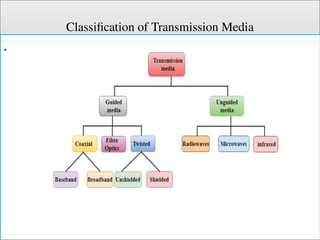
Classification of Transmission Media
.
Cont.
Guided Media
• In guided media, transmitted data travels through cabling
system that has a fixed path. For example, copper wires,
fibre optic wires, etc.
Types of Guided media:
Twisted pair:
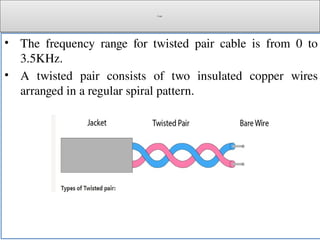
• Twisted pair is a physical media made up of a pair of cables
twisted with each other.
• A twisted pair cable is cheap as compared to other
transmission media. Installation of the twisted pair cable is
easy, and it is a lightweight cable.
Cont.
• The frequency range for twisted pair cable is from 0 to
3.5KHz.
• A twisted pair consists of two insulated copper wires
arranged in a regular spiral pattern.
Cont.
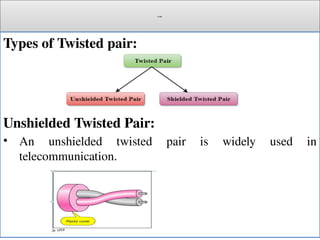
Types of Twisted pair:
Unshielded Twisted Pair:
• An unshielded twisted pair is widely used in
telecommunication.
Cont.
• Following are the categories of the unshielded twisted pair
cable:
• Category 1: Category 1 is used for telephone lines that have low-
speed data.
• Category 2: It can support upto 4Mbps.
• Category 3: It can support upto 16Mbps.
• Category 4: It can support upto 20Mbps. Therefore, it can be
used for long-distance communication.
• Category 5: It can support upto 200Mbps.
Cont.
Advantages:
• It is cheap.
• Installation of the unshielded twisted pair is easy.
• It can be used for high-speed LAN.
Disadvantage:
• This cable can only be used for shorter distances because of
attenuation.
Cont.
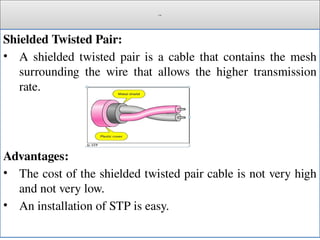
Shielded Twisted Pair:
• A shielded twisted pair is a cable that contains the mesh
surrounding the wire that allows the higher transmission
rate.
Advantages:
• The cost of the shielded twisted pair cable is not very high
and not very low.
• An installation of STP is easy.
Cont.
• It has higher capacity as compared to unshielded twisted
pair cable.
• It is shielded that provides the higher data transmission
rate.
Disadvantages
• It is more expensive as compared to UTP and coaxial cable.
• It has a higher attenuation rate.
Cont.
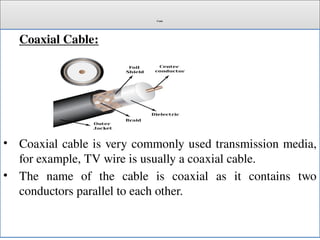
Coaxial Cable:
• Coaxial cable is very commonly used transmission media,
for example, TV wire is usually a coaxial cable.
• The name of the cable is coaxial as it contains two
conductors parallel to each other.
Cont.
c
• It has a higher frequency as compared to Twisted pair cable.
• The inner conductor of the coaxial cable is made up of
copper, and the outer conductor is made up of copper mesh.
• The middle core is made up of non-conductive cover that
separates the inner conductor from the outer conductor.
• The middle core is responsible for the data transferring
whereas the copper mesh prevents from
the EMI(Electromagnetic interference).
Cont.
Coaxial cable is of two types:
• Baseband transmission: It is defined as the process of
transmitting a single signal at high speed.
• Broadband transmission: It is defined as the process of
transmitting multiple signals simultaneously.
Advantages of Coaxial cable:
• The data can be transmitted at high speed.
• It has better shielding as compared to twisted pair cable.
• It provides higher bandwidth.
Cont.
Disadvantages of Coaxial cable:
• It is more expensive as compared to twisted pair cable.
• If any fault occurs in the cable causes the failure in the
entire network.
Cont.
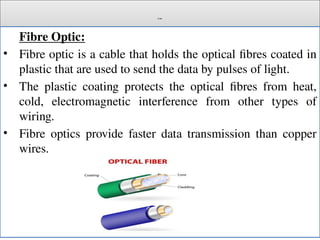
Fibre Optic:
• Fibre optic is a cable that holds the optical fibres coated in
plastic that are used to send the data by pulses of light.
• The plastic coating protects the optical fibres from heat,
cold, electromagnetic interference from other types of
wiring.
• Fibre optics provide faster data transmission than copper
wires.
Cont.
• Core: The optical fibre consists of a narrow strand of glass
or plastic known as a core.
• A core is a light transmission area of the fibre.
• The more the area of the core, the more light will be transmitted
into the fibre.
• Cladding: The concentric layer of glass is known as
cladding.
• The main functionality of the cladding is to provide the lower
refractive index at the core interface as to cause the reflection
within the core so that the light waves are transmitted through the
fibre.
Cont.
• Jacket: The protective coating consisting of plastic is
known as a jacket.
• The main purpose of a jacket is to preserve the fibre
strength, absorb shock and extra fibre protection.
Advantages of Fibre Optic Cable:
• High bandwidth.
• Immune to electromagnetic interference.
.
Cont.
• Suitable for industrial and noisy areas.
• Signals carrying data can travel long distances without
weakening.
Disadvantages:
• Optical fibre cables are expensive.
• Sophisticated technology required for manufacturing,
installing and maintaining optical fibre cables.
• Light waves are unidirectional, so two frequencies are
required for full duplex transmission.
Cont.
Unguided Medea:
• In unguided media, transmitted data travels through free
space in form of electromagnetic signal. For example, radio
waves.
Microwaves:
• Microwaves are the electromagnetic waves that lie in the frequency
band 300 MHz to 300 GHz.
• The wavelength range of the microwaves lies between 1 meter to 1
millimeter.
• In the electromagnetic spectrum, the microwaves are located
between radio waves and infrared waves.
• Microwaves are advantageous as they consist of a large bandwidth
that allows easy transmission of bulk data.
• Also, microwaves rarely get affected by the sky noise.
Cont.
Advantages of Microwaves:
• High Operating frequency. That is they can carry large
amount of information.
• Short wavelength. Hence Short antennas are used.
• Easily pass through ionosphere.
• It can be used for space and satellite communication.
• Few repeaters are needed.
• Highly reliable
• Increased Bandwidth
Cont.
• Minimum Cross talk
• High Directivity for a given antenna size
• Lower power requirements
• Better transmission (low attenuation)
Disadvantages of Microwave
• Difficult to analyze and design
• Difficult to implement circuit components
• Transmission time is high
Cont.
Applications of Microwave
• Telecommunication
• Radar
• Radiobroadcasting
• Astronomy
• Remote Radiometry
• Military Application etc.
• Heating
• Medical Science
• Remote Sensing
Cont.
Radio Wave:
• Transmission of data using radio frequencies is
called radio-wave transmission.
• We all are familiar with radio channels that broadcast
entertainment programs.
• Radio stations transmit radio waves using transmitters,
which are received by the receiver installed in our devices.
• Both transmitters and receivers use antennas to radiate or
capture radio signals.
Cont.
Advantages of Radio Wave:
• These are some of the advantages of radio wave
transmissions
• Inexpensive mode of information exchange
• No land needs to be acquired for laying cables
• Installation and maintenance of devices is cheap
Disadvantages of Radio Wave:
• Insecure communication medium.
• Prone to weather changes like rain, thunderstorms, etc.
Cont.
Infrared Transmission:
• Infrared wave lies in between visible light spectrum and
microwaves.
• It has wavelength of 700-nm to 1-mm and frequency ranges
from 300-GHz to 430-THz.
• Infrared wave is used for very short range communication
purposes such as television and it’s remote.
• Infrared travels in a straight line hence it is directional by
nature.
• Because of high frequency range, Infrared cannot cross
wall-like obstacles.
Cont.
Advantages of (Infrared)
Following are the advantages of (Infrared):
The devices are very cheap.
➨
The devices are compact, light weight and consume low
➨
power.
The technology based devices are easy to use.
➨
Cont.
Disadvantages of (Infrared)
Following are the disadvantages of Infrared:
It requires both transmitter and receiver to be in line of sight.
➨
Devices can not move around while transmission is in
➨
progress.
Used for very short distance applications.
➨
@End
?Welcome

Data communication and computer network Chapter 2.pptx

  • 1.
    Data Communication andComputer Networks Chapter 2 Network Components
  • 2.
    Outlines • Hardware Components •Clients and Servers • Connecting device • Transmission Mediums • Software Components • Operating systems • Protocol Suites
  • 3.
    Network Components • Computernetworks components comprise both physical parts as well as the software required for installing computer networks, both at organizations and at home. • The hardware components are the server, client, peer, transmission medium, and connecting devices. • The software components are operating system and protocols. • The following figure shows a network along with its components:
  • 4.
  • 5.
    Cont. Hardware Components • Servers−Servers are high-configuration computers that manage the resources of the network. • The network operating system is typically installed in the server and so they give user accesses to the network resources. • Servers can be of various kinds: file servers, database servers, print servers etc. • Clients − Clients are computers that request and receive service from the servers to access and use the network resources. • Peers − Peers are computers that provide as well as receive services from other peers in a workgroup network.
  • 6.
    Cont. • Transmission Media− Transmission media are the channels through which data is transferred from one device to another in a network. • Transmission media may be guided media like coaxial cable, fibre optic cables etc; or maybe unguided media like microwaves, infra-red waves etc. • Connecting Devices − Connecting devices act as middleware between networks or computers, by binding the network media together.
  • 7.
    Cont. Some of thecommon connecting devices are: • Routers • Bridges • Hubs • Repeaters • Gateways • Switches
  • 8.
    Network(connecting) Devices • Repeater– A repeater operates at the physical layer. Its job is to regenerate the signal over the same network before the signal becomes too weak or corrupted so as to extend the length to which the signal can be transmitted over the same network. • An important point to be noted about repeaters is that they do not amplify the signal. • When the signal becomes weak, they copy the signal bit by bit and regenerate it at the original strength. • It is a 2 port device.
  • 9.
    Cont. • Hub –A hub is basically a multiport repeater. • A hub connects multiple wires coming from different branches, for example, the connector in star topology which connects different stations. • Hubs cannot filter data, so data packets are sent to all connected devices. • Also, they do not have intelligence to find out best path for data packets which leads to inefficiencies and wastage.
  • 10.
    Cont. • Active Hub:- These are the hubs which have their own power supply and can clean , boost and relay the signal along the network. • It serves both as a repeater as well as wiring center. These are used to extend maximum distance between nodes. • Passive Hub: - These are the hubs which collect wiring from nodes and power supply from active hub. • These hubs relay signals onto the network without cleaning and boosting them and can’t be used to extend distance between nodes.
  • 11.
    Cont. • Bridge –A bridge operates at data link layer. • A bridge is a repeater, with add on functionality of filtering content by reading the MAC addresses of source and destination. • It is also used for interconnecting two LANs working on the same protocol. • It has a single input and single output port, thus making it a 2 port device.
  • 12.
    Cont. • Transparent Bridges:-These are the bridge in which the stations are completely unaware of the bridge’s existence i.e. whether or not a bridge is added or deleted from the network, reconfiguration of the stations is unnecessary. • These bridges make use of two processes i.e. bridge forwarding and bridge learning. • Source Routing Bridges:- In these bridges, routing operation is performed by the source station and the frame specifies which route to follow. • The host can discover the frame by sending a special frame called the discovery frame, which spreads through the entire network using all possible paths to the destination.
  • 13.
    Cont.  Switch –A switch is a multi port bridge with a buffer and a design that can boost its efficiency(large number of ports imply less traffic) and performance. • Switch is data link layer device. • Switch can perform error checking before forwarding data, that makes it very efficient as it does not forward packets that have errors and forward good packets selectively to correct port only.
  • 14.
    Cont. • Routers –A router is a device like a switch that routes data packets based on their IP addresses. • Router is mainly a Network Layer device. • Routers normally connect LANs and WANs together and have a dynamically updating routing table based on which they make decisions on routing the data packets. • Router divide broadcast domains of hosts connected through it.
  • 15.
    Cont. • Gateway –A gateway, as the name suggests, is a passage to connect two networks together that may work upon different networking models. • They basically works as the messenger agents that take data from one system, interpret it, and transfer it to another system. • Gateways are also called protocol converters and can operate at any network layer. • Gateways are generally more complex than switch or router.
  • 16.
    Cont.  Brouter –It is also known as the bridging router is a device that combines features of both bridge and router. • It can work either at the data link layer or a network layer. Working as a router, it is capable of routing packets across networks, and working as the bridge, it is capable of filtering local area network traffic.
  • 17.
    Cont.  NIC –NIC or network interface card is a network adapter that is used to connect the computer to the network. • It is installed in the computer to establish a LAN. • It has a unique id that is written on the chip, and it has a connector to connect the cable to it. • The cable acts as an interface between the computer and router or modem. • NIC card is a layer 2 device which means that it works on both physical and data link layer of the network model.
  • 18.
    Cont. Software Components  NetworkingOperating System: Network Operating Systems is typically installed in the server and facilitate workstations in a network to share files, database, applications, printers etc.  Protocol Suite: A protocol is a rule or guideline followed by each computer for data communication.  Protocol suite is a set of related protocols that are laid down for computer networks.  The two popular protocol suites are: a. OSI Model ( Open System Interconnections) b. TCP / IP Model
  • 19.
    Transmission Medias • Transmissionmedia is a communication channel that carries the information from the sender to the receiver. • Data is transmitted through the electromagnetic signals. • The main functionality of the transmission media is to carry the information in the form of bits through LAN(Local Area Network). • It is a physical path between transmitter and receiver in data communication. • In a copper-based network, the bits in the form of electrical signals.
  • 20.
    Cont. • In afibre based network, the bits in the form of light pulses. • In OSI(Open System Interconnection) phase, transmission media supports the Layer 1. Therefore, it is considered to be as a Layer 1 component. • The electrical signals can be sent through the copper wire, fibre optics, atmosphere, water, and vacuum. • The characteristics and quality of data transmission are determined by the characteristics of medium and signal.
  • 21.
    Cont. • Transmission mediais of two types are wired media and wireless media. In wired media, medium characteristics are more important whereas, in wireless media, signal characteristics are more important. • Different transmission media have different properties such as bandwidth, delay, cost and ease of installation and maintenance. • The transmission media is available in the lowest layer of the OSI reference model, i.e., Physical layer.
  • 22.
    Cont. Some factors needto be considered for designing the transmission media: • Bandwidth: All the factors are remaining constant, the greater the bandwidth of a medium, the higher the data transmission rate of a signal. • Transmission impairment: When the received signal is not identical to the transmitted one due to the transmission impairment. The quality of the signals will get destroyed due to transmission impairment. • Interference: An interference is defined as the process of disrupting a signal when it travels over a communication medium on the addition of some unwanted signal.
  • 23.
  • 24.
    Cont. Guided Media • Inguided media, transmitted data travels through cabling system that has a fixed path. For example, copper wires, fibre optic wires, etc. Types of Guided media: Twisted pair: • Twisted pair is a physical media made up of a pair of cables twisted with each other. • A twisted pair cable is cheap as compared to other transmission media. Installation of the twisted pair cable is easy, and it is a lightweight cable.
  • 25.
    Cont. • The frequencyrange for twisted pair cable is from 0 to 3.5KHz. • A twisted pair consists of two insulated copper wires arranged in a regular spiral pattern.
  • 26.
    Cont. Types of Twistedpair: Unshielded Twisted Pair: • An unshielded twisted pair is widely used in telecommunication.
  • 27.
    Cont. • Following arethe categories of the unshielded twisted pair cable: • Category 1: Category 1 is used for telephone lines that have low- speed data. • Category 2: It can support upto 4Mbps. • Category 3: It can support upto 16Mbps. • Category 4: It can support upto 20Mbps. Therefore, it can be used for long-distance communication. • Category 5: It can support upto 200Mbps.
  • 28.
    Cont. Advantages: • It ischeap. • Installation of the unshielded twisted pair is easy. • It can be used for high-speed LAN. Disadvantage: • This cable can only be used for shorter distances because of attenuation.
  • 29.
    Cont. Shielded Twisted Pair: •A shielded twisted pair is a cable that contains the mesh surrounding the wire that allows the higher transmission rate. Advantages: • The cost of the shielded twisted pair cable is not very high and not very low. • An installation of STP is easy.
  • 30.
    Cont. • It hashigher capacity as compared to unshielded twisted pair cable. • It is shielded that provides the higher data transmission rate. Disadvantages • It is more expensive as compared to UTP and coaxial cable. • It has a higher attenuation rate.
  • 31.
    Cont. Coaxial Cable: • Coaxialcable is very commonly used transmission media, for example, TV wire is usually a coaxial cable. • The name of the cable is coaxial as it contains two conductors parallel to each other.
  • 32.
    Cont. c • It hasa higher frequency as compared to Twisted pair cable. • The inner conductor of the coaxial cable is made up of copper, and the outer conductor is made up of copper mesh. • The middle core is made up of non-conductive cover that separates the inner conductor from the outer conductor. • The middle core is responsible for the data transferring whereas the copper mesh prevents from the EMI(Electromagnetic interference).
  • 33.
    Cont. Coaxial cable isof two types: • Baseband transmission: It is defined as the process of transmitting a single signal at high speed. • Broadband transmission: It is defined as the process of transmitting multiple signals simultaneously. Advantages of Coaxial cable: • The data can be transmitted at high speed. • It has better shielding as compared to twisted pair cable. • It provides higher bandwidth.
  • 34.
    Cont. Disadvantages of Coaxialcable: • It is more expensive as compared to twisted pair cable. • If any fault occurs in the cable causes the failure in the entire network.
  • 35.
    Cont. Fibre Optic: • Fibreoptic is a cable that holds the optical fibres coated in plastic that are used to send the data by pulses of light. • The plastic coating protects the optical fibres from heat, cold, electromagnetic interference from other types of wiring. • Fibre optics provide faster data transmission than copper wires.
  • 36.
    Cont. • Core: Theoptical fibre consists of a narrow strand of glass or plastic known as a core. • A core is a light transmission area of the fibre. • The more the area of the core, the more light will be transmitted into the fibre. • Cladding: The concentric layer of glass is known as cladding. • The main functionality of the cladding is to provide the lower refractive index at the core interface as to cause the reflection within the core so that the light waves are transmitted through the fibre.
  • 37.
    Cont. • Jacket: Theprotective coating consisting of plastic is known as a jacket. • The main purpose of a jacket is to preserve the fibre strength, absorb shock and extra fibre protection. Advantages of Fibre Optic Cable: • High bandwidth. • Immune to electromagnetic interference. .
  • 38.
    Cont. • Suitable forindustrial and noisy areas. • Signals carrying data can travel long distances without weakening. Disadvantages: • Optical fibre cables are expensive. • Sophisticated technology required for manufacturing, installing and maintaining optical fibre cables. • Light waves are unidirectional, so two frequencies are required for full duplex transmission.
  • 39.
    Cont. Unguided Medea: • Inunguided media, transmitted data travels through free space in form of electromagnetic signal. For example, radio waves. Microwaves: • Microwaves are the electromagnetic waves that lie in the frequency band 300 MHz to 300 GHz. • The wavelength range of the microwaves lies between 1 meter to 1 millimeter. • In the electromagnetic spectrum, the microwaves are located between radio waves and infrared waves. • Microwaves are advantageous as they consist of a large bandwidth that allows easy transmission of bulk data. • Also, microwaves rarely get affected by the sky noise.
  • 40.
    Cont. Advantages of Microwaves: •High Operating frequency. That is they can carry large amount of information. • Short wavelength. Hence Short antennas are used. • Easily pass through ionosphere. • It can be used for space and satellite communication. • Few repeaters are needed. • Highly reliable • Increased Bandwidth
  • 41.
    Cont. • Minimum Crosstalk • High Directivity for a given antenna size • Lower power requirements • Better transmission (low attenuation) Disadvantages of Microwave • Difficult to analyze and design • Difficult to implement circuit components • Transmission time is high
  • 42.
    Cont. Applications of Microwave •Telecommunication • Radar • Radiobroadcasting • Astronomy • Remote Radiometry • Military Application etc. • Heating • Medical Science • Remote Sensing
  • 43.
    Cont. Radio Wave: • Transmissionof data using radio frequencies is called radio-wave transmission. • We all are familiar with radio channels that broadcast entertainment programs. • Radio stations transmit radio waves using transmitters, which are received by the receiver installed in our devices. • Both transmitters and receivers use antennas to radiate or capture radio signals.
  • 44.
    Cont. Advantages of RadioWave: • These are some of the advantages of radio wave transmissions • Inexpensive mode of information exchange • No land needs to be acquired for laying cables • Installation and maintenance of devices is cheap Disadvantages of Radio Wave: • Insecure communication medium. • Prone to weather changes like rain, thunderstorms, etc.
  • 45.
    Cont. Infrared Transmission: • Infraredwave lies in between visible light spectrum and microwaves. • It has wavelength of 700-nm to 1-mm and frequency ranges from 300-GHz to 430-THz. • Infrared wave is used for very short range communication purposes such as television and it’s remote. • Infrared travels in a straight line hence it is directional by nature. • Because of high frequency range, Infrared cannot cross wall-like obstacles.
  • 46.
    Cont. Advantages of (Infrared) Followingare the advantages of (Infrared): The devices are very cheap. ➨ The devices are compact, light weight and consume low ➨ power. The technology based devices are easy to use. ➨
  • 47.
    Cont. Disadvantages of (Infrared) Followingare the disadvantages of Infrared: It requires both transmitter and receiver to be in line of sight. ➨ Devices can not move around while transmission is in ➨ progress. Used for very short distance applications. ➨
  • 48.