CONCEPTS OF NETWORKING PRESENTED   BY  :   SUMIT DIMRI
AGENDA Topics To Be Illustrated :- Networking & 3Elements Required For NetworkinG NeeD FoR NetworkinG Types Of NeTwoRk OSI Reference ModeL TCP/IP SuiT ComParInG tcp\ip wiTH osi model NetWorK harDwarE IP AddReSSinG    First Octet RulE
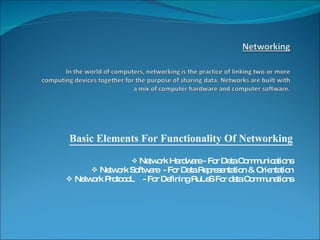
Basic Elements For Functionality Of Networking Network Hardware - For Data Communications Network Software  - For Data Representation & Orientation Network ProtocoL  - For Defining RuLeS For data Communations
NeEd Of NetworkinG File sharing:  A network makes it easy for everyone to access the same file and prevents people from accidentally creating different versions.  Printer sharing:  With a network, several computers can share the same printer.  Communication and collaboration:  A network allows employees to share files, view other people's work, and exchange ideas more efficiently. In a larger office, you can use e-mail and instant messaging tools to communicate quickly and to store messages for future reference.  Remote access:  With remote access in place, users are able to access the same files, data, and messages even when they're not in the office.  Data protection:  A network makes it easier to back up all of your company's data on an offsite server, a set of tapes, CDs, or other backup systems.
Types of networkinG LAN (Local Area Network) MAN (Metropolitan Area Network) WAN (Wide Area Network) Peer To Peer Networking Server Base Networking Host  (Sender of Information  Guest (Receiver of Information)
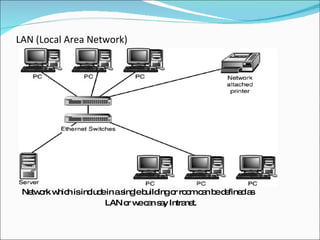
LAN (Local Area Network) Network which is include in a single building or room can be defined as LAN or we can say Intranet.
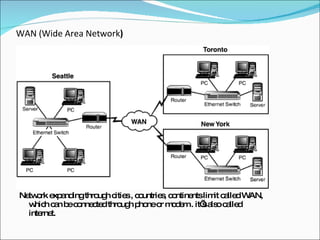
WAN (Wide Area Network ) Network expanding through cities , countries, continents limit called WAN, which can be connected through phone or modem . it’s also called internet.
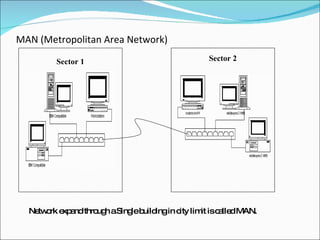
MAN (Metropolitan Area Network) Network expand through a Single building in city limit is called MAN. Sector 1 Sector 2
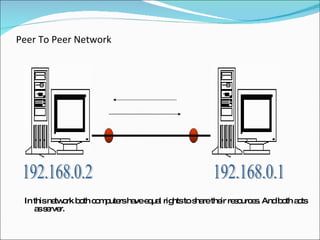
Peer To Peer Network In this network both computers have equal rights to share their resources. And both acts as server. 192.168.0.1 192.168.0.2
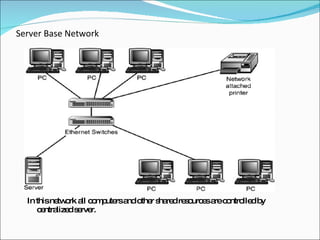
Server Base Network In this network all computers and other shared resources are controlled by centralized server.
OSI REFERENCE MODEL [ Open System Interconnection ]
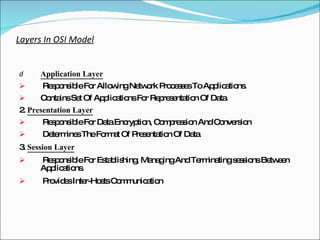
Layers In OSI Model Application Layer   Responsible For Allowing Network Processes To Applications. Contains Set Of Applications For Representation Of Data. 2.  Presentation Layer Responsible For Data Encryption, Compression And Conversion Determines The Format Of Presentation Of Data 3.  Session Layer Responsible For Establishing, Managing And Terminating sessions Between Applications. Provides Inter-Hosts Communication
4.  Transport layer Provides Virtual End To End Communication Between Peer Processes Checks For Header And Reliable Connection By Error Detection And Correction 5.  Network Layer Responsible For Path Selection Between End Systems Through Routing Performs Subnet Flow Control Performs Fragmentation Of A Data Packet To Be Sent And Assembly Of Frames Being Received By Sender Establishes Virtual Circuits
6.  Data Link Layer Evaluates Physical Address Of Concerned Hardware Or Device For Receiving Or Transmitting Frames. Contains Two Sub Protocols. Medium Access And Link Layer Protocol Provides Error Free Communication Link 7.  Physical Layer Responsible For Transmission Of Raw Bits Over A Communication Link Consists Of Mechanical and Electrical Interfaces To Physically Transfer Data Through Physical Medium
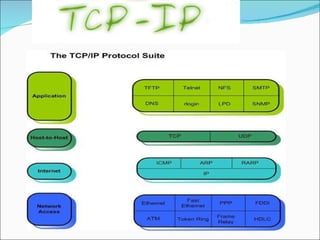
The TCP\IP ModeL The TCP\IP Model Is a Specification For Computer Network Protocols Also Called Internet Reference Model TCP\IP Defines Set Of Rules To Enable The Computers To Communicate Over A Network Provides End To End Connectivity Specifying How Data Should Be Formatted, Addressed And Routed Over A Network Contains 4 Layers
 
Layers In TCP\IP ModeL Application Layer:   This is the scope within which applications create user data and communicate this data to other processes or applications on another or the same host.  The communications partners are often called  peers .  This is where the "higher level" protocols such as  SMTP ,  FTP ,  SSH ,  HTTP , etc. operate. Transport Layer:  The Transport Layer constitutes the networking regime between two network hosts, either on the local network or on remote networks separated by routers.  The Transport Layer provides a uniform networking interface that hides the actual topology (layout) of the underlying network connections.  This is where flow-control, error-correction, and connection protocols exist, such as  TCP . This layer deals with opening and maintaining connections between Internet hosts.
Internet Layer:   The Internet Layer has the task of exchanging datagrams across network boundaries. It is therefore also referred to as the layer that establishes internetworking, indeed, it defines and establishes the  Internet . This layer defines the addressing and routing structures used for the TCP/IP protocol suite. The primary protocol in this scope is the  Internet Protocol , which defines  IP addresses .  Its function in routing is to transport datagrams to the next IP router that has the connectivity to a network closer to the final data destination  Link Layer :  This layer defines the networking methods with the scope of the local network link on which hosts communicate without intervening routers.  This layer describes the protocols used to describe the local network topology and the interfaces needed to affect transmission of Internet Layer datagrams to next-neighbor hosts. (cf. the OSI Data Link Layer).
Network hardware Typically refers to equipment facilitating the use of a computer network.Typically, this includes  routers, switches, hubs, gateways, network interface cards, Networking cables,  network bridges, modems.
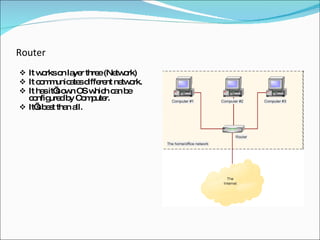
Router It works on layer three (Network) It communicates different network. It has it’s own OS which can be configured by Computer. It’s best than all.
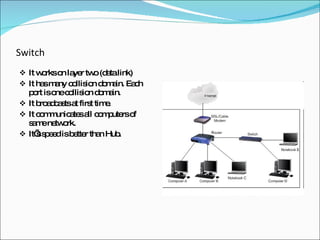
Switch It works on layer two (data link) It has many collision domain. Each port is one collision domain. It broadcasts at first time. It communicates all computers of same network. It’s speed is better than Hub.
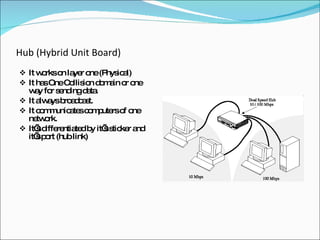
Hub (Hybrid Unit Board) It works on layer one (Physical) It has One Collision domain or one way for sending data. It always broadcast. It communicates computers of one network. It’s differentiated by it’s sticker and it’s port (hub link)
Gateway Operates as a router Data conversions above the network layer. Conversions: encapsulation - use an intermediate network  translation - connect different application protocols encrpyption - could be done by a gateway
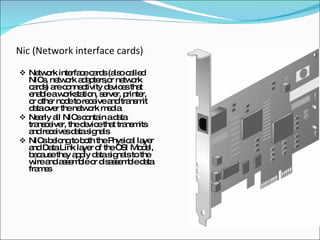
Nic (Network interface cards)   Network interface cards (also called NICs, network adapters,or network cards) are connectivity devices that enable a workstation, server, printer, or other node to receive and transmit data over the network media Nearly all NICs contain a data transceiver, the device that transmits and receives data signals NICs belong to both the Physical layer and Data Link layer of the OSI Model, because they apply data signals to the wire and assemble or disassemble data frames
Network Cabling There are lots of Cables which are used in Network to communicate computers and Network devices to each others. The main cables are . Straight through Cables Cross through Cables Rollover cables
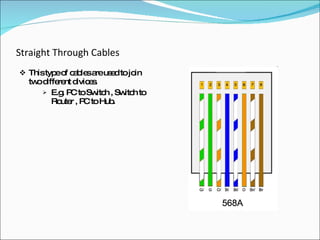
Straight Through Cables This type of cables are used to join two different divices. E.g. PC to Switch , Switch to Router , PC to Hub.
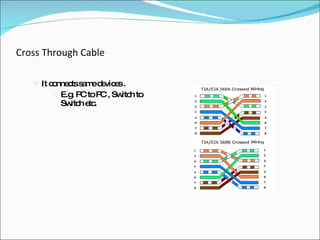
Cross Through Cable It connects same devices . E.g. PC to PC , Switch to Switch etc.
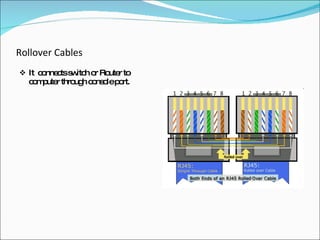
Rollover Cables It  connects switch or Router to computer through console port.
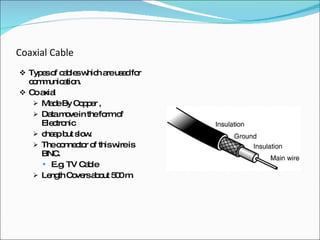
Coaxial Cable Types of cables which are used for communication. Co axial Made By Copper ,  Data move in the form of Electronic  cheap but slow. The connector of this wire is BNC. E.g. TV Cable Length Covers about 500 m.
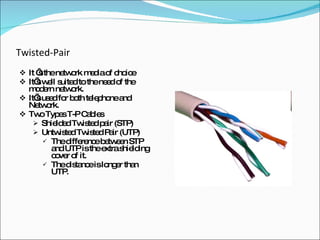
Twisted-Pair It ‘s the network media of choice It’s well suited to the need of the modern network. It’s used for both telephone and Network. Two Types T-P Cables Shielded Twisted pair (STP) Untwisted Twisted Pair (UTP) The difference between STP and UTP is the extra shielding cover of it. The distance is longer than UTP.
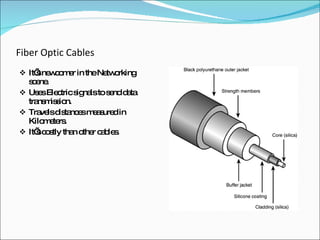
Fiber Optic Cables It’s newcomer in the Networking scene. Uses Electric signals to send data transmission. Travels distances measured in Kilometers. It’s costly than other cables.
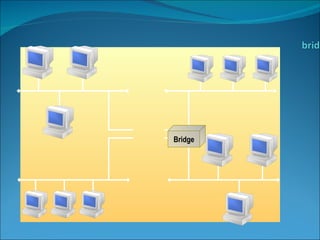
Bridge Copies frames from one network to another Can operate selectively - does not copy all frames (must look at data-link headers). Extends the network beyond physical length limitations.
Bridge
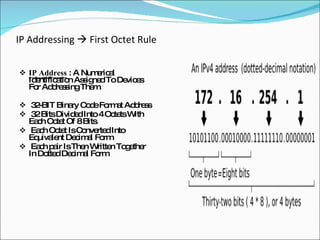
IP Addressing    First Octet Rule IP Address  : A Numerical Identification Assigned To Devices For Addressing Them. 32-BIT Binary Code Format Address 32 Bits Divided Into 4 Octets With Each Octet Of 8 Bits. Each Octet Is Converted Into Equivalent Decimal Form Each pair Is Then Written Together In Dotted Decimal Form
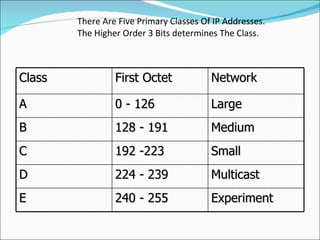
There Are Five Primary Classes Of IP Addresses. The Higher Order 3 Bits determines The Class. Class First Octet Network A 0 - 126 Large B 128 - 191 Medium C 192 -223 Small D 224 - 239 Multicast E 240 - 255 Experiment
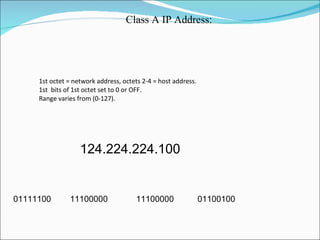
  1st octet = network address, octets 2-4 = host address.  1st  bits of 1st octet set to 0 or OFF.   Range varies from (0-127). Class A IP Address:
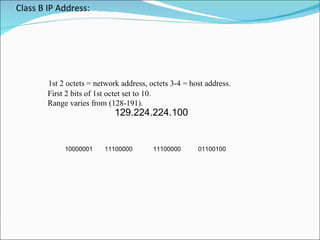
Class B IP Address:   1st 2 octets = network address, octets 3-4 = host address.  First 2 bits of 1st octet set to 10.  Range varies from (128-191).
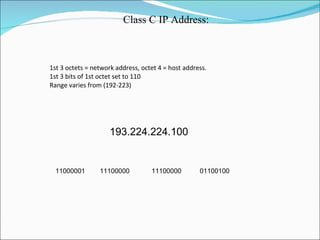
  1st 3 octets = network address, octet 4 = host address.  1st 3 bits of 1st octet set to 110   Range varies from (192-223) Class C IP Address:
Thank You !

Concept of networking

  • 1.
    CONCEPTS OF NETWORKINGPRESENTED BY : SUMIT DIMRI
  • 2.
    AGENDA Topics ToBe Illustrated :- Networking & 3Elements Required For NetworkinG NeeD FoR NetworkinG Types Of NeTwoRk OSI Reference ModeL TCP/IP SuiT ComParInG tcp\ip wiTH osi model NetWorK harDwarE IP AddReSSinG  First Octet RulE
  • 3.
    Basic Elements ForFunctionality Of Networking Network Hardware - For Data Communications Network Software - For Data Representation & Orientation Network ProtocoL - For Defining RuLeS For data Communations
  • 4.
    NeEd Of NetworkinGFile sharing: A network makes it easy for everyone to access the same file and prevents people from accidentally creating different versions. Printer sharing: With a network, several computers can share the same printer. Communication and collaboration: A network allows employees to share files, view other people's work, and exchange ideas more efficiently. In a larger office, you can use e-mail and instant messaging tools to communicate quickly and to store messages for future reference. Remote access: With remote access in place, users are able to access the same files, data, and messages even when they're not in the office. Data protection: A network makes it easier to back up all of your company's data on an offsite server, a set of tapes, CDs, or other backup systems.
  • 5.
    Types of networkinGLAN (Local Area Network) MAN (Metropolitan Area Network) WAN (Wide Area Network) Peer To Peer Networking Server Base Networking Host (Sender of Information Guest (Receiver of Information)
  • 6.
    LAN (Local AreaNetwork) Network which is include in a single building or room can be defined as LAN or we can say Intranet.
  • 7.
    WAN (Wide AreaNetwork ) Network expanding through cities , countries, continents limit called WAN, which can be connected through phone or modem . it’s also called internet.
  • 8.
    MAN (Metropolitan AreaNetwork) Network expand through a Single building in city limit is called MAN. Sector 1 Sector 2
  • 9.
    Peer To PeerNetwork In this network both computers have equal rights to share their resources. And both acts as server. 192.168.0.1 192.168.0.2
  • 10.
    Server Base NetworkIn this network all computers and other shared resources are controlled by centralized server.
  • 11.
    OSI REFERENCE MODEL[ Open System Interconnection ]
  • 12.
    Layers In OSIModel Application Layer Responsible For Allowing Network Processes To Applications. Contains Set Of Applications For Representation Of Data. 2. Presentation Layer Responsible For Data Encryption, Compression And Conversion Determines The Format Of Presentation Of Data 3. Session Layer Responsible For Establishing, Managing And Terminating sessions Between Applications. Provides Inter-Hosts Communication
  • 13.
    4. Transportlayer Provides Virtual End To End Communication Between Peer Processes Checks For Header And Reliable Connection By Error Detection And Correction 5. Network Layer Responsible For Path Selection Between End Systems Through Routing Performs Subnet Flow Control Performs Fragmentation Of A Data Packet To Be Sent And Assembly Of Frames Being Received By Sender Establishes Virtual Circuits
  • 14.
    6. DataLink Layer Evaluates Physical Address Of Concerned Hardware Or Device For Receiving Or Transmitting Frames. Contains Two Sub Protocols. Medium Access And Link Layer Protocol Provides Error Free Communication Link 7. Physical Layer Responsible For Transmission Of Raw Bits Over A Communication Link Consists Of Mechanical and Electrical Interfaces To Physically Transfer Data Through Physical Medium
  • 15.
    The TCP\IP ModeLThe TCP\IP Model Is a Specification For Computer Network Protocols Also Called Internet Reference Model TCP\IP Defines Set Of Rules To Enable The Computers To Communicate Over A Network Provides End To End Connectivity Specifying How Data Should Be Formatted, Addressed And Routed Over A Network Contains 4 Layers
  • 16.
  • 17.
    Layers In TCP\IPModeL Application Layer: This is the scope within which applications create user data and communicate this data to other processes or applications on another or the same host. The communications partners are often called peers . This is where the "higher level" protocols such as SMTP , FTP , SSH , HTTP , etc. operate. Transport Layer: The Transport Layer constitutes the networking regime between two network hosts, either on the local network or on remote networks separated by routers. The Transport Layer provides a uniform networking interface that hides the actual topology (layout) of the underlying network connections. This is where flow-control, error-correction, and connection protocols exist, such as TCP . This layer deals with opening and maintaining connections between Internet hosts.
  • 18.
    Internet Layer: The Internet Layer has the task of exchanging datagrams across network boundaries. It is therefore also referred to as the layer that establishes internetworking, indeed, it defines and establishes the Internet . This layer defines the addressing and routing structures used for the TCP/IP protocol suite. The primary protocol in this scope is the Internet Protocol , which defines IP addresses . Its function in routing is to transport datagrams to the next IP router that has the connectivity to a network closer to the final data destination Link Layer : This layer defines the networking methods with the scope of the local network link on which hosts communicate without intervening routers. This layer describes the protocols used to describe the local network topology and the interfaces needed to affect transmission of Internet Layer datagrams to next-neighbor hosts. (cf. the OSI Data Link Layer).
  • 19.
    Network hardware Typicallyrefers to equipment facilitating the use of a computer network.Typically, this includes routers, switches, hubs, gateways, network interface cards, Networking cables, network bridges, modems.
  • 20.
    Router It workson layer three (Network) It communicates different network. It has it’s own OS which can be configured by Computer. It’s best than all.
  • 21.
    Switch It workson layer two (data link) It has many collision domain. Each port is one collision domain. It broadcasts at first time. It communicates all computers of same network. It’s speed is better than Hub.
  • 22.
    Hub (Hybrid UnitBoard) It works on layer one (Physical) It has One Collision domain or one way for sending data. It always broadcast. It communicates computers of one network. It’s differentiated by it’s sticker and it’s port (hub link)
  • 23.
    Gateway Operates asa router Data conversions above the network layer. Conversions: encapsulation - use an intermediate network translation - connect different application protocols encrpyption - could be done by a gateway
  • 24.
    Nic (Network interfacecards) Network interface cards (also called NICs, network adapters,or network cards) are connectivity devices that enable a workstation, server, printer, or other node to receive and transmit data over the network media Nearly all NICs contain a data transceiver, the device that transmits and receives data signals NICs belong to both the Physical layer and Data Link layer of the OSI Model, because they apply data signals to the wire and assemble or disassemble data frames
  • 25.
    Network Cabling Thereare lots of Cables which are used in Network to communicate computers and Network devices to each others. The main cables are . Straight through Cables Cross through Cables Rollover cables
  • 26.
    Straight Through CablesThis type of cables are used to join two different divices. E.g. PC to Switch , Switch to Router , PC to Hub.
  • 27.
    Cross Through CableIt connects same devices . E.g. PC to PC , Switch to Switch etc.
  • 28.
    Rollover Cables It connects switch or Router to computer through console port.
  • 29.
    Coaxial Cable Typesof cables which are used for communication. Co axial Made By Copper , Data move in the form of Electronic cheap but slow. The connector of this wire is BNC. E.g. TV Cable Length Covers about 500 m.
  • 30.
    Twisted-Pair It ‘sthe network media of choice It’s well suited to the need of the modern network. It’s used for both telephone and Network. Two Types T-P Cables Shielded Twisted pair (STP) Untwisted Twisted Pair (UTP) The difference between STP and UTP is the extra shielding cover of it. The distance is longer than UTP.
  • 31.
    Fiber Optic CablesIt’s newcomer in the Networking scene. Uses Electric signals to send data transmission. Travels distances measured in Kilometers. It’s costly than other cables.
  • 32.
    Bridge Copies framesfrom one network to another Can operate selectively - does not copy all frames (must look at data-link headers). Extends the network beyond physical length limitations.
  • 33.
  • 34.
    IP Addressing  First Octet Rule IP Address : A Numerical Identification Assigned To Devices For Addressing Them. 32-BIT Binary Code Format Address 32 Bits Divided Into 4 Octets With Each Octet Of 8 Bits. Each Octet Is Converted Into Equivalent Decimal Form Each pair Is Then Written Together In Dotted Decimal Form
  • 35.
    There Are FivePrimary Classes Of IP Addresses. The Higher Order 3 Bits determines The Class. Class First Octet Network A 0 - 126 Large B 128 - 191 Medium C 192 -223 Small D 224 - 239 Multicast E 240 - 255 Experiment
  • 36.
    1stoctet = network address, octets 2-4 = host address. 1st bits of 1st octet set to 0 or OFF. Range varies from (0-127). Class A IP Address:
  • 37.
    Class B IPAddress: 1st 2 octets = network address, octets 3-4 = host address. First 2 bits of 1st octet set to 10. Range varies from (128-191).
  • 38.
    1st3 octets = network address, octet 4 = host address. 1st 3 bits of 1st octet set to 110 Range varies from (192-223) Class C IP Address:
  • 39.