Transmission 
Media 
1
Group : Silent Hunter 
Group Member : 
• Syed Ahmed Zaki ID:131-15-2169 
• Fatema Khatun ID:131-15-2372 
• Sumi Basak ID:131-15-2364 
• Priangka Kirtania ID:131-15-2385 
• Afruza Zinnurain ID:131-15-2345 
2
Acknowledgement 
3 
Md. Sarwar Jahan Morshed 
Assistant Professor 
Dept. Of Computer Science and 
Engineering 
Daffodil International University
Content 
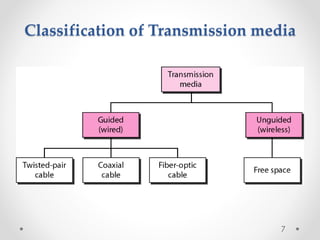
 Transmission Media 
 Guided Media: 
 Twisted Pair 
 UTP 
 STP 
 Co-Axial Cable 
 Fibre Optic Cable 
 Propagartion Modes 
 Transmission Impairment 
 Unguided Media: 
 Propagation Methods 
 Radio Waves 
 Antenna 
 Microwaves 
 Infrared 
4
What is Tranmission Media ? 
In data communication, 
• Transmission media is a pathway that carries the 
information from sender to receiver. 
• We use different types of cables or waves to 
transmit data. 
• Data is transmitted normally through electrical or 
electromagnetic signals. 
5
Description 
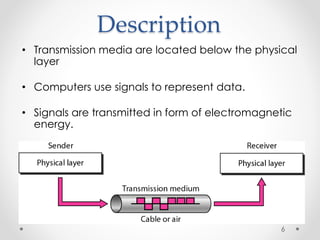
• Transmission media are located below the physical 
layer 
• Computers use signals to represent data. 
• Signals are transmitted in form of electromagnetic 
energy. 
6
Classification of Transmission media 
7
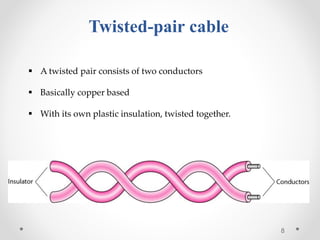
Twisted-pair cable 
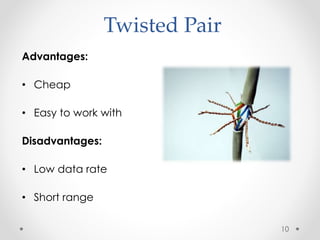
 A twisted pair consists of two conductors 
 Basically copper based 
 With its own plastic insulation, twisted together. 
8
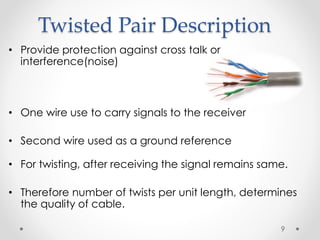
Twisted Pair Description 
• Provide protection against cross talk or 
interference(noise) 
• One wire use to carry signals to the receiver 
• Second wire used as a ground reference 
• For twisting, after receiving the signal remains same. 
• Therefore number of twists per unit length, determines 
the quality of cable. 
9
Twisted Pair 
Advantages: 
• Cheap 
• Easy to work with 
Disadvantages: 
• Low data rate 
• Short range 
10
Twisted Pair - Applications 
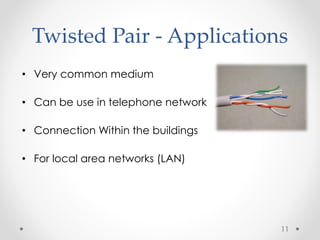
• Very common medium 
• Can be use in telephone network 
• Connection Within the buildings 
• For local area networks (LAN) 
11
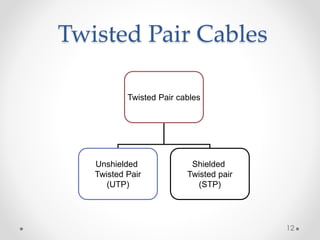
Twisted Pair Cables 
Twisted Pair cables 
Unshielded 
Twisted Pair 
(UTP) 
Shielded 
Twisted pair 
(STP) 
12
Unshielded Twisted Pair (UTP): 
Description 
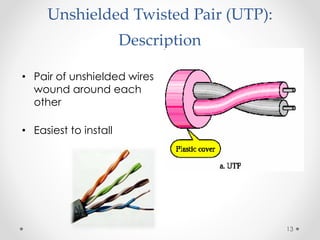
• Pair of unshielded wires 
wound around each 
other 
• Easiest to install 
13
Applications 
UTP : 
 Telephone subscribers connect to the central telephone 
office 
 DSL lines 
 LAN – 10Mbps or 100Mbps 
14
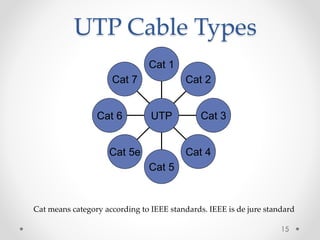
UTP Cable Types 
Cat 7 
Cat 6 
Cat 5e 
Cat 5 
Cat 2 
Cat 3 
Cat 4 
Cat 1 
UTP 
Cat means category according to IEEE standards. IEEE is de jure standard 
15
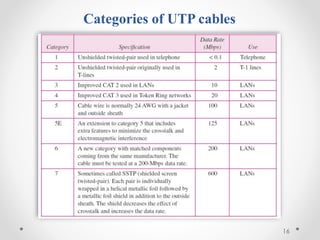
Categories of UTP cables 
16
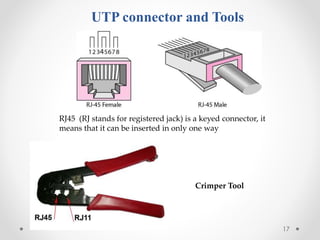
UTP connector and Tools 
RJ45 (RJ stands for registered jack) is a keyed connector, it 
means that it can be inserted in only one way 
17 
Crimper Tool
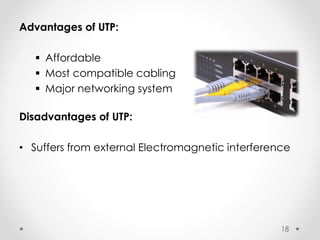
Advantages of UTP: 
 Affordable 
 Most compatible cabling 
 Major networking system 
Disadvantages of UTP: 
• Suffers from external Electromagnetic interference 
18
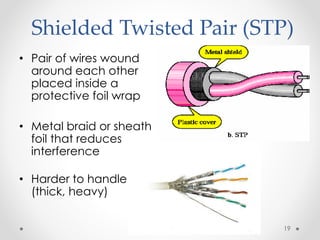
Shielded Twisted Pair (STP) 
• Pair of wires wound 
around each other 
placed inside a 
protective foil wrap 
• Metal braid or sheath 
foil that reduces 
interference 
• Harder to handle 
(thick, heavy) 
19
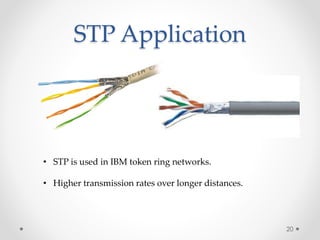
STP Application 
• STP is used in IBM token ring networks. 
• Higher transmission rates over longer distances. 
20
Advantages of STP: 
 Shielded 
 Faster than UTP 
Disadvantages of STP: 
 More expensive than UTP 
 High attenuation rate 
21
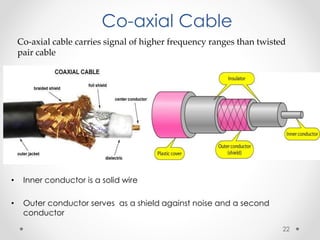
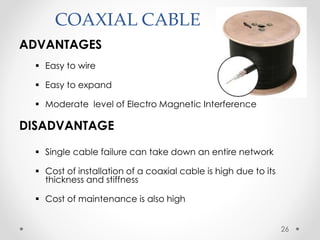
Co-axial Cable 
Co-axial cable carries signal of higher frequency ranges than twisted 
pair cable 
• Inner conductor is a solid wire 
• Outer conductor serves as a shield against noise and a second 
conductor 
22
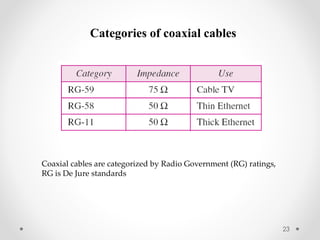
Categories of coaxial cables 
Coaxial cables are categorized by Radio Government (RG) ratings, 
RG is De Jure standards 
23
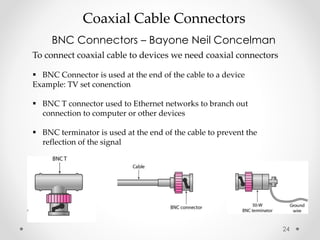
Coaxial Cable Connectors 
BNC Connectors – Bayone Neil Concelman 
To connect coaxial cable to devices we need coaxial connectors 
 BNC Connector is used at the end of the cable to a device 
Example: TV set conenction 
 BNC T connector used to Ethernet networks to branch out 
connection to computer or other devices 
 BNC terminator is used at the end of the cable to prevent the 
reflection of the signal 
24
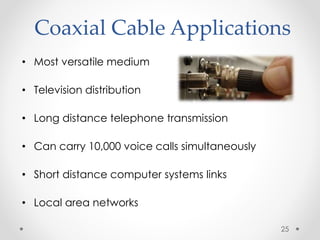
Coaxial Cable Applications 
• Most versatile medium 
• Television distribution 
• Long distance telephone transmission 
• Can carry 10,000 voice calls simultaneously 
• Short distance computer systems links 
• Local area networks 
25
COAXIAL CABLE 
ADVANTAGES 
 Easy to wire 
 Easy to expand 
 Moderate level of Electro Magnetic Interference 
DISADVANTAGE 
 Single cable failure can take down an entire network 
 Cost of installation of a coaxial cable is high due to its 
thickness and stiffness 
 Cost of maintenance is also high 
26
Fiber-Optic Cable 
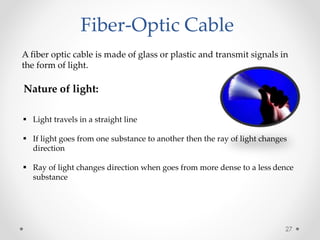
A fiber optic cable is made of glass or plastic and transmit signals in 
the form of light. 
Nature of light: 
 Light travels in a straight line 
 If light goes from one substance to another then the ray of light changes 
direction 
 Ray of light changes direction when goes from more dense to a less dence 
substance 
27
Bending of light ray 
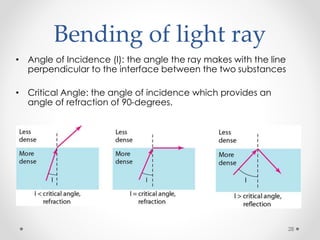
• Angle of Incidence (I): the angle the ray makes with the line 
perpendicular to the interface between the two substances 
• Critical Angle: the angle of incidence which provides an 
angle of refraction of 90-degrees. 
28
Optical fiber 
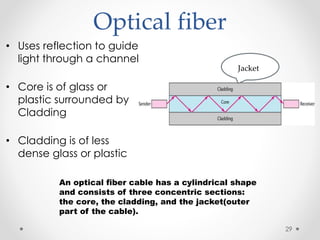
• Uses reflection to guide 
light through a channel 
• Core is of glass or 
plastic surrounded by 
Cladding 
• Cladding is of less 
dense glass or plastic 
An optical fiber cable has a cylindrical shape 
and consists of three concentric sections: 
the core, the cladding, and the jacket(outer 
part of the cable). 
Jacket 
29
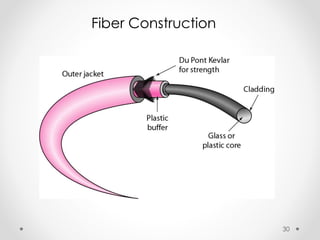
Fiber Construction 
30
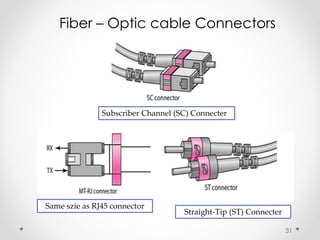
Fiber – Optic cable Connectors 
31 
Subscriber Channel (SC) Connecter 
Straight-Tip (ST) Connecter 
Same szie as RJ45 connector
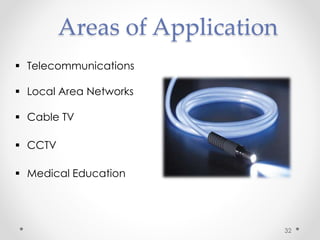
Areas of Application 
 Telecommunications 
 Local Area Networks 
 Cable TV 
 CCTV 
 Medical Education 
32
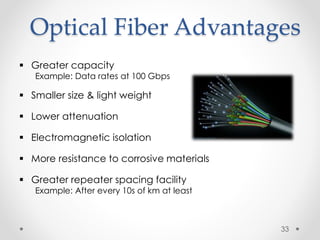
Optical Fiber Advantages 
 Greater capacity 
Example: Data rates at 100 Gbps 
 Smaller size & light weight 
 Lower attenuation 
 Electromagnetic isolation 
 More resistance to corrosive materials 
 Greater repeater spacing facility 
Example: After every 10s of km at least 
33
Optical Fiber Disadvantages 
• Installation and maintenance need expertise 
• Only Unidirectional light propagation 
• Much more expensive 
34
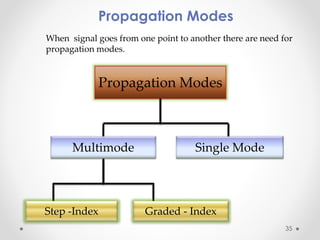
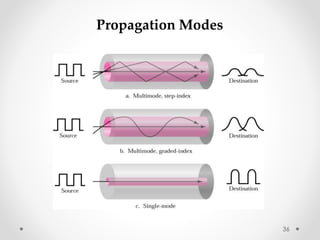
Propagation Modes 
When signal goes from one point to another there are need for 
propagation modes. 
Propagation Modes 
Multimode Single Mode 
Step -Index Graded - Index 
35
Propagation Modes 
36
Transmission Impairment 
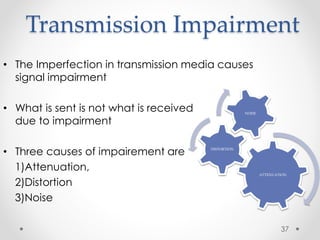
• The Imperfection in transmission media causes 
signal impairment 
• What is sent is not what is received 
due to impairment 
• Three causes of impairement are 
1)Attenuation, 
2)Distortion 
3)Noise 
ATTENUATION 
DISTORTION 
NOISE 
37
Transmission Impairment 
• Attenuation means a loss of energy. 
• Distortion means that the signal changes its form or 
shape. 
• Noise is another cause of impairement. 
• Several types of noise 
Example: thermal noise, induced noise, crosstalk 
38
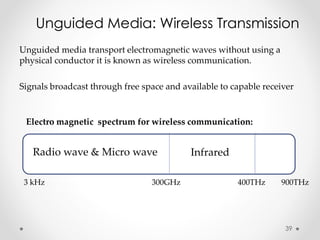
Unguided Media: Wireless Transmission 
Unguided media transport electromagnetic waves without using a 
physical conductor it is known as wireless communication. 
Signals broadcast through free space and available to capable receiver 
Electro magnetic spectrum for wireless communication: 
Radio wave & Micro wave Infrared 
3 kHz 300GHz 400THz 900THz 
39
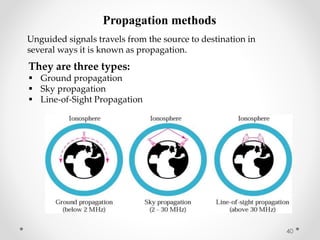
Propagation methods 
Unguided signals travels from the source to destination in 
several ways it is known as propagation. 
They are three types: 
 Ground propagation 
 Sky propagation 
 Line-of-Sight Propagation 
40
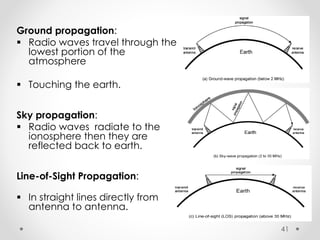
Ground propagation: 
 Radio waves travel through the 
lowest portion of the 
atmosphere 
 Touching the earth. 
Sky propagation: 
 Radio waves radiate to the 
ionosphere then they are 
reflected back to earth. 
Line-of-Sight Propagation: 
 In straight lines directly from 
antenna to antenna. 
41
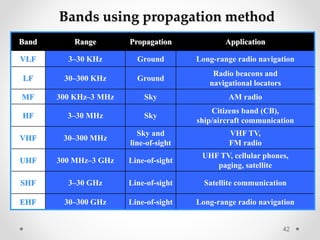
Bands using propagation method 
Band Range Propagation Application 
VLF 3–30 KHz Ground Long-range radio navigation 
LF 30–300 KHz Ground 
Radio beacons and 
navigational locators 
MF 300 KHz–3 MHz Sky AM radio 
HF 3–30 MHz Sky 
Citizens band (CB), 
ship/aircraft communication 
VHF 30–300 MHz 
Sky and 
line-of-sight 
VHF TV, 
FM radio 
UHF 300 MHz–3 GHz Line-of-sight 
UHF TV, cellular phones, 
paging, satellite 
SHF 3–30 GHz Line-of-sight Satellite communication 
EHF 30–300 GHz Line-of-sight Long-range radio navigation 
42
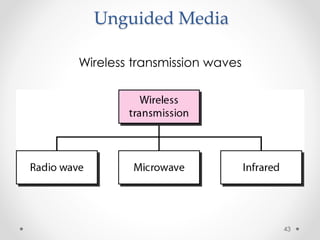
Unguided Media 
Wireless transmission waves 
43
Unguided Media – Radio Waves 
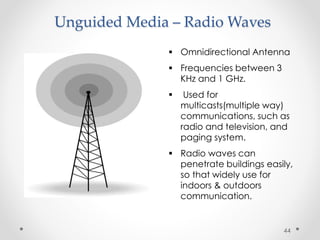
 Omnidirectional Antenna 
 Frequencies between 3 
KHz and 1 GHz. 
 Used for 
multicasts(multiple way) 
communications, such as 
radio and television, and 
paging system. 
 Radio waves can 
penetrate buildings easily, 
so that widely use for 
indoors & outdoors 
communication. 
44
Antennas 
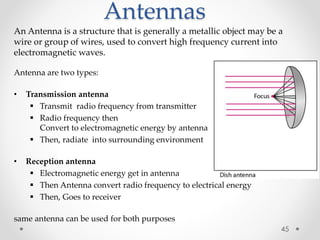
An Antenna is a structure that is generally a metallic object may be a 
wire or group of wires, used to convert high frequency current into 
electromagnetic waves. 
Antenna are two types: 
• Transmission antenna 
 Transmit radio frequency from transmitter 
 Radio frequency then 
Convert to electromagnetic energy by antenna 
 Then, radiate into surrounding environment 
• Reception antenna 
 Electromagnetic energy get in antenna 
 Then Antenna convert radio frequency to electrical energy 
 Then, Goes to receiver 
same antenna can be used for both purposes 
45
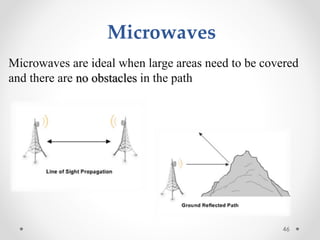
Microwaves are ideal when large areas need to be covered 
and there are no obstacles in the path 
46 
Microwaves
Micro waves Transmission 
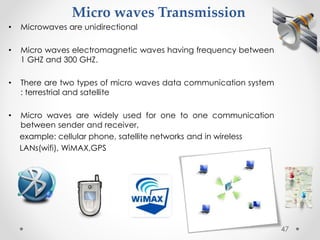
• Microwaves are unidirectional 
• Micro waves electromagnetic waves having frequency between 
1 GHZ and 300 GHZ. 
• There are two types of micro waves data communication system 
: terrestrial and satellite 
• Micro waves are widely used for one to one communication 
between sender and receiver, 
example: cellular phone, satellite networks and in wireless 
LANs(wifi), WiMAX,GPS 
47
Infrared 
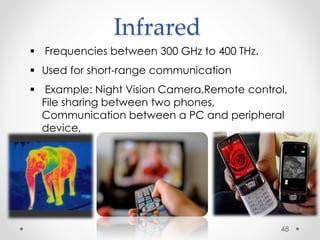
 Frequencies between 300 GHz to 400 THz. 
 Used for short-range communication 
 Example: Night Vision Camera,Remote control, 
File sharing between two phones, 
Communication between a PC and peripheral 
device, 
48
References 
 Data communication and Networking, 
fourth edition 
By : BEHROUZ A FOROUZAN 
 And various relevant websites 
49
Any Question ?
Thank You

Presentation on Transmission Media

  • 1.
  • 2.
    Group : SilentHunter Group Member : • Syed Ahmed Zaki ID:131-15-2169 • Fatema Khatun ID:131-15-2372 • Sumi Basak ID:131-15-2364 • Priangka Kirtania ID:131-15-2385 • Afruza Zinnurain ID:131-15-2345 2
  • 3.
    Acknowledgement 3 Md.Sarwar Jahan Morshed Assistant Professor Dept. Of Computer Science and Engineering Daffodil International University
  • 4.
    Content  TransmissionMedia  Guided Media:  Twisted Pair  UTP  STP  Co-Axial Cable  Fibre Optic Cable  Propagartion Modes  Transmission Impairment  Unguided Media:  Propagation Methods  Radio Waves  Antenna  Microwaves  Infrared 4
  • 5.
    What is TranmissionMedia ? In data communication, • Transmission media is a pathway that carries the information from sender to receiver. • We use different types of cables or waves to transmit data. • Data is transmitted normally through electrical or electromagnetic signals. 5
  • 6.
    Description • Transmissionmedia are located below the physical layer • Computers use signals to represent data. • Signals are transmitted in form of electromagnetic energy. 6
  • 7.
  • 8.
    Twisted-pair cable A twisted pair consists of two conductors  Basically copper based  With its own plastic insulation, twisted together. 8
  • 9.
    Twisted Pair Description • Provide protection against cross talk or interference(noise) • One wire use to carry signals to the receiver • Second wire used as a ground reference • For twisting, after receiving the signal remains same. • Therefore number of twists per unit length, determines the quality of cable. 9
  • 10.
    Twisted Pair Advantages: • Cheap • Easy to work with Disadvantages: • Low data rate • Short range 10
  • 11.
    Twisted Pair -Applications • Very common medium • Can be use in telephone network • Connection Within the buildings • For local area networks (LAN) 11
  • 12.
    Twisted Pair Cables Twisted Pair cables Unshielded Twisted Pair (UTP) Shielded Twisted pair (STP) 12
  • 13.
    Unshielded Twisted Pair(UTP): Description • Pair of unshielded wires wound around each other • Easiest to install 13
  • 14.
    Applications UTP :  Telephone subscribers connect to the central telephone office  DSL lines  LAN – 10Mbps or 100Mbps 14
  • 15.
    UTP Cable Types Cat 7 Cat 6 Cat 5e Cat 5 Cat 2 Cat 3 Cat 4 Cat 1 UTP Cat means category according to IEEE standards. IEEE is de jure standard 15
  • 16.
  • 17.
    UTP connector andTools RJ45 (RJ stands for registered jack) is a keyed connector, it means that it can be inserted in only one way 17 Crimper Tool
  • 18.
    Advantages of UTP:  Affordable  Most compatible cabling  Major networking system Disadvantages of UTP: • Suffers from external Electromagnetic interference 18
  • 19.
    Shielded Twisted Pair(STP) • Pair of wires wound around each other placed inside a protective foil wrap • Metal braid or sheath foil that reduces interference • Harder to handle (thick, heavy) 19
  • 20.
    STP Application •STP is used in IBM token ring networks. • Higher transmission rates over longer distances. 20
  • 21.
    Advantages of STP:  Shielded  Faster than UTP Disadvantages of STP:  More expensive than UTP  High attenuation rate 21
  • 22.
    Co-axial Cable Co-axialcable carries signal of higher frequency ranges than twisted pair cable • Inner conductor is a solid wire • Outer conductor serves as a shield against noise and a second conductor 22
  • 23.
    Categories of coaxialcables Coaxial cables are categorized by Radio Government (RG) ratings, RG is De Jure standards 23
  • 24.
    Coaxial Cable Connectors BNC Connectors – Bayone Neil Concelman To connect coaxial cable to devices we need coaxial connectors  BNC Connector is used at the end of the cable to a device Example: TV set conenction  BNC T connector used to Ethernet networks to branch out connection to computer or other devices  BNC terminator is used at the end of the cable to prevent the reflection of the signal 24
  • 25.
    Coaxial Cable Applications • Most versatile medium • Television distribution • Long distance telephone transmission • Can carry 10,000 voice calls simultaneously • Short distance computer systems links • Local area networks 25
  • 26.
    COAXIAL CABLE ADVANTAGES  Easy to wire  Easy to expand  Moderate level of Electro Magnetic Interference DISADVANTAGE  Single cable failure can take down an entire network  Cost of installation of a coaxial cable is high due to its thickness and stiffness  Cost of maintenance is also high 26
  • 27.
    Fiber-Optic Cable Afiber optic cable is made of glass or plastic and transmit signals in the form of light. Nature of light:  Light travels in a straight line  If light goes from one substance to another then the ray of light changes direction  Ray of light changes direction when goes from more dense to a less dence substance 27
  • 28.
    Bending of lightray • Angle of Incidence (I): the angle the ray makes with the line perpendicular to the interface between the two substances • Critical Angle: the angle of incidence which provides an angle of refraction of 90-degrees. 28
  • 29.
    Optical fiber •Uses reflection to guide light through a channel • Core is of glass or plastic surrounded by Cladding • Cladding is of less dense glass or plastic An optical fiber cable has a cylindrical shape and consists of three concentric sections: the core, the cladding, and the jacket(outer part of the cable). Jacket 29
  • 30.
  • 31.
    Fiber – Opticcable Connectors 31 Subscriber Channel (SC) Connecter Straight-Tip (ST) Connecter Same szie as RJ45 connector
  • 32.
    Areas of Application  Telecommunications  Local Area Networks  Cable TV  CCTV  Medical Education 32
  • 33.
    Optical Fiber Advantages  Greater capacity Example: Data rates at 100 Gbps  Smaller size & light weight  Lower attenuation  Electromagnetic isolation  More resistance to corrosive materials  Greater repeater spacing facility Example: After every 10s of km at least 33
  • 34.
    Optical Fiber Disadvantages • Installation and maintenance need expertise • Only Unidirectional light propagation • Much more expensive 34
  • 35.
    Propagation Modes Whensignal goes from one point to another there are need for propagation modes. Propagation Modes Multimode Single Mode Step -Index Graded - Index 35
  • 36.
  • 37.
    Transmission Impairment •The Imperfection in transmission media causes signal impairment • What is sent is not what is received due to impairment • Three causes of impairement are 1)Attenuation, 2)Distortion 3)Noise ATTENUATION DISTORTION NOISE 37
  • 38.
    Transmission Impairment •Attenuation means a loss of energy. • Distortion means that the signal changes its form or shape. • Noise is another cause of impairement. • Several types of noise Example: thermal noise, induced noise, crosstalk 38
  • 39.
    Unguided Media: WirelessTransmission Unguided media transport electromagnetic waves without using a physical conductor it is known as wireless communication. Signals broadcast through free space and available to capable receiver Electro magnetic spectrum for wireless communication: Radio wave & Micro wave Infrared 3 kHz 300GHz 400THz 900THz 39
  • 40.
    Propagation methods Unguidedsignals travels from the source to destination in several ways it is known as propagation. They are three types:  Ground propagation  Sky propagation  Line-of-Sight Propagation 40
  • 41.
    Ground propagation: Radio waves travel through the lowest portion of the atmosphere  Touching the earth. Sky propagation:  Radio waves radiate to the ionosphere then they are reflected back to earth. Line-of-Sight Propagation:  In straight lines directly from antenna to antenna. 41
  • 42.
    Bands using propagationmethod Band Range Propagation Application VLF 3–30 KHz Ground Long-range radio navigation LF 30–300 KHz Ground Radio beacons and navigational locators MF 300 KHz–3 MHz Sky AM radio HF 3–30 MHz Sky Citizens band (CB), ship/aircraft communication VHF 30–300 MHz Sky and line-of-sight VHF TV, FM radio UHF 300 MHz–3 GHz Line-of-sight UHF TV, cellular phones, paging, satellite SHF 3–30 GHz Line-of-sight Satellite communication EHF 30–300 GHz Line-of-sight Long-range radio navigation 42
  • 43.
    Unguided Media Wirelesstransmission waves 43
  • 44.
    Unguided Media –Radio Waves  Omnidirectional Antenna  Frequencies between 3 KHz and 1 GHz.  Used for multicasts(multiple way) communications, such as radio and television, and paging system.  Radio waves can penetrate buildings easily, so that widely use for indoors & outdoors communication. 44
  • 45.
    Antennas An Antennais a structure that is generally a metallic object may be a wire or group of wires, used to convert high frequency current into electromagnetic waves. Antenna are two types: • Transmission antenna  Transmit radio frequency from transmitter  Radio frequency then Convert to electromagnetic energy by antenna  Then, radiate into surrounding environment • Reception antenna  Electromagnetic energy get in antenna  Then Antenna convert radio frequency to electrical energy  Then, Goes to receiver same antenna can be used for both purposes 45
  • 46.
    Microwaves are idealwhen large areas need to be covered and there are no obstacles in the path 46 Microwaves
  • 47.
    Micro waves Transmission • Microwaves are unidirectional • Micro waves electromagnetic waves having frequency between 1 GHZ and 300 GHZ. • There are two types of micro waves data communication system : terrestrial and satellite • Micro waves are widely used for one to one communication between sender and receiver, example: cellular phone, satellite networks and in wireless LANs(wifi), WiMAX,GPS 47
  • 48.
    Infrared  Frequenciesbetween 300 GHz to 400 THz.  Used for short-range communication  Example: Night Vision Camera,Remote control, File sharing between two phones, Communication between a PC and peripheral device, 48
  • 49.
    References  Datacommunication and Networking, fourth edition By : BEHROUZ A FOROUZAN  And various relevant websites 49
  • 50.
  • 51.