Computer Output
devices
>> What is an output device?
An output is a device is a device which carried out or
show the result that is commanded computer to perform.
Computer is used to help or reduce our work and to do
various type of tasks. So, after completing any task
computer needs some devices or media to show what is
does. These devices are called output devices.
An output device is any device used to send data
from a computer to another device or user. Most
computer data output that is meant for humans is in the
form of audio or video. Thus, most output devices used
by humans are in these categories. Examples include
monitors, projectors, speakers, headphones and printers.
>> Why we need an output
device..?
Computers have to have output devices in order to relay information
back to other devices for its use. If computer information remain
exclusively in the computer, then it is useless, because nothing is done
with it. Even in the case of stored data, the information is often
relayed to another computer with output devices, or directly to an
output device, so that it can affect the outer world.
Without output devices, it would be, in addition, impossible to
determine the inner workings of computers without output devices, as
any modifications to allow the viewing of the information/functionality
would be considered an output device.
Here we showed some points about the importance of output devices:
# Output devices gives us feedbacks which was our desire.
# Computer needs output device to focus what it does according to our demand.
# Outputs devices help us to edit or elaborate our command and thus the way we
do.
# In some way, output devices enable us to ask Computer to do a particular job;
such as we see on monitor but we order with keyboard. Here the output device
monitor helps to command Computer.
# Output devices convert feedback from computer signal to our nominated result.
# An output device is used to communicate the results of data processing carried
out by an information processing system which converts the electronically generated
information into human-readable form.
>> Various type of output devices..
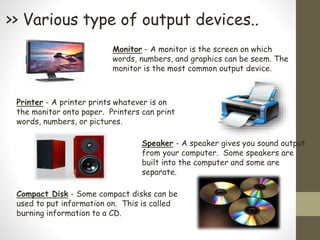
Monitor - A monitor is the screen on which
words, numbers, and graphics can be seem. The
monitor is the most common output device.
Printer - A printer prints whatever is on
the monitor onto paper. Printers can print
words, numbers, or pictures.
Speaker - A speaker gives you sound output
from your computer. Some speakers are
built into the computer and some are
separate.
Compact Disk - Some compact disks can be
used to put information on. This is called
burning information to a CD.
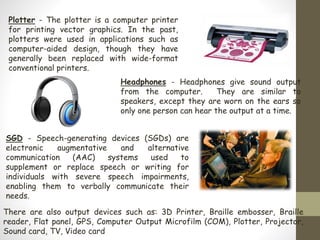
Plotter - The plotter is a computer printer
for printing vector graphics. In the past,
plotters were used in applications such as
computer-aided design, though they have
generally been replaced with wide-format
conventional printers.
Headphones - Headphones give sound output
from the computer. They are similar to
speakers, except they are worn on the ears so
only one person can hear the output at a time.
SGD - Speech-generating devices (SGDs) are
electronic augmentative and alternative
communication (AAC) systems used to
supplement or replace speech or writing for
individuals with severe speech impairments,
enabling them to verbally communicate their
needs.
There are also output devices such as: 3D Printer, Braille embosser, Braille
reader, Flat panel, GPS, Computer Output Microfilm (COM), Plotter, Projector,
Sound card, TV, Video card
Among these output devices, we’re going to describe
‘Monitor’ briefly:
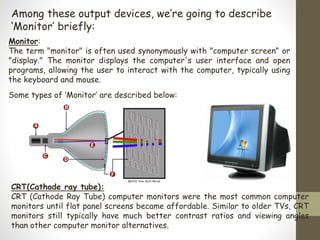
Monitor:
The term "monitor" is often used synonymously with "computer screen" or
"display." The monitor displays the computer's user interface and open
programs, allowing the user to interact with the computer, typically using
the keyboard and mouse.
CRT(Cathode ray tube):
CRT (Cathode Ray Tube) computer monitors were the most common computer
monitors until flat panel screens became affordable. Similar to older TVs, CRT
monitors still typically have much better contrast ratios and viewing angles
than other computer monitor alternatives.
Some types of ‘Monitor’ are described below:
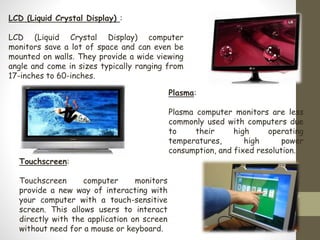
LCD (Liquid Crystal Display) :
LCD (Liquid Crystal Display) computer
monitors save a lot of space and can even be
mounted on walls. They provide a wide viewing
angle and come in sizes typically ranging from
17-inches to 60-inches.
Plasma:
Plasma computer monitors are less
commonly used with computers due
to their high operating
temperatures, high power
consumption, and fixed resolution.
Touchscreen:
Touchscreen computer monitors
provide a new way of interacting with
your computer with a touch-sensitive
screen. This allows users to interact
directly with the application on screen
without need for a mouse or keyboard.
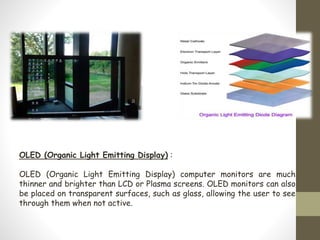
OLED (Organic Light Emitting Display) :
OLED (Organic Light Emitting Display) computer monitors are much
thinner and brighter than LCD or Plasma screens. OLED monitors can also
be placed on transparent surfaces, such as glass, allowing the user to see
through them when not active.
And this is it…

Computer output devices

  • 1.
  • 2.
    >> What isan output device? An output is a device is a device which carried out or show the result that is commanded computer to perform. Computer is used to help or reduce our work and to do various type of tasks. So, after completing any task computer needs some devices or media to show what is does. These devices are called output devices. An output device is any device used to send data from a computer to another device or user. Most computer data output that is meant for humans is in the form of audio or video. Thus, most output devices used by humans are in these categories. Examples include monitors, projectors, speakers, headphones and printers.
  • 3.
    >> Why weneed an output device..? Computers have to have output devices in order to relay information back to other devices for its use. If computer information remain exclusively in the computer, then it is useless, because nothing is done with it. Even in the case of stored data, the information is often relayed to another computer with output devices, or directly to an output device, so that it can affect the outer world. Without output devices, it would be, in addition, impossible to determine the inner workings of computers without output devices, as any modifications to allow the viewing of the information/functionality would be considered an output device.
  • 4.
    Here we showedsome points about the importance of output devices: # Output devices gives us feedbacks which was our desire. # Computer needs output device to focus what it does according to our demand. # Outputs devices help us to edit or elaborate our command and thus the way we do. # In some way, output devices enable us to ask Computer to do a particular job; such as we see on monitor but we order with keyboard. Here the output device monitor helps to command Computer. # Output devices convert feedback from computer signal to our nominated result. # An output device is used to communicate the results of data processing carried out by an information processing system which converts the electronically generated information into human-readable form.
  • 5.
    >> Various typeof output devices.. Monitor - A monitor is the screen on which words, numbers, and graphics can be seem. The monitor is the most common output device. Printer - A printer prints whatever is on the monitor onto paper. Printers can print words, numbers, or pictures. Speaker - A speaker gives you sound output from your computer. Some speakers are built into the computer and some are separate. Compact Disk - Some compact disks can be used to put information on. This is called burning information to a CD.
  • 6.
    Plotter - Theplotter is a computer printer for printing vector graphics. In the past, plotters were used in applications such as computer-aided design, though they have generally been replaced with wide-format conventional printers. Headphones - Headphones give sound output from the computer. They are similar to speakers, except they are worn on the ears so only one person can hear the output at a time. SGD - Speech-generating devices (SGDs) are electronic augmentative and alternative communication (AAC) systems used to supplement or replace speech or writing for individuals with severe speech impairments, enabling them to verbally communicate their needs. There are also output devices such as: 3D Printer, Braille embosser, Braille reader, Flat panel, GPS, Computer Output Microfilm (COM), Plotter, Projector, Sound card, TV, Video card
  • 7.
    Among these outputdevices, we’re going to describe ‘Monitor’ briefly: Monitor: The term "monitor" is often used synonymously with "computer screen" or "display." The monitor displays the computer's user interface and open programs, allowing the user to interact with the computer, typically using the keyboard and mouse. CRT(Cathode ray tube): CRT (Cathode Ray Tube) computer monitors were the most common computer monitors until flat panel screens became affordable. Similar to older TVs, CRT monitors still typically have much better contrast ratios and viewing angles than other computer monitor alternatives. Some types of ‘Monitor’ are described below:
  • 8.
    LCD (Liquid CrystalDisplay) : LCD (Liquid Crystal Display) computer monitors save a lot of space and can even be mounted on walls. They provide a wide viewing angle and come in sizes typically ranging from 17-inches to 60-inches. Plasma: Plasma computer monitors are less commonly used with computers due to their high operating temperatures, high power consumption, and fixed resolution. Touchscreen: Touchscreen computer monitors provide a new way of interacting with your computer with a touch-sensitive screen. This allows users to interact directly with the application on screen without need for a mouse or keyboard.
  • 9.
    OLED (Organic LightEmitting Display) : OLED (Organic Light Emitting Display) computer monitors are much thinner and brighter than LCD or Plasma screens. OLED monitors can also be placed on transparent surfaces, such as glass, allowing the user to see through them when not active.
  • 10.