Output Devices
Aarya Khanal
Contents
• Introduction
• Differences Between input and Output devices
• Functions of Output devices
• Types of output devices
• Examples of output devices
• About some major output devices
• Conclusion
Output devices: Definition
 An output device is computer hardware that uses received data and commands
from a computer in order to perform a task.
 Any peripheral that receives data from a computer, usually for display,
projection, or physical reproduction.
 Computer hardware equipment used to communicate the results of data
processing carried out by a computer to the outside world.
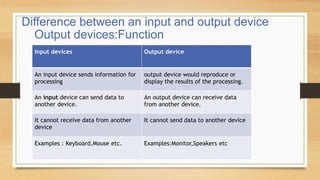
Difference between an input and output device
Input devices Output device
An input device sends information for
processing
output device would reproduce or
display the results of the processing.
An input device can send data to
another device.
An output device can receive data
from another device.
It cannot receive data from another
device
It cannot send data to another device
Examples : Keyboard,Mouse etc. Examples:Monitor,Speakers etc
Output devices:Function
They perform the following functions:
 Receive results from memory.
 Convert data into human readable form.
 Display results to the user.
Output devices: Types
Some types of output are
 Text
 Graphics
 Tactile
 Audio
 Video
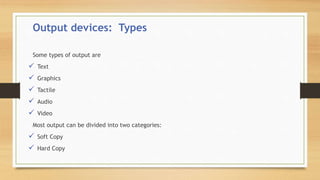
Most output can be divided into two categories:
 Soft Copy
 Hard Copy
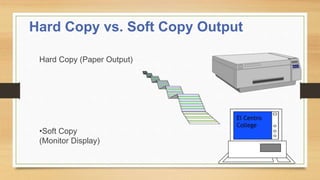
Hard Copy vs. Soft Copy Output
Hard Copy (Paper Output)
•Soft Copy
(Monitor Display)
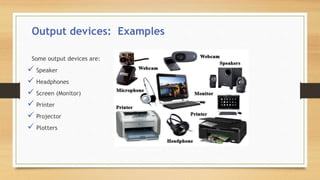
Output devices: Examples
Some output devices are:
 Speaker
 Headphones
 Screen (Monitor)
 Printer
 Projector
 Plotters
Output devices: Printers
Output devices that produces text and graphics on a physical medium
Printing mechanism strikes paper, ribbon and character together
Results in hard copy or printout
Two orientations: portrait and landscape
Output devices: printer (con..)
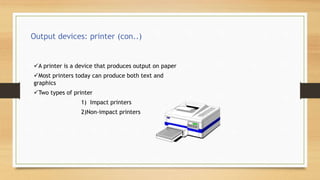
A printer is a device that produces output on paper
Most printers today can produce both text and
graphics
Two types of printer
1) Impact printers
2)Non-impact printers
Output devices: printer (Con..)
1) Impact Printers
 There is some physical contact with the paper to produce the image
i.e.physically striking the paper
 Types
Line printers
Dot matrix printers
2)Non-Impact Printers
Types
Laser Printers
Ink-jet printer
Bubble-jet printers
Output devices: speaker
Computer speakers, or multimedia speakers, are
speakers external to a computer, that disable the
lower fidelity built-in speaker
They often have a low-power internal amplifier.
Computer speakers range widely in quality and in
price.
The computer speakers typically packaged with
computer systems are small, plastic, and have
mediocre sound quality.
Output devices: Headphones
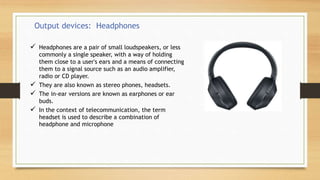
 Headphones are a pair of small loudspeakers, or less
commonly a single speaker, with a way of holding
them close to a user's ears and a means of connecting
them to a signal source such as an audio amplifier,
radio or CD player.
 They are also known as stereo phones, headsets.
 The in-ear versions are known as earphones or ear
buds.
 In the context of telecommunication, the term
headset is used to describe a combination of
headphone and microphone
Output devices: Screen(Monitor)
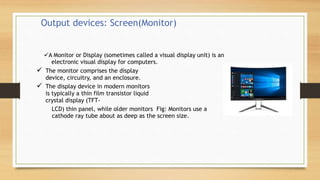
A Monitor or Display (sometimes called a visual display unit) is an
electronic visual display for computers.
 The monitor comprises the display
device, circuitry, and an enclosure.
 The display device in modern monitors
is typically a thin film transistor liquid
crystal display (TFT-
LCD) thin panel, while older monitors Fig: Monitors use a
cathode ray tube about as deep as the screen size.
 Types
 CRT u LCD u LED
 Resolution
 Pixels
 SVGA or VGA
 Monochrome or color
Monitor (contd)
Output devices: projector
A projector is an output device that can take images generated by a computer
or Blu-ray player and reproduce them onto a screen, wall, or other surface.
 Typically, the surface projected onto is
large, flat, and lightly colored
 The most common type of projector
used today is called a video projector.
Output devices: Plotters
Used by graphic designers/architects
Image transferred to paper with ink pens
Very high resolution
Excellent for scientific and engineering applications
Conclusion
References
https://www.computerhope.com/jargon/o/outputde.htm
https://www.techwalla.com/articles/difference-input-output-devices-computer
https://www.shutterstock.com/search/computer+parts
http://www.sainiktech.com
ANY QUIRES??
Output devices

Output devices

  • 1.
  • 2.
    Contents • Introduction • DifferencesBetween input and Output devices • Functions of Output devices • Types of output devices • Examples of output devices • About some major output devices • Conclusion
  • 3.
    Output devices: Definition An output device is computer hardware that uses received data and commands from a computer in order to perform a task.  Any peripheral that receives data from a computer, usually for display, projection, or physical reproduction.  Computer hardware equipment used to communicate the results of data processing carried out by a computer to the outside world.
  • 4.
    Difference between aninput and output device Input devices Output device An input device sends information for processing output device would reproduce or display the results of the processing. An input device can send data to another device. An output device can receive data from another device. It cannot receive data from another device It cannot send data to another device Examples : Keyboard,Mouse etc. Examples:Monitor,Speakers etc Output devices:Function
  • 5.
    They perform thefollowing functions:  Receive results from memory.  Convert data into human readable form.  Display results to the user.
  • 6.
    Output devices: Types Sometypes of output are  Text  Graphics  Tactile  Audio  Video Most output can be divided into two categories:  Soft Copy  Hard Copy
  • 8.
    Hard Copy vs.Soft Copy Output Hard Copy (Paper Output) •Soft Copy (Monitor Display)
  • 9.
    Output devices: Examples Someoutput devices are:  Speaker  Headphones  Screen (Monitor)  Printer  Projector  Plotters
  • 10.
    Output devices: Printers Outputdevices that produces text and graphics on a physical medium Printing mechanism strikes paper, ribbon and character together Results in hard copy or printout Two orientations: portrait and landscape
  • 11.
    Output devices: printer(con..) A printer is a device that produces output on paper Most printers today can produce both text and graphics Two types of printer 1) Impact printers 2)Non-impact printers
  • 12.
    Output devices: printer(Con..) 1) Impact Printers  There is some physical contact with the paper to produce the image i.e.physically striking the paper  Types Line printers Dot matrix printers 2)Non-Impact Printers Types Laser Printers Ink-jet printer Bubble-jet printers
  • 13.
    Output devices: speaker Computerspeakers, or multimedia speakers, are speakers external to a computer, that disable the lower fidelity built-in speaker They often have a low-power internal amplifier. Computer speakers range widely in quality and in price. The computer speakers typically packaged with computer systems are small, plastic, and have mediocre sound quality.
  • 14.
    Output devices: Headphones Headphones are a pair of small loudspeakers, or less commonly a single speaker, with a way of holding them close to a user's ears and a means of connecting them to a signal source such as an audio amplifier, radio or CD player.  They are also known as stereo phones, headsets.  The in-ear versions are known as earphones or ear buds.  In the context of telecommunication, the term headset is used to describe a combination of headphone and microphone
  • 15.
    Output devices: Screen(Monitor) AMonitor or Display (sometimes called a visual display unit) is an electronic visual display for computers.  The monitor comprises the display device, circuitry, and an enclosure.  The display device in modern monitors is typically a thin film transistor liquid crystal display (TFT- LCD) thin panel, while older monitors Fig: Monitors use a cathode ray tube about as deep as the screen size.
  • 16.
     Types  CRTu LCD u LED  Resolution  Pixels  SVGA or VGA  Monochrome or color Monitor (contd)
  • 17.
    Output devices: projector Aprojector is an output device that can take images generated by a computer or Blu-ray player and reproduce them onto a screen, wall, or other surface.  Typically, the surface projected onto is large, flat, and lightly colored  The most common type of projector used today is called a video projector.
  • 18.
    Output devices: Plotters Usedby graphic designers/architects Image transferred to paper with ink pens Very high resolution Excellent for scientific and engineering applications
  • 19.
  • 20.
  • 21.