OUTPUT DEVICES
TAGORE GOVERNMENT COLLEGE OF EDUCATION
PRESENTED BY
RUPALI GHARAMI
PEDAGOGY OF COMPUTER SCIENCE
B.Sc B.Ed 3rd
YEAR (MATHEMATICS)
(PRACTICUM 2)
WHAT ARE OUTPUT
DEVICES ?
Output Devices are those devices
which show us the result after
giving the input data to a
computer system. Output can be
in different forms like image,
graphic audio, video, etc.
TYPES OF OUTPUT
DEVICES
1.Monitor
2.Printer
3.Plotter
4.Projector
5.Speaker
6.Headphones
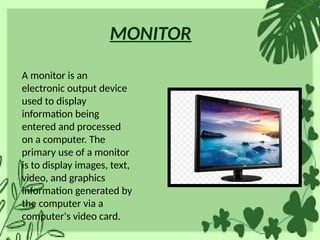
MONITOR
A monitor is an
electronic output device
used to display
information being
entered and processed
on a computer. The
primary use of a monitor
is to display images, text,
video, and graphics
information generated by
the computer via a
computer's video card.
PRINTER
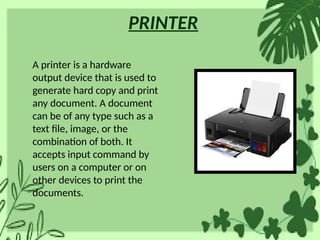
A printer is a hardware
output device that is used to
generate hard copy and print
any document. A document
can be of any type such as a
text file, image, or the
combination of both. It
accepts input command by
users on a computer or on
other devices to print the
documents.
PLOTTER
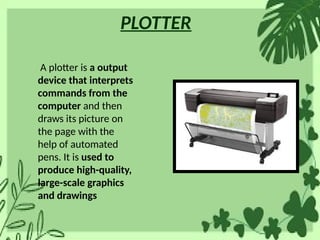
A plotter is a output
device that interprets
commands from the
computer and then
draws its picture on
the page with the
help of automated
pens. It is used to
produce high-quality,
large-scale graphics
and drawings
PROJECTOR
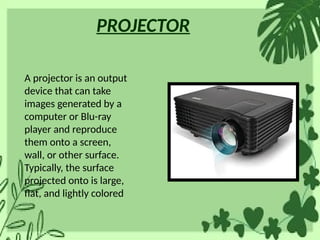
A projector is an output
device that can take
images generated by a
computer or Blu-ray
player and reproduce
them onto a screen,
wall, or other surface.
Typically, the surface
projected onto is large,
flat, and lightly colored
SPEAKER
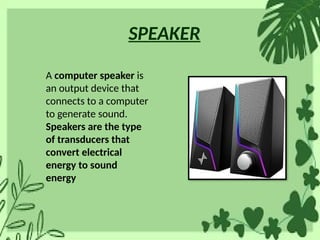
A computer speaker is
an output device that
connects to a computer
to generate sound.
Speakers are the type
of transducers that
convert electrical
energy to sound
energy
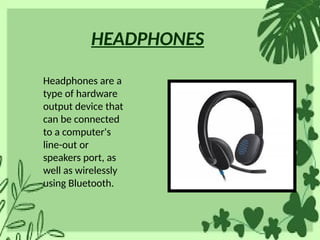
HEADPHONES
Headphones are a
type of hardware
output device that
can be connected
to a computer's
line-out or
speakers port, as
well as wirelessly
using Bluetooth.
IMPORTANCE OF
OUTPUT DEVICES
Essential for User Interaction
a) Output devices are the primary way users interact
with the computer and receive feedback.
b) Without them, we wouldn’t be able to see, hear, or
receive any information from the computer.
Example: Monitors show visual data, speakers provide
sound, and printers produce physical documents.
APPLICATIONS OF
OUTPUT DEVICES
. Applications in Daily Life
Education:
a) Projectors are widely used in classrooms to deliver
presentations and lessons.
b) Printers help in producing study materials.
Entertainment:
a) Monitors and televisions display movies, video games, and
other multimedia
b) Speakers provide sound for music, films, and gaming
conclusion
a) Output devices are crucial in various
fields, ranging from education to
entertainment and business.
b) The choice of the right output device
depends on the user’s needs (visual
quality, audio clarity, or print precision).
THANK YOU

OUTPUT DEVICES PRACTICUM 2 POWERPOINT PRESENTATION

  • 1.
    OUTPUT DEVICES TAGORE GOVERNMENTCOLLEGE OF EDUCATION PRESENTED BY RUPALI GHARAMI PEDAGOGY OF COMPUTER SCIENCE B.Sc B.Ed 3rd YEAR (MATHEMATICS) (PRACTICUM 2)
  • 2.
    WHAT ARE OUTPUT DEVICES? Output Devices are those devices which show us the result after giving the input data to a computer system. Output can be in different forms like image, graphic audio, video, etc.
  • 3.
  • 4.
    MONITOR A monitor isan electronic output device used to display information being entered and processed on a computer. The primary use of a monitor is to display images, text, video, and graphics information generated by the computer via a computer's video card.
  • 5.
    PRINTER A printer isa hardware output device that is used to generate hard copy and print any document. A document can be of any type such as a text file, image, or the combination of both. It accepts input command by users on a computer or on other devices to print the documents.
  • 6.
    PLOTTER A plotter isa output device that interprets commands from the computer and then draws its picture on the page with the help of automated pens. It is used to produce high-quality, large-scale graphics and drawings
  • 7.
    PROJECTOR A projector isan output device that can take images generated by a computer or Blu-ray player and reproduce them onto a screen, wall, or other surface. Typically, the surface projected onto is large, flat, and lightly colored
  • 8.
    SPEAKER A computer speakeris an output device that connects to a computer to generate sound. Speakers are the type of transducers that convert electrical energy to sound energy
  • 9.
    HEADPHONES Headphones are a typeof hardware output device that can be connected to a computer's line-out or speakers port, as well as wirelessly using Bluetooth.
  • 10.
    IMPORTANCE OF OUTPUT DEVICES Essentialfor User Interaction a) Output devices are the primary way users interact with the computer and receive feedback. b) Without them, we wouldn’t be able to see, hear, or receive any information from the computer. Example: Monitors show visual data, speakers provide sound, and printers produce physical documents.
  • 11.
    APPLICATIONS OF OUTPUT DEVICES .Applications in Daily Life Education: a) Projectors are widely used in classrooms to deliver presentations and lessons. b) Printers help in producing study materials. Entertainment: a) Monitors and televisions display movies, video games, and other multimedia b) Speakers provide sound for music, films, and gaming
  • 12.
    conclusion a) Output devicesare crucial in various fields, ranging from education to entertainment and business. b) The choice of the right output device depends on the user’s needs (visual quality, audio clarity, or print precision).
  • 13.