Name:MD.KhairulIslam
Id: 0272310014121052
Course name: Computer Fundamentals & programing
Department of Textile Engineering
City university Bangladesh
• Faculty Name :md. Ahadul islam
Department of computer science & Engineering
Presentation Topic
CONTEX
• Output Device
• Monitor
• Printer
• Speaker
• Headphone
• Plotter
• Projector
• Router
• Fax Machine
• Conclusion
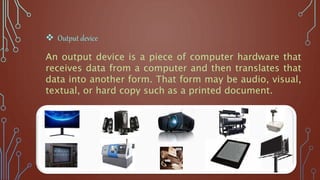
An output device is a piece of computer hardware that
receives data from a computer and then translates that
data into another form. That form may be audio, visual,
textual, or hard copy such as a printed document.
 Output device
Monitor
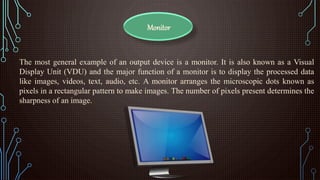
The most general example of an output device is a monitor. It is also known as a Visual
Display Unit (VDU) and the major function of a monitor is to display the processed data
like images, videos, text, audio, etc. A monitor arranges the microscopic dots known as
pixels in a rectangular pattern to make images. The number of pixels present determines the
sharpness of an image.
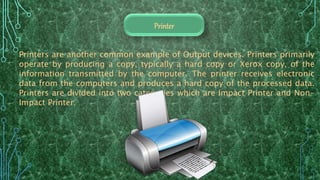
Printers are another common example of Output devices. Printers primarily
operate by producing a copy, typically a hard copy or Xerox copy, of the
information transmitted by the computer. The printer receives electronic
data from the computers and produces a hard copy of the processed data.
Printers are divided into two categories which are Impact Printer and Non-
Impact Printer.
Printer
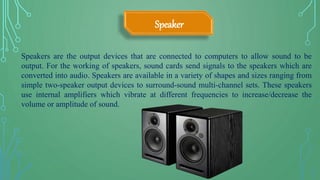
Speakers are the output devices that are connected to computers to allow sound to be
output. For the working of speakers, sound cards send signals to the speakers which are
converted into audio. Speakers are available in a variety of shapes and sizes ranging from
simple two-speaker output devices to surround-sound multi-channel sets. These speakers
use internal amplifiers which vibrate at different frequencies to increase/decrease the
volume or amplitude of sound.
Speaker
Headphone
Headphones are the output devices that help us listen to the audio coming out of a computer. With the help
of headphones, we can listen to the audio privately and without disturbing anyone around. These come in
various sizes and brands and can be connected with computer systems both wired or wirelessly. Computers
generate sound or audio as electric signals, which we perceive through headphones. The headphones can
convert electrical energy into mechanical energy and we can then listen to songs or audio on computer
systems. Headphones are light and portable, unlike heavy computer speakers.
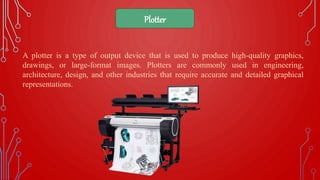
A plotter is a type of output device that is used to produce high-quality graphics,
drawings, or large-format images. Plotters are commonly used in engineering,
architecture, design, and other industries that require accurate and detailed graphical
representations.
Plotter
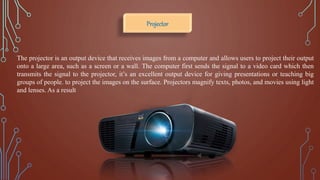
The projector is an output device that receives images from a computer and allows users to project their output
onto a large area, such as a screen or a wall. The computer first sends the signal to a video card which then
transmits the signal to the projector, it’s an excellent output device for giving presentations or teaching big
groups of people. to project the images on the surface. Projectors magnify texts, photos, and movies using light
and lenses. As a result
Projector
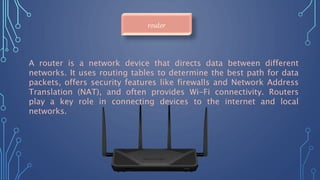
A router is a network device that directs data between different
networks. It uses routing tables to determine the best path for data
packets, offers security features like firewalls and Network Address
Translation (NAT), and often provides Wi-Fi connectivity. Routers
play a key role in connecting devices to the internet and local
networks.
router
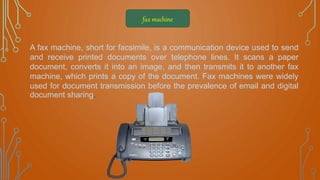
fax machine
A fax machine, short for facsimile, is a communication device used to send
and receive printed documents over telephone lines. It scans a paper
document, converts it into an image, and then transmits it to another fax
machine, which prints a copy of the document. Fax machines were widely
used for document transmission before the prevalence of email and digital
document sharing.
Output devices are integral to computing, bridging the gap between
digital data and human perception. They encompass monitors,

printers, speakers, and more, each serving a unique purpose in
presenting information to users. As technology advances, output
devices continually enhance user experiences through higher
resolutions, better color fidelity, and improved sound quality.
Whether it's for work, entertainment, or communication, output
devices play a critical role in how we interact with computers and
digital information.
conclusion
Output Devices.pptx

Output Devices.pptx

  • 3.
    Name:MD.KhairulIslam Id: 0272310014121052 Course name:Computer Fundamentals & programing Department of Textile Engineering City university Bangladesh
  • 4.
    • Faculty Name:md. Ahadul islam Department of computer science & Engineering
  • 5.
  • 6.
    CONTEX • Output Device •Monitor • Printer • Speaker • Headphone • Plotter • Projector • Router • Fax Machine • Conclusion
  • 7.
    An output deviceis a piece of computer hardware that receives data from a computer and then translates that data into another form. That form may be audio, visual, textual, or hard copy such as a printed document.  Output device
  • 8.
    Monitor The most generalexample of an output device is a monitor. It is also known as a Visual Display Unit (VDU) and the major function of a monitor is to display the processed data like images, videos, text, audio, etc. A monitor arranges the microscopic dots known as pixels in a rectangular pattern to make images. The number of pixels present determines the sharpness of an image.
  • 9.
    Printers are anothercommon example of Output devices. Printers primarily operate by producing a copy, typically a hard copy or Xerox copy, of the information transmitted by the computer. The printer receives electronic data from the computers and produces a hard copy of the processed data. Printers are divided into two categories which are Impact Printer and Non- Impact Printer. Printer
  • 10.
    Speakers are theoutput devices that are connected to computers to allow sound to be output. For the working of speakers, sound cards send signals to the speakers which are converted into audio. Speakers are available in a variety of shapes and sizes ranging from simple two-speaker output devices to surround-sound multi-channel sets. These speakers use internal amplifiers which vibrate at different frequencies to increase/decrease the volume or amplitude of sound. Speaker
  • 11.
    Headphone Headphones are theoutput devices that help us listen to the audio coming out of a computer. With the help of headphones, we can listen to the audio privately and without disturbing anyone around. These come in various sizes and brands and can be connected with computer systems both wired or wirelessly. Computers generate sound or audio as electric signals, which we perceive through headphones. The headphones can convert electrical energy into mechanical energy and we can then listen to songs or audio on computer systems. Headphones are light and portable, unlike heavy computer speakers.
  • 12.
    A plotter isa type of output device that is used to produce high-quality graphics, drawings, or large-format images. Plotters are commonly used in engineering, architecture, design, and other industries that require accurate and detailed graphical representations. Plotter
  • 13.
    The projector isan output device that receives images from a computer and allows users to project their output onto a large area, such as a screen or a wall. The computer first sends the signal to a video card which then transmits the signal to the projector, it’s an excellent output device for giving presentations or teaching big groups of people. to project the images on the surface. Projectors magnify texts, photos, and movies using light and lenses. As a result Projector
  • 14.
    A router isa network device that directs data between different networks. It uses routing tables to determine the best path for data packets, offers security features like firewalls and Network Address Translation (NAT), and often provides Wi-Fi connectivity. Routers play a key role in connecting devices to the internet and local networks. router
  • 15.
    fax machine A faxmachine, short for facsimile, is a communication device used to send and receive printed documents over telephone lines. It scans a paper document, converts it into an image, and then transmits it to another fax machine, which prints a copy of the document. Fax machines were widely used for document transmission before the prevalence of email and digital document sharing.
  • 16.
    Output devices areintegral to computing, bridging the gap between digital data and human perception. They encompass monitors, printers, speakers, and more, each serving a unique purpose in presenting information to users. As technology advances, output devices continually enhance user experiences through higher resolutions, better color fidelity, and improved sound quality. Whether it's for work, entertainment, or communication, output devices play a critical role in how we interact with computers and digital information. conclusion