COMPUTER
MOUSE
~FATHIMA LIDIYA~
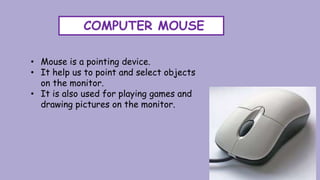
COMPUTER MOUSE
• Mouse is a pointing device.
• It help us to point and select objects
on the monitor.
• It is also used for playing games and
drawing pictures on the monitor.
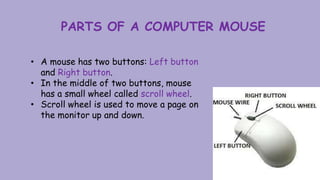
PARTS OF A COMPUTER MOUSE
• A mouse has two buttons: Left button
and Right button.
• In the middle of two buttons, mouse
has a small wheel called scroll wheel.
• Scroll wheel is used to move a page on
the monitor up and down.
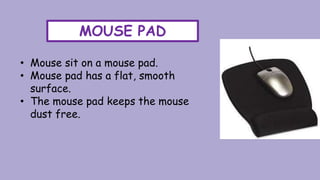
MOUSE PAD
• Mouse sit on a mouse pad.
• Mouse pad has a flat, smooth
surface.
• The mouse pad keeps the mouse
dust free.
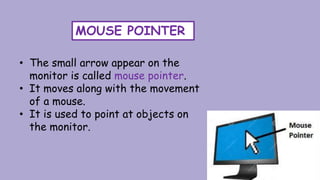
MOUSE POINTER
• The small arrow appear on the
monitor is called mouse pointer.
• It moves along with the movement
of a mouse.
• It is used to point at objects on
the monitor.
MOUSE CLICK
• The pressing and releasing of a mouse button
is called clicking.
• There are four types of mouse clicks.
i. Left click
ii. Right click
iii. Double click
iv. Dragging
LEFT CLICK
• LEFT CLICK: It is the action of pressing and
releasing left mouse button once.
• It is also called as click.
• Left click is used to select an item on the
monitor.
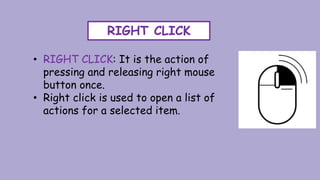
RIGHT CLICK
• RIGHT CLICK: It is the action of
pressing and releasing right mouse
button once.
• Right click is used to open a list of
actions for a selected item.
DOUBLE-CLICK
• DOUBLE-CLICK: It is the action of quick
press and release of left mouse button twice.
• Double-click is used to select and open an
item on the monitor.
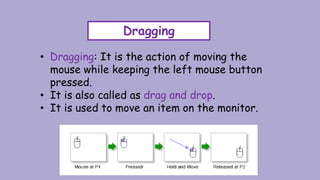
Dragging
• Dragging: It is the action of moving the
mouse while keeping the left mouse button
pressed.
• It is also called as drag and drop.
• It is used to move an item on the monitor.
WIRELESS MOUSE
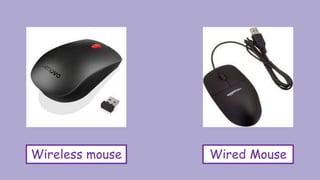
• A mouse connected to computer without a
wire is called wireless mouse.
• It is also called cordless mouse.
• It is easier to use compared with a wired
mouse, as it can be used from a distance.
Wireless mouse Wired Mouse
THANKS

Computer Mouse

  • 1.
  • 2.
    COMPUTER MOUSE • Mouseis a pointing device. • It help us to point and select objects on the monitor. • It is also used for playing games and drawing pictures on the monitor.
  • 3.
    PARTS OF ACOMPUTER MOUSE • A mouse has two buttons: Left button and Right button. • In the middle of two buttons, mouse has a small wheel called scroll wheel. • Scroll wheel is used to move a page on the monitor up and down.
  • 4.
    MOUSE PAD • Mousesit on a mouse pad. • Mouse pad has a flat, smooth surface. • The mouse pad keeps the mouse dust free.
  • 5.
    MOUSE POINTER • Thesmall arrow appear on the monitor is called mouse pointer. • It moves along with the movement of a mouse. • It is used to point at objects on the monitor.
  • 6.
    MOUSE CLICK • Thepressing and releasing of a mouse button is called clicking. • There are four types of mouse clicks. i. Left click ii. Right click iii. Double click iv. Dragging
  • 7.
    LEFT CLICK • LEFTCLICK: It is the action of pressing and releasing left mouse button once. • It is also called as click. • Left click is used to select an item on the monitor.
  • 8.
    RIGHT CLICK • RIGHTCLICK: It is the action of pressing and releasing right mouse button once. • Right click is used to open a list of actions for a selected item.
  • 9.
    DOUBLE-CLICK • DOUBLE-CLICK: Itis the action of quick press and release of left mouse button twice. • Double-click is used to select and open an item on the monitor.
  • 10.
    Dragging • Dragging: Itis the action of moving the mouse while keeping the left mouse button pressed. • It is also called as drag and drop. • It is used to move an item on the monitor.
  • 11.
    WIRELESS MOUSE • Amouse connected to computer without a wire is called wireless mouse. • It is also called cordless mouse. • It is easier to use compared with a wired mouse, as it can be used from a distance.
  • 12.
  • 13.