PowerPoint Presentation to AccompanyGO! with Microsoft® Office 2010Common FeaturesUsing the Common Features ofMicrosoft® Office 2010
ObjectivesUse Windows Explorer to Locate Files and FoldersLocate and Start a Microsoft Office 2010 ProgramEnter and Edit Text in an Office 2010 Program
ObjectivesPerform Commands from a Dialog BoxCreate a Folder, Save a File, and Close a ProgramAdd Document Properties and Print a File
ObjectivesOpen an Existing File and Save It with a New NameExplore Options for an ApplicationPerform Commands from the Ribbon
ObjectivesApply Formatting in Office ProgramsUse the Microsoft Office 2010 Help SystemCompress Files
Use Windows Explorer to Locate Files and FoldersA file is a collection of information stored on a computer under a single name.Every file is stored in either  a folder—a container in which you store filesa subfolder—a folder within a folder
Use Windows Explorer to Locate Files and FoldersUse Windows Explorer to:Navigate (explore) within the organizing structure of WindowsCreate, save, and find your files and folders
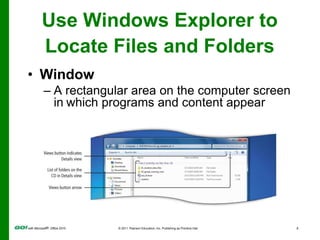
Use Windows Explorer to Locate Files and FoldersWindow
A rectangular area on the computer screen inwhich programs and content appearLocate and Start a MicrosoftOffice 2010 ProgramMicrosoft Office 2010 includes programs, servers, and services for individuals, small organizations, and large enterprises.A program or application, is a computer’s set of instructions to perform a task, such as word processing or accounting.
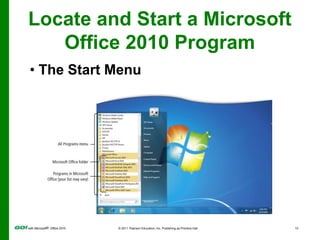
Locate and Start a MicrosoftOffice 2010 Program The Start MenuLocate and Start a Microsoft Office 2010 Program
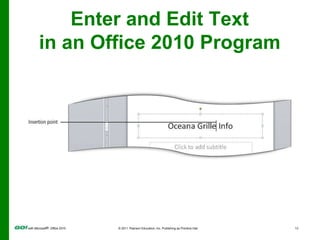
Enter and Edit Text in an Office 2010 ProgramAll Office 2010 programs require some typed text.Your keyboard is the primary method of entering information into your computer.Techniques to edit—make changes to—text are similar among all Office 2010 programs.
Enter and Edit Text in an Office 2010 Program
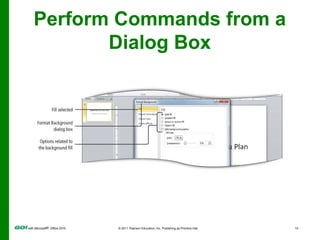
Perform Commands from a Dialog BoxDialog boxIn a dialog box, you make decisions about an individual object or topic.A dialog box also offers a way to adjust a number of settings at one time.
Perform Commands from a Dialog Box
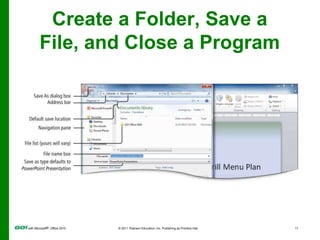
Create a Folder, Save a File, and Close a ProgramA location is any disk drive, folder, or other place in which you can store files and folders.Where you store your files depends on how and where you use your data.Take time to name your files and folders in a consistent manner.
Create a Folder, Save a File, and Close a Program
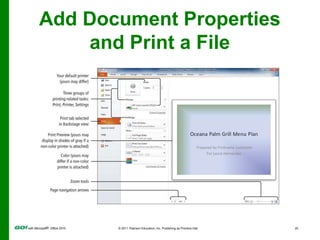
Add Document Propertiesand Print a FileAdding properties to your documents will make them easier to search for in systems such as Microsoft Sharepoint.Use your name, subject, and other keywords in the Document Properties panel.
Add Document Propertiesand Print a FileThe process of printing a file is similar in all Office applications.The only differences are in the types of options you can select.Example: A PowerPoint program can print full slides or handouts with small pictures of slides on a page. Word offers other options.
Add Document Propertiesand Print a File
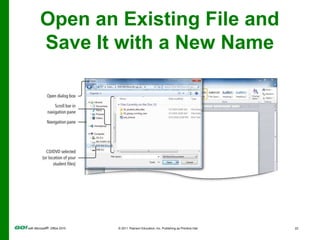
Open an Existing File and Save It with a New NameOpen command Display the Open dialog boxNavigate to and open existing files from the Open dialog box.Common dialog boxes:OpenSave Save As
Open an Existing File and Save It with a New Name
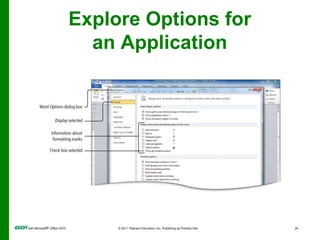
Explore Options foran ApplicationEach Office application has an Options dialog box from which you can select:Program settingsOther options and preferences, such as setting preferences for viewing and editing files
Explore Options foran Application
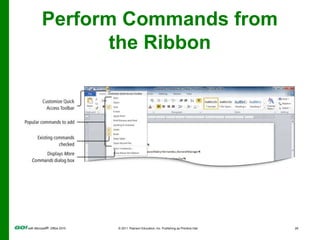
Perform Commands from the RibbonThe RibbonDisplays across the top of the program windowGroups commands and features logicallyCan be minimized so only tab names appear
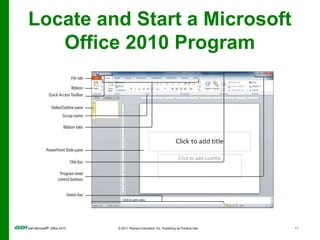
Perform Commands from the RibbonEach Office program’s Ribbon contains:Tabs GroupsCommands
Perform Commands from the RibbonTabs relate to a type of activity,such as laying out a page.Groups, located on tabs, are sets of related commands for specific tasks.Commands, arranged in groups, are instructions to computer programs and display as a button, menu, or box.
Perform Commands from the Ribbon
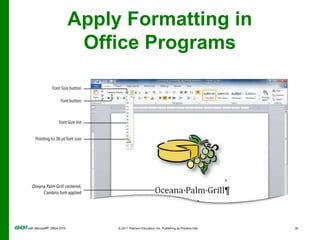
Apply Formatting in Office ProgramsFormatting is the process of establishing the overall appearance of text, graphics, and pages in an Office file.
Apply Formatting in Office Programs
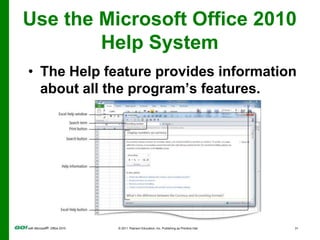
Use the Microsoft Office 2010 Help SystemThe Help feature provides information about all the program’s features.
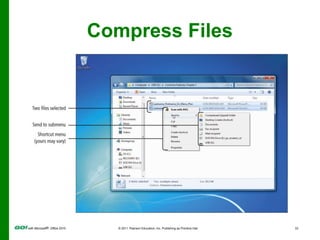
Compress FilesA compressed file is a file that has been reduced in size.Compressed files Take less storage spaceTransferred to other computers faster Make sharing files easier by combining a group of files into one compressed file
Compress Files
Covered ObjectivesUse Windows Explorer to Locate Files and FoldersLocate and Start a Microsoft Office 2010 ProgramEnter and Edit Text in an Office 2010 Program
Covered ObjectivesPerform Commands from a Dialog BoxCreate a Folder, Save a File, and Close a ProgramAdd Document Properties and Print a File
Covered ObjectivesOpen an Existing File and Save It with a New NameExplore Options for an ApplicationPerform Commands from the Ribbon
Covered ObjectivesApply Formatting in Office ProgramsUse the Microsoft Office 2010 Help SystemCompress Files
All rights reserved. No part of this publication may be reproduced, stored in a retrieval system, or transmitted, in any form or by any means, electronic, mechanical, photocopying, recording, or otherwise, without the prior written permission of the publisher. Printed in the United States of America.Copyright © 2011 Pearson Education, Inc.  Publishing as Prentice Hall
Common Features PPT

Common Features PPT

  • 1.
    PowerPoint Presentation toAccompanyGO! with Microsoft® Office 2010Common FeaturesUsing the Common Features ofMicrosoft® Office 2010
  • 2.
    ObjectivesUse Windows Explorerto Locate Files and FoldersLocate and Start a Microsoft Office 2010 ProgramEnter and Edit Text in an Office 2010 Program
  • 3.
    ObjectivesPerform Commands froma Dialog BoxCreate a Folder, Save a File, and Close a ProgramAdd Document Properties and Print a File
  • 4.
    ObjectivesOpen an ExistingFile and Save It with a New NameExplore Options for an ApplicationPerform Commands from the Ribbon
  • 5.
    ObjectivesApply Formatting inOffice ProgramsUse the Microsoft Office 2010 Help SystemCompress Files
  • 6.
    Use Windows Explorerto Locate Files and FoldersA file is a collection of information stored on a computer under a single name.Every file is stored in either a folder—a container in which you store filesa subfolder—a folder within a folder
  • 7.
    Use Windows Explorerto Locate Files and FoldersUse Windows Explorer to:Navigate (explore) within the organizing structure of WindowsCreate, save, and find your files and folders
  • 8.
    Use Windows Explorerto Locate Files and FoldersWindow
  • 9.
    A rectangular areaon the computer screen inwhich programs and content appearLocate and Start a MicrosoftOffice 2010 ProgramMicrosoft Office 2010 includes programs, servers, and services for individuals, small organizations, and large enterprises.A program or application, is a computer’s set of instructions to perform a task, such as word processing or accounting.
  • 10.
    Locate and Starta MicrosoftOffice 2010 Program The Start MenuLocate and Start a Microsoft Office 2010 Program
  • 11.
    Enter and EditText in an Office 2010 ProgramAll Office 2010 programs require some typed text.Your keyboard is the primary method of entering information into your computer.Techniques to edit—make changes to—text are similar among all Office 2010 programs.
  • 12.
    Enter and EditText in an Office 2010 Program
  • 13.
    Perform Commands froma Dialog BoxDialog boxIn a dialog box, you make decisions about an individual object or topic.A dialog box also offers a way to adjust a number of settings at one time.
  • 14.
  • 15.
    Create a Folder,Save a File, and Close a ProgramA location is any disk drive, folder, or other place in which you can store files and folders.Where you store your files depends on how and where you use your data.Take time to name your files and folders in a consistent manner.
  • 16.
    Create a Folder,Save a File, and Close a Program
  • 17.
    Add Document PropertiesandPrint a FileAdding properties to your documents will make them easier to search for in systems such as Microsoft Sharepoint.Use your name, subject, and other keywords in the Document Properties panel.
  • 18.
    Add Document PropertiesandPrint a FileThe process of printing a file is similar in all Office applications.The only differences are in the types of options you can select.Example: A PowerPoint program can print full slides or handouts with small pictures of slides on a page. Word offers other options.
  • 19.
  • 20.
    Open an ExistingFile and Save It with a New NameOpen command Display the Open dialog boxNavigate to and open existing files from the Open dialog box.Common dialog boxes:OpenSave Save As
  • 21.
    Open an ExistingFile and Save It with a New Name
  • 22.
    Explore Options foranApplicationEach Office application has an Options dialog box from which you can select:Program settingsOther options and preferences, such as setting preferences for viewing and editing files
  • 23.
  • 24.
    Perform Commands fromthe RibbonThe RibbonDisplays across the top of the program windowGroups commands and features logicallyCan be minimized so only tab names appear
  • 25.
    Perform Commands fromthe RibbonEach Office program’s Ribbon contains:Tabs GroupsCommands
  • 26.
    Perform Commands fromthe RibbonTabs relate to a type of activity,such as laying out a page.Groups, located on tabs, are sets of related commands for specific tasks.Commands, arranged in groups, are instructions to computer programs and display as a button, menu, or box.
  • 27.
  • 28.
    Apply Formatting inOffice ProgramsFormatting is the process of establishing the overall appearance of text, graphics, and pages in an Office file.
  • 29.
    Apply Formatting inOffice Programs
  • 30.
    Use the MicrosoftOffice 2010 Help SystemThe Help feature provides information about all the program’s features.
  • 31.
    Compress FilesA compressedfile is a file that has been reduced in size.Compressed files Take less storage spaceTransferred to other computers faster Make sharing files easier by combining a group of files into one compressed file
  • 32.
  • 33.
    Covered ObjectivesUse WindowsExplorer to Locate Files and FoldersLocate and Start a Microsoft Office 2010 ProgramEnter and Edit Text in an Office 2010 Program
  • 34.
    Covered ObjectivesPerform Commandsfrom a Dialog BoxCreate a Folder, Save a File, and Close a ProgramAdd Document Properties and Print a File
  • 35.
    Covered ObjectivesOpen anExisting File and Save It with a New NameExplore Options for an ApplicationPerform Commands from the Ribbon
  • 36.
    Covered ObjectivesApply Formattingin Office ProgramsUse the Microsoft Office 2010 Help SystemCompress Files
  • 37.
    All rights reserved.No part of this publication may be reproduced, stored in a retrieval system, or transmitted, in any form or by any means, electronic, mechanical, photocopying, recording, or otherwise, without the prior written permission of the publisher. Printed in the United States of America.Copyright © 2011 Pearson Education, Inc.  Publishing as Prentice Hall

Editor's Notes