




What is Cluster?
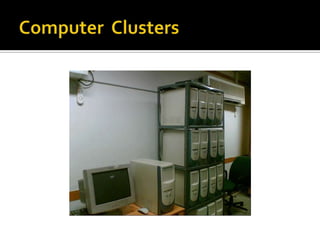
Computer Clusters
Configuration
Applications of Clusters
Components
Classification
Single Sysytem Image
Cluster Middleware
Benefits of Cluster , SSI & Middle
A group of the same or similar elements gathered or
occurring closely together;
 a bunch
 a number of persons or things grouped together
 a number of things growing, fastened, or occurring
close together

 “A computer cluster is a single logical unit

consisting of multiple computers that are linked
through a LAN and they can be worked as a single
system.”
 The components of a cluster are usually connected
to each other through fast local area
networks ("LAN").
 The networked computers essentially act as a
single, much more powerful machine
Each system has its own CPU, memory, and I/O
facilities
• Each system is known as a node of the cluster
• generally 2 or more computers (nodes) connected
together
• in a single cabinet, or physically separated &
connected via a LAN
• appear as a single system to users and
applications
• provide a cost-effective way to gain features and
benefits
•



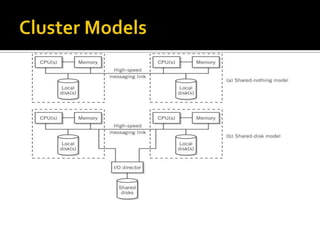
Shared nothing Model
Shared Disk Model

The detailed configuration models are:-

1. Shared nothing Model
 High speed link between nodes
 No sharing of resources
 Partitioning of work through division of data
 Advantage:
 Reduced communication between nodes



Disadvantage:

 Can result in inefficient division of work




High speed link between nodes
Disk drives are shared between nodes
Advantage:
 Better load balancing



Disadvantage:
 Complex software required for transactional

processing
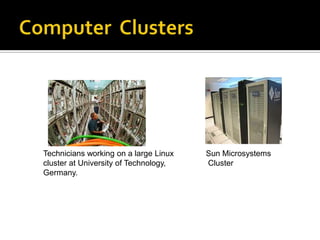
Technicians working on a large Linux
cluster at University of Technology,
Germany.

Sun Microsystems
Cluster
Clusters are classified into many categories
based on various factors as indicated below.
 Application Target
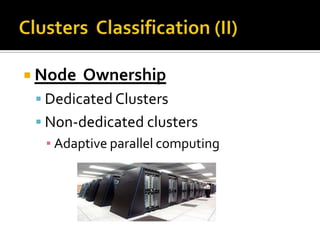
 Node Ownership
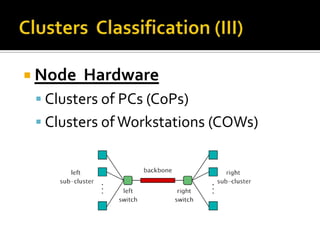
 Node Hardware
 Node Operating System
 Node Configuration
 Application Target

 High Performance (HP) Clusters
▪ Grand Challenging Applications

 High Availability (HA) Clusters
▪ Mission Critical applications
 Node

Ownership

 Dedicated Clusters
 Non-dedicated clusters
▪ Adaptive parallel computing
 Node

Hardware

 Clusters of PCs (CoPs)
 Clusters of Workstations (COWs)
 Node Configuration

 Homogeneous Clusters
▪ All nodes will have similar architectures and run
the same OSs

 Heterogeneous Clusters
▪ All nodes will have different architectures and
run different OSs


Processors



Memory and Cache



Disk and I/O



System Bus
Aggregated speed with
which complex calculations
carried out by millions of neurons in
human brain is amazing! although
individual neurons response is slow
(milli sec.)
•

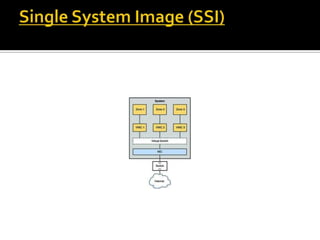
The Single System Image (SSI) represents the view of a distributed
system as a single unified computing resource

•

This provides better usability for the users as it hides the
complexities of the underlying distributed and heterogeneous
nature of clusters from them



A single system image is the illusion, created by software or
hardware, that presents a collection of resources as one, more
powerful resource.



SSI makes the cluster appear like a single machine to the user, to
applications, and to the network.

•

A cluster without a SSI is not a cluster









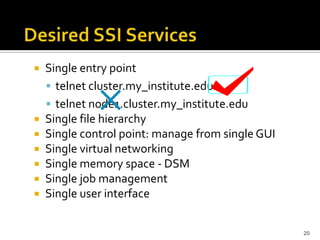
Single entry point
 telnet cluster.my_institute.edu
 telnet node1.cluster.my_institute.edu
Single file hierarchy
Single control point: manage from single GUI
Single virtual networking
Single memory space - DSM
Single job management
Single user interface
20


Problem
 each nodes has a certain amount of resources

that can only be used from that node
 This restriction limits the power of a cluster


Solution
 implementing a middle-ware layer that glues

all operating systems on all nodes
 offer a unified access to system resources
22








Usage of system resources transparently
Transparent process migration and load balancing
across nodes.
Improved reliability and higher availability
Improved system response time and performance
Simplified system management
Reduction in the risk of operator errors
User need not be aware of the underlying system
architecture to use these machines effectively
•

A cluster resource management system (RMS) acts
as a cluster middleware that implements the SSI for
a cluster of machines

•

It enables users to execute jobs on the cluster
without the need to understand the complexities of
the underlying cluster architecture

•

A RMS manages the cluster through four major
branches, namely: resource management, job
queuing, job scheduling, and job management
An interface between between use applications and cluster
hardware and OS platform.
Middleware packages support each other at the management,
programming, and implementation levels.









Programming
 enable applications, reduce programming effort,
distributed object/component models?
Middleware Layers:
 SSI Layer
 Availability Layer: It enables the cluster services of
▪ Checkpointing, Automatic Failover, recovery from failure,
▪ fault-tolerant operating among all cluster nodes.


Complete Transparency (Manageability)
 Lets the see a single cluster system..
▪ Single entry point



Scalable Performance
 Easy growth of cluster
▪ no change of API & automatic load distribution.



Enhanced Availability
 Automatic Recovery from failures
▪ Employ checkpointing & fault tolerant technologies
 Handle consistency of data when replicated..
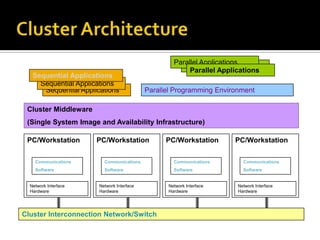
Sequential Applications

Parallel Applications
Parallel Programming Environment

Cluster Middleware
(Single System Image and Availability Infrastructure)
PC/Workstation

PC/Workstation

PC/Workstation

PC/Workstation

Communications

Communications

Communications

Communications

Software

Software

Software

Software

Network Interface
Hardware

Network Interface
Hardware

Cluster Interconnection Network/Switch

Network Interface
Hardware

Network Interface
Hardware


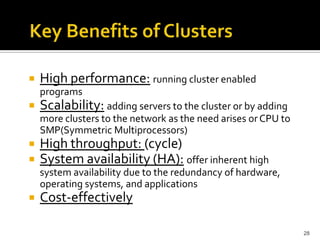
High performance: running cluster enabled
programs



Scalability: adding servers to the cluster or by adding
more clusters to the network as the need arises or CPU to
SMP(Symmetric Multiprocessors)




High throughput: (cycle)
System availability (HA): offer inherent high
system availability due to the redundancy of hardware,
operating systems, and applications



Cost-effectively
28





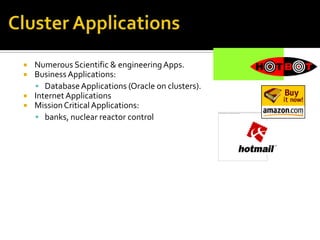
Numerous Scientific & engineering Apps.
Business Applications:
 Database Applications (Oracle on clusters).
Internet Applications
Mission Critical Applications:
 banks, nuclear reactor control
The conclusion of this chapter is that although
solutions to the resource management and
Meta computing problems do exist, none of the
solutions is directly applicable to the case in
which a user does not have a great deal of
knowledge about the system they are using.


Clusters are promising and fun
 Offer incremental growth and match with funding

pattern
 New trends in hardware and software
technologies are likely to make clusters more
promising
 Cluster-based HP and HA systems can be seen
everywhere!
Summary ?


Thank You ...

?


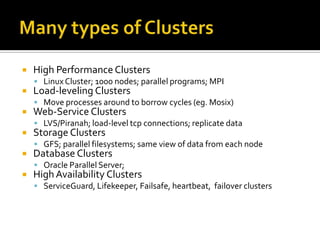
High Performance Clusters
 Linux Cluster; 1000 nodes; parallel programs; MPI



Load-leveling Clusters

 Move processes around to borrow cycles (eg. Mosix)



Web-Service Clusters

 LVS/Piranah; load-level tcp connections; replicate data



Storage Clusters

 GFS; parallel filesystems; same view of data from each node



Database Clusters

 Oracle Parallel Server;



High Availability Clusters
 ServiceGuard, Lifekeeper, Failsafe, heartbeat, failover clusters

Clusters

  • 3.
    What is Cluster? ComputerClusters Configuration Applications of Clusters Components Classification Single Sysytem Image Cluster Middleware Benefits of Cluster , SSI & Middle
  • 4.
    A group ofthe same or similar elements gathered or occurring closely together;  a bunch  a number of persons or things grouped together  a number of things growing, fastened, or occurring close together 
  • 5.
     “A computercluster is a single logical unit consisting of multiple computers that are linked through a LAN and they can be worked as a single system.”  The components of a cluster are usually connected to each other through fast local area networks ("LAN").  The networked computers essentially act as a single, much more powerful machine
  • 6.
    Each system hasits own CPU, memory, and I/O facilities • Each system is known as a node of the cluster • generally 2 or more computers (nodes) connected together • in a single cabinet, or physically separated & connected via a LAN • appear as a single system to users and applications • provide a cost-effective way to gain features and benefits •
  • 7.
      Shared nothing Model SharedDisk Model The detailed configuration models are:- 1. Shared nothing Model  High speed link between nodes  No sharing of resources  Partitioning of work through division of data  Advantage:  Reduced communication between nodes  Disadvantage:  Can result in inefficient division of work
  • 8.
       High speed linkbetween nodes Disk drives are shared between nodes Advantage:  Better load balancing  Disadvantage:  Complex software required for transactional processing
  • 11.
    Technicians working ona large Linux cluster at University of Technology, Germany. Sun Microsystems Cluster
  • 12.
    Clusters are classifiedinto many categories based on various factors as indicated below.  Application Target  Node Ownership  Node Hardware  Node Operating System  Node Configuration
  • 13.
     Application Target High Performance (HP) Clusters ▪ Grand Challenging Applications  High Availability (HA) Clusters ▪ Mission Critical applications
  • 14.
     Node Ownership  DedicatedClusters  Non-dedicated clusters ▪ Adaptive parallel computing
  • 15.
     Node Hardware  Clustersof PCs (CoPs)  Clusters of Workstations (COWs)
  • 16.
     Node Configuration Homogeneous Clusters ▪ All nodes will have similar architectures and run the same OSs  Heterogeneous Clusters ▪ All nodes will have different architectures and run different OSs
  • 17.
  • 18.
    Aggregated speed with whichcomplex calculations carried out by millions of neurons in human brain is amazing! although individual neurons response is slow (milli sec.)
  • 19.
    • The Single SystemImage (SSI) represents the view of a distributed system as a single unified computing resource • This provides better usability for the users as it hides the complexities of the underlying distributed and heterogeneous nature of clusters from them  A single system image is the illusion, created by software or hardware, that presents a collection of resources as one, more powerful resource.  SSI makes the cluster appear like a single machine to the user, to applications, and to the network. • A cluster without a SSI is not a cluster
  • 20.
           Single entry point telnet cluster.my_institute.edu  telnet node1.cluster.my_institute.edu Single file hierarchy Single control point: manage from single GUI Single virtual networking Single memory space - DSM Single job management Single user interface 20
  • 22.
     Problem  each nodeshas a certain amount of resources that can only be used from that node  This restriction limits the power of a cluster  Solution  implementing a middle-ware layer that glues all operating systems on all nodes  offer a unified access to system resources 22
  • 23.
           Usage of systemresources transparently Transparent process migration and load balancing across nodes. Improved reliability and higher availability Improved system response time and performance Simplified system management Reduction in the risk of operator errors User need not be aware of the underlying system architecture to use these machines effectively
  • 24.
    • A cluster resourcemanagement system (RMS) acts as a cluster middleware that implements the SSI for a cluster of machines • It enables users to execute jobs on the cluster without the need to understand the complexities of the underlying cluster architecture • A RMS manages the cluster through four major branches, namely: resource management, job queuing, job scheduling, and job management
  • 25.
    An interface betweenbetween use applications and cluster hardware and OS platform. Middleware packages support each other at the management, programming, and implementation levels.     Programming  enable applications, reduce programming effort, distributed object/component models? Middleware Layers:  SSI Layer  Availability Layer: It enables the cluster services of ▪ Checkpointing, Automatic Failover, recovery from failure, ▪ fault-tolerant operating among all cluster nodes.
  • 26.
     Complete Transparency (Manageability) Lets the see a single cluster system.. ▪ Single entry point  Scalable Performance  Easy growth of cluster ▪ no change of API & automatic load distribution.  Enhanced Availability  Automatic Recovery from failures ▪ Employ checkpointing & fault tolerant technologies  Handle consistency of data when replicated..
  • 27.
    Sequential Applications Sequential Applications SequentialApplications Parallel Applications Parallel Applications Parallel Applications Parallel Programming Environment Cluster Middleware (Single System Image and Availability Infrastructure) PC/Workstation PC/Workstation PC/Workstation PC/Workstation Communications Communications Communications Communications Software Software Software Software Network Interface Hardware Network Interface Hardware Cluster Interconnection Network/Switch Network Interface Hardware Network Interface Hardware
  • 28.
     High performance: runningcluster enabled programs  Scalability: adding servers to the cluster or by adding more clusters to the network as the need arises or CPU to SMP(Symmetric Multiprocessors)   High throughput: (cycle) System availability (HA): offer inherent high system availability due to the redundancy of hardware, operating systems, and applications  Cost-effectively 28
  • 29.
        Numerous Scientific &engineering Apps. Business Applications:  Database Applications (Oracle on clusters). Internet Applications Mission Critical Applications:  banks, nuclear reactor control
  • 30.
    The conclusion ofthis chapter is that although solutions to the resource management and Meta computing problems do exist, none of the solutions is directly applicable to the case in which a user does not have a great deal of knowledge about the system they are using.
  • 31.
     Clusters are promisingand fun  Offer incremental growth and match with funding pattern  New trends in hardware and software technologies are likely to make clusters more promising  Cluster-based HP and HA systems can be seen everywhere!
  • 32.
  • 33.
  • 34.
     High Performance Clusters Linux Cluster; 1000 nodes; parallel programs; MPI  Load-leveling Clusters  Move processes around to borrow cycles (eg. Mosix)  Web-Service Clusters  LVS/Piranah; load-level tcp connections; replicate data  Storage Clusters  GFS; parallel filesystems; same view of data from each node  Database Clusters  Oracle Parallel Server;  High Availability Clusters  ServiceGuard, Lifekeeper, Failsafe, heartbeat, failover clusters

Editor's Notes

  • #27 application programming interface