CLUSTER COMPUTING
Presented by :
Shreeraj Khatiwada
Msc. Computer Science
NCIT College, Lalitpur
OUTLINES:
 Introduction
 Objective/Design requirements
 Cluster Configuration
 Cluster Methods
 Clusters Computer Architecture
 Implementation: Blade servers
 Clusters compared to SMP
INTRODUCTION:
 Super, Mainframe computers are not cost effective.
 Cluster is a widely used term meaning multiple independent computers
combined to work in coordinated fashion to process applications into a
unified system through software and networking.
 Clusters are typically used for High Availability (HA) for greater reliability
or High Performance Computing(HPC) to provide greater computational
power than a single computer can provide.
 Whole computers working together as a unified computing resources
can create illusion of being one machine.
 The term whole computer means a system that can run on its own, apart
from the cluster; each computer in a cluster is typically referred to as a
node.
 Composed of many commodity computers , linked together by a high-
speed dedicated network.
OBJECTIVE/DESIGN REQUIREMENTS:
 Absolute Scalability
 Incremental Scalability
 High Availability
 Superior Price/ Performance
CLUSTER CONFIGURATION:
High Availability Clusters:
 These clusters are designed to provide uninterrupted availability of data or
service (typically web services) to the end user community. If a node fails, the
service can be restored without affecting the availability of the services provided
by the cluster, while the application will still be available, there will be a
performance drop due to missing node.
 High availability clusters implementations are best for mission-critical
applications or databases, mail, file and print, web or application servers.
Load Balancing Clusters:
 This type of cluster distributes the incoming requests for resources or content
among multiple nodes running the same program or having the same content.
 Every node in the cluster is able to handle requests for the same content or
application.
 Middleware mechanisms need to recognize that services can appear on
different members of cluster and may migrate from one member to another.
 Almost all load balancing clusters are HA clusters.
 This type of distribution is typically seen in a web hosting environment.
Parallel/Distributed Processing Clusters :
 Parallel processing was performed by multiple processors in a specially
designed parallel computer. These are systems in which multiple processors
share a single memory and bus interface within a single computer.
 These types of cluster increase availability, performance and scalability for
applications.
CLUSTERING METHODS:
Some clustering methods are:
Passive Standby:
 Older method.
 A secondary server takes over in case of
primary server failure.
 Easy to implement.
 High cost because the secondary server is
unavailable for the other processing tasks.
 Heartbeat message.
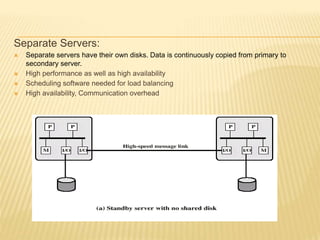
Separate Servers:
 Separate servers have their own disks. Data is continuously copied from primary to
secondary server.
 High performance as well as high availability
 Scheduling software needed for load balancing
 High availability, Communication overhead
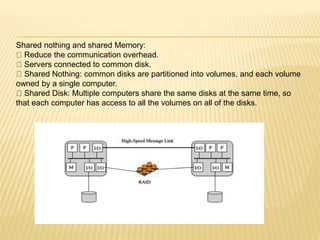
Shared nothing and shared Memory:
Reduce the communication overhead.
Servers connected to common disk.
Shared Nothing: common disks are partitioned into volumes, and each volume
owned by a single computer.
Shared Disk: Multiple computers share the same disks at the same time, so
that each computer has access to all the volumes on all of the disks.
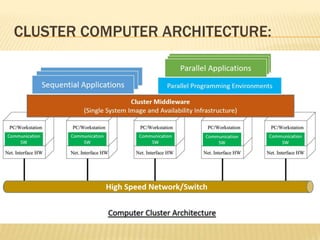
CLUSTER COMPUTER ARCHITECTURE:
 Individual computers are connected by some high-speed LAN or switch hardware.
 Each computer is capable of operating independently.
 Middleware layer of software is installed in each computer to enable cluster operation.
 The middleware provides a unified system image to the user, known as a single-system
image.
 The middleware is responsible for providing high availability, by means of load balancing
and responding to failures in individual components. Following are the desirable cluster
middleware services and functions:
Single entry point
Single file hierarchy
Single control point
Single virtual networking (any node can access any other point )
Single memory space
Single job-management system
Single user interface
Single I/O space
Single process space
Checkpointing (saves the process state, recovery after failure)
Process migration (load balancing)
 The last four items in the preceding list
enhance the availability of the cluster.
 Others are concerned with providing a single
system image.
Implementation: Blade Servers
 Is a server architecture that houses multiple
server modules (‘blades’) in a single chassis.
 Used in data centres.
 Increase server density, lowers powers and
cooling costs, ease server expansion and
Ethernet configuration for Massive Blade Server Site
CLUSTERS COMPARED TO SMP:
 Both clusters and symmetric multiprocessors
provide a configuration with multiple
processors to support high-demand
applications.
 Both solutions are commercially available.
 SMP: the processing of programs by multiple
processors that share a common OS and
memory. Whereas , in clusters individual
systems are tied together.
 The aim of SMP is time saving and of cluster
computing is high availability.
THANK YOU!

Cluster computing

  • 1.
    CLUSTER COMPUTING Presented by: Shreeraj Khatiwada Msc. Computer Science NCIT College, Lalitpur
  • 2.
    OUTLINES:  Introduction  Objective/Designrequirements  Cluster Configuration  Cluster Methods  Clusters Computer Architecture  Implementation: Blade servers  Clusters compared to SMP
  • 3.
    INTRODUCTION:  Super, Mainframecomputers are not cost effective.  Cluster is a widely used term meaning multiple independent computers combined to work in coordinated fashion to process applications into a unified system through software and networking.  Clusters are typically used for High Availability (HA) for greater reliability or High Performance Computing(HPC) to provide greater computational power than a single computer can provide.  Whole computers working together as a unified computing resources can create illusion of being one machine.  The term whole computer means a system that can run on its own, apart from the cluster; each computer in a cluster is typically referred to as a node.  Composed of many commodity computers , linked together by a high- speed dedicated network.
  • 4.
    OBJECTIVE/DESIGN REQUIREMENTS:  AbsoluteScalability  Incremental Scalability  High Availability  Superior Price/ Performance
  • 5.
    CLUSTER CONFIGURATION: High AvailabilityClusters:  These clusters are designed to provide uninterrupted availability of data or service (typically web services) to the end user community. If a node fails, the service can be restored without affecting the availability of the services provided by the cluster, while the application will still be available, there will be a performance drop due to missing node.  High availability clusters implementations are best for mission-critical applications or databases, mail, file and print, web or application servers. Load Balancing Clusters:  This type of cluster distributes the incoming requests for resources or content among multiple nodes running the same program or having the same content.  Every node in the cluster is able to handle requests for the same content or application.  Middleware mechanisms need to recognize that services can appear on different members of cluster and may migrate from one member to another.  Almost all load balancing clusters are HA clusters.  This type of distribution is typically seen in a web hosting environment.
  • 6.
    Parallel/Distributed Processing Clusters:  Parallel processing was performed by multiple processors in a specially designed parallel computer. These are systems in which multiple processors share a single memory and bus interface within a single computer.  These types of cluster increase availability, performance and scalability for applications.
  • 7.
    CLUSTERING METHODS: Some clusteringmethods are: Passive Standby:  Older method.  A secondary server takes over in case of primary server failure.  Easy to implement.  High cost because the secondary server is unavailable for the other processing tasks.  Heartbeat message.
  • 8.
    Separate Servers:  Separateservers have their own disks. Data is continuously copied from primary to secondary server.  High performance as well as high availability  Scheduling software needed for load balancing  High availability, Communication overhead
  • 9.
    Shared nothing andshared Memory: Reduce the communication overhead. Servers connected to common disk. Shared Nothing: common disks are partitioned into volumes, and each volume owned by a single computer. Shared Disk: Multiple computers share the same disks at the same time, so that each computer has access to all the volumes on all of the disks.
  • 10.
  • 11.
     Individual computersare connected by some high-speed LAN or switch hardware.  Each computer is capable of operating independently.  Middleware layer of software is installed in each computer to enable cluster operation.  The middleware provides a unified system image to the user, known as a single-system image.  The middleware is responsible for providing high availability, by means of load balancing and responding to failures in individual components. Following are the desirable cluster middleware services and functions: Single entry point Single file hierarchy Single control point Single virtual networking (any node can access any other point ) Single memory space Single job-management system Single user interface Single I/O space Single process space Checkpointing (saves the process state, recovery after failure) Process migration (load balancing)
  • 12.
     The lastfour items in the preceding list enhance the availability of the cluster.  Others are concerned with providing a single system image. Implementation: Blade Servers  Is a server architecture that houses multiple server modules (‘blades’) in a single chassis.  Used in data centres.  Increase server density, lowers powers and cooling costs, ease server expansion and
  • 13.
    Ethernet configuration forMassive Blade Server Site
  • 14.
    CLUSTERS COMPARED TOSMP:  Both clusters and symmetric multiprocessors provide a configuration with multiple processors to support high-demand applications.  Both solutions are commercially available.  SMP: the processing of programs by multiple processors that share a common OS and memory. Whereas , in clusters individual systems are tied together.  The aim of SMP is time saving and of cluster computing is high availability.
  • 15.