Chapter 12:
Secondary-Storage Structure
Outline
Cover 12.1 -12.6
(Magnetic) Disk Structure
Disk Attachment
Disk Scheduling Algorithms
FCFS, SSTF, SCAN, LOOK

Disk Management
Formatting, booting, bad
sectors

Swap-Space Management
Performance optimization

Not covered:
RAID Structure
Disk Attachment
Stable-Storage Implementation
Tertiary Storage Devices
Operating System Issues
Performance Issues
Magnetic Disk Storage Structure
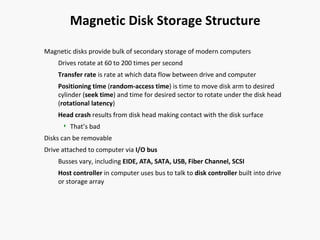
Magnetic disks provide bulk of secondary storage of modern computers
Drives rotate at 60 to 200 times per second
Transfer rate is rate at which data flow between drive and computer
Positioning time (random-access time) is time to move disk arm to desired
cylinder (seek time) and time for desired sector to rotate under the disk head
(rotational latency)
Head crash results from disk head making contact with the disk surface


That’s bad

Disks can be removable
Drive attached to computer via I/O bus
Busses vary, including EIDE, ATA, SATA, USB, Fiber Channel, SCSI
Host controller in computer uses bus to talk to disk controller built into drive
or storage array
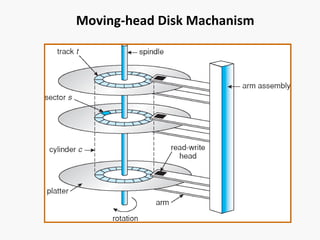
Moving-head Disk Machanism
Overview of Mass Storage Structure (Cont.)
Magnetic tape
Was early secondary-storage medium
Relatively permanent and holds large quantities of data
Access time slow
Random access ~1000 times slower than disk
Mainly used for backup, storage of infrequently-used data,
transfer medium between systems
Kept in spool and wound or rewound past read-write head
Once data under head, transfer rates comparable to disk
20-200GB typical storage
Common technologies are 4mm, 8mm, 19mm, LTO-2 and
SDLT
Disk Structure
Disk drives are addressed as large 1-dimensional arrays of logical
blocks, where the logical block is the smallest unit of transfer.
The 1-dimensional array of logical blocks is mapped into the
sectors of the disk sequentially.
Sector 0 is the first sector of the first track on the outermost
cylinder.
Mapping proceeds in order through that track, then the rest
of the tracks in that cylinder, and then through the rest of the
cylinders from outermost to innermost.
Disk Attachment
Host-attached storage accessed through I/O ports talking to I/O
busses
SCSI itself is a bus, up to 16 devices on one cable, SCSI initiator
requests operation and SCSI targets perform tasks
Each target can have up to 8 logical units (disks attached to
device controller
FC is high-speed serial architecture
Can be switched fabric with 24-bit address space – the basis
of storage area networks (SANs) in which many hosts attach
to many storage units
Can be arbitrated loop (FC-AL) of 126 devices
Network-Attached Storage
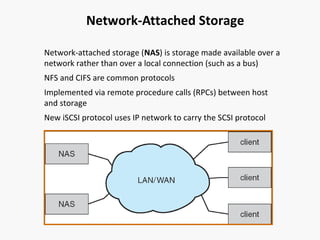
Network-attached storage (NAS) is storage made available over a
network rather than over a local connection (such as a bus)
NFS and CIFS are common protocols
Implemented via remote procedure calls (RPCs) between host
and storage
New iSCSI protocol uses IP network to carry the SCSI protocol
Storage Area Network
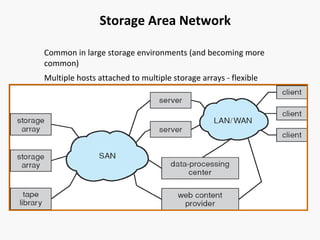
Common in large storage environments (and becoming more
common)
Multiple hosts attached to multiple storage arrays - flexible
Disk Scheduling
The operating system is responsible for using hardware efficiently
— for the disk drives, this means having a fast access time and
disk bandwidth.
Access time has three major components
Seek time is the time for the disk are to move the heads to
the cylinder containing the desired sector.
Rotational latency is the additional time waiting for the disk
to rotate the desired sector to the disk head.
Transfer time is the time between disk surface to disk head
Minimize seek time
Seek time ≈ seek distance (performance evaluation criteria)
Total seek distance between the first request to the
completion of the last transfer.
Disk Scheduling (Cont.)
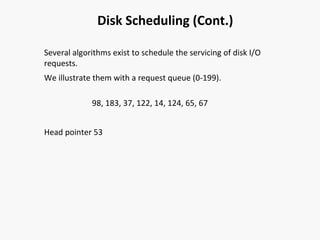
Several algorithms exist to schedule the servicing of disk I/O
requests.
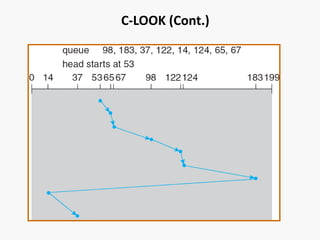
We illustrate them with a request queue (0-199).
98, 183, 37, 122, 14, 124, 65, 67
Head pointer 53
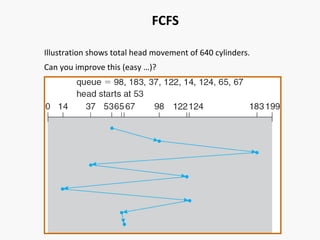
FCFS
Illustration shows total head movement of 640 cylinders.
Can you improve this (easy …)?
SSTF
Selects the request with the minimum seek time from the current
head position.
SSTF scheduling is a form of SJF scheduling; may cause starvation
of some requests.
Illustration shows total head movement of 236 cylinders.
SSTF (Cont.)
Is this optimal/fair? Can you find a more optimal schedule?
How to improve this?
SCAN
The disk arm starts at one end of the disk, and moves toward the
other end, servicing requests until it gets to the other end of the
disk, where the head movement is reversed and servicing
continues.
Sometimes called the elevator algorithm.
Illustration shows total head movement of 208 cylinders.
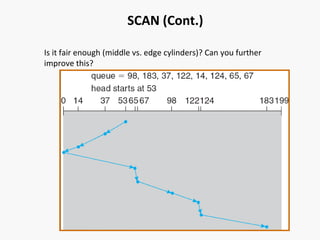
SCAN (Cont.)
Is it fair enough (middle vs. edge cylinders)? Can you further
improve this?
C-SCAN
Provides a more uniform wait time than SCAN.
Circular SCAN
The head moves from one end of the disk to the other,
servicing requests as it goes. When it reaches the other end,
it immediately returns to the beginning of the disk, without
servicing any requests on the return trip.
Treat the cylinders as a circular list that wraps around from the
last cylinder to the first one.
C-SCAN (Cont.)
C-LOOK
Version of C-SCAN
Arm only goes as far as the last request in each direction, then
reverses direction immediately, without first going all the way to
the end of the disk.
C-LOOK (Cont.)
Selecting a Disk-Scheduling Algorithm
Which one has better performance?
SSTF vs. FCFS?
SCAN/C-SCAN vs. SSTF?
What does performance depend on?
What if the disk queue/load is always 1? Does the disk
scheduling algorithm matter?
What also matters? File-allocation method.
The disk-scheduling algorithm should be written as a separate
module of the operating system, allowing it to be replaced with a
different algorithm if necessary.
Either SSTF or LOOK is a reasonable choice for the default
algorithm.
Disk Management
Low-level formatting, or physical formatting — Dividing a disk
into sectors that the disk controller can read and write.
Done by factory
To use a disk to hold files, the operating system still needs to
record its own data structures on the disk.
Partition the disk into one or more groups of cylinders.
Logical formatting or “making a file system”.
Boot block initializes system.
The bootstrap is stored in ROM.
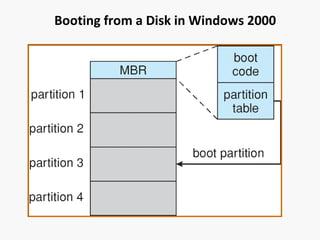
Master boot record (MBR) on the first sector of disk
Boot partition
Booting from a Disk in Windows 2000
Bad Sectors
Mechanical parts and prone to failures
Bad sectors at factory
How to detect bad sectors?
Error correcting code (ECC)
How to handle bad sectors on disks?
Reserve some spared sectors …
Sector sparing or forwarding
Sector slipping
Swap-Space Management
What is swap space?
Virtual memory uses disk space as an extension of main
memory.
Should swap space be placed in normal file system?
Why or why not?
Performance vs. space efficiency tradeoff?
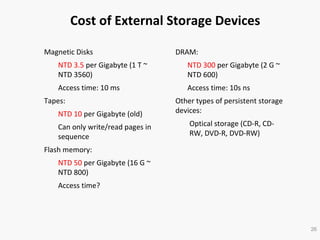
Cost of External Storage Devices
Magnetic Disks

DRAM:

NTD 3.5 per Gigabyte (1 T ~
NTD 3560)

NTD 300 per Gigabyte (2 G ~
NTD 600)

Access time: 10 ms

Access time: 10s ns

Tapes:
NTD 10 per Gigabyte (old)
Can only write/read pages in
sequence

Other types of persistent storage
devices:
Optical storage (CD-R, CDRW, DVD-R, DVD-RW)

Flash memory:
NTD 50 per Gigabyte (16 G ~
NTD 800)
Access time?

26
Price per Megabyte of DRAM, From 1981 to 2004
Why DRAM manufacturers are in trouble?
2008 (USD10/GB ~ USD0.01/MB)
Price per Megabyte of Magnetic Hard Disk, From 1981 to 2004
2008 (USD 100 per Terabyte, or USD 0.0001 per MB)

Secondary storage structure-Operating System Concepts

  • 1.
  • 2.
    Outline Cover 12.1 -12.6 (Magnetic)Disk Structure Disk Attachment Disk Scheduling Algorithms FCFS, SSTF, SCAN, LOOK Disk Management Formatting, booting, bad sectors Swap-Space Management Performance optimization Not covered: RAID Structure Disk Attachment Stable-Storage Implementation Tertiary Storage Devices Operating System Issues Performance Issues
  • 3.
    Magnetic Disk StorageStructure Magnetic disks provide bulk of secondary storage of modern computers Drives rotate at 60 to 200 times per second Transfer rate is rate at which data flow between drive and computer Positioning time (random-access time) is time to move disk arm to desired cylinder (seek time) and time for desired sector to rotate under the disk head (rotational latency) Head crash results from disk head making contact with the disk surface  That’s bad Disks can be removable Drive attached to computer via I/O bus Busses vary, including EIDE, ATA, SATA, USB, Fiber Channel, SCSI Host controller in computer uses bus to talk to disk controller built into drive or storage array
  • 4.
  • 5.
    Overview of MassStorage Structure (Cont.) Magnetic tape Was early secondary-storage medium Relatively permanent and holds large quantities of data Access time slow Random access ~1000 times slower than disk Mainly used for backup, storage of infrequently-used data, transfer medium between systems Kept in spool and wound or rewound past read-write head Once data under head, transfer rates comparable to disk 20-200GB typical storage Common technologies are 4mm, 8mm, 19mm, LTO-2 and SDLT
  • 6.
    Disk Structure Disk drivesare addressed as large 1-dimensional arrays of logical blocks, where the logical block is the smallest unit of transfer. The 1-dimensional array of logical blocks is mapped into the sectors of the disk sequentially. Sector 0 is the first sector of the first track on the outermost cylinder. Mapping proceeds in order through that track, then the rest of the tracks in that cylinder, and then through the rest of the cylinders from outermost to innermost.
  • 7.
    Disk Attachment Host-attached storageaccessed through I/O ports talking to I/O busses SCSI itself is a bus, up to 16 devices on one cable, SCSI initiator requests operation and SCSI targets perform tasks Each target can have up to 8 logical units (disks attached to device controller FC is high-speed serial architecture Can be switched fabric with 24-bit address space – the basis of storage area networks (SANs) in which many hosts attach to many storage units Can be arbitrated loop (FC-AL) of 126 devices
  • 8.
    Network-Attached Storage Network-attached storage(NAS) is storage made available over a network rather than over a local connection (such as a bus) NFS and CIFS are common protocols Implemented via remote procedure calls (RPCs) between host and storage New iSCSI protocol uses IP network to carry the SCSI protocol
  • 9.
    Storage Area Network Commonin large storage environments (and becoming more common) Multiple hosts attached to multiple storage arrays - flexible
  • 10.
    Disk Scheduling The operatingsystem is responsible for using hardware efficiently — for the disk drives, this means having a fast access time and disk bandwidth. Access time has three major components Seek time is the time for the disk are to move the heads to the cylinder containing the desired sector. Rotational latency is the additional time waiting for the disk to rotate the desired sector to the disk head. Transfer time is the time between disk surface to disk head Minimize seek time Seek time ≈ seek distance (performance evaluation criteria) Total seek distance between the first request to the completion of the last transfer.
  • 11.
    Disk Scheduling (Cont.) Severalalgorithms exist to schedule the servicing of disk I/O requests. We illustrate them with a request queue (0-199). 98, 183, 37, 122, 14, 124, 65, 67 Head pointer 53
  • 12.
    FCFS Illustration shows totalhead movement of 640 cylinders. Can you improve this (easy …)?
  • 13.
    SSTF Selects the requestwith the minimum seek time from the current head position. SSTF scheduling is a form of SJF scheduling; may cause starvation of some requests. Illustration shows total head movement of 236 cylinders.
  • 14.
    SSTF (Cont.) Is thisoptimal/fair? Can you find a more optimal schedule? How to improve this?
  • 15.
    SCAN The disk armstarts at one end of the disk, and moves toward the other end, servicing requests until it gets to the other end of the disk, where the head movement is reversed and servicing continues. Sometimes called the elevator algorithm. Illustration shows total head movement of 208 cylinders.
  • 16.
    SCAN (Cont.) Is itfair enough (middle vs. edge cylinders)? Can you further improve this?
  • 17.
    C-SCAN Provides a moreuniform wait time than SCAN. Circular SCAN The head moves from one end of the disk to the other, servicing requests as it goes. When it reaches the other end, it immediately returns to the beginning of the disk, without servicing any requests on the return trip. Treat the cylinders as a circular list that wraps around from the last cylinder to the first one.
  • 18.
  • 19.
    C-LOOK Version of C-SCAN Armonly goes as far as the last request in each direction, then reverses direction immediately, without first going all the way to the end of the disk.
  • 20.
  • 21.
    Selecting a Disk-SchedulingAlgorithm Which one has better performance? SSTF vs. FCFS? SCAN/C-SCAN vs. SSTF? What does performance depend on? What if the disk queue/load is always 1? Does the disk scheduling algorithm matter? What also matters? File-allocation method. The disk-scheduling algorithm should be written as a separate module of the operating system, allowing it to be replaced with a different algorithm if necessary. Either SSTF or LOOK is a reasonable choice for the default algorithm.
  • 22.
    Disk Management Low-level formatting,or physical formatting — Dividing a disk into sectors that the disk controller can read and write. Done by factory To use a disk to hold files, the operating system still needs to record its own data structures on the disk. Partition the disk into one or more groups of cylinders. Logical formatting or “making a file system”. Boot block initializes system. The bootstrap is stored in ROM. Master boot record (MBR) on the first sector of disk Boot partition
  • 23.
    Booting from aDisk in Windows 2000
  • 24.
    Bad Sectors Mechanical partsand prone to failures Bad sectors at factory How to detect bad sectors? Error correcting code (ECC) How to handle bad sectors on disks? Reserve some spared sectors … Sector sparing or forwarding Sector slipping
  • 25.
    Swap-Space Management What isswap space? Virtual memory uses disk space as an extension of main memory. Should swap space be placed in normal file system? Why or why not? Performance vs. space efficiency tradeoff?
  • 26.
    Cost of ExternalStorage Devices Magnetic Disks DRAM: NTD 3.5 per Gigabyte (1 T ~ NTD 3560) NTD 300 per Gigabyte (2 G ~ NTD 600) Access time: 10 ms Access time: 10s ns Tapes: NTD 10 per Gigabyte (old) Can only write/read pages in sequence Other types of persistent storage devices: Optical storage (CD-R, CDRW, DVD-R, DVD-RW) Flash memory: NTD 50 per Gigabyte (16 G ~ NTD 800) Access time? 26
  • 27.
    Price per Megabyteof DRAM, From 1981 to 2004 Why DRAM manufacturers are in trouble? 2008 (USD10/GB ~ USD0.01/MB)
  • 28.
    Price per Megabyteof Magnetic Hard Disk, From 1981 to 2004 2008 (USD 100 per Terabyte, or USD 0.0001 per MB)