Data Center Virtualization
(DCV)
insta:Mazinsalih.92
Content:
 What is Data Center.
 Component of data center.
 Data center issues.
 Virtualization.
 Data Center Virtualization.
 Benefit of Data Center Virtualization.
 Data center virtualization issues.
What is Data Center:
 Is a center for store and disseminate large amounts
of data by using servers that connected to internet
with high speed.
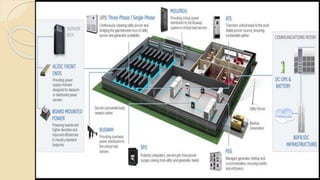
Components of data center:
 special building structures
 servers
 power backup structures
 cooling systems
 structured cabling
 network devices
 storage systems
 application software
 physical security systems
 monitoring centers, ………….and many other support
systems.
Data center Challenges:
 1-Monitoring
 2-Energy cost
 3-Structure
What’s the meaning of virtual?
 If you can see it but it is not there -It’s virtual
 Virtualization lets you run multiple virtual machines
on a single physical machine
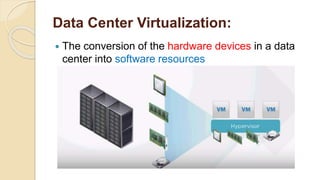
Data Center Virtualization:
 The conversion of the hardware devices in a data
center into software resources
Data Center Virtualization:
 Consider your physical data center include a
number of physical servers and networking and
storage devices this physical device are expensive,
consume space, consume power, generate heat and
it causes a hardware failure .
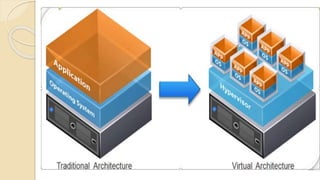
 DCV enables you to consolidate the servers into
fewer pieces of hardware, in the virtualize
environment each server operating system and
application are separated from the underling
hardware and placed on a hypervisor
Data Center Virtualization:
 Hypervisor: is a program installed on the hardware that enable
you to host several different virtual machines on a single
hardware with different operating system and applications and
manage them.
Data Center Virtualization:
 Bare-metal or native hypervisors : bare-metal
hypervisors are installed on physical device without an
operating system. They perform the action of the
operating systems and have resource management
capabilities
 DCV is typically performed by using bare-metal
hypervisors because the dependency of another
operating system is low.
 Embedded or hosted hypervisors: hosted
hypervisors operate as an application on top of a pre
existing operating system
Example for understanding DCV
 Imagine your friend watch football match in stadium
and you watch it on TV . Lets imagine the stadium is
real data center and imagine the players is servers
and the ball is data and so on, can you watch as like
as your friend watch? Yes you can see by TV .
 TV is not real stadium or real players but you can
see the match. Then we can say the virtual data
center is TV and the software that control and
mange the TV is a hypervisor
Benefits of DCV:
 1-Reduced cost
 2-Easier backups
 3-Energy Savings and Greener environment
 4-Better testing
Benefit of DCV:
 5-No vendor lock-in
 6-Single-minded servers
 7- Isolation
 8-Easier migration to cloud
DCV issues:
 1- Security.
 2-Elephant Flows
 3-Forgoing the physical.
 4. Sub-par application performance.
 5. Licensing costs.
 6. Missing components.

Data center virtualization

  • 1.
  • 2.
    Content:  What isData Center.  Component of data center.  Data center issues.  Virtualization.  Data Center Virtualization.  Benefit of Data Center Virtualization.  Data center virtualization issues.
  • 3.
    What is DataCenter:  Is a center for store and disseminate large amounts of data by using servers that connected to internet with high speed.
  • 4.
    Components of datacenter:  special building structures  servers  power backup structures  cooling systems  structured cabling  network devices  storage systems  application software  physical security systems  monitoring centers, ………….and many other support systems.
  • 7.
    Data center Challenges: 1-Monitoring  2-Energy cost  3-Structure
  • 8.
    What’s the meaningof virtual?  If you can see it but it is not there -It’s virtual  Virtualization lets you run multiple virtual machines on a single physical machine
  • 9.
    Data Center Virtualization: The conversion of the hardware devices in a data center into software resources
  • 10.
    Data Center Virtualization: Consider your physical data center include a number of physical servers and networking and storage devices this physical device are expensive, consume space, consume power, generate heat and it causes a hardware failure .  DCV enables you to consolidate the servers into fewer pieces of hardware, in the virtualize environment each server operating system and application are separated from the underling hardware and placed on a hypervisor
  • 12.
    Data Center Virtualization: Hypervisor: is a program installed on the hardware that enable you to host several different virtual machines on a single hardware with different operating system and applications and manage them.
  • 13.
    Data Center Virtualization: Bare-metal or native hypervisors : bare-metal hypervisors are installed on physical device without an operating system. They perform the action of the operating systems and have resource management capabilities  DCV is typically performed by using bare-metal hypervisors because the dependency of another operating system is low.  Embedded or hosted hypervisors: hosted hypervisors operate as an application on top of a pre existing operating system
  • 14.
    Example for understandingDCV  Imagine your friend watch football match in stadium and you watch it on TV . Lets imagine the stadium is real data center and imagine the players is servers and the ball is data and so on, can you watch as like as your friend watch? Yes you can see by TV .  TV is not real stadium or real players but you can see the match. Then we can say the virtual data center is TV and the software that control and mange the TV is a hypervisor
  • 15.
    Benefits of DCV: 1-Reduced cost  2-Easier backups  3-Energy Savings and Greener environment  4-Better testing
  • 16.
    Benefit of DCV: 5-No vendor lock-in  6-Single-minded servers  7- Isolation  8-Easier migration to cloud
  • 17.
    DCV issues:  1-Security.  2-Elephant Flows  3-Forgoing the physical.  4. Sub-par application performance.  5. Licensing costs.  6. Missing components.