NETWORK FILE SYSTEM
(NFS)

By:
Amruta Udamale
Sequence
 Introduction to NFS
 Version
 NFS basic and protocol- State ,Architecture
 Component

 Different NFS processes
 Working

 Read operation while accessing file from server
 Steps to mount directory from NFS server
Introduction to NFS
•
•
•
•

Developed by Sun Microsystems
Use Distributed File Protocol
Mostly used with UNIX OS
Implement for other OS like
- Mac OS, Microsoft Windows, Novell NetWare, and IBM AS/400

•
•
•
•
•

Allows users to ‘Share’ a directory
RPC-based (uses XDR)
NFS is perfect for a NAS
Opposed to SAMBA
Currently based on VFS
Major Goals
- simple crash recovery
- reasonable performance :80% of a local drive
Sun Protocols in the ISO OSI Model
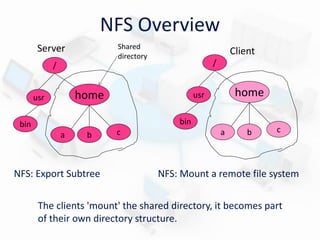
NFS Overview
Shared
directory

Server

Client
/

/

home

usr

home

usr
bin

bin
a

b

NFS: Export Subtree

c

a

b

c

NFS: Mount a remote file system

The clients 'mount' the shared directory, it becomes part
of their own directory structure.
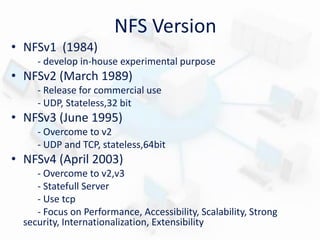
NFS Version
• NFSv1 (1984)
- develop in-house experimental purpose

• NFSv2 (March 1989)
- Release for commercial use
- UDP, Stateless,32 bit

• NFSv3 (June 1995)
- Overcome to v2
- UDP and TCP, stateless,64bit

• NFSv4 (April 2003)
- Overcome to v2,v3
- Statefull Server
- Use tcp
- Focus on Performance, Accessibility, Scalability, Strong
security, Internationalization, Extensibility
System Structure: Server Type
• Stateless

server

– No information kept for client requests
– Information needed to be provided by the client
– More tolerant to server crashes

• Statefull

server

– maintins information about client Access
– Shorted request messages
– Better performance
– Idempotency easier
– Consistency is easier to achieve
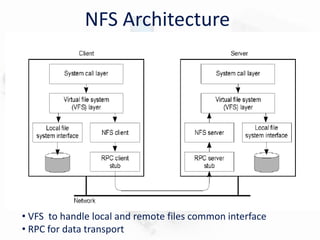
NFS Architecture

• VFS to handle local and remote files common interface
• RPC for data transport
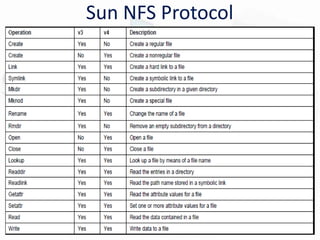
Sun NFS Protocol
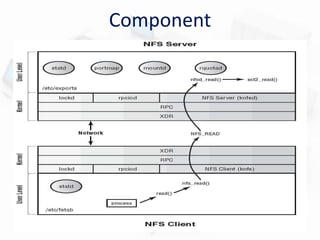
Component
1. File Handles
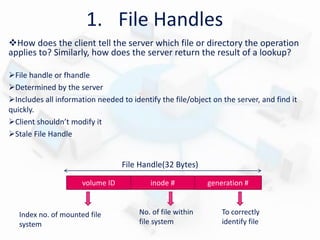
How does the client tell the server which file or directory the operation
applies to? Similarly, how does the server return the result of a lookup?
File handle or fhandle
Determined by the server
Includes all information needed to identify the file/object on the server, and find it
quickly.
Client shouldn’t modify it
Stale File Handle

File Handle(32 Bytes)
volume ID

Index no. of mounted file
system

inode #

No. of file within
file system

generation #

To correctly
identify file
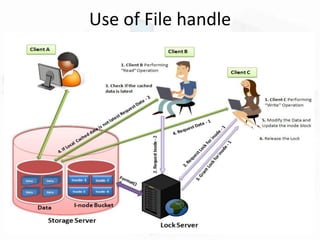
Use of File handle
2. Remote Procedure Call (RPC)

• Initially implementations of RPC was used with the UDP protocol
• Today both UDP and TCP are used
3. External Data Representation
(XDR)
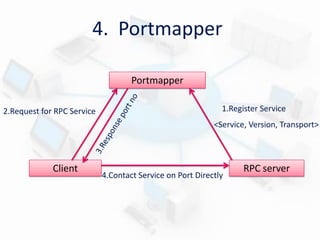
4. Portmapper
Portmapper
2.Request for RPC Service

1.Register Service
<Service, Version, Transport>

Client

4.Contact Service on Port Directly

RPC server
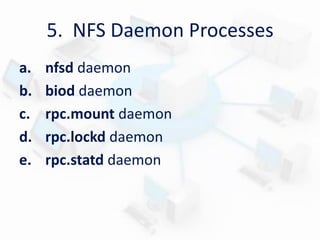
5. NFS Daemon Processes
a.
b.
c.
d.
e.

nfsd daemon
biod daemon
rpc.mount daemon
rpc.lockd daemon
rpc.statd daemon
nfsd Daemon
• Handle incoming RPC requests
• May have multiple nfsd daemons per site
• A nfsd daemon makes kernel calls to do
the real work
• Allows multiple threads
biod Daemon
• Does readahead for clients
- To make use of kernel file buffer cache
• Only improves performance
- NFS works correctly without biod daemon

• Also flushes buffered writes for clients
rpc.mount Daemon
• server implements the MOUNT protocol
• Provides initial file handle for a remote volume
• Also checks that incoming requests are from privileged ports (in
UDP/IP packet source address)
• Protocols used: rpc.mountd [-d] [-f] [-h] [-v]
Mount
Daemon

NFS Client
3 .If ‘YES’ then
return rootfile_handle to
client

checks the list of
currently exported
volumes against the
credentials of NFS client

3.If ‘NOT’ Found
then report to
client with error
rpc.lockd Daemon
• NFS server is stateless, so it does not handle file
locking
• rpc.lockd provides locking
• server crashes and recovers : rpc.lockd reestablish
locks
• Use NFS Lock Manager (NLM) Protocol
• Procedure used:
NLM_NULL, NLM_TEST, NLM_LOCK,
NLM_GRANTED NLM_UNLOCK, NLM_FREE
rpc.statd Daemon
• at client and server
• Used to check status of a machine
• Server’s rpc.lockd asks rpc.statd to store lock info (in
file system)
– And to monitor status of locking machine
• If client crashes, clear its locks from server
• client crashes: rpc.statd contacts client when it
becomes available again
• Use Network Status Monitor (NSM) Protocol
• Procedure used:
SM_NULL,SM_STAT,SM_MON,SM_NOTIFY
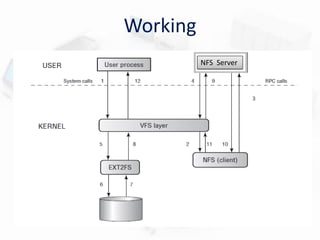
Working
NFS Server
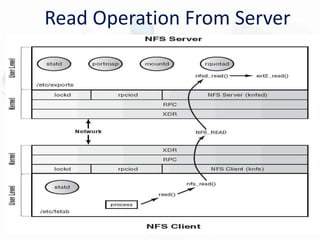
Read Operation From Server
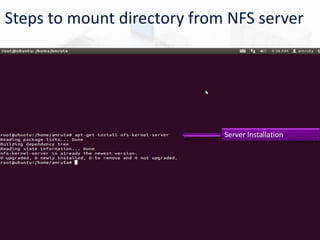
Steps to mount directory from NFS server

Server Installation
Creating Share Folder in
Home directory
Setting
Folder’s
Properties
File which you want to mount
in share folder
Edit File with IP address
Select Packages For
Mounting Purpose
After wards do on cmd :sudo getit /etc/fstab
For output :mount /home/share1

At client side
shared file will
appear .Hear we
can see video
which was shared
by server side in
share folder.
Conclusions
• It is ubiquitous.
• It is easy to setup and administer.
• It provides a better solution than the alternative of
not sharing files.
• NFS v4 improves security.
• Alternatives of NFS :
–
–
–
–

Server Message Block (SMB, also known as CIFS) protocol
Apple Filing Protocol (AFP)
NetWare Core Protocol (NCP)
OS/400 File Server file system (QFileSvr.400)
References
• http://en.wikipedia.org/wiki/Network_File_System
• http://www.cs.sunysb.edu/~ezk/cse595s13/nfs/ch1+6.pdf
• http://lass.cs.umass.edu/~shenoy/courses/spring07/
lectures/Lec20.pdf
• http://www.tldp.org/HOWTO/pdf/NFS-HOWTO.pdf
Thank You !!

NFS(Network File System)

  • 1.
  • 2.
    Sequence  Introduction toNFS  Version  NFS basic and protocol- State ,Architecture  Component  Different NFS processes  Working  Read operation while accessing file from server  Steps to mount directory from NFS server
  • 3.
    Introduction to NFS • • • • Developedby Sun Microsystems Use Distributed File Protocol Mostly used with UNIX OS Implement for other OS like - Mac OS, Microsoft Windows, Novell NetWare, and IBM AS/400 • • • • • Allows users to ‘Share’ a directory RPC-based (uses XDR) NFS is perfect for a NAS Opposed to SAMBA Currently based on VFS Major Goals - simple crash recovery - reasonable performance :80% of a local drive
  • 4.
    Sun Protocols inthe ISO OSI Model
  • 5.
    NFS Overview Shared directory Server Client / / home usr home usr bin bin a b NFS: ExportSubtree c a b c NFS: Mount a remote file system The clients 'mount' the shared directory, it becomes part of their own directory structure.
  • 6.
    NFS Version • NFSv1(1984) - develop in-house experimental purpose • NFSv2 (March 1989) - Release for commercial use - UDP, Stateless,32 bit • NFSv3 (June 1995) - Overcome to v2 - UDP and TCP, stateless,64bit • NFSv4 (April 2003) - Overcome to v2,v3 - Statefull Server - Use tcp - Focus on Performance, Accessibility, Scalability, Strong security, Internationalization, Extensibility
  • 7.
    System Structure: ServerType • Stateless server – No information kept for client requests – Information needed to be provided by the client – More tolerant to server crashes • Statefull server – maintins information about client Access – Shorted request messages – Better performance – Idempotency easier – Consistency is easier to achieve
  • 8.
    NFS Architecture • VFSto handle local and remote files common interface • RPC for data transport
  • 9.
  • 10.
  • 11.
    1. File Handles Howdoes the client tell the server which file or directory the operation applies to? Similarly, how does the server return the result of a lookup? File handle or fhandle Determined by the server Includes all information needed to identify the file/object on the server, and find it quickly. Client shouldn’t modify it Stale File Handle File Handle(32 Bytes) volume ID Index no. of mounted file system inode # No. of file within file system generation # To correctly identify file
  • 12.
  • 13.
    2. Remote ProcedureCall (RPC) • Initially implementations of RPC was used with the UDP protocol • Today both UDP and TCP are used
  • 14.
    3. External DataRepresentation (XDR)
  • 15.
    4. Portmapper Portmapper 2.Request forRPC Service 1.Register Service <Service, Version, Transport> Client 4.Contact Service on Port Directly RPC server
  • 16.
    5. NFS DaemonProcesses a. b. c. d. e. nfsd daemon biod daemon rpc.mount daemon rpc.lockd daemon rpc.statd daemon
  • 17.
    nfsd Daemon • Handleincoming RPC requests • May have multiple nfsd daemons per site • A nfsd daemon makes kernel calls to do the real work • Allows multiple threads
  • 18.
    biod Daemon • Doesreadahead for clients - To make use of kernel file buffer cache • Only improves performance - NFS works correctly without biod daemon • Also flushes buffered writes for clients
  • 19.
    rpc.mount Daemon • serverimplements the MOUNT protocol • Provides initial file handle for a remote volume • Also checks that incoming requests are from privileged ports (in UDP/IP packet source address) • Protocols used: rpc.mountd [-d] [-f] [-h] [-v] Mount Daemon NFS Client 3 .If ‘YES’ then return rootfile_handle to client checks the list of currently exported volumes against the credentials of NFS client 3.If ‘NOT’ Found then report to client with error
  • 20.
    rpc.lockd Daemon • NFSserver is stateless, so it does not handle file locking • rpc.lockd provides locking • server crashes and recovers : rpc.lockd reestablish locks • Use NFS Lock Manager (NLM) Protocol • Procedure used: NLM_NULL, NLM_TEST, NLM_LOCK, NLM_GRANTED NLM_UNLOCK, NLM_FREE
  • 21.
    rpc.statd Daemon • atclient and server • Used to check status of a machine • Server’s rpc.lockd asks rpc.statd to store lock info (in file system) – And to monitor status of locking machine • If client crashes, clear its locks from server • client crashes: rpc.statd contacts client when it becomes available again • Use Network Status Monitor (NSM) Protocol • Procedure used: SM_NULL,SM_STAT,SM_MON,SM_NOTIFY
  • 22.
  • 23.
  • 24.
    Steps to mountdirectory from NFS server Server Installation
  • 25.
    Creating Share Folderin Home directory
  • 26.
  • 27.
    File which youwant to mount in share folder
  • 29.
    Edit File withIP address
  • 30.
  • 31.
    After wards doon cmd :sudo getit /etc/fstab
  • 32.
    For output :mount/home/share1 At client side shared file will appear .Hear we can see video which was shared by server side in share folder.
  • 33.
    Conclusions • It isubiquitous. • It is easy to setup and administer. • It provides a better solution than the alternative of not sharing files. • NFS v4 improves security. • Alternatives of NFS : – – – – Server Message Block (SMB, also known as CIFS) protocol Apple Filing Protocol (AFP) NetWare Core Protocol (NCP) OS/400 File Server file system (QFileSvr.400)
  • 34.
    References • http://en.wikipedia.org/wiki/Network_File_System • http://www.cs.sunysb.edu/~ezk/cse595s13/nfs/ch1+6.pdf •http://lass.cs.umass.edu/~shenoy/courses/spring07/ lectures/Lec20.pdf • http://www.tldp.org/HOWTO/pdf/NFS-HOWTO.pdf
  • 35.