Pre-Production
Sound Effects
Sound Effect How/Where will it be used Source
Crowd Cheering It will be used during an interview
with somebody talking about a
specific team. Include the team’s
crowd noises.
http://soundbible.com/1882-
Football-Crowd.html
Football Being Kicked During interviews for effect.
Hitting the post. Talking about the teams and add a
clip to show the team’s efforts.
Things happening in the background It will happen casually.
Football Commentary. When clips are played in-between
the interview clips.
Crowd Booing When a separate clip is played this
will get played after or before.
http://soundbible.com/499-Crowd-
Boo-3.html
Stadium Applause It will be used during a positive
talking situation about a player or a
match.
http://soundbible.com/444-
Stadium-Applause.html
Music
Track Name/Artist How/Where will it be used Source
Kahoot Music Music will be used in the
background for majority of the time.
https://www.youtube.com/watch?v
=8YGlzSl6cxU
Nihils - Help Our Souls (Urban
Contact Remix)
Intro music. https://www.youtube.com/watch?v
=phn2JZ2xTz4
Upbeat /Pop/ Vlog Music Royalty
Free Music
Background music. https://www.youtube.com/watch?v
=A_iKsVbPpe4
Inspiring - Happy Upbeat
Background Music
Background music. https://www.youtube.com/watch?v
=e_xTaYxHutQ
Motivating and Upbeat Background
Music
Background music. https://www.youtube.com/watch?v
=mGx_FATyasQ
Cool Electronic Background Music Background music. https://www.youtube.com/watch?v
=J7TxqelxYjo
Energetic Pop Background Music Outro Music https://www.youtube.com/watch?v
=4H4wMR7_twY
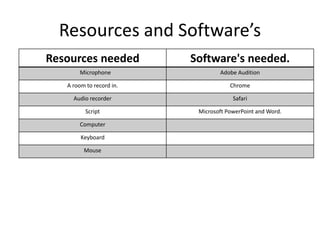
Resources and Software’s
Resources needed Software's needed.
Microphone Adobe Audition
A room to record in. Chrome
Audio recorder Safari
Script Microsoft PowerPoint and Word.
Computer
Keyboard
Mouse
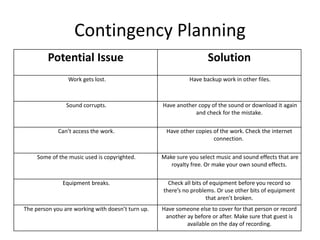
Contingency Planning
Potential Issue Solution
Work gets lost. Have backup work in other files.
Sound corrupts. Have another copy of the sound or download it again
and check for the mistake.
Can’t access the work. Have other copies of the work. Check the internet
connection.
Some of the music used is copyrighted. Make sure you select music and sound effects that are
royalty free. Or make your own sound effects.
Equipment breaks. Check all bits of equipment before you record so
there’s no problems. Or use other bits of equipment
that aren’t broken.
The person you are working with doesn’t turn up. Have someone else to cover for that person or record
another ay before or after. Make sure that guest is
available on the day of recording.
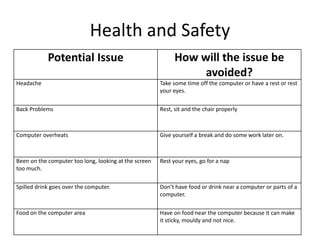
Health and Safety
Potential Issue How will the issue be
avoided?
Headache Take some time off the computer or have a rest or rest
your eyes.
Back Problems Rest, sit and the chair properly
Computer overheats Give yourself a break and do some work later on.
Been on the computer too long, looking at the screen
too much.
Rest your eyes, go for a nap
Spilled drink goes over the computer. Don’t have food or drink near a computer or parts of a
computer.
Food on the computer area Have on food near the computer because it can make
it sticky, mouldy and not nice.
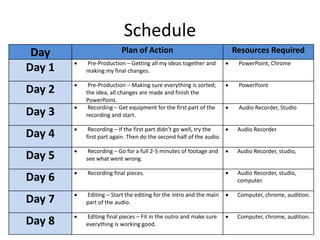
Schedule
Day Plan of Action Resources Required
Day 1  Pre-Production – Getting all my ideas together and
making my final changes.
 PowerPoint, Chrome
Day 2  Pre-Production – Making sure everything is sorted;
the idea, all changes are made and finish the
PowerPoint.
 PowerPoint
Day 3  Recording – Get equipment for the first part of the
recording and start.
 Audio Recorder, Studio
Day 4  Recording – If the first part didn’t go well, try the
first part again. Then do the second half of the audio.
 Audio Recorder
Day 5  Recording – Go for a full 2-5 minutes of footage and
see what went wrong.
 Audio Recorder, studio,
Day 6  Recording final pieces.  Audio Recorder, studio,
computer.
Day 7  Editing – Start the editing for the intro and the main
part of the audio.
 Computer, chrome, audition.
Day 8  Editing final pieces – Fit in the outro and make sure
everything is working good.
 Computer, chrome, audition.

Audio - Production Reflection

  • 1.
  • 2.
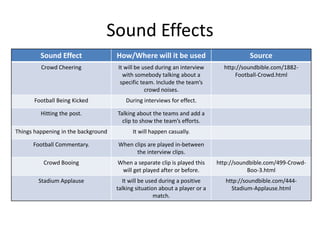
    Sound Effects Sound EffectHow/Where will it be used Source Crowd Cheering It will be used during an interview with somebody talking about a specific team. Include the team’s crowd noises. http://soundbible.com/1882- Football-Crowd.html Football Being Kicked During interviews for effect. Hitting the post. Talking about the teams and add a clip to show the team’s efforts. Things happening in the background It will happen casually. Football Commentary. When clips are played in-between the interview clips. Crowd Booing When a separate clip is played this will get played after or before. http://soundbible.com/499-Crowd- Boo-3.html Stadium Applause It will be used during a positive talking situation about a player or a match. http://soundbible.com/444- Stadium-Applause.html
  • 3.
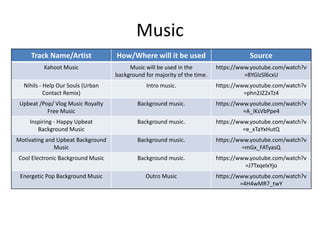
    Music Track Name/Artist How/Wherewill it be used Source Kahoot Music Music will be used in the background for majority of the time. https://www.youtube.com/watch?v =8YGlzSl6cxU Nihils - Help Our Souls (Urban Contact Remix) Intro music. https://www.youtube.com/watch?v =phn2JZ2xTz4 Upbeat /Pop/ Vlog Music Royalty Free Music Background music. https://www.youtube.com/watch?v =A_iKsVbPpe4 Inspiring - Happy Upbeat Background Music Background music. https://www.youtube.com/watch?v =e_xTaYxHutQ Motivating and Upbeat Background Music Background music. https://www.youtube.com/watch?v =mGx_FATyasQ Cool Electronic Background Music Background music. https://www.youtube.com/watch?v =J7TxqelxYjo Energetic Pop Background Music Outro Music https://www.youtube.com/watch?v =4H4wMR7_twY
  • 4.
    Resources and Software’s Resourcesneeded Software's needed. Microphone Adobe Audition A room to record in. Chrome Audio recorder Safari Script Microsoft PowerPoint and Word. Computer Keyboard Mouse
  • 5.
    Contingency Planning Potential IssueSolution Work gets lost. Have backup work in other files. Sound corrupts. Have another copy of the sound or download it again and check for the mistake. Can’t access the work. Have other copies of the work. Check the internet connection. Some of the music used is copyrighted. Make sure you select music and sound effects that are royalty free. Or make your own sound effects. Equipment breaks. Check all bits of equipment before you record so there’s no problems. Or use other bits of equipment that aren’t broken. The person you are working with doesn’t turn up. Have someone else to cover for that person or record another ay before or after. Make sure that guest is available on the day of recording.
  • 6.
    Health and Safety PotentialIssue How will the issue be avoided? Headache Take some time off the computer or have a rest or rest your eyes. Back Problems Rest, sit and the chair properly Computer overheats Give yourself a break and do some work later on. Been on the computer too long, looking at the screen too much. Rest your eyes, go for a nap Spilled drink goes over the computer. Don’t have food or drink near a computer or parts of a computer. Food on the computer area Have on food near the computer because it can make it sticky, mouldy and not nice.
  • 7.
    Schedule Day Plan ofAction Resources Required Day 1  Pre-Production – Getting all my ideas together and making my final changes.  PowerPoint, Chrome Day 2  Pre-Production – Making sure everything is sorted; the idea, all changes are made and finish the PowerPoint.  PowerPoint Day 3  Recording – Get equipment for the first part of the recording and start.  Audio Recorder, Studio Day 4  Recording – If the first part didn’t go well, try the first part again. Then do the second half of the audio.  Audio Recorder Day 5  Recording – Go for a full 2-5 minutes of footage and see what went wrong.  Audio Recorder, studio, Day 6  Recording final pieces.  Audio Recorder, studio, computer. Day 7  Editing – Start the editing for the intro and the main part of the audio.  Computer, chrome, audition. Day 8  Editing final pieces – Fit in the outro and make sure everything is working good.  Computer, chrome, audition.