Pre-Production
Stephen Royle
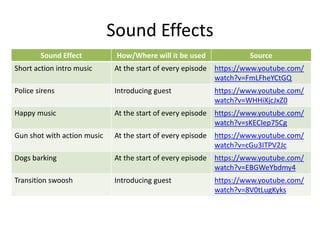
Sound Effects
Sound Effect How/Where will it be used Source
Short action intro music At the start of every episode https://www.youtube.com/
watch?v=FmLFheYCtGQ
Police sirens Introducing guest https://www.youtube.com/
watch?v=WHHiXjcJxZ0
Happy music At the start of every episode https://www.youtube.com/
watch?v=sKECIep75Cg
Gun shot with action music At the start of every episode https://www.youtube.com/
watch?v=cGu3ITPV2Jc
Dogs barking At the start of every episode https://www.youtube.com/
watch?v=EBGWeYbdmy4
Transition swoosh Introducing guest https://www.youtube.com/
watch?v=8V0tLugKyks
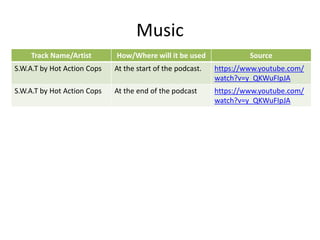
Music
Track Name/Artist How/Where will it be used Source
S.W.A.T by Hot Action Cops At the start of the podcast. https://www.youtube.com/
watch?v=y_QKWuFIpJA
S.W.A.T by Hot Action Cops At the end of the podcast https://www.youtube.com/
watch?v=y_QKWuFIpJA
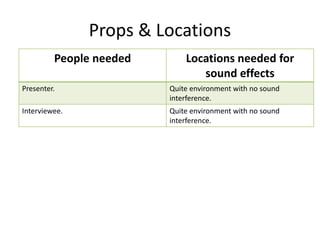
Props & Locations
People needed Locations needed for
sound effects
Presenter. Quite environment with no sound
interference.
Interviewee. Quite environment with no sound
interference.
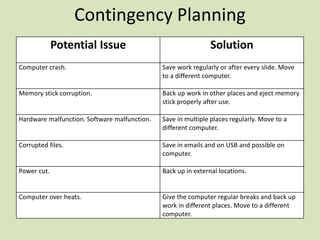
Contingency Planning
Potential Issue Solution
Computer crash. Save work regularly or after every slide. Move
to a different computer.
Memory stick corruption. Back up work in other places and eject memory
stick properly after use.
Hardware malfunction. Software malfunction. Save in multiple places regularly. Move to a
different computer.
Corrupted files. Save in emails and on USB and possible on
computer.
Power cut. Back up in external locations.
Computer over heats. Give the computer regular breaks and back up
work in different places. Move to a different
computer.
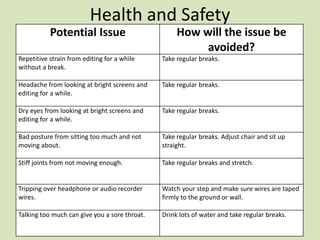
Health and Safety
Potential Issue How will the issue be
avoided?
Repetitive strain from editing for a while
without a break.
Take regular breaks.
Headache from looking at bright screens and
editing for a while.
Take regular breaks.
Dry eyes from looking at bright screens and
editing for a while.
Take regular breaks.
Bad posture from sitting too much and not
moving about.
Take regular breaks. Adjust chair and sit up
straight.
Stiff joints from not moving enough. Take regular breaks and stretch.
Tripping over headphone or audio recorder
wires.
Watch your step and make sure wires are taped
firmly to the ground or wall.
Talking too much can give you a sore throat. Drink lots of water and take regular breaks.
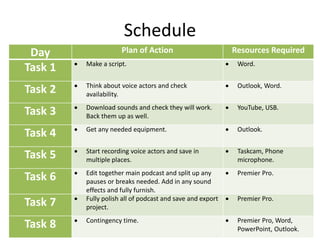
Schedule
Day Plan of Action Resources Required
Task 1  Make a script.  Word.
Task 2  Think about voice actors and check
availability.
 Outlook, Word.
Task 3  Download sounds and check they will work.
Back them up as well.
 YouTube, USB.
Task 4  Get any needed equipment.  Outlook.
Task 5  Start recording voice actors and save in
multiple places.
 Taskcam, Phone
microphone.
Task 6  Edit together main podcast and split up any
pauses or breaks needed. Add in any sound
effects and fully furnish.
 Premier Pro.
Task 7  Fully polish all of podcast and save and export
project.
 Premier Pro.
Task 8  Contingency time.  Premier Pro, Word,
PowerPoint, Outlook.

5. pre production(4)

  • 1.
  • 2.
    Sound Effects Sound EffectHow/Where will it be used Source Short action intro music At the start of every episode https://www.youtube.com/ watch?v=FmLFheYCtGQ Police sirens Introducing guest https://www.youtube.com/ watch?v=WHHiXjcJxZ0 Happy music At the start of every episode https://www.youtube.com/ watch?v=sKECIep75Cg Gun shot with action music At the start of every episode https://www.youtube.com/ watch?v=cGu3ITPV2Jc Dogs barking At the start of every episode https://www.youtube.com/ watch?v=EBGWeYbdmy4 Transition swoosh Introducing guest https://www.youtube.com/ watch?v=8V0tLugKyks
  • 3.
    Music Track Name/Artist How/Wherewill it be used Source S.W.A.T by Hot Action Cops At the start of the podcast. https://www.youtube.com/ watch?v=y_QKWuFIpJA S.W.A.T by Hot Action Cops At the end of the podcast https://www.youtube.com/ watch?v=y_QKWuFIpJA
  • 4.
    Props & Locations Peopleneeded Locations needed for sound effects Presenter. Quite environment with no sound interference. Interviewee. Quite environment with no sound interference.
  • 5.
    Contingency Planning Potential IssueSolution Computer crash. Save work regularly or after every slide. Move to a different computer. Memory stick corruption. Back up work in other places and eject memory stick properly after use. Hardware malfunction. Software malfunction. Save in multiple places regularly. Move to a different computer. Corrupted files. Save in emails and on USB and possible on computer. Power cut. Back up in external locations. Computer over heats. Give the computer regular breaks and back up work in different places. Move to a different computer.
  • 6.
    Health and Safety PotentialIssue How will the issue be avoided? Repetitive strain from editing for a while without a break. Take regular breaks. Headache from looking at bright screens and editing for a while. Take regular breaks. Dry eyes from looking at bright screens and editing for a while. Take regular breaks. Bad posture from sitting too much and not moving about. Take regular breaks. Adjust chair and sit up straight. Stiff joints from not moving enough. Take regular breaks and stretch. Tripping over headphone or audio recorder wires. Watch your step and make sure wires are taped firmly to the ground or wall. Talking too much can give you a sore throat. Drink lots of water and take regular breaks.
  • 7.
    Schedule Day Plan ofAction Resources Required Task 1  Make a script.  Word. Task 2  Think about voice actors and check availability.  Outlook, Word. Task 3  Download sounds and check they will work. Back them up as well.  YouTube, USB. Task 4  Get any needed equipment.  Outlook. Task 5  Start recording voice actors and save in multiple places.  Taskcam, Phone microphone. Task 6  Edit together main podcast and split up any pauses or breaks needed. Add in any sound effects and fully furnish.  Premier Pro. Task 7  Fully polish all of podcast and save and export project.  Premier Pro. Task 8  Contingency time.  Premier Pro, Word, PowerPoint, Outlook.